
Skip to content
KitploitKITPLOIT
ToolsBlog
Einreichen
ToolsBlog
Einreichen

Hacking-, PenTest- und Cybersicherheits-Tools für Ihr Sicherheitsarsenal!

Kitploit ist ein Verzeichnis von Hacking-, Cybersicherheits- und Pentesting-Tools. Entdecken Sie die neuesten Projekt-Updates, um Schwachstellen zu finden, Systeme zu analysieren, Tests zu automatisieren und Ihre Sicherheit zu stärken.

··Feeds·Kontakt·Datenschutz·© 2026 Kitploit

Tool-Verzeichnis

Kategorien

Alle Kategorien anzeigen
Loading categories
Evilginx-Phishing-Infra-Setup — Evilginx-Phishing-Infrastruktur-Einrichtungsleitfaden – Absicherung der Evilginx- und Gophish-Infrastruktur, Entfernen von IOCs, Phishing-TTPs | Kitploit
Tools/GitHubGitHub/an0nud4y/evilginx-phishing-infra-setup
Phishing-ToolsIDS/IPS-UmgehungPhishingCommand and ControlSocial EngineeringLernen & BildungRed TeamingKuratierte RessourcenE-Mail-Sicherheit

Beliebteste

Alle anzeigen →

Entdecken Sie die meistgenutzten Tools unserer Community.

Alle Tools erkunden

Durchsuchen Sie unsere Tool-Sammlung

Alle Tools anzeigen →
Teilen
GitHuban0nud4y/evilginx-phishing-infra-setup

Evilginx-Phishing-Infra-Setup

Evilginx-Phishing-Infrastruktur-Einrichtungsleitfaden – Absicherung der Evilginx- und Gophish-Infrastruktur, Entfernen von IOCs, Phishing-TTPs

Repository anzeigen
598115vor 1 JahrVon Kitploit geprüft

Einrichtungsleitfaden für Phishing-Engagement-Infrastruktur

Hinweis: Dies sind Kopien meiner persönlichen Notizen. Bitte verlasse dich nicht vollständig darauf.

Inhaltsverzeichnis

  • Blogs/Vorträge
  • Red Team/Phishing-Infra-Automatisierung
  • Techniken zum Kauf und zur Kategorisierung von Domains
  • Phishing-E-Mails mit Tools besser schreiben
  • Spam-Wahrscheinlichkeit von E-Mails testen
  • Phishing-E-Mails emulieren / Purple-Team-Phishing
  • Awesome Enterprise-E-Mail-Sicherheit
  • E-Mails im Posteingang zustellen
  • Phishing-Engagements mit Evilginx
    • Evilginx-Phishlets erstellen
    • Evilginx-Installationsskripte
    • Tipps zur Absicherung der Evilginx-Infrastruktur
    • Evilginx-Forschung: Blogs/Vorträge
    • Verteidigungstaktiken gegen Evilginx
  • Absicherung der GoPhish-Infrastruktur
    • GoPhish-Forschung: Blogs/Vorträge
    • Gophish-Alternativen
  • AiTM-Post-Exploitation / Phishing-Forschung: Blogs/Vorträge
  • Weitere Techniken/Blogs/Forschungen
  • Phishing-Forschungsvorträge

Blogs/Vorträge

  • BHIS | Wie man ein Phishing-Engagement aufbaut - Coding TTPs : https://m.youtube.com/watch?si=YTjMa8XBusj_tPdc&v=VglCgoIjztE&feature=youtu.be

Red Team/Phishing-Infra-Automatisierung

  • https://github.com/dazzyddos/HSC24RedTeamInfra/blob/main/RedTeamInfraAutomation.pdf
  • OFFENSIVEX 2024 - Vincent Yiu - Red-Team-Tipps für 2024 : https://youtu.be/ECIBCbMfeo4?feature=shared
  • https://github.com/bluscreenofjeff/Red-Team-Infrastructure-Wiki
  • Phishing-Infrastruktur im Handumdrehen bereitstellen : https://github.com/VirtualSamuraii/flyphish
  • https://labs.jumpsec.com/putting-the-c2-in-c2loudflare/

Techniken zum Kauf und zur Kategorisierung von Domains

  • Nach abgelaufenen Domains suchen und eventuell die guten kaufen

    • https://expireddomains.net/
  • Domain-Kategorisierung

    • Bluecoat/Symantec - https://sitereview.bluecoat.com/#/
    • McAfee - https://www.trustedsource.org
    • Palo Alto Wildfire - https://urlfiltering.paloaltonetworks.com
    • Websense - https://csi.forcepoint.com & https://www.websense.com/content/SiteLookup.aspx (erfordert Registrierung)
    • FortiGuard - https://www.fortiguard.com/webfilter
    • IBM X-force - https://exchange.xforce.ibmcloud.com
    • Cyren - https://www.cyren.com/security-center/url-category-check-gate
    • Checkpoint - https://www.checkpoint.com/urlcat/main.htm (erfordert Registrierung)
    • Trend Micro - https://global.sitesafety.trendmicro.com/
    • Sophos - https://secure2.sophos.com/en-us/support/contact-support.aspx (nur Einreichung; keine Überprüfung) (Klicke auf Submit a Sample -> Web Address)
    • BrightCloud - http://www.brightcloud.com/tools/url-ip-lookup.php
    • LightSpeed Systems - https://archive.lightspeedsystems.com/
  • Automatisierung der Domain-Reputationsprüfung/-einreichung

    • Domainhunter: https://github.com/threatexpress/domainhunter
    • Chameleon : https://github.com/mdsecactivebreach/Chameleon

Phishing-E-Mails mit Tools besser schreiben

  • mgeeky : https://github.com/mgeeky/Penetration-Testing-Tools/tree/master/phishing
  • HTML-Linter (häufige Phishing-E-Mail-Begriffe vermeiden) : https://github.com/mgeeky/Penetration-Testing-Tools/blob/master/phishing/phishing-HTML-linter.py
  • Decode-Spam-Headers : https://github.com/mgeeky/decode-spam-headers

Spam-Wahrscheinlichkeit von E-Mails testen

  • https://www.mail-tester.com/

Phishing-E-Mails emulieren / Purple-Team-Phishing

  • https://delivr.to/

Awesome Enterprise-E-Mail-Sicherheit

  • https://github.com/0xAnalyst/awesome-email-security
  • Gartner Magic Quadrant für E-Mail-Sicherheitsplattformen email-security-providers

E-Mails im Posteingang zustellen

  • Methode 1: Über E-Mail-Dienstanbieter

    • SendGrid verwenden - http://sendgrid.com/
      • Nützlicher Dienst, aber ehrlich gesagt brauchst du den Pro-Tarif, um das Glück zu haben, nicht auf einer Spam-Liste zu landen
    • MailGun - https://app.mailgun.com/
      • hatte noch nie Probleme
    • Amazon AWS SES
    • Brevo : https://www.brevo.com/free-smtp-server/
    • Outlook
    • Gmail
    • Einen Azure-Tenant einrichten, um eine onmicrosoft.com-Domain wie attackdomain.onmicrosoft.com zu erhalten, die sowohl für den E-Mail-Versand als auch für Phishing als Domain genutzt werden kann
    • LarkSuite (ermöglicht eigene Domain) : https://www.larksuite.com/
    • Zoho (Die Zoho-Option „Free for Life“ für E-Mails verwenden) : https://www.zoho.com/mail/custom-domain-email.html
    • Yandex : https://360.yandex.com/business/domain-mail/
  • Methode 2: Verschiedene Techniken

    • Technik 1: Von Andre Rosario - Aus dem BreakDev Red Discord

      • Wenn du wegen E-Mail-Filterung Probleme bei der Zustellung von E-Mails hast, erwäge die Verwendung von Microsoft 365 und Azure IPP, um verschlüsselte E-Mails an deine Zielpersonen zu senden!
        • Die E-Mails stammen von legitimen Microsoft-SMTP-Servern, sodass sie nicht blockiert werden können.
        • Zielpersonen, die die verschlüsselte E-Mail erhalten, sind die Einzigen, die sie öffnen können. Wenn sie sie an ihre DFIR weiterleiten, müssen sie sich als dieser Benutzer anmelden, um deine Nachricht überhaupt zu sehen.
        • Einfache Orchestrierung benutzerdefinierter Domains im Microsoft-Admin-Portal – erstelle eine Menge gefälschter Konten.
        • M365 erlaubt es dir, beliebige Anzeigenamen festzulegen. So kann die E-Mail im Outlook eines Ziels so aussehen, als käme sie von [email protected], stammt aber wirklich von (Technisch versierte Personen können das allerdings leicht herausfinden)

Phishing-Engagements mit Evilginx

  • Evilginx-Phishlets erstellen

    • Evilginx-Mastery-Kurs : https://academy.breakdev.org/evilginx-mastery
    • Evilginx-Dokumentation : https://help.evilginx.com/
    • Evilginx-Phishlet-Sammlungen : https://github.com/An0nUD4Y/Evilginx2-Phishlets
    • Weniger bekannte Evilginx-Techniken : https://github.com/An0nUD4Y/Evilginx2-Phishlets?tab=readme-ov-file#some-less-known-techniques
  • Evilginx-Installationsskripte

    • https://gist.github.com/dunderhay/d5fcded54cc88a1b7e12599839b6badb
  • Tipps zur Absicherung der Evilginx-Infrastruktur -

    • https://github.com/An0nUD4Y/Evilginx2-Phishlets#securing-evilginx-infra-tips

      root@kitploit:~
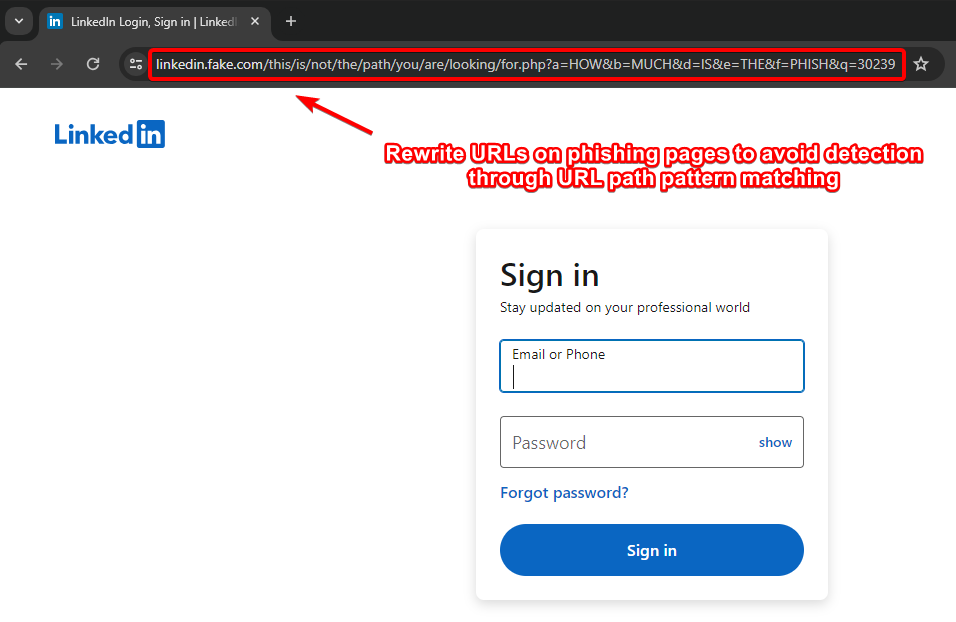
      - Rewrite URLs on Phishing Pages to avoid detection through URL Path pattern matching (by Kuba).
      - Remove IOCs (X-Evilginx header and Default Cert Details)
      - Modify Unauth redirect static contents
      - Modify code to request wildcard certificates for root domain from Let'sEncrypt other than requesting for each subdomains (As mentioned in Kuba's blog) - Check this repo for reference https://github.com/ss23/evilginx2
      - Put evilginx behind a proxy to help against TLS fingerprinting (JA3 and JA3S)
      - Use cloudflare in between if possible/feasible (You have to configure the SSL Settings correctly, change it to Full in cloudflare settings)
      - Use some known ASN blacklist to avoid getting detected like here (https://github.com/aalex954/evilginx2-TTPs#ip-blacklist)
      - Reduce the Number of proxyhosts in phishlet if possible to reduce content loading time.
      - Host Evilginx at Azure and use their domain (limit proxy host in phishlet to 1 or find a way , may be create multiple azure sub domains and try with that)
      - Add some sub_filters to modify the content of the pages to avoid content based detections, like (Favicon, form title font or style, or anything which seems relevant)
      - Block the feedback/telemetry/logs/analytics subdomains using the phishlet sub_filters which can log the domain or may help later on analysis.
      - See if js-injected is static or dynamic , if static modify the evilginx js-inject code to create dynamic/obfuscated version of your js for each user/target.
      - Make sure to not leak your Evilginx infra IP, Check the DNS history to make sure its not stored anywhere (Analysts may look for older DNS Records of the domain)
      - Be aware of this research : https://catching-transparent-phish.github.io/catching_transparent_phish.pdf , repo - https://catching-transparent-phish.github.io/
      

Evilginx-Forschungsblogs/Vorträge :

  • Ein ruhiges Meer macht noch keinen erfahrenen Phisher - Kuba Gretzky (x33fc0n 2024) :
    • Vortrag : https://youtu.be/Nh99d3YnpI4?si=Ltwus2PS0z97gf2R
    • Folien : https://github.com/kgretzky/talks/blob/main/2024/x33fcon/a-smooth-sea-never-made-a-skilled-phisherman.pdf
  • Das Triforce des Initial Access : https://trustedsec.com/blog/the-triforce-of-initial-access
    • Bobber : https://github.com/Flangvik/Bobber
  • Umgehung der Canary-AiTM-Erkennung : https://insights.spotit.be/2024/06/03/clipping-the-canarys-wings-bypassing-aitm-phishing-detections/
  • Schützen Sie Evilginx mit Cloudflare und HTML-Verschleierung : https://www.jackphilipbutton.com/post/how-to-protect-evilginx-using-cloudflare-and-html-obfuscation
  • (Verbesserung der E-Mail-Zustellbarkeit von Evilginx) Hinzufügen von SPF-, DMARC-, DKIM- und MX-Einträgen : https://fortbridge.co.uk/research/add-spf-dmarc-dkim-mx-records-evilginx/
    • https://m3rcer.netlify.app/redteaming/spamfilterbypass/
  • Phishing-Taktiken und OPSEC : https://mgeeky.tech/uploads/WarCon22 - Modern Initial Access and Evasion Tactics.pdf
  • Evilginx + BITB + Evasion-Taktiken : https://youtu.be/p1opa2wnRvg
  • Hook, Line and Phishlet - AD FS mit Evilginx erobern : https://research.aurainfosec.io/pentest/hook-line-and-phishlet/
  • O365-Phishing-Infrastruktur - https://badoption.eu/blog/2023/12/03/PhishingInfra.html
  • Sie können mich nicht sehen – Schutz Ihrer Phishing-Infrastruktur :

Verteidigungstaktiken gegen Evilginx

  • Aufdecken und Bekämpfen von Adversary-in-the-Middle-Phishing - X33fcon 2024 - https://youtu.be/-W-LxcbUxI4
  • Verwendung von HoneyTokens zur Erkennung von AiTM : https://zolder.io/using-honeytokens-to-detect-aitm-phishing-attacks-on-your-microsoft-365-tenant/
  • Schützen Sie sich vor modernem Phishing : https://bleekseeks.com/blog/how-to-protect-against-modern-phishing-attacks
  • https://www.youtube.com/watch?v=wTLB0Yh70_0
  • Erkennung von Evilginx mittels JA3-, JA3S- und JA4-Fingerprinting
    • JA4-Datenbank : https://ja4db.com/

Absicherung der GoPhish-Infrastruktur

Diese Änderungen funktionieren auch in der neuesten Evilginx- + GoPhish-Version, d. h. evilginx3.3

  • Tipps : Verwenden Sie den Parameter {{.URL}} in der Phishing-Vorlage, wenn Sie Evilginx verwenden ( https://github.com/kgretzky/evilginx2/issues/1042#issuecomment-2052073864)

  • Änderungen im GoPhish-Quellcode und in der Dateistruktur, um die GoPhish-Infrastruktur abzusichern

    • Entfernen Sie X-Gophish-Instanzen ( X-Gophish-Contact , X-Gophish-Signature)

    • Entfernen Sie const ServerName= "gophish" und ändern Sie es in const ServerName= "IGNORE" in der Datei config/config.go

    • Ändern Sie den Standard-Admin-Server-Port in der Datei config.json.

    • Ändern Sie die Signaturen von Test-E-Mail-Nachrichten, um eine Erkennung während des SMTP-Tests zu vermeiden. Controllers > api > util.go

      root@kitploit:~
      Controllers > api > util.go
      models > testdata > email_request.go
      models > testdata > email_request_test.go
      models > testdata > maillog.go
      models > testdata > maillog_test.go
      models > testdata > smtp_test.go
      

Blogs/Vorträge zu AiTM-Post-Exploitation und Phishing-Forschung

  • AiTM (Post-Exploitation) : https://www.youtube.com/live/WY4mH-8TbWY?si=LkZ1LuduDln1vRuj
    • https://youtu.be/py68OE4tQ4Q?si=n6QlNuro88c1PRzn
  • https://trustedsec.com/blog/the-triforce-of-initial-access
  • https://www.youtube.com/live/tOzURCc-qUc?si=DMkLwXHVQomRMEJD## Weitere Techniken/Blogs/Forschungsarbeiten
  • Zum Missbrauch legitimer Websites für Phishing : https://lots-project.com/
  • Muraena : https://github.com/muraenateam/muraena
  • NecroBrowser : https://github.com/muraenateam/necrobrowser
  • BITB : https://mrd0x.com/browser-in-the-browser-phishing-attack/
    • Frameless-bitb : https://github.com/waelmas/frameless-bitb
      • https://youtu.be/luJjxpEwVHI?si=sk8kMfdfhZbTz8qR
    • CuddlePhish : https://github.com/fkasler/cuddlephish
    • https://pushsecurity.com/blog/phishing-2-0-how-phishing-toolkits-are-evolving-with-aitm/
    • Okta mit Azure verknüpft, mit automatischem MFA-Abonnement für Okta und Frame-Buster-Bypass zur Durchführung von BITB : https://x.com/otterhacker/status/1929487165458641045?s=46&t=mlJvZy0Zrkrxzuvtt7m2cQ
      • https://github.com/OtterHacker/OktaGinx/
  • Phishing mit Progressive Web Apps (PWA) : https://mrd0x.com/progressive-web-apps-pwa-phishing/
  • noVNC-Phishing :

Phishing-Forschungsvorträge

  • https://youtu.be/zmo_tPbCXtA?si=4imjZtwQ6I9iu_tP
Tool herunterladen
  • Blogs

    • https://medium.com/@frsfaisall/mastering-modern-red-teaming-infrastructure-leveraging-old-domains-for-reputation-based-bypasses-1fd8cc1768f7
  • [email protected]
  • Die E-Mails kommen von legitimen Microsoft-IPs und -Domains, du musst dir also keine Sorgen um Domain-Kategorisierung oder Lebensdauer machen, da es Microsoft ist.
  • Technik 2: Nutzung der Azure-External-Invite-Funktion - Aus dem BreakDev Red Discord

    • Azure External Invite kann verwendet werden, um eine E-Mail mit einem Weiterleitungslink zu einer Phishing-URL zu senden
    • Massen-E-Mails können ebenfalls gesendet werden, als Referenz siehe: https://learn.microsoft.com/en-us/entra/external-id/tutorial-bulk-invite
  • Verschiedene Tipps, um E-Mails in den Posteingang zu bekommen.

    • Eine Domain mit gutem Ruf haben, Domain-Kategorisierung prüfen
    • Eine Domain haben, die älter als 1 Jahr ist, oder expireddomain verwenden
    • Gültige DKIM-, DMARC- und SPF-Einträge haben.
      • Mailgoose (prüft, ob die SPF-, DMARC- und DKIM-Konfiguration korrekt eingerichtet ist) : https://github.com/CERT-Polska/mailgoose
    • Abmeldelink in die E-Mail einfügen
    • Zuerst harmlose E-Mails senden (kann beim Ruf helfen)
    • Einen Link in der E-Mail verwenden, der dieselbe Domain hat, die für den E-Mail-Versand genutzt wird.
  • Blogs/Vorträge/Referenzen

    • Outlook_Email_Auth_Bypass : https://gitlab.com/hxxpxxp/outlook_email_auth_bypass (In der Outlook-Desktop- und Web-App kann der „Anzeigename“ im „Von“-Header der E-Mail die dem Benutzer angezeigte Absenderadresse manipulieren, was zu überzeugenderen Phishing-E-Mails führen kann)
    • Spy Pixel - Bildpixel zum Verfolgen von E-Mails : https://github.com/collinsmc23/spy-pixel
    • EchoSpoofing : https://labs.guard.io/echospoofing-a-massive-phishing-campaign-exploiting-proofpoints-email-protection-to-dispatch-3dd6b5417db6
    • Blackhat USA 2024 - Neuartige E-Mail-Spoofing-Angriffsmuster : https://github.com/onhexgroup/Conferences/blob/main/Black Hat USA 2024 slides/Hao Wang %26 Caleb Sargent %26 Harrison Pomeroy %26 Renana Friedlich_Into the Inbox Novel Email Spoofing Attack Patterns.pdf
  • X-Evilginx-Header entfernen (Prüfe alle Codezeilen mit req.Header.Set und kommentiere die relevanten Funktionen in der Datei core/http_proxy.go aus)

    root@kitploit:~
      // comment line 469
      req.Header.Set(p.getHomeDir(), o_host)
      
      //comment line 659
      req.Header.Set(p.getHomeDir(), o_host)
      
      // comment function at line 1791-1793
      func (p *HttpProxy) getHomeDir() string {
      	return strings.Replace(HOME_DIR, ".e", "X-E", 1)
      }
      
      // comment line 52-54
      const (
      	HOME_DIR = ".evilginx"
      )
    
  • Um die statischen Inhalte der Unauth-Weiterleitung zu ändern, suche in der Datei core/http_proxy.go nach <html> und passe den HTML-Code an, um statische Signaturen zu entfernen.

  • Um auch die Erkennung der statischen injizierten JS-Code-Signatur zu vermeiden, kannst du den Code wie folgt ändern

    • Stelle sicher, dass du „github.com/tdewolff/minify/js“ zu den Imports hinzufügst

      root@kitploit:~
      	re := regexp.MustCompile(`(?i)(<\s*/body\s*>)`)
      	var d_inject string
      
      	if script != "" {
      		minifier := minify.New() // "github.com/tdewolff/minify/js"
      		minifier.AddFunc("text/javascript", js.Minify)
      		obfuscatedScript, err := minifier.String("text/javascript", script)
      		if err != nil {
      			// Handle error - Obfuscation failed
      			d_inject = "<script" + js_nonce + ">" + "function doNothing() {var x =0};" + script + "</script>\n${1}"
      		}
      		d_inject = "<script" + js_nonce + ">" + "function doNothing() {var x =0};" + obfuscatedScript + "</script>\n${1}"
      		//d_inject = "<script" + js_nonce + ">" + "function doNothing() {var x =0};" + script + "</script>\n${1}"
      
      	} else if src_url != "" {
      		d_inject = "<script" + js_nonce + " type=\"application/javascript\" src=\"" + src_url + "\"></script>\n${1}"
      	} else {
      		return body
      	} 
      
  • Ändere auch die Datei core/cert.db

  • Ändere “rid” für GoPhish.

  • Verwende nginx, caddy oder andere Proxys vor Evilginx.

  • Redirectoren verwenden

    • Cloudflare Turnstile als Evilginx-Redirector verwenden und Bots blockieren.
      • https://github.com/kgretzky/evilginx2/blob/master/redirectors/turnstile/index.html
    • HTML/JS-basierte Redirectoren verschleiern
      • Liste verdächtiger HTTP-User-Agents : https://github.com/mthcht/awesome-lists/blob/main/Lists/suspicious_http_user_agents_list.csv
      • https://github.com/DosX-dev/WebSafeCompiler
    • Bot-Erkennungsmethoden, die vom Gabagool-Phishing-Kit verwendet werden : https://medium.com/@traclabs_/aitm-phishing-hold-the-gabagool-analyzing-the-gabagool-phishing-kit-531f5bbaf0e4
    • Meta-HTML-Tag für die Weiterleitung
      • <meta http-equiv="refresh" content="5;url=https://example.com">
  • Das Standardmuster der Lure-URL ändern, das eine zufällige Zeichenfolge der Länge 8 ist.

    root@kitploit:~
       // Line 728 in core/terminal.go file
      		l := &Lure{
      			Path:     "/" + GenRandomString(8),
      			Phishlet: args[1],
      		}
    
  • URLs auf Phishing-Seiten umschreiben, um eine Erkennung durch URL-Pfad-Musterabgleich zu vermeiden (von Kuba). [Dieses Feature ist in der öffentlichen Evilginx-Version nicht verfügbar, du musst es selbst implementieren.]

    root@kitploit:~
    # Only Work in Evilginx Pro Version
    # Similar functionality can be implemented in public version as well.
    rewrite_urls:
    
    trigger:
    domains: ['www.linkedin.com']
    paths: ['^/login$']
    rewrite:
    path: '/this/is/not/the/path/you/are/looking/for.php'
    query:
    
        {key:'a', value: 'HOW'}
        {key:'b', value: 'MUCH'}
        {key:'d', value: 'IS'}
        {key:'e', value: 'THE'}
        {key:'f', value: 'PHISH'}
        {key:'q', value: '{id}'}


    Untitled

  • Das signierte Muster und den Wert der Lure-/Session-ID-Cookies ändern (von @rad9800 )

    • Regel 1: Cookie-Name=XXXX-XXXX & Wert=64_hex_chars - https://gist.github.com/rad9800/bb73de360fc07ac544f0bc9faac9082d#file-index-js-L130
      • Verantwortliche Evilginx-Codefunktionalität (für Cookie-Name) : https://github.com/kgretzky/evilginx2/blob/9e32484719681892945130187ea52737b3d72051/core/http_proxy.go#L1984
      • Verantwortliche Evilginx-Codefunktionalität (für Cookie-Wert) : https://github.com/kgretzky/evilginx2/blob/9e32484719681892945130187ea52737b3d72051/core/http_proxy.go#L895
    • Regel 2: Skriptpfad=/s/64_hex_chars.js mit content-length=0
    • Regel 3: Sowohl Regel 1 als auch Regel 2 vorhanden
      • die vollständige JS-Blob-Logik des Snippets findest du hier https://gist.github.com/rad9800/bb73de360fc07ac544f0bc9faac9082d
  • Referrer-Header blockieren, damit dein Phishing-Domainname nicht durchsickert - siehe diesen Forschungsblog als Referenz:

    • Füge die folgende Zeile hier in die Datei http_proxy.go ein (Chrome respektiert dies nicht, und wenn die Anfrage durch die CSS-Funktion url() initiiert wird - siehe Blog für mehr Details)
      • resp.Header.Set("Referrer-Policy", "no-referrer")
      • Zur Automatisierung über das Phishlet siehe diesen PR : https://github.com/kgretzky/evilginx2/pull/1006
  • Definiere deine eigene CSP (Content Security Policy), um Telemetrie/Canary/Erkennung durch das Durchsickern der Phishing-Domain zu vermeiden.

    • Mehr dazu hier : https://insights.spotit.be/2024/06/03/clipping-the-canarys-wings-bypassing-aitm-phishing-detections/
  • Prüfen, ob die Zielseite Canary-Tokens (CSS, JS) verwendet, und diese vermeiden

    • Umgehung der (CSS,JS)-Canary-AiTM-Erkennung : https://insights.spotit.be/2024/06/03/clipping-the-canarys-wings-bypassing-aitm-phishing-detections/
    • https://blog.thinkst.com/2024/01/defending-against-the-attack-of-the-cloned-websites.html
  • JA4-Fingerprint-Umgehung

    • https://github.com/refraction-networking/utls
    • https://github.com/juzeon/spoofed-round-tripper
  • BITB + Evilginx + Frame-Busting-Bypass

    • https://x.com/otterhacker/status/1929487165458641045?s=46&t=mlJvZy0Zrkrxzuvtt7m2cQ
      • OktaGinx : https://github.com/OtterHacker/OktaGinx/blob/main/okta.yaml#L17
    • https://github.com/waelmas/frameless-bitb
    • Beispiel-Subfilter für den Frame-Busting-Bypass von : https://github.com/OtterHacker/OktaGinx/blob/44fed02954b6cd65e17ab581209a4d0f3b734c24/okta.yaml#L124 und https://github.com/OtterHacker/OktaGinx/blob/44fed02954b6cd65e17ab581209a4d0f3b734c24/okta.yaml#L82
      root@kitploit:~
      - triggers_on: 'login.microsoftonline.com'
      orig_sub: ''
      domain: 'okta.com'
      search: 'if\(e.self===e.top\){'
      replace: 'if(true){window.oldself=e.self;e.self=e.top;'
      mimes: ['text/html', 'charset=utf-8']
      ```- triggers_on: 'login.microsoftonline.com'
      orig_sub: ''
      domain: 'okta.com'
      search: 'X-Frame-Options: DENY'
      replace: 'Test: test'
      mimes: ['text/html', 'charset=utf-8']
      
      • Allgemein verwendete Frame-Busting-Techniken
        • https://en.wikipedia.org/wiki/Framekiller
        • https://seclab.stanford.edu/websec/framebusting/framebust.pdf
          • Gängige Techniken zur Erkennung des Vorhandenseins eines iframe
            root@kitploit:~
              if (top != self)
              if (top.location != self.location)
              if (top.location != location)
              if (parent.frames.length > 0)
              if (window != top)
              if (window.top !== window.self)
              if (window.self != window.top)
              if (parent && parent != window)
              if (parent && parent.frames && parent.frames.length>0)
              if((self.parent&&!(self.parent===self))&&(self.parent.frames.length!=0))
            
          • Websites können die folgende Methode verwenden, sobald ein iframe erkannt wurde, um eine Weiterleitung durchzuführen
            root@kitploit:~
            top.location.replace(self.location)
             top.location.href = window.location.href
             top.location.replace(document.location)
             top.location.href = window.location.href
             top.location.href = "URL"
             document.write(’’)
             top.location = location
             top.location.replace(document.location)
             top.location.replace(’URL’)
             top.location.href = document.location
             top.location.replace(window.location.href)
             top.location.href = location.href
             self.parent.location = document.location
             parent.location.href = self.document.location
             top.location.href = self.location
             top.location = window.location
             top.location.replace(window.location.pathname)
             window.top.location = window.self.location
             setTimeout(function(){document.body.innerHTML=’’;},1);
             window.self.onload = function(evt){document.body.innerHTML=’’;}
             var url = window.location.href; top.location.replace(url)
            
  • https://redsiege.com/blog/2024/01/you-cant-see-me-protecting-your-phishing-infrastructure/
  • https://janbakker.tech/evilginx-resources-for-microsoft-365/
  • Evilginx + BITB - https://www.youtube.com/watch?v=luJjxpEwVHI&feature=youtu.be
  • Hook, Line and Sinker: Phishing für Windows Hello for Business mit Evilginx : https://medium.com/@yudasm/bypassing-windows-hello-for-business-for-phishing-181f2271dc02
  • Phishing der Widerständigen - Phishing nach primärem Refresh-Token in Microsoft Entra von Dirk Jan : https://youtu.be/tNh_sYkmurI?si=qcb917IB5zHU1fQk
  • X33fcon 2024 - https://youtu.be/Nh99d3YnpI4?si=Ltwus2PS0z97gf2R
  • Like Shooting Phish in a Barrel - Link-Crawler umgehen : ****https://posts.specterops.io/like-shooting-phish-in-a-barrel-926c1905bb4b
  • Drink Like a Phish - So lassen Sie Ihre Phishing-Sites unauffällig wirken ****: https://posts.specterops.io/drink-like-a-phish-b9e91d0b5677
  • Die Phishes füttern : ****https://posts.specterops.io/feeding-the-phishes-276c3579bba7
  • https://posts.specterops.io/phish-out-of-water-aaeb677a5af3
  • https://youtu.be/6jYZQKDlKco?si=cpfd4tWQ4V8ZAZaI
  • https://posts.specterops.io/one-phish-two-phish-red-teams-spew-phish-1a2f02010ed7
  • Erkennung von Phishing-Tools durch Push Security : https://gist.github.com/rad9800/bb73de360fc07ac544f0bc9faac9082d
    • Die Chrome-Erweiterung von Push Security erkennt Evilginx mit einigen ziemlich fragilen Regeln
      • Regel 1: Cookie name=XXXX-XXXX & value=64_hex_chars
      • Regel 2: Script path=/s/64_hex_chars.js with content-length=0
      • Regel 3: Regel 1 & Regel 2 sind beide vorhanden
      • Die vollständige JS-Blob-Logik des Snippets finden Sie hier https://gist.github.com/rad9800/bb73de360fc07ac544f0bc9faac9082d
  • https://janbakker.tech/evilginx-loves-temporary-access-passes-too/
  • Ändern Sie die 404-Antwort

    • Fügen Sie die folgende benutzerdefinierte Funktion in der Datei controllers/phish.go hinzu

      root@kitploit:~
      func customNotFound(w http.ResponseWriter, r *http.Request) {
      	http.Error(w, "Try again!", http.StatusNotFound)
      }
      
    • Ersetzen Sie nun alle Vorkommen von http.NotFound(w, r) durch customNotFound(w, r)

  • Entfernen Sie die hartcodierte robots.txt-Antwort und ändern Sie sie in der Datei controllers/phish.go

    • Ändern Sie den entsprechenden Code in der Datei phish.go wie folgt.

      root@kitploit:~
      //Modified Response
      // RobotsHandler prevents search engines, etc. from indexing phishing materials
      func (ps *PhishingServer) RobotsHandler(w http.ResponseWriter, r *http.Request) {
      	fmt.Fprintln(w, "User-agent: *\nDisallow: /*/*\nDisallow: /.git/*")
      }
      
  • Ändern Sie den GET-Parameter "rid" in den Anfragen

    • Stellen Sie sicher, dass Sie alle Vorkommen von "rid" in etwas anderes ändern.
    • Diese sind auch im Quellcode von evilginx3.3 vorhanden. Stellen Sie also sicher, dass Sie diese auch dort ändern.
  • Für fortgeschrittene Prävention können Sie auch den static-Ordner ändern und in etwas anderes umbenennen. Benennen Sie auch die darin enthaltenen Dateien um, um eine pfadbasierte Erkennung zu vermeiden. Vergessen Sie nicht, auch den jeweiligen Quellcode anzupassen.

    • Zum Beispiel den Bildnamen, z. B. pixel.png, in etwas anderes ändern.
  • Ändern Sie die Zertifikatseigenschaften in der Datei util/util.go

    root@kitploit:~
    	template := x509.Certificate{
    		SerialNumber: serialNumber,
    		Subject: pkix.Name{
    			//Organization: []string{"Gophish"},
    			Organization: []string{"Microsoft Corporation"},
    		},
    
  • Verwenden Sie Nginx als Proxy für den Datenverkehr, um Fingerprinting des Golang-Servers zu vermeiden

    • service nginx start

    • Sie müssen die config.json von GoPhish ändern, um die Ports für HTTP von 80 auf 8080 und für HTTPS vom Standardwert auf 60002 zu ändern, wie unten gezeigt

      root@kitploit:~
      {
      	"admin_server": {
      		"listen_url": "127.0.0.1:60002",
      		"use_tls": true,
      		"cert_path": "gophish_admin.crt",
      		"key_path": "gophish_admin.key",
      		"trusted_origins": []
      	},
      	"phish_server": {
      		"listen_url": "127.0.0.1:8080",
      		"use_tls": false,
      		"cert_path": "example.crt",
      		"key_path": "example.key"
      	},
      	"db_name": "sqlite3",
      	"db_path": "gophish.db",
      	"migrations_prefix": "db/db_",
      	"contact_address": "",
      	"logging": {
      		"filename": "",
      		"level": ""
      	}
      }
      
    • Die folgende Konfiguration blockiert alle Anfragen mit einem User-Agent, der „Bot“ oder „bot“ enthält

      root@kitploit:~
      # /etc/nginx/nginx.conf
      
      events {
          # Define event processing parameters here
          worker_connections 1024; # Adjust according to your requirements
      }
      
      http {
      
          upstream backend {
              server localhost:8080;
          }
          # HTTP server
          server {
              listen 80 default_server;
              
      
              # Reject requests with "bot" or "Bot" in User-Agent
              if ($http_user_agent ~* (bot|Bot)) {
                  return 403;
              }
      
              location / {
                  proxy_pass http://backend;
                  proxy_set_header Host $host;
                  proxy_set_header X-Real-IP $remote_addr;
                  proxy_set_header X-Forwarded-For $proxy_add_x_forwarded_for;
                  proxy_set_header X-Forwarded-Proto $scheme;
              }
          }
      
          upstream backend_https {
              server localhost:60002;
          }
          # HTTPS server
          server {
              listen 60001 ssl default_server;
      
              ssl_certificate /root/Phishing/gophish-mod/gophish_admin.crt;
              ssl_certificate_key /root/Phishing/gophish-mod/gophish_admin.key;
      
              # Reject requests with "bot" or "Bot" in User-Agent
              if ($http_user_agent ~* (bot|Bot)) {
                  return 403;
              }
      
              location / {
                  proxy_pass https://backend_https;
                  proxy_set_header Host $host;
                  proxy_set_header X-Real-IP $remote_addr;
                  proxy_set_header X-Forwarded-For $proxy_add_x_forwarded_for;
                  proxy_set_header X-Forwarded-Proto $scheme;
              }
          }
      }
      
      
    • Um nur einen bestimmten User-Agent zuzulassen, verwenden Sie die folgende Konfiguration. Diese blockiert alle Anfragen und erlaubt nur Anfragen mit dem User-Agent „iamdevil“.

      root@kitploit:~
      # /etc/nginx/nginx.conf
      
      events {
          # Define event processing parameters here
          worker_connections 1024; # Adjust according to your requirements
      }
      
      http {
      
          upstream backend {
              server localhost:8080;
          }
      
          # HTTP server
          server {
              listen 80 default_server;
      
              # Reject requests with user agent other than "iamdevil"
              if ($http_user_agent != "iamdevil") {
                  return 403;
              }
      
              location / {
                  proxy_pass http://backend;
                  proxy_set_header Host $host;
                  proxy_set_header X-Real-IP $remote_addr;
                  proxy_set_header X-Forwarded-For $proxy_add_x_forwarded_for;
                  proxy_set_header X-Forwarded-Proto $scheme;
              }
          }
      
          upstream backend_https {
              server localhost:60002;
          }
      
          # HTTPS server
          server {
              listen 60001 ssl default_server;
      
              ssl_certificate /root/Phishing/gophish-mod/gophish_admin.crt;
              ssl_certificate_key /root/Phishing/gophish-mod/gophish_admin.key;
      
              # Reject requests with user agent other than "iamdevil"
              if ($http_user_agent != "iamdevil") {
                  return 403;
              }
      
              location / {
                  proxy_pass https://backend_https;
                  proxy_set_header Host $host;
                  proxy_set_header X-Real-IP $remote_addr;
                  proxy_set_header X-Forwarded-For $proxy_add_x_forwarded_for;
                  proxy_set_header X-Forwarded-Proto $scheme;
              }
          }
      }
      
  • Ändern Sie die Signatur des Gophish-Tracking-Pixels, um eine Erkennung anhand des signierten Tracking-Pixels zu vermeiden.

  • Ändern Sie das Sequenzmuster der E-Mail-Header von GoPhish. Es kann zur Erkennung von GoPhish verwendet werden (von der BreakDev Red Community).

  • Richten Sie Postfix vor GoPhish ein, um IOCs und andere Erkennungsmerkmale sowie die Spam-Anmutung von E-Mails zu entfernen und die Header zu bereinigen/zu korrigieren.

  • GoPhish-Forschungsblogs/Vorträge :

    • https://edermi.github.io/post/2021/modding_gophish/
    • https://www.sprocketsecurity.com/resources/never-had-a-bad-day-phishing-how-to-set-up-gophish-to-evade-security-controls
    • https://cyberwarfare.live/wp-content/uploads/2023/08/OPSEC-on-the-High-Seas_-A-Gophish-Adventure.pdf
    • https://www.sprocketsecurity.com/resources/never-had-a-bad-day-phishing-how-to-set-up-gophish-to-evade-security-controls
    • https://github.com/puzzlepeaches/sneaky_gophish
    • https://cybercx.co.nz/blog/identifying-gophish-servers/
    • https://github.com/gophish/gophish/issues/1553#issuecomment-523969887
  • Gophish-Alternativen :

    • SniperPhish : https://github.com/GemGeorge/SniperPhish
    • Mailcow : https://github.com/mailcow/mailcow-dockerized
  • https://adepts.of0x.cc/novnc-phishing/
    • EvilnoVNC : https://github.com/JoelGMSec/EvilnoVNC
    • MultiEvilnoVNC : https://blog.wanetty.com/blog/tools/multievilnovnc
    • https://fhlipzero.io/blogs/6_noVNC/noVNC.html
    • Delusion (Toolkit basierend auf NoVNC) : https://cloud.google.com/blog/topics/threat-intelligence/session-stealing-browser-in-the-middle
    • Erkennen von NoVNC : https://gist.github.com/rad9800/bb73de360fc07ac544f0bc9faac9082d
  • noVNC und Docker : https://powerseb.github.io/posts/Another-phishing-tool/
    • https://github.com/powerseb/NoPhish
    • https://fhlipzero.io/blogs/6_noVNC/noVNC.html
    • https://github.com/Macmod/YesPhish/tree/patchright-chrome
  • EvilQR - QR-Phishing
    • QR-Code generieren : https://github.com/Flangvik/QRucible
    • https://badoption.eu/blog/2024/01/08/mobilephish.html
    • QR2Ascii : https://github.com/Jojodicus/qr2eascii
    • https://github.com/kgretzky/evilqr , https://breakdev.org/evilqr-phishing/
    • https://github.com/swagkarna/EvilJack
    • https://techcommunity.microsoft.com/t5/microsoft-security-experts-blog/hunting-for-qr-code-aitm-phishing-and-user-compromise/bc-p/4054850
  • NoPhish (Docker und noVNC) : https://github.com/powerseb/NoPhish und https://badoption.eu/blog/2023/07/12/entra_phish.html
  • EvilGoPhish : https://github.com/fin3ss3g0d/evilgophish
  • Smishing : https://blog.shared-video.mov/systematic-destruction-hacking-the-scammers-pt.-2
  • Phishing mit CloudFlare Workers
    • TryCloudflare : https://developers.cloudflare.com/cloudflare-one/connections/connect-networks/do-more-with-tunnels/trycloudflare/
    • https://github.com/zolderio/AITMWorker
    • https://gist.github.com/RedTeamOperations/33f245a777c9b322b0466b59d6687f15
    • https://cyberwarfare.live/wp-content/uploads/2023/08/Certified-Red-Team-CredOps-Infiltrator-CRT-COI-1.pdf
  • Phishing mit Cloudflare Public Buckets : https://developers.cloudflare.com/r2/buckets/public-buckets/
    • https://medium.com/trac-labs/aitm-phishing-hold-the-gabagool-analyzing-the-gabagool-phishing-kit-531f5bbaf0e4
  • Google Open Redirection für Phishing
    • https://untrustednetwork.net/en/2024/02/26/google-open-redirect/
    • Open Redirect bei (funktioniert nicht) : https://googleweblight.com/i?u=m4lici0u5.com
    • Open Redirect : https://www.google.com/url?q=https://m4lici0u5.com
    • Open Redirect : https://business.google.com/website_shared/launch_bw.html?f=https://m4lici0u5.com
    • Weitere finden Sie unter : https://lots-project.com/
  • https://blog.delivr.to/delivr-tos-top-10-payloads-dec-24-pastejacking-image-less-qr-codes-and-concatenated-zip-a32e668106dd#878d
  • Phishing vorbei an E-Mail-Schutzkontrollen mithilfe von Azure Information Protection
    • https://youtu.be/tHNi5BzScVo?si=H2czog19AmTp_O26
    • https://youtu.be/EYUp_MNtJIk?si=sg_9RQggDvqOSLNL
    • https://youtu.be/KhdzIPPW4W0?si=E4CmWx0iO8EaR6JF
  • https://nicolasuter.medium.com/aitm-phishing-with-azure-functions-a1530b52df05
  • https://pushsecurity.com/blog/a-new-class-of-phishing-verification-phishing-and-cross-idp-impersonation/
  • https://blog.delivr.to/delivr-tos-top-10-payloads-dec-24-pastejacking-image-less-qr-codes-and-concatenated-zip-a32e668106dd#878d
  • https://trustedsec.com/blog/oops-i-udld-it-again
  • Credential-Phishing durch Docusign-Missbrauch : https://sublime.security/blog/living-off-the-land-credential-phishing-via-docusign-abuse/
  • Verstecktes Credential-Phishing mit EML-Anhängen : https://sublime.security/blog/hidden-credential-phishing-within-eml-attachments/
  • https://sublime.security/blog/talking-year-end-credential-phishing-scams-over-turkey/
  • Nutzung von Microsoft Customer Voice für Phishing : https://cofense.com/blog/microsoft-customer-voice-urls-used-in-latest-phishing-campaign
  • https://www.youtube.com/live/tOzURCc-qUc?si=DMkLwXHVQomRMEJD
  • DoubleClickJacking : https://www.paulosyibelo.com/2024/12/doubleclickjacking-what.html
    • https://safetyscience.info/labs/doubleclickjacking/
  • Vergleich verschiedener Techniken : https://blog.quarkslab.com/technical-dive-into-modern-phishing.html
  • https://cloud.google.com/blog/topics/threat-intelligence/session-stealing-browser-in-the-middle
  • Missbrauch eingehender Microsoft-Teams-Webhooks für Phishing : https://www.blackhillsinfosec.com/wishing-webhook-phishing-in-teams/
    • https://www.youtube.com/live/kMMZrd9intI?si=rd_EKWmXeKbbGAEI
  • Rogue RDP oder RDP (.rdp) für Phishing : https://github.com/GoSecure/pyrdp
    • https://cloud.google.com/blog/topics/threat-intelligence/windows-rogue-remote-desktop-protocol
    • https://www.blackhillsinfosec.com/rogue-rdp-revisiting-initial-access-methods/
  • https://easydmarc.com/blog/google-spoofed-via-dkim-replay-attack-a-technical-breakdown/
  • SVG für Phishing : https://www.trustwave.com/en-us/resources/blogs/spiderlabs-blog/pixel-perfect-trap-the-surge-of-svg-borne-phishing-attacks/
  • Nutzung von ClickOnce mit Phishing für den Initial Access : https://www.netspi.com/blog/technical-blog/adversary-simulation/all-you-need-is-one-a-clickonce-love-story/
  • https://denniskniep.github.io/posts/09-device-code-phishing/
  • https://badoption.eu/blog/2025/04/25/github.html
  • https://atticsecurity.com/blog/aitm-for-whfb-persistence/
  • [Unbedingt ansehen] Evilworker : https://github.com/Ahaz1701/EvilWorker
    • https://medium.com/@ahaz1701/evilworker-da94ae171249