 ytkoka/impersonate-proxy
A local MITM proxy that lets you control TLS fingerprints (JA3/JA4), HTTP/2 fingerprints, HTTP header order, and User-Agent — all from a single YAML config file.

A local MITM proxy that lets you control TLS fingerprints (JA3/JA4), HTTP/2 fingerprints, HTTP header order, User-Agent, and source IP headers — all from a single YAML config file.
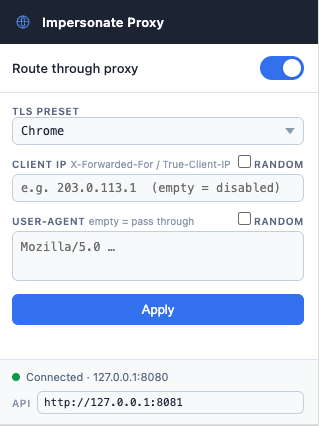
A Chrome extension is included for toggling the proxy and switching fingerprint profiles directly from the browser toolbar without restarting the proxy.
Intended for authorized security testing of WAF bot-detection systems. Route curl, browsers, or Playwright through the proxy to observe how different fingerprint combinations are classified.
curl / browser / Playwright
        │  HTTP CONNECT (to proxy)
        ▼
┌─────────────────────────────────────────┐
│            impersonate-proxy            │
│                                         │
│  MITM TLS ◄──────────────► uTLS         │
│  (our CA cert)          (custom JA3/4)  │
│                                         │
│  Header rewriter (UA, order, add/del)   │
│  HTTP/2 framer  (SETTINGS, WINDOW_UPDATE│
│                  pseudo-header order)   │
└─────────────────────────────────────────┘
        │  Custom TLS ClientHello + HTTP/2
        ▼
   Target server / WAF
| Layer | What you can control |
|---|---|
| TLS | Cipher suites, extensions, their order (JA3 / JA4) via uTLS presets or a fully custom custom_hello spec |
| HTTP/1.1 | Header order, User-Agent, add/remove any header, IP spoofing (X-Forwarded-For / True-Client-IP) |
| HTTP/2 | SETTINGS values & order, WINDOW_UPDATE, pseudo-header order (HTTP/2 fingerprint) |
brew install go
The distro-packaged Go is often outdated. Install the official binary directly:
# Download and extract (replace 1.22.5 with the latest from https://go.dev/dl/)
curl -OL https://go.dev/dl/go1.22.5.linux-amd64.tar.gz
sudo rm -rf /usr/local/go
sudo tar -C /usr/local -xzf go1.22.5.linux-amd64.tar.gz

# Add to PATH (add this line to ~/.bashrc or ~/.zshrc to make it permanent)
export PATH=$PATH:/usr/local/go/bin
Verify:
go version
# go version go1.22.5 linux/amd64
ARM64 (Raspberry Pi, AWS Graviton, etc.): replace
linux-amd64withlinux-arm64in the download URL.
Prefer a disposable environment instead of installing Go? Skip straight to Docker.
git clone https://github.com/ytkoka/impersonate-proxy.git
cd impersonate-proxy
make build
The CA is generated automatically on first run. Start the proxy once to create ca.crt and ca.key:
make run
# 2026/04/22 12:00:00 generated CA certificate → ca.crt
# 2026/04/22 12:00:00 listening on 127.0.0.1:8080  preset=chrome
Stop it with Ctrl-C.
Clients need to trust your MITM CA so they don't reject the proxy-generated leaf certificates.
macOS system keychain (affects all apps):
make trust-ca # runs: sudo security add-trusted-cert ...
Linux system trust (affects all apps; requires ca-certificates package):
# Debian / Ubuntu
sudo cp ca.crt /usr/local/share/ca-certificates/impersonate-proxy.crt
sudo update-ca-certificates

# RHEL / Fedora / Amazon Linux
sudo cp ca.crt /etc/pki/ca-trust/source/anchors/impersonate-proxy.crt
sudo update-ca-trust
curl only (no system-wide change):
curl --cacert ca.crt ...
Playwright / Node.js:
export NODE_EXTRA_CA_CERTS="$(pwd)/ca.crt"
Firefox: Preferences → Privacy & Security → View Certificates → Authorities → Import ca.crt
Run the proxy in a container — no local Go/Make install required.
Linux only: the container runs as an unprivileged user (
nonroot, UID 65532) and needs write access to the./datadirectory that holds the CA cert/key. If./datadoesn't exist yet, Docker auto-creates it owned byrootwith no write access for other users, so the container will fail to generate the CA on first run. Create it with the right owner beforehand:mkdir -p data && sudo chown 65532:65532 dataNot needed on Docker Desktop for Mac/Windows — its bind-mount layer maps ownership automatically.
git clone https://github.com/ytkoka/impersonate-proxy.git
cd impersonate-proxy
docker compose up -d
This builds the image locally and starts the container. On first run it generates the MITM CA and prints:
impersonate-proxy  | generated CA certificate → /data/ca.crt (add to OS trust store to avoid cert errors)
impersonate-proxy  | listening on 0.0.0.0:8080  preset=chrome
Or, to run the prebuilt image directly without cloning:
docker run -d --name impersonate-proxy \
  -p 127.0.0.1:8080:8080 -p 127.0.0.1:8081:8081 \
  -v "$(pwd)/config.docker.yaml:/config.yaml:ro" \
  -v "$(pwd)/data:/data" \
  ghcr.io/ytkoka/impersonate-proxy:latest
docker-compose.yml publishes both ports to 127.0.0.1 only — same loopback-only exposure as a native install (the management API has no authentication, so don't change this to 0.0.0.0 without adding your own access control).
The CA is generated inside the container but persisted to ./data/ca.crt and ./data/ca.key on the host via the bind-mounted volume, so it survives container restarts/rebuilds. Trust it exactly as in the native setup above, just pointing at ./data/ca.crt instead of ./ca.crt:
# curl
curl --proxy http://127.0.0.1:8080 --cacert ./data/ca.crt https://tls.peet.ws/api/all

# macOS system keychain
sudo security add-trusted-cert -d -r trustRoot -k /Library/Keychains/System.keychain ./data/ca.crt
Edit config.docker.yaml (not config.yaml — that file is for the native install) and restart:
docker compose restart
config.docker.yaml is identical to config.yaml except listen/mgmt_listen are 0.0.0.0 (required for Docker's port publishing to reach the process at all — the container's own 127.0.0.1 is unreachable from the host) and ca_cert/ca_key point at /data, the persisted volume. See Configuration below for all available fields.
| Target | Description |
|---|---|
make docker-build | Build the image via docker compose build |
make docker-run | Build and start in the background |
make docker-stop | Stop and remove the container |
docker compose down          # stop the container
rm -rf data                  # also remove the persisted CA (re-trust required after)
Edit config.yaml before starting the proxy. All fields have defaults — you only need to specify what you want to override.
listen: "127.0.0.1:8080"
mgmt_listen: "127.0.0.1:8081"  # management API used by the Chrome extension (empty to disable)
ca_cert: "ca.crt"
ca_key:  "ca.key"

tls:
  # TLS fingerprint preset (controls JA3 / JA4)
  # Options: chrome | firefox | safari | edge | ios | random | golang
  preset: "chrome"

http:
  # Override User-Agent (leave empty to pass through the client's UA)
  # "auto": use the UA matching tls.preset (passed through for random/golang/custom)
  # "random": pick a random UA from a built-in list
  user_agent: "Mozilla/5.0 (Macintosh; Intel Mac OS X 10_15_7) AppleWebKit/537.36 (KHTML, like Gecko) Chrome/131.0.0.0 Safari/537.36"

