 knqyf263/ndff
مراقب شبكة قائم على التدفق مع فحص عميق للحزم

ndff هو مجمّع تدفقات (flow collector) يعتمد على مكتبة nDPI لـ fluentd.
تم تنفيذ ndff على أساس ndpiReader، وهو مثال في nDPI.
nDPI هي مكتبة مفتوحة المصدر برخصة LGPLv3 للتفتيش العميق للحزم. ndpiReader هو مثال في nDPI يتضمن الميزات التالية:
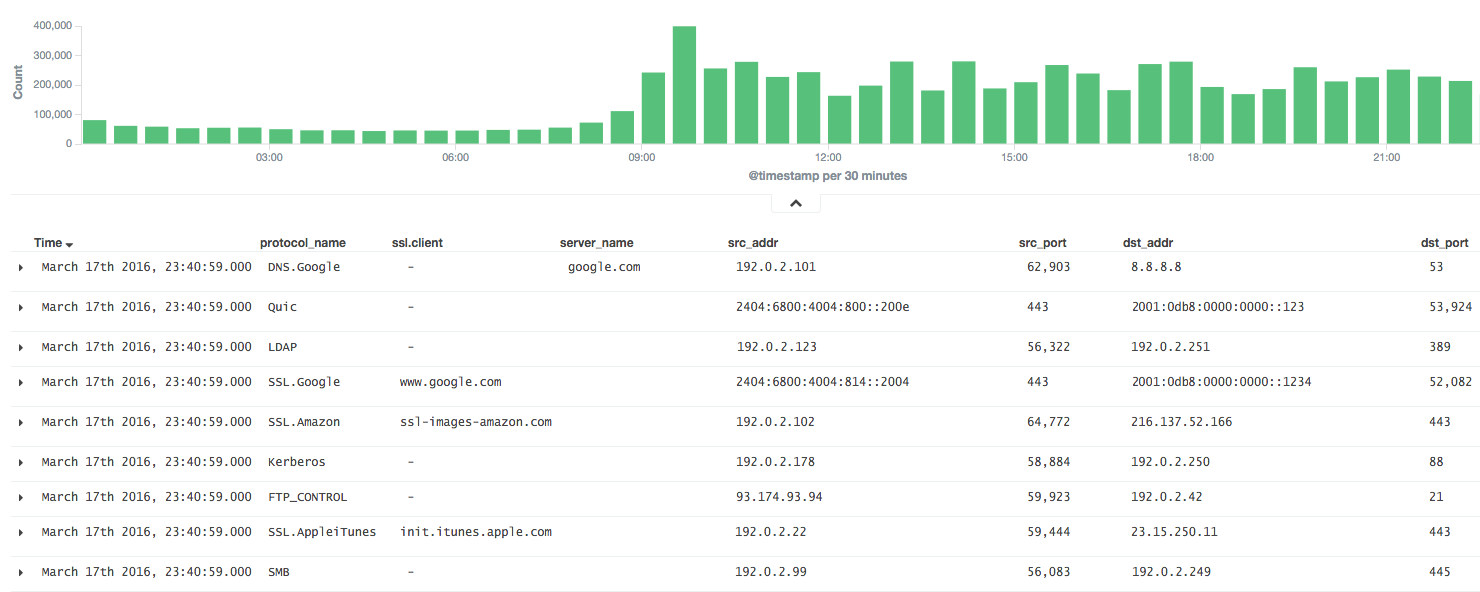
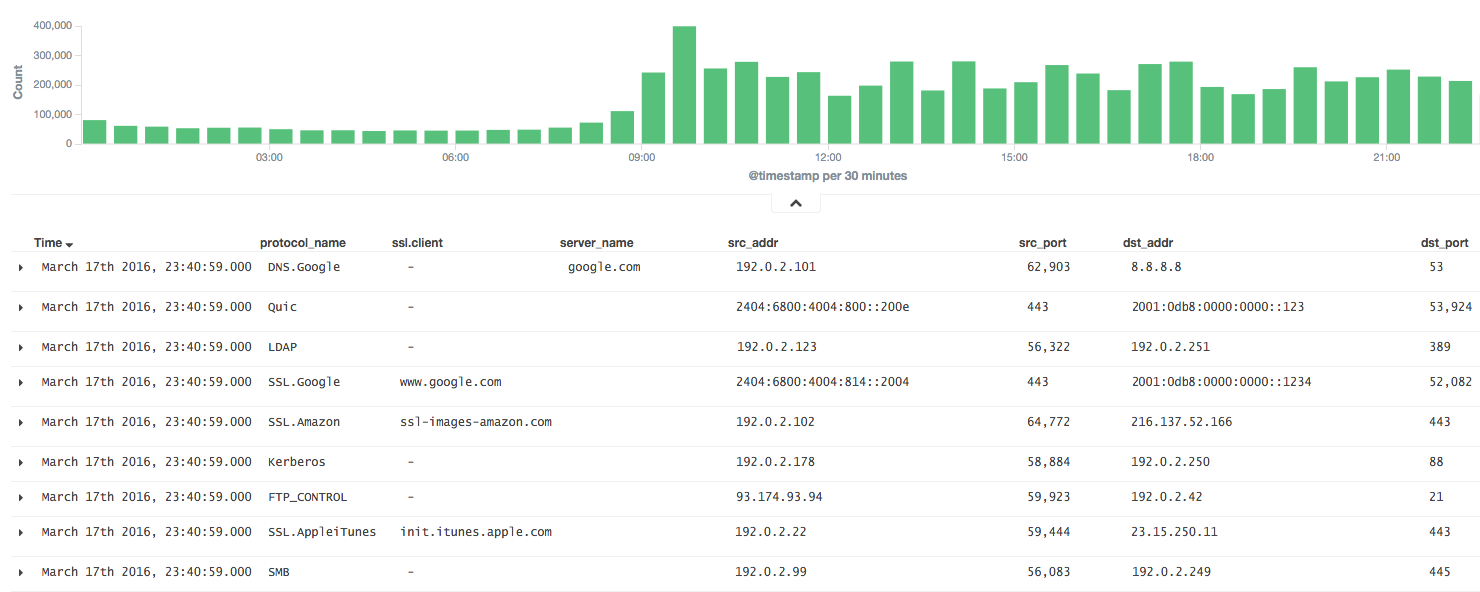
سيكون مفيدًا جدًا إذا أمكن تحليل نتائج nDPI في fluentd.
لذلك، يقوم ndff بتجميع الحزم كتدفق (flow) مثل NetFlow ويرسل النتائج إلى خادم fluentd بصيغة JSON أو MessagePack.
ثبّت ndff من الحزمة الثنائية (CentOS 6).
$ sudo yum -y install libpcap msgpack json-c
$ sudo rpm -ivh https://forensics.cert.org/centos/cert/6.5/x86_64/nDPI-1.7.1-1.el6.x86_64.rpm
$ sudo rpm -ivh https://github.com/knqyf263/ndff/releases/download/0.0.2/ndff-0.0.2-1.x86_64.rpm
ثم شغّل:
$ sudo ndff -i eth0 -s 127.0.0.1 -p 24224 -m msgpack
راجع INSTALL.md
ثم ثبّت json-c أو msgpack-c.
في حالة json-c:
$ git clone https://github.com/json-c/json-c.git
$ cd json-c
$ sh autogen.sh
$ ./configure
$ make
$ make install
أخيرًا، ثبّت ndff من مستودع git.
$ git clone https://github.com/knqyf263/ndff.git
$ cd ndff
$ ./autogen.sh
$ make
$ sudo make install
$ ndff
ndff -i <file|device> [-s <server>] [-m <json|msgpack>] [-f <filter>]
          [-p <port>][-P <protos>][-t <tag>][-q][-d][-D][-h][-T][-v <level>]
          [-n <threads>] [-w <file>]

Usage:
  -i <file.pcap|device>     | Specify a pcap file/playlist to read packets from or a device for live capture (comma-separated list)
  -m <json|msgpack>         | Specify a protocol to send messages to the server (json or msgpack)
  -f <BPF filter>           | Specify a BPF filter for filtering selected traffic
  -s <server>               | Specify a server for fluentd (If not, ndff runs in the dry-run mode)
  -p <port>                 | Specify a port for fluentd (default: 24224)
  -P <file>.protos          | Specify a protocol file (eg. protos.txt)
  -n <num threads>          | Number of threads. Default: number of interfaces in -i. Ignored with pcap files.
  -g <id:id...>             | Thread affinity mask (one core id per thread)
  -d                        | Daemonize (run in background)
  -D                        | Disable protocol guess and use only DPI
  -q                        | Quiet mode
  -t                        | Specify a tag for fluentd (default: ndpi.flow)
  -T                        | Dissect GTP/TZSP tunnels
  -r                        | Print nDPI version and git revision
  -w <path>                 | Write test output on the specified file. This is useful for
                            | testing purposes in order to compare results across runs
  -h                        | This help
  -v <1|2>                  | Verbose 'unknown protocol' packet print. 1=verbose, 2=very verbose
شغّل ndff في المقدمة أو في الخلفية
تصدير النتائج إلى stdout.
$ sudo ndff -v 2 -i eth0
[WARN] No server is specified. This is dry-run mode.
[INFO] Capturing live traffic from device eth0...
[INFO] Running thread 0...

	1	ICMPV6 [2001:db8::253]:0 <-> [2001:db8::22]:0 [VLAN: 262][proto: 102/ICMPV6][1 pkts/90 bytes]
	2	UDP 192.0.2.10:1985 <-> 192.0.2.11:1985 [VLAN: 262][proto: 125/Skype][1 pkts/98 bytes]
	3	VRRP 192.0.2.10:0 <-> 192.0.2.11:0 [VLAN: 262][proto: 73/VRRP][1 pkts/60 bytes]
	4	UDP 192.0.2.12:1985 <-> 192.0.2.13:1985 [proto: 125/Skype][1 pkts/94 bytes]
	5	TCP 192.0.2.14:22 <-> 192.0.2.15:51462 [proto: 92/SSH][11 pkts/1510 bytes]
تصدير النتائج إلى الملف.
$ sudo ndff -v 2 -i tests/pcap/bittorrent.pcap -w bittorrent.txt
[WARN] No server is specified. This is dry-run mode.
[INFO] Reading packets from pcap file tests/pcap/bittorrent.pcap...
[INFO] Running thread 0...

$ head -n5 bittorrent.txt
        1       TCP 192.168.1.3:52888 <-> 82.58.216.115:38305 [proto: 37/BitTorrent][1 pkts/134 bytes][BT Hash: dcfcdccfb9e670ccc3dd40c78c161f2bea243126]
        2       TCP 192.168.1.3:52887 <-> 82.57.97.83:53137 [proto: 37/BitTorrent][1 pkts/134 bytes][BT Hash: dcfcdccfb9e670ccc3dd40c78c161f2bea243126]
        3       TCP 192.168.1.3:52895 <-> 83.216.184.241:51413 [proto: 37/BitTorrent][1 pkts/134 bytes][BT Hash: dcfcdccfb9e670ccc3dd40c78c161f2bea243126]
        4       TCP 79.53.228.2:14627 <-> 192.168.1.3:52896 [proto: 37/BitTorrent][1 pkts/134 bytes][BT Hash: dcfcdccfb9e670ccc3dd40c78c161f2bea243126]
        5       TCP 192.168.1.3:52894 <-> 120.62.33.241:39332 [proto: 37/BitTorrent][1 pkts/134 bytes][BT Hash: dcfcdccfb9e670ccc3dd40c78c161f2bea243126]
أرسل إلى خادم fluentd.
$ sudo ndff -q -i eth0 -s fluentd.example.com -p 22425 -t json.ndpi.flow -m json
Capturing live traffic from device eth0...
Running thread 0...
عندها يصبح الإخراج على خادم fluentd كما يلي:
2016-03-29 14:41:23 +0900 ndpi.flow: {"protocol":"ICMPV6","src_addr":"2001:DB8::1234","src_port":0,"dst_addr":"2001:DB8::5678","dst_port":0,"detected_protocol":102,"protocol_name":"ICMPV6","out_pkts":1,"out_bytes":86,"in_pkts":0,"in_bytes":0,"first_switched":1459230083,"last_switched":1459230083,"server_name":""}
2016-03-29 14:41:00 +0900 ndpi.flow: {"protocol":"UDP","src_addr":"192.0.2.2","src_port":1985,"dst_addr":"192.0.2.3","dst_port":1985,"detected_protocol":125,"protocol_name":"Skype","out_pkts":16,"out_bytes":1568,"in_pkts":0,"in_bytes":0,"first_switched":1459230060,"last_switched":1459230100,"server_name":""}
2016-03-29 14:41:35 +0900 ndpi.flow: {"protocol":"TCP","src_addr":"192.0.2.4","src_port":49751,"dst_addr":"192.0.2.5","dst_port":80,"detected_protocol":7,"protocol_name":"HTTP","out_pkts":6,"out_bytes":514,"in_pkts":4,"in_bytes":816,"first_switched":1459230095,"last_switched":1459230096,"server_name":"google.co.jp"}
2016-03-29 14:41:35 +0900 ndpi.flow: {"protocol":"UDP","src_addr":"192.0.2.4,"src_port":36605,"dst_addr":"192.0.2.6","dst_port":53,"master_protocol":5,"detected_protocol":126,"protocol_name":"DNS.Google","out_pkts":2,"out_bytes":152,"in_pkts":2,"in_bytes":488,"first_switched":1459230095,"last_switched":1459230095,"server_name":"www.google.co.jp"}
$ sudo ndff -q -i eth0 -s fluentd.example.com -p 22425 -t msgpack.ndpi.flow -m msgpack
Capturing live traffic from device eth0...
Running thread 0...
