

إطار عمل تشغيل آمن ومنخفض الكود للخداع، يستفيد من الذكاء الاصطناعي في المحاكاة الافتراضية للنظام.



إطار عمل تشغيلي للخداع
Beelzebub هو إطار عمل خداع مفتوح المصدر ينشر خدمات شرك تكيفية مدعومة بنماذج اللغات الكبيرة (LLM) عبر بروتوكولات SSH وHTTP وTCP وTELNET وMCP. يتجاوز مصائد العسل السلبية من خلال إشراك المهاجمين بنشاط في تفاعلات واقعية، وجمع استخبارات تهديدات عالية الدقة، واكتشاف هجمات حقن التعليمات الموجهة لوكلاء الذكاء الاصطناعي.
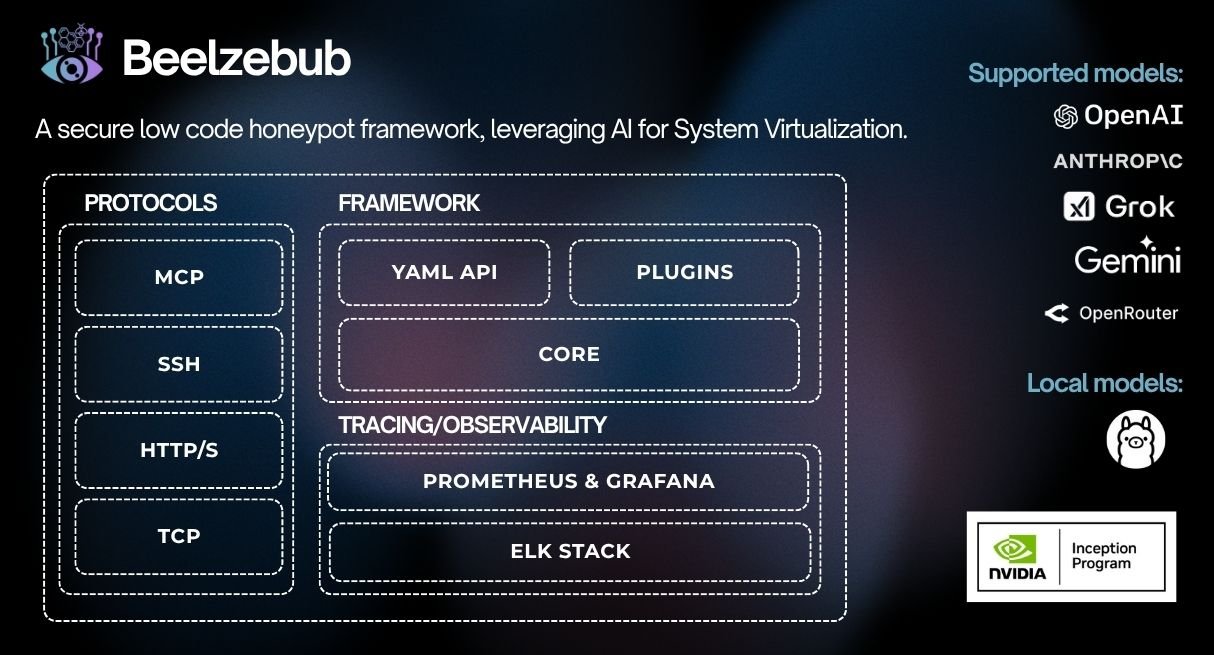
CommandPlugin أو HTTPPlugin وسجّلها عبر init() دون الحاجة إلى تغييرات في النواة
./install.sh # asks local or Docker, checks prerequisites, and starts it
غير تفاعلي: `./install.sh --local` أو `./install.sh --docker`. استخدم
`./install.sh --local --no-run` للتثبيت والبناء دون تشغيل بيئة التشغيل
المحلية. على المضيفين غير الجذر، لا يبدأ التثبيت المحلي تلقائيًا عندما يتضمن
التكوين الافتراضي منافذ مميزة.

### محلي (Go)```bash
make start     # installs any declared plugins, compiles them in, and runs
make docker # builds an image with declared plugins baked in, then runs it
### استخدام Helm (Kubernetes)```bash
helm install beelzebub ./beelzebub-chart
# Upgrade:
helm upgrade beelzebub ./beelzebub-chart
يأتي Beelzebub مع CLI منظم. قم بتشغيل beelzebub --help لعرض جميع الأوامر المتاحة.
beelzebub runتشغيل جميع خدمات الخداع المُعدّة.```bash beelzebub run [flags]
Flags: -c, --conf-core string Path to core configuration file (default "./configurations/beelzebub.yaml") -s, --conf-services string Path to services configuration directory (default "./configurations/services/") -m, --mem-limit-mib int Memory limit in MiB, -1 to disable (default 100)
### `beelzebub validate`

تحليل جميع ملفات التكوين والتحقق منها دون تشغيل أي خدمات. مفيد في خطوط أنابيب CI. راجع [التحقق من التكوين](https://github.com/beelzebub-labs/beelzebub/blob/main/docs/configuration-validation.md) للاطلاع على بنية التحقق ومرجع القواعد.```bash
beelzebub validate --conf-core ./configurations/beelzebub.yaml --conf-services ./configurations/services/
beelzebub pluginقم بتثبيت وسرد وإزالة الإضافات التي يتم جلبها من GitHub. راجع نظام الإضافات.```bash beelzebub plugin install github.com/your-org/beelzebub-myplugin beelzebub plugin list beelzebub plugin remove myplugin
### `beelzebub version`

طباعة الإصدار، SHA للالتزام، تاريخ البناء، ومعلومات وقت تشغيل Go.```bash
beelzebub version
يكشف Beelzebub عن SDK عام مستقر في pkg/plugin لتوسيع بيئة التشغيل الخادعة دون تعديل الكود الأساسي.
// CommandPlugin generates text responses for SSH, TCP, TELNET, and HTTP services. type CommandPlugin interface { Metadata() Metadata Execute(ctx context.Context, req CommandRequest) (string, error) }
// HTTPPlugin generates full HTTP responses with status code, headers, and body. type HTTPPlugin interface { Metadata() Metadata HandleHTTP(r *http.Request) HTTPResponse }
### كتابة إضافة```go
package myplugin

import (
    "context"
    "github.com/beelzebub-labs/beelzebub/v3/pkg/plugin"
)

type MyPlugin struct{}

func (p *MyPlugin) Metadata() plugin.Metadata {
    return plugin.Metadata{
        Name:        "MyPlugin",
        Description: "Custom deception response generator",
        Version:     "1.0.0",
        Author:      "your-name",
    }
}

func (p *MyPlugin) Execute(_ context.Context, req plugin.CommandRequest) (string, error) {
    return "simulated response to: " + req.Command, nil
}

func init() {
    plugin.Register(&MyPlugin{})
}
beelzebub plugin install github.com/your-org/myplugin # also appends to the config
make start # local: install declared plugins → build → run (needs Go) make docker # docker: image with plugins baked in → run (needs Docker)
| الأمر | الوظيفة |
|---|---|
| `plugin install <link>` | جلب إضافة، وتوصيلها، وإعادة البناء؛ كما يضيفها إلى `configurations/plugins.yaml` |
| `plugin install` | تثبيت كل ما هو مُصرَّح به في `configurations/plugins.yaml` |
| `plugin list` | عرض الإضافات المثبتة مقارنةً بما هو مُضمَّن في الملف الثنائي |
| `plugin update [name]` | إعادة الجلب عند المرجع المصرَّح به وإعادة تثبيت الالتزام |
| `plugin remove <name>` | إزالة إضافة من `configurations/plugins.yaml`، وفصل توصيلها، وطباعة خطوة إعادة البناء |

يتم تكوين مصادر إضافات النشر في `configurations/plugins.yaml`:```yaml
plugins:
  - source: github.com/your-org/myplugin
  - source: github.com/your-org/[email protected]
يمكن أن يكون إعداد وقت التشغيل المستقبلي لكل إضافة تحت configurations/plugins/ كملف YAML واحد لكل إضافة.

