
Specter-FlipperZero v2.1
👻 سبيكتر — ماسح/قارئ NFC سلبي بتردد 13.56 ميغاهرتز لكشف أجهزة التنصت لجهاز Flipper Zero. مقياس EMF لمكافحة المراقبة باستخدام شريحة NFC المدمجة. لا حاجة لأجهزة إضافية.
The waveform is not a graphic. It is 128 columns of 13.56 MHz carrier that Specter recorded off a real polling reader at 8 ms per column, read back out of the screenshot beside it. Its duty measures 28% where the device's own counter printed 27%, and both numbers are on the banner.
Sweep for the readers you can't see.
Project site · Download · Changelog


-8A6714?style=flat-square&labelColor=000000)



Specter turns your Flipper Zero into a pocket counter-surveillance bug-sweep for active 13.56 MHz NFC readers. It passively listens for the RF field that a powered-on reader is constantly emitting — a hidden card skimmer slipped into a payment terminal, a covert reader behind a door panel, a rogue logger taped under a desk — then tells you where it is, what kind of thing it is, whether the room is clean, and — left on watch — the moment one appears while you're away. It never transmits.
The readers are invisible. Specter makes them visible.
As featured in
Help Net Security
·
Cyber Security News
على الفليبر
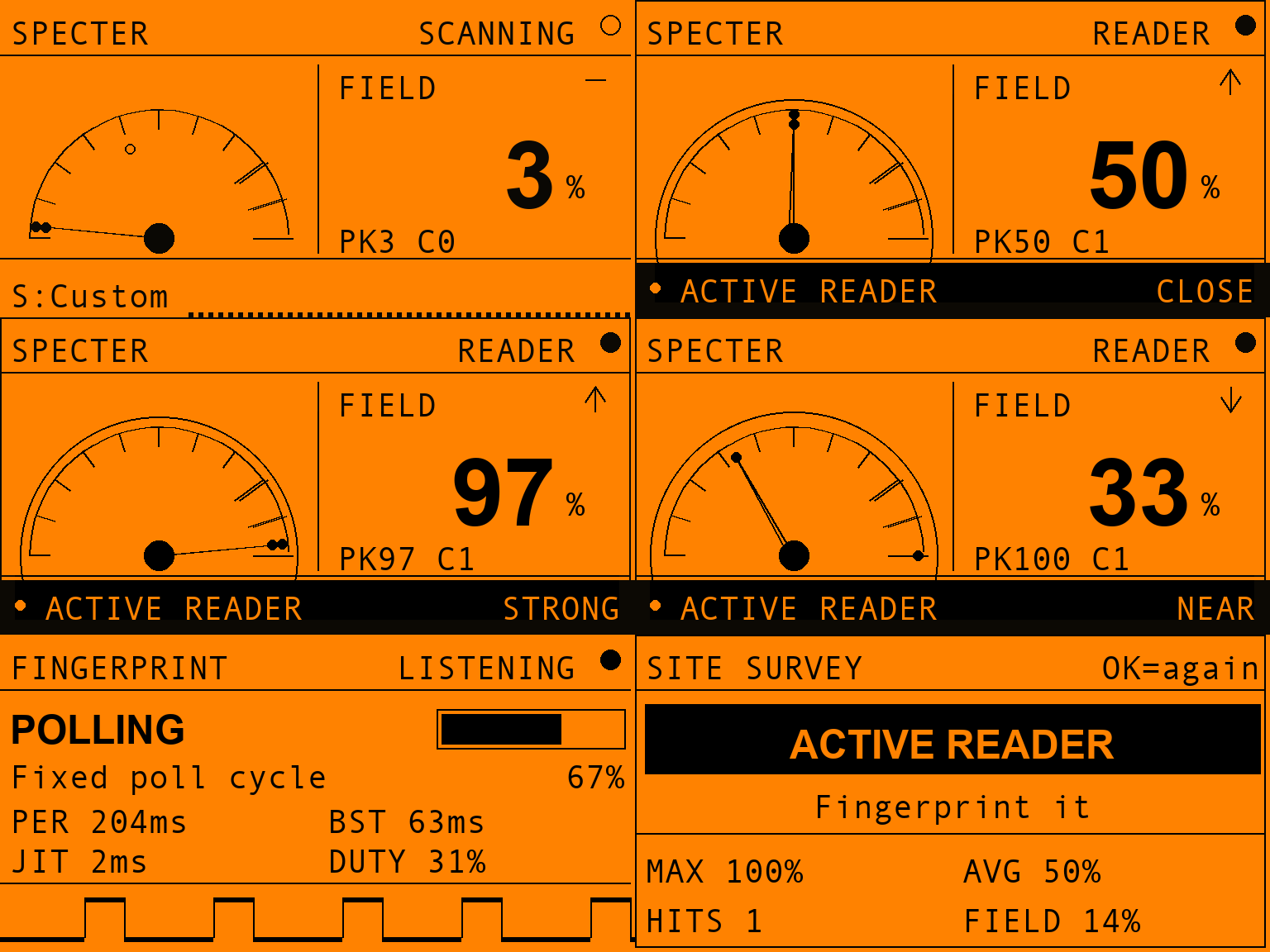
مسح كامل، من البداية إلى النهاية: غرفة هادئة → الاقتراب → الإغلاق على الهدف → ما هو → حكم الغرفة.
الشاشات التي لا يملكها وضع واحد
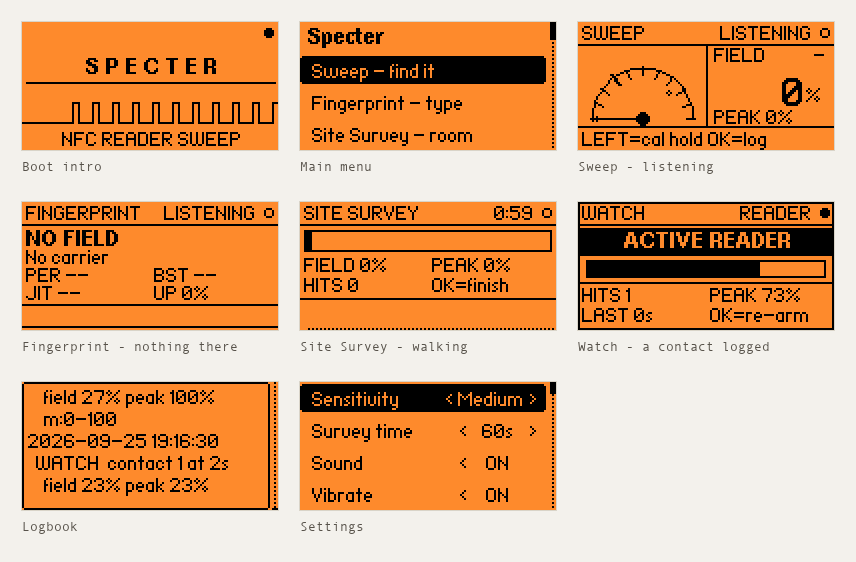
الحالات الهادئة والمقدمة — كل وضع من الأوضاع الأربعة أدناه يحمل لقطته
الخاصة، فهذه هي التي لا يملكونها. كل صورة في هذا الـ README هي لقطة من
جهاز حقيقي، مأخوذة عبر جلسة RPC الخاصة بالفليبر بواسطة
tools_screenshot.py. لم يعد هناك أي مُصيّر واجهات وهمي في هذا
المشروع — فرسم الواجهة هو تنفيذ ثانٍ لها، وقد خالف الفيرموير بينما كان يبدو
مقنعًا تمامًا (انظر 3.0.1).
الأوضاع الخمسة
Specter هو خمس أدوات حول مستشعر واحد. كل واحدة تجيب على سؤال مختلف، لذا يعتمد الوضع الصحيح على ما تحاول معرفته فعلاً:
| الوضع | السؤال الذي يجيب عليه | استخدمه عندما |
|---|---|---|
| Sweep | أين هو؟ | تشتبه في جهاز وتريد تحديد موقعه بالتنقل حوله |
| Fingerprint | أي نوع من الأشياء هو؟ | وجدت باعثًا وتريد معرفة كيف يتصرف |
| Site Survey | هل هذه الغرفة نظيفة؟ | تريد حكمًا واحدًا لمساحة كاملة، دون استخدام اليدين |
| Watch Mode | هل ظهر أحدهم أثناء غيابي؟ | تترك الفليبر في مكان ما ليقف حارسًا |
| Logbook | ماذا وجدت، ومتى؟ | تكتب تقريرًا، أو تقارن اليوم بالأسبوع الماضي — صفِّ حسب نوع الاكتشاف |
Sweep — أين هو؟
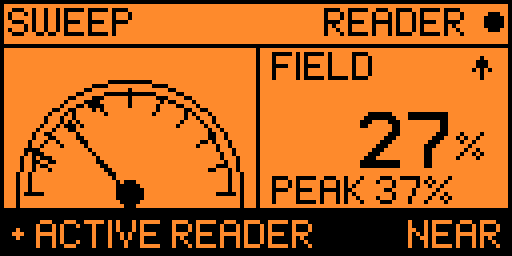
ما الذي يفعله. مقياس حي على طراز EMF. أمسك الفليبر مسطحًا وحرّكه ببطء فوق الشيء الذي تفحصه — طرفية دفع، قارئ باب، الجانب السفلي من فتحة صراف آلي، طرد، مكتب. تتحرك الإبرة مع شدة المجال في الوقت الفعلي.
ما الذي تراه.
- القرص — الإبرة = القراءة الحية، النقطة الصغيرة = تثبيت الذروة (أقوى نقطة لمستها، حتى تتمكن من مقارنة المواضع).
FIELD %— نفس القراءة كرقم، مع سهم اتجاه ▲ / ▼ يخبرك ما إذا كانت النصف ثانية الأخيرة قد جعلت الأمور أسخن أم أبرد. عند الصيد، هذا السهم يهم أكثر من الرقم.PEAK %— أقوى قراءة منذ التسليح، الرقم خلف نقطة تثبيت الذروة.- العلامة عبر القرص — حيث يبدأ
READERعند حساسيتك الحالية. كل ما بعدها هو ما سيعتبره Specter إصابة، لذا يجيب القرص على سؤال "ما الذي يُحتسب؟" بدلاً من تركك تخمّن. - الشريط السفلي — حتى تجد أول قارئ لك يحمل المفتاحين اللذين لا يمكنك
اكتشافهما بالضغط على الأشياء (
LEFT=cal،hold OK=log)؛ بعد ذلك، حساسيتك وموجة حية. يتحول إلى شريط إنذار أسود● ACTIVE READERمع كلمة قرب في اللحظة التي يُكتشف فيها حامل. - القرب —
FAINT → NEAR → CLOSE → STRONG → PEGGED.PEGGEDتعني أن المقياس مثبّت: أنت أقرب ما يمكن لهذا القياس أن يميّزه.
الصوت. نقرات جيجر اختيارية تتسارع كلما اقتربت، حتى تتمكن من المسح والفليبر في جيبك والصيد بالأذن وحدها.
| المفتاح | الإجراء |
|---|---|
OK | إعادة ضبط تثبيت الذروة وعدد التلامسات |
hold OK | حفظ هذه القراءة في سجل الاكتشافات |
LEFT | المعايرة على أرضية ضوضاء الغرفة (3 ثوانٍ) |
UP / DOWN | تعديل الحساسية دون مغادرة الصيد |