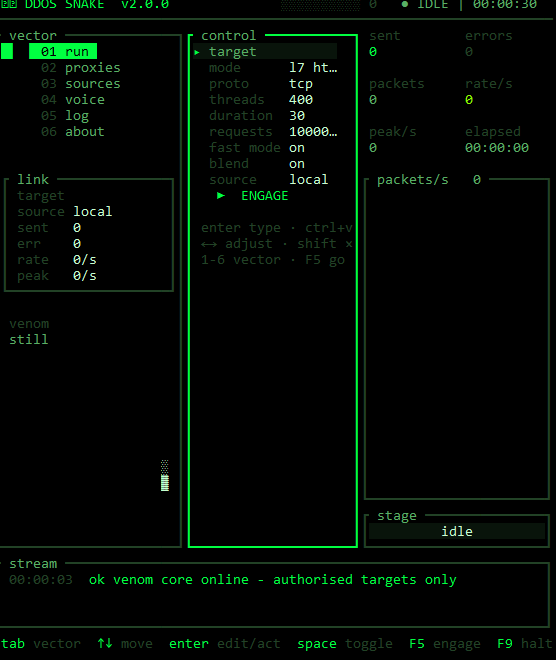
负载测试器。Rust 编写,全屏终端应用。黑底绿字,启动序列、数据包图表,以及一个涵盖旧 go 构建所有功能的菜单。
Rust 1.75 或更新版本。无需 cgo,无需其他工具。
cargo build --release
二进制文件生成于 target/release/ddossnake.exe,在其他平台上则生成于 target/release/ddossnake。
在 Windows 上如果没有 msvc 链接器,请使用 gnu 工具链。任何较新的 msys2 安装都带有 mingw-w64:
rustup toolchain install stable-x86_64-pc-windows-gnu
rustup target add x86_64-pc-windows-gnu --toolchain stable-x86_64-pc-windows-gnu

# with C:\msys64\mingw64\bin on PATH
cargo +stable-x86_64-pc-windows-gnu build --release
ddossnake                 # terminal ui
ddossnake --tui           # same, explicit
无头模式,与 go cli 相同的标志:
ddossnake -target <url|ip|ip:port> [flags]

  -target    target to hit
  -mode      l7 (http) or l4 (raw tcp/udp)          [l7]
  -proto     l4 protocol: tcp or udp                 [tcp]
  -threads   concurrent workers                      [400]
  -duration  seconds to run                          [30]
  -requests  request cap                             [1000000]
  -source    worker source, see -list                [local]
  -proxies   proxy folder (with -source proxies)      [proxies]
  -fast      keep-alive, no delay                    [true]
  -blend     vary request shape and pace             [true]
  -discord-token / -guild / -channel                 voice lane resolve
  -list      list worker sources and exit
  -version   print version
左侧有六个向量:运行、代理、来源、语音、日志、关于。
tab / shift-tab   cycle vectors
1 ... 6           jump straight to a vector
up down / j k     move selection
left right        adjust a value or choice (shift = x10 step)
enter             type a fresh value / fire an action
ctrl+v            paste into the focused field
space             toggle or cycle
F5 / r            engage
F9 / s            halt
esc               halt, then quit when idle
q                 quit
pgup / pgdn       scroll the log
运行标签页包含目标、模式、协议、线程数、持续时间、请求上限、快速模式、混合比例、工作节点来源以及启动按钮。使用 ctrl+v 或终端自带的粘贴功能粘贴 URL,它会直接填入输入框。遥测信息位于右侧:已发送、错误、数据包、速率、峰值、已用时间、每秒数据包的迷你走势图以及运行时钟的仪表盘。
代理标签页:文件夹路径、加载、抓取并检查免费列表(实时计数器、可保存的可用集合)、在检查中途停止并保留已通过的部分、清除。
来源标签页:选择工作节点来源,查看其类型、节点数量、端点以及密钥环境变量。reload 会从工作目录或二进制文件所在目录重新读取 nodes.json。
语音标签页:令牌、服务器 ID、频道 ID、可选代理。Resolve 会加入语音状态,仅停留足够长的时间以捕获 VOICE_SERVER_UPDATE。随后 push relay to run 会将目标设置为使用 l4/udp 的媒体中继。
日志标签页:带级别的完整消息流。
| 来源 | 说明 |
|---|---|
local | 本机的套接字,默认选项 |
proxies | 你自己的代理列表 |
scrape | 抓取免费列表、检查它们、运行可用集合 |
redirects | 内置的开放重定向中继,跳转来自它们的 IP |
ufonet | 连接到本地 UFONet 克隆的桥接,如果你有的话 |
vps-pool | 你自己运行代理程序的节点 |
stress-api | 你持有密钥的付费测试 API |
每行一个代理。文件夹中的每个文件都会被读取。
http://1.2.3.4:8080
socks5://5.6.7.8:1080
9.9.9.9:3128          (http assumed)
user:[email protected]:3128
# comment
Worker 分散在整个列表中,每个代理一个连接池。只有 http 会经过代理。l4 任务会回退到本地,并会说明这一点。
拉取 monosans 和 proxifly 列表,先用较短的超时对每个候选进行探测(大多数条目都是死主机),然后通过存活下来的代理发起真实请求。先试 http,再试 socks5,因为这些列表经常标错。可用集合会写入代理文件夹中的 scraped.txt,最快的排在最前面。
Blend 默认开启。每个请求都会有自己的查询字符串,user agent、语言和 referer 会轮换,worker 之间会以较小的随机间隔进行节奏控制,ramp 会把线程创建分散到约 3 秒内,而不是一开始就出现尖峰。这会牺牲吞吐量。当你想要原始数字时,使用 -blend=false。
l4 需要一个端口。它不会猜测 80。
redirects 通道的节奏比 http 通道更宽,中继的速率限制最严格。
线程是真实线程。你运行它的机器首先就是限制。
src/engine/   stats, target parsing, l7/l4 load, proxies, scrape,
              redirects, sources, ufonet bridge, discord voice resolve
src/ui/       app state, rendering, boot animation, theme
src/cli.rs    headless flags
cargo test
MIT,参见 LICENSE。