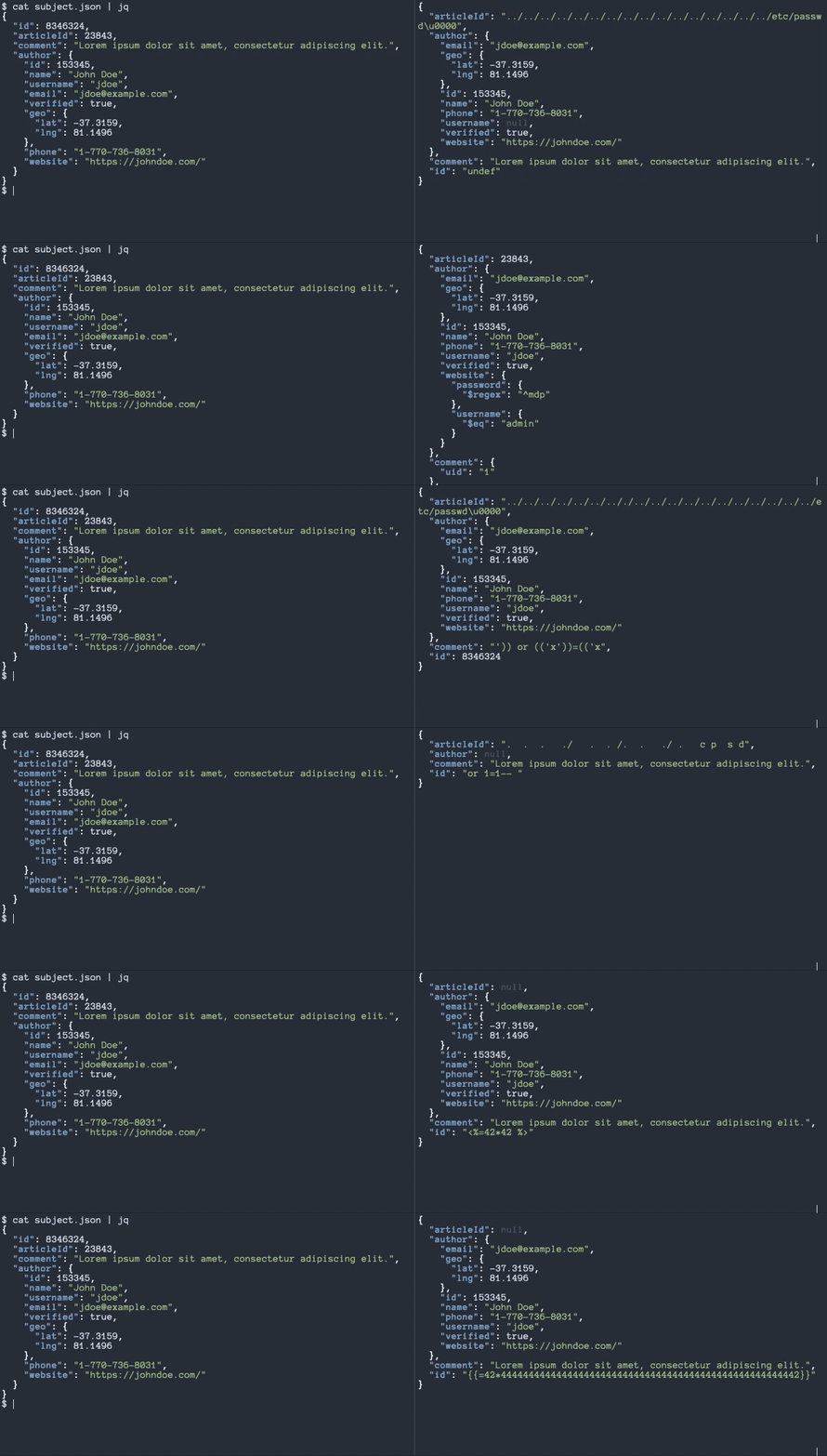
jdam 是一个受 Radamsa 启发的工具,用于以结构化感知的方式对任意 JSON 对象进行模糊测试,确保模糊测试结果始终是有效的 JSON。
许多现有的模糊测试工具会盲目更改输入,常常导致结果成为无效的 JSON。这意味着模糊测试只会测试目标应用的 JSON 解析器,而由于请求无效,模糊测试永远不会触及底层应用代码。Jdam 旨在解决这个问题。
jdam 带有多个变异模块,旨在揭示处理模糊数据的系统中的潜在问题和漏洞。一些模块执行随机更改,例如丢弃、替换、交换和重复随机字节,反转布尔值,取反数字;而其他模块则用试图触发特定漏洞类型的负载替换值,例如:
要查看所有可用的变异器列表,请使用 jdam -list。
jdam 仍然相当粗糙,可能会遇到错误。不过它已足够稳定,可以发布给喜欢冒险的用户,但目前请将其视为 alpha 软件!
为你的操作系统下载预构建的 release,或者克隆仓库并使用 go build -o jdam cmd/jdam/* 编译。
Usage of jdam:
  -count int
    	Number of fuzzed objects to generate (default 1)
  -ignore string
    	Comma-separated list of fields to exclude from fuzzing
  -list
    	List available mutators
  -max-depth int
    	Maximum object depth to fuzz (default 100)
  -mutators string
    	Comma-separated list of mutator IDs to use (default: all)
  -nil-chance float
    	Probability of value being set to nil (between 0 (no nils) and 1 (all nils)) (default 0.75)
  -output string
    	Output file pattern to use for results (e.g. /tmp/jdam-%d.json)
  -rounds int
    	Number of times to fuzz object (default 1)
  -seed int
    	Seed to use for pseudo-random number generator (default: current UNIX timestamp)
  -verbose
    	Print activity information
  -version
    	Print current jdam version
jdam 通过将有效的 JSON 对象 ({...}) 管道传入来工作。默认情况下,jdam 会对一个随机字段执行一次随机排列,并打印出结果 JSON 对象:
$ echo '{"hello":"world"}' | jdam
{"hello":{"id":1}}
可以使用 -rounds 标志对目标 JSON 进行多次变异,但请注意,之前的模糊测试负载也可能被变异:
$ echo '{"hello":"world"}' | jdam -rounds 10
{"hello":{"_constructor":"${42*444444444444444444444444444444444444444444444444444444444444444444444444444444444444444444444444442}"}}
可以使用 -count 标志生成多个模糊对象:
$ echo '{"hello":"world"}' | jdam -count 10
{"hello":"sorld"}
{"hello":"../../../../../../../../../../../../../../../../../../../../etc/passwd"}
{"hello":"{{42*42}}"}
{"hello":null}
{"hello":"' \u0026\u0026 this.password.match(/.*/)//+\u0000"}
{"hello":{"$where":"1"}}
{"hello":"null"}
{"hello":"\";touch /tmp/jdam.70797.fail'"}
{"hello":null}
{"hello":"|| 1==1"}
如果你希望准备测试文件而不是使用命令的标准输出,jdam 可以将模糊测试结果写入单独的文件:
$ echo '{"hello":"world"}' | jdam -count 10 -output "/tmp/jdam-%d.json"
上述命令将在 /tmp 中生成从 jdam-1.json 到 jdam-10.json 共 10 个文件。特殊的 %d 占位符会自动替换为序号,以便将结果写入单独的文件。
如果你希望确保 jdam 永远不会变异目标 JSON 对象中的特定字段,可以使用 -ignore 标志告诉 jdam 忽略它们:
$ echo '{"id":13,"articleId":37,"comment":"Hello"}' | ./jdam -count 10 -ignore id,articleId
{"id":13,"articleId":37,"comment":"%x%x%x%x"}
{"id":13,"articleId":37,"comment":"search=')] | //user/*[contains(*,'"}
{"id":13,"articleId":37,"comment":"' and count(/comment())=1 and '1'='1"}
{"id":13,"articleId":37,"comment":"\u0016ello"}
{"id":13,"articleId":37,"comment":"/"}
{"id":13,"articleId":37,"comment":null}
{"id":13,"articleId":37,"comment":"{{{42*42}}}"}
{"id":13,"articleId":37,"comment":"@*"}
{"id":13,"articleId":37,"comment":"Helloooooooooooooooo"}
{"id":13,"articleId":37,"comment":"//*"}
ffuf 是一个极好的 Web 模糊测试工具,可以轻松地将 jdam 用作输入:
ffuf -input-cmd 'cat subject.json | jdam -rounds 3' -d FUZZ -u http://localhost/api/todos/1 -X PUT -v -mc 500 -mr 'error|failed|failure|fault|abort|root:|1764|0x|\d{20}' -od /tmp/ffuf_test
上述命令将指示 ffuf 从 jdam 获取模糊测试输入,并将其作为请求体发送到 PUT /api/todos/1。如果响应为 500 Internal Server Error,或者响应体中包含某些有趣的字符串,则请求和响应的详细信息将被写入 /tmp/ffuf_test/。
如果你熟悉 Go 并需要进行非常专门的模糊测试,可以在自己的 Go 代码中使用 jdam。请参阅 examples/ 文件夹中的用法示例。
模糊测试只有在你能检测到某个变异引起了问题或触发了漏洞时才有用。这些迹象会根据目标系统和环境而有所不同,但以下是一些通用的好指标:
sleep。error、failure、failed 等)的响应。/etc/passwd 文件以获得可预测的内容。因此任何包含 root: 的响应都非常有趣!42*42,结果为 1.764。如果响应中出现了这个数字,那么系统很可能存在模板注入漏洞。0x 后跟长十六进制字符串或长数字字符串,这可能是负载触发了格式字符串漏洞的迹象。/tmp 文件夹中创建一个名为 jdam.<数字>.fail 的文件。数字将是一个随机的五位数字,以便更容易识别导致问题的负载。jdam 仍然是一个非常新的工具,因此尚未发现任何重大漏洞。如果 jdam 帮助你获得了 CVE 或不错的漏洞赏金,我很乐意听到你的消息,并会在此处链接你的文章或报告。:)
我要感谢以下项目:
祝模糊测试愉快!