一个用 Python 编写的被动式 OSINT 工具包——支持用户名、邮箱、域名、IP、电话号码、哈希值。无需密钥,无需登录。
一个用 Python 编写的被动式 OSINT 工具包。无需 API 密钥、无需账户、任何地方都不记录日志。将它指向一个用户名、一个邮箱、一个域名、一个 IP、一个电话号码或一个哈希值,它就会挖掘已经公开的信息。
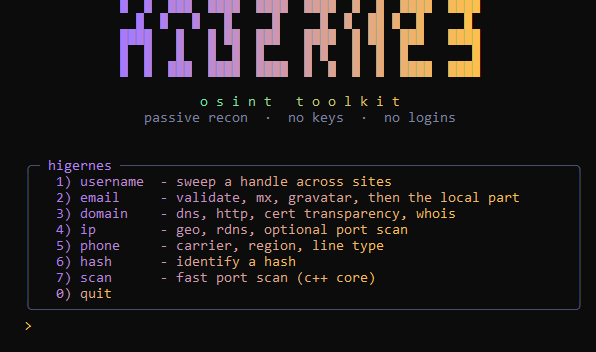
六个模块,全部读取公开端点:
| 模块 | 你能得到什么 |
|---|---|
username | 在约 700 个站点上扫描一个用户名(WhatsMyName 数据集),命中时实时更新 |
email | 语法、MX、一次性邮箱检查、gravatar,然后将 @ 之前的部分作为用户名 |
domain | A/AAAA/MX/NS/TXT/CNAME、http 状态和标题、来自证书透明度的子域名、whois |
ip | 地理位置 + ASN、反向 DNS、可选的常见端口扫描 |
phone | 有效性、运营商、地区、线路类型、时区 |
hash | 长度/字符集识别 |
scan | 快速 TCP 端口扫描,带横幅抓取,由 C++ 核心驱动 |
这里的一切都不会触及任何私有内容。全部是 DNS、WHOIS、公开个人资料端点和证书日志。
用户名扫描基于 data/wmn-data.json 运行——即社区 WhatsMyName 数据集,约 700 个站点,每个站点都有一条检查规则(状态码加上一个必须存在、且一个必须不存在的字符串)。随时可以将更新的副本覆盖到该文件上;工具在启动时读取它。如果文件缺失,则回退到一个小型内置列表。
用 --cat 缩小扫描范围:
python higernes.py username vqkro --cat social
python higernes.py username vqkro --cat gaming
不带 --cat 运行则会扫描所有站点。
端口扫描器在 Python 中太慢,因此繁重的工作放在 core/hcore.cpp 中——一个小型独立二进制文件,执行带横幅抓取和主机名解析的多线程连接扫描。higernes.py 会在自身旁边(或在 core/ 中,或在 PATH 上)查找它并调用它;如果它不存在,ip --ports 扫描会静默回退到较慢的纯 Python 版本。
构建它(仅当你从源代码运行并想要快速路径时才需要):
# windows (mingw g++)
g++ -O2 -std=c++17 -static -o core/hcore.exe core/hcore.cpp -lws2_32

# linux / macOS
g++ -O2 -std=c++17 -o core/hcore core/hcore.cpp -pthread
如果你想,也可以直接运行它:
hcore dns github.com
hcore ports example.com --banners
hcore ports example.com --all --threads 1024
Releases 页面上的预构建 .exe 已经内置了核心。
需要 Python 3.9 或更新版本。
任何操作系统
pip install -r requirements.txt
这会拉取 rich、requests、dnspython 和 aiohttp。phonenumbers 也在其中,但只有 phone 模块需要它——从文件中删除它,其余部分仍可运行。没有 aiohttp 时,用户名扫描会回退到线程,速度要慢得多(针对数百个站点需要数十秒)。
Windows(PowerShell,如果 python 还不在 PATH 上)
winget install --id Python.Python.3.13 -e
git clone https://gitlab.com/jankoboy88/higernes
cd higernes
pip install -r requirements.txt
python higernes.py
Linux / macOS
git clone https://gitlab.com/jankoboy88/higernes
cd higernes
python3 -m pip install -r requirements.txt
python3 higernes.py
FreeBSD
pkg install -y python3
git clone https://gitlab.com/jankoboy88/higernes
cd higernes
python3 -m pip install -r requirements.txt
如果 pip 抱怨外部管理的环境,要么使用 venv:
python3 -m venv .venv && . .venv/bin/activate && pip install -r requirements.txt
要么传入 --break-system-packages。
直接运行它会得到菜单。或者直接进入某个模块:
python higernes.py username vqkro
python higernes.py username vqkro --cat coding
python higernes.py email [email protected]
python higernes.py domain example.com
python higernes.py ip 1.1.1.1 --ports
python higernes.py phone +14155552671
python higernes.py hash 5f4dcc3b5aa765d61d8327deb882cf99
python higernes.py scan example.com
python higernes.py scan example.com --all
屏幕上全是实时旋转指示器和彩色表格;启动时字标会自行绘制。
dnspython 和 requests。没有 dnspython 时,只有 A 记录能解析(使用标准库),其他所有记录类型都会被跳过。目标机器上没有 Python?打包它:
pip install pyinstaller
pyinstaller --onefile --name higernes --console higernes.py
# -> dist/higernes.exe
Releases 页面上的二进制文件就是这样制作的。无需其他配置。
MIT。参见 LICENSE。