更新内容见日志log
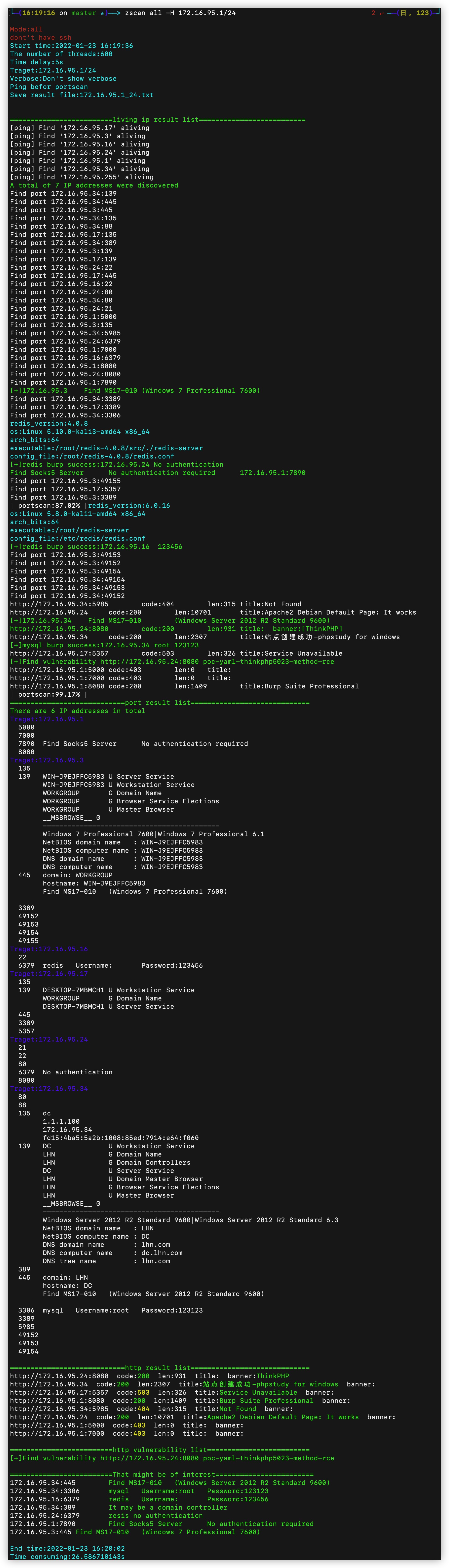
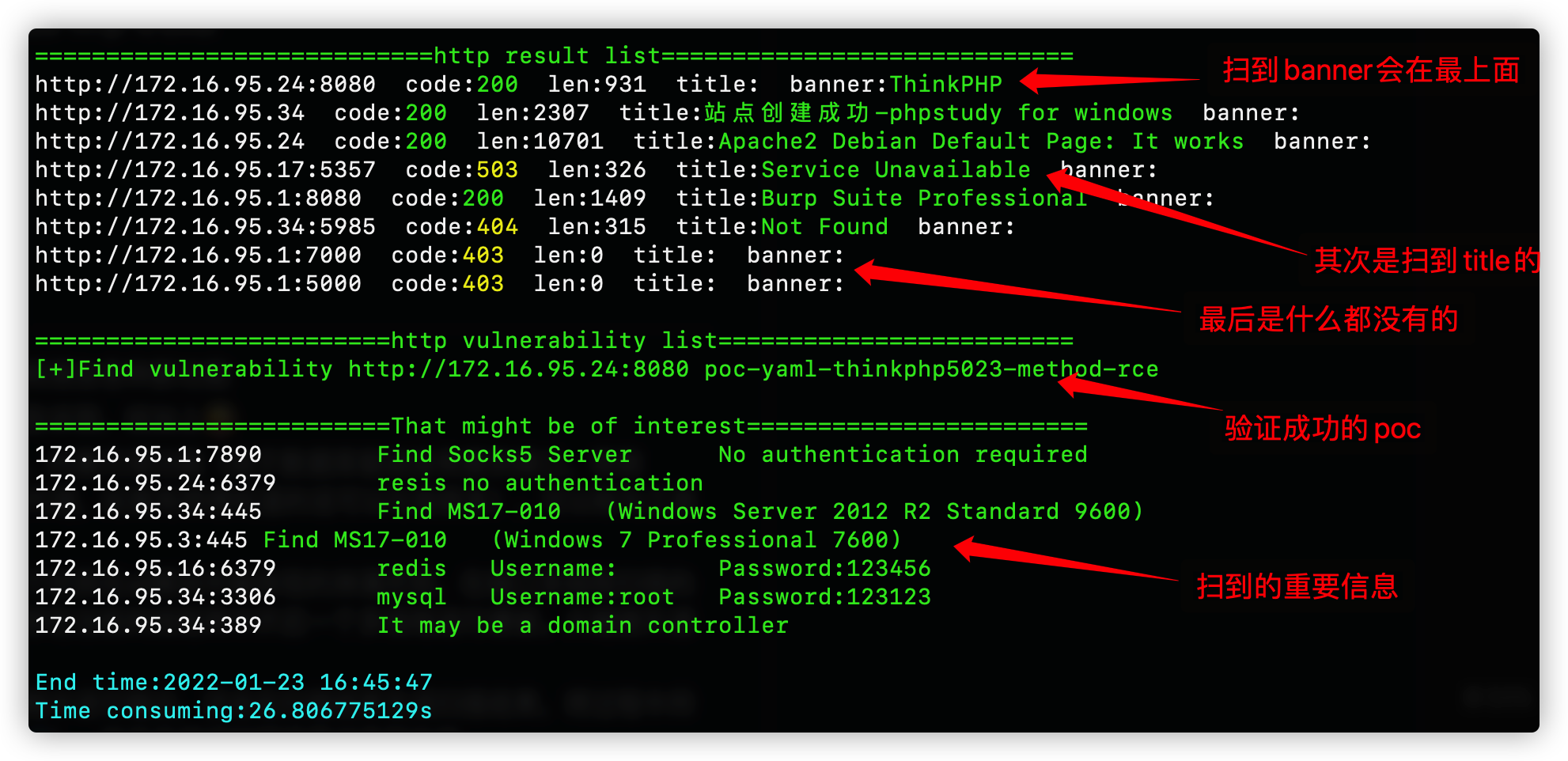
Zscan是一个开源的内网端口扫描器、爆破工具和其他实用工具的集合体可以称为工具包。以内网网段发现、主机发现和端口扫描为基础,可以在blast模块中对mysql、mssql、redis、mongo、postgres、ftp、ssh、ldap、rdp、smb等服务进行爆破,在scan模块中进行netbios、smb、oxid、socks server(扫描代理服务器)、ms17010、http的poc扫描等扫描功能,默认会抓取http的title和指纹信息。在server模块中可以开启http(可以上传下载文件)和socks5服务器(代理服务器),tools模块中集成实用的小工具暂时只有nc。最新添加exploit模块,可以针对爆破成功的服务进行利用,可进行ssh交互式登陆(用户名密码或者密钥),redis主从复制和Lua沙箱逃逸(上传文件和执行命令),ldap查询(内置常见查询语句)。还有all模块,扫描的时候调用所有的扫描和爆破模块。支持ipv6扫描,支持域名输入并自动识别cdn。具体模块功能如下
工具体积较大,后期会出精简版,模块化设计,拆分掉不需要的功能很方便
  all         调用所有扫描和爆破模块
  ping        主机发现和网段发现
  ps          基本的端口扫描和http指纹识别title抓取
  scan        扫描模块
  		--->ms17010扫描
  		--->poc漏洞扫描(内置380个poc)
  		--->proxyfind内网代理服务器扫描
  		--->winscan Windows的smb,netbios和oxid扫描
  blast       爆破服务模块(包括以下爆破模块)
  		--->ftp
  		--->ldap
  		--->mongo
  		--->mssql
  		--->mysql
  		--->postgres
  		--->rdp
  		--->redis
  		--->smb
  		--->ssh
  server      start http server or socks5 server
  		--->http服务器(可上传下载文件)
  		--->socks5服务器(可启动一个代理服务器,支持身份验证)
  exploit     漏洞利用模块
  		--->ldap查询
  		--->redis组从复制上传文件执行命令,lua沙箱逃逸RCE
  		--->snmp查询
  		--->ssh登陆
  		--->sunlogin向日葵RCE
  tools   实用工具模块
  		--->nc简单的nc,可以开放端口连接端口
  		--->searchfile支持多线程正则搜索文件
使用格式为
zscan 模块 参数
 ______     ______     ______     ______     __   __
/\___  \   /\  ___\   /\  ___\   /\  __ \   /\ "-.\ \
\/_/  /__  \ \___  \  \ \ \____  \ \  __ \  \ \ \-.  \
  /\_____\  \/\_____\  \ \_____\  \ \_\ \_\  \ \_\\"\_\
  \/_____/   \/_____/   \/_____/   \/_/\/_/   \/_/ \/_/

Usage:
  zscan [command]

Available Commands:
  all         Use all scan mode
  blast       Common service blasting
  exploit     sshlogin,redisexec
  help        Help about any command
  ping        ping scan to find computer
  ps          Port Scan
  scan        ms17010,proxyfind,snmp,winscan(smb,netbios,oxid),poc
  server      start http server or socks5 server

Flags:
  -h, --help            help for zscan
      --nobar           disable portscan progress bar
  -o, --output string   the path of result file (default "result.txt")
      --proxy string    Connect with a proxy(user:[email protected]:1080 or 172.16.95.1:1080)
  -T, --thread thread   Set thread eg:2000 (default 600)
  -t, --timeout time    Set timeout(s) eg:5s (default 5s)
  -v, --verbose         Show verbose information
模块里面的Flag代表当前命令的参数,Global Flags代表全局参数(所有命令都可以用) 这里的Flags为全局参数,所有模块都可以使用
目前已有模块:
zscan ping
Usage:
  zscan ping [flags]

Flags:
  -d, --discover string   Live network segment found,local parameter uses the local NIC information。eg:zscan ping -d local/zscan ping -d 172.18.0.0,172.19.0.0
  -h, --help              help for ping
  -H, --host hosts        Set hosts(The format is similar to Nmap)
      --hostfile string   Set host file
  -i, --icmp              Icmp packets are sent to check whether the host is alive(need root)

Global Flags:
      --nobar           disable portscan progress bar
  -o, --output string   the path of result file (default "result.txt")
      --proxy string    Connect with a proxy(user:[email protected]:1080 or 172.16.95.1:1080)
  -T, --thread thread   Set thread eg:2000 (default 600)
  -t, --timeout time    Set timeout(s) eg:5s (default 5s)
  -v, --verbose         Show verbose information
必须指定host和hostfile两个参数其中的一个,当有root权限的时候可以使用-i不调用本地的ping而是自己发icmp数据包(线程开的特别高的话几千那种,调用本地ping命令会导致cpu占用过高)
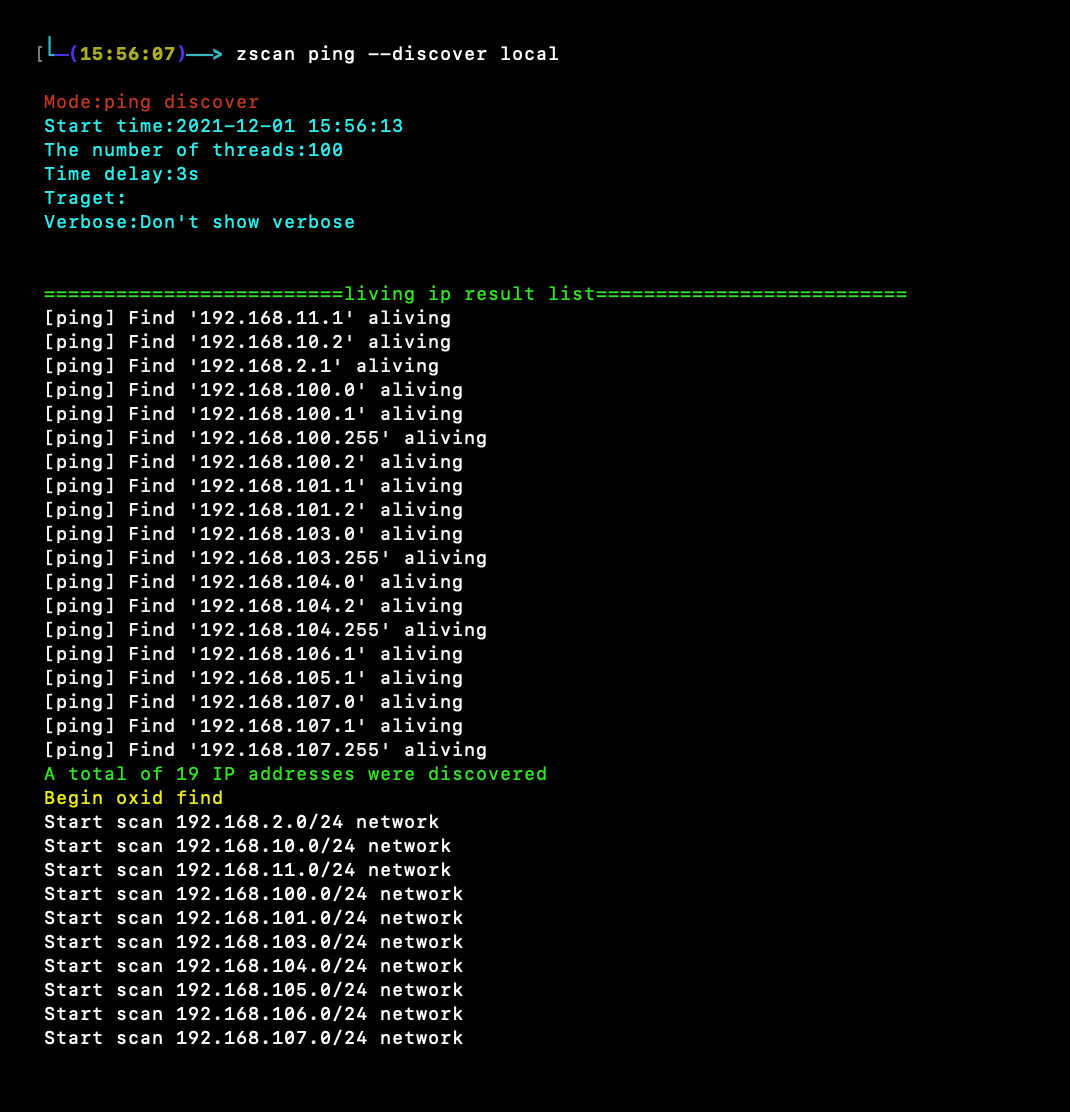
--discover两种网段发现模式,一种是ping网络b段网关,一种是oxid扫描
--discover后面需要给一个参数,如果给local(zscan ping --disconver local)就会读取本地网卡信息,去扫描本地的网络b段,例如读取到本地的两张网卡192.168.13.13和172.16.95.23,那么他就会去ping192.168.0.0/16和172.16.0.0/16这两个b段
还可以给定一个或者多个b段ip例如172.17.0.0或者172.18.0.0,10.10.0.0,多个ip段用逗号隔开
zscan ps
Usage:
  zscan ps [flags]

Flags:
  -b, --banner            Return banner information
  -h, --help              help for ps
  -H, --host hosts        Set hosts(The format is similar to Nmap) eg:192.168.1.1/24,172.16.95.1-100,127.0.0.1
      --hostfile string   Set host file
  -i, --icmp              Icmp packets are sent to check whether the host is alive(need root)
      --noping            not ping discovery before port scanning
      --nowebscan         Whether to perform HTTP scanning (httpTitle and HTTP vulnerabilities)(default on)
  -p, --port port         Set port eg:1-1000,3306,3389 or use " zscan ps -p l" ) to scan less port(thirty port)
  -s, --syn               use syn scan
      --vulscan           Whether to perform HTTP vulnerabilities(default off)

Global Flags:
      --nobar           disable portscan progress bar
  -o, --output string   the path of result file (default "result.txt")
      --proxy string    Connect with a proxy(user:[email protected]:1080 or 172.16.95.1:1080)
  -T, --thread thread   Set thread eg:2000 (default 600)
  -t, --timeout time    Set timeout(s) eg:5s (default 5s)
  -v, --verbose         Show verbose information
--host和--hostfile指定目标
-p指定端口,不指定的话使用默认端口,或者指定“l”使用less port(大概三十个常用端口)
--noping直接扫描所有目标不先ping
--icmp在使用ping的时候使用icmp包进行主机发现
--nowebscan 参数用来禁止开启web扫描只做端口扫描
--vulscan 参数用来开启poc探测(只有web扫描开启的时候才能使用,不然没有意义)
--syn 实用syn扫描(需要高权限)
zscan all
Usage:
  zscan all [flags]

Flags:
  -h, --help              help for all
  -H, --host hosts        Set hosts(The format is similar to Nmap) eg:192.168.1.1/24,172.16.95.1-100,127.0.0.1
      --hostfile string   Set host file
  -i, --icmp              Icmp packets are sent to check whether the host is alive(need root)
      --noburp            Set postgres passworddict path
      --noping             Not ping before port scanning
      --novulscan         disable http vulnerability scan
      --passdict string   Set postgres passworddict path
  -P, --password string   Set postgres password
  -p, --port port         Set port eg:1-1000,3306,3389 or use " zscan all -p l" ) to scan less port(thirty port)
  -U, --username string   Set user name

Global Flags:
      --nobar           disable portscan progress bar
  -o, --output string   the path of result file (default "result.txt")
      --proxy string    Connect with a proxy(user:[email protected]:1080 or 172.16.95.1:1080)
  -T, --thread thread   Set thread eg:2000 (default 600)
  -t, --timeout time    Set timeout(s) eg:5s (default 5s)
  -v, --verbose         Show verbose information
all模块本质是和ps模块基本相同,只不过all模块扫到对应的端口的时候会在当前线程中进行指纹识别或者用户名密码爆破
all模块参数和ps模块相同,就多了一个密码字典,是用来设置扫到需要爆破的端口时候的字典,其他都一样
--notburp 不进行爆破只进行扫描
--novulscan 由于all模块会调用所有模块,这个参数用于禁止漏洞扫描
zscan blast