用于集成 MCP 服务器的 JADX 插件
<div align="center">
# JADX-AI-MCP(Zin MCP 套件的一部分)
⚡ 全自动化的 MCP 服务器 + JADX 插件,旨在通过 MCP 与 LLM 通信,使用 Claude 等 LLM 分析 Android APK——轻松发现漏洞、分析 APK 并进行逆向工程。






[](http://www.apache.org/licenses/LICENSE-2.0.html)
#### ⭐ 贡献者
感谢以下这些优秀的人所作出的贡献 ⭐
<table>
<tr align="center">
<td>
<a href="https://github.com/ljt270864457">
<img src="https://assets.kitploit.com/production/public/readmes/6657/a21f05ae54dafc25c40b8b86dd848ae6cc62a165c11d1aaa484a2971191c04c0.jpg" width="30px;" alt=""/>
<br /><sub><b>ljt270864457</b></sub>
</a>
</td>
<td>
<a href="https://github.com/p0px">
<img src="https://assets.kitploit.com/production/public/readmes/6657/87812519c4f48c0cb45aa6e7605ed82ba5cb0f0a410c7bec0c031b407330d683.png" width="30px;" alt=""/>
<br /><sub><b>p0px</b></sub>
</a>
</td>
<td>
<a href="https://github.com/bx33661">
<img src="https://assets.kitploit.com/production/public/readmes/6657/cc055bf866f36cc8ba4680bb158f91d2a459559a0ea31ce3525f2024e81d9d1b.png" width="30px;" alt=""/>
<br /><sub><b>bx33661</b></sub>
</a>
</td>
<td>
<a href="https://github.com/Haicaji">
<img src="https://assets.kitploit.com/production/public/readmes/6657/70bd2a092000ef110c6ef9a177ae39889c5fa12af384165218ecdc65ab87cca2.png" width="30px;" alt=""/>
<br /><sub><b>Haicaji</b></sub>
</a>
</td>
<td>
<a href="https://github.com/mostafaNazari702">
<img src="https://assets.kitploit.com/production/public/readmes/6657/c15b7582722221365f89b5900f1e2d53a5de4bfe888f1f4cf3c24a09ca74553b.jpg" width="30px;" alt=""/>
<br /><sub><b>Mostafa Nazari</b></sub>
</a>
</td>
<td>
<a href="https://github.com/ChineseAStar">
<img src="https://assets.kitploit.com/production/public/readmes/6657/69e2a4cd0bbb7228e06fd1ccc32a37c30d1406fc6b06cfce0a6e2d22f5bbf6b0.png" width="30px;" alt=""/>
<br /><sub><b>ChineseAStar</b></sub>
</a>
</td>
<td>
<a href="https://github.com/cyal1r">
<img src="https://assets.kitploit.com/production/public/readmes/6657/f81a8c01f47c36dbf03f4117810d43075e3ca85f2d2d3c5d70cfb6ea20f45290.jpg" width="30px;" alt=""/>
<br /><sub><b>cyal1</b></sub>
</a>
</td>
<td>
<a href="https://github.com/badmonkey7">
<img src="https://assets.kitploit.com/production/public/readmes/6657/07d2eb4e3cd4cc09c5dca57d877c4d816247baab606e7848af7a0ab7d23c040d.jpg" width="30px;" alt=""/>
<br /><sub><b>badmonkey7</b></sub>
</a>
</td>
<td>
<a href="https://github.com/tiann">
<img src="https://assets.kitploit.com/production/public/readmes/6657/73dc97b271331bb2711fc80543636b25ec03cb523b985af1af05ea9ab6f40cfd.jpg" width="30px;" alt=""/>
<br /><sub><b>tiann</b></sub>
</a>
</td>
<td>
<a href="https://github.com/ZERO-A-ONE">
<img src="https://assets.kitploit.com/production/public/readmes/6657/73c55a088226d05d6fbf5ff1d14caee34ef98224c00e463acd07d6f4bb65e655.png" width="30px;" alt=""/>
<br /><sub><b>ZERO-A-ONE</b></sub>
</a>
</td>
<td>
<a href="https://github.com/neoz">
<img src="https://assets.kitploit.com/production/public/readmes/6657/77a4659904d1ba9253e77f8ff592547b305b3a1a9f46e289d1a900c5a7983d68.jpg" width="30px;" alt=""/>
<br /><sub><b>neoz</b></sub>
</a>
</td>
<td>
<a href="https://github.com/SamadiPour">
<img src="https://assets.kitploit.com/production/public/readmes/6657/4a39a74e2cd9e53f1ef326afc4a7d177d8689e7238dce567aa7dede879ce8f9f.jpg" width="30px;" alt=""/>
<br /><sub><b>SamadiPour</b></sub>
</a>
</td>
<td>
<a href="https://github.com/wuseluosi">
<img src="https://assets.kitploit.com/production/public/readmes/6657/3ada2b6e2ed063020ca3b0ce57bd5cd5c1cba2416454d2d038f630a667b88e8c.png" width="30px;" alt=""/>
<br /><sub><b>wuseluosi</b></sub>
</a>
</td>
<td>
<a href="https://github.com/CainYzb">
<img src="https://assets.kitploit.com/production/public/readmes/6657/b6bdcfb4162b1366cb4850ba880ab59e42f705ddd91fbf25dd8912ddfa7dd2bf.png" width="30px;" alt=""/>
<br /><sub><b>CainYzb</b></sub>
</a>
</td>
<td>
<a href="https://github.com/tbodt">
<img src="https://assets.kitploit.com/production/public/readmes/6657/bb6b73635bffe086662106c496032717f4cfeee9d0341799d0afaf5f9d009e92.jpg" width="30px;" alt=""/>
<br /><sub><b>tbodt</b></sub>
</a>
</td>
<td>
<a href="https://github.com/LilNick0101">
<img src="https://assets.kitploit.com/production/public/readmes/6657/628dc1638821f28b99dbfe9a971259713d16e0bcfc5718783f91eb09acebd64f.png" width="30px;" alt=""/>
<br /><sub><b>LilNick0101</b></sub>
</a>
</td>
<td>
<a href="https://github.com/lwsinclair">
<img src="https://assets.kitploit.com/production/public/readmes/6657/e3169690505f7a2b7fd0968057af5807f29830292553cbaa6eaf0ad418521b59.jpg" width="30px;" alt=""/>
<br /><sub><b>lwsinclair</b></sub>
</a>
</td>
</tr>
<tr align="center">
<td>
<a href="https://github.com/LYC-Android">
<img src="https://assets.kitploit.com/production/public/readmes/6657/6f0596bf4a8146f7b79a95baa7704b130d61c0852890ef3e0aa3fc8f898d0a35.jpg" width="30px;" alt=""/>
<br /><sub><b>LYC-Android</b></sub>
</a>
</td>
<td>
<a href="https://github.com/zbhello">
<img src="https://assets.kitploit.com/production/public/readmes/6657/03a9374ed3b190d5b659fd30d28202aeebc237753bced41b02be84efed36a24e.jpg" width="30px;" alt=""/>
<br /><sub><b>zbhello</b></sub>
</a>
</td>
<td>
<a href="https://github.com/1yearning1">
<img src="https://assets.kitploit.com/production/public/readmes/6657/903595003df5d7eab06f7e32897f8e34a15fe9f677485f7c8e3939ddd895bffd.png" width="30px;" alt=""/>
<br /><sub><b>1yearning1</b></sub>
</a>
</td>
<td>
<a href="https://github.com/mhsjzsq">
<img src="https://assets.kitploit.com/production/public/readmes/6657/dadd027e0da3b8c59babf87a66dd50985c6815676c75677523148ea640b1926a.png" width="30px;" alt=""/>
<br /><sub><b>mhsjzsq</b></sub>
</a>
</td>
<td>
<a href="https://github.com/darkblack1234">
<img src="https://assets.kitploit.com/production/public/readmes/6657/02fd1704e19e0fd764f024e440eef0f47afe420baa415e24227a020b3f9f21c8.png" width="30px;" alt=""/>
<br /><sub><b>darkblack1234</b></sub>
</a>
</td>
<td>
<a href="https://github.com/Merrg1n">
<img src="https://assets.kitploit.com/production/public/readmes/6657/43cdc3b100677e85f4e063711c59fe487d994fb66a8e57ba68444f6d9fb0dfd3.png" width="30px;" alt=""/>
<br /><sub><b>Merrg1n</b></sub>
</a>
</td>
</tr>
</table>
</div>
<!-- 目前仍处于早期开发阶段,因此预计会出现缺陷、崩溃和逻辑错误。-->
<!-- 用于 [JADX](https://github.com/skylot/jadx) 的独立插件(最初为 Fork),集成了模型上下文协议(MCP),可借助 Claude 实现 AI 驱动的静态代码分析、实时代码审查和逆向工程任务。-->
<div align="center">
<img alt="banner" height="480px" widht="620px" src="https://assets.kitploit.com/production/public/readmes/6657/54d557a38e17d9886d933b2e480910702f245c4cf62dc720a842cfe40994efe2.png">
</div>
<!--  图片由 AI 工具生成。 -->
#### 阅读文档
- 阅读文档现已上线:https://jadx-ai-mcp.readthedocs.io/en/latest/
---
## 🤖 什么是 JADX-AI-MCP?
**JADX-AI-MCP** 是 [JADX 反编译器](https://github.com/skylot/jadx) 的一个插件,可直接与 [模型上下文协议(MCP)](https://github.com/anthropic/mcp) 集成,从而**借助 Claude 等 LLM 提供实时逆向工程支持**。
可以理解为:“反编译 → 上下文感知的代码审查 → AI 建议”——全部实时完成。
#### 高层时序图
```mermaid
sequenceDiagram
LLM CLIENT->>JADX MCP SERVER: INVOKE MCP TOOL
JADX MCP SERVER->>JADX AI MCP PLUGIN: INVOKE HTTP REQUEST
JADX AI MCP PLUGIN->>REQUEST HANDLERS: INVOKE HTTP REQUEST HANDLER
REQUEST HANDLERS->>JADX GUI: PERFORM ACTION/GATHER DATA
JADX GUI->>REQUEST HANDLERS: ACTION PERFORMED/DATA GATHERED
REQUEST HANDLERS->>JADX AI MCP PLUGIN: CRAFT HTTP RESPONSE
JADX AI MCP PLUGIN->>JADX MCP SERVER:HTTP RESPONSE
JADX MCP SERVER->>LLM CLIENT: MCP TOOL RESULT
```
### 观看演示!
- **执行快速分析**
https://github.com/user-attachments/assets/b65c3041-fde3-4803-8d99-45ca77dbe30a
- **快速发现漏洞**
https://github.com/user-attachments/assets/c184afae-3713-4bc0-a1d0-546c1f4eb57f
- **支持多个 AI Agent**
https://github.com/user-attachments/assets/6342ea0f-fa8f-44e6-9b3a-4ceb8919a5b0
- **使用你喜欢的 LLM 客户端运行**
https://github.com/user-attachments/assets/b4a6b280-5aa9-4e76-ac72-a0abec73b809
- **分析 APK 资源**
https://github.com/user-attachments/assets/f42d8072-0e3e-4f03-93ea-121af4e66eb1
- **使用 JADX 调试 APK 时的 AI 助手**
https://github.com/user-attachments/assets/2b0bd9b1-95c1-4f32-9b0c-38b864dd6aec
它是两个工具的组合:
1. JADX-AI-MCP
2. [JADX MCP SERVER](https://github.com/zinja-coder/jadx-mcp-server)
## 🤖 什么是 JADX-MCP-SERVER?
**JADX MCP Server** 是一个独立的 Python 服务器,通过 MCP(Model Context Protocol)与 `JADX-AI-MCP` 插件(参见:[jadx-ai-mcp](https://github.com/zinja-coder/jadx-ai-mcp))交互。它让 LLM 能够实时与反编译后的 Android 应用上下文通信。
---
## Zin MCP Suite 中的其他项目
- **[APKTool-MCP-Server](https://github.com/zinja-coder/apktool-mcp-server)**
- **[JADX-MCP-Server](https://github.com/zinja-coder/jadx-mcp-server)**
- **[ZIN-MCP-Client](https://github.com/zinja-coder/zin-mcp-client)**
## 当前 MCP 工具
以下 MCP 工具可用:
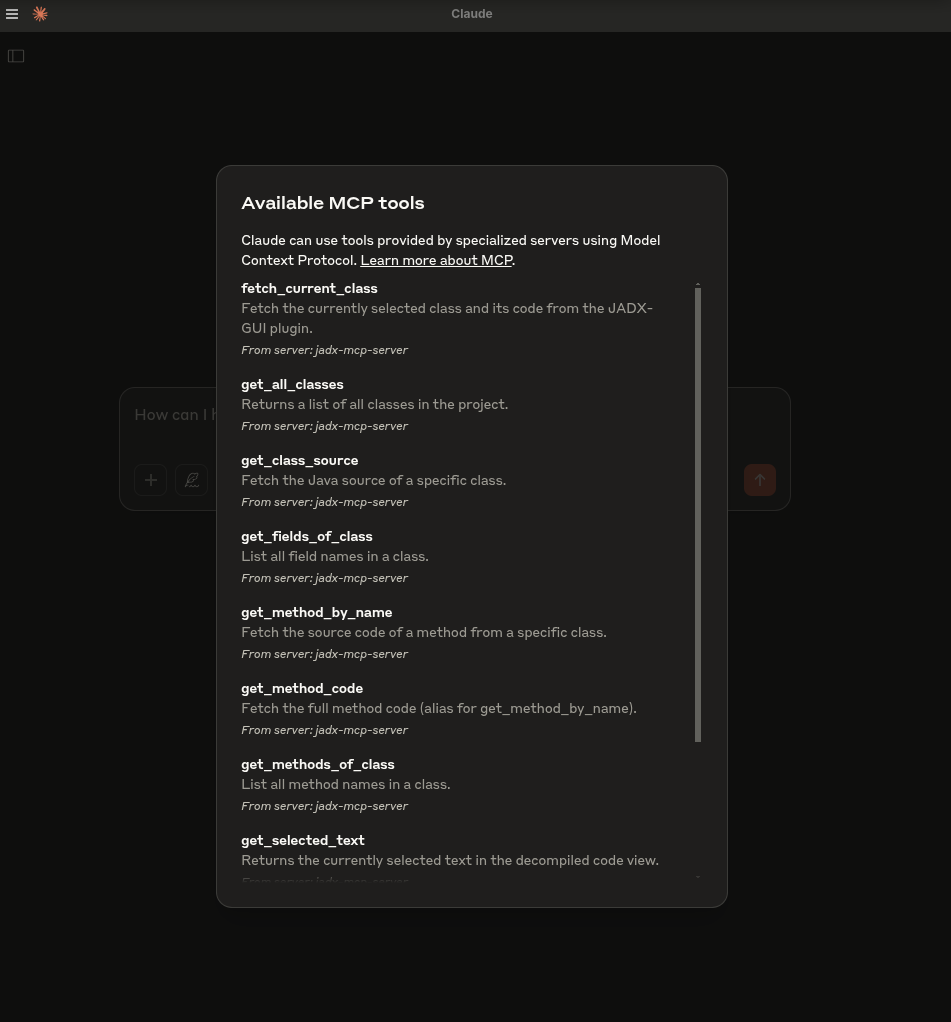
- `fetch_current_class()` — 获取所选类的类名和完整源码
- `get_selected_text()` — 获取当前选中的文本
- `get_all_classes()` — 列出项目中的所有类
- `get_class_source()` — 获取指定类的完整源码
- `get_method_by_name()` — 获取方法的源码
- `search_method_by_name()` — 跨类搜索方法
- `search_classes_by_keyword()` — 搜索源码中包含特定关键字的类(支持分页)
- `get_methods_of_class()` — 列出类中的方法
- `get_fields_of_class()` — 列出类中的字段
- `get_smali_of_class()` — 获取类的 smali 代码
- `get_main_activity_class()` — 获取 AndroidManifest.xml 文件中提到的 jadx 主 Activity。
- `get_main_application_classes_code()` — 根据 AndroidManifest.xml 中定义的包名,获取所有主应用类的代码。
- `get_main_application_classes_names()` — 根据 AndroidManifest.xml 中定义的包名,获取所有主应用类的名称。
- `get_android_manifest()` — 检索并返回 AndroidManifest.xml 内容。
- `get_manifest_component` - 检索特定的 manifest 组件,而不是整个 manifest 文件
- `get_strings()`:获取 strings.xml 文件
- `get_all_resource_file_names()`:检索应用中存在的所有资源文件名
- `get_resource_file()`:检索资源文件内容
- `rename_class()`:重命名类名
- `rename_method()`:重命名方法
- `rename_field()`:重命名字段
- `rename_package()`:重命名整个包
- `rename_variable()`:重命名方法内的变量
- `add_comment()`:为类、方法、字段或单行代码(`line=`,反编译源码中从 1 开始的行号)添加注释,注释会显示在 JADX-GUI 中并随项目保存(对同一目标重复添加注释会更新该注释,空注释会将其删除)
- `list_comments()`:列出项目中存储的注释,可选择筛选到某一个类
- `debug_get_stack_frames()`:从 jadx 调试器获取堆栈帧
- `debug_get_threads()`:从 jadx 调试器获取线程的详细信息
- `debug_get_variables()`:从 jadx 调试器获取变量
- `xrefs_to_class()`:查找对某个类的所有引用(返回方法级和类级引用,支持分页)
- `xrefs_to_method()`:查找对某个方法的所有引用(包括与重写相关的方法,支持分页)
- `xrefs_to_field()`:查找对某个字段的所有引用(返回访问该字段的方法,支持分页)
---
## 🗒️ 示例提示词
🔍 基础代码理解
“用一段话解释这个类的作用。”
“总结这个方法的职责。”
“这个类中是否存在任何混淆?”
“列出这个类可能需要的所有 Android 权限。”
🛡️ 漏洞检测
“这个方法中是否存在不安全的 API 用法?”
“检查这个类中是否有硬编码的密钥或凭据。”
“这个方法在使用用户输入之前是否对其进行了净化处理?”
“这段代码可能引入哪些安全漏洞?”
🛠️ 逆向工程辅助
“对类和方法的名称进行反混淆,并重命名为可读的名称。”
“你能推断出这个 smali 方法的原始用途吗?”
“这个类看起来属于哪些库或 SDK?”
“告诉我哪些类包含与‘加密’相关的代码?”
📦 静态分析
“列出这个类中所有与网络相关的 API 调用。”
“识别文件 I/O 操作及其潜在风险。”
“这个方法是否会泄露设备信息或 PII?”
🤖 AI 代码修改
“重构这个方法以提高可读性。”
“为这段代码添加注释,解释每个步骤。”
“将这个 Java 方法改写为 Python 以便分析。”
📄 文档与元数据
“为所有方法生成 Javadoc 风格的注释。”
“这个类可能属于哪个包或应用组件?”
“你能识别出 Android 组件类型(Activity、Service 等)吗?”
🐞 调试器助手
```
"Fetch stack frames, varirables and threads from debugger and provide summary"
"Based the stack frames from debugger, explain the execution flow of the application"
"Based on the state of variables, is there security threat?"
```
## 🛠️ 快速开始
### 1. 从 Releases 下载:https://github.com/zinja-coder/jadx-ai-mcp/releases
> [!NOTE]
>
> 请同时下载 `jadx-ai-mcp-<version>.jar` 和 `jadx-mcp-server-<version>.zip` 两个文件。
```bash
# 0. Download the jadx-ai-mcp-<version>.jar and jadx-mcp-server-<version>.zip
https://github.com/zinja-coder/jadx-ai-mcp/releases
# 1.
unzip jadx-mcp-server-<version>.zip
├jadx-mcp-server/
├── jadx_mcp_server.py
├── requirements.txt
├── README.md
├── LICENSE
├── src/
├── static/
├── examples/
└── test.sh
├jadx-ai-mcp-<version>.jar
# 2. Install the plugin
# For this you can follow two approaches:
## 1. One liner - execute below command in your shell
jadx plugins --install "github:zinja-coder:jadx-ai-mcp"
## The above one line code will install the latest version of the plugin directly into the jadx, no need to download the jadx-ai-mcp's .jar file.
## 2. Or you can use JADX-GUI to install it by following images as shown below:
```
<div align="center">
<img alt="横幅" height="480px" widht="620px" src="https://assets.kitploit.com/production/public/readmes/6657/1c2660639daf7352d2bdeafeb7b5e0846e3c0bed45846ee52256b7bf3d316386.png">
</div>
<div align="center">
<img alt="横幅" height="480px" widht="620px" src="https://assets.kitploit.com/production/public/readmes/6657/ccc2cc3566566517abad1097711afad3c668a999dc105d82686c4ffb791eba3b.png">
</div>
<div align="center">
<img alt="横幅" height="480px" widht="620px" src="https://assets.kitploit.com/production/public/readmes/6657/0f9770bc38f4234826a661e6d37bc205a801ad38380363fd4394a903bd35ff94.png">
</div>
```bash
## 3. GUI method, download the .jar file and follow below steps shown in images
```
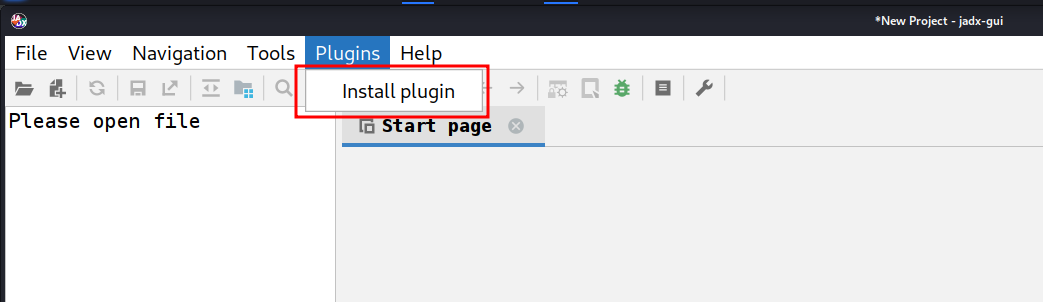
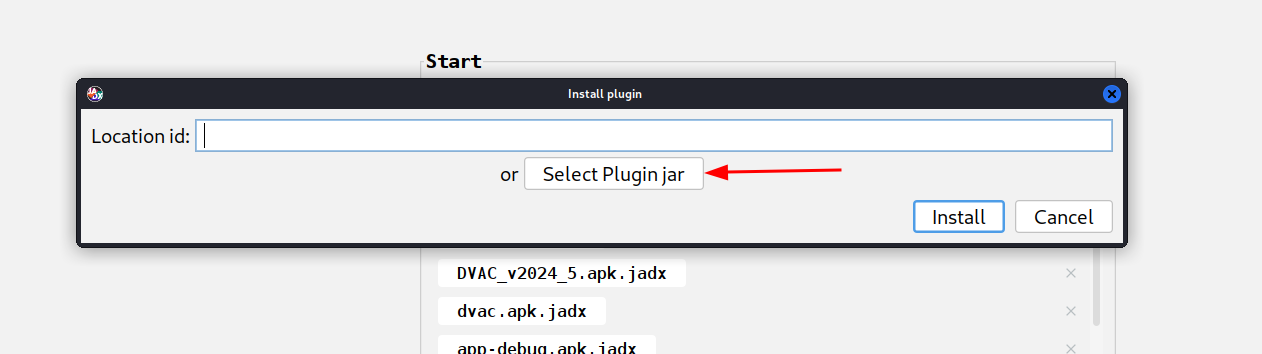
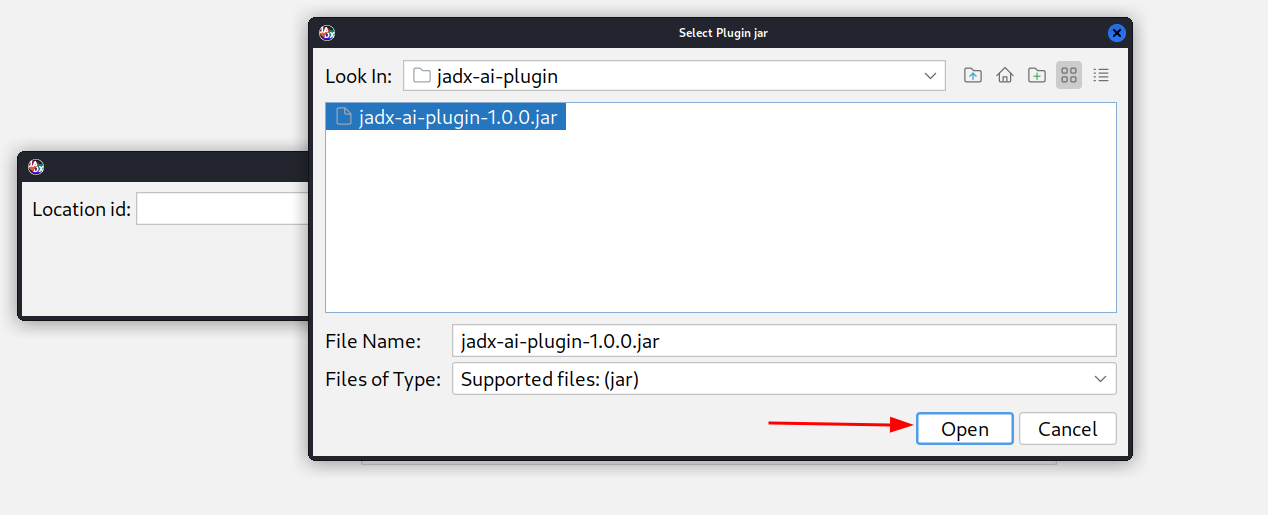
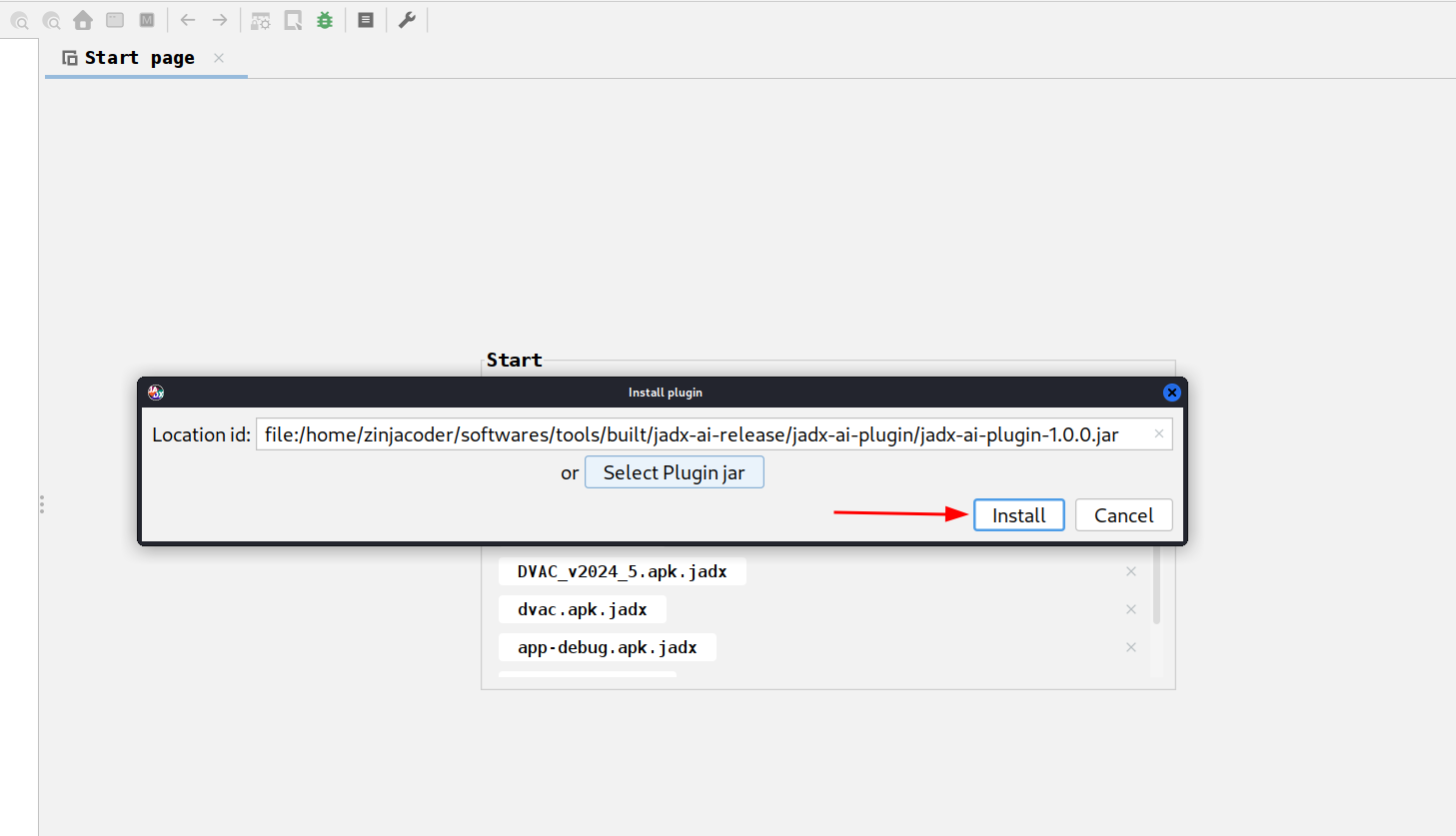
```bash
# 3. Navigate to jadx-mcp-server directory
cd jadx-mcp-server
# 4. This project uses uv - https://github.com/astral-sh/uv instead of pip for dependency management.
## a. Install uv (if you dont have it yet)
curl -LsSf https://astral.sh/uv/install.sh | sh
## b. OPTIONAL, if for any reasons, you get dependecy errors in jadx-mcp-server, Set up the environment
uv venv
source .venv/bin/activate # or .venv\Scripts\activate on Windows
## c. OPTIONAL Install dependencies
uv pip install httpx fastmcp
# The setup for jadx-ai-mcp and jadx_mcp_server is done.
```
## 🤖 2. 使用 Claude Desktop
确保 Claude Desktop 正在运行并已启用 MCP。
例如,我在 Kali Linux 上使用了以下内容:https://github.com/aaddrick/claude-desktop-debian
配置并将 MCP 服务器添加到 LLM 文件:
```bash
nano ~/.config/Claude/claude_desktop_config.json
```
对于:
- Windows:`%APPDATA%\Claude\claude_desktop_config.json`
- macOS:`~/Library/Application Support/Claude/claude_desktop_config.json`
并在其中填入以下内容:
```json
{
"mcpServers": {
"jadx-mcp-server": {
"command": "/<path>/<to>/uv",
"args": [
"--directory",
"</PATH/TO/>jadx-mcp-server/",
"run",
"jadx_mcp_server.py"
]
}
}
}
```
将以下内容替换:
- `path/to/uv` 替换为你的 `uv` 可执行文件的实际路径
- `path/to/jadx-mcp-server` 替换为你克隆此仓库的绝对路径
然后,使用内置集成,通过实时代码审查提示来浏览代码并进行交互。
**或者**
或者,你可以使用以下命令直接将 jadx_mcp_server 安装为可执行文件:
```
uv tool install git+https://github.com/zinja-coder/jadx-mcp-server
```
然后你只需在 MCP 配置的 `command` 部分提供 `jadx_mcp_server` 即可。
## 3. 使用 Cherry Studio
如果你想在 Cherry Studio 中配置 MCP 工具,可以参考以下配置。
- 类型:stdio
- 命令:uv
- 参数:
```bash
--directory
path/to/jadx-mcp-server
run
jadx_mcp_server.py
```
- `path/to/jadx-mcp-server`,指向你克隆此仓库的绝对路径
## 4. 使用 LMStudio
你还可以通过配置 LM Studio 的 mcp.json 文件,将 JADX AI MCP Server 与 LM Studio 配合使用。以下是视频指南。
https://github.com/user-attachments/assets/b4a6b280-5aa9-4e76-ac72-a0abec73b809
## 5. 以 HTTP Stream 模式运行
你还可以通过 `jadx_mcp_server.py` 使用 `--http` 选项,以 HTTP Stream 模式运行 Jadx,如下所示:
```bash
uv run jadx_mcp_server.py --http
OR
uv run jadx_mcp_server.py --http --port 9999
```
### 高级 CLI 选项 — 理解各标志
存在**两个独立的连接**,每个连接都有自己的主机/端口:
```
┌─────────────┐ --host / --port ┌──────────────────┐ --jadx-host / --jadx-port ┌──────────────────┐
│ LLM Client │ ◄──────────────────► │ jadx-mcp-server │ ──────────────────────────► │ JADX-GUI Plugin │
│ (Claude, │ Where the MCP server │ │ Where the MCP server looks │ (jadx-ai-mcp) │
│ Codex..) │ LISTENS for clients │ │ for the JADX plugin │ │
└─────────────┘ └──────────────────┘ └──────────────────┘
```
| 参数 | 默认值 | 控制内容 |
|------|---------|----------|
| `--http` | 关闭 | 使用 HTTP 传输而非 stdio |
| `--host` | `127.0.0.1` | **MCP 服务器监听的位置**(供 LLM 客户端连接的绑定地址) |
| `--port` | `8651` | **MCP 服务器监听的端口** |
| `--jadx-host` | `127.0.0.1` | **在何处查找 JADX 插件**(目标 JADX-GUI 机器) |
| `--jadx-port` | `8650` | **JADX 插件所在的端口** |
### 使用示例
**场景 1 — 所有组件都在同一台机器上(最常见):**
```bash
# Default: MCP server on localhost:8651, connects to JADX plugin on localhost:8650
uv run jadx_mcp_server.py --http
```
**场景 2 — Docker 容器或 WSL(MCP 服务器可从主机网络访问):**
```bash
# MCP server listens on ALL interfaces so the host can reach it
# JADX plugin is still on the same machine
uv run jadx_mcp_server.py --http --host 0.0.0.0
```
**场景 3 — JADX-GUI 运行在另一台机器上(例如远程虚拟机):**
```bash
# MCP server runs locally, but connects to JADX plugin on a remote machine
uv run jadx_mcp_server.py --http --jadx-host 192.168.1.100
```
**场景 4 — 完全远程部署(所有组件位于不同机器):**
```bash
# MCP server listens on all interfaces on port 9999
# JADX plugin is on a different machine at 192.168.1.100:8652
uv run jadx_mcp_server.py --http --host 0.0.0.0 --port 9999 --jadx-host 192.168.1.100 --jadx-port 8652
```
> [!CAUTION]
> ### ⚠️ 安全警告 — 远程绑定
>
> 使用 `--host 0.0.0.0`(或任何非 localhost 地址)时,MCP 服务器会通过**无身份验证的纯 HTTP** 绑定到**所有网络接口**。这意味着:
>
> - **网络上的任何人都可以**连接并调用所有 MCP 工具
> - **没有 TLS 加密** — 流量可能被拦截
> - 攻击者可以利用该服务器**读取反编译代码**、**重命名类/方法**以及**访问调试信息**
>
> **缓解措施:**
> - 仅在**可信、隔离的网络**(例如 Docker 桥接网络、本地虚拟机)上绑定到 `0.0.0.0`
> - 使用**防火墙**限制对 MCP 端口的访问
> - 考虑改用 **SSH 隧道**:`ssh -L 8651:127.0.0.1:8651 remote-host`
### Stdio 模式兼容性
> [!NOTE]
> 在 **stdio** 模式下运行(默认模式,不带 `--http`)时,所有人类可读输出(横幅、健康检查)都会写入 **stderr**,以便将 **stdout** 保留给 MCP JSON-RPC 流。这确保了与 Codex、Claude Desktop 以及其他基于 stdio 的 MCP 客户端的兼容性。
## 6. JADX AI MCP Plugin 的自定义端口和主机配置
<img width="800" height="335" alt="image" src="https://assets.kitploit.com/production/public/readmes/6657/34e13964afba1fa722733838892491b2ec9ea2d11f2dfd4e8612aa62817dfa41.png" />
1. 配置端口:配置 JADX AI MCP Plugin 将监听的端口。
2. 默认端口:还原更改并监听默认端口。
3. 重启服务器:强制重启 JADX AI MCP Plugin 服务器。
4. 服务器状态:检查 JADX AI MCP Plugin 服务器的状态。
要连接运行在自定义端口上的 JADX AI MCP Plugin,将使用 `--jadx-port` 选项,如下所示:
```
uv run jadx_mcp_server.py --jadx-port 8652
```
如果 JADX AI MCP 插件运行在**另一台机器**上(例如 JADX 在远程虚拟机上,MCP 服务器在你的本地主机上),请使用 `--jadx-host` 选项:
```bash
# Connect to JADX plugin on a remote host
uv run jadx_mcp_server.py --jadx-host 192.168.1.100 --jadx-port 8650
```
### CLI 参考 — 理解各标志
存在**两个独立的连接**,每个连接都有自己的主机/端口:
```
┌─────────────┐ --host / --port ┌──────────────────┐ --jadx-host / --jadx-port ┌──────────────────┐
│ LLM Client │ ◄──────────────────► │ jadx-mcp-server │ ──────────────────────────► │ JADX-GUI Plugin │
│ (Claude, │ Where the MCP server │ │ Where the MCP server looks │ (jadx-ai-mcp) │
│ Codex..) │ LISTENS for clients │ │ for the JADX plugin │ │
└─────────────┘ └──────────────────┘ └──────────────────┘
```
| 参数 | 默认值 | 控制内容 |
|------|---------|----------|
| `--http` | 关闭 | 使用 HTTP 传输而非 stdio |
| `--host` | `127.0.0.1` | **MCP 服务器监听的位置**(供 LLM 客户端连接的绑定地址) |
| `--port` | `8651` | **MCP 服务器监听的端口** |
| `--jadx-host` | `127.0.0.1` | **在何处查找 JADX 插件**(目标 JADX-GUI 机器) |
| `--jadx-port` | `8650` | **JADX 插件所在的端口** |
### 使用示例
**场景 1 — 所有组件都在同一台机器上(最常见):**
```bash
# Default: MCP server on localhost:8651, connects to JADX plugin on localhost:8650
uv run jadx_mcp_server.py --http
```
**场景 2 — Docker 容器或 WSL(MCP 服务器可从主机网络访问):**
```bash
# MCP server listens on ALL interfaces so the host can reach it
# JADX plugin is still on the same machine
uv run jadx_mcp_server.py --http --host 0.0.0.0
```
**场景 3 — JADX-GUI 运行在另一台机器上(例如远程虚拟机):**
```bash
# MCP server runs locally, but connects to JADX plugin on a remote machine
uv run jadx_mcp_server.py --http --jadx-host 192.168.1.100
```
**场景 4 — 完全远程部署(所有组件位于不同机器):**
```bash
# MCP server listens on all interfaces on port 9999
# JADX plugin is on a different machine at 192.168.1.100:8652
uv run jadx_mcp_server.py --http --host 0.0.0.0 --port 9999 --jadx-host 192.168.1.100 --jadx-port 8652
```
claude 的自定义 jadx 端口的 MCP 配置如下:
```
{
"mcpServers": {
"jadx-mcp-server": {
"command": "/path/to/uv",
"args": [
"--directory",
"/path/to/jadx-mcp-server/",
"run",
"jadx_mcp_server.py",
"--jadx-port",
"8652"
]
}
}
}
```
## 试一试
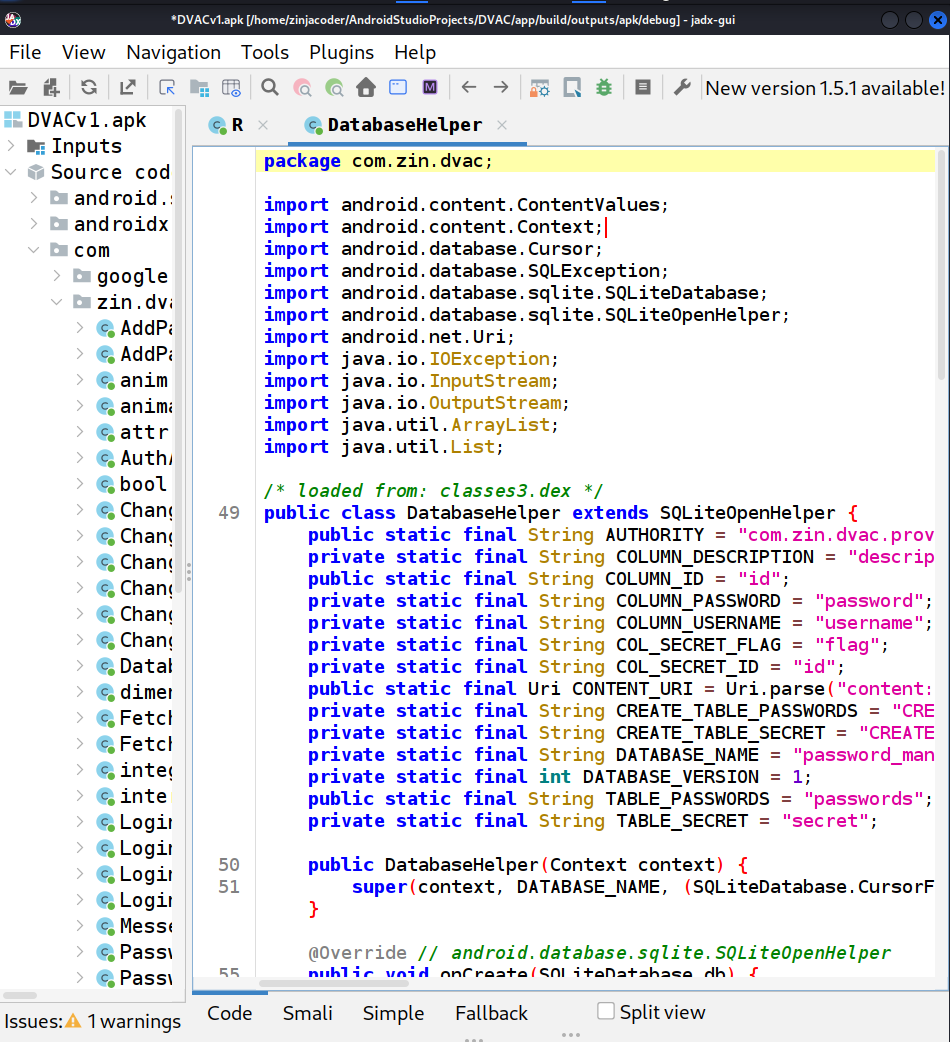
1. 运行 jadx-gui 并加载任意 .apk 文件
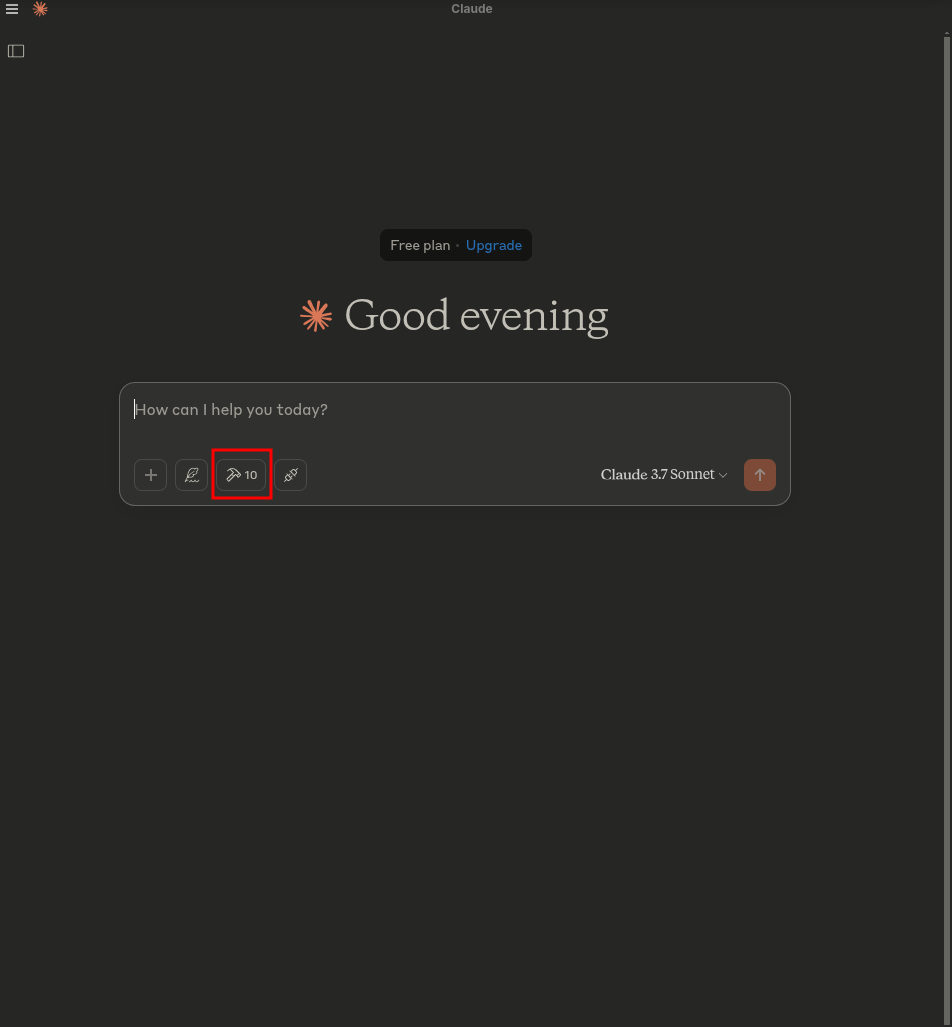
2. 启动 claude - 你必须看到锤子符号
3. 点击 `hammer` 符号,你应该会看到类似以下内容:
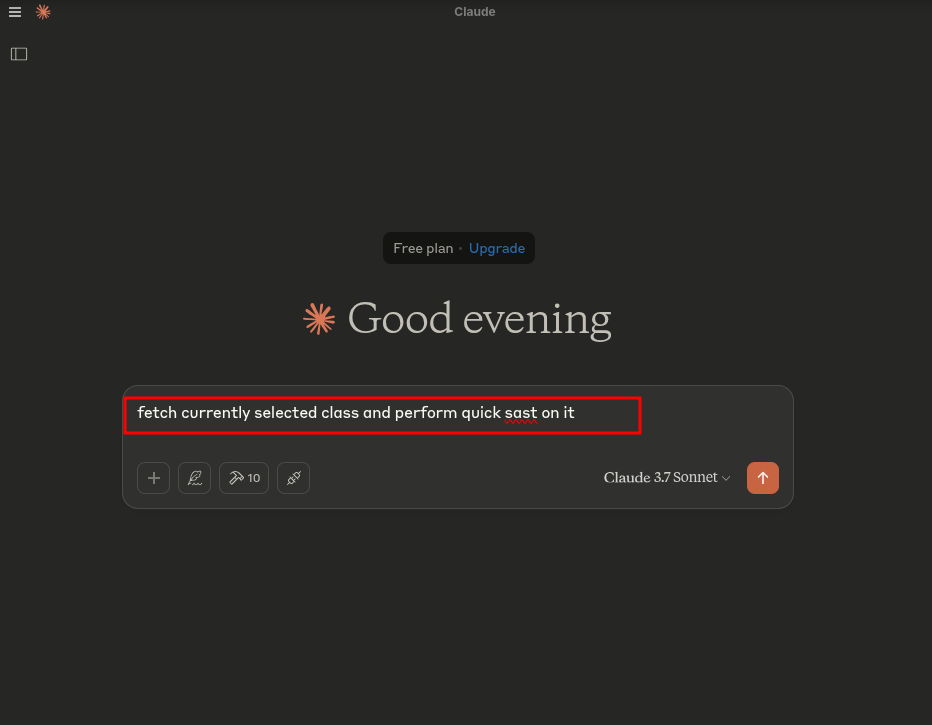
4. 运行以下提示词:
```text
fetch currently selected class and perform quick sast on it
```
5. 出现提示时允许访问:
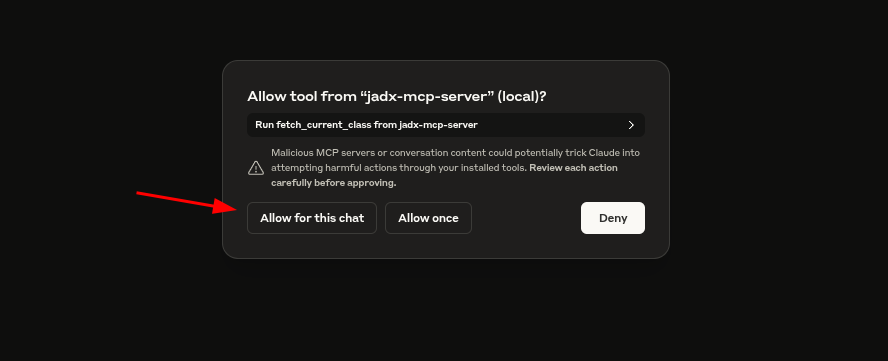
6. HACK!
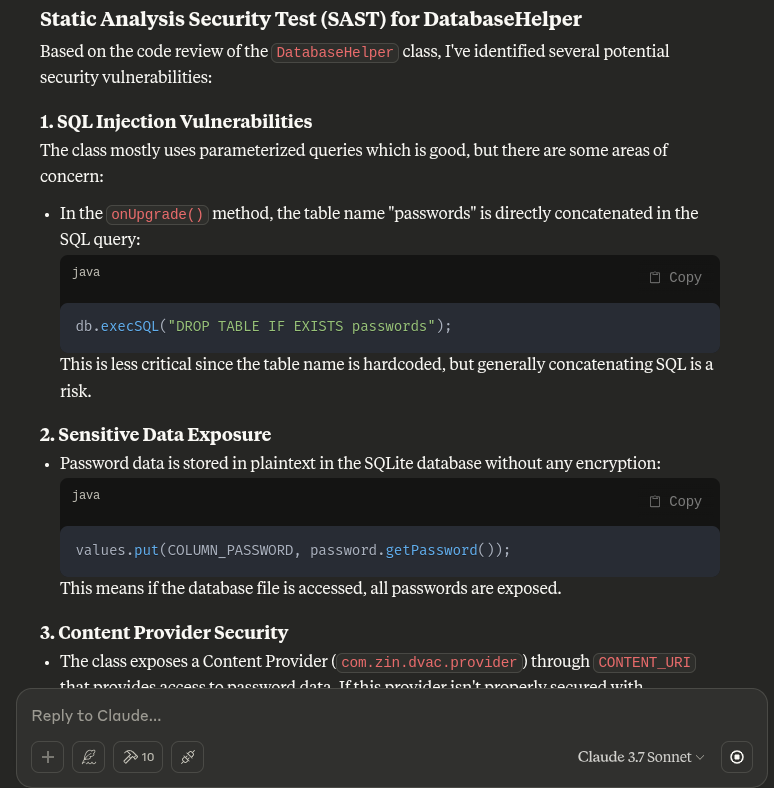
此插件允许对 GUI 和内部项目模型进行完全控制,以支持更深入的 LLM 集成,包括:
- 将选定的类导出到 MCP
- 运行自动化 Claude 分析
- 以内联方式接收返回的建议
---
## 故障排除
[点击此处查看](https://github.com/zinja-coder/jadx-ai-mcp/edit/jadx-ai/TROUBLESHOOTING.md)
## 致贡献者的说明
- 与 JADX-AI-MCP 相关的文件可在此仓库中找到。
- 与 **jadx-mcp-server** 相关的文件可在[此处](https://github.com/zinja-coder/jadx-mcp-server)找到。
## 报告缺陷、问题、功能建议、性能问题、一般性问题、文档问题。
- 请使用相应的模板提交 issue。
- 已在 Claude Desktop Client 上测试,对其他 AI 的支持将很快进行测试!
## 🙏 致谢
本项目是 JADX 的一个插件,JADX 是一个出色的开源 Android 反编译器,由 [@skylot](https://github.com/skylot) 创建并维护。所有核心反编译逻辑均归功于他们。我仅对其进行了扩展,以支持我的具备 AI 能力的 MCP 服务器。
[📎 原始 README(JADX)](https://github.com/skylot/jadx)
jadx 的原始 README.md 已包含在本仓库中,以供参考和致谢。
本 MCP 服务器之所以成为可能,得益于 JADX-GUI 的可扩展性以及出色的 Android 逆向工程社区。
同时非常感谢 [@aaddrick](https://github.com/aaddrick) 为基于 Debian 的 Linux 开发了 Claude desktop。
最后感谢 [@anthropics](https://github.com/anthropics) 开发了 Model Context Protocol,以及 [@FastMCP](https://github.com/modelcontextprotocol/python-sdk) 团队。
除此之外,非常感谢所有作为本项目依赖的开源项目,是它们让这一切成为可能。
### 依赖项
本项目使用了以下出色的库。
- 插件 - Java
- Javalin - https://javalin.io/ - Apache 2.0 License
- SLF4J - https://slf4j.org/ - MIT License
- org.w3c.dom - https://mvnrepository.com/artifact/org.w3c.dom - W3C Software and Document License
- MCP 服务器 - Python
- FastMCP - https://github.com/jlowin/fastmcp - Apache 2.0 License
- httpx - https://www.python-httpx.org - BSD-3-Clause(“BSD licensed”)
## 📄 许可证
JADX-AI-MCP 及所有相关项目继承自原始 JADX 仓库的 Apache 2.0 许可证。
## ⚖️ 法律警告
**免责声明**
工具 `jadx-ai-mcp` 和 `jadx_mcp_server` 严格用于教育、研究和合乎道德的 security assessment 目的。它们按“原样”提供,不附带任何明示或暗示的保证。用户全权负责确保其对这些工具的使用符合所有适用的法律、法规和道德准则。
使用 `jadx-ai-mcp` 或 `jadx_mcp_server`,即表示您同意仅在您获授权测试的环境中使用它们,例如您拥有或获得明确许可进行分析的应用程序。严禁将这些工具滥用于未经授权的逆向工程、侵犯知识产权或恶意活动。
`jadx-ai-mcp` 和 `jadx_mcp_server` 的开发者不对因使用或滥用这些工具而导致的任何损害、数据丢失、法律后果或其他后果承担责任。用户对其行为及使用所造成的任何影响承担全部责任。
负责任地使用。尊重知识产权。遵循道德黑客实践。
---
## 🙌 贡献或支持
- 觉得有用?给它一个 ⭐️
- 有想法?提交一个 [issue](https://github.com/zinja-coder/jadx-ai-mcp/issues) 或提交 PR
- 在其基础上构建了什么?私信我或提及我——我会将其添加到 README 中!
- 喜欢我的工作并希望它持续下去?赞助本项目。
---
用 ❤️ 为逆向工程和 AI 社区构建。