
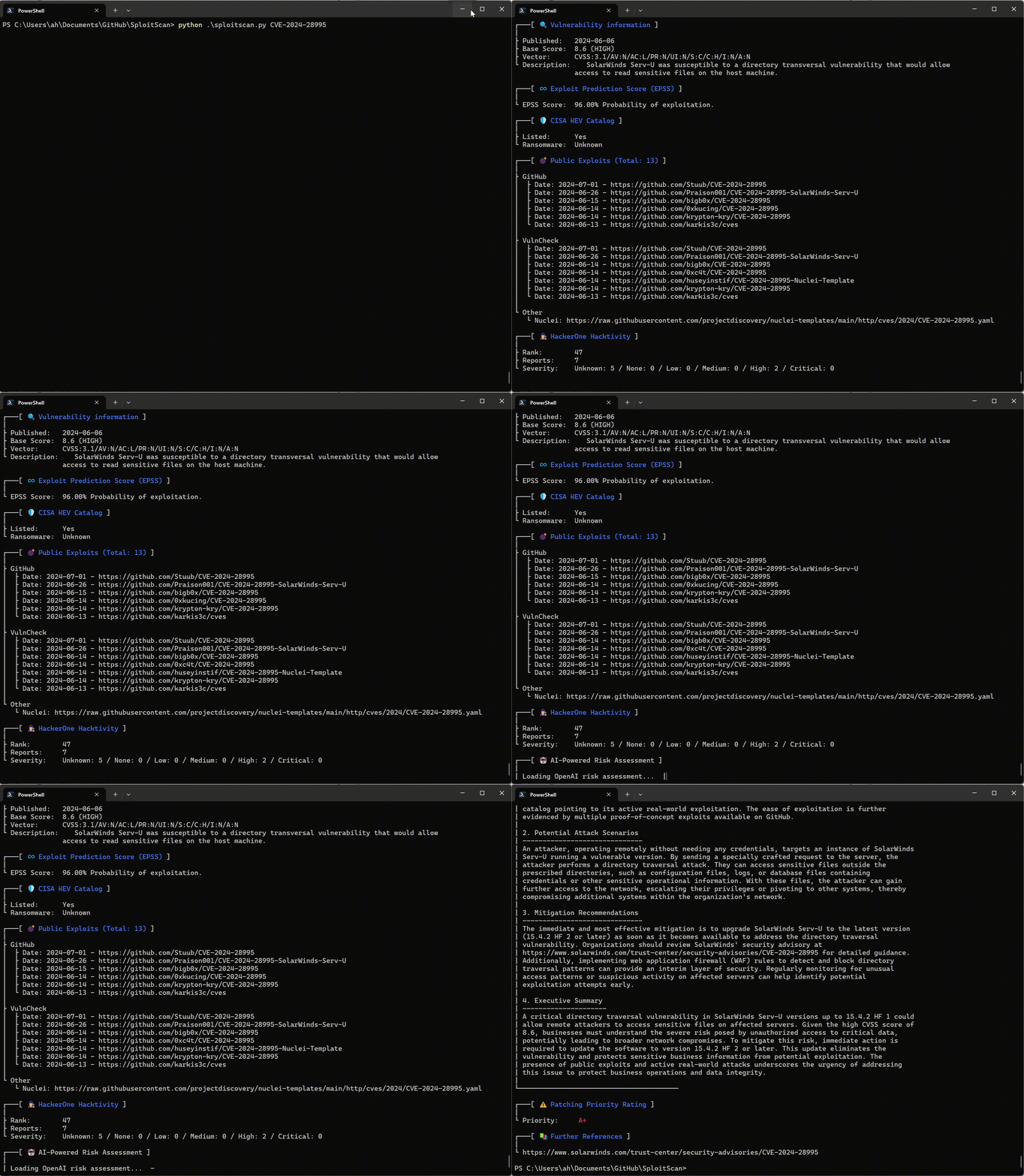
SploitScan 是一款强大且用户友好的工具,旨在简化已知漏洞及其利用概率的识别过程。它赋能网络安全专业人员快速识别并应用已知的测试性漏洞利用代码。对于希望加强安全措施或针对新兴威胁制定稳健检测策略的专业人士来说,该工具尤其有价值。
CVE 信息检索
获取漏洞的详细信息。
EPSS 集成
利用漏洞利用预测评分系统(EPSS)的数据检查漏洞被利用的可能性。
公开漏洞利用聚合
收集公开可用的漏洞利用数据,帮助您理解每个漏洞的上下文。
CISA KEV 集成
快速查看某个漏洞是否被列入 CISA 已知被利用漏洞(KEV)目录。
AI 驱动的风险评估
使用多种 AI 提供商(OpenAI ChatGPT、Google Gemini、Grok AI 或 DeepSeek)获取风险评估,解释潜在风险并提供缓解建议。
HackerOne 报告
查明某个漏洞是否涉及 HackerOne 漏洞赏金报告,包括基本排名和严重性详情。
补丁优先级系统
根据 CVSS、EPSS 和可用的漏洞利用信息,获得简单的补丁优先级评级。
多 CVE 支持与导出选项
同时处理多个 CVE,并将结果导出为 HTML、JSON 或 CSV 格式。
漏洞扫描器导入
从流行的漏洞扫描器(Nessus、Nexpose、OpenVAS、Docker)导入扫描结果,直接搜索已知漏洞。现在支持使用 --input-dir 进行基于目录的导入,以批量处理多个报告。
细粒度方法选择
选择具体要运行的数据检索方法(如 CISA、EPSS、HackerOne、AI 等),只获取您需要的信息。
本地 CVE 数据库更新与克隆
维护一份本地 CVE 列表 V5 仓库副本。这允许您在本地更新完整的 CVE 数据以供离线使用和搜索。
跨来源的关键词 CVE 搜索
通过关键词(例如“Apple”)在本地数据库以及 CISA 和 Nuclei 模板等远程来源中搜索 CVE。
快速模式简化输出
使用快速模式仅显示基本 CVE 信息,跳过额外查询以获得更快速的结果。
用户友好界面
享受清晰直观的界面,所有信息以易于阅读的格式呈现。
git clone https://github.com/xaitax/SploitScan.git cd sploitscan pip install -r requirements.txt
### pip```shell
pip install --user sploitscan
apt install sploitscan
### 获取 API 密钥
- **VulnCheck**:在 [VulnCheck](https://vulncheck.com/) 注册免费账户以获取您的 API 密钥。
- **OpenAI**:在 [OpenAI](https://platform.openai.com/signup/) 创建账户并获取 API 密钥。
- **Google Gemini**:在 [Google AI Studio](https://aistudio.google.com/app/apikey) 创建账户并获取 API 密钥。
- **xAI Grok**:在 [xAI](https://x.ai/api) 创建账户并获取 API 密钥。
- **DeepSeek**:在 [DeepSeek](https://platform.deepseek.com/api_keys) 创建账户并获取 API 密钥。
### 配置文件
SploitScan 默认在多个位置查找 `config.json`。它会按以下顺序加载找到的第一个有效文件:
1. **通过 `--config` 或 `-c` 传递的自定义路径**
2. **环境变量**:`SPLOITSCAN_CONFIG_PATH`
3. **本地和标准配置文件位置**:
- 当前工作目录
- `~/.sploitscan/config.json`
- `~/.config/sploitscan/config.json`
- `~/Library/Application Support/sploitscan/config.json` (macOS)
- `%APPDATA%/sploitscan/config.json` (Windows)
- `/etc/sploitscan/config.json`
> **注意**:只加载一个文件——在上述序列中找到的第一个文件。您可以将 `config.json` 放置在这些路径中的任意一个。
典型的 `config.json` 可能如下所示:```json
{
"vulncheck_api_key": "",
"openai_api_key": "",
"google_ai_api_key": "",
"grok_api_key": "",
"deepseek_api_key": ""
}
$ python .\sploitscan.py -h
███████╗██████╗ ██╗ ██████╗ ██╗████████╗███████╗ ██████╗ █████╗ ███╗ ██╗ ██╔════╝██╔══██╗██║ ██╔═══██╗██║╚══██╔══╝██╔════╝██╔════╝██╔══██╗████╗ ██║ ███████╗██████╔╝██║ ██║ ██║██║ ██║ ███████╗██║ ███████║██╔██╗ ██║ ╚════██║██╔═══╝ ██║ ██║ ██║██║ ██║ ╚════██║██║ ██╔══██║██║╚██╗██║ ███████║██║ ███████╗╚██████╔╝██║ ██║ ███████║╚██████╗██║ ██║██║ ╚████║ ╚══════╝╚═╝ ╚══════╝ ╚═════╝ ╚═╝ ╚═╝ ╚══════╝ ╚═════╝╚═╝ ╚═╝╚═╝ ╚═══╝ v0.14.0 / Alexander Hagenah / @xaitax / [email protected]
usage: sploitscan.py [-h] [-e {json,csv,html}] [-t {nessus,nexpose,openvas,docker}] [--ai {openai,google,grok,deepseek}] [-k KEYWORDS [KEYWORDS ...]] [-local] [-f] [-m METHODS] [-i IMPORT_FILE] [-c CONFIG] [-d] [cve_ids ...]
SploitScan: Retrieve and display vulnerability and exploit data for specified CVE ID(s).
positional arguments: cve_ids Enter one or more CVE IDs (e.g., CVE-YYYY-NNNNN). This is optional if an import file is provided via -i.
options: -h, --help show this help message and exit -e {json,csv,html}, --export {json,csv,html} Export the results in the specified format ('json', 'csv', or 'html'). -t {nessus,nexpose,openvas,docker}, --type {nessus,nexpose,openvas,docker} Specify the type of the import file ('nessus', 'nexpose', 'openvas', or 'docker'). --ai {openai,google,grok,deepseek} Select the AI provider for risk assessment (e.g., 'openai', 'google', 'grok', or 'deepseek'). -k KEYWORDS [KEYWORDS ...], --keywords KEYWORDS [KEYWORDS ...] Search for CVEs related to specific keywords (e.g., product name). -local, --local-database Download the cvelistV5 repository into the local directory. Use the local database over online research if available. -f, --fast-mode Enable fast mode: only display basic CVE information without fetching additional exploits or data. -m METHODS, --methods METHODS Specify which methods to run, separated by commas (e.g., 'cisa,epss,hackerone,ai,prio,references'). -i IMPORT_FILE, --import-file IMPORT_FILE Path to an import file. When provided, positional CVE IDs can be omitted. The file should be a plain text list with one CVE per line. --input-dir INPUT_DIR Path to a directory containing vulnerability reports to scan for CVE IDs. -c CONFIG, --config CONFIG Path to a custom configuration file. -d, --debug Enable debug output.
### 单个 CVE 查询```bash
sploitscan CVE-2024-1709
sploitscan CVE-2024-1709 CVE-2024-21413
### 本地 CVE 数据库更新
您现在可以使用 `--local` 选项在本地更新(或初始克隆)完整的 CVE List V5 仓库。请注意,此仓库大小有数GB,因此下载可能需要一些时间。例如:```bash
sploitscan -local
███████╗██████╗ ██╗ ██████╗ ██╗████████╗███████╗ ██████╗ █████╗ ███╗ ██╗
██╔════╝██╔══██╗██║ ██╔═══██╗██║╚══██╔══╝██╔════╝██╔════╝██╔══██╗████╗ ██║
███████╗██████╔╝██║ ██║ ██║██║ ██║ ███████╗██║ ███████║██╔██╗ ██║
╚════██║██╔═══╝ ██║ ██║ ██║██║ ██║ ╚════██║██║ ██╔══██║██║╚██╗██║
███████║██║ ███████╗╚██████╔╝██║ ██║ ███████║╚██████╗██║ ██║██║ ╚████║
╚══════╝╚═╝ ╚══════╝ ╚═════╝ ╚═╝ ╚═╝ ╚══════╝ ╚═════╝╚═╝ ╚═╝╚═╝ ╚═══╝
v0.14.0 / Alexander Hagenah / @xaitax / [email protected]
📥 Cloning CVE List V5 into 'C:\Users\ah/.sploitscan\cvelistV5'.
⚠️ Warning: The repository is several GB in size and the download may take a while.
🔄 Progress: 100.00% - 940.62 MiB | 4.97 MiB/s
✅ CVE List V5 cloned successfully.
通过关键词(例如"Apple")在本地数据库、CISA 和 Nuclei 模板中搜索 CVE。
[!TIP] 这可以或多或少替代 searchsploit,因为 ExploitDB 已经不再定期更新。```bash sploitscan -k "Outlook Express"
███████╗██████╗ ██╗ ██████╗ ██╗████████╗███████╗ ██████╗ █████╗ ███╗ ██╗ ██╔════╝██╔══██╗██║ ██╔═══██╗██║╚══██╔══╝██╔════╝██╔════╝██╔══██╗████╗ ██║ ███████╗██████╔╝██║ ██║ ██║██║ ██║ ███████╗██║ ███████║██╔██╗ ██║ ╚════██║██╔═══╝ ██║ ██║ ██║██║ ██║ ╚════██║██║ ██╔══██║██║╚██╗██║ ███████║██║ ███████╗╚██████╔╝██║ ██║ ███████║╚██████╗██║ ██║██║ ╚████║ ╚══════╝╚═╝ ╚══════╝ ╚═════╝ ╚═╝ ╚═╝ ╚══════╝ ╚═════╝╚═╝ ╚═╝╚═╝ ╚═══╝ v0.14.0 / Alexander Hagenah / @xaitax / [email protected]
┌───[ 🕵️ Searching local database for keywords: outlook express ] Processing CVE files: 100%|████████████████████████████████████████████████████████████████████████████████████████████████████████████████████████████████████| 282372/282372 [04:38<00:00, 1013.92it/s]
╔═══════════════════════════════════════════╗ ║ Found 48 CVE(s) matching: Outlook Express ║ ╚═══════════════════════════════════════════╝
CVE-1999-0967, CVE-1999-1016, CVE-1999-1033, CVE-2000-0036, CVE-2000-0105, CVE-2000-0415, CVE-2000-0524, CVE-2000-0567, CVE-2000-0621, CVE-2000-0653, CVE-2001-0145, CVE-2001-0149, CVE-2001-0945, CVE-2001-0999, CVE-2001-1088, CVE-2001-1325, CVE-2001-1547, CVE-2002-0152, CVE-2002-0285, CVE-2002-0637, CVE-2002-0862, CVE-2002-1121, CVE-2002-1179, CVE-2002-2164, CVE-2002-2202, CVE-2003-0301, CVE-2003-1105, CVE-2003-1378, CVE-2004-0215, CVE-2004-0380, CVE-2004-0526, CVE-2004-2137, CVE-2004-2694, CVE-2005-1213, CVE-2005-2226, CVE-2005-4840, CVE-2006-0014, CVE-2006-2111, CVE-2006-2386, CVE-2006-2766, CVE-2007-2225, CVE-2007-2227, CVE-2007-3897, CVE-2007-4040, CVE-2008-1448, CVE-2008-5424, CVE-2010-0816, CVE-2024-1187
╔═══════════════════════╗ ║ CVE ID: CVE-2001-1547 ║ ╚═══════════════════════╝
┌───[ 🔍 Vulnerability information ] | ├ Published: 2005-07-14 ├ Base Score: N/A (N/A) ├ Vector: N/A └ Description: Outlook Express 6.0, with "Do not allow attachments to be saved or opened that could potentially be a virus" enabled, does not block email attachments from forwarded messages, which could allow remote attackers to execute arbitrary code. [...]
### 快速模式
启用快速模式以仅显示基本CVE信息(跳过额外查找)。```bash
sploitscan CVE-2024-1709 --fast-mode
指定类型:'nessus'、'nexpose'、'openvas'或'docker',并提供文件路径。```bash sploitscan --import-file path/to/yourfile.nessus --type nessus
### 从目录导入
递归扫描整个目录以查找漏洞报告,并从所有文件中提取CVE ID。```bash
sploitscan --input-dir path/to/reports/directory
要仅运行特定的数据检索方法(例如 CISA、EPSS、AI 风险评估),请使用 -m 参数:```bash
sploitscan CVE-2024-1709 -m cisa,epss
### 导出结果
指定导出格式:'json', 'csv' 或 'html'。```bash
sploitscan CVE-2024-1709 -e html
确保您已安装Docker。有关安装说明,请参阅 Docker的官方安装指南。
要在Docker中构建和运行SploitScan:```shell docker build -t sploitscan . docker run --rm sploitscan CVE-2024-1709
挂载当前目录下的卷
#### Windows (Powershell)```shell
docker run -v ${PWD}:/app --rm sploitscan CVE-2024-1709 -e JSON
docker run -v $(pwd):/app --rm sploitscan CVE-2024-1709 -e JSON
## 🤖 AI驱动的风险评估
选择用于风险评估的AI提供商(OpenAI ChatGPT、Google Gemini、Grok AI 和 DeepSeek)。
SploitScan 与 OpenAI 集成,为每个 CVE 提供全面的 AI 驱动的风险评估。此功能包括:
- **详细风险评估**:了解漏洞的性质及其业务影响。
- **潜在攻击场景**:获取利用漏洞的潜在攻击场景描述。
- **缓解建议**:接收具体、可操作的缓解风险建议。
- **执行摘要**:为非技术利益相关者提供的简洁摘要,突出业务影响和紧迫性。
### 示例输出```text
$ sploitscan.py --ai openai CVE-2024-21413
[...]
┌───[ 🤖 AI-Powered Risk Assessment ]
|
| 1. Risk Assessment
| -------------------
| The vulnerability identified by CVE-2024-21413 is a critical remote code execution flaw in
| Microsoft Outlook with a CVSS score of 9.8. The impact on business operations can be severe due to
| its high potential to be exploited over a network without any user interactions or elevated
| privileges. This unvalidated input vulnerability (CWE-20) could allow an attacker to execute
| arbitrary code on the target system, thereby compromising the confidentiality, integrity, and
| availability of critical business data and systems. Given its critical rating and the existence of
| multiple exploits on public repositories like GitHub, the likelihood of exploitation is very high.
| This necessitates immediate attention from the security teams to mitigate the risks associated.
|
| 2. Potential Attack Scenarios
| ------------------------------
| An attacker could exploit this vulnerability by sending a specially crafted email to a victim
| using Microsoft Outlook. Once the email is opened or previewed, the malicious payload would
| execute, allowing the attacker to gain control over the victim's system. The process involves: 1.
| Crafting a malicious email leveraging the specific flaw in email handling within Microsoft
| Outlook. 2. Sending the email to the intended victim. 3. Upon opening or previewing the email, the
| victim’s system executes the malicious code. The potential outcomes of this attack include theft
| of sensitive information, installation of malware or ransomware, and compromising other systems
| within the same network due to lateral movement capabilities.
|
| 3. Mitigation Recommendations
| ------------------------------
| Immediate mitigation recommendation includes: 1. Applying the latest security patches provided by
| Microsoft. Reference: https://msrc.microsoft.com/update-guide/vulnerability/CVE-2024-21413 2.
| Implementing network-level protections such as email filtering and network segmentation to limit
| the spread of potential infections. 3. Conducting regular security awareness training for users to
| recognize phishing and malicious emails. 4. Monitoring network and system activity for signs of
| suspicious behavior and unauthorized execution. 5. Regularly backing up critical data and ensuring
| the integrity of backups.
|
| 4. Executive Summary
| ---------------------
| CVE-2024-21413, a critical remote code execution vulnerability in Microsoft Outlook, poses a
| significant risk to businesses due to its potential to be exploited without user interaction.
| Multiple exploit proofs are publicly available, increasing the likelihood of attacks.
| Organizations must act swiftly by applying the necessary patches from Microsoft, enhancing their
| email security protocols, and educating their staff to identify potential phishing attempts.
| Mitigating this vulnerability is essential to protect sensitive information, maintain business
| integrity, and ensure system availability, thus preventing potential financial and reputational
| damage. Immediate action is crucial to safeguard the organization against this severe threat.
|
└────────────────────────────────────────
SploitScan中的补丁优先级系统提供了一种基于漏洞严重性和可利用性的策略性补丁优先排序方法。它受到CVE Prioritizer模型的启发,并针对处理公开可用的利用方式进行了增强。该系统帮助用户就优先修补哪些漏洞做出明智决策,同时考虑其潜在影响和被利用的可能性。阈值可根据业务需求进行调整。 以下是其工作原理:
如果某个尚未被评为A+的漏洞已知有公开利用方式,其优先级将提升两级。 例如:
这确保具有已知利用潜力的漏洞以适当的紧迫性得到处理。
欢迎贡献!无论是修复错误、添加新功能,还是改进文档,请随时复刻仓库并提交拉取请求。您也可以通过GitHub问题追踪器报告问题或提出改进建议。
特别感谢:
有关更新、修复和新功能的详细列表,请查看更新日志。