▄▄▄▄▄▄▄▄▄▄▄ ▄▄▄▄▄▄▄▄▄▄▄ ▄▄▄▄▄▄▄▄▄▄ ▄▄▄▄▄▄▄▄▄▄▄ ▄▄ ▄ ▄▄▄▄▄▄▄▄▄▄▄ ▄▄▄▄▄▄▄▄▄▄▄
▐░░░░░░░░░░░▌▐░░░░░░░░░░░▌▐░░░░░░░░░░▌ ▐░░░░░░░░░░░▌▐░░▌ ▐░▌▐░░░░░░░░░░░▌▐░░░░░░░░░░░▌
▐░█▀▀▀▀▀▀▀█░▌ ▀▀▀▀█░█▀▀▀▀ ▐░█▀▀▀▀▀▀▀█░▌▐░█▀▀▀▀▀▀▀▀▀ ▐░▌░▌ ▐░▌▐░█▀▀▀▀▀▀▀▀▀ ▐░█▀▀▀▀▀▀▀▀▀
▐░▌ ▐░▌ ▐░▌ ▐░▌ ▐░▌▐░▌ ▐░▌▐░▌ ▐░▌▐░▌ ▐░▌
▐░█▄▄▄▄▄▄▄█░▌ ▐░▌ ▐░▌ ▐░▌▐░█▄▄▄▄▄▄▄▄▄ ▐░▌ ▐░▌ ▐░▌▐░█▄▄▄▄▄▄▄▄▄ ▐░█▄▄▄▄▄▄▄▄▄
▐░░░░░░░░░░░▌ ▐░▌ ▐░▌ ▐░▌▐░░░░░░░░░░░▌▐░▌ ▐░▌ ▐░▌▐░░░░░░░░░░░▌▐░░░░░░░░░░░▌
▐░█▀▀▀▀▀▀▀▀▀ ▐░▌ ▐░▌ ▐░▌▐░█▀▀▀▀▀▀▀▀▀ ▐░▌ ▐░▌ ▐░▌ ▀▀▀▀▀▀▀▀▀█░▌▐░█▀▀▀▀▀▀▀▀▀
▐░▌ ▐░▌ ▐░▌ ▐░▌▐░▌ ▐░▌ ▐░▌▐░▌ ▐░▌▐░▌
▐░▌ ▄▄▄▄█░█▄▄▄▄ ▐░█▄▄▄▄▄▄▄█░▌▐░█▄▄▄▄▄▄▄▄▄ ▐░▌ ▐░▐░▌ ▄▄▄▄▄▄▄▄▄█░▌▐░█▄▄▄▄▄▄▄▄▄
▐░▌ ▐░░░░░░░░░░░▌▐░░░░░░░░░░▌ ▐░░░░░░░░░░░▌▐░▌ ▐░░▌▐░░░░░░░░░░░▌▐░░░░░░░░░░░▌
▀ ▀▀▀▀▀▀▀▀▀▀▀ ▀▀▀▀▀▀▀▀▀▀ ▀▀▀▀▀▀▀▀▀▀▀ ▀ ▀▀ ▀▀▀▀▀▀▀▀▀▀▀ ▀▀▀▀▀▀▀▀▀▀▀
                         监控非法无线网络活动。
          ------------------------------------------------------------------------------
<p align="center">
<img src="https://img.shields.io/badge/Python-2-yellow.svg"></a> <img src="https://img.shields.io/badge/license-GPLv3-red.svg">
<a href="http://www.blackhat.com/eu-17/arsenal/schedule/#wipi-hunter---wifi-pineapple-activities-detection-9091"><img src="https://rawgit.com/toolswatch/badges/master/arsenal/europe/2017.svg"></a>
<a href="https://www.blackhat.com/asia-18/arsenal/schedule/index.html#wipi-hunter---detects-illegal-wireless-network-activities-9854"><img src="https://rawgit.com/toolswatch/badges/master/arsenal/asia/2018.svg"></a>
<a href="https://defcon.org/html/defcon-26/dc-26-demolabs.html#WiPi-Hunter"><img src="https://hackwith.github.io/badges/defcon/26/demolabs.svg"></a>
</p>

#### 目的

监控 **非法无线网络活动。**

+ 类似的SSID广播
+ 检测SSID暴力破解
+ 检测信标泛洪
+ 监控解除认证攻击
+ 相同SSID广播
+ 计算未加密无线网络密度
+ 监控黑名单中的SSID广播
+ KARMA攻击
+ WiFi Pineapple活动

#### 功能(目前)

+ 计算未加密无线网络密度
+ 发现相同SSID但不同加密
+ 监控黑名单中的SSID广播
+ KARMA攻击
+ WiFi Pineapple活动
+ 黑名单SSID分析

#### PiDense工作原理

* -

#### 即将添加的功能

+ Pcap解析
+ 针对非法无线攻击活动的公司名称设置(监控)
+ 探测请求分析用于SSID暴力破解
+ 信标分析用于SSID泛洪

#### 示例
+ 视频:https://www.youtube.com/watch?v=hsMz6zM-yks

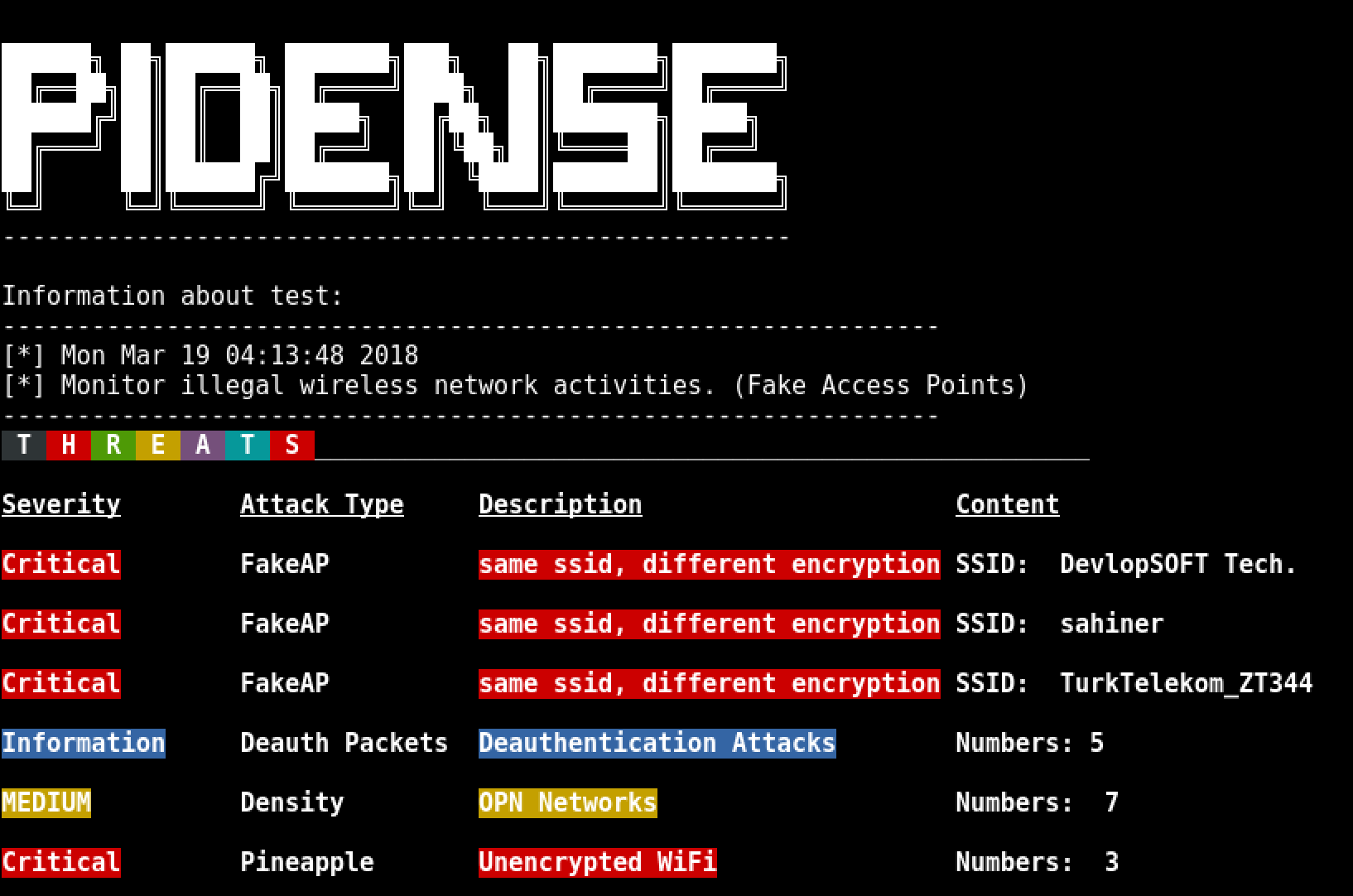
**截图:**
<p align="center">
<img src="https://raw.githubusercontent.com/WiPi-Hunter/PiDense/master/pid.png" height="%50" width="60%">
</p>


### --------------------------------------------------------------------------------

### 使用说明

#### 需求

* **硬件:** TP LINK TL-WN722N
* **模块:** scapy, time, termcolor, argparse

#### Kali Linux:

下载PiDense:

`git clone https://github.com/WiPi-Hunter/PiDense.git`

完成!

使用以下命令运行程序:

监控模式:

```python
airmon-ng start interface(wlan0,wlan1) (Monitor mode)

or

ifconfig wlan0 down
iwconfig wlan0 mode Monitor
ifconfig wlan0 up
运行:
cd PiDense
python pidense.py -h