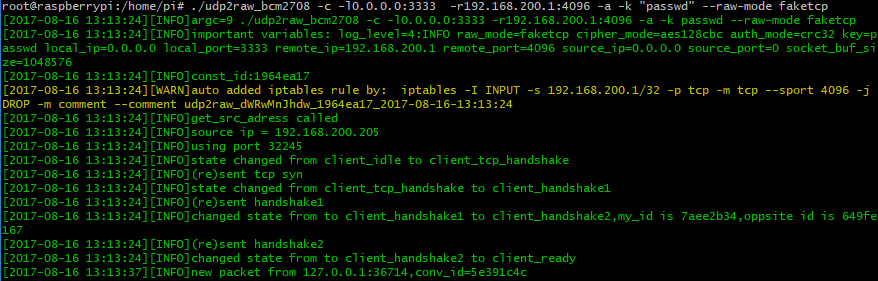
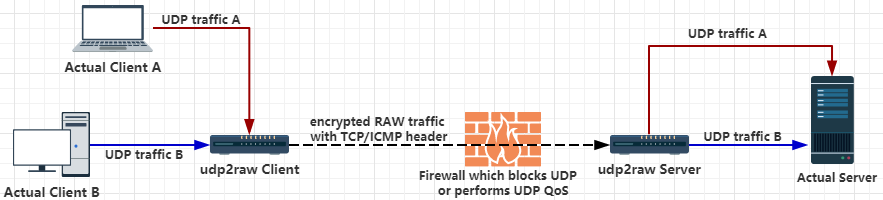
 udp2raw tunnel,通过raw socket给UDP包加上TCP或ICMP header,进而绕过UDP屏蔽或QoS,或在UDP不稳定的环境下提升稳定性。可以有效防止在使用kcptun或者finalspeed的情况下udp端口被运营商限速。
支持心跳保活、自动重连,重连后会恢复上次连接,在底层掉线的情况下可以保持上层不掉线。同时有加密、防重放攻击、信道复用的功能。
udp2raw+finalspeed step_by_step教程
提示:
udp2raw不是加速器,只是一个帮助你绕过UDP限制的工具。如果你需要UDP“加速器” (改善UDP丢包),请看UDPspeeder。
UDPspeeder的repo:
https://github.com/wangyu-/UDPspeeder
Linux主机,有root权限或cap_net_raw capability.。可以是PC、android手机/平板、openwrt路由器、树莓派。主机上最好安装了iptables命令(apt/yum很容易安装)。
Release中提供了amd64、x86、arm、mips_be、mips_le的预编译binary.
可以用这个repo里的udp2raw。
可以把udp2raw运行在局域网的其他机器/虚拟机上。最好的办法是买个能刷OpenWrt/LEDE/梅林的路由器,把udp2raw运行在路由器上。
用raw socket给udp包加上tcp/icmp包头,可以突破udp流量限制或Udp QOS。或者在udp nat有问题的环境下,提升稳定性。 另外也支持用raw 发udp包,这样流量不会被伪装,只会被加密。
模拟TCP3次握手,模拟seq ack过程。另外还模拟了一些tcp option:MSS,sackOk,TS,TS_ack,wscale,用来使流量看起来更像是由普通的linux tcp协议栈发送的。
心跳保活、自动重连,udp2raw重连可以恢复上次的连接,重连后上层连接继续有效,底层掉线上层不掉线。有效解决上层连接断开的问题。 (功能借鉴自kcptun-raw)(就算你拔掉网线重插,或者重新拨号获得新ip,上层应用也不会断线)
用aes128cbc加密(或更弱的xor),hmac-sha1(或更弱的md5/crc32/simple)做数据完整校验。用类似ipsec/openvpn的replay window机制来防止重放攻击。
信道复用,client的udp端支持多个连接。
server支持多个client,也能正确处理多个连接的重连和连接恢复。
NAT 穿透 ,tcp icmp udp模式都支持nat穿透。
支持Openvz,配合finalspeed使用,可以在openvz上用tcp模式的finalspeed.
支持Openwrt,没有编译依赖,容易编译到任何平台上。
突破udp qos,突破udp屏蔽,openvpn tcp over tcp problem,openvpn over icmp,udp to icmp tunnel,udp to tcp tunnel,udp via icmp,udp via tcp
下载编译好的二进制文件,解压到任意目录。
https://github.com/wangyu-/udp2raw-tunnel/releases
假设你有一个server,ip为44.55.66.77,有一个服务监听在udp 7777端口。 假设你本地的主机到44.55.66.77的UDP流量被屏蔽了,或者被qos了
在server端运行:
./udp2raw_amd64 -s -l0.0.0.0:4096  -r127.0.0.1:7777   -k "passwd" --raw-mode faketcp   --cipher-mode xor  -a

在client端运行:
./udp2raw_amd64 -c -l0.0.0.0:3333  -r44.55.66.77:4096 -k "passwd" --raw-mode faketcp   --cipher-mode xor  -a
(以上例子需要用root账号运行。 用非root运行udp2raw需要一些额外的步骤,具体方法请看 这个 链接。用非root运行更安全)
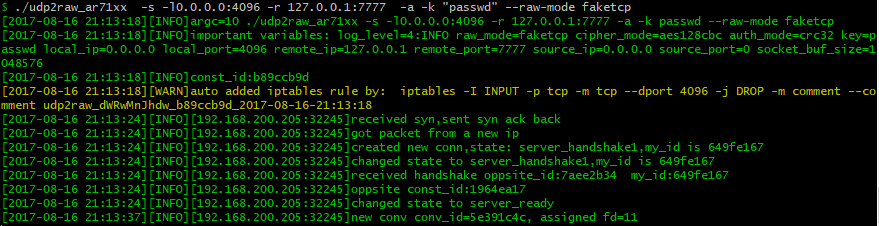
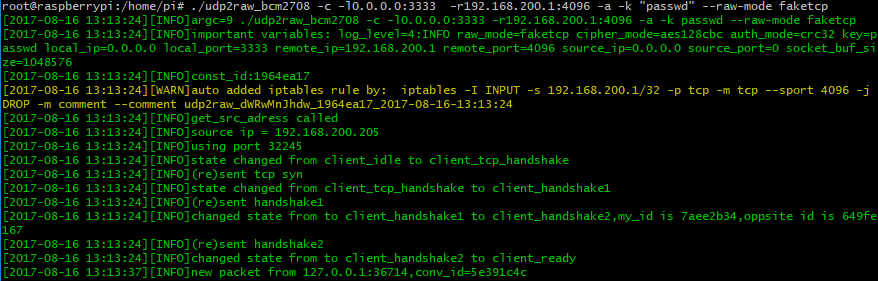
现在client和server之间建立起了,tunnel。想要在本地连接44.55.66.77:7777,只需要连接 127.0.0.1:3333。来回的所有的udp流量会被经过tunneling发送。在外界看起来是tcp流量,不会有udp流量暴露到公网。
不论你用udp2raw来加速kcptun还是vpn,为了稳定使用,都需要设置合理的MTU(在kcptun/vpn里设置,而不是在udp2raw里),建议把MTU设置成1200。client和server端都要设置。
--cipher-mode xor表示仅使用简单的XOR加密,这样可以节省CPU占用,以免CPU成为速度瓶颈。如果你需要更强的加密,可以去掉此选项,使用默认的AES加密。加密相关的选项见后文的--cipher-mode和--auth-mode。
如果要在anroid上运行,请看Android简明教程
-a选项会自动添加一条/几条iptables规则,udp2raw必须和相应的iptables规则配合才能稳定工作,一定要注意不要忘了-a(这是个常见错误)。 如果你不想让udp2raw自动添加iptables规则,可以自己手动添加相应的iptables规则(看一下-g选项),然后以不带-a的方式运行udp2raw。
udp2raw-tunnel
git version:4623f878e0    build date:Nov  3 2024 23:15:46
repository: https://github.com/wangyu-/udp2raw-tunnel

usage:
    run as client : ./this_program -c -l local_listen_ip:local_port -r server_address:server_port  [options]
    run as server : ./this_program -s -l server_listen_ip:server_port -r remote_address:remote_port  [options]

common options,these options must be same on both side:
    --raw-mode            <string>        available values:faketcp(default),udp,icmp and easy-faketcp
    -k,--key              <string>        password to gen symetric key,default:"secret key"
    --cipher-mode         <string>        available values:aes128cfb,aes128cbc(default),xor,none
    --auth-mode           <string>        available values:hmac_sha1,md5(default),crc32,simple,none
    -a,--auto-rule                        auto add (and delete) iptables rule
    -g,--gen-rule                         generate iptables rule then exit,so that you can copy and
                                          add it manually.overrides -a
    --disable-anti-replay                 disable anti-replay,not suggested
    --fix-gro                             try to fix huge packet caused by GRO. this option is at an early stage.
                                          make sure client and server are at same version.
client options:
    --source-ip           <ip>            force source-ip for raw socket
    --source-port         <port>          force source-port for raw socket,tcp/udp only
                                          this option disables port changing while re-connecting
other options:
    --conf-file           <string>        read options from a configuration file instead of command line.
                                          check example.conf in repo for format
    --fifo                <string>        use a fifo(named pipe) for sending commands to the running program,
                                          check readme.md in repository for supported commands.
    --log-level           <number>        0:never    1:fatal   2:error   3:warn
                                          4:info (default)     5:debug   6:trace
    --log-position                        enable file name,function name,line number in log
    --disable-color                       disable log color
    --disable-bpf                         disable the kernel space filter,most time its not necessary
                                          unless you suspect there is a bug
    --dev                 <string>        bind raw socket to a device, not necessary but improves performance
    --sock-buf            <number>        buf size for socket,>=10 and <=10240,unit:kbyte,default:1024
    --force-sock-buf                      bypass system limitation while setting sock-buf
    --seq-mode            <number>        seq increase mode for faketcp:
                                          0:static header,do not increase seq and ack_seq
                                          1:increase seq for every packet,simply ack last seq
                                          2:increase seq randomly, about every 3 packets,simply ack last seq
                                          3:simulate an almost real seq/ack procedure(default)
                                          4:similiar to 3,but do not consider TCP Option Window_Scale,
                                          maybe useful when firewall doesnt support TCP Option
    --lower-level         <string>        send packets at OSI level 2, format:'if_name#dest_mac_adress'
                                          ie:'eth0#00:23:45:67:89:b9'.or try '--lower-level auto' to obtain
                                          the parameter automatically,specify it manually if 'auto' failed
    --wait-lock                           wait for xtables lock while invoking iptables, need iptables v1.4.20+
    --gen-add                             generate iptables rule and add it permanently,then exit.overrides -g