一个使用 auth_request 模块为 Nginx 提供的 SSO 解决方案。Vouch Proxy 可以一次性保护您的所有网站。
Vouch Proxy 支持多种 OAuth 和 OIDC 登录提供方,并可以对以下服务强制实施身份验证……
当您使用自己偏好的 IdP 或库部署了 Vouch Proxy 后,请务必告知我们,以便我们更新此列表。
如果 Vouch 与 Nginx 反向代理运行在同一台主机上,那么从 /validate 端点返回给 Nginx 的响应时间应小于 1ms。
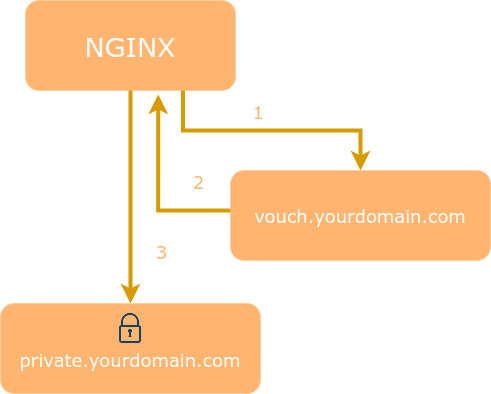
Vouch Proxy(VP)强制访客先通过 IdP(例如上文列出的服务之一)登录并完成身份验证,之后才允许他们访问网站。
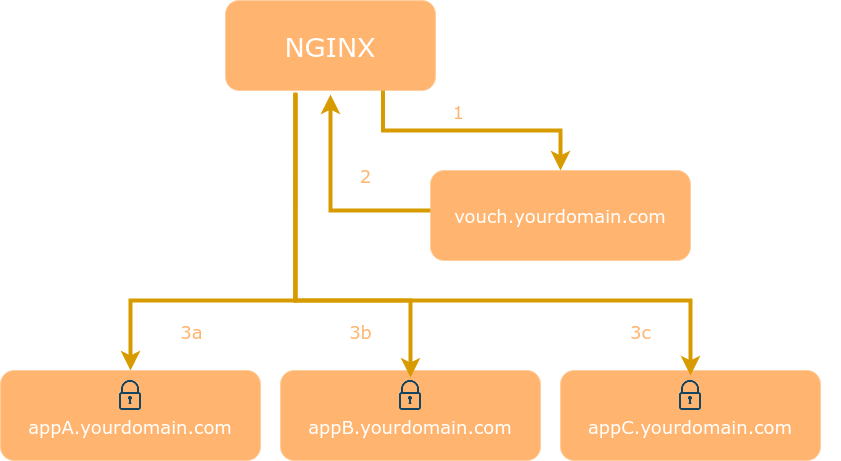
VP 也可以用作单点登录(SSO)解决方案,以保护同一域名下的所有 Web 应用。
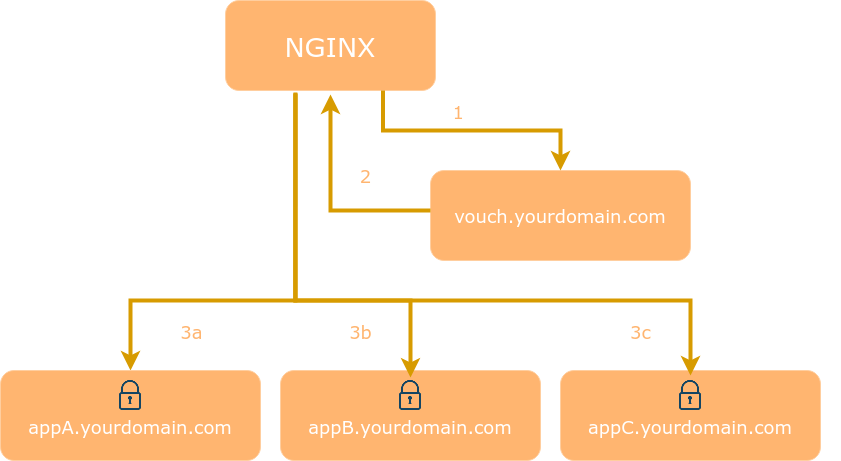
访客登录后,Vouch Proxy 会在数小时内允许其访问受保护的网站。VP 会检查每一个请求,以确保其有效。
VP 可以将访客的电子邮件、姓名以及 IdP 提供的其他信息(包括访问令牌)作为 HTTP 头发送给 Web 应用。VP 可以完全取代应用的用户管理。
Vouch Proxy 依赖于在 Vouch Proxy 服务器与其所保护的应用之间共享 cookie 的能力。通常的做法是将 Vouch 运行在诸如 vouch.yourdomain.com 的子域名上,而应用运行在 app1.yourdomain.com 和 app2.yourdomain.com 上。受保护的域名是 .yourdomain.com,必须通过将 vouch.domains 设置为包含 yourdomain.com,或者有时通过将 vouch.cookie.domain 设置为 yourdomain.com,来在该域名中设置 Vouch Proxy cookie。
cp ./config/config.yml_example_$OAUTH_PROVIDER ./config/config.yml/auth 端点以下 Nginx 配置假设..
vouch.yourdomain.com 和 protectedapp.yourdomain.com 运行在同一台服务器上https 提供服务,并拥有有效的证书(如果没有,请改为 listen 80,并将 vouch.cookie.secure 设置为 false)server {
listen 443 ssl http2;
server_name protectedapp.yourdomain.com;
root /var/www/html/;
ssl_certificate /etc/letsencrypt/live/protectedapp.yourdomain.com/fullchain.pem;
ssl_certificate_key /etc/letsencrypt/live/protectedapp.yourdomain.com/privkey.pem;
# send all requests to the `/validate` endpoint for authorization
auth_request /validate;
location = /validate {
# forward the /validate request to Vouch Proxy
proxy_pass http://127.0.0.1:9090/validate;
# be sure to pass the original host header
proxy_set_header Host $http_host;
# Vouch Proxy only acts on the request headers
proxy_pass_request_body off;
proxy_set_header Content-Length "";
# optionally add X-Vouch-User as returned by Vouch Proxy along with the request
auth_request_set $auth_resp_x_vouch_user $upstream_http_x_vouch_user;
# optionally add X-Vouch-IdP-Claims-* custom claims you are tracking
# auth_request_set $auth_resp_x_vouch_idp_claims_groups $upstream_http_x_vouch_idp_claims_groups;
# auth_request_set $auth_resp_x_vouch_idp_claims_given_name $upstream_http_x_vouch_idp_claims_given_name;
# optinally add X-Vouch-IdP-AccessToken or X-Vouch-IdP-IdToken
# auth_request_set $auth_resp_x_vouch_idp_accesstoken $upstream_http_x_vouch_idp_accesstoken;
# auth_request_set $auth_resp_x_vouch_idp_idtoken $upstream_http_x_vouch_idp_idtoken;
# these return values are used by the @error401 call
auth_request_set $auth_resp_jwt $upstream_http_x_vouch_jwt;
auth_request_set $auth_resp_err $upstream_http_x_vouch_err;
auth_request_set $auth_resp_failcount $upstream_http_x_vouch_failcount;
# Vouch Proxy can run behind the same Nginx reverse proxy
# may need to comply to "upstream" server naming
# proxy_pass http://vouch.yourdomain.com/validate;
# proxy_set_header Host $http_host;
}
# if validate returns `401 not authorized` then forward the request to the error401block
error_page 401 = @error401;