一个收集与推导引擎。它映射你的环境,评估有效权限与信任关系,并将完整的攻击图写入单个 .rage.ndjson 文件。它是其他一切组件的输入。

你并没有 4,000 个发现。你只有六条通往核心资产的路径。
CSPM 会给你一份扁平、去重、按严重性排序的错误配置列表,然后让你自己猜哪些才重要。Thunderstorm 则围绕可达性进行推理:它以只读方式收集你的云环境,将其建模为一张安全能力图,并告诉你一条 GitHub Actions OIDC 信任关系如何在四跳之内通向你的生产数据湖。
上面每一跳单独来看都不是一个发现。一个公开的存储桶、状态文件中的一把密钥、一个可被扮演的角色、一个权限过宽的 IAM 操作。路径才是发现,而路径正是几乎其他所有工具都不会计算的东西。
在你指定的平台上深入分析。 针对一个 AWS 账户、一个 Azure 订阅或一个 GCP 项目运行它,它会以该提供商自身的术语来映射这一个环境:AWS 中的 STS assume-role 和 IAM 权限提升,Azure 中的 RBAC 和托管标识链,GCP 中的服务账号模拟。一个环境,一张图,按照该云平台实际运作的方式建模。
有很多工具枚举得更多。这里的说法是,Thunderstorm 以真正的深度对它枚举的内容进行推理:219 种资源类型、80 种边类型、2,400+ 条推导规则,以及 1,049 个已映射的凭据泄露点,全部来源于 RAGE。
RAGE 是格式,Thunderstorm 生成它,Blaze 探索它。
这些就是 Thunderstorm 通过一次 scan 生成的结果。
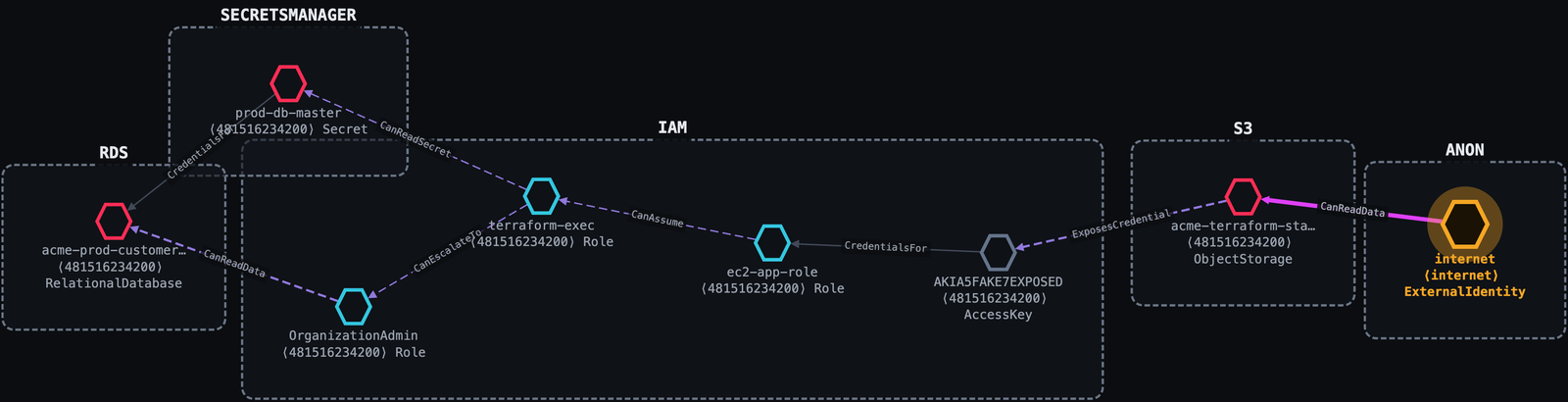
一个配置错误的 S3 存储桶。Thunderstorm 追踪它六跳到达生产客户数据库,还有第二条路径直通数据库主密钥。
Internet ──public s3:GetObject──▶ acme-terraform-state (public bucket)
         ──ExposesCredential────▶ AKIA…            (access key leaked in tfstate)
         ──CredentialsFor───────▶ ec2-app-role
         ──CanAssume────────────▶ terraform-exec    (sts:AssumeRole)
         ──CanEscalateTo────────▶ OrganizationAdmin (iam:AttachRolePolicy)
         ──CanReadData──────────▶ acme-prod-customers (PII)
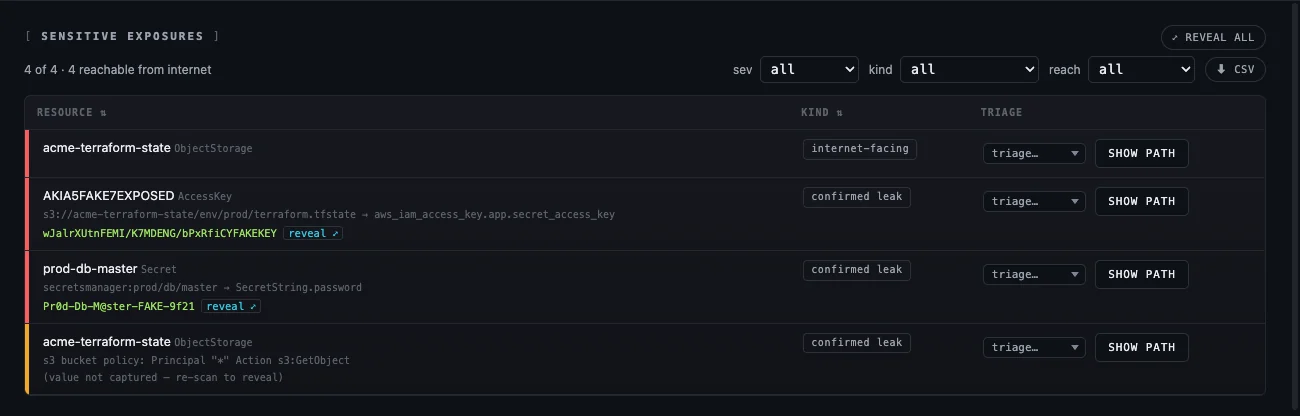
每一跳都带有授予它的权限、证明它的证据,以及一段通俗易懂的叙述。泄露的值也随之呈现:
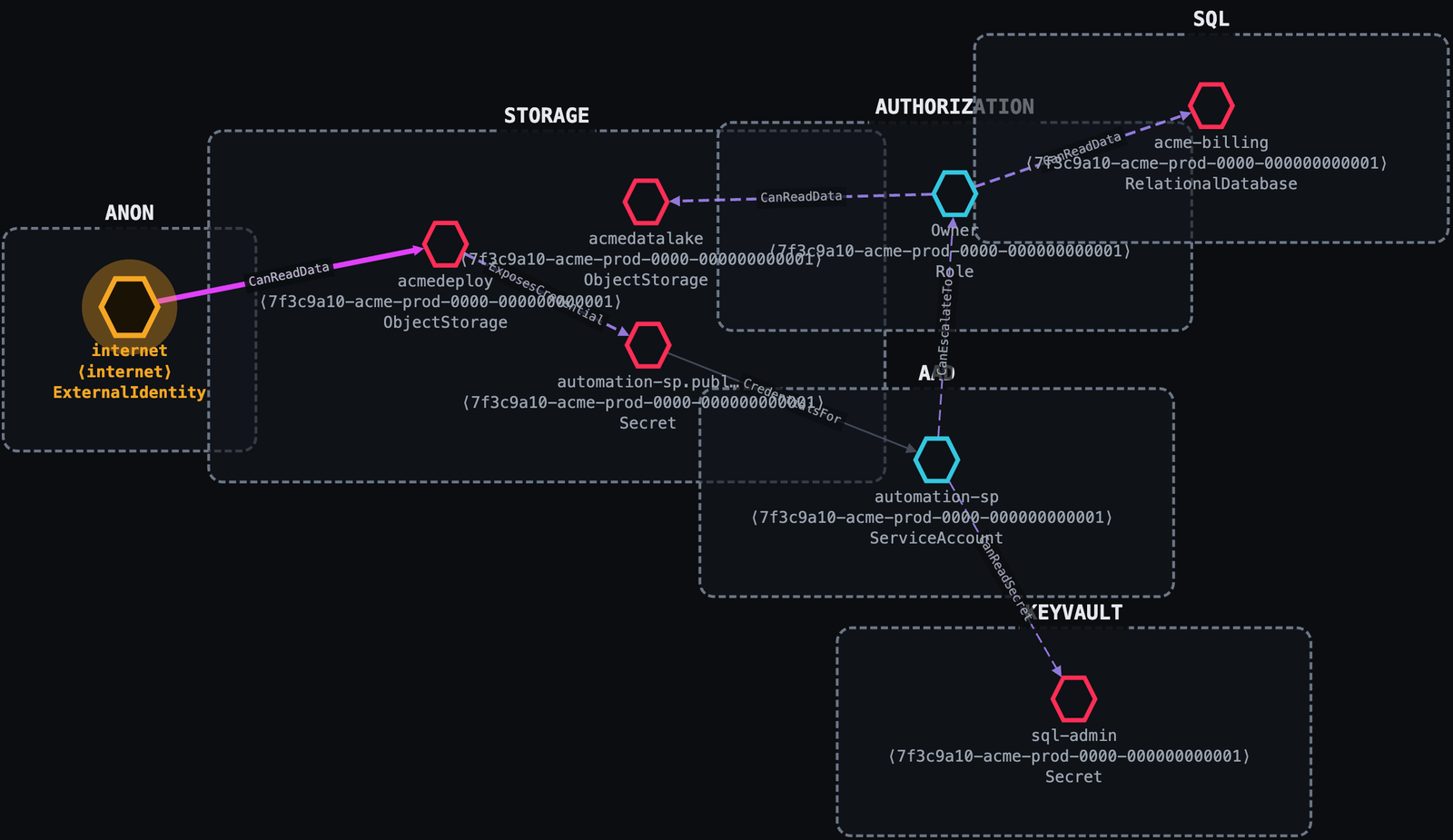
一个可公开读取的 blob 泄露了一个服务主体密钥。一个 Contributor 凭借一项额外权限将自己提升为订阅 Owner。没有应用漏洞利用;只有云配置错误和 IAM。
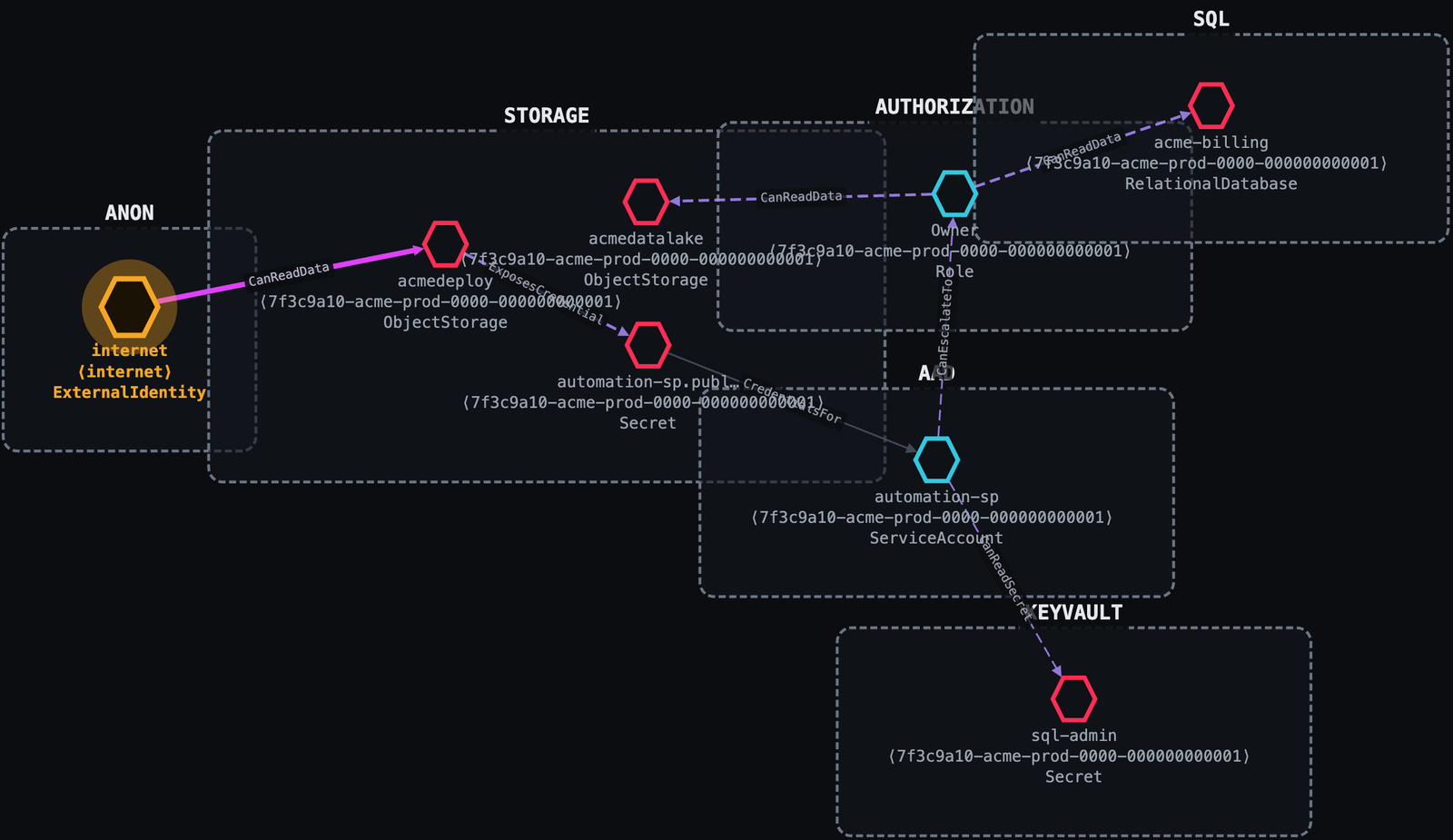
Internet ──anonymous blob read──▶ acmedeploy (public Storage account)
         ──ExposesCredential────▶ automation-sp secret (in a deploy config blob)
         ──CredentialsFor───────▶ automation-sp (Contributor)
         ──CanEscalateTo────────▶ Owner  (Microsoft.Authorization/roleAssignments/write)
         ──CanReadData──────────▶ acmedatalake
服务账号模拟对大多数工具来说是不可见的。Thunderstorm 将 iam.serviceAccounts.getAccessToken 视为它本来的横向移动边。
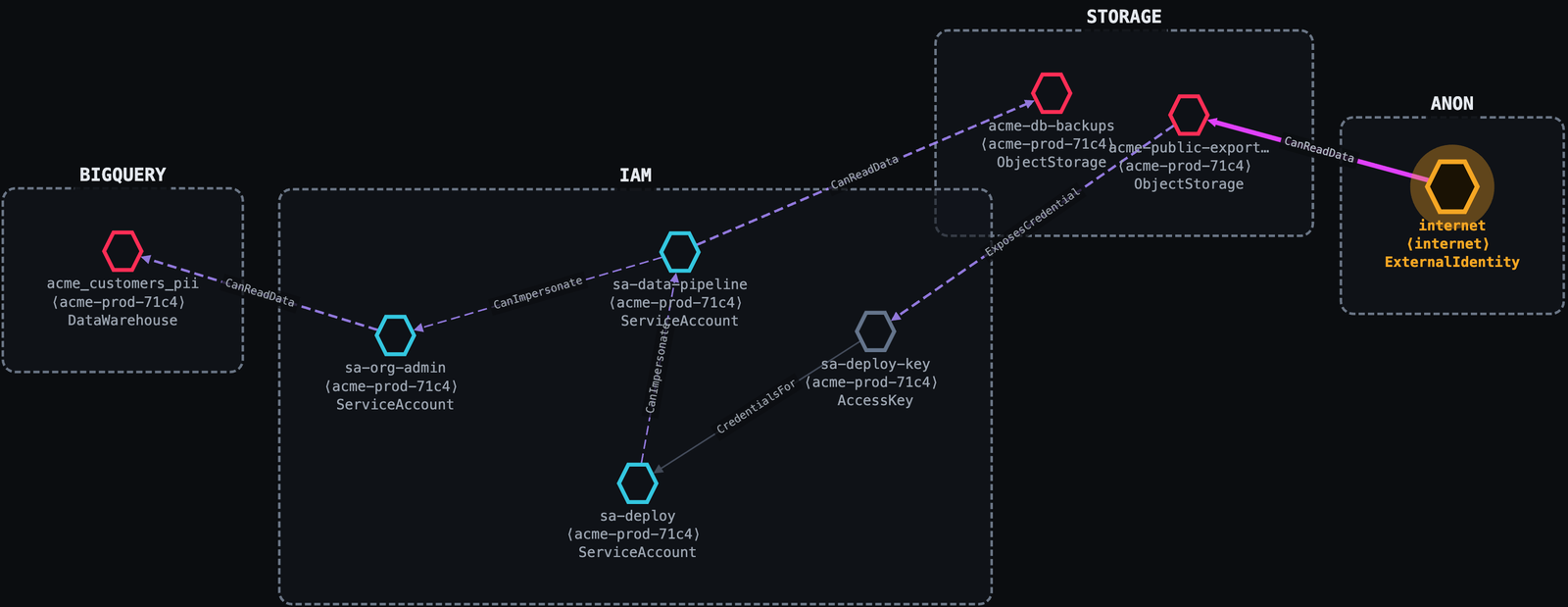
Internet ──public allUsers───▶ acme-public-exports (GCS)
         ──ExposesCredential─▶ sa-deploy-key
         ──CredentialsFor────▶ sa-deploy
         ──CanImpersonate────▶ sa-data-pipeline
         ──CanImpersonate────▶ sa-org-admin
         ──CanReadData───────▶ acme_customers_pii (BigQuery)
view 会在你的浏览器中打开它;不会上传任何内容。collectors/、engine/)。Thunderstorm 不自带任何分类法、映射或规则。它端到端地消费 RAGE 标准:
| 关注点 | 位于 RAGE 中 |
|---|---|
| 节点 / 边分类法、条件 | vocab/{node-types,edge-types,conditions}.json |
| 原生→通用映射 + 收集配方 | providers/{aws,gcp,azure}.json |
| 推导规则语料库 | rules/ |
| 凭据暴露目录 | exposure-db/{aws,gcp,azure}.json + vocabulary.json |
版本绑定: RAGE 的 spec_version 是将 Thunderstorm 固定到某个 RAGE 版本的唯一编号。收集器从它构建时所针对的 RAGE 中实时读取它(thunderstorm version 会打印 RAGE <v>),并将其标记到它生成的每一张图中;Blaze Lite 读取该标记,并在某张图是针对它不支持的版本构建时发出警告。
RAGE 的解析方式(首个匹配生效):
$RAGE_ROOT:如果你设置了它,则使用一个实时的 RAGE 检出(开发覆盖;编辑无需重新构建即可生效)。collectors/rage/ 的 vendored 快照,已嵌入二进制文件中。使用 make RAGE_ROOT=/path/to/rage(或在 collectors/ 中运行 go generate ./...)刷新快照。RAGE 位于 github.com/trustedsec/rage。
Thunderstorm 使用你现有的云凭据以只读方式扫描;它从不管理密钥,也从不写入目标。使用提供商常规工具登录,然后将 scan 指向账户 / 项目 / 订阅。
AWS 使用标准 AWS SDK 凭据链(命名 profile、环境变量、SSO 或实例角色):
aws configure --profile myprofile        # or: aws sso login --profile myprofile
./bin/thunderstorm scan --profile myprofile [--region us-east-1]
GCP 使用 Application Default Credentials (ADC)。登录,然后传入项目:
gcloud auth application-default login
./bin/thunderstorm scan --provider gcp --project my-project-id
服务账号密钥也可通过 GOOGLE_APPLICATION_CREDENTIALS=/path/key.json 使用。
Azure 使用 Azure CLI / DefaultAzureCredential 链。登录,然后可选地限定到一个订阅:
az login
./bin/thunderstorm scan --provider azure [--subscription <sub-id>]
服务主体也可通过 AZURE_CLIENT_ID / AZURE_CLIENT_SECRET / AZURE_TENANT_ID 使用。
一次扫描多个账户可使用 --aws-profiles、--gcp-projects、--azure-subscriptions,或一个 --scopes 文件(每行 provider:scope)。
构建(生成 ./bin/thunderstorm):
make                              # build with the embedded RAGE snapshot
make RAGE_ROOT=/path/to/RAGE      # re-vendor from a live RAGE checkout, then build
扫描,然后探索:
./bin/thunderstorm scan --profile <aws-profile>   # → a single .rage.ndjson attack graph
./bin/thunderstorm view --in engagement.zip       # open it offline in Blaze Lite
./bin/thunderstorm redact --in engagement.zip --out redacted.zip   # de-identify for sharing
如果没有 --out,engagement 会落在 ./output/(已被 git 忽略)。这就是整个工具:scan、redact、view、version。
STRUCTURAL,并被排除在路径之外。Thunderstorm 采用 GNU General Public License v3 许可(见 LICENSE)。
它是一款攻击性安全工具,仅供授权的安全测试、教育和研究使用;在对任何你不拥有的环境运行它之前,请获得明确授权。请参阅 LICENSE 顶部的授权使用声明。