
检测并防止机密被提交进入版本控制的工具
Talisman是一个扫描Git变更集的工具,确保潜在的机密或敏感信息不会离开开发者的工作站。
它验证即将推送的变更集中是否有看起来可疑的内容——例如潜在的SSH密钥、授权令牌、私钥等。
Talisman支持macOS、Linux和Windows。
Talisman可以通过以下方式之一安装和使用:
Talisman可以设置为Git仓库上的预提交或预推送钩子。
具体说明如下。
免责声明:通过强制推送进入Git仓库的机密无法被Talisman检测到。强制推送被认为本身存在风险,我们建议Git仓库管理员采取适当措施授权此类操作。
我们推荐将talisman安装到路径中,以便git钩子框架和脚本可以使用。请从发布页面选择适合您系统的正确二进制文件,或运行我们的安装脚本:```bash
bash -c "$(curl --silent https://raw.githubusercontent.com/thoughtworks/talisman/main/install.sh)"
或者设置环境变量 `INSTALL_LOCATION` 来指定二进制文件的自定义位置:```bash
INSTALL_LOCATION=/usr/local/bin bash -c "$(curl --silent https://raw.githubusercontent.com/thoughtworks/talisman/main/install.sh)"
或者设置环境变量 VERSION 为已发布的标签来安装特定版本::```bash
VERSION=v1.36.0 bash -c "$(curl --silent https://raw.githubusercontent.com/thoughtworks/talisman/main/install.sh)"
或者在 Linux 上使用 linuxbrew,在 macOS 上使用 homebrew,在终端中运行以下命令:```bash
brew install talisman
我们提供的脚本可以将 Talisman 安装为 pre-commit git 钩子模板,这样 Talisman 不仅会出现在你现有的 git 仓库中,也会出现在你之后 'init' 或 'clone' 的任何新仓库中。
作为 pre-commit 钩子: ``` bash -c "$(curl --silent https://raw.githubusercontent.com/thoughtworks/talisman/main/global_install_scripts/install.bash)"
或
作为预推送钩子: ```
bash -c "$(curl --silent https://raw.githubusercontent.com/thoughtworks/talisman/main/global_install_scripts/install.bash)" -- pre-push
$PATH 中设置 TALISMAN_HOME,系统会询问一个合适的位置来设置它。请选择你在机器上设置 profile 来源的选项数字。记得对路径文件执行 source 命令或重启终端。
如果你选择稍后设置 $PATH,请将 TALISMAN_HOME=$HOME/.talisman/bin 导出到路径中。
全局安装 talisman 作为钩子不会覆盖任何已有钩子。如果安装脚本发现已有钩子,它只会在控制台上进行提示。要运行多个钩子,我们建议使用钩子框架,例如 pre-commit 或 husky。这些说明假设 talisman 可执行文件已安装在你的系统路径中。
使用 pre-commit 来管理与 Talisman 一起的已有钩子。在你的 .pre-commit-config.yaml 中引用我们的 pre-commit-hooks:```yaml
### Husky
[husky](https://typicode.github.io/husky) 是一个用于管理 hooks 的 npm 模块。
将以下行添加到你的 `package.json` 中的 husky pre-commit 配置中:```
talisman --githook pre-commit
一旦 安装 了Talisman可执行文件,就可以为某个Git仓库配置独立的pre-commit钩子:```bash cd my-git-project echo "talisman -g pre-commit" >> .git/hooks/pre-commit chmod +x .git/hooks/pre-commit
# 升级
自 v0.4.4 版本起,Talisman 会在钩子被调用时(按照设置,在 pre-commit/pre-push 时)<b>自动更新</b>二进制文件至最新版本。因此,您只需放松,无需额外操作即可持续使用最新版 Talisman。
可以设置以下环境变量:
1. TALISMAN_SKIP_UPGRADE:如果希望跳过自动升级检查,请设置为 true。默认值为 false。
2. TALISMAN_UPGRADE_CONNECT_TIMEOUT:升级取消前的最大连接超时时间(以秒为单位)。默认值为 10 秒。
如果您确实需要手动升级,以下是相关步骤:
<br>[推荐] 将 Talisman 二进制文件和钩子脚本更新至最新版本:```bash
curl --silent https://raw.githubusercontent.com/thoughtworks/talisman/main/global_install_scripts/update_talisman.bash > /tmp/update_talisman.bash && /bin/bash /tmp/update_talisman.bash
仅通过执行以下命令更新Talisman二进制文件:```bash curl --silent https://raw.githubusercontent.com/thoughtworks/talisman/main/global_install_scripts/update_talisman.bash > /tmp/update_talisman.bash && /bin/bash /tmp/update_talisman.bash talisman-binary
# Talisman 运行效果
安装成功后,Talisman 会在每次提交(commit)或推送(push)之前自动检查明显的机密信息(根据安装时的选择)。如果检测到任何安全漏洞,talisman 将显示详细的错误报告:```bash
$ git push
Talisman Report:
+-----------------+-------------------------------------------------------------------------------+
| FILE | ERRORS |
+-----------------+-------------------------------------------------------------------------------+
| danger.pem | The file name "danger.pem" |
| | failed checks against the |
| | pattern ^.+\.pem$ |
+-----------------+-------------------------------------------------------------------------------+
| danger.pem | Expected file to not contain hex encoded texts such as: |
| | awsSecretKey=c64e8c79aacf5ddb02f1274db2d973f363f4f553ab1692d8d203b4cc09692f79 |
+-----------------+-------------------------------------------------------------------------------+
在上面的例子中,文件 danger.pem 因以下原因被标记为安全违规:
如果您将 Talisman 安装为预提交钩子 (pre-commit hook),它将仅扫描每个提交中的 差异。这意味着它只会报告文件中被更改部分存在的错误。
如果您将 Talisman 安装为预推送钩子 (pre-push hook),它将扫描发生更改的完整文件。如上所述,建议您将 Talisman 用作 预提交钩子。
以下检测器会针对变更集执行,以检测机密/敏感信息:
如果您 真的 确定要推送该文件,可以在项目根目录的 .talismanrc 文件中配置它。忽略失败文件所需的内容将在 Talisman 错误报告之后立即由 Talisman 打印到控制台上:```bash
If you are absolutely sure that you want to ignore the above files from talisman detectors, consider pasting the following format in .talismanrc file in the project root
fileignoreconfig:
在 `.talismanrc` 文件中输入此项将确保 Talisman 忽略 `danger.pem` 文件,只要校验和与 `checksum` 字段中提到的值匹配。
### 交互模式
**仅适用于非 Windows 用户**
如果每次遇到 Talisman 错误时都要不断复制内容到 .talismanrc 中很麻烦,您可以启用交互模式,让 Talisman 协助您提示添加要忽略的文件。
只需按照以下简单步骤操作:
1. 打开设置环境变量的 bash 配置文件(.bashrc、.bash_profile、.profile 或任何其他位置)
2. 您将在 `# >>> talisman >>>` 下看到 `TALISMAN_INTERACTIVE` 变量
3. 如果尚未设置为 true,添加 `export TALISMAN_INTERACTIVE=true`
4. 别忘了保存并 source 该文件
就是这样!每当 Talisman 钩子在 pre-push/pre-commit 期间发现错误时,只需按照 Talisman 建议的指示操作即可。
注意不要在不验证内容的情况下忽略文件。您必须确信没有任何秘密被泄露。
### 忽略特定的检测器
以下是可在 `.talismanrc` 文件中配置的各种字段的详细描述:
* `filename`:此字段应提及完全限定的文件名。
* `checksum`:此字段的值应始终为上面显示的消息中 Talisman 指定的值。如果对文件进行了任何新的更改,将导致新的校验和,Talisman 将重新扫描文件以查找任何潜在的安全威胁。
* `ignore_detectors`:此字段将禁用特定文件的特定检测器。
例如,如果您的 `init-env.sh` 文件名触发了警告,您可以仅禁用此警告,同时仍然在其他方面(例如文件内容)出现问题时收到警报:```yaml
fileignoreconfig:
- filename: init-env.sh
checksum: cf97abd34cebe895417eb4d97fbd7374aa138dcb65b1fe7f6b6cc1238aaf4d48
ignore_detectors: [filename, filesize]
注意:此处对 init-env.sh 既忽略了文件名检测器也忽略了文件大小检测器,但文件内容检测器仍会在 init-env.sh 上激活。
目前,你可以忽略
filecontentfilenamefilesize因为你的某些文件可能包含如 key 或 pass 等关键字,而这些关键字不一定与秘密相关,你可能希望忽略这些关键字以减少误报数量。
这可以通过在文件级别和/或仓库级别使用 allowed_patterns 字段来实现:```yaml
fileignoreconfig:
在上一个例子中,`key` 在 `test` 文件中被允许,`keyword` 和 `pass` 在仓库级别被允许。
`allowed_patterns` 字段也支持 Golang 正则表达式。以下是一个简单的代码示例,展示了 Golang RegExp 的用途:```sh
export AWS_ACCESS_KEY_ID = AKIAIO5FODNN7EXAMPLE
export AWS_ACCESS_KEY_ID=$(vault read -field=value path/to/aws-access-key-id)
默认情况下,Talisman 会对这两行都发出警报。在第二行中,我们从 Hashicorp Vault 中提取 AWS 访问密钥 ID,这不会将秘密暴露给代码。如果这种用法在您的代码中很常见,您可能希望告诉 Talisman 在使用 Vault 时不发出警报。这可以通过如下配置实现:```yaml allowed_patterns:
### Ignoring multiple files of same type (with wildcards)
You can choose to ignore all files of a certain type, because you know they will always be safe, and you wouldn't want Talisman to scan them.
Steps:
1. Format a wildcard pattern for the files you want to ignore. For example, `*.lock`
2. Use the [checksum calculator](#checksum-calculator) to feed the pattern and attain a collective checksum. For example, `talisman --checksum="*.lock" `
3. Copy the fileconfig block, printed on console, to .talismanrc file.
If any of the files are modified, talisman will scan the files again, unless you re-calculate the new checksum and replace it in .talismanrc file.
### Ignoring files by specifying language scope
You can choose to ignore files by specifying the language scope for your project in your talismanrc.```yaml
scopeconfig:
- scope: go
- scope: node
- scope: images
- scope: php
- scope: python
Talisman 配置为根据指定的作用域忽略某些文件。例如,在 scopeconfig 中提及 node 作用域将阻止 talisman 扫描诸如 yarn.lock 或 package-lock.json 之类的文件。
您可以指定多个作用域。
目前 .talismanrc 仅支持 go、node、php 和 images 的 scopeconfig 支持。其他作用域将很快添加。
您可以指定在当前仓库中查找的自定义正则表达式模式。```yaml custom_patterns:
<br/><i>
**注意**:使用 .talismanignore 已弃用。文件 .talismanrc 将取代它,原因如下:
* .talismanrc 具有更易读的 yaml 格式
* 每次修改可能包含敏感值的文件时,都需进行审查,从而引入更安全的实践
* 新格式还带来了扩展性,可引入新的可用功能。请持续关注更多信息</i>
## 配置严重性阈值
每个验证都与一个严重性等级相关联
1. 低
2. 中
3. 高
你可以在 .talismanrc 中指定一个阈值:```yaml
threshold: medium
这将报告所有中等及以上严重性的问题(低于阈值的潜在风险将在警告中报告)
您可以在 .talismanrc 文件中自定义 Talisman 所提供的检测器的安全级别:```yaml custom_severities:
通过使用自定义严重性和严重性阈值,可以根据您的上下文将 Talisman 配置为仅对重要的内容发出警报。这有助于减少误报数量。
## Talisman 作为命令行工具
如果在命令行中执行 `talisman`,您将能够查看所有可以传递的参数选项。```
-c, --checksum string checksum calculator calculates checksum and suggests .talismanrc format
-d, --debug enable debug mode (warning: very verbose)
-g, --githook string either pre-push or pre-commit (default "pre-push")
--ignoreHistory scanner scans all files on current head, will not scan through git commit history
-i, --interactive interactively update talismanrc (only makes sense with -g/--githook)
-p, --pattern string pattern (glob-like) of files to scan (ignores githooks)
-r, --reportdirectory string directory where the scan reports will be stored
-s, --scan scanner scans the git commit history for potential secrets
-w, --scanWithHtml generate html report (**Make sure you have installed talisman_html_report to use this, as mentioned in Readme**)
-v, --version show current version of talisman
当你经常有大量文件被 talisman 钩子标记,但你知道这些文件实际上可以安全提交时,可以使用此功能让 talisman 简化处理流程。交互模式将使 Talisman 提示你直接将想要忽略的文件从命令行添加到 .talismanrc 中。
要启用此功能,你需要在 bash 文件中将 TALISMAN_INTERACTIVE 变量设置为 true。
你可以通过以下两种方式之一调用 talisman 的交互模式:
打开你的 bash 文件,并添加export TALISMAN_INTERACTIVE=true
Don't forget to source the bash file for the variable to take effect!
Alternatively, you can also invoke the interactive mode by using the CLI utility
(for using pre-commit hook)
talisman -i -g pre-commit
注意: 如果您使用IDE的版本控制集成进行Git操作,此功能将无法工作。您仍然可以在.talismanrc文件中手动输入建议的文件名和校验和。
现在您可以从命令行执行Talisman,并可能将其添加到CI/CD流水线中,以扫描仓库的Git历史,查找任何敏感内容。这包括扫描.talismanrc文件中列出的文件。
步骤:
cd <要扫描的目录>talisman --scantalisman --scan --reportdirectory=/Users/username/Desktop您可以使用上面给出的其他选项进行扫描。
Talisman目前不支持在扫描时忽略文件。
Talisman校验和计算器输出YAML格式,您可以直接复制并粘贴到.talismanrc文件中,以忽略Talisman检测器中的特定文件格式。
要运行校验和,请"cd"进入仓库的根目录并运行以下命令
例如:
talisman --checksum="*.pem *.txt"
输出示例:
.talismanrc format for given file names / patterns
fileignoreconfig:
- filename: '*.pem'
checksum: f731b26be086fd2647c40801630e2219ef207cb1aacc02f9bf0559a75c0855a4
ignore_detectors: []
- filename: '*.txt'
checksum: d9e9e94868d7de5b2a0706b8d38d0f79730839e0eb4de4e9a2a5a014c7c43f35
ignore_detectors: []
注意:校验和计算器在计算文件的集体校验和时会考虑暂存的文件。
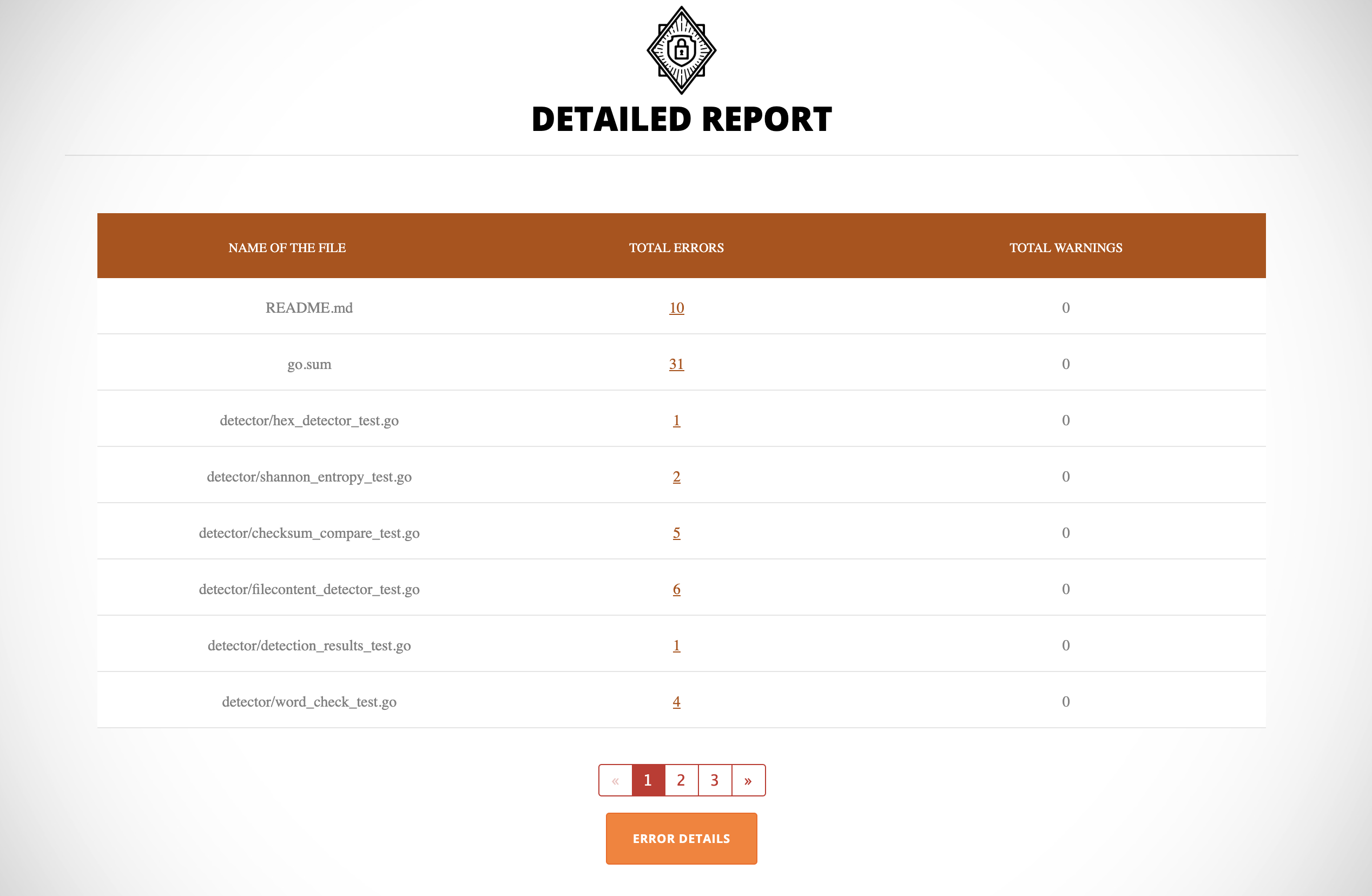
Talisman CLI工具 talisman 还具备提供详细且可共享的HTML报告的能力。安装Talisman后,请按照talisman-html-report中提到的步骤,在.talisman文件夹中安装报告包。要生成HTML报告,请运行:
talisman --scanWithHtml这将扫描仓库并在被扫描的仓库下创建一个talisman_html_report文件夹。我们需要在此仓库内启动一个HTTP服务器来访问报告。下面是一个启动HTTP服务器的推荐方法:
python -m SimpleHTTPServer <port> (例如: 8000)现在您可以通过导航到以下地址来访问报告:
http://localhost:8000
注意:如果您在CI或任何其他托管环境中运行Talisman,则无需启动服务器。
卸载过程取决于您安装Talisman的方式。您可能选择作为全局钩子模板安装,或者在单个仓库中安装。
请根据您在安装时选择的选项,按照以下步骤操作。
在终端上运行以下命令,以从您的机器上全局卸载Talisman。
对于pre-commit钩子:``` bash -c "$(curl --silent https://raw.githubusercontent.com/thoughtworks/talisman/main/global_install_scripts/uninstall.bash)"
用于预推送钩子:```
bash -c "$(curl --silent https://raw.githubusercontent.com/thoughtworks/talisman/main/global_install_scripts/uninstall.bash)" -- pre-push
这将
您需要手动从环境变量中移除 TALISMAN_HOME
安装 Talisman 时,它一定会在您的仓库中创建一个 pre-commit 或 pre-push 钩子(根据选择)。
您可以通过删除仓库中 .git/hooks 文件夹下的 Talisman pre-commit 或 pre-push 钩子来手动移除钩子。
要为 Talisman 做贡献,请查阅我们的贡献指南。