可用语言
Seeker 背后的概念很简单,就像我们托管钓鱼页面来获取凭证一样,为什么不托管一个虚假页面,请求您的位置权限,就像许多流行的基于位置的网站那样。更多内容请阅读 thewhiteh4t 的博客 。Seeker 托管一个虚假网站,该网站请求位置权限,如果目标允许,我们可以获取:
除了位置信息,我们还可以在无需任何权限的情况下获取 设备信息:
在收到上述信息后,会自动执行 IP 地址侦察。
此工具是一个概念验证,仅供教育目的。Seeker 展示了恶意网站可以收集到关于您和您设备的哪些数据,以及为什么您不应该点击随机链接并允许位置等关键权限。
其他工具和服务提供 IP 地理位置,但这根本不准确,并且不会给出目标的位置,而是 ISP 的大致位置。
Seeker 使用 HTML API 获取位置权限,然后利用设备中的 GPS 硬件获取经纬度,因此 Seeker 在智能手机上效果最佳。如果没有 GPS 硬件(例如在笔记本电脑上),Seeker 会回退到 IP 地理位置或查找缓存的坐标。
通常,如果用户接受了位置权限,所获信息的精确度可达到约 30 米。
精确度取决于多个因素,其中一些可能可控,也可能不可控,例如:
可用模板:
创建您自己的模板!关于如何创建模板的步骤,请参见此 指南
模板准备就绪后,不要忘记通过 PR(拉取请求)将其提交给社区
git clone https://github.com/thewhiteh4t/seeker.git
cd seeker/
chmod +x install.sh
./install.sh
sudo pacman -S seeker
docker pull thewhiteh4t/seeker
git clone https://github.com/thewhiteh4t/seeker.git
cd seeker/
python3 seeker.py
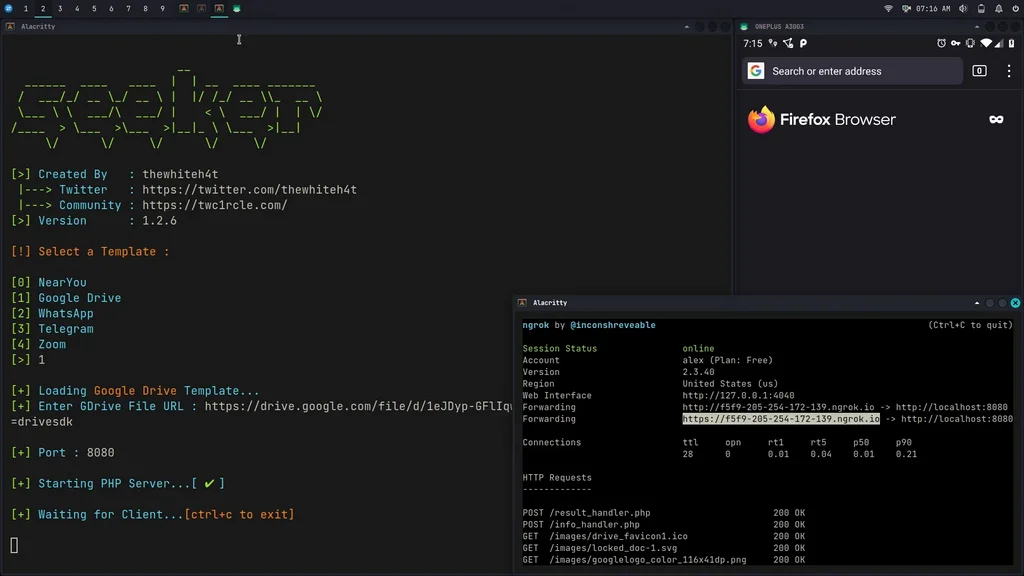
要在隧道模式下运行,请在终端中运行以下命令安装 ngrok:
brew install ngrok/ngrok/ngrok
ngrok http 8080
python3 seeker.py -h
usage: seeker.py [-h] [-k KML] [-p PORT] [-u] [-v] [-t TEMPLATE] [-d] [--telegram token:chatId] [--webhook WEBHOOK]
options:
-h, --help show this help message and exit
-k KML, --kml KML KML filename
-p PORT, --port PORT Web server port [ Default : 8080 ]
-u, --update Check for updates
-v, --version Prints version
-t TEMPLATE, --template TEMPLATE Auto choose the template with the given index
-d, --debugHTTP Disable auto http --> https redirection for testing purposes
(only works for the templates having index_temp.html file)
--telegram Send info to a telegram bot, provide telegram token and chat to use
format = token:chatId separated by a colon
--webhook Send events to a webhook endpoint to be processed
Note : endpoint must be unauthenticated and accept POST request
#########################
# Environment Variables #
#########################
Some of the options above can also be enabled via environment variables, to ease deployment.
Other parameters can be provided via environment variables to avoid interactive mode.
Variables:
DEBUG_HTTP Same as -d, --debugHTTP
PORT Same as -p, --port
TEMPLATE Same as -t, --template
TITLE Provide the group title or the page title
REDIRECT Provide the URL to redirect the user to, after the job is done
IMAGE Provide the image to use, can either be remote (http or https) or local
Note : Remote image will be downloaded locally during the startup
DESC Provide the description of the item (group or webpage depending on the template)
SITENAME Provide the name of the website
DISPLAY_URL Provide the URL to display on the page
MEM_NUM Provide the number of group membres (Telegram so far)
ONLINE_NUM Provide the number of the group online members (Telegram so far)
TELEGRAM Provide telegram token and chat to use to send info to a telegram bot
format = token:chatId separated by a colon
WEBHOOK Provide the webhook url to forward the events to
Note : endpoint should be unauthenticated and accept POST method
##################
# Usage Examples #
##################
# Step 1 : In first terminal
$ python3 seeker.py
# Step 2 : In second terminal start a tunnel service such as ngrok
$ ./ngrok http 8080
###########
# Options #
###########
# Ouput KML File for Google Earth
$ python3 seeker.py -k <filename>
# Use Custom Port
$ python3 seeker.py -p 1337
$ ./ngrok http 1337
# Pre-select a specific template
$ python3 seeker.py -t 1
################
# Docker Usage #
################
# Step 1
$ docker network create ngroknet
# Step 2
$ docker run --rm -it --net ngroknet --name seeker thewhiteh4t/seeker
# Step 3
$ docker run --rm -it --net ngroknet --name ngrok wernight/ngrok ngrok http seeker:8080
使用
ssh -R 80:localhost:8080 [email protected]
作为 ngrok 的替代方案
YouTube