telekom-security/tpotce
🍯 T-Pot - 全能多蜜罐平台 🐝

T-Pot 是一个一体化、可选分布式、多架构(amd64、arm64)的蜜罐平台,支持20多种蜜罐和无数可视化选项,使用 Elastic Stack、动态实时攻击地图以及大量安全工具来进一步提升欺骗体验。
ssh)。curl:如果尚未安装,运行 $ sudo [apt, dnf, zypper] install curl。$HOME 运行安装程序:```
env bash -c "$(curl -sL https://github.com/telekom-security/tpotce/raw/master/install.sh)"* 遵循说明,阅读消息,检查可能的端口冲突并重启
<!-- TOC -->
- [T-Pot - 全合一多蜜罐平台](#t-pot---the-all-in-one-multi-honeypot-platform)
- [摘要](#tldr)
- [免责声明](#disclaimer)
- [技术概念](#technical-concept)
- [蜜罐与工具](#honeypots-and-tools)
- [技术架构](#technical-architecture)
- [服务](#services)
- [用户类型](#user-types)
- [系统要求](#system-requirements)
- [在虚拟机中运行](#running-in-a-vm)
- [在物理硬件上运行](#running-on-hardware)
- [在云中运行](#running-in-a-cloud)
- [所需端口](#required-ports)
- [基于 LLM 的蜜罐](#llm-based-honeypots)
- [Ollama](#ollama)
- [ChatGPT](#chatgpt)
- [系统部署位置](#system-placement)
- [安装](#installation)
- [选择你的发行版](#choose-your-distro)
- [树莓派 4(8GB)支持](#raspberry-pi-4-8gb-support)
- [获取并安装 T-Pot](#get-and-install-t-pot)
- [macOS 与 Windows](#macos--windows)
- [Red Hat Enterprise Linux](#red-hat-enterprise-linux)
- [安装类型](#installation-types)
- [标准 / 中心](#standard--hive)
- [分布式](#distributed)
- [卸载 T-Pot](#uninstall-t-pot)
- [首次启动](#first-start)
- [独立首次启动](#standalone-first-start)
- [分布式部署](#distributed-deployment)
- [规划与证书](#planning-and-certificates)
- [部署传感器](#deploying-sensors)
- [移除传感器](#removing-sensors)
- [社区数据提交](#community-data-submission)
- [可选 HPFEEDS 数据提交](#opt-in-hpfeeds-data-submission)
- [远程访问与工具](#remote-access-and-tools)
- [SSH](#ssh)
- [T-Pot 登录页](#t-pot-landing-page)
- [Kibana 仪表盘](#kibana-dashboard)
- [攻击地图](#attack-map)
- [Cyberchef](#cyberchef)
- [Elasticvue](#elasticvue)
- [Spiderfoot](#spiderfoot)
- [配置](#configuration)
- [T-Pot 配置文件](#t-pot-config-file)
- [自定义 T-Pot 蜜罐与服务](#customize-t-pot-honeypots-and-services)
- [维护](#maintenance)
- [常规更新](#general-updates)
- [更新脚本](#update-script)
- [每日重启](#daily-reboot)
- [已知问题](#known-issues)
- [Docker 镜像下载失败](#docker-images-fail-to-download)
- [T-Pot 网络故障](#t-pot-networking-fails)
- [启动 T-Pot](#start-t-pot)
- [停止 T-Pot](#stop-t-pot)
- [T-Pot 数据目录](#t-pot-data-folder)
- [日志持久化](#log-persistence)
- [恢复出厂设置](#factory-reset)
- [查看容器与镜像](#show-containers-and-images)
- [黑洞](#blackhole)
- [向 Nginx(T-Pot WebUI)添加用户](#add-users-to-nginx-t-pot-webui)
- [导入导出 Kibana 对象](#import-and-export-kibana-objects)
- [导出](#export)
- [导入](#import)
- [故障排查](#troubleshooting)
- [日志](#logs)
- [内存与存储](#ram-and-storage)
- [联系方式](#contact)
- [问题反馈](#issues)
- [讨论](#discussions)
- [许可证](#licenses)
- [致谢](#credits)
- [以下项目的开发者和开发社区](#the-developers-and-development-communities-of)
- [**以下公司及组织**](#the-following-companies-and-organizations)
- [**当然还有***YOU***,感谢你加入社区!**](#and-of-course-you-for-joining-the-community)
- [用户评价](#testimonials)
- [感谢 💖](#thank-you-)
<!-- TOC -->
<br><br>
# 免责声明
- 你需自行负责安装和运行 T-Pot。请谨慎选择你的部署方式,因为系统被攻破的可能性永远无法完全排除。
- 如需快速帮助,请查阅 [Issues](https://github.com/telekom-security/tpotce/issues) 和 [Discussions](https://github.com/telekom-security/tpotce/discussions)。
- 该软件以最大努力原则设计和提供。作为一个社区及开源项目,它使用了大量其他开源软件,可能存在错误和问题。请负责任地报告问题。
- 蜜罐——从设计上来说——不应存放任何敏感数据。请确保你没有添加任何敏感数据。
- 默认情况下,你的数据会提交到 [Sicherheitstacho](https://www.sicherheitstacho.eu/start/main)。你可以在配置文件(`~/tpotce/docker-compose.yml`)中通过 [移除](#community-data-submission) `ewsposter` 部分来禁用它。但请记住,分享即是关爱!
<br><br>
# 技术概念
T-Pot 的主要组件已被迁移到 `tpotinit` Docker 镜像中,这使得 T-Pot 现在可以支持多个 Linux 发行版,甚至包括 macOS 和 Windows(尽管两者功能受限于 Docker Desktop 的功能集)。T-Pot 使用 [docker](https://www.docker.com/) 和 [docker compose](https://docs.docker.com/compose/) 来实现同时运行尽可能多的蜜罐和工具的目标,从而最大限度地利用宿主机的硬件资源。
<br><br>
## 蜜罐与工具
- T-Pot 为以下蜜罐提供了 Docker 镜像:<br>
[adbhoney](https://github.com/huuck/ADBHoney)、
[beelzebub](https://github.com/beelzebub-labs/beelzebub)、
[ciscoasa](https://github.com/Cymmetria/ciscoasa_honeypot)、
[citrixhoneypot](https://github.com/MalwareTech/CitrixHoneypot)、
[conpot](http://conpot.org/)、
[cowrie](https://github.com/cowrie/cowrie)、
[ddospot](https://github.com/aelth/ddospot)、
[dicompot](https://github.com/nsmfoo/dicompot)、
[dionaea](https://github.com/DinoTools/dionaea)、
[elasticpot](https://gitlab.com/bontchev/elasticpot)、
[endlessh](https://github.com/skeeto/endlessh)、
[galah](https://github.com/0x4D31/galah)、
[go-pot](https://github.com/ryanolee/go-pot)、
[glutton](https://github.com/mushorg/glutton)、
[h0neytr4p](https://github.com/pbssubhash/h0neytr4p)、
[hellpot](https://github.com/yunginnanet/HellPot)、
[heralding](https://github.com/johnnykv/heralding)、
[honeyaml](https://github.com/mmta/honeyaml)、
[honeypots](https://github.com/qeeqbox/honeypots)、
[honeytrap](https://github.com/armedpot/honeytrap/)、
[ipphoney](https://gitlab.com/bontchev/ipphoney)、
[log4pot](https://github.com/thomaspatzke/Log4Pot)、
[mailoney](https://github.com/phin3has/mailoney)、
[medpot](https://github.com/schmalle/medpot)、
[miniprint](https://github.com/sa7mon/miniprint)、
[redishoneypot](https://github.com/cypwnpwnsocute/RedisHoneyPot)、
[rdphoneypot](https://gitlab.com/bontchev/rdphoneypot)、
[sentrypeer](https://github.com/SentryPeer/SentryPeer)、
[snare](http://mushmush.org/)、
[tanner](http://mushmush.org/)、
[wordpot](https://github.com/gbrindisi/wordpot)
同时还包含以下工具:
* [Autoheal](https://github.com/willfarrell/docker-autoheal) —— 自动重启健康检查失败容器的工具。
* [Cyberchef](https://gchq.github.io/CyberChef/) —— 用于加密、编码、压缩和数据分析的 Web 应用。
* [Elastic Stack](https://www.elastic.co/videos) —— 用于美观地可视化 T-Pot 捕获的所有事件。
* [Elasticvue](https://github.com/cars10/elasticvue/) —— 用于浏览和与 Elasticsearch 集群交互的 Web 前端。
* [Fatt](https://github.com/0x4D31/fatt) —— 基于 pyshark 的脚本,用于从 pcap 文件及实时网络流量中提取网络元数据和指纹。
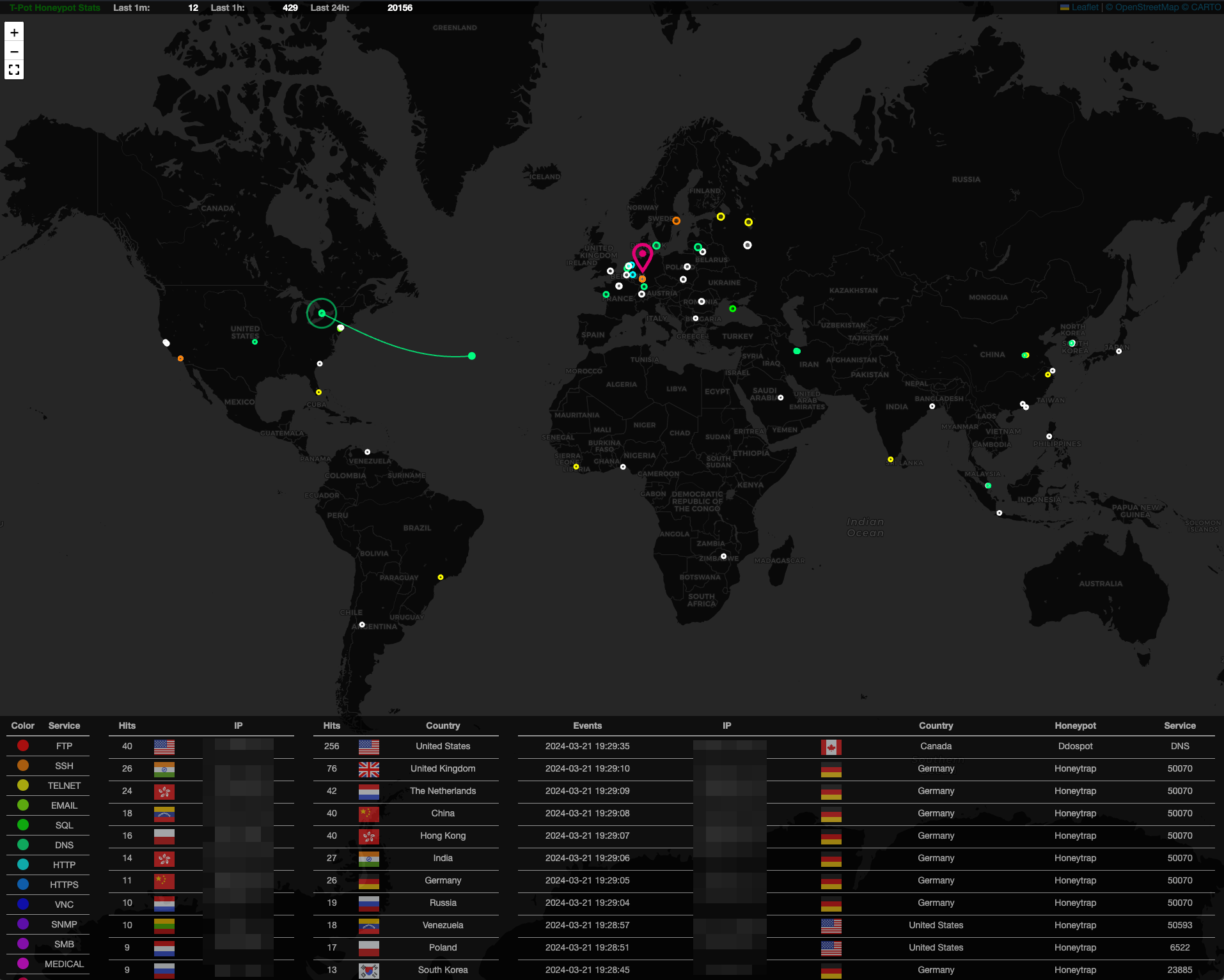
* [T-Pot-Attack-Map](https://github.com/telekom-security/t-pot-attack-map) —— T-Pot 的动画攻击地图。
* [P0f](https://lcamtuf.coredump.cx/p0f3/) —— 纯被动流量指纹识别工具。
* [Spiderfoot](https://github.com/smicallef/spiderfoot) —— 开源情报自动化工具。
* [Suricata](https://suricata.io/) —— 网络安全管理引擎。
... 为你提供尽可能出色的一体化体验,以及一个易于使用的多蜜罐系统。
<br><br>
## 技术架构
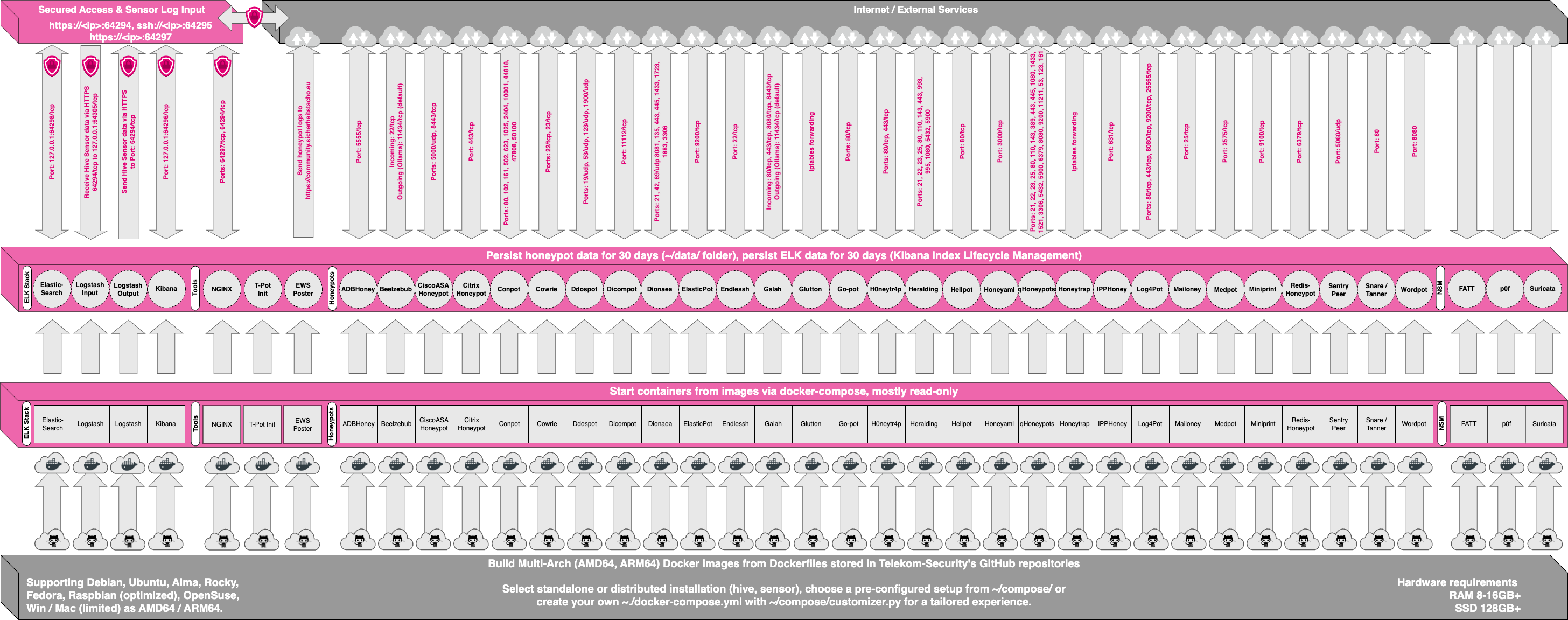
源代码和配置文件完全存储在 T-Pot GitHub 仓库中。Docker 镜像已构建并预配置好,适用于 T-Pot 环境。
各个 Dockerfile 和配置位于 [docker 文件夹](https://github.com/telekom-security/tpotce/tree/master/docker)中。
<br><br>
## 服务
T-Pot 提供多种服务,大致分为五组:
1. 操作系统提供的系统服务
* SSH 用于安全的远程访问。
2. Elastic Stack
* Elasticsearch 用于存储事件。
* Logstash 用于接收、发送事件至 Elasticsearch。
* Kibana 用于在精心渲染的仪表盘上展示事件。
3. 工具
* NGINX 提供安全的远程访问(反向代理)到 Kibana、CyberChef、Elasticvue、GeoIP 攻击地图、Spiderfoot,并允许 T-Pot 传感器将事件数据安全地传输到 T-Pot 中心。
* CyberChef —— 用于加密、编码、压缩和数据分析的 Web 应用。
* Elasticvue —— 用于浏览和与 Elasticsearch 集群交互的 Web 前端。
* T-Pot 攻击地图 —— T-Pot 的动画攻击地图。
* Spiderfoot —— 开源情报自动化工具。
4. 蜜罐
* 基于所选 `docker-compose.yml` 从 23 个可用蜜罐中选取的一组蜜罐。
5. 网络安全监控 (NSM)
* Fatt —— 基于 pyshark 的脚本,用于从 pcap 文件及实时网络流量中提取网络元数据和指纹。
* P0f —— 纯被动流量指纹识别工具。
* Suricata —— 网络安全监控引擎。
<br><br>
## 用户类型
在 T-Pot 的安装和使用过程中,你会用到两种不同类型的账户。请务必了解不同账户类型的差异,因为认证错误的最常见原因**莫过于此**。