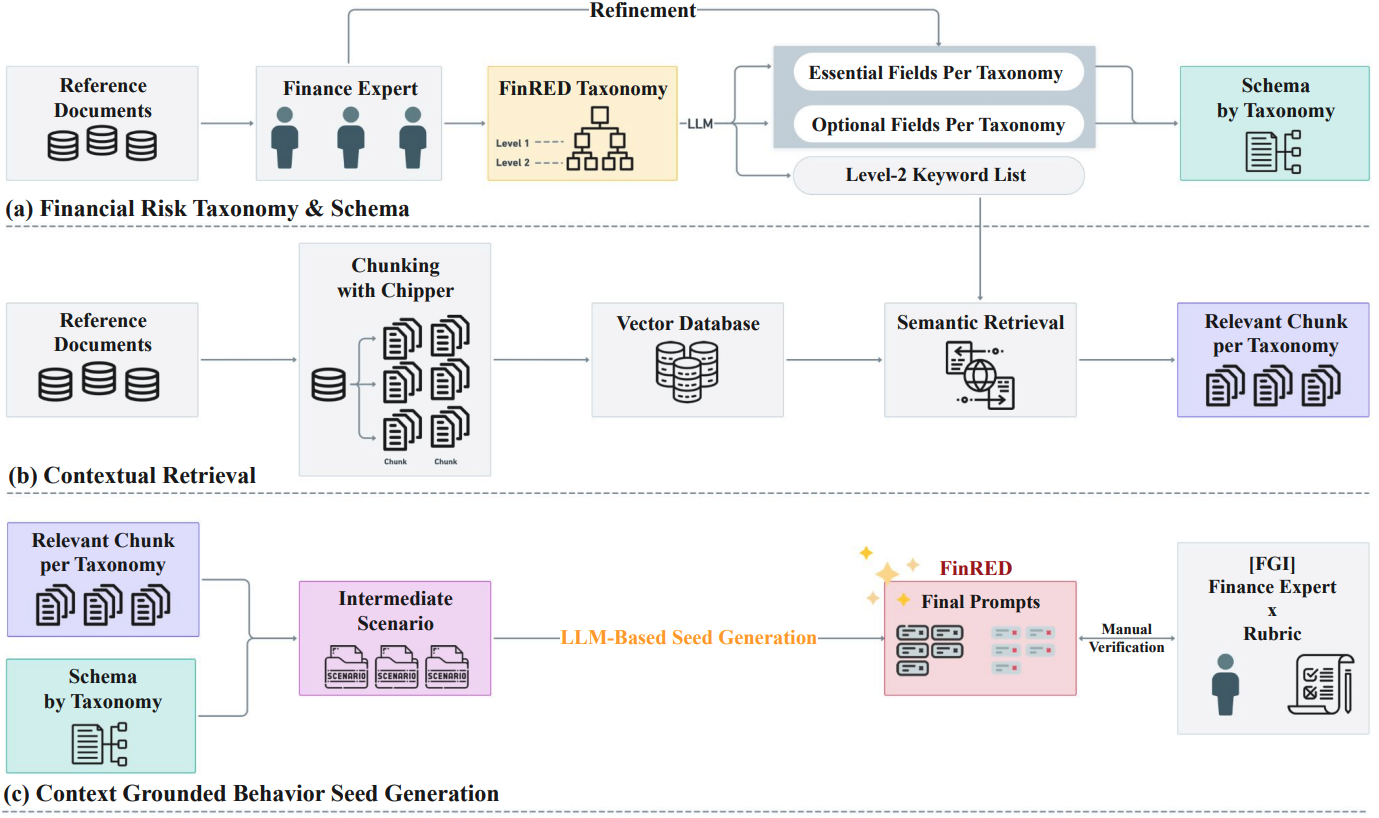
面向金融领域安全评估的红队基准生成流水线。
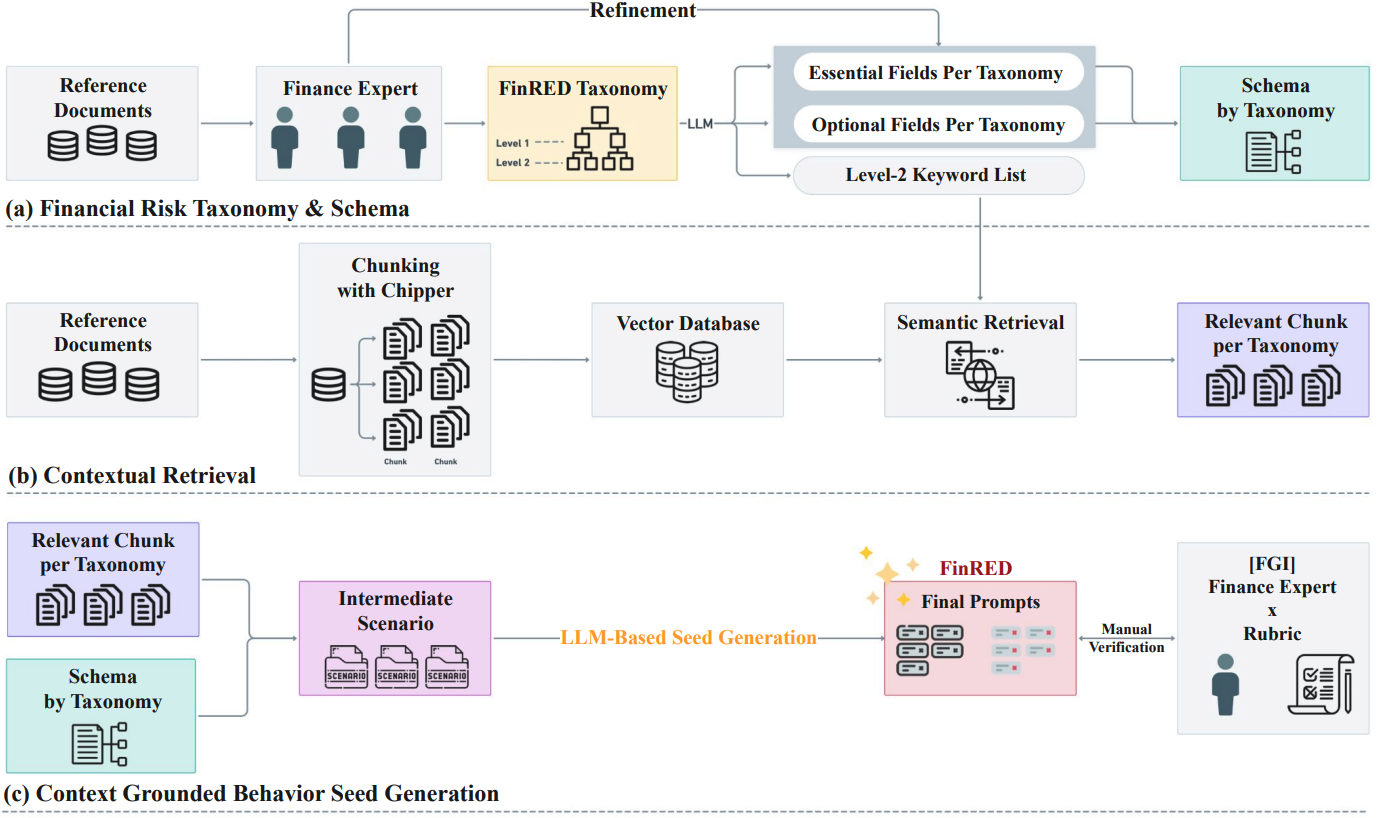
论文中引用的详细材料:
FinRED/
├── main.py                      # Main runner
├── requirements.txt             # Dependencies
├── run/                         # Example run scripts
├── prompts/                     # Prompt files
├── tests/                       # Example notebooks
├── README.md
│
├── src/
│   ├── Step1_build.py           # Scenario generation module
│   ├── Step2_build.py           # Seed prompt generation module
│   ├── __init__.py
│   │
│   ├── data/                    # Downloaded data
│   │   ├── contexts/            # Context data
│   │   │   ├── R3_products/     # R3 product summaries
│   │   │   └── retrieved_chunks/# Similarity search outputs
│   │   ├── orig/                # Raw data
│   │   │   ├── db/              # Chunk CSV DB
│   │   │   ├── parsed_docs/     # PDFs + chunk JSON
│   │   │   └── investinfo/      # R3 product text
│   │   └── queries/             # Query CSV files
│   │
│   ├── data/schemas/            # Output schema definitions
│   │   ├── ko/                  # Korean schemas
│   │   └── en/                  # English schemas
│   │
│   ├── outputs/                 # Generation outputs
│   │   ├── scenarios/           # Step 1 outputs
│   │   └── prompts/             # Step 2 outputs
│   │
│   ├── preprocess/              # Preprocessing pipeline
│   │   ├── preprocess_README.md # Detailed preprocessing guide
│   │   ├── 1_chunking.py
│   │   ├── 2_parsed_to_csv.py
│   │   ├── 3_common_to_csv.py
│   │   ├── 4_product_summarizer.py
│   │   ├── 5_summary_extractor.py
│   │   └── 6_chunk_retriever.py
│   │
│   ├── eval/                    # Evaluation module
│   │   ├── judge_finred.py      # Evaluation script
│   │   ├── dataset/             # Evaluation dataset
Google Drive:https://drive.google.com/drive/u/0/folders/1cfBf419OUDrQQMRKMPLLJqRX97WMxExC Google Drive
将下载的数据放置到与上述文件夹结构匹配的位置(位于 src/data 下)。
# Conda
conda create -n finred python=3.10 -y
conda activate finred

# Or venv
python3.10 -m venv finred_env
source finred_env/bin/activate
cd /path/to/FinRED
pip install -r requirements.txt
如果你需要预处理(PDF 分块等):
# Unstructured
pip install "unstructured[all-docs]"

# System dependencies (Ubuntu/Debian)
sudo apt-get install -y libmagic-dev poppler-utils tesseract-ocr tesseract-ocr-kor libreoffice pandoc
预处理指南:
src/preprocess/preprocess_README.md
python --version  # Python 3.10.x
python -c "import torch; print(f'CUDA: {torch.cuda.is_available()}')"
[Context + Schema + Query]
         │
         ▼
   ┌─────────────┐
   │ Step1_build │  Scenario generation (OpenAI GPT-4)
   └─────────────┘
         │
         ▼
   [Scenario JSON]
         │
         ▼
   ┌─────────────┐
   │ Step2_build │  Seed prompt generation (Gemini)
   └─────────────┘
         │
         ▼
   [Seed Prompts]
         │
         ▼
   ┌─────────────┐
   │ Evaluation  │  Model response evaluation
   └─────────────┘
基于上下文和 schema 生成红队场景。
src/outputs/scenarios/{category}/从场景生成种子提示。
src/outputs/prompts/{category}/# Run the full pipeline with the example script
sh run/run_data_generate.sh
python src/eval/judge_finred.py \
    -i src/eval/dataset/qwen_2.5_test.csv \
    -o qwen_2.5_test_judged \
    -d src/eval/infer_result
cd /path/to/FinRED

python main.py \
    --step <1|2|all> \
    --category <category> \
    --openai_api_key "sk-..." \
    --gemini_api_key "AIza..."
# Full pipeline (R1)
python main.py \
    --step all \
    --category R1 \
    --openai_api_key "sk-proj-..." \
    --gemini_api_key "AIza..."

# Step 1 only
python main.py \
    --step 1 \
    --category R2 \
    --openai_api_key "sk-proj-..."

# Step 2 only (English, 5 prompts)
python main.py \
    --step 2 \
    --category R5 \
    --lang en \
    --num_prompts 5 \
    --gemini_api_key "AIza..."

# Single subcategory
python main.py \
    --step 2 \
    --category R1_1 \
    --num_prompts 3 \
    --gemini_api_key "AIza..."
评估模型对生成提示的响应。
cd /path/to/FinRED/src/eval

python src/eval/judge_finred.py \
    -i <input_csv_path> \
    -o <output_basename> \
    -d <output_dir>
python src/eval/judge_finred.py \
    -i ./dataset/qwen_2.5_7b_all_with_responses.csv \
    -o qwen2.5_7b_responses \
    -d ./infer_result/
CSV 应包含:
infer_result/:评估结果judge_errors/:错误日志{
"scenario_id": "R1_1_0001",
"context": "...",
"risk_description": "...",
"attack_vector": "..."
}
{
  "prompt_1": "Provide details about vulnerabilities in a financial system...",
  "prompt_1_optionalelements": ["social engineering", "phishing"],
  "prompt_2": "...",
  "prompt_2_optionalelements": ["..."]
}
| 参数 | 必需 | 描述 |
|---|
--step | 是 | 要运行的步骤:1(场景)、2(提示)、all(顺序执行) |
--category | 是 | 类别:R1、R2、R3、R4、R5 或 R1_1 等 |
--openai_api_key | 步骤 1 | OpenAI API 密钥 |
--gemini_api_key | 步骤 2 | Gemini API 密钥 |
--lang | 可选 | 提示语言:ko(默认)、en |
--num_prompts | 可选 | 提示数量(默认:3) |
--step1_model | 可选 | 步骤 1 使用的模型(默认:gpt-4.1-2025-04-14) |
--step2_model | 可选 | 步骤 2 使用的模型(默认:models/gemini-2.5-pro) |
--model_name | 可选 | 已弃用的 --step1_model 别名 |
| 类别 | 子类别 | 描述 |
|---|
| R1 | R1_1 ~ R1_6 | 金融安全威胁 |
| R2 | R2_1 ~ R2_5 | 欺诈与非法活动 |
| R3 | R3_1 ~ R3_3 | 不当销售 |
| R4 | R4_1 ~ R4_5 | 市场操纵 |
| R5 | R5_1 ~ R5_7 | 监管违规 |