每个人都在运行 YOLO 模式。Gryph 强制执行护栏并保留审计追踪。
快速开始 · 演示 · 支持的代理 · 使用场景 · 安全策略







AI 编码代理(Claude Code、Cursor、Windsurf、Gemini CLI、OpenCode)可以读取任何文件、写入任何位置,并在开发者机器上执行任意命令。它们每个会话会运行数十次工具调用。它们能做什么没有边界,出问题时也没有审计追踪。
Gryph 解决了这个问题。 它挂钩到代理中,实时强制执行 block、warn 或 guide 操作的 YAML 策略规则,并将每个事件记录到本地 SQLite 数据库以供审查和审计。所有数据都保留在本地。没有云端,没有遥测。
开发者让 Claude Code 重构一个模块。它在 90 秒内运行了 47 次工具调用。然后测试失败了。
没有 Gryph,开发者只能猜测。有了 Gryph,gryph logs 会显示一切。
# Install Gryph with one command
curl -fsSL https://raw.githubusercontent.com/safedep/gryph/main/install.sh | sh

# Setup gryph for available agents
gryph install                    # hooks into all detected agents
gryph status                     # verify setup

# ... use your AI agent normally ...
gryph logs                       # see what happened
# Homebrew (macOS/Linux)
brew install safedep/tap/gryph

# npm
npm install -g @safedep/gryph

# Go
go install github.com/safedep/gryph/cmd/gryph@latest
适用于 macOS、Linux 和 Windows 的预构建二进制文件可在 GitHub Releases 页面获取。
提示: 将
logging.level设置为full以查看文件差异和原始事件:gryph config set logging.level full。详情请参阅配置。
| 代理 | 钩子支持 |
|---|---|
| Claude Code | 完整(PreToolUse、PostToolUse、Notification) |
| Codex | 完整(PreToolUse、PostToolUse、SessionStart、UserPromptSubmit、Stop) |
| Command Code | 完整(PreToolUse、PostToolUse、Stop、SessionStart) |
| Cursor | 完整(文件读取/写入、shell 执行、MCP 工具) |
| Devin CLI | 完整(PreToolUse、PostToolUse、SessionStart、UserPromptSubmit、Stop、SessionEnd) |
| Gemini CLI | 完整(BeforeTool、AfterTool、Notification) |
| OpenCode | 完整(tool.execute、会话事件) |
| Pi Agent | 完整(tool_call、tool_result、会话事件) |
| Windsurf | 完整(文件读取/写入、命令、MCP 工具) |
注意: Codex 钩子需要在 Codex 配置(
~/.codex/config.toml)中启用codex_hooks功能标志:[features] codex_hooks = true
注意: Devin CLI 默认还会从
~/.claude/settings.json加载 Claude Code 钩子(read_config_from.claude)。当为两个代理都安装了 gryph 钩子时,一个 Devin 会话会同时发出 devin 事件和 claude-code 事件。在 Devin 用户配置中禁用read_config_from.claude以保持单一事件流。
一条命令即可为所有检测到的代理安装钩子。无需逐个代理设置。
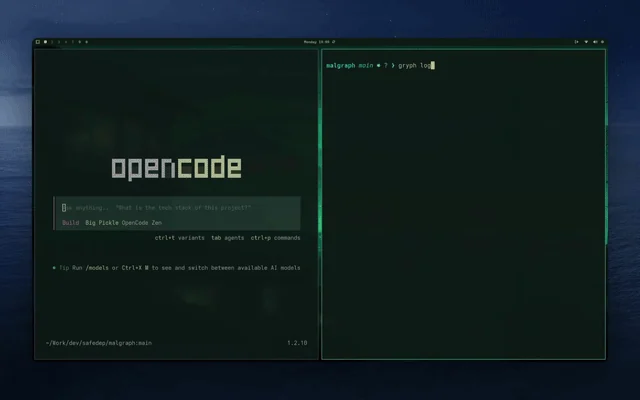
使用 gryph logs --live 实时流式查看代理操作:
| 场景 | Gryph 如何提供帮助 |
|---|---|
| 重放完整会话 | git diff 显示最终更改。Gryph 显示完整序列:代理读取了什么、运行了什么、写入并还原了什么,以及按什么顺序。 |
| 捕获不可见的副作用 | 代理运行的 shell 命令不会在 git 中留下痕迹(npm install、curl、rm)。gryph query --action exec 会全部呈现出来。 |
| 敏感文件访问 | Gryph 会自动标记对 .env、*.pem、*.key 及类似文件的访问。操作会被记录,但内容永远不会被存储。 |
| 阻止有风险的代理操作 | 编写 YAML 规则来阻止破坏性命令、拒绝泄露凭据的写入,或按代理或项目限定行为。请参阅安全策略。 |
| 安全审查 | 将事件导出到你的 SIEM,或使用 OpenSearch 可观测性示例 实现集中式仪表板和威胁检测警报。 |
| 成本和令牌跟踪 | 跟踪跨模型和代理的每会话令牌使用量和预估成本。查看文档 |
| 比较代理 | 按 --agent 过滤,查看不同代理如何处理同一任务:哪个读取更多、哪个运行更多命令、哪个成本更高。 |
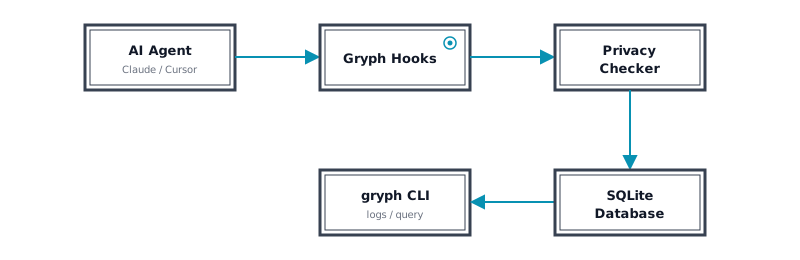
Gryph 将轻量级钩子安装到 AI 编码代理中。当代理读取文件、写入文件或执行命令时,钩子会向 Gryph 发送 JSON 事件。事件存储在本地 SQLite 数据库中,可随时查询。由于 Gryph 同时挂钩到 工具前 和 工具后 事件,它捕获了每个代理操作的完整生命周期。
除了日志记录,Gryph 还可以对代理操作强制执行 YAML 策略。规则可以根据操作类型、文件路径、命令模式、工具名称、代理、项目以及基于每会话计数器的 CEL 表达式来 block、warn、guide 或 allow。被阻止的操作永远不会到达代理的工具,指导会作为 stderr 文本返回给代理,每个决策都会被持久化。
gryph policy init          # write the example policy to the global config dir
gryph policy edit          # open it in $EDITOR and scaffold if missing
gryph policy validate
gryph policy test --action file_write --path ./secrets/db.env
gryph config set policy.enabled true
详情请参阅安全策略。
有关所有命令和标志的完整参考,请参阅 CLI 参考。
gryph install                      # Install hooks for all detected agents
gryph install --dry-run            # Preview what would be installed
gryph install --agent claude-code  # Install for a specific agent
gryph uninstall                    # Remove hooks from all agents
gryph uninstall --purge            # Remove hooks and purge all data
gryph uninstall --restore-backup   # Restore original hook config from backup
gryph logs                     # Last 24 hours
gryph logs --today             # Today's activity
gryph logs --agent claude-code # Filter by agent
gryph logs --follow            # Stream events in real time
gryph logs --format json       # Output as JSON
gryph query --file "src/auth/**" --action file_write    # Find writes to specific files
gryph query --action exec --since "1w"           # Commands run in the last week
gryph query --session abc123                             # Activity from a specific session
gryph query --action file_write --today --count          # Count matching events
gryph query --command "npm *" --since "1w"               # Filter by command pattern
gryph sessions                        # List all sessions
gryph session <session-id>            # View detailed session history
gryph session <session-id> --show-diff # View session with file diffs