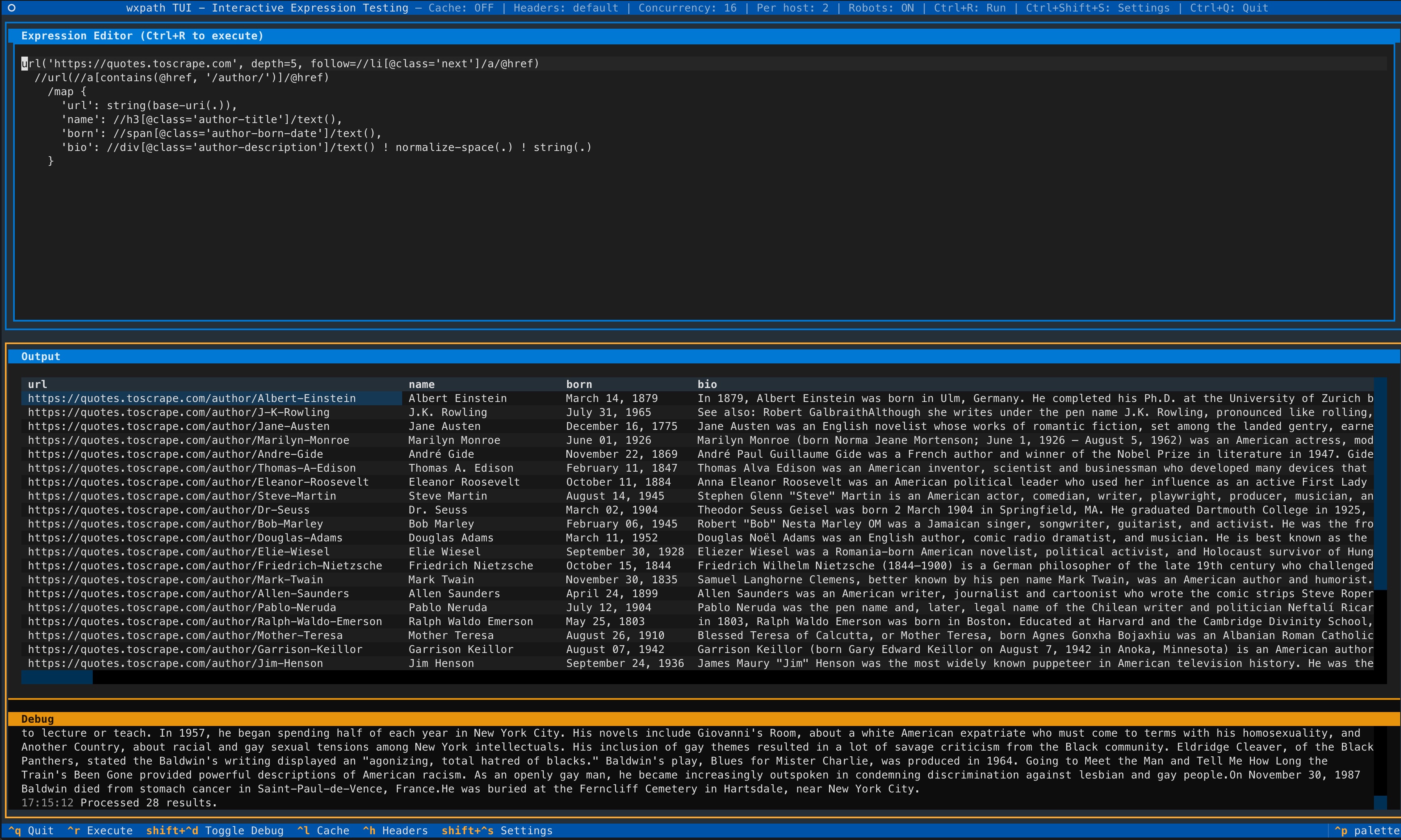
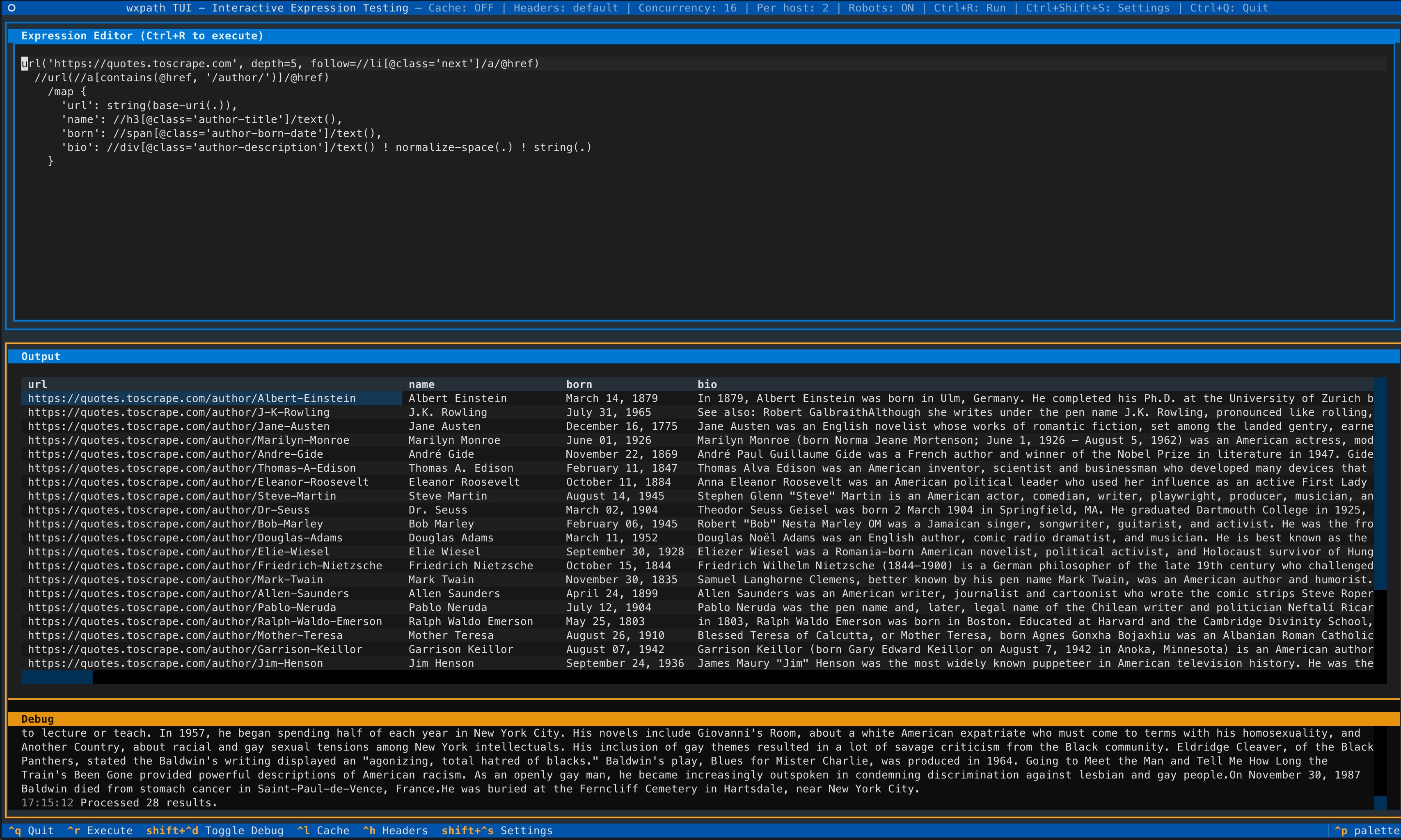
新功能:TUI - 交互式终端界面(由 Textual 驱动),用于测试 wxpath 表达式和导出数据。
需要 Python 3.10+。
pip install wxpath
# 如需 TUI 支持:
pip install "wxpath[tui]"
# 立即通过 uv 启动 TUI:
uvx --from "wxpath[tui]" wxpath-tui
wxpath 是一个声明式网络爬虫,其遍历逻辑直接通过 XPath 表达。无需编写命令式的爬取循环,wxpath 允许你在单个表达式中描述要跟随的链接以及要提取的内容。wxpath 并发地执行该表达式,采用广度优先(ish)的方式,并在发现结果时即时流式输出。
以下表达式获取一个页面,提取链接,并并发地流式输出——无需爬取循环:
import wxpath

expr = "url('https://quotes.toscrape.com')//a/@href"

for link in wxpath.wxpath_async_blocking_iter(expr):
    print(link)
通过引入 url(...) 运算符和 /// 语法,wxpath 引擎能够执行递归(或分页)的网络爬取与提取:
import wxpath

path_expr = """
url('https://quotes.toscrape.com')
  ///url(//a/@href)
    //a/@href
"""

for item in wxpath.wxpath_async_blocking_iter(path_expr, max_depth=1):
    print(item)
大多数网页抓取工具强迫你先编写爬取控制流程,再处理数据提取。
wxpath 将这两个步骤合二为一:
直接从图中提取干净、结构化的 JSON 层级——为你的 LLM 提供信号而非噪音。详情请参考 LangChain 集成。
wxpath 是确定性的(注意:并非由 LLM 驱动)。虽然我们无法保证网络的稳定性,但能保证遍历的确定性。
文档现已可用此处。
url(...) 和 ///url(...) 详解import wxpath
from wxpath.settings import CRAWLER_SETTINGS
# 自定义请求头体现礼貌;某些站点(如维基百科)需要此设置
CRAWLER_SETTINGS.headers = {'User-Agent': 'my-app/0.4.0 (contact: [email protected])'}
# 爬取、提取字段、构建知识图谱
path_expr = """
url('https://en.wikipedia.org/wiki/Expression_language')
///url(
//main//a/@href[
starts-with(., '/wiki/') and not(contains(., ':'))
]
)
/map{
'title': (//span[contains(@class, "mw-page-title-main")]/text())[1] ! string(.),
'url': string(base-uri(.)),
'short_description': //div[contains(@class, 'shortdescription')]/text() ! string(.),
'forward_links': //div[@id="mw-content-text"]//a/@href ! string(.)
}
"""
for item in wxpath.wxpath_async_blocking_iter(path_expr, max_depth=1):
print(item)
注意: 某些站点(包括维基百科)若无合适的请求头可能会阻止请求。
参见进阶:引擎与爬虫配置以设置自定义 User-Agent。
上述表达式的功能如下:
https://en.wikipedia.org/wiki/Expression_language 开始。<main> 区域中开头为 /wiki/ 且不包含冒号(:)的链接。url(...) 和 ///url(...) 详解url(...) 是一个自定义运算符,用于获取用户指定或内部生成的 URL 的内容,并将其作为 lxml.html.HtmlElement 返回,以便进行后续的 XPath 处理。///url(...) 表示深度爬取。它指示运行时引擎继续跟随链接,直到达到指定的 max_depth。与重复的 url() 跳转不同,它允许单个表达式描述更深入的图探索。警告:请谨慎使用,并通过 max_depth 或 XPath 谓词加以约束,以避免遍历爆炸。详见 DESIGN.md 了解语言设计的详细信息。你将看到核心概念并从零开始设计该语言。
wxpath 将表达式评估为一系列遍历和提取步骤(内部称为“Segment”)。
url(...) 创建爬取任务,可以是静态的(通过固定 URL)或动态的(通过 XPath 表达式派生出的 URL)。URL 在全局范围内基于尽力而为的原则去重,而不是按深度去重。
XPath 片段作用于获取到的文档(通过紧邻的前一个 url(...) 操作获取)。
///url(...) 表示深度爬取——它以广度优先(ish)的方式执行,直到 max_depth。
结果一旦就绪即被产出。
wxpath 优先使用 asyncio/aiohttp,提供用于爬取和提取数据的异步 API。
import asyncio
from wxpath import wxpath_async

items = []

async def main():
    path_expr = "url('https://en.wikipedia.org/wiki/Expression_language')///url(//@href[starts-with(., '/wiki/')])//a/@href"
    async for item in wxpath_async(path_expr, max_depth=1):
        items.append(item)

asyncio.run(main())
wxpath 也提供“异步中的同步”API,允许你并发地爬取多个页面,同时保持同步代码的简洁性。这对于在严格同步的执行环境(即不在 asyncio 事件循环内)中进行性能敏感的爬取特别有用。
from wxpath import wxpath_async_blocking_iter

path_expr = "url('https://en.wikipedia.org/wiki/Expression_language')///url(//@href[starts-with(., '/wiki/')])//a/@href"
items = list(wxpath_async_blocking_iter(path_expr, max_depth=1))
wxpath 默认通过 WXPathEngine(..., robotstxt=True) 构造函数尊重 robots.txt。
wxpath 的 Python API 输出结构化的对象。
根据表达式的不同,结果可能包括:
lxml.* 和 lxml.html.* 对象elementpath.datatypes.* 对象(用于 XPath 3.1 特性)WxStr(带有来源信息的字符串值)CLI 将这些对象展平为纯 JSON 以便显示。 Python API 默认保留结构。
wxpath 使用 elementpath 库提供 XPath 3.1 支持,使你能使用高级 XPath 特性,如映射、数组等。这让你可以编写功能更强大的 XPath 查询。
path_expr = """
    url('https://en.wikipedia.org/wiki/Expression_language')
    ///url(//div[@id='mw-content-text']//a/@href)
    /map{
        'title':(//span[contains(@class, "mw-page-title-main")]/text())[1],
        'short_description':(//div[contains(@class, "shortdescription")]/text())[1],
        'url'://link[@rel='canonical']/@href[1]
    }
"""
# [...
# {'title': 'Computer language',
# 'short_description': 'Formal language for communicating with a computer',
# 'url': 'https://en.wikipedia.org/wiki/Computer_language'},
# {'title': 'Machine-readable medium and data',
# 'short_description': 'Medium capable of storing data in a format readable by a machine',
# 'url': 'https://en.wikipedia.org/wiki/Machine-readable_medium_and_data'},
# {'title': 'Domain knowledge',
# 'short_description': 'Specialist knowledge within a specific field',
# 'url': 'https://en.wikipedia.org/wiki/Domain_knowledge'},
# ...]
wxpath 提供进度条(通过 tqdm)来追踪爬取进度。这对于长时间运行的爬取特别有用。
通过设置 engine.run(..., progress=True) 启用,或在任何 wxpath_async*(...) 函数中传入 progress=True。
items = wxpath.wxpath_async_blocking("...", progress=True)
> 100%|██████████████████████████████████████████████████████████▎| 469/471 [00:05<00:00, 72.00it/s, depth=2, yielded=457]
wxpath 提供命令行界面(CLI),方便你直接从终端快速试验和执行 wxpath 表达式。
以下示例演示如何从“Expression language”页面开始爬取维基百科,提取指向其他维基页面的链接,并从每个链接页面获取特定字段。
注意:由于网页内容的不断变化,输出可能随时间而异。
> wxpath --depth 1 \
    --header "User-Agent: my-app/0.1 (contact: [email protected])" \
    "url('https://en.wikipedia.org/wiki/Expression_language') \
    ///url(//div[@id='mw-content-text']//a/@href[starts-with(., '/wiki/') \
        and not(matches(@href, '^(?:/wiki/)?(?:Wikipedia|File|Template|Special|Template_talk|Help):'))]) \
    /map{ \
        'title':(//span[contains(@class, 'mw-page-title-main')]/text())[1], \
        'short_description':(//div[contains(@class, 'shortdescription')]/text())[1], \
        'url':string(base-uri(.)), \
        'backlink':wx:backlink(.), \
        'depth':wx:depth(.) \
        }"