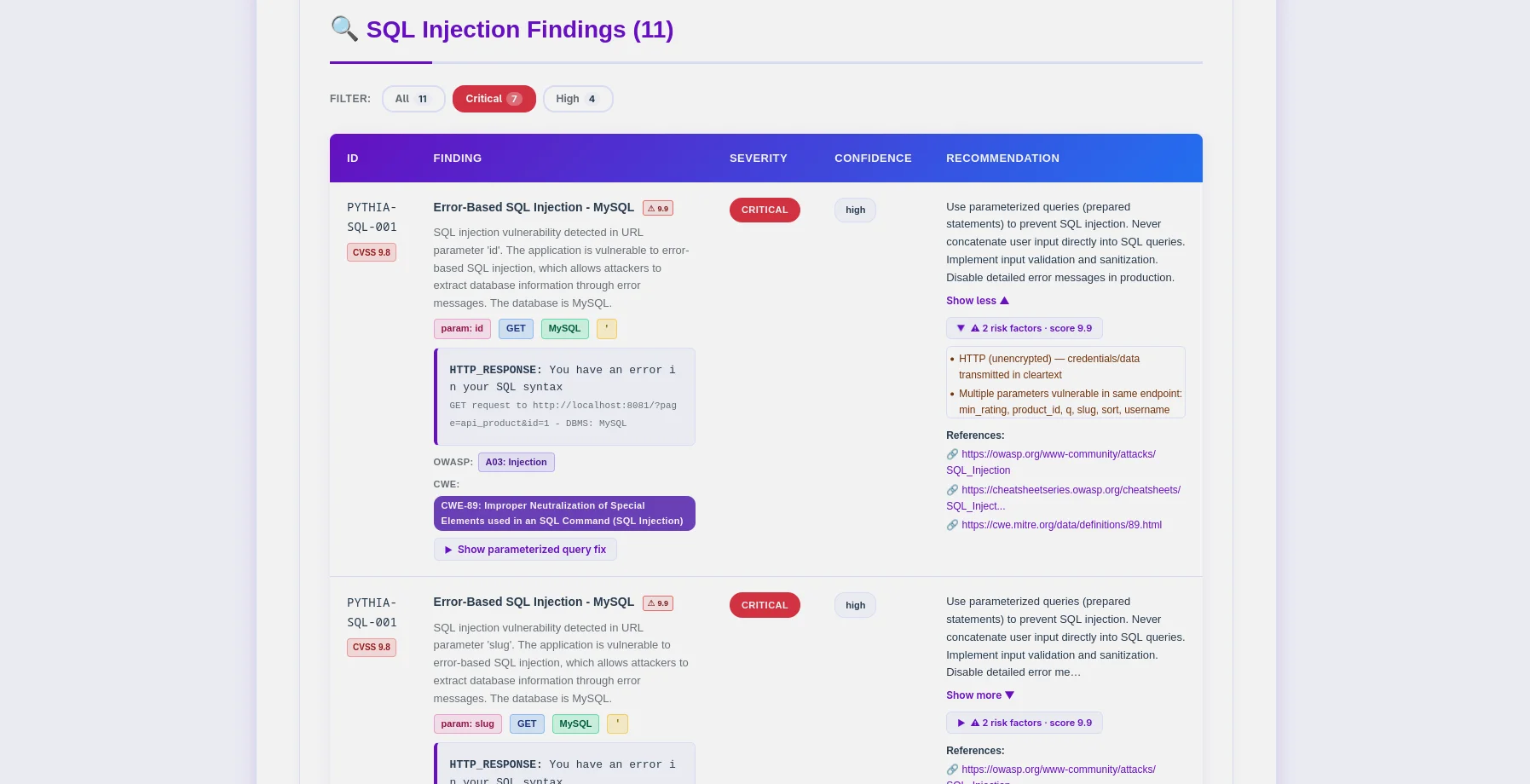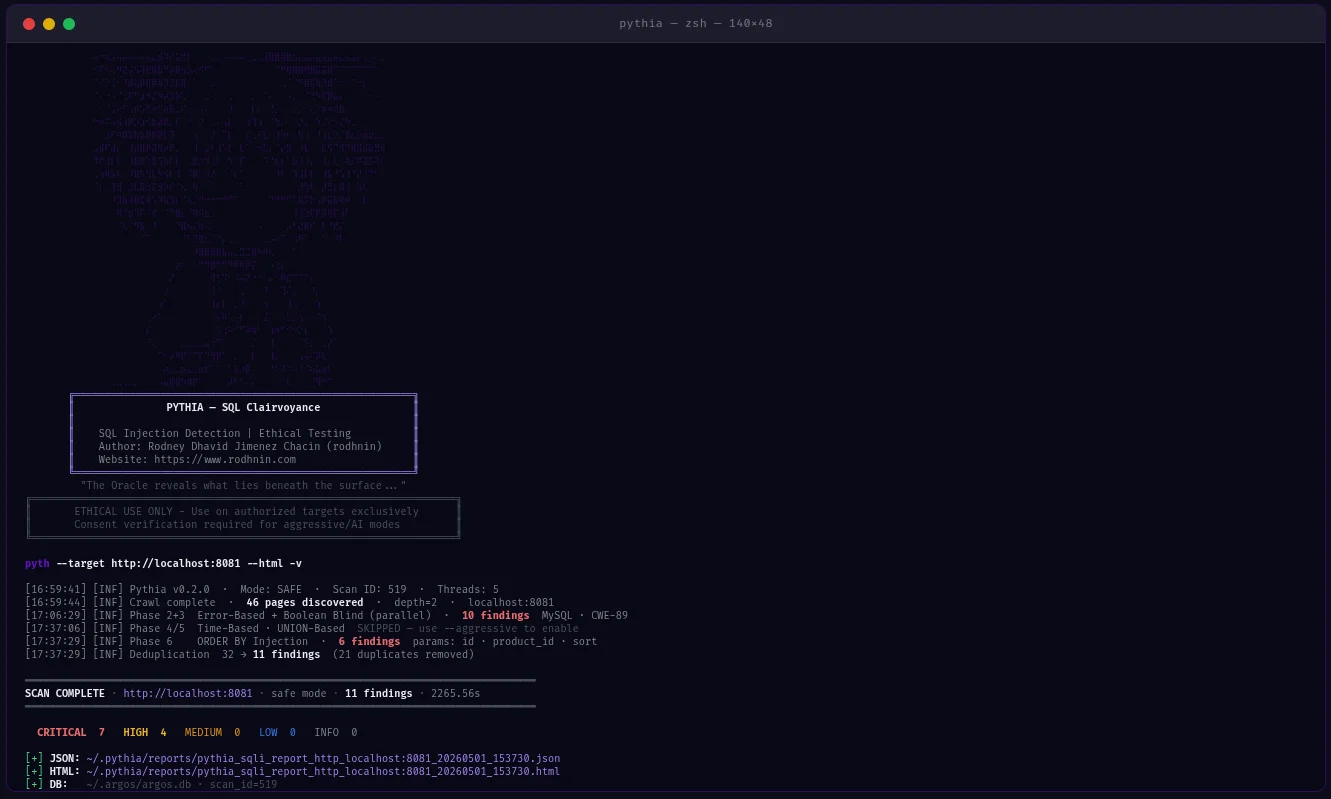
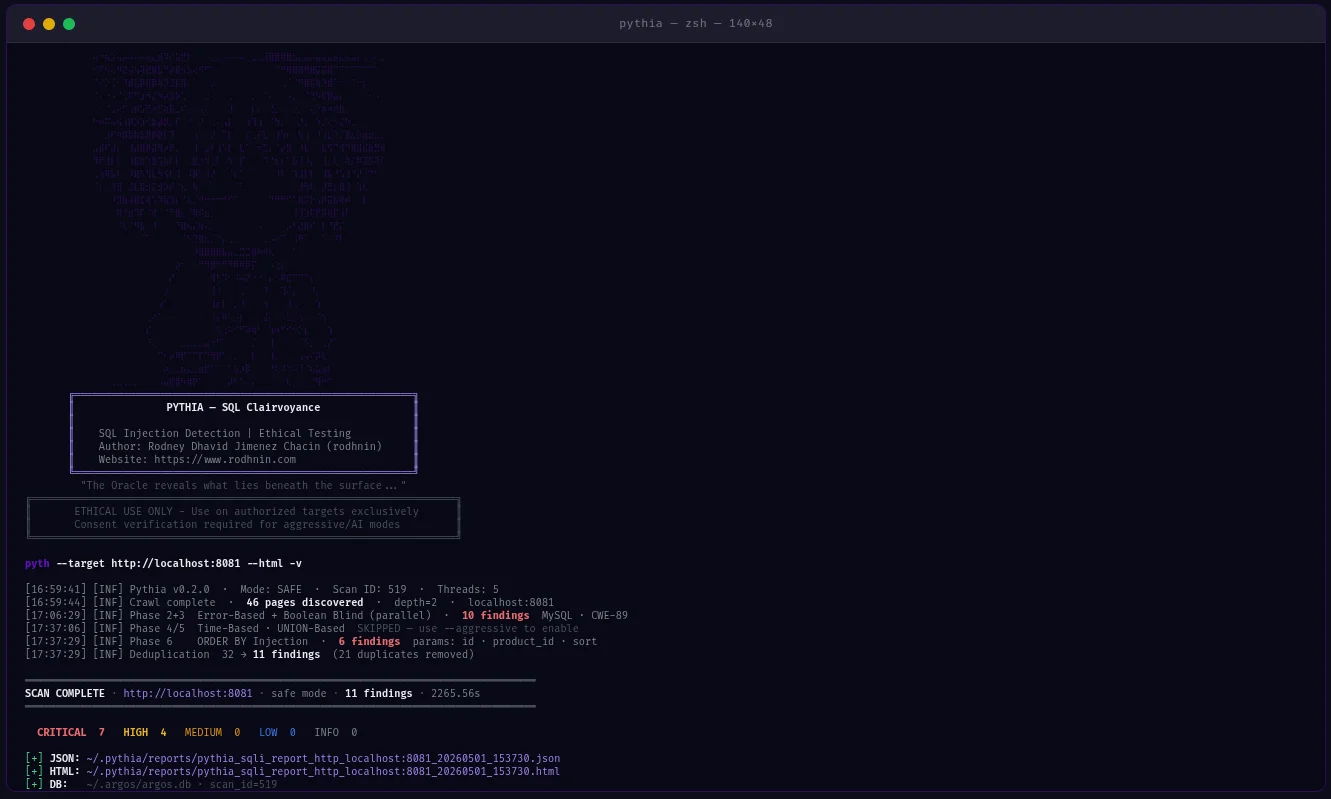
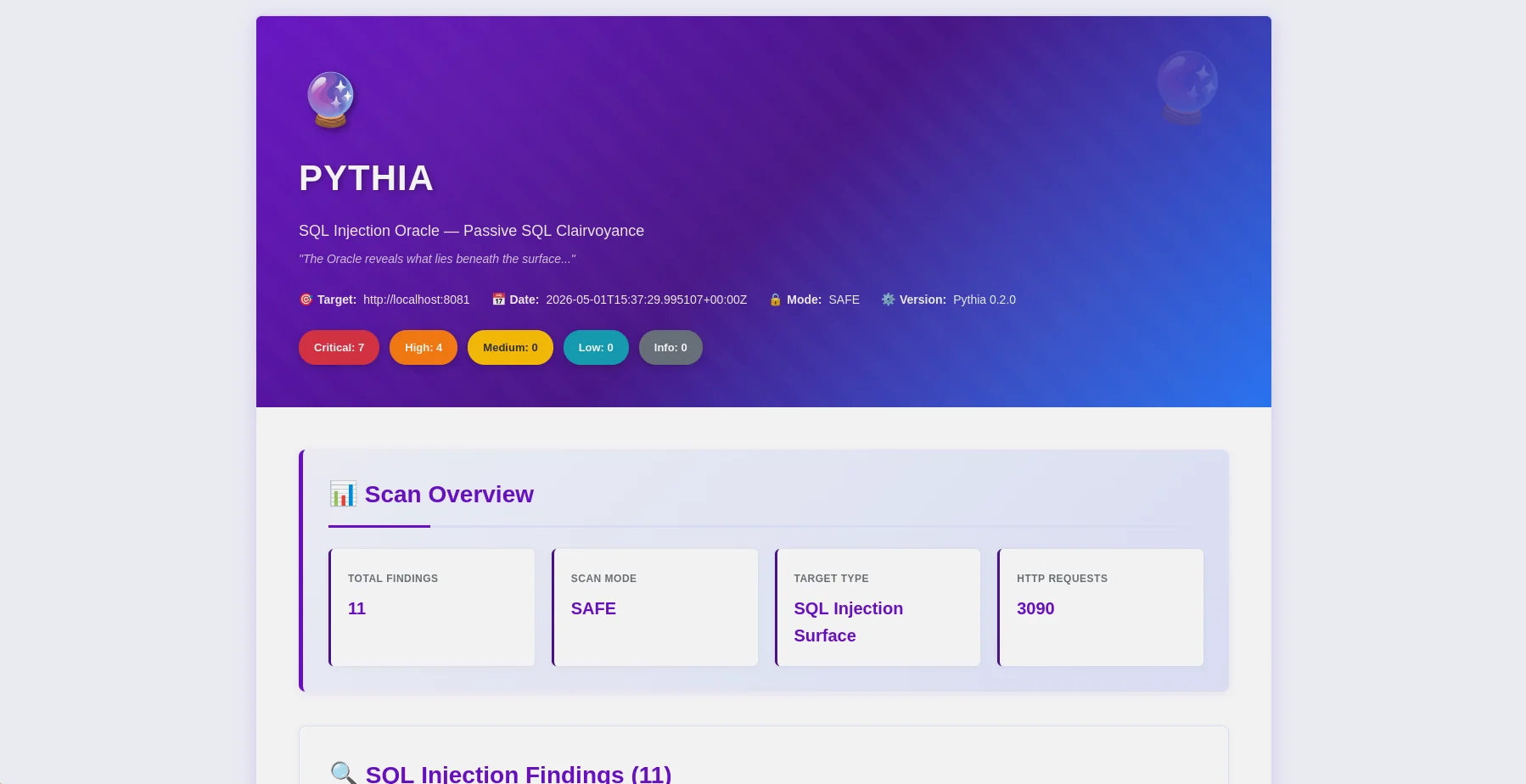
HTML 报告 — 发现项概览,含严重性徽章和 OWASP 映射 |
发现项表格 — PYTHIA-SQL 代码、DBMS 检测、CWE-89 映射 |
Pythia 是一款生产级 SQL 注入检测扫描器,将伦理置于首位。专为渗透测试人员、安全研究员和 DevSecOps 工程师设计,通过 6 种检测方法识别 SQL 注入漏洞,并可直接集成到 CI/CD 流水线中。
--fail-on、--sarif、--diff 标志用于流水线集成~/.argos/argos.db)| 检测方法 | 描述 | 所需模式 |
|---|---|---|
| 基于错误 | 响应中的 SQL 错误(MySQL、PostgreSQL、MSSQL、Oracle、SQLite) | 安全 |
| 布尔盲注 | 来自 TRUE/FALSE 条件的响应差异 | 安全 |
| 时间盲注 | 来自 SLEEP/WAITFOR 负载的响应延迟 | 激进 |
| UNION 查询注入 | 通过 UNION SELECT 提取数据 | 激进 |
| 二阶注入 | 存储→检索注入模式(POST→GET 链) | 激进 |
| ORDER BY 注入 | 数字排序参数注入 | 激进 |
python -m pyth --target http://example.com/products?id=1 --html
- **14种发现代码**:DBMS专用(MySQL、PostgreSQL、MSSQL、Oracle、SQLite)+ 技术专用
- **DBMS指纹识别**:自动检测数据库类型和版本
- **WAF绕过**:激进模式下170+绕过载荷(十六进制、URL编码、内联注释、大小写变体)
- **会话变量检测**:针对DVWA-high风格认证模式的POST→GET链
- **智能爬虫**:BFS爬取,支持弹窗/onclick提取(`--js`)、站点地图、robots.txt
- **误报加固**:SequenceMatcher相似度评分 + 多载荷确认
### CI/CD集成```bash
# Pipeline-friendly: exit 10 if high+ findings found
python -m pyth --target https://staging.app.com --aggressive --fail-on high
echo $? # 0=clean, 10=findings found, 1=error
# SARIF for GitHub Security / GitLab SAST
python -m pyth --target https://app.com --aggressive --sarif > results.sarif
# Compare vs last scan — show what's new, what's fixed
python -m pyth --target https://app.com --aggressive --diff last --html
python -m pyth --target https://api.example.com/v1/users
--auth-header "Authorization: Bearer eyJhbGc..."
--auth-header "X-API-Key: sk-prod-xxx"
--aggressive --html
多次传递 `--auth-header` 以设置多个请求头。
### AI 驱动分析
从命令行选择你的 AI 提供商:
| 提供商 | 最佳用途 | 速度 | 成本 | 隐私 |
| ------------------------------------ | ------------------------------- | ---------- | ------------- | ----------- |
| **OpenAI gpt-4o-mini**(默认) | 生产质量,低成本 | 快速 | ~$0.02/次扫描 | 标准 |
| **Anthropic Claude** | 注重隐私,代码修复 | 快速 | ~$0.06/次扫描 | 增强 |
| **Ollama(本地)** | 完全隐私 | 慢(CPU) | 免费 | 100% 离线 |```bash
# Standard analysis
python -m pyth --target http://example.com --use-ai --ai-tone technical --html
# Agent mode: AI queries NVD for real CVEs (no API key for NVD)
python -m pyth --target http://example.com --use-ai --ai-agent --html
# Multi-provider comparison
python -m pyth --target http://example.com --use-ai \
--ai-compare "openai:gpt-4o-mini,anthropic:claude-3-5-haiku-20241022" --html
# With budget cap
python -m pyth --target http://example.com --use-ai --ai-budget 0.05 --html
JSON 报告(机器可读,v0.2.0 schema)```json { "tool": "pythia", "version": "0.2.0", "target": "http://localhost:8081", "mode": "aggressive", "summary": { "total": 26, "critical": 18, "high": 6, "medium": 2 }, "findings": [ { "id": "PYTHIA-SQL-001", "title": "Error-Based SQL Injection (MySQL/MariaDB)", "severity": "critical", "confidence": "high", "parameter": "id", "vector": "GET", "dbms": "MySQL 8.0.32", "cvss": 9.8, "contextual_score": 9.9, "risk_factors": ["no_ssl", "pii_detected"], "payload": "' OR '1'='1' --", "owasp": { "id": "A03", "name": "Injection" }, "cwe": { "id": "CWE-89", "name": "SQL Injection" }, "detection_method": "error-based" } ], "notes": { "scan_duration_seconds": 87.3, "requests_sent": 342, "rate_limit_applied": "5.0 req/s", "false_positive_disclaimer": "..." }, "diff": null }
**HTML 报告**(友好可读)
- 过滤栏:严重级别、OWASP 分类、检测方法、数据库管理系统
- 每个发现项的 OWASP/CWE/CVE 徽章(可点击跳转至外部参考)
- CVSS 基础分数 + 上下文分数(带颜色标识)
- 可展开的证据部分,附带载荷可视化
- AI 分析标签页(标准/代理/对比)
- 差异部分(新增/已修复/持续存在的发现项)
- Oracle 主题(紫色 `#6a11cb`)— 可直接交付客户,无需修改
### 发现代码
所有代码 → **OWASP A03 注入** / **CWE-89 SQL 注入**
| 代码 | 类型 | 数据库/向量 | 模式 |
| ---------------- | ------------------ | ------------------------------ | -------- |
| `PYTHIA-SQL-001` | 基于错误 | MySQL / MariaDB | 安全 |
| `PYTHIA-SQL-002` | 基于错误 | PostgreSQL | 安全 |
| `PYTHIA-SQL-003` | 基于错误 | MSSQL | 安全 |
| `PYTHIA-SQL-004` | 基于错误 | Oracle | 安全 |
| `PYTHIA-SQL-005` | 基于错误 | SQLite | 安全 |
| `PYTHIA-SQL-010` | 布尔盲注 | 任意数据库 | 安全 |
| `PYTHIA-SQL-011` | 布尔盲注 | 通过头注入 | 安全 |
| `PYTHIA-SQL-020` | 基于时间 | MySQL SLEEP() | 激进 |
| `PYTHIA-SQL-021` | 基于时间 | MSSQL WAITFOR | 激进 |
| `PYTHIA-SQL-022` | 基于时间 | PostgreSQL pg_sleep() | 激进 |
| `PYTHIA-SQL-030` | UNION 查询 | GET/POST 参数 | 激进 |
| `PYTHIA-SQL-031` | UNION 查询 | 通过 Cookie | 激进 |
| `PYTHIA-SQL-040` | 二阶注入 | 存储→检索模式 | 激进 |
| `PYTHIA-SQL-050` | ORDER BY 注入 | 数字排序参数 | 激进 |
---
## 验证与测试
Pythia v0.2.0 已通过基于 Docker 的受控漏洞应用进行了**实证验证**。
### QA 测试结果(2026 年 5 月)
| 目标 | 模式 | 发现数量 | 备注 |
| ----------------------- | --------------------------------- | ---------------- | ----------------------------------------------- |
| **PHP Lab** (8081) | `--aggressive` | **26 个发现项** | 全部 4 种技术 + 二阶注入 + ORDER BY 注入 |
| **Flask Lab** (8082) | `--js --aggressive` | **18 个发现项** | 会话变量 + 二阶注入 + ORDER BY 注入 |
| **DVWA Low** | `--no-crawl --aggressive` | 全部 4 种技术 | PYTHIA-SQL-001/010/020/030 |
| **DVWA Medium** | `--no-crawl --aggressive` | 全部 4 种技术 | POST 表单,全部技术 |
| **DVWA High** | `--js --max-pages 2 --aggressive` | 全部 4 种技术 | 会话变量 POST→GET 链 |
| **误报测试** | `--aggressive` | **0 个发现项** | 静态 URL — 确认无误报 |
**关键验证:**
- ✅ 全部 14 个发现代码可用
- ✅ DVWA 高级(会话变量模式)— 全部 4/4 技术覆盖
- ✅ 二阶注入检测 (PYTHIA-SQL-040)
- ✅ ORDER BY 注入检测 (PYTHIA-SQL-050)
- ✅ 静态 URL 零误报
- ✅ `--fail-on` 退出码 (0/10/1) 正确
- ✅ SARIF 2.1.0 输出验证通过
- ✅ `--diff last` 对比功能正常
- ✅ `--auth-header` 在所有请求中传递头信息
---
## 快速开始
### 前提条件
- **Python 3.11+**(推荐 3.12)
- **pip**(Python 包管理器)
- **Docker**(可选,用于搭建漏洞实验室)
### 安装
**1. 克隆仓库**```bash
git clone https://github.com/rodhnin/pythia-sql-clairvoyance.git
cd pythia-sql-clairvoyance
2. 创建并激活虚拟环境```bash python3 -m venv .venv source .venv/bin/activate
**3. 安装依赖项**```bash
python -m pip install --upgrade pip
python -m pip install -r requirements.txt
4. 配置API密钥(如果使用云AI)```bash export OPENAI_API_KEY="sk-..." export ANTHROPIC_API_KEY="sk-ant-..."
**5. 验证安装**```bash
python -m pyth --version
# Output: Pythia v0.2.0
python -m pyth --target "http://testphp.vulnweb.com/artists.php?artist=1"
python -m pyth --target "http://testphp.vulnweb.com/artists.php?artist=1" --html
python -m pyth --gen-consent example.com python -m pyth --verify-consent http --domain example.com --token verify-abc123 python -m pyth --target http://example.com --aggressive --html
Reports saved to `~/.pythia/reports/`.
---
## 使用指南
### CLI 标志参考```
Scan Options:
--target URL Target URL to scan
--safe Safe mode (default): error-based + boolean-blind
--aggressive Aggressive mode: all 6 techniques + WAF bypass payloads
Auth:
--cookie COOKIE Session cookie string
--auth-header HEADER Custom HTTP header (pass multiple times for multiple headers)
--auto-csrf Automatically detect and include CSRF tokens
Crawler:
--max-depth N Max crawl depth (default: 2)
--max-pages N Max pages to crawl (default: 100)
--no-robots Ignore robots.txt
--no-crawl Skip BFS crawl, test target URL only
--js JS-aware popup/onclick URL extraction
Output:
--report-dir DIR Output directory for reports (default: ~/.pythia/reports/)
--html Generate HTML report
--db Save findings to database
--diff SCAN_ID Compare vs previous scan (use "last" for most recent)
--sarif Output SARIF 2.1.0 to stdout (logs redirect to stderr)
--fail-on SEVERITY Exit 10 if findings found at this severity or higher
CI/CD:
--fail-on SEVERITY Exit codes: 0=clean, 10=findings found, 1=error
Logging:
-v / -vv / -vvv Verbosity levels
-q Quiet mode (errors only)
--log-file FILE Log to file
--log-json Structured JSON logging
--no-color Disable colored output
AI:
--use-ai Enable AI analysis
--ai-tone TONE Analysis tone: technical, non_technical, both
--api-key-env VAR Environment variable name for API key
--ai-provider NAME AI provider: openai, anthropic, ollama
--ai-model MODEL Model name (e.g. gpt-4o-mini, claude-3-5-haiku-20241022)
--ai-stream Stream AI output token by token
--ai-compare LIST Compare providers (e.g. "openai,anthropic" or "openai:gpt-4o-mini,anthropic:claude-3-5-haiku-20241022")
--ai-agent Agent mode: NVD CVE lookup + iterative analysis
--ai-budget AMOUNT Cost cap per scan in USD
Consent:
--gen-consent DOMAIN Generate consent token for domain
--verify-consent METHOD Verify consent: http or dns
--domain DOMAIN Domain for consent verification
--token TOKEN Consent token value
Advanced:
--rate N Request rate limit (default: 2.0 safe, 5.0 aggressive)
--timeout N HTTP timeout in seconds (default: 10)
--user-agent STRING Custom User-Agent
--no-verify-ssl Disable SSL verification
--threads N Worker threads (default: 5)
--version Show version and exit
python -m pyth --target "http://example.com/search?q=test"
python -m pyth --target "http://example.com/products?id=1" --html
python -m pyth --target "http://example.com/api/users?id=1" -vv
python -m pyth --target "http://example.com/api/users?id=1" --no-crawl
### CI/CD 集成```bash
# Exit 10 if high or critical findings exist (blocks pipeline)
python -m pyth \
--target https://staging.myapp.com \
--aggressive \
--fail-on high
# SARIF output for GitHub Security tab
python -m pyth \
--target https://staging.myapp.com \
--aggressive \
--sarif > results.sarif
# Compare vs last scan to see what changed
python -m pyth \
--target https://staging.myapp.com \
--aggressive \
--diff last \
--html
python -m pyth
--target https://api.example.com/v1/products
--aggressive
--auth-header "Authorization: Bearer eyJhbGc..."
--html
python -m pyth
--target https://api.example.com/v1/users
--aggressive
--auth-header "Authorization: Bearer eyJhbGc..."
--auth-header "X-API-Key: sk-prod-xxx"
--html
python -m pyth
--target "http://localhost:8080/vulnerabilities/sqli/?id=1&Submit=Submit"
--no-crawl
--aggressive
--cookie "PHPSESSID=abc123; security=low"
### JS感知爬取```bash
# Extract popup/onclick URLs for complex navigation patterns
python -m pyth \
--target http://localhost:8082 \
--js \
--aggressive \
--html
# DVWA high: session-variable form (needs popup URL extraction)
python -m pyth \
--target "http://localhost:8080/vulnerabilities/sqli/" \
--js \
--max-pages 2 \
--aggressive \
--cookie "PHPSESSID=abc123; security=high"
--js 标志使用正则表达式从 onclick 属性中提取 — 无需 Playwright 依赖。
python -m pyth --gen-consent example.com
python -m pyth --verify-consent http
--domain example.com
--token verify-a3f9b2c1d8e4
python -m pyth
--target http://example.com
--aggressive
--html -v
---
## Docker 部署
Pythia 提供两种 Docker 部署选项:
1. **扫描器镜像**:将 Pythia 构建为 Docker 镜像,用于一次性扫描
2. **测试实验室**:用于安全测试的易受攻击的应用程序(DVWA、PHP、Flask)
### 快速开始```bash
cd docker
./deploy.sh
切勿将测试实验室暴露于公共互联网 — 仅限本地测试!```bash
sudo docker compose -f docker/compose.testing.yml up -d
python -m pyth --target http://localhost:8081 --aggressive --html
sudo docker compose -f docker/compose.testing.yml down
---
## AI 驱动分析
Pythia 使用 **LangChain v1.0.0**,支持多种 AI 提供者。
### 两种分析模式
- **技术型**:预编译语句、参数化查询、输入验证代码(PHP/PDO、Python/SQLAlchemy、Node.js/pg、Java/PreparedStatement)
- **管理层**:面向利益相关者和管理层的简明语言风险评估
### 切换提供者```bash
# CLI flags (v0.2.0) — no YAML editing required
python -m pyth --target http://example.com --use-ai --ai-provider anthropic --ai-model claude-3-5-haiku-20241022 --html
python -m pyth --target http://example.com --use-ai --ai-provider ollama --ai-model llama3.2 --html
YAML 配置(config/default.yaml)仍可作为后备方案使用。CLI 标志优先。
~/.pythia/ ├── reports/ │ ├── pythia_sqli_report_localhost_20260318_143022.json │ └── pythia_sqli_report_localhost_20260318_143022.html ~/.argos/ ├── argos.db # Shared Argos Suite database ├── costs.json # AI cost tracking (shared) └── logs/ └── pythia.log # Scan logs
### 严重性映射
- **CRITICAL (9.0-10.0)**:基于错误、基于时间、基于UNION、二次注入且确认可利用
- **HIGH (7.0-8.9)**:布尔盲注(高置信度),ORDER BY注入
- **MEDIUM (4.0-6.9)**:布尔盲注(中等置信度)
- **LOW (0.1-3.9)**:潜在SQLi但证据不足
### 退出代码
| 代码 | 含义 |
| ------ | --------------------------------------------------------------------------------- |
| `0` | 扫描完成,未达到`--fail-on`阈值(或未使用`--fail-on`) |
| `1` | 技术错误(连接、超时、数据库) |
| `10` | 发现达到或超过`--fail-on`严重性阈值的发现 |
| `130` | 用户取消(Ctrl+C) |
---
## 数据库持久化
SQLite数据库**与Argos生态系统共享**(`~/.argos/argos.db`):
- **扫描历史**:日期、持续时间、发现数量、检测方法
- **发现存储库**:可搜索的SQL注入漏洞数据库
- **已验证域**:带有过期时间的同意令牌追踪
- **AI成本**:每扫描成本追踪(v0.2.0新增)```bash
# Query recent Pythia scans
sqlite3 ~/.argos/argos.db "SELECT * FROM scans WHERE tool='pythia' ORDER BY scan_id DESC LIMIT 10"
# Find critical SQL injections
sqlite3 ~/.argos/argos.db "SELECT * FROM findings WHERE severity='critical' AND scan_id IN (SELECT scan_id FROM scans WHERE tool='pythia')"
# View AI cost summary
sqlite3 ~/.argos/argos.db "SELECT provider, model, ROUND(SUM(cost_usd),4) FROM ai_costs WHERE tool='pythia' GROUP BY provider, model"
pythia-sql-clairvoyance/ ├── pyth/ │ ├── checks/ │ │ ├── crawler.py # BFS web crawler (JS-aware with --js) │ │ ├── error_based.py # PYTHIA-SQL-001..005 │ │ ├── boolean_blind.py # PYTHIA-SQL-010..011 │ │ ├── time_based.py # PYTHIA-SQL-020..022 │ │ ├── union_based.py # PYTHIA-SQL-030..031 │ │ ├── second_order.py # PYTHIA-SQL-040 │ │ ├── order_injection.py # PYTHIA-SQL-050 │ │ ├── waf_bypass.py # WAF bypass payloads (aggressive only) │ │ └── forms.py # Form analysis │ ├── core/ │ │ ├── ai.py # AI integration + AICostTracker │ │ ├── config.py # Config loader │ │ ├── consent.py # Consent token system │ │ ├── cve_lookup.py # NVD CVE API client │ │ ├── db.py # ArgosDB (shared SQLite) │ │ ├── diff.py # Diff reports │ │ ├── http_client.py # Rate-limited HTTP session │ │ ├── logging.py # Structured logging + secret redaction │ │ ├── owasp.py # OWASP/CWE mapper │ │ ├── report.py # Report generation (JSON + HTML + SARIF) │ │ └── risk_scoring.py # Contextual CVSS scoring │ ├── cli.py # CLI argument parser (35+ flags) │ ├── scanner.py # Main scan orchestrator │ └── init.py # version = "0.2.0" ├── config/ │ ├── default.yaml │ └── prompts/ # AI prompt templates ├── db/migrate.sql # Shared DB schema ├── schema/report.schema.json # JSON Schema Draft 2020-12 ├── templates/report.html.j2 # HTML template (oracle purple theme) ├── docker/ # Docker deployment + vulnerable labs └── docs/ ├── AI_INTEGRATION.md ├── CONSENT.md ├── DATABASE_GUIDE.md ├── ETHICS.md ├── REPORT_FORMAT.md ├── ROADMAP.md └── TESTING_GUIDE.md
---
## 路线图
### v0.1.0 — 初始发布 (2025年11月)
**状态:** 已发布
- 4种检测方法、AI修复、同意系统、HTML+JSON报告、SQLite持久化
### v0.2.0 — 完全功能与企业特性 (2026年5月)
**状态:** 已发布
- 6种检测方法(新增二阶注入+ORDER BY)
- 14个DBMS特定发现代码
- CI/CD集成(`--fail-on`、`--sarif`、`--diff`)
- 认证头、JS感知爬取、WAF绕过Payload
- AI:流式输出、对比、智能体(NVD CVE查询)、成本追踪、`--ai-provider`/`--ai-model`标志
- 每个发现中的OWASP/CWE/CVSS/上下文风险评分
- 误报加固(相似度评分、多Payload确认)
- DVWA高安全级别的同等支持(会话变量链)
### v0.3.0 — Pytest测试套件与开发者工具 (2026年第三季度)
**计划中:**
- 40+个pytest测试,覆盖全部14个发现代码
- 交互式配置管理(`python -m pyth config set`)
- 数据库CLI(`python -m pyth db scans list`)
- 认证扫描期间的会话过期检测
- 多站点批量扫描(`--targets targets.txt`)
### v0.4.0 — 智能与自动化 (2027年第一季度)
**计划中:**
- 基于机器学习的异常检测
- 自动只读利用(影响证明)
- 用于扫描结果分析的AI聊天界面
详细功能描述见 [docs/ROADMAP.md](https://github.com/rodhnin/pythia-sql-clairvoyance/blob/main/docs/ROADMAP.md)
---
## 伦理与法律
### 黄金法则
**只扫描你拥有或已获得明确书面许可的系统。**
### 同意执行
| 模式 | 测试方法 | 是否需要同意 | 速率限制 |
| ------------ | ------------------------- | ------------ | ------------ |
| **安全** | 基于错误、基于布尔盲注 | 否 | 2.0 请求/秒 |
| **激进** | 全部6种技术 | 是 | 5.0 请求/秒 |
| **AI分析** | 修复指南 | 是 | 不适用 |
### 法律框架
- 美国:Computer Fraud and Abuse Act (CFAA)
- 英国:Computer Misuse Act 1990
- 欧盟:Directive 2013/40/EU
- 国际:各类网络犯罪法律
完整伦理指南见 [docs/ETHICS.md](https://github.com/rodhnin/pythia-sql-clairvoyance/blob/main/docs/ETHICS.md)
---
## 贡献
我们欢迎贡献——Bug报告、功能请求、文档改进以及代码贡献。
### 如何贡献
1. Fork仓库
2. 创建功能分支(`git checkout -b feature/amazing-feature`)
3. 进行修改并编写测试
4. 提交修改
5. 推送分支并创建Pull Request
### 开发环境设置```bash
git clone https://github.com/YOUR-USERNAME/pythia-sql-clairvoyance.git
cd pythia-sql-clairvoyance
python -m pip install -r requirements.txt
python -m pip install pytest black flake8 mypy
black pyth/
flake8 pyth/
pytest tests/
| 文档 | 描述 |
|---|---|
| AI_INTEGRATION.md | 完整 AI 设置指南(提供商、流式处理、智能体、成本追踪) |
| CONSENT.md | 同意令牌系统技术详情 |
| DATABASE_GUIDE.md | SQLite 模式 v1.1、查询、ai_costs 表 |
| ETHICS.md | 法律框架与道德准则 |
| REPORT_FORMAT.md | 完整 JSON 模式、SARIF、差异格式 |
| ROADMAP.md | 功能历史与开发计划 |
| TESTING_GUIDE.md | Docker 实验室设置与 v0.2.0 测试场景 |
本项目采用 MIT 许可证 授权 — 详见 LICENSE 文件。
重要提示: 本工具仅用于授权安全测试。
使用 Pythia 即表示您知悉并同意:
Rodney Dhavid Jimenez Chacin(rodhnin)