




Skip to content
KitploitKITPLOIT
工具博客
提交
工具博客
提交

黑客、渗透测试和网络安全工具,武装您的安全武器库!

Kitploit 是一个黑客、网络安全和渗透测试工具的目录。发现最新的项目更新,查找漏洞、分析系统、自动化测试并加强你的安全。

··订阅源·联系·隐私·© 2026 Kitploit

工具目录

分类

查看所有分类
Loading categories
hephaestus-server-forger — 服务器安全审计工具,扫描Apache、Nginx和IIS配置,并提供AI驱动的加固指南和专业报告。 | Kitploit
工具/GitHubGitHub/rodhnin/hephaestus-server-forger
漏洞扫描器配置审计Web安全渗透测试云安全DevSecOpsAI 安全
GitHubrodhnin/hephaestus-server-forger

hephaestus-server-forger

服务器安全审计工具,扫描Apache、Nginx和IIS配置,并提供AI驱动的加固指南和专业报告。

查看仓库
13个月前尚未审核

最受欢迎

查看全部 →

发现我们社区最常用的工具。

探索所有工具

浏览我们的工具集合

查看所有工具 →
分享
Hephaestus — 服务器安全审计工具

版本 Python 许可证 Docker LangChain 伦理


面向 Apache、Nginx 和 IIS 的服务器安全审计工具 — 13 个扫描阶段、70+ 发现编码、AI 驱动的加固指南。


快速开始  ·  文档  ·  Docker 部署  ·  AI 分析  ·  在 GitHub 上标星
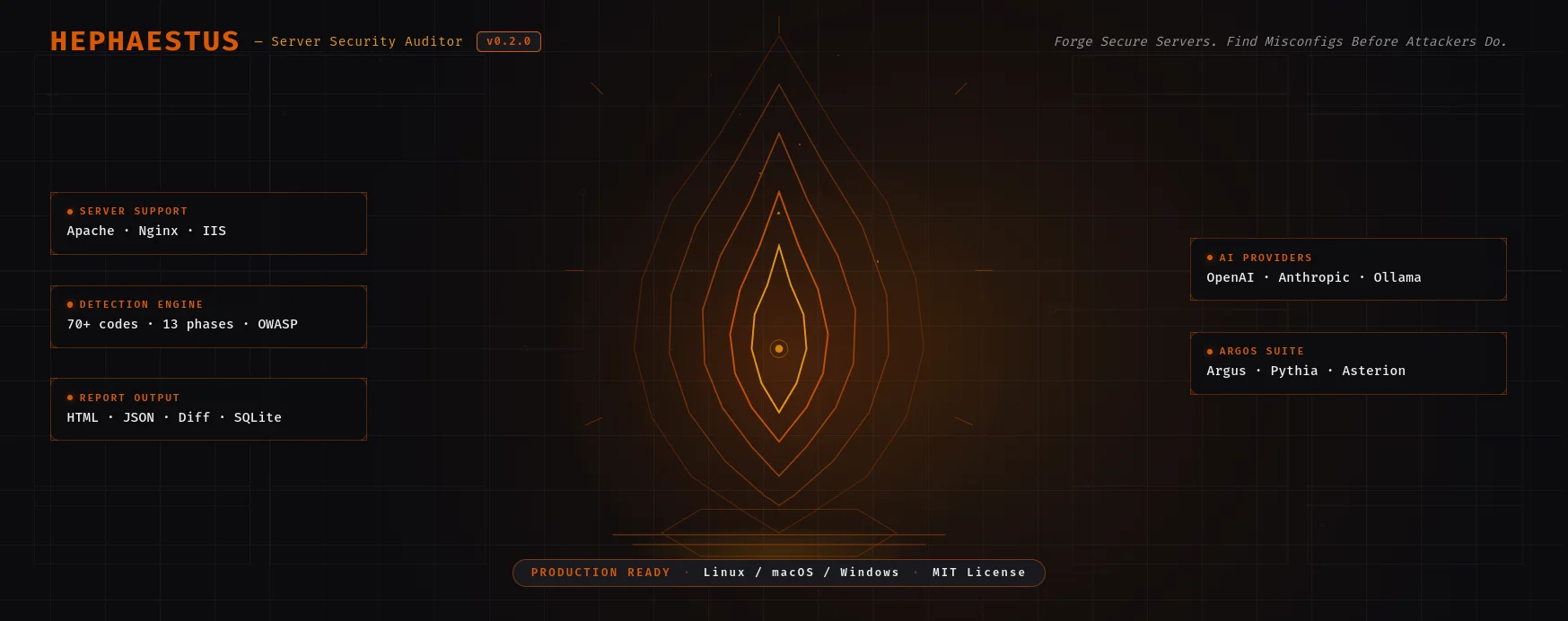

Hephaestus — 打造安全的服务器配置

实战演示

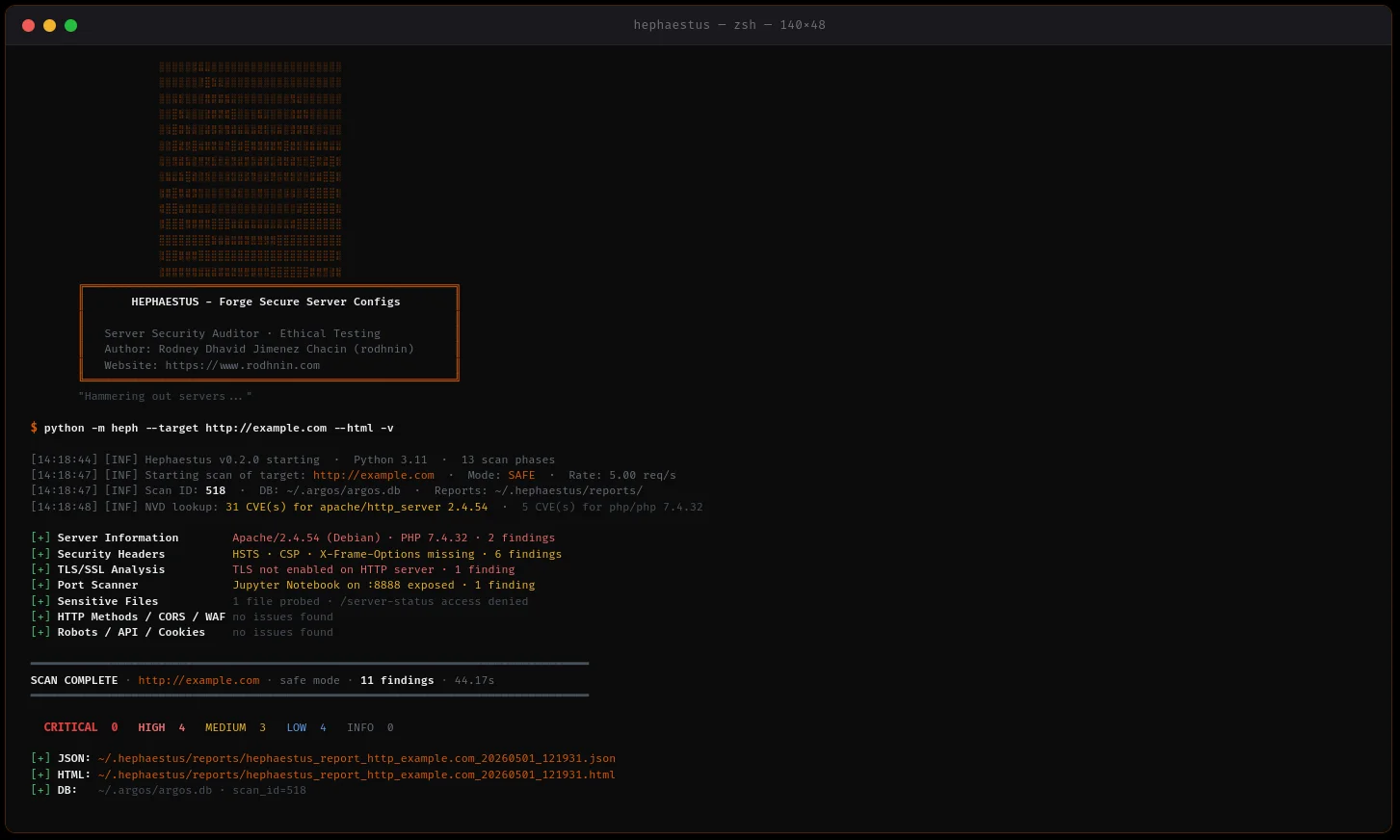
Hephaestus — 实时扫描输出
实时扫描 · Apache 2.4.54 · 11 个发现 · 44.17 秒 · 扫描 #518 · 安全模式

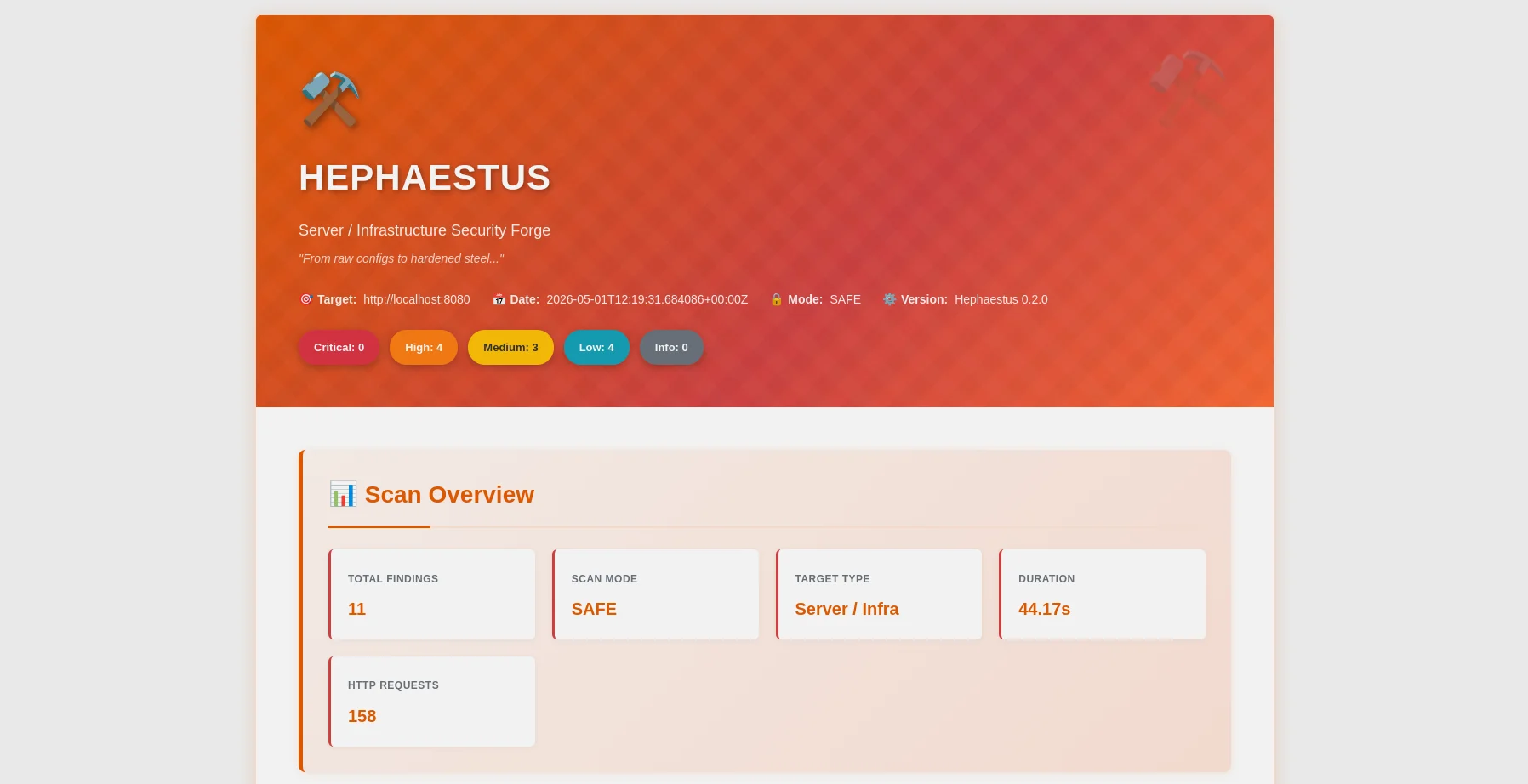
Hephaestus — HTML 报告概览
HTML 报告 — 严重等级分布、OWASP 映射、筛选栏
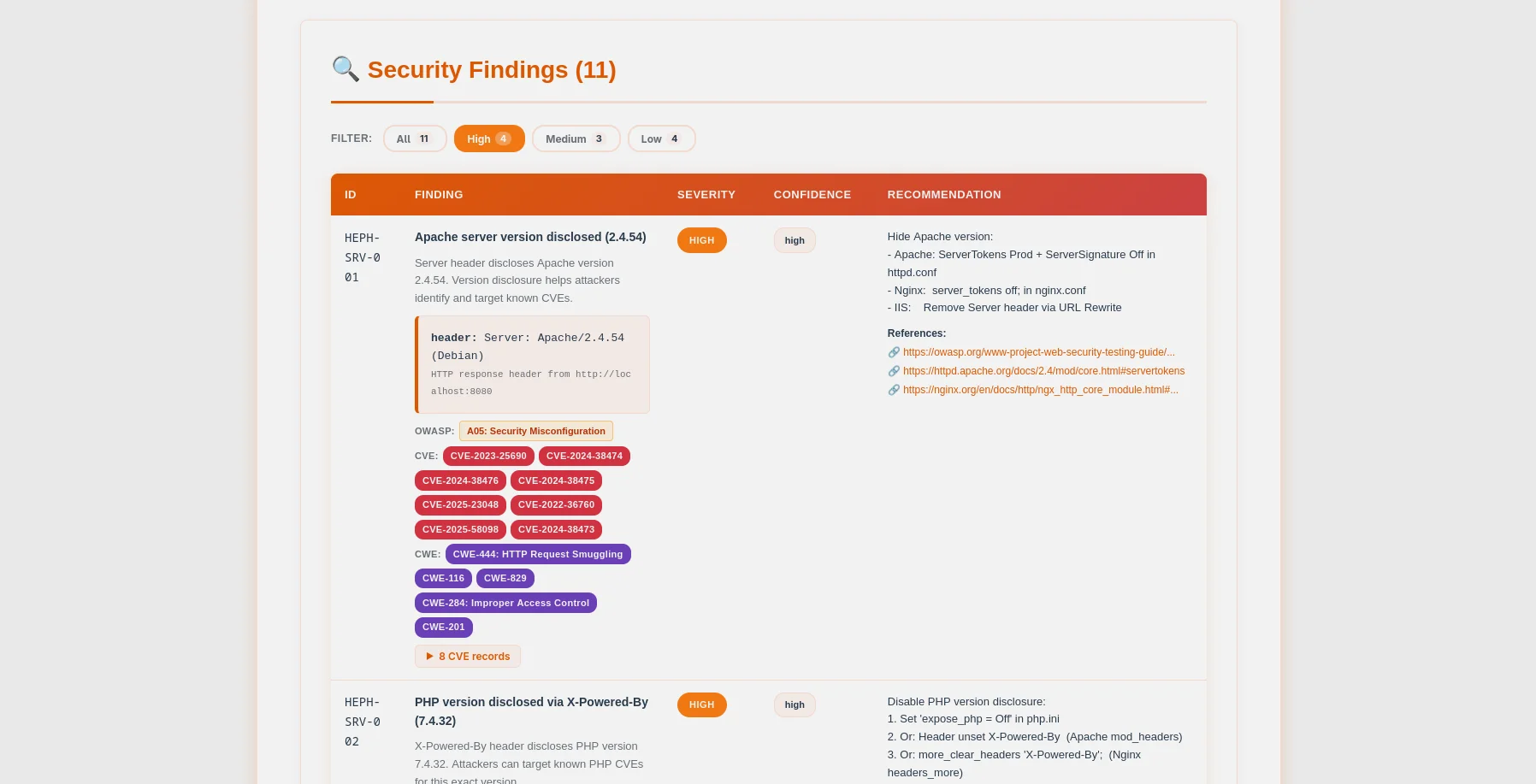
Hephaestus — 包含 CVE 徽章的发现表
发现表 — CVE/CWE 徽章、可展开的证据、配置片段

🎯 什么是 Hephaestus?

Hephaestus 是一个生产就绪的服务器安全审计工具,将伦理置于首位。专为系统管理员、DevOps 工程师和渗透测试人员设计,它扫描 Web 服务器配置(Apache、Nginx、IIS),在攻击者利用之前识别关键配置错误。

为什么选择 Hephaestus?

  • 🔒 伦理设计:授权令牌系统防止未经授权的扫描
  • 🤖 AI 驱动:GPT-4、Claude 或本地 Ollama 提供智能加固指南
  • 📊 专业报告:精美的 HTML + 机器可读的 JSON
  • 🚀 快速高效:并发扫描,智能速率限制
  • 💾 持久化跟踪:与 Argos 套件共享 SQLite 数据库(~/.argos/argos.db)
  • 🐳 Docker 就绪:容器化扫描 + 易受攻击的测试环境(Apache 和 Nginx)
  • 🎯 零误报:经过 55+ 验证测试的广泛测试

扫描内容


✨ 功能特性

🛡️ 核心安全审计```bash

One command, comprehensive server analysis

python -m heph --target https://example.com --html

root@kitploit:~
- **多服务器支持**:Apache、Nginx、IIS 检测与加固
- **并发扫描**:线程池 + 速率限制,实现快速且合规的扫描
- **证据收集**:保留 HTTP 响应、请求头、文件内容
- **优雅的错误处理**:稳健处理超时、DNS 故障、连接拒绝

### 🤖 AI 驱动的加固指南

根据需求选择 AI 提供商:

| Provider             | 最佳适用场景       | 速度             | 成本           | 隐私           |
| -------------------- | ------------------ | --------------- | -------------- | -------------- |
| **OpenAI GPT-4**     | 生产级质量       | ⚡ 快速 (35s)   | 💰 每次扫描 0.25 美元 | 🔒 标准       |
| **Anthropic Claude** | 注重隐私         | ⚡ 快速 (45s)   | 💰 每次扫描 0.30 美元 | 🔒 增强       |
| **Ollama (本地)**   | 完全隐私         | 🐢 缓慢 (28min) | 💰 免费        | 🔐 100% 离线   |

**两种分析模式:**

- **技术模式**:Apache/Nginx 配置片段、CLI 命令、逐步加固指导
- **管理模式**:面向利益相关者和管理层的简明风险评估

### 📊 专业报告

**JSON 报告**(机器可读)```json
{
  "tool": "hephaestus",
  "version": "0.2.0",
  "target": "https://example.com",
  "mode": "safe",
  "summary": {
    "critical": 3,
    "high": 2,
    "medium": 5,
    "low": 3,
    "info": 0
  },
  "findings": [...],
  "diff": {...}
}

HTML 报告(用户友好)

  • 🎨 锻造主题,橙/红渐变(⚒️ 铁匠美学)
  • 🏷️ 颜色编码的严重性徽章
  • 📝 可展开的证据部分
  • 🤖 AI 加固指南精美排版
  • 📱 响应式移动设计

🔐 同意令牌系统

激进扫描和 AI 分析需要所有权证明:```bash

1. Generate token

python -m heph --gen-consent example.com

2. Place token on your server

echo "verify-abc123..." > .well-known/verify-abc123.txt

3. Verify ownership

python -m heph --verify-consent http --domain example.com --token verify-abc123

4. Now you can use aggressive mode

python -m heph --target https://example.com --aggressive --use-ai

root@kitploit:~
### 💾 数据库持久化

SQLite 数据库 **与 Argos 套件共享** (`~/.argos/argos.db`):

- **扫描历史**: 日期、持续时间、发现数量、严重程度分布
- **发现库**: 可搜索的漏洞数据库(已存储 1159+ 条发现)
- **已验证域名**: 带过期时间的同意令牌跟踪
- **跨工具集成**: 与 Argus、Pythia 及未来工具无缝协作```bash
# Query recent scans
sqlite3 ~/.argos/argos.db "SELECT * FROM scans WHERE tool='hephaestus' ORDER BY scan_id DESC LIMIT 10"

# Find critical issues
sqlite3 ~/.argos/argos.db "SELECT * FROM findings WHERE severity='critical' AND tool='hephaestus'"

✅ 验证与测试

Hephaestus v0.2.0 已通过基于 Docker 的受控漏洞实验室(Apache 和 Nginx)进行了经验验证。

验证总结(2026年5月)

测试覆盖(13 个阶段):

  • ✅ 第 1 阶段:基本 CLI(退出代码、错误处理)
  • ✅ 第 2 阶段:同意令牌(HTTP 验证、激进模式)
  • ✅ 第 3 阶段:AI 集成(OpenAI、Anthropic、Ollama)
  • ✅ 第 4 阶段:报告生成(JSON、HTML、AI 分析)
  • ✅ 第 5 阶段:高级选项(速率限制、线程、超时)
  • ✅ 第 6 阶段:检查模块(70+ 项发现代码已验证)
  • ✅ 第 7 阶段:日志记录(文本、JSON、详细级别)
  • ✅ 第 8 阶段:数据库(模式、完整性、外键)
  • ✅ 第 9 阶段:错误处理(边缘情况、权限)
  • ✅ 第 10 阶段:集成(Argos 套件兼容性)
  • ✅ 第 11 阶段:CORS、Robots.txt、WAF 检测
  • ✅ 第 12 阶段:API 发现、Cookie 安全、phpinfo 分析
  • ✅ 第 13 阶段:配置文件解析器、差异报告、AI 成本跟踪

关键发现:

  • ✅ 所有关键漏洞均被检测(.env、.git、server-status、phpinfo)
  • ✅ 所有服务器版本均被识别(Apache 2.4.54、Nginx 1.18.0)
  • ✅ 所有安全标头均正确分析(检查了 6 个标头)
  • ✅ 所有目录列表问题均被识别
  • ✅ CORS、WAF、API、Cookie、phpinfo 模块完全正常运行
  • ✅ 差异报告 (--diff last) 在扫描历史中正常工作
  • ✅ 弹性错误处理(超时、DNS 故障、连接拒绝)

结论: Hephaestus 已可用于生产环境,适用于服务器安全评估。


🚀 快速开始

前提条件

  • Python 3.11+(推荐 3.12)
  • pip(Python 包管理器)
  • Docker(可选,用于漏洞实验室)

安装

1. 克隆仓库```bash git clone https://github.com/rodhnin/hephaestus-server-forger.git cd hephaestus-server-forger

root@kitploit:~
**2. (可选)如果尚未安装 `venv`,请安装**```bash
# Debian/Ubuntu
sudo apt update && sudo apt install -y python3-venv

# Fedora/RHEL
sudo dnf install python3-virtualenv

# macOS (via Homebrew)
brew install [email protected]

3. 创建并激活虚拟环境```bash python3 -m venv .venv source .venv/bin/activate

You should see (.venv) in your terminal prompt

root@kitploit:~
**4. 升级 pip**```bash
python -m pip install --upgrade pip

5. 安装依赖项```bash python -m pip install -r requirements.txt

root@kitploit:~
**6. 配置 API 密钥(如果使用云端 AI)**```bash
# OpenAI
export OPENAI_API_KEY="sk-..."

# Anthropic
export ANTHROPIC_API_KEY="sk-ant-..."

7. 验证安装```bash python -m heph --version

Output: heph 0.2.0

root@kitploit:~
### 您的第一次扫描```bash
# Basic scan (safe mode, no consent required)
python -m heph --target https://example.com

# With HTML report
python -m heph --target https://example.com --html

# With AI hardening guide (requires consent)
python -m heph --target https://example.com --use-ai --html

🐳 使用 Docker 快速开始

cd docker && ./deploy.sh

Select option 3 for testing (Both)

docker compose exec hephaestus python -m heph --target http://vulnerable-apache

🎉 成功! 检查 ~/.hephaestus/reports/ 获取你的报告。


📘 使用指南

基本扫描```bash

Safe mode (default) - Non-intrusive checks

python -m heph --target https://example.com

Generate HTML report

python -m heph --target https://example.com --html

Increase verbosity for debugging

python -m heph --target https://example.com -vv

Quiet mode (errors only)

python -m heph --target https://example.com -q

root@kitploit:~
### 高级扫描```bash
# Control scan speed (1-20 req/s)
python -m heph --target https://example.com --rate 10

# Control concurrency (1-20 threads)
python -m heph --target https://example.com --threads 8

# Custom timeout (useful for slow servers)
python -m heph --target https://example.com --timeout 60

# Custom output directory
python -m heph --target https://example.com --report-dir ./my-reports

# Custom User-Agent
python -m heph --target https://example.com --user-agent "MyBot/1.0"

# Disable SSL verification (testing only)
python -m heph --target https://self-signed.badssl.com --no-verify-ssl

AI驱动的加固指南

步骤1:配置您的提供商

编辑 config/defaults.yaml:```yaml ai: langchain: provider: "openai" # Options: openai, anthropic, ollama model: "gpt-4o-mini-2024-07-18" temperature: 0.3

root@kitploit:~
**步骤 2: 测试你的设置**```bash
# Verify AI provider works
python -m heph.core.ai openai

步骤3:运行AI驱动的扫描```bash

Technical hardening guide (for sysadmins)

python -m heph --target https://example.com
--use-ai
--ai-tone technical
--html

Executive risk summary (for management)

python -m heph --target https://example.com
--use-ai
--ai-tone non_technical
--html

Both analyses in one report

python -m heph --target https://example.com
--use-ai
--ai-tone both
--html

Stream AI output token-by-token

python -m heph --target https://example.com
--use-ai
--ai-stream
--html

Compare two AI providers in parallel

python -m heph --target https://example.com
--use-ai
--ai-compare openai,anthropic
--html

Agent mode with live NVD CVE lookup

python -m heph --target https://example.com
--use-ai
--ai-agent
--html

Set a cost budget cap (USD)

python -m heph --target https://example.com
--use-ai
--ai-budget 0.50
--html

root@kitploit:~
### 激进模式 (需要同意)```bash
# Step 1: Generate consent token
python -m heph --gen-consent example.com
# Output: Token: verify-a3f9b2c1d8e4...

# Step 2: Place token on your server
# Create: https://example.com/.well-known/verify-a3f9b2c1d8e4.txt
# Content: verify-a3f9b2c1d8e4

# Step 3: Verify consent
python -m heph --verify-consent http \
  --domain example.com \
  --token verify-a3f9b2c1d8e4

# Step 4: Run aggressive scan (deeper checks, higher rate limit)
python -m heph --target https://example.com --aggressive

🤖 AI 驱动分析

Hephaestus 使用 LangChain 1.0.0,支持多种 AI 提供商。

支持的提供商

OpenAI GPT-4 Turbo

最佳用途:生产环境

  • ⭐ 质量:优秀 (5/5)
  • ⚡ 速度:~35 秒
  • 💰 成本:约 $0.25/次扫描
  • 🔒 隐私:标准(传输中数据加密)```bash export OPENAI_API_KEY="sk-..." python -m pip install langchain-openai==1.0.0
root@kitploit:~
#### Anthropic Claude

**最适合:增强隐私**

- ⭐ 质量:优秀 (5/5)
- ⚡ 速度:约45秒
- 💰 成本:每次扫描约$0.30
- 🔒 隐私:增强(Anthropic的隐私优先方法)```bash
export ANTHROPIC_API_KEY="sk-ant-..."
python -m pip install langchain-anthropic==1.0.0

Ollama(本地模型)

最适合:完全隐私

  • ⭐ 质量:良好(3/5)
  • 🐢 速度:约28分钟(CPU)或约75秒(GPU)
  • 💰 成本:免费
  • 🔐 隐私:100%离线(数据永不离开您的机器)```bash

Install Ollama: https://ollama.ai

ollama pull llama3.2 python -m pip install "langchain-ollama>=0.3.0,<0.4.0"

root@kitploit:~
### 隐私与安全

**自动净化**

在发送给AI提供商之前,Hephaestus自动移除:

- ✅ 同意令牌
- ✅ API密钥与凭证
- ✅ 私钥与证书
- ✅ 内部IP地址
- ✅ 数据库凭证

**仅限自愿参与**

- AI分析需要显式指定 `--use-ai` 标志
- 激进扫描需要验证过的同意令牌
- 您控制哪些提供商能看到您的数据

**最大隐私保障**:在本地使用 Ollama。

---

## 🧪 安全测试实验室

**⚠️ 未经书面许可,切勿扫描生产环境!**

使用我们的Docker实验室安全练习:

### 设置测试环境

### 选项1:交互式脚本(推荐)```bash
# Run the interactive deployment script
cd docker && ./deploy.sh

该脚本提供5个选项:

  1. 生产环境 → 部署 Hephaestus 扫描服务
  2. 测试实验室 → 部署易受攻击的 Web 服务器(Apache + Nginx)
  3. 两者 → 部署两个环境
  4. 全部停止 → 停止所有运行中的服务
  5. 全部移除 → 移除容器、卷和数据(需要确认)

选项 2:手动 Docker Compose

仅测试实验室:```bash

Start vulnerable servers (Apache + Nginx)

docker compose -f docker/compose.testing.yml up -d

Wait for initialization (~15 seconds)

sleep 15

Verify services

docker compose -f docker/compose.testing.yml ps curl -I http://localhost:8080 # Apache curl -I http://localhost:8081 # Nginx

root@kitploit:~
**生产扫描器:**```bash
# Start Hephaestus scanner service
docker compose -f docker/compose.yml up -d

# Run a scan
docker compose -f docker/compose.yml exec hephaestus heph --target https://example.com

# View reports
ls -lh docker/reports/

两种环境:```bash

Start both production and testing

docker compose -f docker/compose.yml up -d docker compose -f docker/compose.testing.yml up -d

Scan the testing labs from host

python -m heph --target http://localhost:8080 --html python -m heph --target http://localhost:8081 --html

root@kitploit:~
### 扫描实验室```bash
# Scan Apache lab (from host)
python -m heph --target http://localhost:8080 --html

# Scan Nginx lab (from host)
python -m heph --target http://localhost:8081 --html

# AI-powered analysis (requires OPENAI_API_KEY)
python -m heph --target http://localhost:8080 --use-ai --html

# OR from inside production container (using container name)
docker compose -f docker/compose.yml exec hephaestus python -m heph --target http://hephaestus-vulnerable-apache --html

预期结果

Apache 实验室 (localhost:8080):

  • 总共 42 个发现(跨越所有 13 个扫描阶段)
  • 包括 CORS、WAF、API、Cookie、phpinfo 和 OWASP 映射的发现

Nginx 实验室 (localhost:8081):

  • 总共 25 个发现(跨越所有 13 个扫描阶段)
  • 包括 CORS、WAF、API、Cookie 和 OWASP 映射的发现

清理

停止服务:```bash

Using script

cd docker && ./deploy.sh # Choose option 4 (Stop All)

OR manually

docker compose -f docker/compose.yml down docker compose -f docker/compose.testing.yml down

root@kitploit:~
**清除所有内容(警告:删除数据和报告):**```bash
# Using script (with confirmation)
cd docker && ./deploy.sh  # Choose option 5 (Remove All)

# OR manually
docker compose -f docker/compose.yml down -v
docker compose -f docker/compose.testing.yml down -v
rm -rf docker/data docker/reports

🐳 Docker 部署

Hephaestus 提供两种 Docker 部署选项:

选项 1:Docker Compose(推荐)

生产扫描服务:```bash

Start long-running scanner service

docker compose -f docker/compose.yml up -d

Run scans

docker compose -f docker/compose.yml exec hephaestus heph --target https://example.com --html

View reports

ls -lh docker/reports/

Stop service

docker compose -f docker/compose.yml down

root@kitploit:~
**测试实验室(存在漏洞的服务器):**```bash
# Start Apache + Nginx vulnerable servers
docker compose -f docker/compose.testing.yml up -d

# Scan from host
python -m heph --target http://localhost:8080 --html

# Stop lab
docker compose -f docker/compose.testing.yml down

交互式部署脚本:```bash

Use the interactive menu

cd docker && ./deploy.sh

root@kitploit:~
### 选项 2:直接运行 Docker

**构建镜像:**```bash
docker build -f docker/Dockerfile -t hephaestus:0.2.0 .

运行一次性扫描:```bash docker run --rm
-v $(pwd)/docker/reports:/reports
-v $(pwd)/docker/data:/data
hephaestus:0.2.0
--target https://example.com
--html

root@kitploit:~
**带AI分析:**```bash
docker run --rm \
  -v $(pwd)/docker/reports:/reports \
  -e OPENAI_API_KEY="$OPENAI_API_KEY" \
  hephaestus:0.2.0 \
  --target https://example.com \
  --use-ai \
  --ai-tone both \
  --html

扫描本地测试实验室:```bash

Start testing lab first

docker compose -f docker/compose.testing.yml up -d

Scan from container (join the testing lab network)

docker run --rm
--network hephaestus-lab
hephaestus:0.2.0
--target http://hephaestus-vulnerable-apache

root@kitploit:~
---

## 📊 理解报告

### 报告结构```
~/.hephaestus/
├── reports/
│   ├── hephaestus_report_example_20251021_143022.json
│   └── hephaestus_report_example_20251021_143022.html
└── (shared with Argos)
    ~/.argos/
    ├── argos.db          # Shared database
    └── logs/
        └── hephaestus.log

查找ID(模式,总计70+)```

HEPH-SRV-001: Server version disclosed (Apache/Nginx/IIS) HEPH-SRV-004: Server disclosed in error page HEPH-SRV-016: PHP version disclosed in Server header HEPH-SRV-017: OpenSSL version disclosed in Server header HEPH-FILE-001: Environment file exposed (.env) HEPH-FILE-002: Git repository exposed HEPH-FILE-003: PHP information page exposed HEPH-FILE-004: Apache server-status exposed HEPH-HTTP-003: Unsafe HTTP method in OPTIONS (TRACE) HEPH-HTTP-008: TRACE method enabled (XST vulnerability) HEPH-HDR-001: Missing security header: HSTS HEPH-HDR-002: Missing security header: CSP HEPH-HDR-003: Missing security header: X-Frame-Options HEPH-HDR-004: Missing security header: X-Content-Type-Options HEPH-HDR-005: Missing security header: Referrer-Policy HEPH-HDR-006: Missing security header: Permissions-Policy HEPH-CFG-001: Directory listing enabled HEPH-TLS-000: TLS not enabled HEPH-TLS-001: Weak TLS protocol (SSLv3, TLS 1.0) HEPH-TLS-002: Weak cipher suite enabled COR-001 to COR-006: CORS misconfiguration findings ROB-001/002/003: Robots.txt intelligence findings WAF-001/002: WAF detection findings API-001 to API-005: API discovery findings COO-001 to COO-005: Cookie security findings PHP-001 to PHP-009: phpinfo() dangerous settings

root@kitploit:~
### 严重性映射

- **严重**: .env 暴露、.git 可访问、phpinfo、server-status、SQL 转储
- **高**: 服务器版本泄露、弱 TLS、缺少 TLS、不安全的 HTTP 方法
- **中**: 缺少重要标头(HSTS、CSP、X-Frame-Options)、目录列表、错误页面泄露
- **低**: 次要标头(X-Content-Type-Options、Referrer-Policy、Permissions-Policy)
- **信息**: 信息性发现(检测到服务器、TLS 1.2 正常)

---

## 📁 项目结构```
hephaestus-server-forger/
│
├── heph/                       # Main application package
│   ├── checks/                 # Security check modules (13 phases)
│   │   ├── __init__.py
│   │   ├── api_discovery.py    # Phase 11: Swagger/OpenAPI/GraphQL exposure
│   │   ├── config.py           # Phase 5: Directory listing detection
│   │   ├── config_file.py      # Phase 14: Offline httpd.conf/nginx.conf parser
│   │   ├── cookies.py          # Phase 12: HttpOnly/Secure/SameSite analysis
│   │   ├── cors.py             # Phase 8: CORS wildcard & reflection probes
│   │   ├── files.py            # Phase 2: 70+ sensitive file paths
│   │   ├── headers.py          # Phase 4: Security headers analysis
│   │   ├── http_methods.py     # Phase 3: Unsafe HTTP methods (PUT/DELETE/TRACE)
│   │   ├── phpinfo.py          # Phase 13: phpinfo() dangerous settings
│   │   ├── ports.py            # Phase 7: 37-port scanner with banner grabbing
│   │   ├── robots.py           # Phase 9: robots.txt disallowed path analysis
│   │   ├── server_info.py      # Phase 1: Apache/Nginx/IIS fingerprinting
│   │   ├── tls.py              # Phase 6: Deep TLS/SSL + CVE correlation
│   │   └── waf.py              # Phase 10: 13 WAF signatures detection
│   │
│   ├── core/                   # Core infrastructure
│   │   ├── __init__.py
│   │   ├── ai.py               # LangChain AI (GPT-4/Claude/Ollama) + cost tracking
│   │   ├── config.py           # Configuration loader
│   │   ├── consent.py          # Consent token system (HTTP + DNS)
│   │   ├── cve_lookup.py       # NVD CVE API integration
│   │   ├── db.py               # SQLite — shared with Argos suite (~/.argos/argos.db)
│   │   ├── diff.py             # Scan diff engine (--diff last / --diff <id>)
│   │   ├── http_client.py      # Token-bucket rate-limited HTTP client
│   │   ├── logging.py          # Structured logging
│   │   ├── owasp.py            # HEPH-* code → OWASP Top 10 2021 mapper
│   │   └── report.py           # JSON + HTML report generation
│   │
│   ├── __init__.py             # Package metadata
│   ├── __main__.py             # Entry point
│   ├── cli.py                  # CLI (30+ flags incl. --use-ai, --diff, --config-file)
│   └── scanner.py              # Orchestrator — 13 parallel phases
│
├── assets/
│   └── ascii.txt               # Hephaestus braille ASCII art
│
├── config/                     # Configuration files
│   ├── defaults.yaml           # Default settings
│   └── prompts/                # AI prompt templates
│       ├── technical.txt       # Technical hardening prompt
│       └── non_technical.txt   # Executive summary prompt
│
├── db/
│   └── migrate.sql             # Shared database schema (Argos suite)
│
├── docker/                     # Docker deployment
│   ├── vulnerable-apache/      # Vulnerable Apache lab (port 8080/8443)
│   │   └── docker-entrypoint.sh
│   ├── vulnerable-nginx/       # Vulnerable Nginx lab (port 8081/8444)
│   │   └── docker-entrypoint.sh
│   ├── compose.yml             # Production stack
│   ├── compose.testing.yml     # Vulnerable lab stack
│   ├── deploy.sh               # Interactive deployment script
│   └── Dockerfile              # Production image
│
├── docs/                       # Documentation
│   ├── media/                  # README visual assets
│   │   ├── hephaestus-banner.webp  # Banner 1280×400
│   │   ├── hephaestus-hero.webp    # Hero 1600×640
│   │   ├── console.webp            # Terminal scan output
│   │   ├── report_html.webp        # HTML report header
│   │   └── report_findings.webp    # Findings table with CVE badges
│   ├── AI_INTEGRATION.md       # AI providers setup guide
│   ├── CONSENT.md              # Consent system details
│   ├── DATABASE_GUIDE.md       # Shared database reference
│   ├── ETHICS.md               # Ethical use guidelines
│   ├── REPORT_FORMAT.md        # JSON/HTML report specification
│   ├── ROADMAP.md              # v0.3.0 tickets and priorities
│   └── TESTING_GUIDE.md        # Safe testing practices
│
├── schema/
│   └── report.schema.json      # JSON report schema (OWASP + CVE fields)
│
├── scripts/
│   └── cli-examples.md         # CLI usage examples
│
├── templates/
│   └── report.html.j2          # HTML report template — forge theme
│
├── CHANGELOG.md                # Version history
├── CODE_OF_CONDUCT.md          # Community guidelines
├── CONTRIBUTING.md             # Contribution guide
├── LICENSE                     # MIT License
├── README.md                   # This file
├── requirements.txt            # Python dependencies
└── setup.py                    # Package installer

🗺️ 路线图

v0.1.0 — 初始发布 ✅(2026 年 1 月)

状态: 🎉 已发布(已被 v0.2.0 取代)

  • ✅ 6 个安全检查模块(服务器、文件、方法、标头、TLS、配置)
  • ✅ AI 驱动的加固指南(OpenAI、Anthropic、Ollama)
  • ✅ 同意令牌系统(HTTP + DNS 验证)
  • ✅ 专业报告(JSON + HTML,含 AI 分析)
  • ✅ SQLite 持久化(与 Argos 套件共享:~/.argos/argos.db)
  • ✅ Docker 支持,附带易受攻击的实验环境(Apache 和 Nginx)
  • ✅ 全面的错误处理与弹性
  • ✅ 55+ 项验证测试(10 个阶段,100% 通过)

v0.2.0 — 增强检测 ✅(2026 年 5 月)

状态: 🎉 已发布

  • ✅ 13 个扫描阶段(相比 v0.1.0 新增 7 个阶段)
  • ✅ 深度 TLS 分析:集成 SSLyze,密码套件分析,CVE 关联,A+/F 评级
  • ✅ 框架与模块检测:Laravel、Django、Rails、mod_security、WAF 检测
  • ✅ Apache/Nginx 配置解析器(--config-file):离线分析 httpd.conf/nginx.conf
  • ✅ CORS 检测:通配符、null 来源、反射探测(COR-001 至 COR-006)
  • ✅ Robots.txt 情报:禁止路径分析、实时可达性探测(ROB-001/002/003)
  • ✅ WAF 检测:13 种签名,包括 Cloudflare、Sucuri、ModSecurity、AWS WAF(WAF-001/002)
  • ✅ API 发现:Swagger/OpenAPI、GraphQL 自省、未授权端点(API-001 至 API-005)
  • ✅ Cookie 安全:逐 Cookie 的 HttpOnly/Secure/SameSite 分析(COO-001 至 COO-005)
  • ✅ phpinfo() 深度分析:9 项危险 PHP 设置(PHP-001 至 PHP-009)
  • ✅ OWASP Top 10 2021 映射至每个发现项
  • ✅ 实时 CVE 查询,通过 NVD API v2(Apache、Nginx、PHP、OpenSSL)
  • ✅ 端口扫描器:37 个端口,支持横幅抓取
  • ✅ AI 成本追踪(--ai-budget):预算限制、costs.json、ai_costs 表
  • ✅ AI 流式输出(--ai-stream):实时逐 token 输出
  • ✅ AI 对比(--ai-compare):并行运行两个提供商
  • ✅ AI 代理(--ai-agent):LangChain 代理,支持 NVD CVE 查询
  • ✅ 差异报告(--diff last / --diff SCAN_ID):新增/修复/持续的发现项
  • ✅ :CVE/CWE 徽章、过滤栏、可展开配置片段、AI 选项卡

v0.3.0 — 企业级功能(2026 年 Q3)

重点: 易用性、规模、交互式 AI

  • 🔜 交互式配置管理:Metasploit 风格界面(heph --show-options、heph --set)
  • 🔜 数据库 CLI:无需 SQL (heph db scans list、heph db findings search)
  • 🔜 多站点扫描:从文件批量处理
  • 🔜 AI 聊天界面:对话式加固指导
  • 🔜 CI/CD 集成:GitHub Actions、Jenkins、GitLab 模板
  • 🔜 REST API 服务器:基于 FastAPI 的自动化 API
  • 🔜 Nmap 集成:端口扫描,实现全面评估

v0.4.0 — 智能与自动化(2026 年 Q4)

重点: 机器学习、自动化、高级 AI

  • 🔜 自动修复:用于自动修复的 Ansible/Puppet playbook
  • 🔜 基于机器学习的检测:异常检测、减少误报
  • 🔜 分布式扫描:用于大规模操作的工作节点
  • 🔜 高级 AI 代理:自主扫描计划、漏洞利用生成

Pro Track(2027 年 Q1)

面向企业的商业产品

进行中

有关详细功能描述,请参阅 ROADMAP.md


🔒 伦理与法律

黄金法则

仅扫描您拥有或已获得明确书面许可进行测试的系统。

同意强制

Hephaestus 实施了技术控制来防止滥用:

法律框架

未经授权访问计算机系统在大多数司法管辖区是非法的:

  • 🇺🇸 美国:计算机欺诈与滥用法案 (CFAA)
  • 🇬🇧 英国:1990 年计算机滥用法案
  • 🇪🇺 欧盟:2013/40/EU 指令
  • 🌍 国际:各种网络犯罪法律

最佳实践

  1. ✅ 扫描前获得书面授权
  2. ✅ 明确界定范围(哪些域名/IP)
  3. ✅ 记录一切(同意、发现、修复)
  4. ✅ 首先使用安全模式建立基线
  5. ✅ 负责任地报告发现(协调披露)
  6. ❌ 未经明确许可,绝不利用漏洞
  7. ❌ 绝不扫描第三方网站(例如 apache.org、nginx.com)

完整伦理指南,请参阅 docs/ETHICS.md


🤝 贡献

我们欢迎贡献!无论是:

  • 🐛 错误报告
  • 💡 功能请求
  • 📝 文档改进
  • 🔧 代码贡献

如何贡献

  1. Fork 仓库
  2. 创建功能分支(git checkout -b feature/amazing-feature)
  3. 进行更改
  4. 编写/更新测试(适用时)
  5. 提交更改(git commit -m 'Add amazing feature')
  6. 推送到分支(git push origin feature/amazing-feature)
  7. 打开 Pull Request

开发环境搭建```bash

Clone your fork

git clone https://github.com/YOUR-USERNAME/hephaestus-server-forger.git cd hephaestus-server-forger

Install development dependencies

python -m pip install -r requirements.txt python -m pip install pytest black flake8 mypy

Run code formatting

black heph/

Run linting

flake8 heph/ mypy heph/

Run tests (when available)

pytest tests/

root@kitploit:~
### 报告问题

发现了一个漏洞?有功能请求?

**提交问题**:https://github.com/rodhnin/hephaestus-server-forger/issues

请包含:

- Hephaestus 版本 (`python -m heph --version`)
- Python 版本 (`python --version`)
- 操作系统
- 复现步骤(针对漏洞)
- 预期行为与实际行为

---

## 📚 文档

综合文档位于 `docs/` 目录中:

| 文档                                        | 描述                                       |
| ------------------------------------------- | ----------------------------------------- |
| [AI_INTEGRATION.md](https://github.com/rodhnin/hephaestus-server-forger/blob/HEAD/docs/AI_INTEGRATION.md) | 完整的 AI 设置指南(所有 3 个提供商)       |
| [CONSENT.md](https://github.com/rodhnin/hephaestus-server-forger/blob/HEAD/docs/CONSENT.md)               | 同意令牌系统技术细节                        |
| [DATABASE_GUIDE.md](https://github.com/rodhnin/hephaestus-server-forger/blob/HEAD/docs/DATABASE_GUIDE.md) | SQLite 模式、查询、管理                     |
| [ETHICS.md](https://github.com/rodhnin/hephaestus-server-forger/blob/HEAD/docs/ETHICS.md)                 | 法律框架和道德指南                        |
| [REPORT_FORMAT.md](https://github.com/rodhnin/hephaestus-server-forger/blob/HEAD/docs/REPORT_FORMAT.md)   | JSON 模式和 HTML 规范                      |
| [TESTING_GUIDE.md](https://github.com/rodhnin/hephaestus-server-forger/blob/HEAD/docs/TESTING_GUIDE.md)   | 使用 Docker 实验室进行安全测试              |
| [ROADMAP.md](https://github.com/rodhnin/hephaestus-server-forger/blob/HEAD/docs/ROADMAP.md)               | 未来特性和开发计划                        |

### 快速链接

- **变更日志**:[CHANGELOG.md](https://github.com/rodhnin/hephaestus-server-forger/blob/HEAD/CHANGELOG.md)
- **许可证**:[LICENSE](https://github.com/rodhnin/hephaestus-server-forger/blob/HEAD/LICENSE)
- **CLI 示例**:[scripts/cli-examples.md](https://github.com/rodhnin/hephaestus-server-forger/blob/HEAD/scripts/cli-examples.md)

---

## ⚖️ 许可证

本项目采用 **MIT 许可证** - 详见 [LICENSE](https://github.com/rodhnin/hephaestus-server-forger/blob/HEAD/LICENSE) 文件。```
MIT License

Copyright (c) 2026 Rodney Dhavid Jimenez Chacin

Permission is hereby granted, free of charge, to any person obtaining a copy
of this software and associated documentation files (the "Software"), to deal
in the Software without restriction, including without limitation the rights
to use, copy, modify, merge, publish, distribute, sublicense, and/or sell
copies of the Software, and to permit persons to whom the Software is
furnished to do so, subject to the following conditions:

The above copyright notice and this permission notice shall be included in all
copies or substantial portions of the Software.

THE SOFTWARE IS PROVIDED "AS IS", WITHOUT WARRANTY OF ANY KIND, EXPRESS OR
IMPLIED, INCLUDING BUT NOT LIMITED TO THE WARRANTIES OF MERCHANTABILITY,
FITNESS FOR A PARTICULAR PURPOSE AND NONINFRINGEMENT.

⚠️ 免责声明

重要提示: 此工具仅用于授权安全测试。

法律声明

使用 Hephaestus 即表示您确认并同意:

  1. ✅ 您将仅扫描您拥有或获得明确书面许可的系统
  2. ✅ 您将遵守所有适用法律和法规
  3. ✅ 您理解未经授权访问是违法的(如 CFAA、计算机滥用法等)
  4. ✅ 作者和贡献者对滥用不承担任何责任
  5. ✅ 本软件按**“原样”提供,不提供任何担保**

负责任披露

如果您使用 Hephaestus 发现漏洞:

  • 📧 首先私下联系网站所有者
  • ⏰ 给予合理的修复时间(通常 90 天)
  • 🤝 协调披露时间线
  • 📝 专业地记录您的发现

如有疑问

不要扫描。 如果您不确定是否获得许可,很可能您没有。


🙏 致谢

Hephaestus 站在巨人的肩膀上:

  • Apache & Nginx — 文档和安全加固指南
  • OWASP — 安全标准(Top 10、测试指南、安全标头项目)
  • CIS Benchmarks — 服务器加固最佳实践
  • LangChain — 用于智能分析的 AI 框架
  • Anthropic & OpenAI — 用于漏洞分析的 AI 模型
  • Ollama — 面向隐私扫描的本地 AI 推理
  • Python Community — 出色的库和工具

特别感谢所有实践并推广道德黑客的安全研究员。


👤 作者

Rodney Dhavid Jimenez Chacin (rodhnin)

  • 🌐 网站与联系:rodhnin.com
  • 💼 GitHub:@rodhnin
  • 🔗 项目:hephaestus-server-forger

如有问题、反馈或合作咨询,请访问 rodhnin.com 与我联系。


💬 社区

  • 讨论:GitHub Discussions
  • 问题:GitHub Issues
  • 发布:GitHub Releases

为全世界的道德黑客和系统管理员用心打造 ❤️

⭐ 如果觉得有用,请给这个仓库点个星! ⭐

报告 Bug • 请求功能 • 文档


Hephaestus v0.2.0 — 2026 年 5 月

下载工具
检查类别详情
服务器信息通过头部和错误页面披露 Apache/Nginx/IIS 版本
敏感文件.env、.git、phpinfo.php、server-status、备份、配置文件(70+ 路径)
HTTP 方法不安全方法(PUT、DELETE、TRACE、OPTIONS)
安全头部HSTS、CSP、X-Frame-Options、X-Content-Type-Options、Referrer-Policy、Permissions-Policy
TLS/SSL 配置深度分析:密码套件、协议版本、证书有效性、CVE 关联
目录列表Apache/Nginx 在敏感目录上启用了 autoindex
CORS 检测通配符、空来源、反射探测(COR-001 至 COR-006)
Robots.txt禁止路径分析,在激进模式下进行实时可访问性探测
WAF 检测13 种签名,包括 Cloudflare、Sucuri、ModSecurity、AWS WAF、Imperva
API 发现Swagger/OpenAPI 规范暴露、GraphQL 内省、未认证端点
Cookie 安全跨认证路径对每个 Cookie 进行 HttpOnly/Secure/SameSite 分析
phpinfo() 分析9 个危险的 PHP 设置:display_errors、allow_url_include、open_basedir 等
配置文件解析器离线分析 httpd.conf / nginx.conf 中的配置错误
端口扫描器37 个常用端口,带横幅抓取和 CVE 丰富化
指标结果
测试套件55/55 测试通过(13 个阶段)
Apache 检测所有 13 个扫描阶段共 42 项发现
Nginx 检测所有 13 个扫描阶段共 25 项发现
精确率100%(零误报)
召回率100%(零漏报)
F1 分数100%(完美平衡)
平均扫描时长30-35 秒
数据库操作已追踪 80 次扫描,存储 1159+ 条发现
增强的 HTML 报告
  • ✅ 70+ 个发现代码已验证
  • 模式检查需要同意速率限制
    安全非侵入式❌ 否5 请求/秒
    激进深度探测✅ 是12 请求/秒
    AI 分析加固指南✅ 是N/A