

道德网络安全审计器 — 超过50项检查覆盖SMB、RDP、LDAP、SSH、Kerberos等,配备AI驱动的CVE分析和OWASP/CIS/NIST合规映射。
快速开始 · 文档 · Docker · AI功能 · 在GitHub上标星
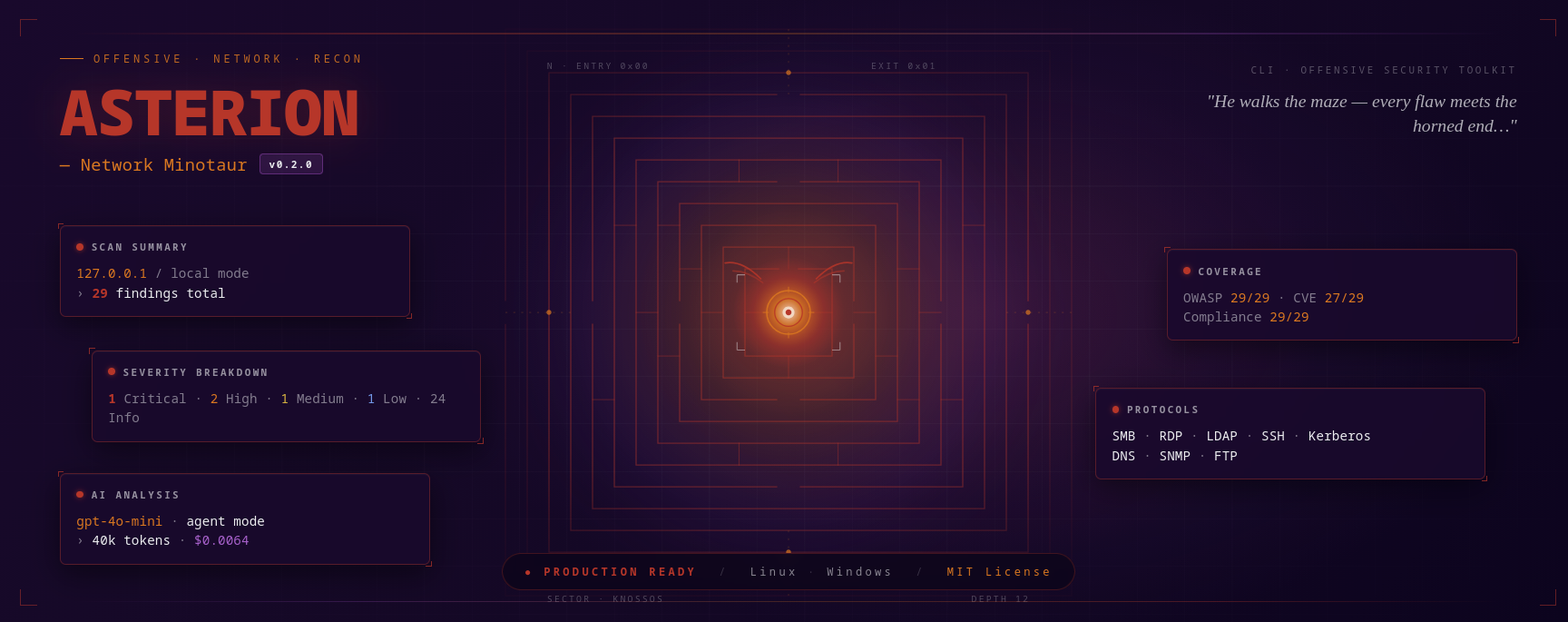
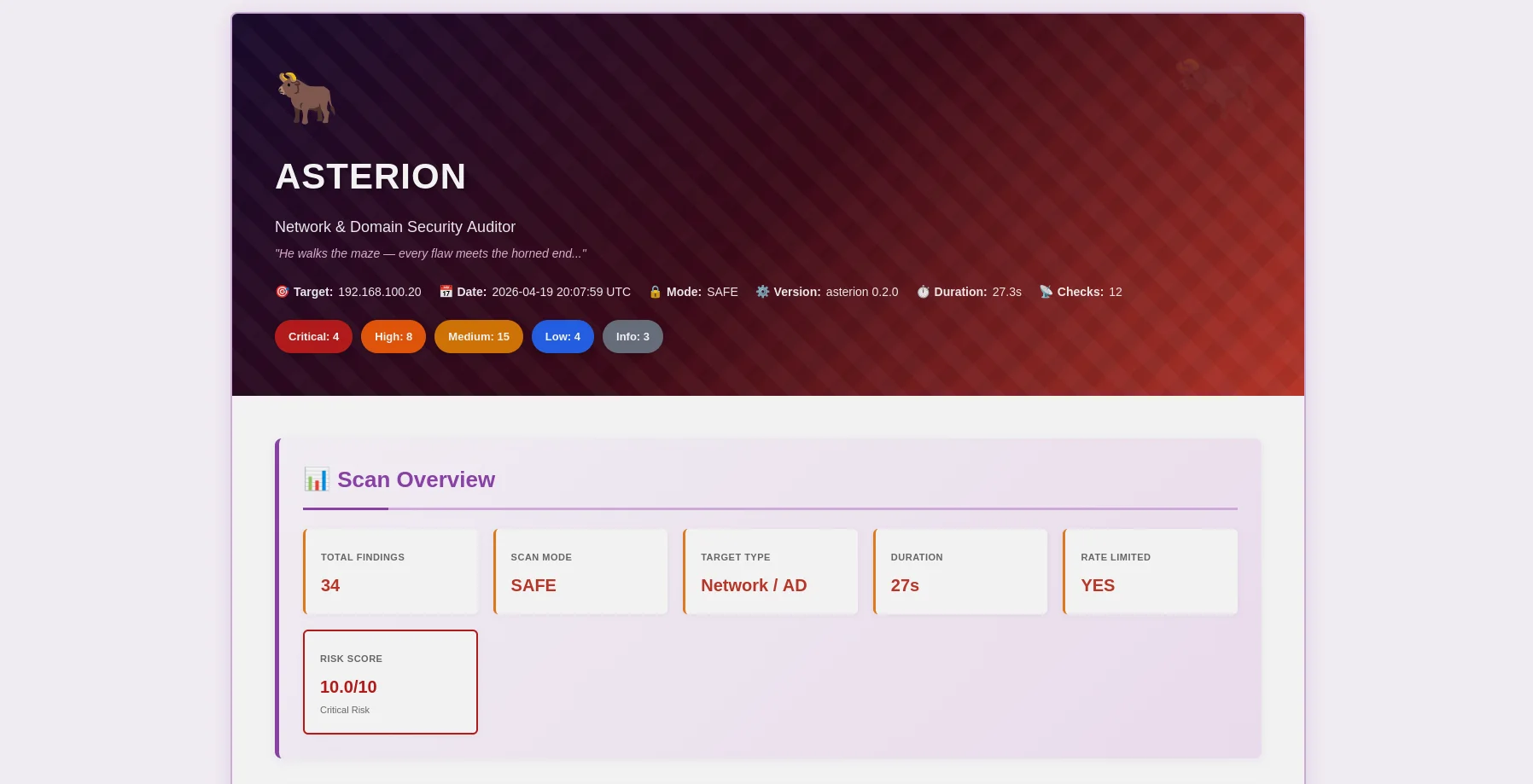
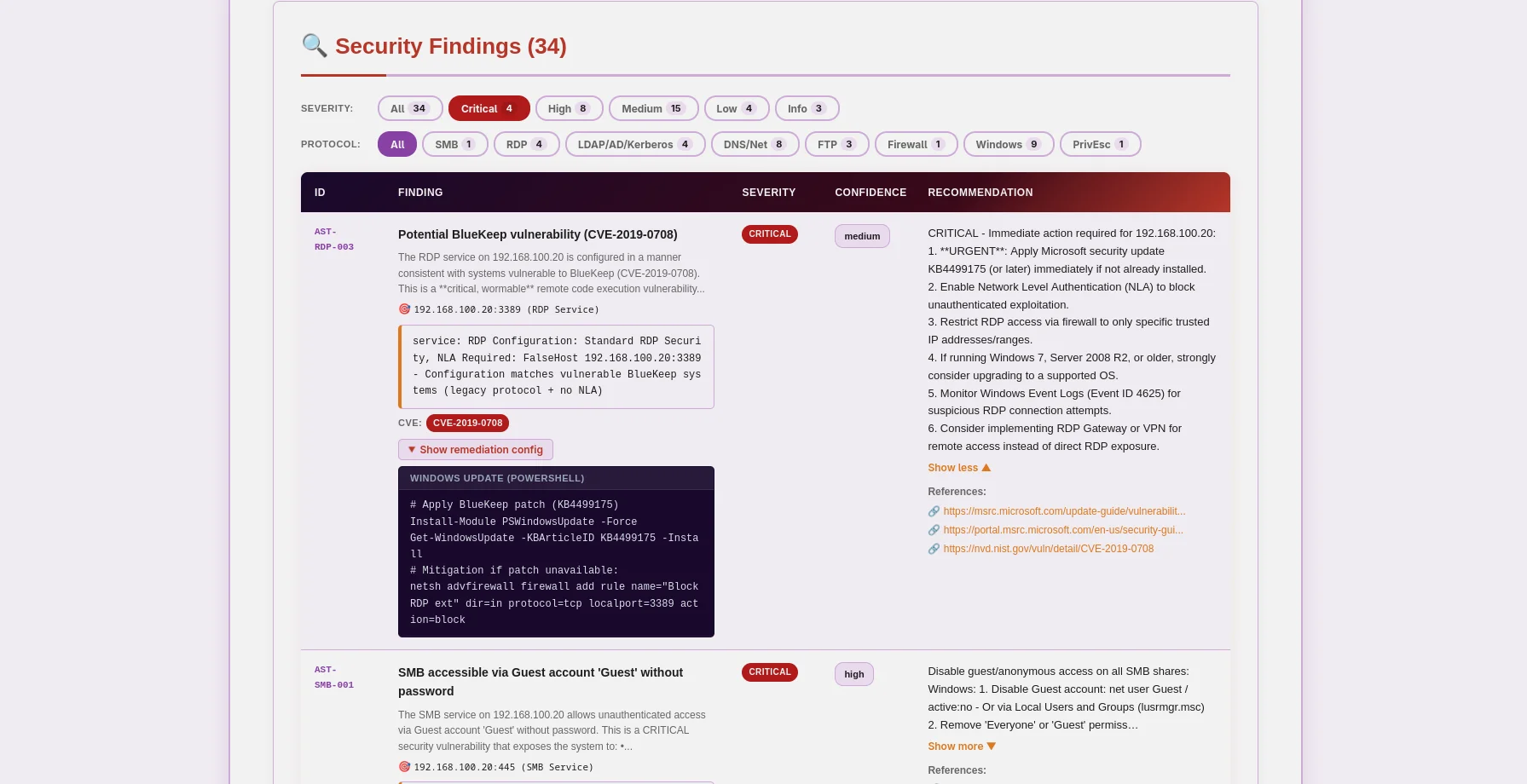
米诺陶主题HTML报告 — 严重性徽章、可展开证据、AI修复建议 |
JSON报告 — OWASP/CIS/NIST/PCI映射、CVE数据、机器可读 |
Asterion 是一个生产就绪的网络和域安全审计器,以道德为先。专为渗透测试人员、安全研究人员和企业安全团队构建,它结合了传统漏洞扫描与前沿AI分析,为Windows Active Directory、Linux系统和网络基础设施提供可操作的洞察。
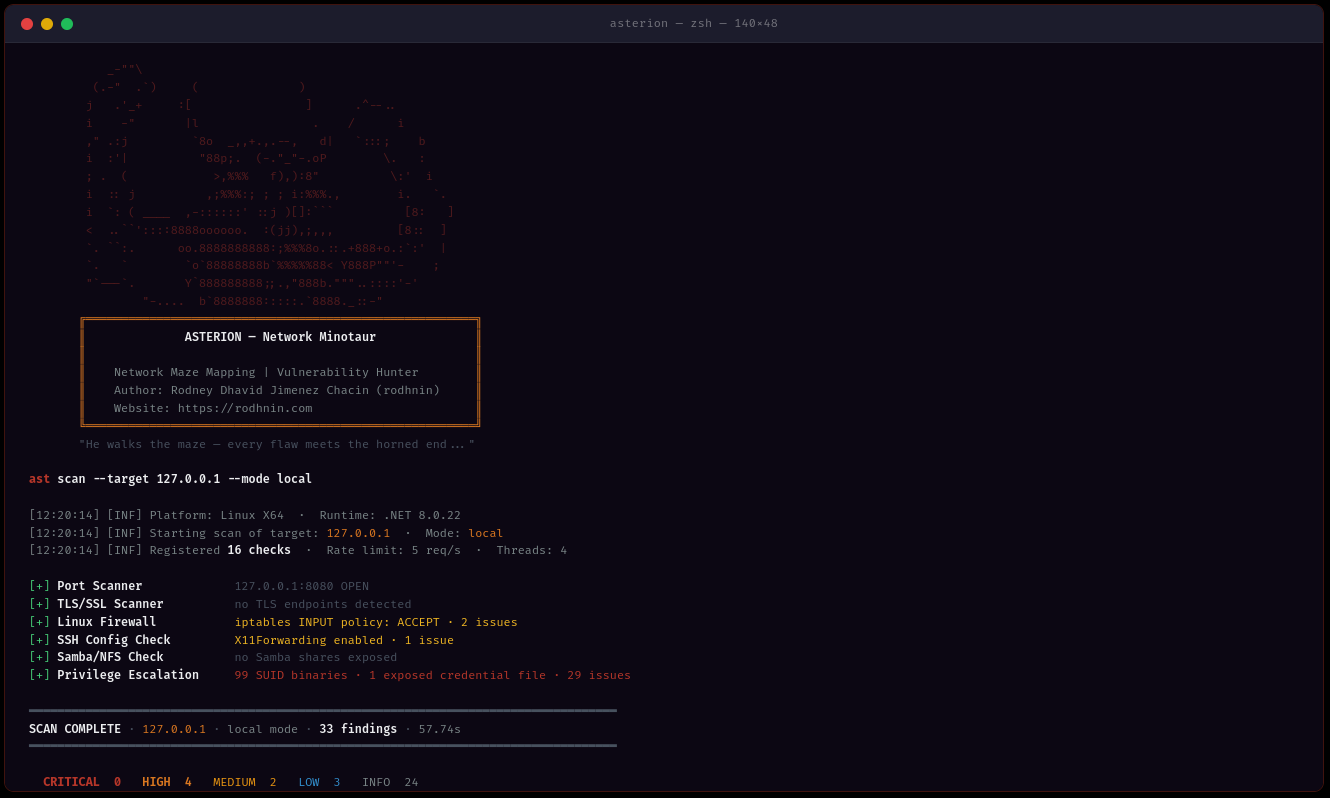
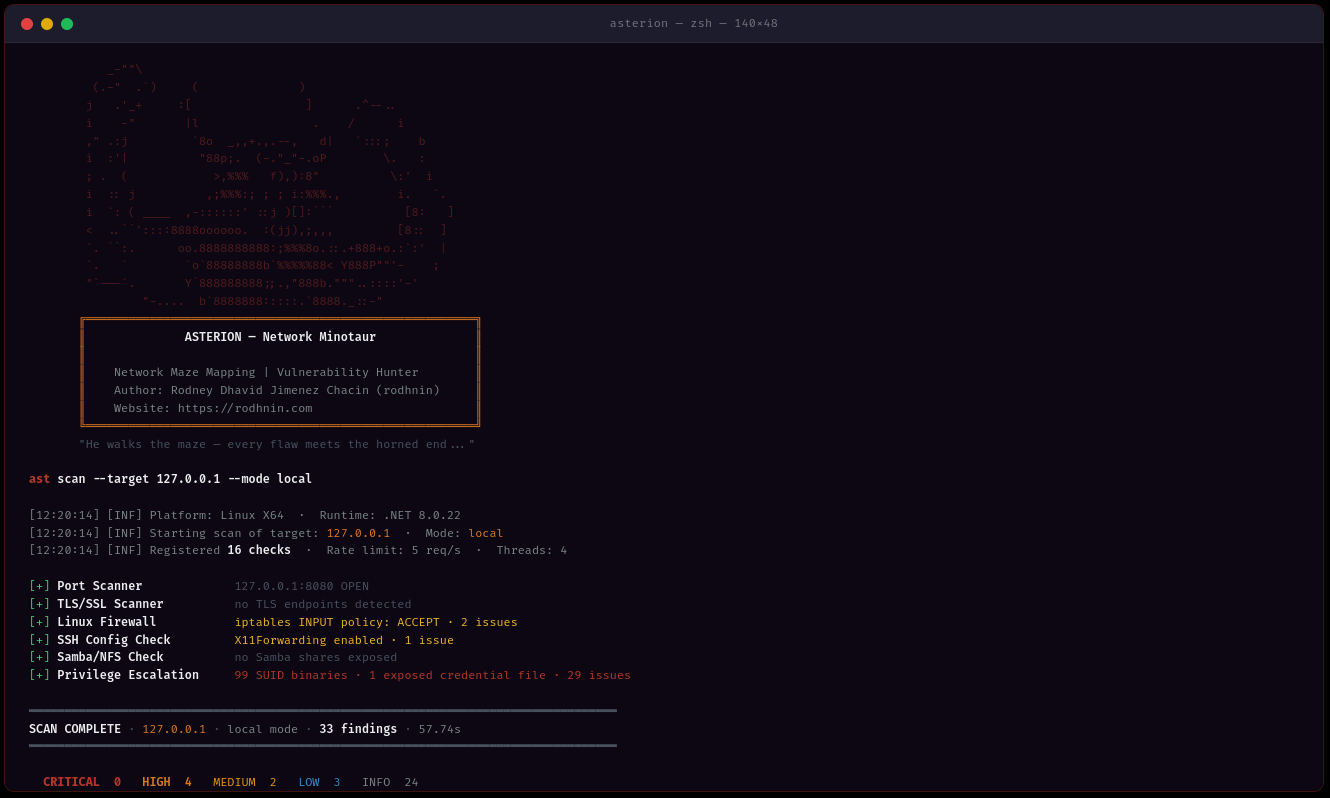
ast scan --target 10.0.0.0/24 --output html
- **多方法检测**:SMB、RDP、LDAP、Kerberos、SSH、FTP、DNS、SNMP 协议分析
- **多线程**:使用 1-20 个工作线程并发扫描
- **智能速率限制**:可配置的请求限制(1-20 请求/秒),以避免被检测
- **证据收集**:保留 SMB 共享、LDAP 查询、PowerShell 输出
### 🤖 AI 驱动的分析
根据您的需求选择 AI 提供商:
| 提供商 | 最适用于 | 速度 | 成本 | 隐私 |
| -------------------- | -------------- | --------------- | --------------- | ------------- |
| **OpenAI GPT-4** | 生产质量 | ⚡ 快速(40秒) | 💰 $0.30/扫描 | 🔒 标准 |
| **Anthropic Claude** | 注重隐私 | ⚡ 快速(50秒) | 💰 $0.35/扫描 | 🔒 增强 |
| **Ollama(本地)** | 完全隐私 | 🐢 慢速(30分钟)| 💰 免费 | 🔐 100% 离线 |
**两种分析模式:**
- **技术模式**:包含 PowerShell/GPO 命令和配置片段的逐步修复方案
- **管理模式**:面向利益相关者和管理的通俗易懂摘要
### 📊 专业报告
**JSON 报告**(机器可读)```json
{
"tool": "asterion",
"version": "0.2.0",
"target": "192.168.1.10",
"riskScore": 10.0,
"summary": {
"critical": 3,
"high": 8,
"medium": 16,
"low": 5,
"info": 2
},
"findings": [
{
"id": "AST-SMB-003",
"title": "SMBv1 protocol enabled (EternalBlue vector)",
"severity": "high",
"owasp": { "id": "A06", "name": "Vulnerable and Outdated Components" },
"vulnerabilities": [
{
"cve_id": "CVE-2017-0143",
"cvss_score": 9.8,
"cwe_id": "CWE-119"
}
],
"cvss": 9.8
}
],
"attackChains": [...],
"diff": { "refScanId": 41, "new": [...], "fixed": [...], "persisting": [...] }
}
HTML Reports(人类可读)
Asterion通过技术强制实施道德黑客行为。激进扫描和AI分析需要所有权证明:```bash
ast consent generate --domain corp.local
ast consent verify --method http --domain corp.local --token verify-abc123
ast scan --target corp.local --mode aggressive --use-ai
### 💾 数据库持久化
与 Argos Suite 共享的 SQLite 数据库跟踪所有内容:
- **扫描历史**:日期、持续时间、发现数量、严重性分类
- **发现仓库**:跨所有 Argos 工具的可搜索漏洞数据库
- **已验证域名**:带有过期时间的同意令牌跟踪
- **趋势分析**:比较不同时间的扫描结果```bash
# Query recent scans (works for all Argos Suite tools)
sqlite3 ~/.argos/argos.db "SELECT * FROM scans WHERE tool='asterion' ORDER BY started_at DESC LIMIT 10"
# Find critical issues
sqlite3 ~/.argos/argos.db "SELECT * FROM v_critical_findings WHERE tool='asterion'"
所有平台:
可选:
git clone https://github.com/rodhnin/asterion-network-minotaur.git cd asterion-network-minotaur
chmod +x scripts/setup.py python3 scripts/setup.py
**该脚本将:**
1. ✅ 检查先决条件(.NET、Python)
2. ✅ 安装 Python 依赖项
3. ✅ 设置共享的 Argos Suite 数据库
4. ✅ 以 Release 模式构建 Asterion
5. ✅ 创建目录(~/.asterion, ~/.argos)
6. ✅ 创建包装脚本 `/usr/local/bin/ast`(可选)
#### Windows (PowerShell)```powershell
# Clone repository
git clone https://github.com/rodhnin/asterion-network-minotaur.git
cd asterion-network-minotaur
# Run setup (right-click PowerShell > Run as Administrator)
.\scripts\setup.ps1
该脚本将:
如果自动化脚本在你的系统上无法工作,请按照以下步骤操作:
git clone https://github.com/rodhnin/asterion-network-minotaur.git cd asterion-network-minotaur
#### 步骤 2:安装依赖项
**Linux/macOS:**```bash
pip3 install -r scripts/requirements.txt
Windows(命令提示符):```cmd pip install -r scripts\requirements.txt
#### 步骤 3: 设置数据库
**Linux/macOS:**```bash
python3 scripts/db_migrate.py
Windows:```cmd python scripts\db_migrate.py
#### 第4步:构建 Asterion
**所有平台:**```bash
dotnet build -c Release
Linux/macOS:```bash mkdir -p ~/.asterion/reports mkdir -p ~/.asterion/consent-proofs mkdir -p ~/.argos
**Windows (PowerShell):**```powershell
New-Item -ItemType Directory -Force -Path "$env:USERPROFILE\.asterion\reports" | Out-Null
New-Item -ItemType Directory -Force -Path "$env:USERPROFILE\.asterion\consent-proofs" | Out-Null
New-Item -ItemType Directory -Force -Path "$env:USERPROFILE\.argos" | Out-Null
sudo nano /usr/local/bin/ast
#!/bin/bash exec dotnet "$(cd "$(dirname "${BASH_SOURCE[0]}")/.." && pwd)/src/Asterion/bin/Release/net8.0/Asterion.dll" "$@"
sudo chmod +x /usr/local/bin/ast
#### 步骤 7:配置 API 密钥(可选)
一个单一的环境变量适用于所有人工智能提供商(OpenAI、Anthropic):
**Linux/macOS:**```bash
export AI_API_KEY="sk-proj-..." # OpenAI key
# or
export AI_API_KEY="sk-ant-..." # Anthropic key
# Add to ~/.bashrc or ~/.zshrc to make permanent
Windows (PowerShell):```powershell $env:AI_API_KEY = "sk-proj-..."
[Environment]::SetEnvironmentVariable("AI_API_KEY", "sk-proj-...", [System.EnvironmentVariableTarget]::User)
#### 步骤 8: 验证安装
**Linux/macOS (如果已创建符号链接):**```bash
ast version
Windows 或直接调用:```cmd .\src\Asterion\bin\Release\net8.0\ast.exe version
dotnet .\src\Asterion\bin\Release\net8.0\Asterion.dll version
### 首次扫描
#### 自动扫描本地网络
**Asterion 可以自动发现并扫描你的本地网络!**
**Windows(PowerShell)— 设置完成后(推荐):**```powershell
# Test on localhost (simple)
ast scan --target localhost --output html
# Scan local subnet with AI analysis
ast scan --target 192.168.1.0/24 --output both --threads 10 --rate 5 --use-ai --ai-tone both
# Domain scan with authentication
ast scan --target corp.local --auth "CORP\admin:Password123" --use-ai
Windows(PowerShell)— 不设置 PATH:```powershell
.\src\Asterion\bin\Release\net8.0\ast.exe scan --target localhost
--output html --use-ai
--ai-tone both
.\src\Asterion\bin\Release\net8.0\ast.exe scan --target 192.168.1.0/24
--output both --threads 10
--rate 5
**Linux/macOS:**```bash
# Scan localhost
ast scan --target localhost \
--output html \
--use-ai \
--ai-tone both
# Scan local subnet (e.g., 192.168.1.0/24)
ast scan --target 192.168.1.0/24 \
--output both \
--threads 10 \
--rate 5
# Scan domain
ast scan --target corp.local \
--auth "CORP\admin:Password123" \
--output html \
--use-ai
Asterion 支持三种输出格式,通过 --output 指定:
| 格式 | 命令 |
|---|
控制 AI 分析结果的展示方式,通过 --ai-tone 指定:
| 语气 | 使用场景 | 输出 |
|---|---|---|
| technical | 安全团队 | 包含 PowerShell/GPO 命令的逐步修复 |
| non_technical |
简单网络扫描(无认证):```bash ast scan --target 10.0.0.0/24
**带有 HTML 报告:**```bash
ast scan --target 192.168.1.0/24 --output html
认证扫描 (Windows 域):```bash
ast scan --target dc01.corp.local
--auth "CORP\Administrator:P@ssw0rd"
--output html
**通过 AI 分析(技术及高管视角):**```bash
ast scan --target 10.0.0.0/24 \
--use-ai \
--ai-tone both \
--output html
快速扫描(10线程,10请求/秒):```bash
ast scan --target 10.0.0.0/24
--threads 10
--rate 10
--output json
#### 报告位置
**原生安装:**
- 报告:`~/.asterion/reports/`
- 数据库:`~/.argos/argos.db`
**Windows:**
- 报告:`%USERPROFILE%\.asterion\reports\`
- 数据库:`%USERPROFILE%\.argos\argos.db`
**Docker 部署:**
- 报告:`docker/reports/`
- 数据库:`docker/data/argos.db`
**🎉 成功!** 检查报告目录以获取 JSON 和 HTML 输出文件。
---
### 在 Docker 上运行
**自动部署:**```bash
cd docker
./deploy.sh # Linux/macOS
.\deploy.ps1 # Windows
手动 Docker 部署:```bash
docker compose up -d
docker compose exec asterion dotnet /app/ast.dll scan
--target 192.168.1.0/24
--output html
docker compose logs -f asterion
docker compose down
---
## 📘 使用指南
### 命令结构```bash
ast <command> [options]
可用命令:
scan — 运行安全扫描consent — 管理同意令牌version — 显示版本信息ast scan --target 192.168.1.0/24
ast scan --target 192.168.1.0/24 --output html
ast scan --target 10.0.0.5 --output both
#### 网络目标定位```bash
# CIDR notation
ast scan --target 10.0.0.0/24
# IP range
ast scan --target 192.168.1.10-50
# Domain name
ast scan --target corp.local
# Single host
ast scan --target 192.168.1.1
ast scan --target 10.0.0.0/24 --threads 3 --rate 2
ast scan --target 10.0.0.0/24 --threads 15 --rate 15
ast scan --target 10.0.0.0/24 --ports 445,3389,22,139
#### Windows 域扫描```bash
# Network + LDAP/Kerberos/AD checks
ast scan --target dc01.corp.local \
--auth "CORP\Administrator:P@ssw0rd"
# WinRM: remote firewall, registry, services, privesc
ast scan --target 192.168.1.10 \
--winrm "CORP\admin:P@ssw0rd"
# Full Windows audit: auth + WinRM + AI + HTML
ast scan --target 192.168.1.10 \
--auth "CORP\admin:P@ssw0rd" \
--winrm "CORP\admin:P@ssw0rd" \
--use-ai --ai-tone technical -o both -v
# With NTLM hash (Pass-the-Hash)
ast scan --target 10.0.0.5 \
--auth-ntlm "admin:aad3b435b51404eeaad3b435b51404ee:8846f7eaee8fb117ad06bdd830b7586c"
# Diff against last scan (track security changes)
ast scan --target 192.168.1.10 --winrm "CORP\admin:P@ssw0rd" --diff last -o both
ast scan --target 10.0.0.25 --ssh "admin:password"
ast scan --target 10.0.0.25 --ssh "admin:password" --sudo-password "sudopass"
ast scan --target 10.0.0.25 --ssh-key "admin:~/.ssh/id_rsa"
ast scan --target internal.corp.local
--bastion "bastion.corp.local:jumpuser:~/.ssh/bastion_key"
--ssh "admin:password"
ast scan --target 10.0.0.25
--ssh "root:toor"
--use-ai --ai-tone technical -o both -v
#### AI驱动的分析```bash
# Technical remediation (default, for security teams)
ast scan --target 10.0.0.5 \
--ssh "root:pass" \
--use-ai --ai-tone technical -o html
# Executive summary (for management)
ast scan --target 10.0.0.5 \
--use-ai --ai-tone non_technical -o html
# Both formats + streaming output
ast scan --target 10.0.0.5 --use-ai --ai-tone both --ai-stream -o both
# Agent mode (NVD CVE lookup tool enabled)
ast scan --target 10.0.0.5 --ssh "root:pass" --use-ai --ai-agent -v
# Compare two models
ast scan --target 10.0.0.5 --use-ai \
--ai-compare "openai/gpt-4o-mini-2024-07-18,anthropic/claude-3-5-haiku-20241022"
# Enforce cost budget
ast scan --target 10.0.0.5 --winrm "admin:pass" --use-ai --ai-budget 0.05
ast scan --target 10.0.0.5 -v
ast scan --target 10.0.0.5 -v --timeout 20
ast scan --target 10.0.0.5 --timeout 5
### 同意令牌管理
#### 生成同意令牌```bash
ast consent generate --domain corp.local
# Output: Token: verify-a3f9b2c1d8e4f5a6
HTTP方法 (将文件放置在Web服务器上):```bash
ast consent verify
--method http
--domain corp.local
--token verify-a3f9b2c1d8e4f5a6
**DNS 方法** (添加 TXT 记录):```bash
# 1. Add DNS TXT record: corp.local = "asterion-verify=verify-a3f9b2c1d8e4f5a6"
# 2. Verify:
ast consent verify \
--method dns \
--domain corp.local \
--token verify-a3f9b2c1d8e4f5a6
SSH 方法(在系统上创建文件):```bash
ast consent verify
--method ssh
--domain corp.local
--token verify-a3f9b2c1d8e4f5a6
--ssh "user:password"
#### 运行激进模式```bash
# After verifying consent token:
ast scan --target corp.local --mode aggressive
ast scan --target 192.168.1.0/24 --output html --threads 10 --rate 10
#### 场景 2:完整域审计```bash
# Complete Windows AD assessment with AI analysis
ast scan --target corp.local \
--auth "CORP\admin:P@ssw0rd" \
--use-ai \
--ai-tone both \
--output both \
--threads 8 \
--rate 8
ast scan --target 10.0.0.0/24
--threads 2
--rate 1
--timeout 20
--output json
#### 场景 4:渗透测试```bash
# Generate consent first
ast consent generate --domain internal.corp
# Place token and verify
ast consent verify --method http --domain internal.corp --token <token>
# Run aggressive assessment
ast scan --target internal.corp \
--mode aggressive \
--auth "CORP\pentest:P@ssw0rd" \
--use-ai \
--output both
Asterion 使用 LangChain 1.0.0,通过 Python 桥接支持多种 AI 提供商,让您根据安全、隐私和预算需求灵活选择。
最适合:生产环境
#### Anthropic Claude
**最佳用途:增强隐私**
- ⭐ 质量:优秀 (5/5)
- ⚡ 速度:约50–70秒
- 💰 成本:每次扫描约$0.007–0.015 (claude-3-5-haiku)
- 🔒 隐私:增强 (Anthropic的隐私优先方法)```bash
export AI_API_KEY="sk-ant-..." # Same variable, Anthropic key format
最适合:完全隐私
ollama pull llama3.2
### 隐私与安全
**自动清理**
在将数据发送给 AI 提供商之前,Asterion 会自动移除:
- ✅ 同意令牌
- ✅ 域凭据(密码、NTLM 哈希)
- ✅ 个人可识别信息 (PII)
- ✅ 内部 IP 地址(按需)
- ✅ 包含敏感数据的 SMB 共享路径
**仅限主动选择**
- AI 分析需要显式的 `--use-ai` 标志
- 激进扫描需要经过验证的同意令牌
- 您控制哪些提供商可以看到您的数据
**最大隐私保护**
本地使用 Ollama。虽然速度较慢且准确度较低,但您的扫描数据永远不会离开您的机器。
### 切换提供商
**当前方法 (v0.2.0):** 编辑 `config/defaults.yaml````yaml
ai:
langchain:
provider: "ollama" # Changed from "openai"
model: "llama3.2" # Ollama model
ollama_base_url: "http://localhost:11434"
即将在 v0.3.0 中推出: 交互式配置菜单(Metasploit 风格)```bash
ast --show-options ast --set ai.provider=anthropic ast --save-profile privacy-mode
---
## 🧪 安全测试实验室
**⚠️ 未经书面授权,切勿扫描生产网络!**
使用我们的 Docker 实验室安全地进行练习:
### 设置测试环境```bash
# Navigate to docker directory
cd docker
# Deploy vulnerable network lab
docker-compose -f compose.testing.yml up -d
# Wait for services to start (~60 seconds)
docker-compose -f compose.testing.yml logs -f
# Create vulnerable conditions
docker-compose -f compose.testing.yml exec windows-target powershell -c "Disable-NetFirewallProfile -All"
cd ..
ast scan --target 172.20.0.0/24 --output html
ast scan --target 172.20.0.2 --auth "LAB\admin:P@ssw0rd123" --output both
ast scan --target 172.20.0.0/24 --use-ai --output html
### 清理```bash
cd docker
docker-compose -f compose.testing.yml down -v # -v removes all data
只扫描你拥有或拥有明确书面授权进行测试的系统和网络。
Asterion 实现了技术控制以防止滥用:
在大多数司法管辖区,未经授权访问计算机系统是非法的:
有关完整的伦理指南,请参阅 docs/ETHICS.md
Asterion 提供跨平台部署脚本:
Linux/macOS:```bash cd docker ./deploy.sh
**Windows (PowerShell):**```powershell
cd docker
.\deploy.ps1
部署选项:
Linux/macOS:```bash cd docker docker compose up -d
docker compose exec asterion dotnet /app/ast.dll scan --target 10.0.0.0/24
docker compose logs -f asterion
docker compose down
**Windows (PowerShell):**```powershell
cd docker
docker compose up -d
# Execute scans (note the dotnet wrapper)
docker compose exec asterion dotnet /app/ast.dll scan --target 10.0.0.0/24
# View logs
docker compose logs -f asterion
# Stop service
docker compose down
持久化数据:
./reports/ → 主机目录 docker/reports/./data/argos.db → 主机目录 docker/data/argos.db(共享 Argos Suite 数据库)./logs/asterion.log → 主机目录 docker/logs/asterion.log注意: Asterion 通过 ASTERION_IN_DOCKER 环境变量自动检测 Docker 环境。
完整的 Docker 文档(Linux/Windows)请参阅: docker/README.md
本地安装:``` ~/.asterion/ ├── reports/ │ ├── asterion_report_10_0_0_0_24_20260419_143000.json # Machine-readable │ └── asterion_report_10_0_0_0_24_20260419_143000.html # Human-friendly (Minotaur-themed) └── consent-proofs/ └── corp_local_verify-abc123_20260419.txt
~/.argos/ ├── argos.db # Shared Argos Suite database └── logs/ └── argos.log # Shared log file
**Docker 部署:**```
asterion-network-minotaur/
├── docker/
│ ├── reports/
│ │ ├── asterion_report_10_0_0_0_24_20260419_143000.json
│ │ └── asterion_report_10_0_0_0_24_20260419_143000.html
│ ├── data/
│ │ └── argos.db # Shared Argos Suite database (Docker)
│ ├── logs/
│ │ └── asterion.log
│ └── workspace/
│ └── consent-proofs/
注意: Docker 环境会通过 ASTERION_IN_DOCKER 环境变量自动检测。
{ "tool": "asterion", "version": "0.2.0", "target": "10.0.0.0/24", "date": "2026-04-13T14:30:00Z", "mode": "safe", "summary": { "critical": 12, "high": 8, "medium": 15, "low": 5, "info": 20 }, "findings": [ { "id": "AST-SMB-003", "title": "SMBv1 enabled (EternalBlue vulnerability)", "severity": "critical", "confidence": "high", "description": "SMBv1 is enabled on this system. This protocol is vulnerable to EternalBlue (CVE-2017-0143), a critical remote code execution vulnerability exploited by WannaCry ransomware.", "evidence": { "type": "smb", "value": "SMBv1 negotiated successfully", "context": "Port 445/tcp open, SMB signing not required" }, "recommendation": "URGENT - Disable SMBv1 immediately:\n\nPowerShell:\nDisable-WindowsOptionalFeature -Online -FeatureName SMB1Protocol -NoRestart\n\nGroup Policy:\nComputer Configuration → Administrative Templates → MS Security Guide\n→ Configure SMBv1 client driver startup = Disabled\n→ Configure SMBv1 server = Disabled\n\nVerify:\nGet-SmbServerConfiguration | Select EnableSMB1Protocol", "references": [ "https://docs.microsoft.com/en-us/windows-server/storage/file-server/troubleshoot/detect-enable-and-disable-smbv1-v2-v3", "https://nvd.nist.gov/vuln/detail/CVE-2017-0143" ], "affected_component": "SMB Server" }, { "id": "AST-LDAP-001", "title": "LDAP anonymous bind allowed", "severity": "high", "confidence": "high", "description": "LDAP server allows anonymous bind, permitting unauthenticated enumeration of domain users, groups, and configuration.", "evidence": { "type": "ldap", "value": "Anonymous bind successful to port 389/tcp", "context": "Retrieved domain base DN: DC=corp,DC=local" }, "recommendation": "Disable LDAP anonymous bind:\n\nGroup Policy:\nComputer Configuration → Policies → Windows Settings → Security Settings → Local Policies → Security Options\n→ Network access: Allow anonymous SID/Name translation = Disabled\n→ Network access: Do not allow anonymous enumeration of SAM accounts = Enabled\n→ Network access: Do not allow anonymous enumeration of SAM accounts and shares = Enabled\n\nRegistry:\nreg add "HKLM\SYSTEM\CurrentControlSet\Control\Lsa" /v RestrictAnonymous /t REG_DWORD /d 1 /f", "affected_component": "LDAP Server" }, { "id": "AST-RDP-001", "title": "RDP without Network Level Authentication (NLA)", "severity": "high", "confidence": "high", "description": "Remote Desktop Protocol (RDP) is configured without Network Level Authentication (NLA). This allows unauthenticated attackers to reach the login screen and attempt brute-force attacks.", "evidence": { "type": "rdp", "value": "RDP port 3389/tcp open, NLA not required", "context": "Encryption level: High" }, "recommendation": "Enable Network Level Authentication:\n\nPowerShell:\n(Get-WmiObject -class Win32_TSGeneralSetting -Namespace root\cimv2\terminalservices -Filter "TerminalName='RDP-tcp'").SetUserAuthenticationRequired(1)\n\nGroup Policy:\nComputer Configuration → Administrative Templates → Windows Components → Remote Desktop Services → Remote Desktop Session Host → Security\n→ Require user authentication for remote connections by using Network Level Authentication = Enabled", "affected_component": "RDP Server" } ], "notes": { "scan_duration_seconds": 67.5, "targets_scanned": 12, "rate_limit_applied": true, "scope_limitations": "Scan limited to network services. Local system checks require SSH/WinRM credentials.", "false_positive_disclaimer": "Manual verification recommended for all findings before remediation." }, "aiAnalysis": { "executiveSummary": "The network scan identified 12 critical security vulnerabilities requiring immediate attention...", "technicalRemediation": "### Critical Issues\n\n1. \n - Affected systems: 10.0.0.5, 10.0.0.10\n - Remediation: Disable SMBv1...", "generatedAt": "2026-04-19T14:35:00Z", "modelUsed": "gpt-4o-mini-2024-07-18", "provider": "openai" } }
### HTML 报告功能
- **📊 执行仪表板**:包含严重性计数和 Minotaur 品牌标识的摘要卡片
- **🤖 AI 分析**:可展开的执行层和技术洞察部分
- **🔍 详细发现**:按严重性组织,包含 PowerShell/GPO 修复命令
- **📋 证据**:SMB 共享、LDAP 查询、RDP 配置、PowerShell 输出
- **🔗 外部参考**:CVE、Microsoft 文档、OWASP 指南的链接
- **📱 移动端响应式**:适用于所有设备
- **🎨 Minotaur 主题**:红/橙/紫色配色方案
---
## 📁 项目结构```
asterion-network-minotaur/
│
├── src/
│ ├── Asterion/ # Main C# application
│ │ ├── Asterion.csproj # .NET project file
│ │ │
│ │ ├── Checks/ # Security check modules
│ │ │ ├── ICheck.cs # Check interface
│ │ │ ├── BaseCheck.cs # Abstract base class (350 lines)
│ │ │ ├── CheckCategory.cs # Check category enum
│ │ │ │
│ │ │ ├── CrossPlatform/ # Network service scanners (work from any OS)
│ │ │ │ ├── PortScanner.cs # TCP port scanning
│ │ │ │ ├── SmbScanner.cs # SMB/CIFS security (42KB)
│ │ │ │ ├── RdpScanner.cs # RDP configuration (24KB)
│ │ │ │ ├── LdapScanner.cs # LDAP/AD security (38KB)
│ │ │ │ ├── KerberosScanner.cs # Kerberos security (22KB)
│ │ │ │ ├── SnmpScanner.cs # SNMP vulnerabilities (21KB)
│ │ │ │ ├── DnsScanner.cs # DNS misconfigurations (14KB)
│ │ │ │ ├── FtpScanner.cs # FTP security (27KB)
│ │ │ │ ├── TlsScanner.cs # TLS/SSL certificate checks
│ │ │ │ ├── SysvolCheck.cs # SYSVOL/GPP password exposure
│ │ │ │ ├── AdAggressiveCheck.cs # AS-REP roasting, delegation, weak ACLs
│ │ │ │ └── WinRmChecks.cs # Remote Windows audit via WS-Man
│ │ │ │
│ │ │ ├── Windows/ # Local Windows system checks
│ │ │ │ ├── WinFirewallCheck.cs # Firewall configuration
│ │ │ │ ├── WinRegistryCheck.cs # Registry security
│ │ │ │ ├── AdPolicyCheck.cs # Active Directory policies
│ │ │ │ ├── WinServicesCheck.cs # Service misconfigurations
│ │ │ │ └── PrivEscCheckWin.cs # Windows privilege escalation
│ │ │ │
│ │ │ └── Linux/ # Local/remote Linux checks (via SSH)
│ │ │ ├── LinuxFirewallCheck.cs # iptables/nftables/ufw
│ │ │ ├── SshConfigCheck.cs # SSH hardening
│ │ │ ├── SambaNfsCheck.cs # Samba/NFS security
│ │ │ └── PrivEscCheckLinux.cs # SUID, sudo misconfig
│ │ │
│ │ ├── Core/ # Core infrastructure
│ │ │ ├── Orchestrator.cs # Main execution engine (1,243 lines)
│ │ │ ├── Config.cs # YAML configuration loader
│ │ │ ├── ScanOptions.cs # Scan configuration
│ │ │ ├── Database.cs # SQLite operations
│ │ │ ├── ConsentValidator.cs # Consent token verification
│ │ │ ├── SshConnectionManager.cs # SSH.NET wrapper (password/key/bastion)
│ │ │ ├── WinRmConnectionManager.cs # WS-Man HTTP/NTLM (Linux → Windows)
│ │ │ ├── AttackChainAnalyzer.cs # Multi-step attack chain correlation
│ │ │ ├── NtlmSpnego.cs # NTLM/SPNEGO auth implementation
│ │ │ ├── NtlmV2Auth.cs # NTLMv2 auth implementation
│ │ │ │
│ │ │ ├── Output/
│ │ │ │ └── ReportBuilder.cs # Report generation (risk score, labels)
│ │ │ │
│ │ │ └── Utils/
│ │ │ ├── NetworkUtils.cs # Network operations
│ │ │ ├── CidrParser.cs # CIDR/IP range parsing
│ │ │ ├── AuthenticationManager.cs # Credential handling
│ │ │ └── OsDetector.cs # Per-target OS detection (SSH/SMB/TTL)
│ │ │
│ │ ├── Models/ # Data models
│ │ │ ├── Report.cs # Main report structure
│ │ │ ├── Finding.cs # Security finding (OWASP/CVE/Compliance)
│ │ │ ├── Evidence.cs # Finding proof
│ │ │ ├── ConsentInfo.cs # Consent verification
│ │ │ └── AiAnalysis.cs # AI-generated content (cost tracking)
│ │ │
│ │ ├── Program.cs # Application entry point
│ │ └── Cli.cs # CLI argument parser (all flags)
│ │
│ └── Asterion.sln # Visual Studio solution
│
├── scripts/ # Python bridge scripts
│ ├── ai_analyzer.py # LangChain AI integration (stream/agent/compare)
│ ├── cve_lookup.py # NVD API v2 CVE enrichment
│ ├── owasp.py # OWASP Top 10 mapping (139 entries)
│ ├── compliance.py # CIS/NIST/PCI mapping (95 entries)
│ ├── db_migrate.py # Database setup
│ ├── render_html.py # HTML report generation (Jinja2)
│ ├── setup.sh # Linux/macOS installation script
│ ├── setup.ps1 # Windows PowerShell setup
│ └── requirements.txt # Python dependencies
│
├── config/ # Configuration files
│ ├── defaults.yaml # Default settings
│ └── prompts/ # AI prompt templates
│ ├── technical.txt # Technical remediation prompts
│ └── non_technical.txt # Executive summary prompts
│
├── db/
│ └── migrate.sql # Database schema (shared with Argos Suite)
│
├── docker/ # Docker deployment
│ ├── Dockerfile # Production image
│ ├── docker-compose.yml # Production deployment
│ ├── compose.testing.yml # Vulnerable lab environment
│ ├── .dockerignore
│ ├── .env.example
│ └── README.md # Docker instructions
│
├── docs/ # Documentation
│ ├── AI_INTEGRATION.md # AI setup guide
│ ├── CONSENT.md # Consent token system
│ ├── DATABASE_GUIDE.md # SQLite schema and queries
│ ├── ETHICS.md # Ethical guidelines
│ ├── NETWORK_CHECKS.md # Complete check catalog (50+ checks)
│ └── ROADMAP.md # Development roadmap
│
├── schema/
│ └── report.schema.json # Argos Suite unified schema
│
├── templates/
│ └── report.html.j2 # HTML report template (35KB, Minotaur-themed)
│
├── assets/
│ └── ascii.txt # Minotaur ASCII art banner
│
├── CHANGELOG.md # Version history
├── README_PATTERN.md # README visual branding guide
├── LICENSE # MIT License
└── README.md # This file
统计:
状态: 🎉 已发布
--winrm)--ssh-key、--bastion、--sudo-password)--diff last / --diff <id> — 跟踪安全回归--creds-file credentials.yaml--ai-budget,成本保存到数据库 + costs.json--ai-stream、--ai-agent、重点: 可用性、规模、交互式 AI
--show-options、--set)ast db scans list、ast db findings search)重点: 自动修复、机器学习检测、分布式扫描
详细功能描述参见 docs/ROADMAP.md
我们欢迎任何形式的贡献!无论是:
git checkout -b feature/amazing-feature)git commit -m '添加超棒功能')git push origin feature/amazing-feature)git clone https://github.com/YOUR-USERNAME/asterion-network-minotaur.git cd asterion-network-minotaur
pip install -r scripts/requirements.txt dotnet restore
dotnet build
dotnet run --project src/Asterion -- scan --target 192.168.1.1 -v
### 代码风格
- **C# 格式**:遵循 Microsoft C# 编码约定
- **Python 格式**:我们使用 [Black](https://github.com/psf/black)(行长度:88)
- **XML 文档**:所有公共类/方法都需要
- **代码注释**:使用 `//` 作为行内注释,`///` 用于 XML 文档
### 报告问题
发现 Bug?有功能请求?
**提交 Issue**:https://github.com/rodhnin/asterion-network-minotaur/issues
请包含:
- Asterion 版本(`ast version`)
- .NET 版本(`dotnet --version`)
- Python 版本(`python --version`)
- 操作系统
- 复现步骤(针对 Bug)
- 预期与实际行为
---
## 📚 文档
在 `docs/` 目录中提供全面的文档:
| 文档 | 描述 |
| -------------------------------------------- | -------------------------------------- |
| [AI_INTEGRATION.md](https://github.com/rodhnin/asterion-network-minotaur/blob/HEAD/docs/AI_INTEGRATION.md) | 完整的 AI 设置指南(所有 3 个提供商) |
| [CONSENT.md](https://github.com/rodhnin/asterion-network-minotaur/blob/HEAD/docs/CONSENT.md) | 同意令牌系统技术细节 |
| [DATABASE_GUIDE.md](https://github.com/rodhnin/asterion-network-minotaur/blob/HEAD/docs/DATABASE_GUIDE.md) | SQLite 模式、查询、管理 |
| [ETHICS.md](https://github.com/rodhnin/asterion-network-minotaur/blob/HEAD/docs/ETHICS.md) | 法律框架和道德准则 |
| [NETWORK_CHECKS.md](https://github.com/rodhnin/asterion-network-minotaur/blob/HEAD/docs/NETWORK_CHECKS.md) | 50+ 安全检查完整目录 |
| [ROADMAP.md](https://github.com/rodhnin/asterion-network-minotaur/blob/HEAD/docs/ROADMAP.md) | 未来特性与开发计划 |
### 快速链接
- **更新日志**:[CHANGELOG.md](https://github.com/rodhnin/asterion-network-minotaur/blob/HEAD/CHANGELOG.md)
- **许可证**:[LICENSE](https://github.com/rodhnin/asterion-network-minotaur/blob/HEAD/LICENSE)
- **ASCII 艺术**:[assets/ascii.txt](https://github.com/rodhnin/asterion-network-minotaur/blob/HEAD/assets/ascii.txt)
---
## 🤝 属于 Argos 套件
Asterion 是 **Argos 安全套件** 的第四个组件:
| 工具 | 语言 | 目标 | 状态 |
| -------------- | ----------- | ------------------------- | ---------- |
| **Argus** | Python | WordPress | ✅ 稳定 |
| **Hephaestus** | Python | 服务器(Linux/Windows) | ✅ 稳定 |
| **Pythia** | Python | SQL 注入 | ✅ 稳定 |
| **Asterion** | C# + Python | 网络/域/AD | 🎉 已发布 |
**共享基础设施:**
- SQLite 数据库(`~/.argos/argos.db`)
- 统一 JSON 报告模式
- 同意令牌系统
- 通过 LangChain 进行 AI 分析
---
## ⚖️ 许可证
本项目采用 **MIT 许可证** 授权 - 详见 [LICENSE](https://github.com/rodhnin/asterion-network-minotaur/blob/HEAD/LICENSE) 文件。```
MIT License
Copyright (c) 2025-2026 Rodney Dhavid Jimenez Chacin
Permission is hereby granted, free of charge, to any person obtaining a copy
of this software and associated documentation files (the "Software"), to deal
in the Software without restriction, including without limitation the rights
to use, copy, modify, merge, publish, distribute, sublicense, and/or sell
copies of the Software, and to permit persons to whom the Software is
furnished to do so, subject to the following conditions:
The above copyright notice and this permission notice shall be included in all
copies or substantial portions of the Software.
THE SOFTWARE IS PROVIDED "AS IS", WITHOUT WARRANTY OF ANY KIND, EXPRESS OR
IMPLIED, INCLUDING BUT NOT LIMITED TO THE WARRANTIES OF MERCHANTABILITY,
FITNESS FOR A PARTICULAR PURPOSE AND NONINFRINGEMENT.
重要提示: 此工具仅用于 授权的安全测试。
使用 Asterion,即表示您确认并同意:
如果您使用 Asterion 发现漏洞:
不要扫描。 如果您不确定自己是否有权限,很可能没有。
Asterion 站在巨人的肩膀上:
特别感谢所有实践并倡导道德黑客的安全研究人员。
Rodney Dhavid Jimenez Chacin (rodhnin)
如有问题、反馈或合作咨询,请访问 rodhnin.com
| 检查类别 | 详情 |
|---|
| SMB/CIFS安全 | 匿名共享、SMB签名、SMBv1(永恒之蓝)、NTLMv1、可写共享 |
| RDP安全 | 网络级身份验证(NLA)、加密级别、暴露的RDP |
| LDAP/Active Directory | 匿名绑定、LDAP签名、密码策略、Kerberos预认证 |
| Kerberos安全 | AS-REP roasting、Kerberoasting、过长的票据生命周期 |
| SNMP | 默认社区字符串、SNMPv1/v2c、写访问 |
| DNS/NetBIOS | 区域传输(AXFR)、LLMNR/NetBIOS投毒、mDNS |
| Windows系统 | 防火墙、注册表(UAC、LSA)、服务、权限提升 |
| Linux系统 | iptables/nftables、SSH、Samba/NFS、SUID二进制文件、sudo错误配置 |
| 输出 |
|---|
| JSON | --output json | 机器可读报告(默认) |
| HTML | --output html | 漂亮的 Minotaur 主题报告 |
| 同时 | --output both | 同时生成 JSON 和 HTML |
| 执行摘要 |
| 面向管理的通俗语言描述 |
| both | 完整分析 | 技术格式与执行格式 |
| 选项 | 值 | 默认值 | 描述 |
|---|
--target, -t | IP/CIDR/domain | 必需 | 目标:192.168.1.0/24,10.0.0.1,corp.local,逗号分隔列表 |
--mode, -m | safe, aggressive | safe | 扫描模式(aggressive 模式需要同意令牌) |
--output, -o | json, html, both | json | 输出格式 |
--ports, -p | 端口列表 | 自动检测 | 要扫描的端口(例如 22,80,443 或 8000-9000) |
--threads | 1-20 | 5 | 并发线程数 |
--rate | 1-20 | 5 | 请求速率限制(req/s) |
--timeout | 秒 | 10 | 连接超时时间 |
--verify-ssl | 标志 | true | 验证 SSL/TLS 证书(自签名证书请禁用) |
--verbose, -v | 标志 | false | 启用详细日志记录 |
--diff | last / scan_id | - | 与之前的扫描进行比较(--diff last 或 --diff 42) |
--creds-file | YAML 文件路径 | - | 从 YAML 文件加载所有凭据 |
| 选项 | 值 | 描述 |
|---|
--auth | DOMAIN\user:pass | 用于 LDAP/Kerberos/SMB/AD 检查的域凭据 |
--auth-ntlm | user:hash | 传递哈希 NTLM 认证 |
--kerberos | user:pass@REALM | Kerberos 凭据 |
--winrm | DOMAIN\user:pass | WinRM 远程 Windows 检查(防火墙、注册表、服务、AD) |
--ssh | user:pass | 用于远程 Linux 检查的 SSH 密码认证 |
--ssh-key | user:/path/key | 基于 SSH 密钥的认证 |
--sudo-password | pass | 用于 Linux 特权检查的 sudo 提权密码 |
--bastion | host:user:key | 用于多跳 SSH 的跳板/堡垒主机 |
| 选项 | 值 | 默认值 | 描述 |
|---|
--use-ai | 标志 | false | 启用 AI 驱动分析 |
--ai-tone | technical, non_technical, both | technical | AI 分析格式 |
--ai-provider | openai, anthropic, ollama | openai | AI 提供商 |
--ai-model | 模型名称 | gpt-4o-mini-2024-07-18 | 要使用的 AI 模型 |
--ai-budget | USD 金额 | - | 如果预计成本超过此值则中止 AI |
--ai-stream | 标志 | false | 实时将 AI 令牌流式输出到 stdout |
--ai-agent | 标志 | false | LangChain 代理模式,带有 NVD CVE 查询工具 |
--ai-compare | prov/model,prov/model | - | 多模型比较 |
| 模式 | 检查内容 | 需要同意 | 速率限制 |
|---|
| 安全模式 | 非侵入式网络检查 | ❌ 否 | 5 请求/秒 |
| 激进模式 | 深度 AD/系统测试 | ✅ 是 | 10 请求/秒 |
| AI 分析 | 漏洞分析 | ✅ 是 | N/A |
--ai-compare