Skip to content
KitploitKITPLOIT
工具博客
提交
工具博客
提交

黑客、渗透测试和网络安全工具,武装您的安全武器库!

Kitploit 是一个黑客、网络安全和渗透测试工具的目录。发现最新的项目更新,查找漏洞、分析系统、自动化测试并加强你的安全。

··订阅源·联系·隐私·© 2026 Kitploit

工具目录

分类

查看所有分类
Loading categories
Redeye — 协作式渗透测试数据管理平台,用于组织服务器、用户、漏洞、攻击向量及文件,支持API访问和图谱可视化。 | Kitploit
工具/GitHubGitHub/redeye-framework/redeye
渗透测试框架漏洞分析信息收集渗透测试实用工具与框架
GitHubredeye-framework/redeye

Redeye

协作式渗透测试数据管理平台,用于组织服务器、用户、漏洞、攻击向量及文件,支持API访问和图谱可视化。

查看仓库
4734583年前Kitploit 审核通过

最受欢迎

查看全部 →

发现我们社区最常用的工具。

探索所有工具

浏览我们的工具集合

查看所有工具 →
分享

Redeye

该项目由渗透测试人员为渗透测试人员构建。 Redeye 是一款旨在帮助您在渗透测试操作中以最高效、最有条理的方式管理数据的工具。

目录

  • Redeye
    • 目录
    • 开发者
    • 概述
    • 安装
      • Docker
      • 源码
      • 通用
    • 特别感谢
    • 致谢

开发者

Daniel Arad - @dandan_arad && Elad Pticha - @elad_pt

概述

服务器面板将显示所有已添加的服务器及服务器基本信息,例如:拥有用户、开放端口以及是否已被攻破。

servers

进入服务器后,将出现一个编辑面板。我们可以添加在服务器上发现的新用户、发现的漏洞,并添加相关的成果和文件。

edit-server

用户面板包含来自所有服务器的所有已发现用户,用户按权限级别和类型分类。将鼠标悬停在用户名上即可更改这些详细信息。

Users

文件面板将显示当前渗透测试中的所有文件。团队成员可以上传和下载这些文件。

Files

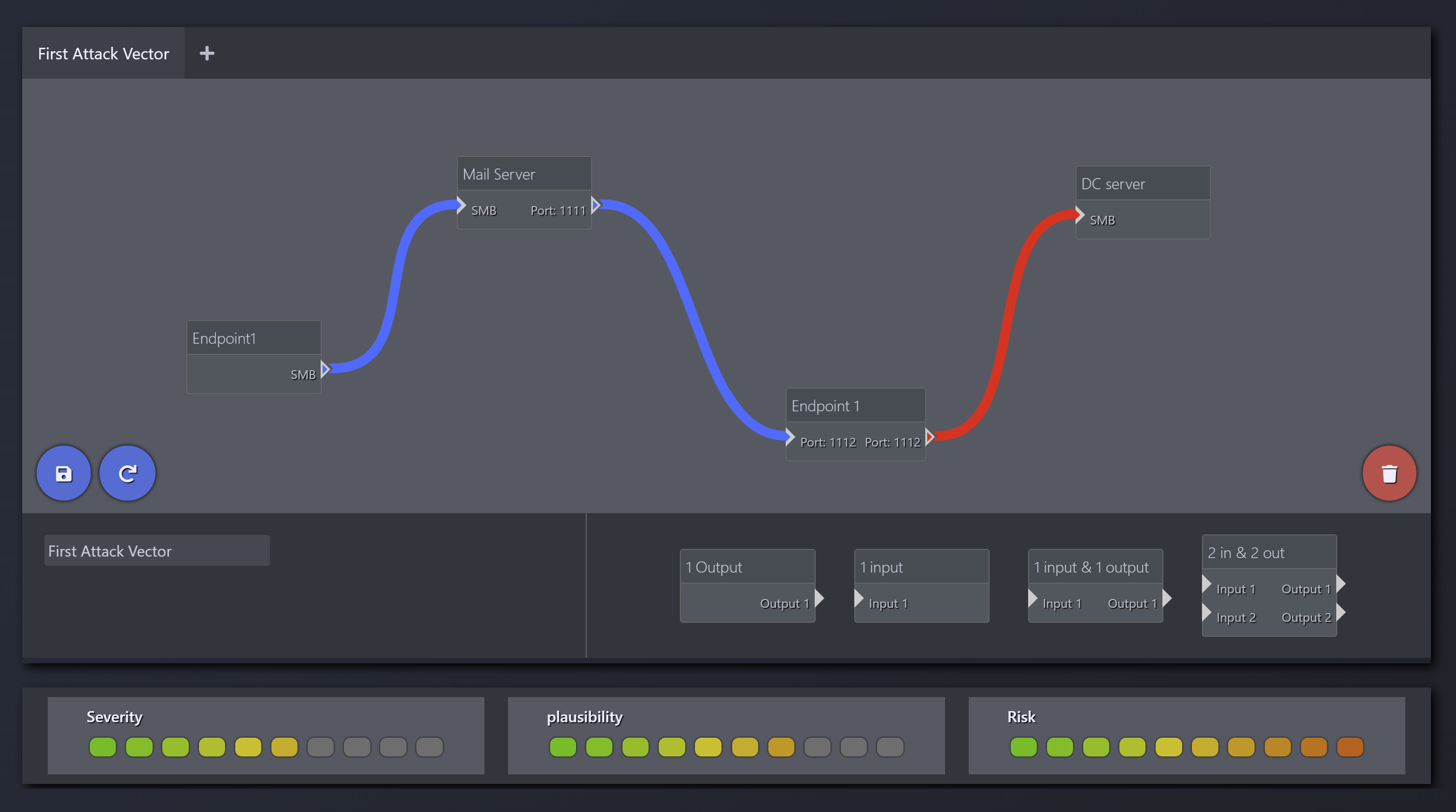
攻击向量面板将显示所有已发现的攻击向量,并附带严重性/可行性/风险图表。

AttackVector

预报告面板将包含当前渗透测试中的所有截图。

Pre-Report

图形面板将包含所有用户和服务器及它们之间的关系。

Graph

API 允许用户通过简单的 API 请求轻松获取数据。

image
root@kitploit:~
curl redeye.local:8443/api/servers --silent -H "Token: redeye_61a8fc25-105e-4e70-9bc3-58ca75e228ca" | jq
curl redeye.local:8443/api/users --silent -H "Token: redeye_61a8fc25-105e-4e70-9bc3-58ca75e228ca" | jq
curl redeye.local:8443/api/exploits --silent -H "Token: redeye_61a8fc25-105e-4e70-9bc3-58ca75e228ca" | jq

安装

Docker

从 GitHub 容器注册表拉取。

root@kitploit:~
git clone https://github.com/redeye-framework/Redeye.git
cd Redeye
docker-compose up -d

启动/停止容器

root@kitploit:~
sudo docker-compose start/stop

保存/加载 Redeye

root@kitploit:~
docker save ghcr.io/redeye-framework/redeye:latest neo4j:4.4.9 > Redeye.tar
docker load < Redeye.tar

GitHub 容器注册表:https://github.com/redeye-framework/Redeye/pkgs/container/redeye

源码

root@kitploit:~
git clone https://github.com/redeye-framework/Redeye.git
cd Redeye
sudo apt install python3.8-venv
python3 -m venv RedeyeVirtualEnv
source RedeyeVirtualEnv/bin/activate
pip3 install -r requirements.txt
python3 RedDB/db.py
python3 redeye.py --safe

通用

Redeye 将在 http://0.0.0.0:8443 监听
默认凭据:

  • 用户名:redeye
  • 密码:redeye

Neo4j 将在 http://0.0.0.0:7474 监听
默认凭据:

  • 用户名:neo4j
  • 密码:redeye

特别感谢

  • 感谢 Yoav Danino 提供精神支持和 Beta 测试。

致谢

  • 侧边栏

    • https://github.com/azouaoui-med/pro-sidebar-template
    • https://bootsnipp.com/snippets/Q0dAX
  • 流程图

    • https://www.jqueryscript.net/chart-graph/Drag-drop-Flow-Chart-Plugin-With-jQuery-jQuery-UI-flowchart-js.html
  • download.js

    • http://danml.com/download.html
  • dropzone

    • http://www.dropzonejs.com
  • 图片和图标

    • https://www.iconfinder.com
      • licensed by - https://creativecommons.org/licenses/by/4.0
    • http://www.freepik.com
  • 日志

    • https://codepen.io/jo_Geek/pen/NLoGZZ
      • licensed by - https://blog.codepen.io/documentation/terms-of-service/

如果您拥有 Redeye 中任何不属于 MIT 许可证的代码/文件,请通过 [email protected] 联系我们。

下载工具