Skip to content
KitploitKITPLOIT
工具博客
提交
工具博客
提交

黑客、渗透测试和网络安全工具,武装您的安全武器库!

Kitploit 是一个黑客、网络安全和渗透测试工具的目录。发现最新的项目更新,查找漏洞、分析系统、自动化测试并加强你的安全。

··订阅源·联系·隐私·© 2026 Kitploit

工具目录

分类

查看所有分类
Loading categories
chaos — 使用ChatGPT开发的源IP扫描工具 | Kitploit
工具/GitHubGitHub/r57-labs/chaos
侦察网络映射信息收集Web安全渗透测试
GitHubr57-labs/chaos

chaos

使用ChatGPT开发的源IP扫描工具

查看仓库
7083年前Kitploit 审核通过

最受欢迎

查看全部 →

发现我们社区最常用的工具。

探索所有工具

浏览我们的工具集合

查看所有工具 →
分享
网站

chaos

chaos 是一款由 RST 与 ChatGPT 合作开发的“源站”IP 扫描器。它是一款小众工具,目标用户主要是渗透测试人员和漏洞猎人。

“源站 IP”是一个术语,指通过第三方公开提供服务的网站最终的公网 IP 地址。如果您想了解更多关于源站 IP 的信息,请查看我们的博客文章。

chaos 从概念到功能原型在不到 24 小时内快速实现,遵循了我们使用 ChatGPT 进行 DevOps 的原则。

root@kitploit:~
usage: chaos.py [-h] -f FQDN -i IP [-a AGENT] [-C] [-D] [-j JITTER] [-o OUTPUT] [-p PORTS] [-P] [-r] [-s SLEEP] [-t TIMEOUT] [-T] [-v] [-x] 
         _..._
     .-'`     `'-.
   __|___________|__ 
   \               /
    `._  CHAOS _.'
       `-------`
         /   \\
        /     \\
       /       \\
      /         \\
     /           \\
    /             \\
   /               \\
  /                 \\
 /                   \\
/_____________________\\
CHAtgpt Origin-ip Scanner
 _______ _______ _______ _______ _______
|\\     /|\\     /|\\     /|\\     /|\\/|
| +---+ | +---+ | +---+ | +---+ | +---+ |
| |H  | | |U  | | |M  | | |A  | | |N  | |
| |U  | | |S  | | |A  | | |N  | | |C  | |
| |M  | | |E  | | |N  | | |D  | | |O  | |
| |A  | | |R  | | |C  | | |   | | |L  | |
| +---+ | +---+ | +---+ | +---+ | +---+ |
|/_____|\\_____|\\_____|\\_____|\\_____\\

 Origin IP Scanner developed with ChatGPT
 cha*os (n): complete disorder and confusion
 (ver: 0.9.4)
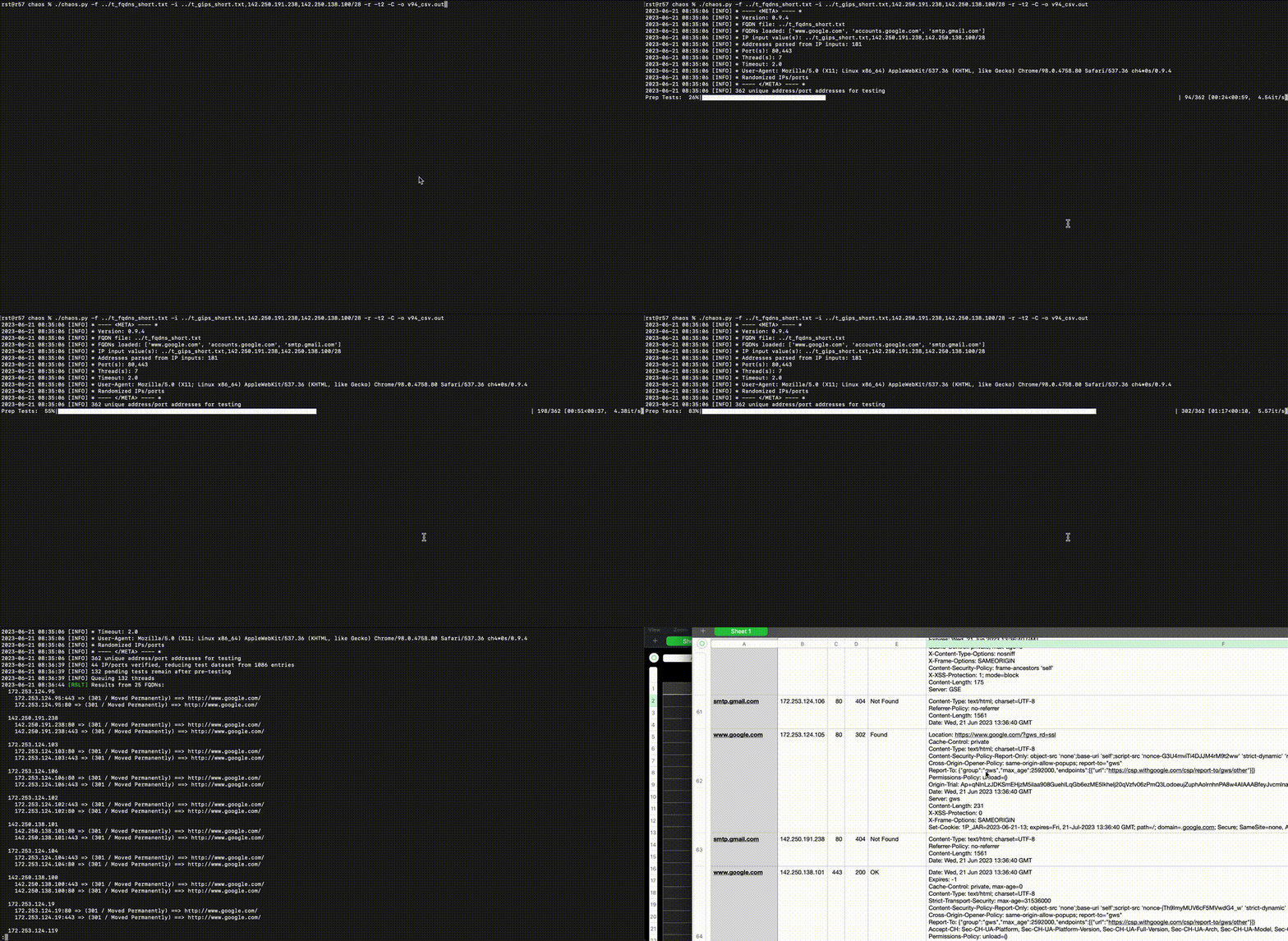
v94_csv

特性

  • 多线程,提升性能
  • 实时状态更新和进度条,适合大型扫描 😉
  • 灵活的用户选项,适应各种场景和限制
  • 缩减数据集,加快扫描速度
  • 易于使用的 CSV 输出

安装

  1. 下载/克隆/解压等
  2. cd 路径/到/chaos
  3. pip3 install -U pip setuptools virtualenv
  4. virtualenv env
  5. source env/bin/activate
  6. (env) pip3 install -U -r ./requirements.txt
  7. (env) ./chaos.py -h

选项

root@kitploit:~
-h, --help            显示此帮助信息并退出
-f FQDN, --fqdn FQDN  FQDN 文件路径(每行一个 FQDN)
-i IP, --ip IP        HTTP 请求的 IP 地址(逗号分隔的 IP、IP 网络,和/或包含每行 IP/网络的文件)
-a AGENT, --agent AGENT
                      请求的 User-Agent 头值
-C, --csv             将 CSV 输出追加到 OUTPUT_FILE.csv
-D, --dns             在请求前对 FQDN/IP 值执行正向/反向 DNS 查找;不影响测试队列
-j JITTER, --jitter JITTER
                      为睡眠值添加 0-N 秒随机延迟
-o OUTPUT, --output OUTPUT
                      将控制台输出追加到 FILE
-p PORTS, --ports PORTS
                      要使用的 TCP 端口列表(逗号分隔,默认:"80,443")
-P, --no-prep         不预先使用 `GET /` 和 `Host: {IP:Port}` 头扫描每个 IP/端口以排除无响应的主机
-r, --randomize       随机化(大致)测试 IP/端口的顺序
-s SLEEP, --sleep SLEEP
                      在完成线程前添加 N 秒
-t TIMEOUT, --timeout TIMEOUT
                      等待无响应主机 N 秒
-T, --test            测试模式;不发送请求
-v, --verbose         启用详细输出
-x, --singlethread    单线程执行;适用于 1-2 核心系统;默认线程数=(核心数-1) 若核心数>2

示例

本地主机测试

启动 Python HTTP 服务器

root@kitploit:~
% python3 -u -m http.server 8001
Serving HTTP on :: port 8001 (http://[::]:8001/) ...

启动 ncat 作为 HTTP 监听在一个被检测为 SSL 的端口上;使用循环因为 --keep-open 可能挂起

root@kitploit:~
% while true; do ncat -lvp 8443 -c 'printf "HTTP/1.0 204 Plaintext OK\n\n<html></html>\n"'; done
Ncat: Version 7.94 ( https://nmap.org/ncat )
Ncat: Listening on [::]:8443
Ncat: Listening on 0.0.0.0:8443

同样启动 ncat 作为 SSL 监听在一个默认检测为 HTTP 的端口上

root@kitploit:~
% while true; do ncat --ssl -lvp 8444 -c 'printf "HTTP/1.0 202 OK\n\n<html></html>\n"'; done    
Ncat: Version 7.94 ( https://nmap.org/ncat )
Ncat: Generating a temporary 2048-bit RSA key. Use --ssl-key and --ssl-cert to use a permanent one.
Ncat: SHA-1 fingerprint: 0208 1991 FA0D 65F0 608A 9DAB A793 78CB A6EC 27B8
Ncat: Listening on [::]:8444
Ncat: Listening on 0.0.0.0:8444

准备一个 FQDN 文件:

root@kitploit:~
% cat ../test_localhost_fqdn.txt 
www.example.com
localhost.example.com
localhost.local
localhost
notreally.arealdomain

准备一个 IP 文件/列表:

root@kitploit:~
% cat ../test_localhost_ips.txt 
127.0.0.1
127.0.0.0/29
not_an_ip_addr
-6.a
=4.2
::1

运行扫描

  • 注意 CLI 上添加了一个 IPv6 网络到 IP 列表
  • -p 指定我们监听的端口
  • -x 单线程运行,给 ncat 服务器重启时间
  • -s0.2 短暂睡眠,让 ncat 服务器重启
  • -t1 超时 1 秒

test_local

root@kitploit:~
% ./chaos.py -f ../test_localhost_fqdn.txt -i ../test_localhost_ips.txt,::1/126 -p 8001,8443,8444 -x -s0.2 -t1   
2023-06-21 12:48:33 [WARN] Ignoring invalid FQDN value: localhost.local
2023-06-21 12:48:33 [WARN] Ignoring invalid FQDN value: localhost
2023-06-21 12:48:33 [WARN] Ignoring invalid FQDN value: notreally.arealdomain
2023-06-21 12:48:33 [WARN] Error: invalid IP address or CIDR block =4.2
2023-06-21 12:48:33 [WARN] Error: invalid IP address or CIDR block -6.a
2023-06-21 12:48:33 [WARN] Error: invalid IP address or CIDR block not_an_ip_addr
2023-06-21 12:48:33 [INFO] * ---- <META> ---- *
2023-06-21 12:48:33 [INFO] * Version: 0.9.4
2023-06-21 12:48:33 [INFO] * FQDN file: ../test_localhost_fqdn.txt
2023-06-21 12:48:33 [INFO] * FQDNs loaded: ['www.example.com', 'localhost.example.com']
2023-06-21 12:48:33 [INFO] * IP input value(s): ../test_localhost_ips.txt,::1/126
2023-06-21 12:48:33 [INFO] * Addresses parsed from IP inputs: 12
2023-06-21 12:48:33 [INFO] * Port(s): 8001,8443,8444
2023-06-21 12:48:33 [INFO] * Thread(s): 1
2023-06-21 12:48:33 [INFO] * Sleep value: 0.2
2023-06-21 12:48:33 [INFO] * Timeout: 1.0
2023-06-21 12:48:33 [INFO] * User-Agent: Mozilla/5.0 (X11; Linux x86_64) AppleWebKit/537.36 (KHTML, like Gecko) Chrome/98.0.4758.80 Safari/537.36 ch4*0s/0.9.4
2023-06-21 12:48:33 [INFO] * ---- </META> ---- *
2023-06-21 12:48:33 [INFO] 36 unique address/port addresses for testing
Prep Tests: 100%|████████████████████████████████████████████████████████████████████████████████████████████████████████████████████████████████████████████████| 36/36 [00:29<00:00,  1.20it/s]
2023-06-21 12:49:03 [INFO] 9 IP/ports verified, reducing test dataset from 72 entries
2023-06-21 12:49:03 [INFO] 18 pending tests remain after pre-testing
2023-06-21 12:49:03 [INFO] Queuing 18 threads
  ++RCVD++ (200 OK) www.example.com @ :::8001                                                                                                                                                    
  ++RCVD++ (204 Plaintext OK) www.example.com @ :::8443                                                                                                                                          
  ++RCVD++ (202 OK) www.example.com @ :::8444                                                                                                                                                    
  ++RCVD++ (200 OK) www.example.com @ ::1:8001                                                                                                                                                   
  ++RCVD++ (204 Plaintext OK) www.example.com @ ::1:8443                                                                                                                                         
  ++RCVD++ (202 OK) www.example.com @ ::1:8444                                                                                                                                                   
  ++RCVD++ (200 OK) www.example.com @ 127.0.0.1:8001                                                                                                                                             
  ++RCVD++ (204 Plaintext OK) www.example.com @ 127.0.0.1:8443                                                                                                                                   
  ++RCVD++ (202 OK) www.example.com @ 127.0.0.1:8444                                                                                                                                             
  ++RCVD++ (200 OK) localhost.example.com @ :::8001                                                                                                                                              
  ++RCVD++ (204 Plaintext OK) localhost.example.com @ :::8443                                                                                                                                    
  ++RCVD++ (202 OK) localhost.example.com @ :::8444                                                                                                                                              
  ++RCVD++ (200 OK) localhost.example.com @ ::1:8001                                                                                                                                             
  ++RCVD++ (204 Plaintext OK) localhost.example.com @ ::1:8443                                                                                                                                   
  ++RCVD++ (202 OK) localhost.example.com @ ::1:8444                                                                                                                                             
  ++RCVD++ (200 OK) localhost.example.com @ 127.0.0.1:8001                                                                                                                                       
  ++RCVD++ (204 Plaintext OK) localhost.example.com @ 127.0.0.1:8443                                                                                                                             
  ++RCVD++ (202 OK) localhost.example.com @ 127.0.0.1:8444                                                                                                                                       
Origin Scan: 100%|███████████████████████████████████████████████████████████████████████████████████████████████████████████████████████████████████████████████| 18/18 [00:06<00:00,  2.76it/s]
2023-06-21 12:49:09 [RSLT] Results from 5 FQDNs:
  ::1
    ::1:8444 => (202 / OK)
    ::1:8443 => (204 / Plaintext OK)
    ::1:8001 => (200 / OK)

  127.0.0.1
    127.0.0.1:8001 => (200 / OK)
    127.0.0.1:8443 => (204 / Plaintext OK)
    127.0.0.1:8444 => (202 / OK)

  ::
    :::8001 => (200 / OK)
    :::8443 => (204 / Plaintext OK)
    :::8444 => (202 / OK)

  www.example.com
    :::8001 => (200 / OK)
    :::8443 => (204 / Plaintext OK)
    :::8444 => (202 / OK)
    ::1:8001 => (200 / OK)
    ::1:8443 => (204 / Plaintext OK)
    ::1:8444 => (202 / OK)
    127.0.0.1:8001 => (200 / OK)
    127.0.0.1:8443 => (204 / Plaintext OK)
    127.0.0.1:8444 => (202 / OK)

  localhost.example.com
    :::8001 => (200 / OK)
    :::8443 => (204 / Plaintext OK)
    :::8444 => (202 / OK)
    ::1:8001 => (200 / OK)
    ::1:8443 => (204 / Plaintext OK)
    ::1:8444 => (202 / OK)
    127.0.0.1:8001 => (200 / OK)
    127.0.0.1:8443 => (204 / Plaintext OK)
    127.0.0.1:8444 => (202 / OK)


rst@r57 chaos % 

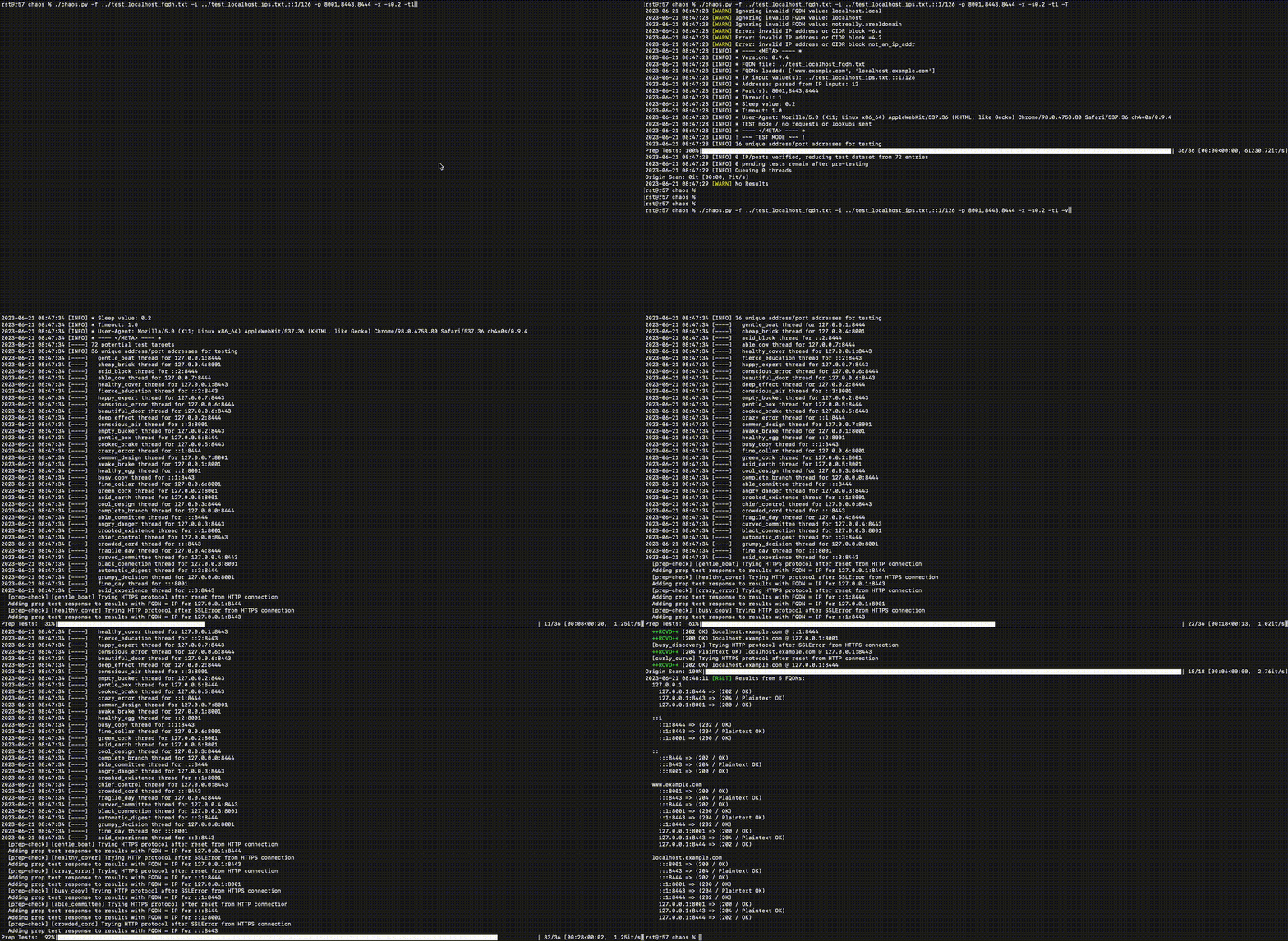
测试与详细输出(本地主机)

-T 运行于测试模式(执行所有操作但不发送请求)

-v 详细选项提供额外输出

test_local_verbose

已知缺陷

  • HTTP/HTTPS 检测不够理想
  • 需要添加调整 CSV 换行分隔符的选项
  • 需要添加调整长字符串/多行截断方式的选项
  • 尝试找出为何我们将 requests v2.x 标记为必需 😉
  • 添加极详细/静默选项
  • 在使用睡眠/抖动时错开线程启动
  • 在 200 响应中搜索 meta-refresh
  • 201 响应的 Content-Location 头?
  • 改进线程名生成,确保唯一名称数量正确
  • 对 IPv6 子网掩码进行合理性检查,防止扫描时间长过太阳?
  • 待定?

相关链接

  • chaos 博客文章

免责声明

  • 版权所有 (C) 2023 RST
  • 本软件按“现状”提供,不提供任何形式的明示或暗示担保
  • 本软件仅用于研究和/或授权测试;您有责任确保有权以任何方式使用本软件
  • 使用本软件即表示您承认对自己的行为负责,并承担任何直接、间接或其他损害的所有责任
下载工具