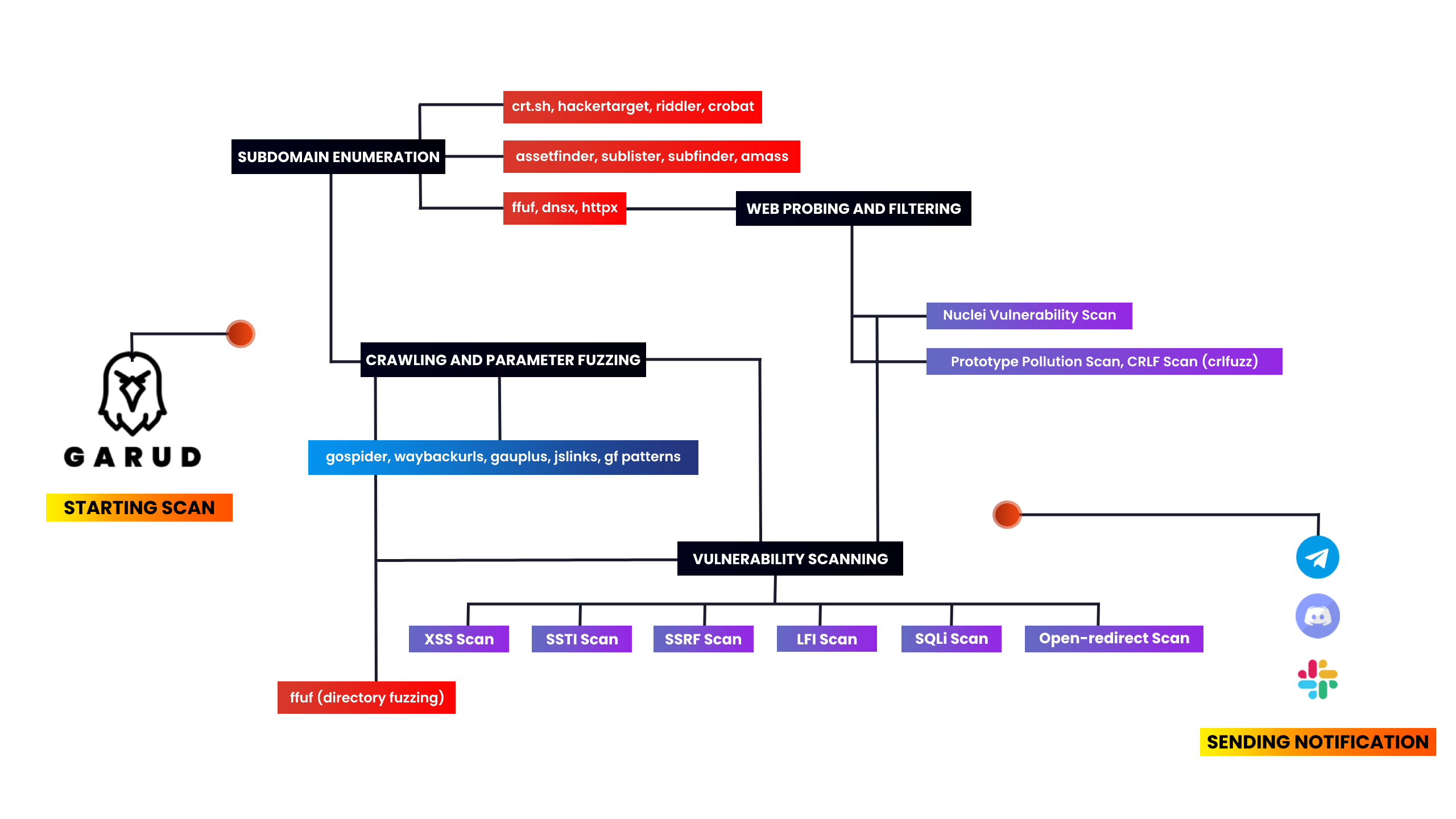







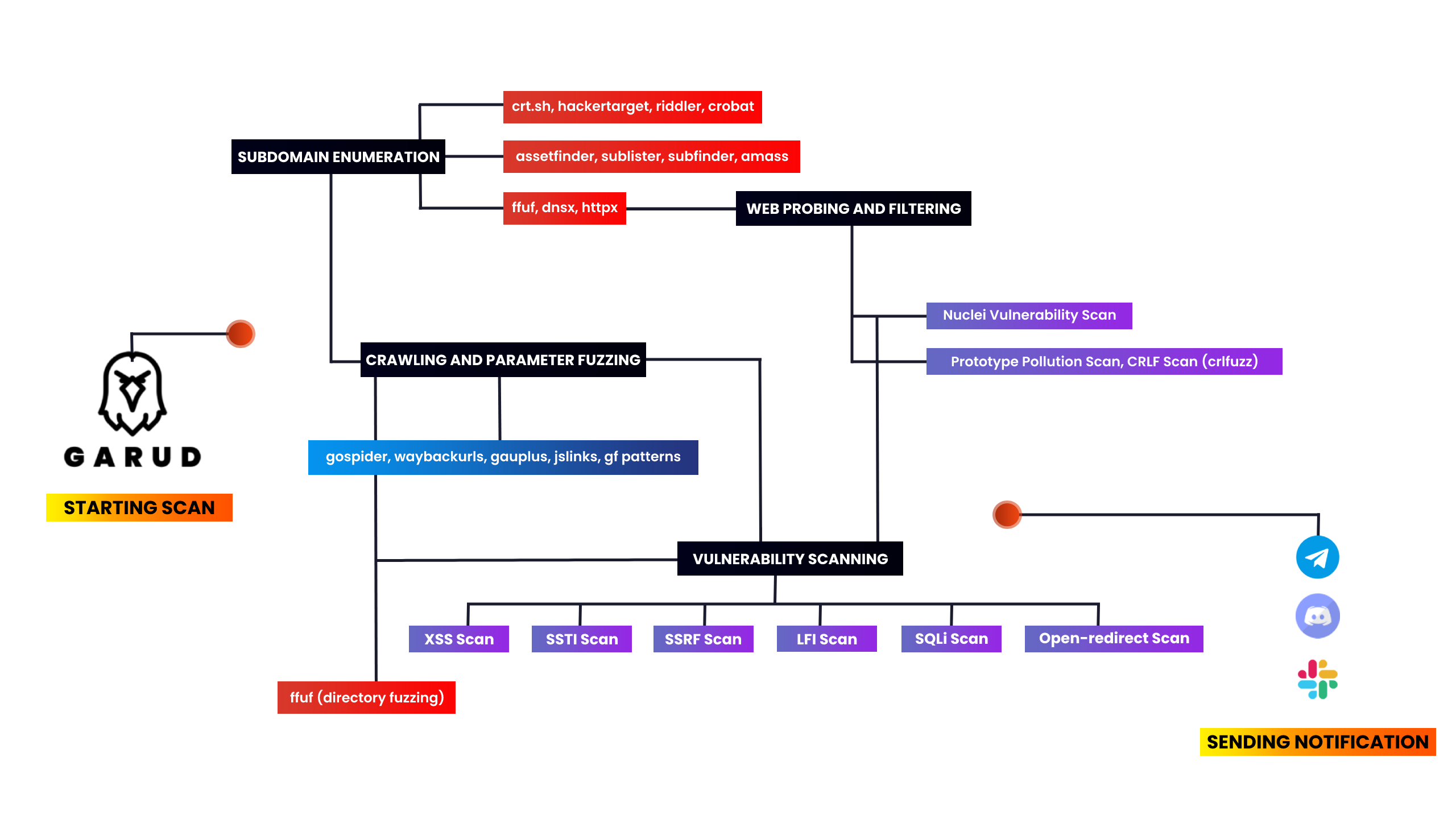
我制作这个工具是为了自动化我的信息收集并节省时间。每次都要输入这样的命令,然后等待一个命令完成,再输入另一个命令,这真的很让我头疼。所以我收集了一些在漏洞赏金领域广泛使用的工具。在这个脚本中,我使用了Assetfinder、subfinder、amass、httpx、sublister、gauplus和gf模式,然后使用dirsearch、dalfox、nuclei和kxss来发现一些唾手可得的安全问题。
该脚本首先使用assetfinder、sublister、subfinder和amass枚举给定目标域名的所有子域名,然后从整个子域名列表中过滤出所有存活域名,接着使用httpx提取子域名的标题,再使用nuclei扫描子域名接管。然后它使用gauplus提取给定子域名的参数,再使用gf模式从这些子域名中过滤出XSS、SSTI、SSRF、SQLi等参数,并同时扫描简单易得的漏洞。之后,它会将所有输出保存到一个文本文件中,例如target-xss.txt。最后,它会使用notify发送扫描通知。
v4.0 的新变化:修复了一些之前的问题,过滤掉了浪费时间的漏洞(你需要手动查找它们),并添加了dorking功能。
需求: Go语言 和 Python 3。
系统要求: 建议在具有 1VCPU 和 2GB RAM 的VPS上运行。
使用的工具 - 你必须安装这些工具才能使用此脚本
subfinder •
sublist3r •
gf patterns •
dnsx •
assetfinder •
httpx •
kxss •
nuclei •
dalfox •
anew •
notify •
aquatone •
amass •
gau •
crlfuzz •
uro •
ffuf •
naabu •
crobat •
gobuster •
gospider •
waybackurls
#确保你在安装工具前是root用户

garud:~ sudo su
garud:~ apt install git
garud:~ git clone https://github.com/R0X4R/Garud.git && cd Garud/ && chmod +x garud install.sh && mv garud /usr/bin/ && ./install.sh
注意:如果在运行
install.sh文件或garud时遇到任何问题,请运行sed -i -e 's/\r$//' install.sh
                █▀▀▀ █▀▀█ █▀▀█ █░░█ █▀▀▄
                █░▀█ █▄▄█ █▄▄▀ █░░█ █░░█
                ▀▀▀▀ ▀░░▀ ▀░▀▀ ░▀▀▀ ▀▀▀░

[GARUD] == 漏洞赏金信息收集套件 (@R0X4R)

示例用法:
garud [-d target.tld] [-x exclude domains] [--json] [-s]

标志:
   -d, --domain                 string     添加你的目标                         -d target.tld
   -x, --exclude                string     排除范围外的域名                     -x /home/dommains.list

可选标志:
   -s, --silent                             在终端中隐藏输出                     Default: False
   -j, --json                               将输出存储到单个json文件             Default: False
   -v, --version                            打印Garud当前版本
修复使用或安装Garud时的错误
garud:~ chmod +x install.sh && ./install.sh
Error: ./install.sh : /bin/bash^M : bad interpretor: No such file or directory

# 修复方法
garud:~ sed -i -e 's/\r$//' install.sh
你也可以复制错误信息并在谷歌上搜索,这会让你的调试技能变得更好 ;)
示例用法
# garud -d hackerone.com
排除范围外的域名
# echo test.hackerone.com > ossdomain.txt
# garud -d hackerone.com -x ~/ossdomain.txt
使用所有标志
# garud -d hackerone.com -j -s -x /home/oss.txt
在终端中隐藏输出
# garud -d hackerone.com -s
将输出存储到单个 json 文件
# garud -d hackerone.com -s -j
# cd hackerone
# cat output.json | jq
{
  "nuclei_critical": [],
  "vuln_crlf": [],
  "dalfox": [
    "[POC][V][GET][inATTR-double(3)-URL] http://subdomain.target.tld/hpp?pp=FUZZ%22onpointerout%3Dconfirm.call%28null%2C1%29+class%3Ddalfox+",
    ----------------------snip----------------------
    "subdomains": [
      "sub.target.tld",
      "tub.target.tld",
      "subdomain.target.tld"
  ],
  "vuln_xss": [
    "[POTENTIAL XSS] - http://subdomain.target.tld/hpp/?pp=%22%3E%2F%3E%3Csvg%2Fonload%3Dconfirm%28document.domain%29%3E ",
    "[POTENTIAL XSS] - http://subdomain.target.tld:80/hpp/?pp=%22%3E%2F%3E%3Csvg%2Fonload%3Dconfirm%28document.domain%29%3E ",
    "[POTENTIAL XSS] - http://subdomain.target.tld:80/hpp/index.php?pp=%22%3E%2F%3E%3Csvg%2Fonload%3Dconfirm%28document.domain%29%3E "
  ]
}
Docker
贡献者:@frost19k
此镜像需要使用Buildkit 构建。
garud:~ git clone https://github.com/R0X4R/Garud.git
garud:~ cd Garud
garud:~ docker buildx build -t garud -f Dockerfile .
运行容器
garud:~ docker run -t --rm \
  -v "/path/on/host":"/output" \   # 将主机的输出文件夹挂载到 "/output"
  -v "/path/to/configs":"/Garud/.config/notify" \   # 将你的 Notify 配置文件挂载到 "/Garud/.config/notify"
  garud -d hackerone.com
Garud 在容器内以 root 身份运行,因此建议配置 Linux 命名空间:
@slack •
@discord •
@telegram •
configure-notify
buymeacoffee.com/R0X4R | payU India | kofi.com/R0X4R |
|---|