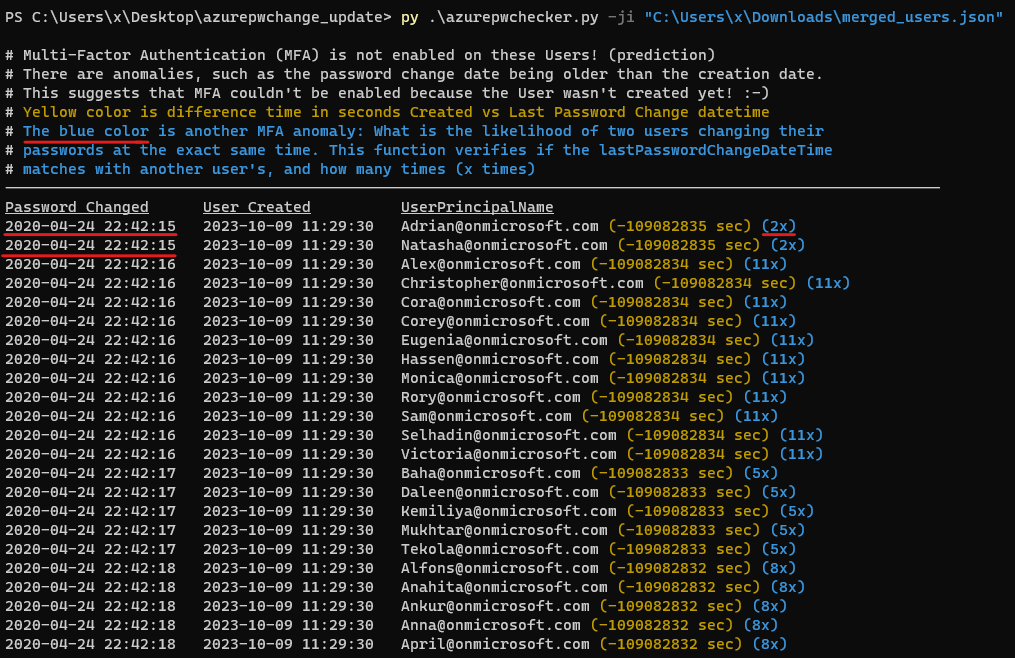
在 Azure AD 环境中,无需任何特殊权限即可确定用户是否已禁用多重身份验证 (MFA)。这可以通过分析账户的创建日期和上次密码更改日期来实现。
如果账户的创建日期和时间与其上次密码更改日期和时间一致,则可能表明自账户创建以来未发生任何人机交互,且用户无法启用多重身份验证 (MFA) 或更改其密码。此外还有其他“异常”,例如密码更改日期早于创建日期。这也表明,由于用户尚未创建,因此无法启用多重身份验证 (MFA)!
2023 年 10 月 16 日更新:
2024 年 2 月 18 日更新:
此信息可用于识别潜在的安全风险,供红队和蓝队使用。
此工具需要 roadrecon 数据库文件或借助 --code-javascript 选项提取的 JSON 文件。
Roadrecon 工具由 dirkjanm 开发,可在 github 上下载 https://github.com/dirkjanm/ROADtools 或通过 pip install roadrecon 安装。
使用方法请参阅:
python3 azurepwchecker.py
usage: azurepwchecker.py [-h] [--roadrecon-dump] [--roadrecon-dump-mfa] [-d DB] [-m] [-l] [-ll] [-lll] [-la] [-lo]
                         [-ji JSON_INPUT] [-c]

Azure AD Password Checker - This is a parser for generated JSON file or the roadrecon database file designed for use by both red and blue teams.
Database can be created when using --code-javascript option to extract 'merged_users.json' file with be created to later input this file with --json-input argument.
And roadrecon generated roadrecon.db file can be used! roadrecon is developed by https://github.com/dirkjanm credits to him!

options:
  -h, --help            show this help message and exit
  -d DB, --db DB        Specify the path to the 'roadrecon.db' database file, default is this location
  -m, --mfa-list        User Accounts without MFA (No privileged user required)! This argument helps identify user
                        accounts that have not enabled Multi-Factor Authentication (MFA). If an account's creation
                        date and time match its last password change date and time, it may indicate that no human
                        interaction has occurred since the account was created, and the user has not been able to
                        enable MFA or change their password. And there are other 'anomalies' such as the password
                        change date being older than the creation date. This suggests also that Multi-Factor
                        Authentication (MFA) couldn't be enabled because the User wasn't created yet! :-]
  -mo OUTFILE, --outfile OUTFILE
                        Output users with MFA anomalies to file
  -l, --pw-month        User accounts that had their passwords changed last month
  -ll, --pw-year        User accounts that had their passwords changed last year
  -lll, --pw-older      User accounts that haven't changed their passwords in a long time, oldest first
  -la, --admin          User accounts that are members of 'Admin' named groups, including 'Global Reader'
  -lo, --out-of-hours   User password change that occurred outside of office hours, specifically between 5:00 PM
                        (17:00) and 8:00 AM (08:00) on weekdays, as well as on Saturdays and Sundays
  -ji JSON_INPUT, --json-input JSON_INPUT
                        Provide the JSON file imported from your web browser's console using JavaScript. For
                        'createdDateTime' and 'lastPasswordChange' details, ensure you download the JSON output using
                        the '--code-javascript' option.
  -c, --code-javascript
                        Perform extraction even if 'azurepwchecker.py' or 'roadrecon' is unavailable. This script
                        enables extraction through the JavaScript console of a web browser. To proceed, ensure you
                        have a valid account to log in at https://portal.azure.com/#view/Microsoft_AAD_UsersAndTenants
                        /UserManagementMenuBlade/~/AllUsers or an active session on a computer. Copy and paste the
                        provided JavaScript code into the browser's console. Once the session is validated and you
                        have the necessary permissions, a JSON file named 'merged_users.json' will be generated. You
                        can then import it using the following command as example: 'azurepwchecker.py --json-input
                        merged_users.json -m'
  -v, --version         show program's version number and exit

run roadrecon first:
  (Run the following command to install the tool "pip install roadrecon)"

  --roadrecon-dump      "roadrecon dump" command or do it with roadrecon
  --roadrecon-dump-mfa  "roadrecon dump --mfa" command (requires privileged access) or do it with roadrecon
azurepwchecker.py --code-javascript 或文件夹中的 js 文件:按照以下步骤,使用提供的脚本获取用户列表及其账户信息。
登录 Azure 门户
访问用户管理
打开开发者工具
F12 打开开发者工具。执行脚本
获取用户列表和用户信息
下载合并的用户信息
merged_users.json 的文件。在 Azure AD Password Checker 中运行
azurepwchecker.py --json-input merged_users.json查看示例:
查看介绍:
2023 年 10 月 16 日更新:
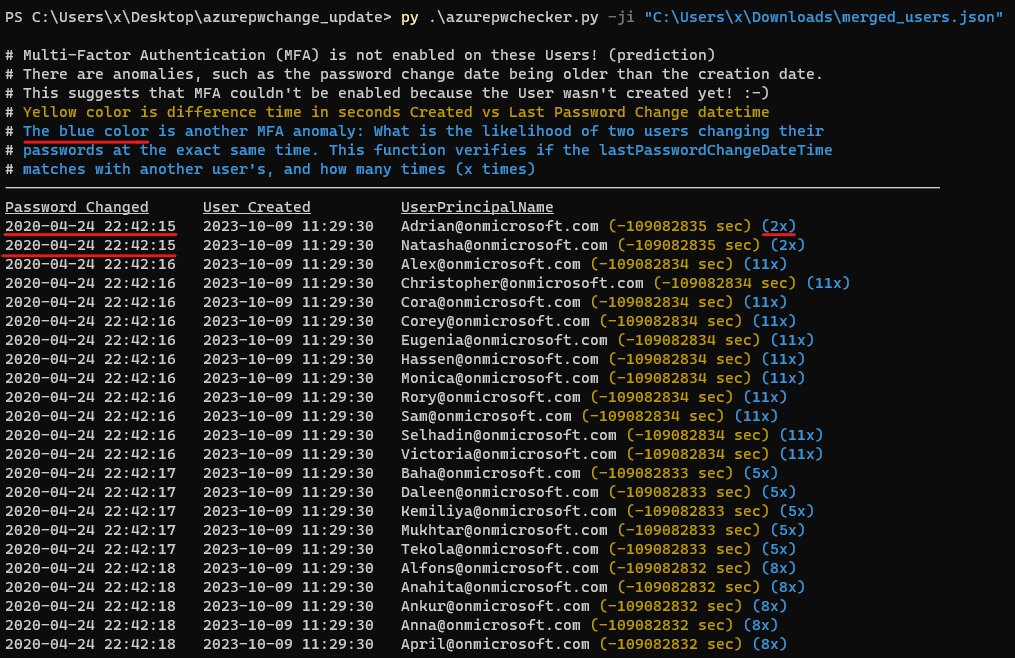
如何使用 --code-javascript 参数在 Azure 门户上生成用户列表,然后使用命令 azurepwchecker.py --json-input merged_users.json 导入该列表:
2024 年 2 月 13 日更新:
我上传了来自 @dafthack 的 GraphRunner 编辑版本,感谢他的贡献。在此修改版本中,我添加了一项新功能,允许直接读取“受害者”设备上的 HAR 文件。此新功能有助于检查和审阅访问令牌,以访问不同的权限或作用域。此外,如果访问令牌已过期,此版本允许使用刷新令牌来创建新的访问令牌。此过程具有时效性,但如果你已经登录 Office365 环境,则无需用户名和密码,因为它只需要 HAR 文件中找到的会话令牌。
请理解,代码可能看起来有些杂乱。我的专长主要不在 JavaScript 上,因此我的主要精力放在添加新功能上,而不是整理代码。