

 qeeqbox/social-analyzer
用于在1000个社交媒体\网站中分析和查找个人资料的API、CLI和Web应用

Social Analyzer - 用于在 +1000 个社交媒体 \ 网站上分析和查找个人资料的 API、CLI 和 Web 应用程序。它包含不同的分析和检测模块,您可以在调查过程中选择使用哪些模块。
检测模块采用了基于不同检测技术的评级机制,产生的评分值从 0 到 100(否-可能-是)。该模块旨在减少误报。
来自此 OSINT 工具的分析和公开提取信息可帮助调查与可疑或恶意活动相关的资料,例如网络霸凌、网络诱骗、网络跟踪和传播虚假信息。
该项目目前被一些资源有限的国家执法机构使用 - 检测数据库与此处共享的不同..
使创建和分享内容或参与社交网络的网站和应用程序 - 牛津词典
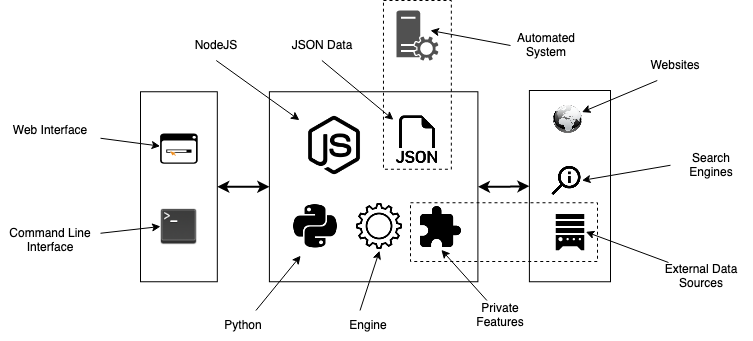
标准 localhost WEB APP URL:http://0.0.0.0:9005/app.html
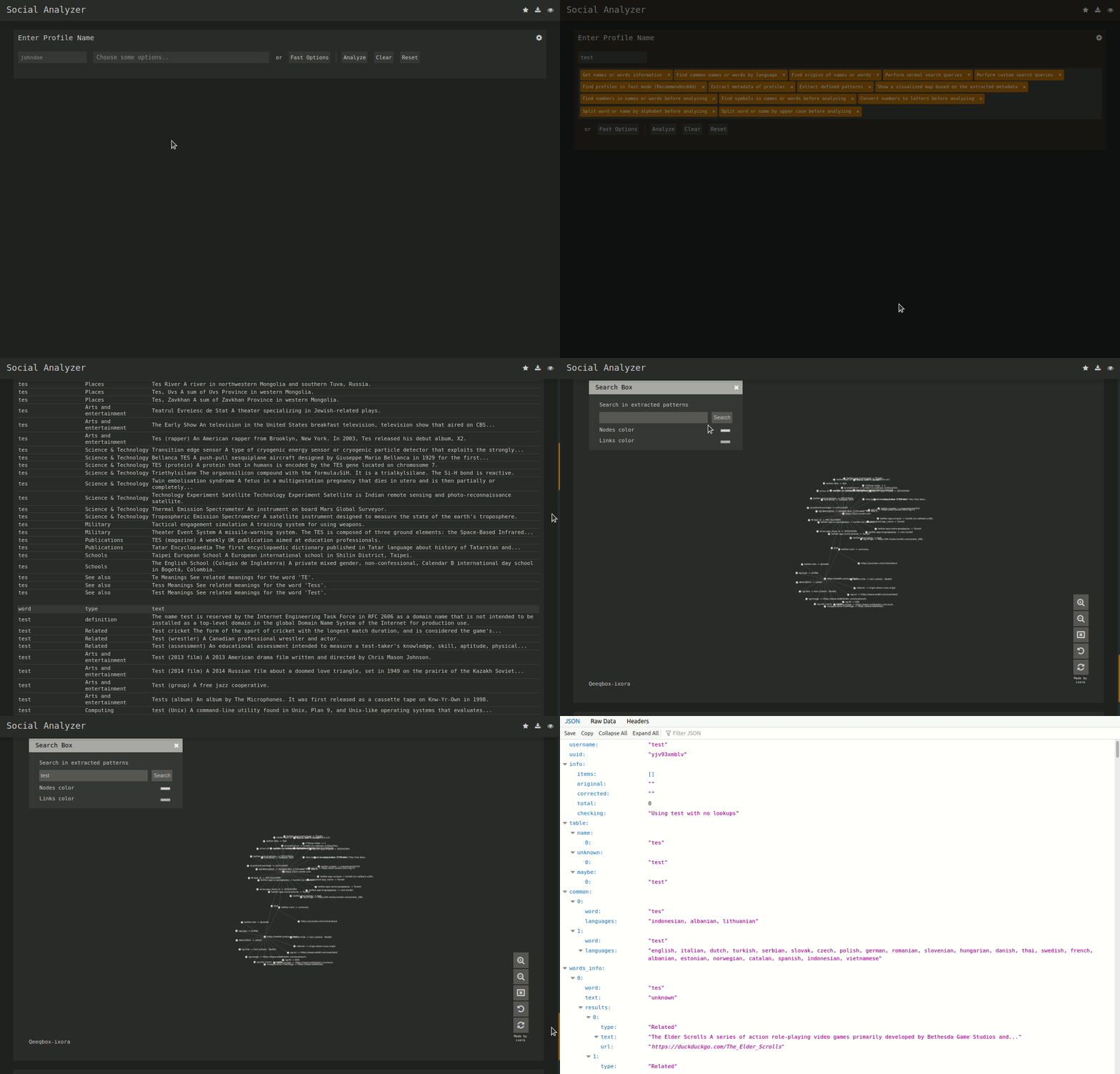

sudo apt-get update
#Depedning on your Linux distro, you may or may not need these 2 lines
sudo DEBIAN_FRONTEND=noninteractive apt-get install -y software-properties-common
sudo add-apt-repository ppa:mozillateam/ppa -y
sudo apt-get install -y firefox-esr tesseract-ocr git nodejs npm
git clone https://github.com/qeeqbox/social-analyzer.git
cd social-analyzer
npm update
npm install
npm start
sudo apt-get update
#Depedning on your Linux distro, you may or may not need these 2 lines
sudo DEBIAN_FRONTEND=noninteractive apt-get install -y software-properties-common
sudo add-apt-repository ppa:mozillateam/ppa -y
sudo apt-get install -y firefox-esr tesseract-ocr git nodejs npm
git clone https://github.com/qeeqbox/social-analyzer.git
cd social-analyzer
npm install
nodejs app.js --username "johndoe"
#or
nodejs app.js --username "johndoe,janedoe" --metadata
#or
nodejs app.js --username "johndoe,janedoe" --metadata --top 100
#or
nodejs app.js --username "johndoe" --type "adult"
sudo apt-get update
sudo apt-get install python3 python3-pip
pip3 install social-analyzer
python3 -m social-analyzer --username "johndoe"
#or
python3 -m social-analyzer --username "johndoe" --metadata
#or
python3 -m social-analyzer --username "johndoe" --metadata --top 100
#or
python3 -m social-analyzer --username "johndoe" --type "adult"
#or
python3 -m social-analyzer --username "johndoe" --websites "car" --logs --screenshots
sudo apt-get update
sudo apt-get install git python3 python3-pip
git clone https://github.com/qeeqbox/social-analyzer
cd social-analyzer
pip3 install -r requirements.txt
python3 app.py --username "janedoe"
#or
python3 app.py --username "johndoe" --metadata
#or
python3 app.py --username "johndoe" --metadata --top 100
#or
python3 app.py --username "johndoe" --type "adult"
#or
python3 app.py --username "johndoe" --websites "car" --logs --screenshots
#E.g. #1
from importlib import import_module
SocialAnalyzer = import_module("social-analyzer").SocialAnalyzer()
results = SocialAnalyzer.run_as_object(username="johndoe",silent=True)
print(results)

#E.g. #2
from importlib import import_module
SocialAnalyzer = import_module("social-analyzer").SocialAnalyzer()
results = SocialAnalyzer.run_as_object(username="johndoe,janedoe",silent=True,output="json",filter="good",metadata=False,timeout=10, profiles="detected")
print(results)
Required Arguments:
  --username   E.g. johndoe, john_doe or johndoe9999

Optional Arguments:
  --websites    A website or websites separated by space E.g. youtube, tiktokor tumblr
  --mode        Analysis mode E.g.fast -> FindUserProfilesFast, slow -> FindUserProfilesSlow or special -> FindUserProfilesSpecial
  --output      Show the output in the following format: json -> json outputfor integration or pretty -> prettify the output
  --options     Show the following when a profile is found: link, rate, titleor text
  --method      find -> show detected profiles, get -> show all profiles regardless detected or not, all -> combine find & get
  --filter      Filter detected profiles by good, maybe or bad, you can do combine them with comma (good,bad) or use all
  --profiles    Filter profiles by detected, unknown or failed, you can do combine them with comma (detected,failed) or use all
  --countries   select websites by country or countries separated by space as: us br ru
  --type        Select websites by type (Adult, Music etc)
  --top         select top websites as 10, 50 etc...[--websites is not needed]
  --extract     Extract profiles, urls & patterns if possible
  --metadata    Extract metadata if possible (pypi QeeqBox OSINT)
  --trim        Trim long strings
  --gui         Reserved for a gui (Not implemented)
  --cli         Reserved for a cli (Not needed)

Listing websites & detections:
  --list        List all available websites

Setting:
  --headers     Headers as dict
  --logs_dir    Change logs directory
  --timeout     Change timeout between each request
  --silent      Disable output to screen

 ,请直接联系我(不要在 GitHub 上打开 issue)
