自动化研究产物 — 非上游项目。
本仓库是由自动化工具链构建的一次性实验环境,用于拉瓦尔大学(Université Laval)硕士论文中复现已公开的 GitHub Actions 工作流漏洞。它是
timescale/pgai在提交2a209b058c60823b57e8b7775b10244ff340eb8b(2025-05-14)时的逐字快照,依据该项目自身的许可证重新分发,该许可证文件已原样包含在本快照中。上游项目未参与其中,也从未成为攻击目标,此处研究的漏洞已公开。本仓库中的每个密钥和变量均为随机生成的虚拟值——不包含任何真实凭据。操作引用和运行器镜像均固定为其在 2025-05-14 解析到的版本;有关对快照所做的每项更改,请参阅工具链输出中的
pinning.md。如有疑问或异议:[email protected]


一个 Python 库,可将 PostgreSQL 转变为适用于 RAG 和 Agentic 应用的稳健、生产级检索引擎。
🔄 自动从 PostgreSQL 数据和 S3 文档创建并同步向量嵌入。嵌入会随数据变化自动更新。
🔍 借助 pgvector 和 pgvectorscale 实现强大的向量与语义搜索。
🛡️ 开箱即用、生产就绪:支持批量处理以高效生成嵌入,并内置对模型故障、速率限制和延迟突增的处理机制。
🐘 适用于任何 PostgreSQL 数据库,包括 Timescale Cloud、Amazon RDS、Supabase 等。
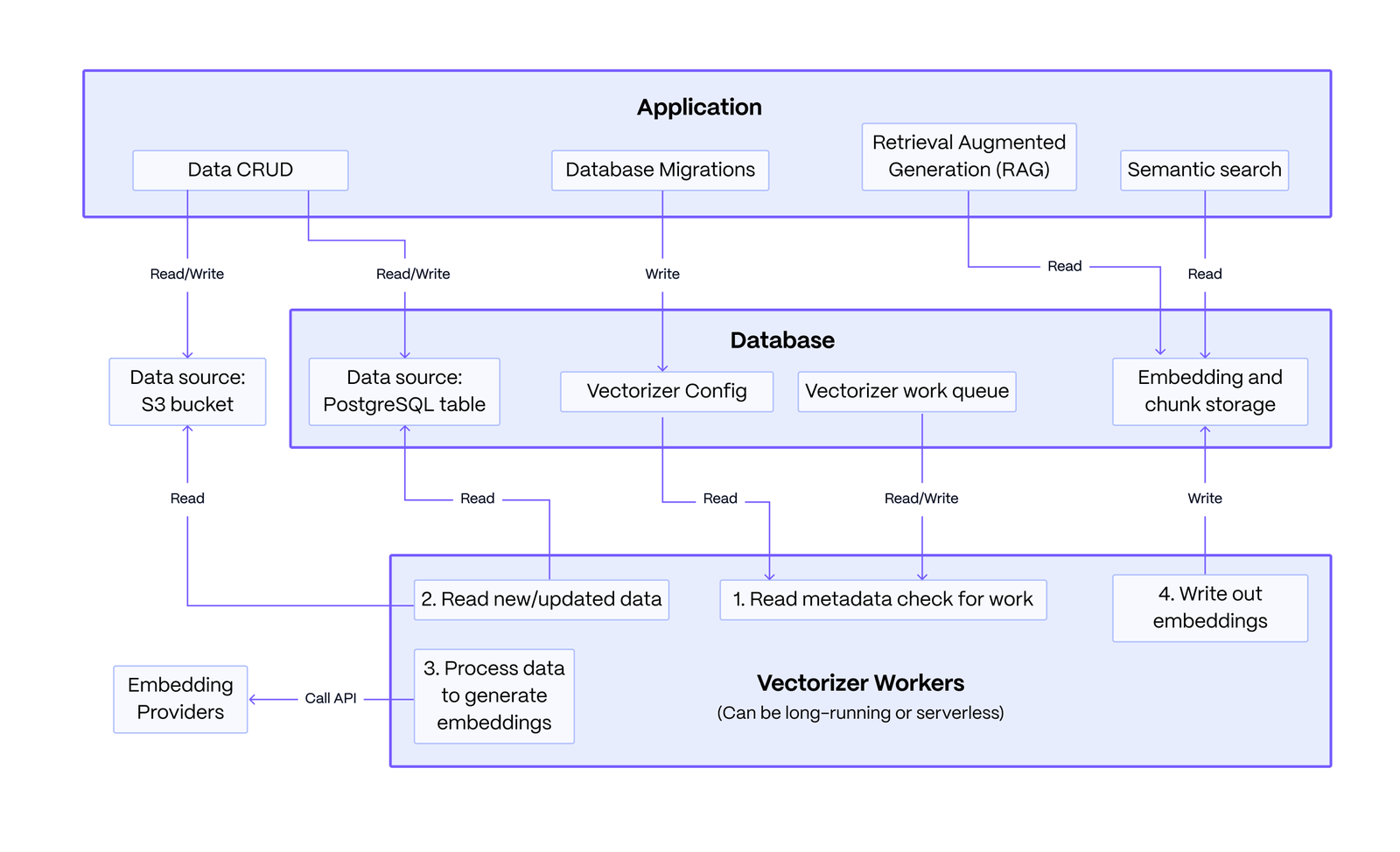
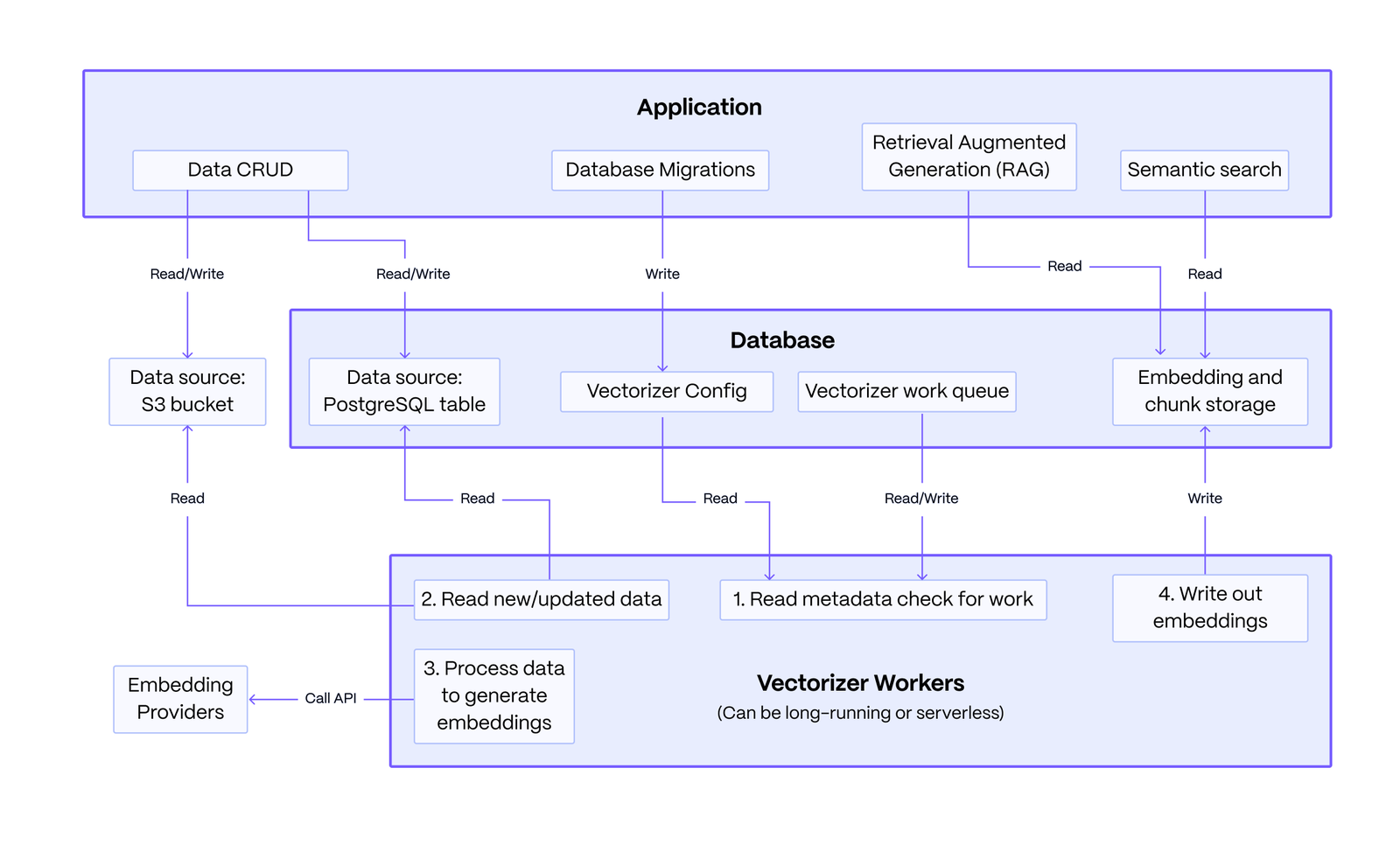
基本架构: 该系统由您编写的应用程序、一个 PostgreSQL 数据库以及无状态向量化工作进程组成。应用程序定义向量化配置,以从 PostgreSQL 或 S3 等来源嵌入数据。工作进程读取该配置,将数据队列处理为嵌入和分块文本,并将结果写回。随后,应用程序查询这些数据,为 RAG 和语义搜索提供支持。
该架构的关键优势在于其韧性:应用程序所做的数据修改与嵌入过程解耦,确保嵌入服务的故障不会影响核心数据操作。
首先,安装 pgai 包。``` pip install pgai
然后,安装 pgai 数据库组件。你可以通过终端使用 CLI 来完成此操作,也可以在 Python 应用程序代码中使用 pgai Python 包来完成。```
# from the cli
pgai install -d <database-url>

# or from the python package, often done as part of your application setup
import pgai
pgai.install(DB_URL)
本快速入门演示了 pgai Vectorizer 如何通过自动创建和同步嵌入(embeddings),在数据发生变化时实现对 PostgreSQL 数据的语义搜索和 RAG。
pgai Vectorizer 的关键“秘诀”在于其声明式的嵌入生成方法。只需定义你的流水线,让 Vectorizer 处理保持嵌入同步的运维复杂性,即使嵌入端点不可靠也能正常工作。你可以按如下方式定义流水线的简单版本:```sql CREATE TABLE IF NOT EXISTS wiki ( id INTEGER PRIMARY KEY GENERATED ALWAYS AS IDENTITY, url TEXT NOT NULL, title TEXT NOT NULL, text TEXT NOT NULL )
SELECT ai.create_vectorizer( 'wiki'::regclass, loading => ai.loading_column(column_name=>'text'), destination => ai.destination_table(target_table=>'wiki_embedding_storage'), embedding => ai.embedding_openai(model=>'text-embedding-ada-002', dimensions=>'1536') )
向量化器会自动为`wiki`表中的所有行创建嵌入,更重要的是,它会随着底层数据的变化保持嵌入的同步更新。**可以把它想象成在`wiki`表上声明一个索引**,只不过不是由数据库替你管理索引数据结构,而是由Vectorizer来管理嵌入。

## 运行快速入门

**前提条件:**
- 一个PostgreSQL数据库([Docker安装说明](https://docs.timescale.com/self-hosted/latest/install/installation-docker/))。
- 一个OpenAI API密钥(快速入门中我们使用openai进行嵌入,但你也可以使用[多种提供商](#supported-embedding-models))。

创建一个包含以下内容的`.env`文件:```
OPENAI_API_KEY=<your-openai-api-key>
DB_URL=<your-database-url>
你可以从快速入门示例中下载完整的 python 代码 和 requirements.txt,并在与 .env 文件相同的目录下运行它。
Pgai 需要在数据库中安装一些目录表和函数。这通过 pgai.install 函数完成,该函数会将必要的组件安装到数据库的 ai 模式中。```python
pgai.install(DB_URL)
### 创建向量化器

这里定义了向量化器,它告诉系统如何根据 `wiki` 表中的 `text` 列创建嵌入。向量化器会创建一个 `wiki_embedding` 视图,我们可以通过查询该视图来获取嵌入(如下所示)。```python
async def create_vectorizer(conn: psycopg.AsyncConnection):
    async with conn.cursor() as cur:
        await cur.execute("""
            SELECT ai.create_vectorizer(
                'wiki'::regclass,
                if_not_exists => true,
                loading => ai.loading_column(column_name=>'text'),
                embedding => ai.embedding_openai(model=>'text-embedding-ada-002', dimensions=>'1536'),
                destination => ai.destination_table(view_name=>'wiki_embedding')
            )
        """)
    await conn.commit()
在此示例中,我们运行一次向量化工作进程,为现有数据创建嵌入。```python worker = Worker(DB_URL, once=True) worker.run()
在真实应用中,我们不会像这样每次创建嵌入时都手动调用 worker。相反,我们会让 worker 在后台运行,并持续运行,轮询 vectorizer 分配的工作。

你可以从应用程序、CLI 或 Docker 中在后台运行 worker。有关更多详细信息,请参阅 [vectorizer worker](https://github.com/pvharmo2/gha-lab-e8902eccd3/blob/main/docs/vectorizer/worker.md) 文档。


### 使用语义搜索检索 wiki 文章

这是 PostgreSQL 中标准的 pgvector 语义搜索。搜索针对 `wiki_embedding` 视图执行,该视图由 vectorizer 创建,包含 `wiki` 表中的所有列,外加 `embedding` 列和分块文本。此函数返回 `wiki` 表中完整的 `text` 列,以及与查询最相关的较小文本块。```python
@dataclass
class WikiSearchResult:
    id: int
    url: str
    title: str
    text: str
    chunk: str
    distance: float

async def _find_relevant_chunks(client: AsyncOpenAI, query: str, limit: int = 1) -> List[WikiSearchResult]:
    # Generate embedding for the query using OpenAI's API
    response = await client.embeddings.create(
        model="text-embedding-ada-002",
        input=query,
        encoding_format="float",
    )

    embedding = np.array(response.data[0].embedding)

    # Query the database for the most similar chunks using pgvector's cosine distance operator (<=>)
    async with pool.connection() as conn:
        async with conn.cursor(row_factory=class_row(WikiSearchResult)) as cur:
            await cur.execute("""
                SELECT w.id, w.url, w.title, w.text, w.chunk, w.embedding <=> %s as distance
                FROM wiki_embedding w
                ORDER BY distance
                LIMIT %s
            """, (embedding, limit))

            return await cur.fetchall()
这段代码值得注意的地方在于它没有做什么。这只是向 wiki 表中简单插入一篇新文章。我们无需做任何额外操作来创建嵌入,向量化工作进程会在数据变化时自动负责更新嵌入。```python
def insert_article_about_pgai(conn: psycopg.AsyncConnection):
async with conn.cursor(row_factory=class_row(WikiSearchResult)) as cur:
await cur.execute("""
INSERT INTO wiki (url, title, text) VALUES
('https://en.wikipedia.org/wiki/pgai', 'pgai', 'pgai is a Python library that turns PostgreSQL into the retrieval engine behind robust, production-ready RAG and Agentic applications. It does this by automatically creating vector embeddings for your data based on the vectorizer you define.')
""")
await conn.commit()
### 使用 LLM 执行 RAG

此代码使用 LLM 执行 RAG。它使用上面定义的 `_find_relevant_chunks` 函数从 `wiki` 表中查找最相关的文本块,然后使用 LLM 生成响应。```python
    query = "What is the main thing pgai does right now?"
    relevant_chunks = await _find_relevant_chunks(client, query)
    context = "\n\n".join(
        f"{chunk.title}:\n{chunk.text}"
        for chunk in relevant_chunks
    )
    prompt = f"""Question: {query}

Please use the following context to provide an accurate response:

{context}

Answer:"""

    response = await client.chat.completions.create({
        model: "gpt-3.5-turbo",
        messages: [{ role: "user", content: prompt }],
    })
    print("RAG response:")
    print(response.choices[0].message.content)
查看其他快速入门指南:
深入了解 vectorizer:
我们的 pgai Python 库让您能够处理从数据生成的嵌入向量:
您可以使用向量嵌入来:
我们还提供了一款 PostgreSQL 扩展,可直接从 SQL 中调用 LLM 模型。这对于分类、摘要以及对现有数据进行数据增强等用例通常非常有用。
vectorizer 的设计灵活且可定制。每个 vectorizer 都定义了一个从数据创建嵌入的管道。该管道由一系列按顺序应用于数据的组件组成:
以下模型支持用于嵌入:
简单地创建向量嵌入是容易且直接的。挑战在于 LLM 在一定程度上并不可靠,且端点会表现出间歇性 故障和/或性能下降。正确处理故障的一个关键点是, 您的主要数据修改操作(INSERT、UPDATE、 DELETE)不应依赖于嵌入操作。否则,每当端点变慢或失败时, 您的应用程序就会宕机,用户体验也会受到影响。
通常,您需要实现一个自定义的 MLops 管道来正确处理 端点故障。这通常涉及 Kafka 之类的队列系统、专门的 worker,以及其他用于处理队列和重试失败请求的基础设施。这是 大量的工作,而且很容易出错。
使用 pgai,您可以跳过所有这些,专注于构建您的应用程序,因为 vectorizer 正在为您管理嵌入。我们内置了队列和 重试逻辑,以处理您可能遇到的各种故障模式。由于我们在 后台执行这项工作,因此主要的数据修改操作不会 依赖于嵌入操作。这就是 pgai 开箱即用即可投入生产的原因。
许多专门的向量数据库会为您创建嵌入。然而,当嵌入端点宕机或性能下降时,它们通常会失败,从而将错误处理和重试的负担重新抛回给您。
我们欢迎对 pgai 的贡献!请参阅 贡献指南 页面了解更多信息。
pgai 仍处于早期阶段。现在是帮助塑造该项目方向的绝佳时机; 我们目前正在确定优先级。请查看我们正在考虑开发的 功能列表。 欢迎发表评论、扩充列表,或加入 Discussions 论坛。
要开始使用,请查看 如何贡献 以及 如何搭建开发/测试环境。
Timescale 是一家 PostgreSQL 数据库公司。要了解更多信息,请访问 timescale.com。
Timescale Cloud 是一个高性能、面向开发者、提供 PostgreSQL 服务的云平台, 适用于要求最严苛的 AI、时间序列、分析和事件工作负载。Timescale Cloud 非常适合生产应用程序,并提供高可用性、流式备份、持续升级、角色和权限管理以及出色的安全性。