自动化研究产物 — 非上游项目。
本仓库是由自动化测试框架为拉瓦尔大学(Université Laval)硕士论文构建的一次性实验环境,用于复现已发表的 GitHub Actions 工作流漏洞。它是
openlit/openlit在提交8529a7746ce2cae946bd2346cb3792c22f86cbee(2026-02-24)时的逐字快照,依据该项目自身的许可证重新分发,该许可证文件已原样包含在本快照中。上游项目未参与其中,也从未成为攻击目标,此处研究的漏洞已公开。本仓库中的每个密钥和变量均为随机生成的虚拟值——不存在任何真实凭据。操作引用和运行器镜像均固定为 2026-02-24 时解析到的版本;有关对快照所做的每项更改,请参阅测试框架输出中的
pinning.md。如有疑问或异议:[email protected]
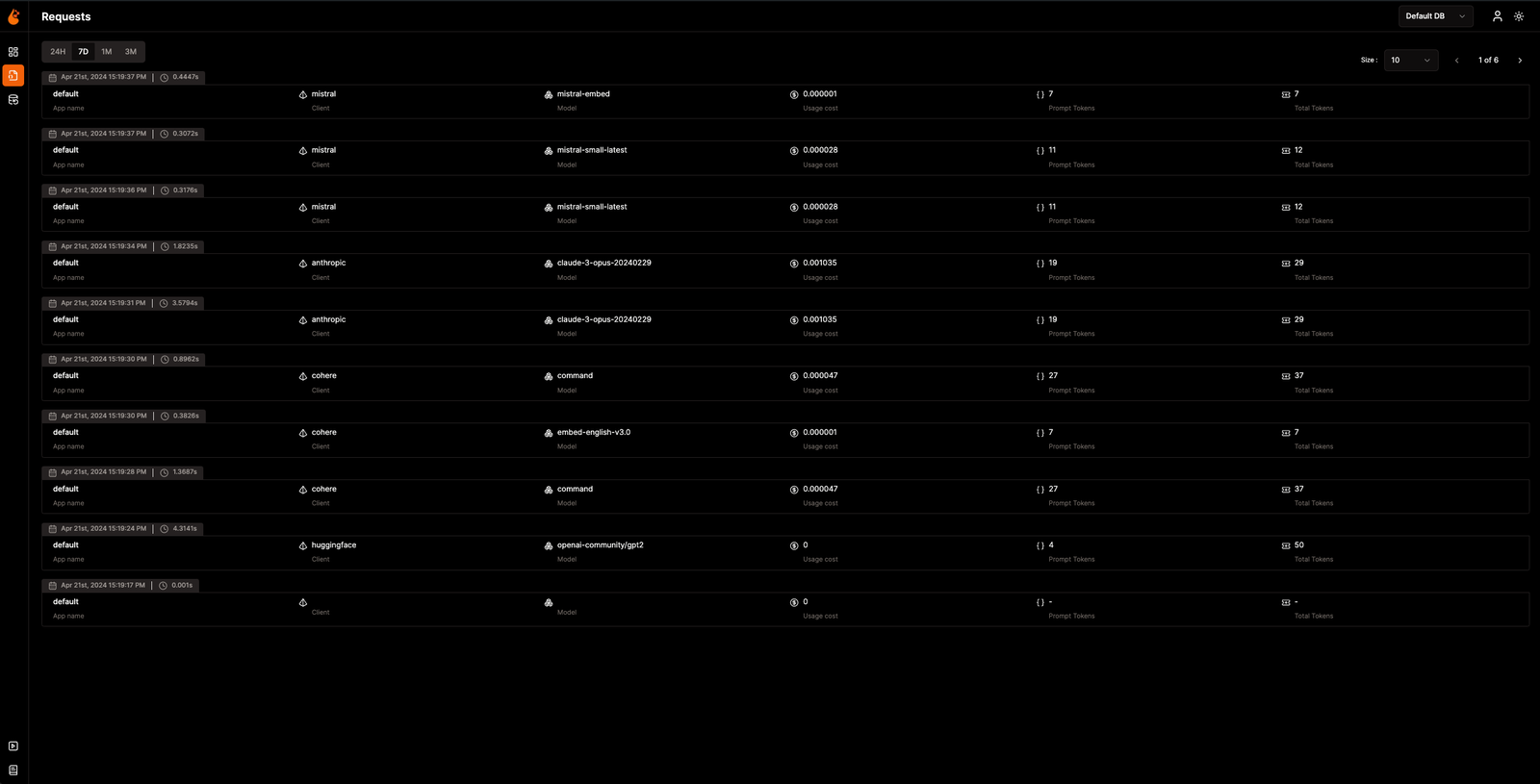
https://github.com/user-attachments/assets/6909bf4a-f5b4-4060-bde3-95e91fa36168
OpenLIT 让您能够简化 AI 开发工作流,尤其是针对生成式 AI 和大语言模型(LLM)。它精简了诸如试验 LLM、组织和版本化管理提示词、以及安全处理 API 密钥等关键任务。仅需一行代码,您即可启用原生 OpenTelemetry 可观测性,提供涵盖 LLM、向量数据库和 GPU 的全栈监控。这使得开发者能够自信地构建 AI 功能和应用,从测试平稳过渡到生产环境。
本项目自豪地遵循并维护与 OpenTelemetry 社区共同制定的语义约定,并持续更新以对齐可观测性领域的最新标准。
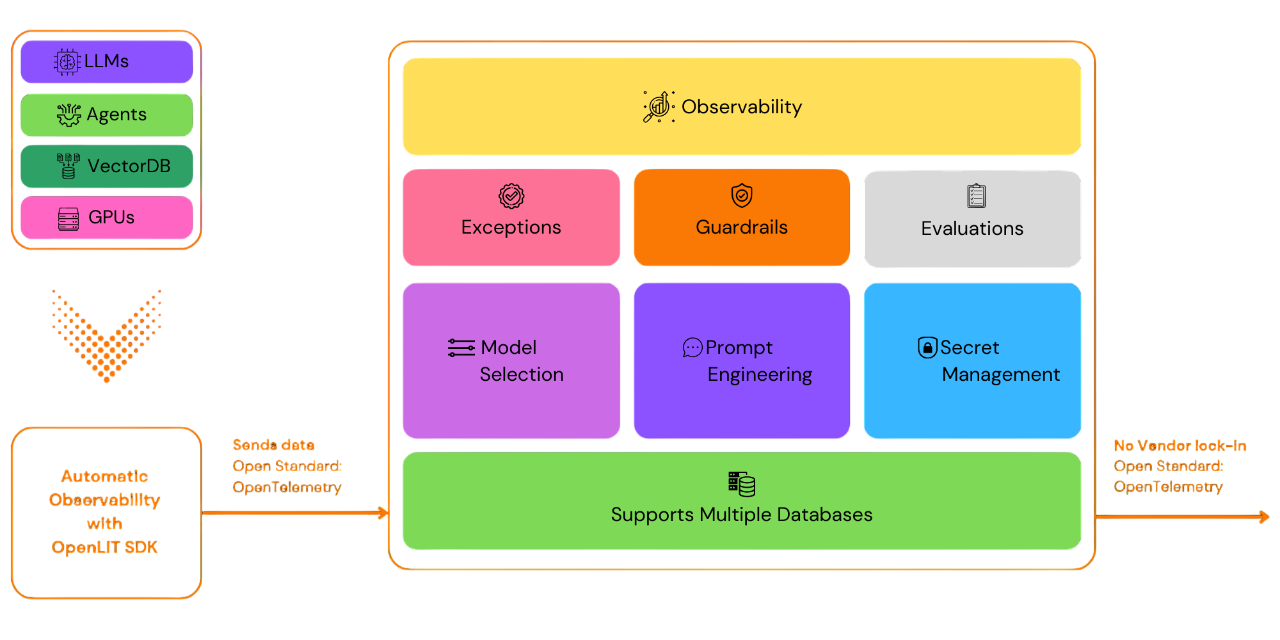
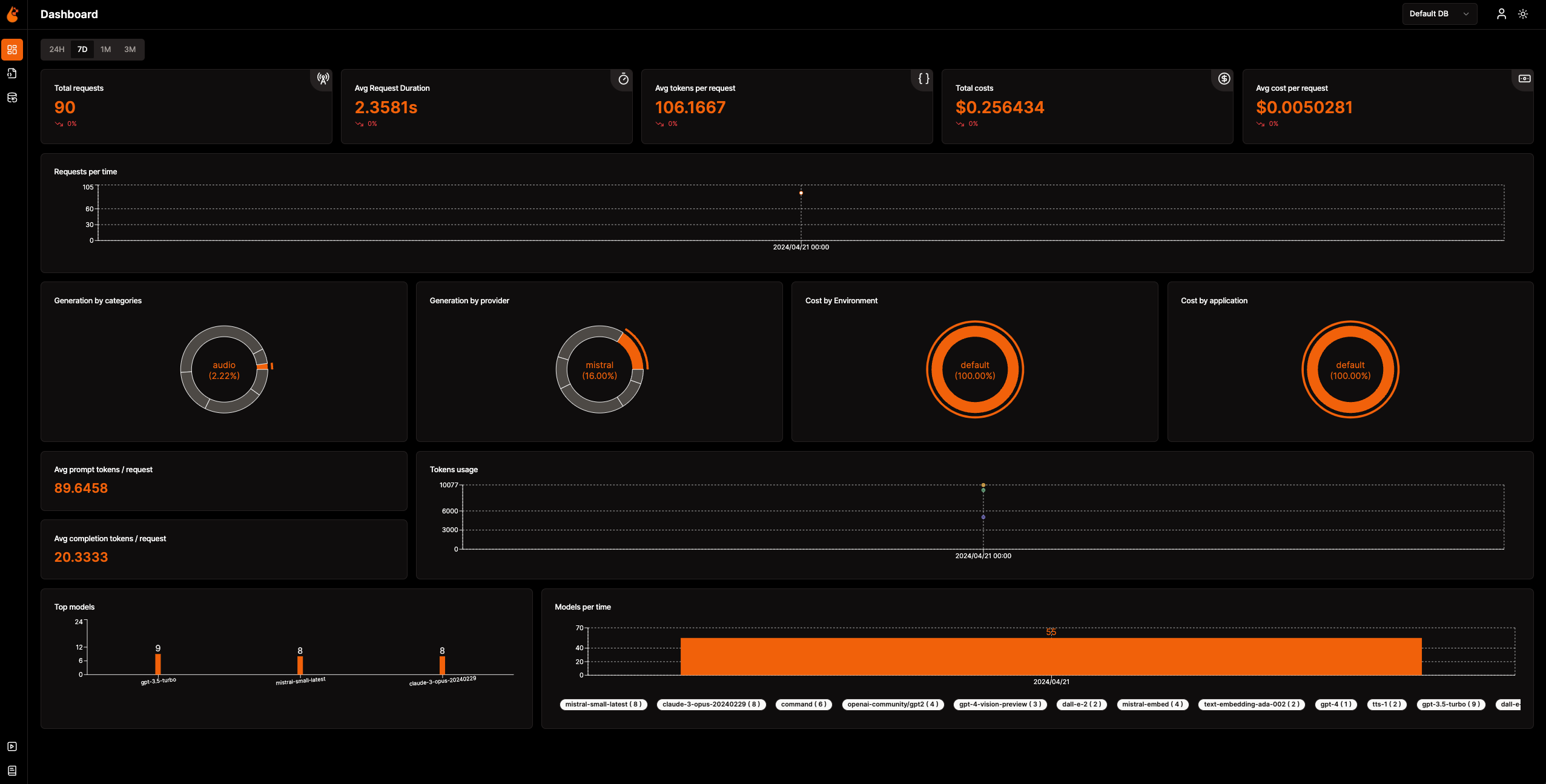
📈 分析仪表盘:通过跟踪指标、成本和用户交互的详细仪表盘,监控您的 AI 应用健康状态与性能,清晰呈现整体效率。
🔌 原生 OpenTelemetry 可观测性 SDK:供应商中立的 SDK,用于将追踪(traces)和指标(metrics)发送到您现有的可观测性工具。
💲 自定义与微调模型的成本跟踪:使用自定义定价文件,为特定模型定制成本估算,实现精准预算管理。
🐛 异常监控仪表盘:通过专用监控仪表盘跟踪常见异常和错误,快速发现并解决问题。
💭 提示词管理:使用 Prompt Hub 管理和版本化管理提示词,确保跨应用的一致性和便捷访问。
🔑 API 密钥与机密管理:集中安全管理您的 API 密钥和机密,避免不安全做法。
🎮 试验不同的 LLM:使用 OpenGround 并排探索、测试和比较各种 LLM。
🚀 用于 OpAMP 管理的 Fleet Hub:使用 OpAMP(开放代理管理协议)并通过安全的 TLS 通信,集中管理和监控您基础设施中的 OpenTelemetry Collector。
flowchart TB; subgraph " " direction LR; subgraph " " direction LR; OpenLIT_SDK[OpenLIT SDK] -->|Sends Traces & Metrics| OTC[OpenTelemetry Collector]; OTC -->|Stores Data| ClickHouseDB[ClickHouse]; end subgraph " " direction RL; OpenLIT_UI[OpenLIT] -->|Pulls Data| ClickHouseDB; end end
### 步骤 1:部署 OpenLIT 技术栈

1. 克隆 OpenLIT 仓库

   打开你的命令行或终端,然后运行:   ```shell
   git clone [email protected]:openlit/openlit.git
使用 Docker 自行托管
通过以下命令部署并运行 OpenLIT: ```shell docker compose up -d
有关使用 Helm 在 Kubernetes 中安装的说明,请参阅 Kubernetes Helm 安装指南。
打开命令行或终端并运行:```bash pip install openlit
> 有关使用 TypeScript SDK 的说明,请参阅 [TypeScript SDK 安装指南](https://github.com/openlit/openlit/tree/main/sdk/typescript#-installation)。

### 步骤 3:在您的应用程序中初始化 OpenLIT

通过将以下代码行添加到您的代码中,将 OpenLIT 集成到您的 AI 应用程序中。```python
import openlit

openlit.init()
按如下方式配置遥测数据目标:
| 用途 | 参数/环境变量 | 用于发送至 OpenLIT |
|---|---|---|
| 将数据发送至 HTTP OTLP 端点 | otlp_endpoint 或 OTEL_EXPORTER_OTLP_ENDPOINT | "http://127.0.0.1:4318" |
💡 提示:如果未提供
otlp_endpoint或OTEL_EXPORTER_OTLP_ENDPOINT,OpenLIT SDK 将直接把追踪信息输出到您的控制台,这在开发阶段是推荐的做法。
在您的应用程序代码中添加以下两行: ```python import openlit
openlit.init( otlp_endpoint="http://127.0.0.1:4318", )
</details>

---

<details>

---

<summary>使用环境变量进行初始化</summary>

在你的应用程序代码中添加以下两行:  ```python
import openlit

openlit.init()
然后,使用环境变量配置你的 OTLP 端点: ```env export OTEL_EXPORTER_OTLP_ENDPOINT = "http://127.0.0.1:4318"
</details>
---
### 第 4 步:可视化与优化
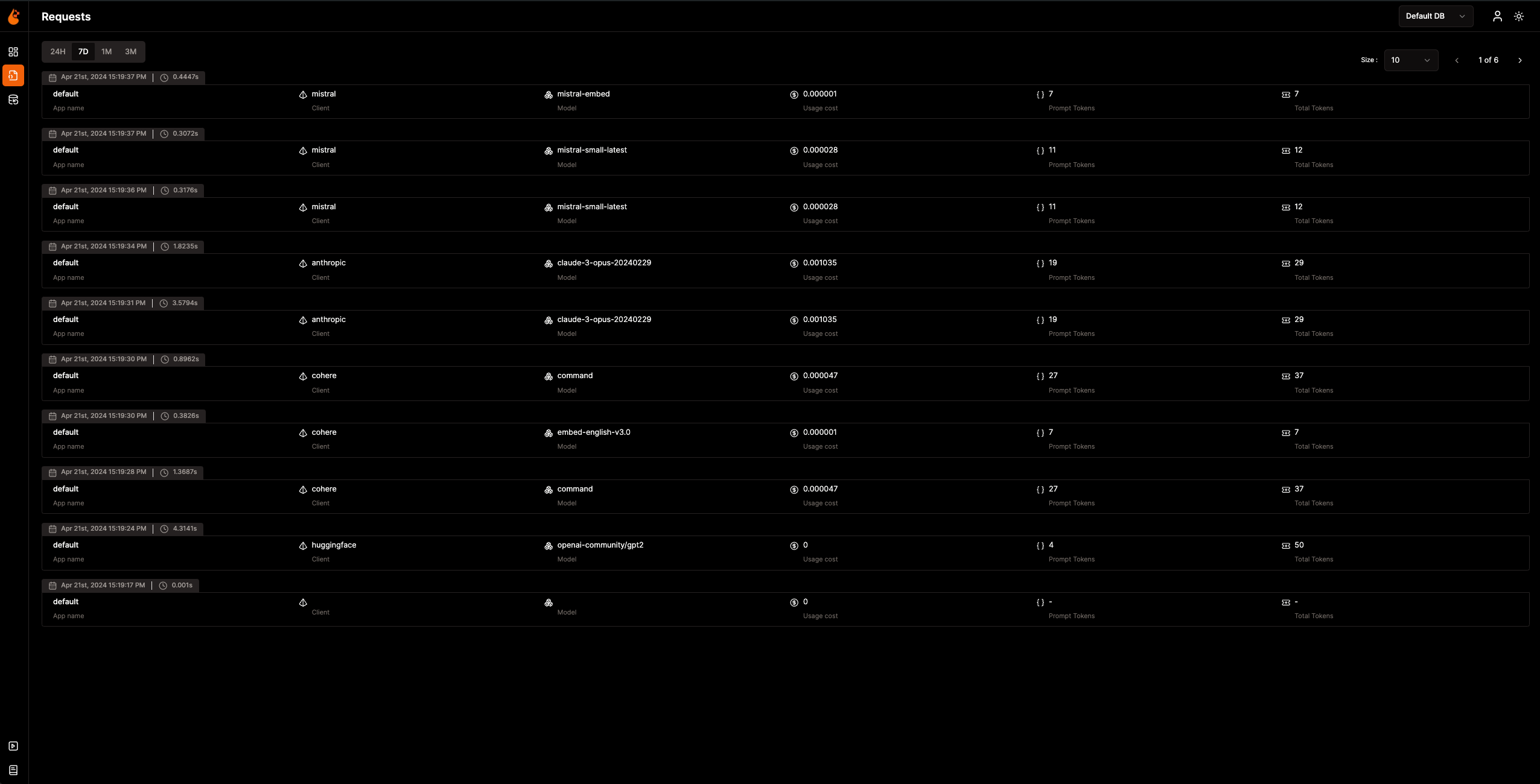
现在,可观测性数据已被收集并发送到 OpenLIT,下一步就是可视化并分析这些数据,以深入了解 AI 应用的性能和行为,并找出需要改进的地方。
只需在浏览器中访问 `127.0.0.1:3000` 即可开始探索 OpenLIT。您可以使用默认凭据登录:
- **邮箱**:`[email protected]`
- **密码**:`openlituser`
## 📦 支持的集成
OpenLIT 只需一行代码即可自动检测 **44+ 个 LLM 提供商、AI 框架和向量数据库**。每个集成都会生成 [OpenTelemetry 原生](https://opentelemetry.io/) 的追踪和指标。点击任意卡片即可查看集成文档。
<sub>
<img src="https://img.shields.io/badge/Python-3776AB?logo=python&logoColor=white&style=flat-square" height="16"> Python SDK
<img src="https://img.shields.io/badge/TypeScript-3178C6?logo=typescript&logoColor=white&style=flat-square" height="16"> TypeScript SDK
</sub>
### LLM 提供商
<table>
<tr>
<td align="center" width="160"><a href="https://docs.openlit.io/latest/sdk/integrations/openai"><b>OpenAI</b></a><br/><img src="https://img.shields.io/badge/Python-3776AB?logo=python&logoColor=white&style=flat-square" height="18"> <img src="https://img.shields.io/badge/TypeScript-3178C6?logo=typescript&logoColor=white&style=flat-square" height="18"></td>
<td align="center" width="160"><a href="https://docs.openlit.io/latest/sdk/integrations/anthropic"><b>Anthropic</b></a><br/><img src="https://img.shields.io/badge/Python-3776AB?logo=python&logoColor=white&style=flat-square" height="18"> <img src="https://img.shields.io/badge/TypeScript-3178C6?logo=typescript&logoColor=white&style=flat-square" height="18"></td>
<td align="center" width="160"><a href="https://docs.openlit.io/latest/sdk/integrations/cohere"><b>Cohere</b></a><br/><img src="https://img.shields.io/badge/Python-3776AB?logo=python&logoColor=white&style=flat-square" height="18"> <img src="https://img.shields.io/badge/TypeScript-3178C6?logo=typescript&logoColor=white&style=flat-square" height="18"></td>
<td align="center" width="160"><a href="https://docs.openlit.io/latest/sdk/integrations/mistral"><b>Mistral AI</b></a><br/><img src="https://img.shields.io/badge/Python-3776AB?logo=python&logoColor=white&style=flat-square" height="18"> <img src="https://img.shields.io/badge/TypeScript-3178C6?logo=typescript&logoColor=white&style=flat-square" height="18"></td>
</tr>
<tr>
<td align="center" width="160"><a href="https://docs.openlit.io/latest/sdk/integrations/groq"><b>Groq</b></a><br/><img src="https://img.shields.io/badge/Python-3776AB?logo=python&logoColor=white&style=flat-square" height="18"> <img src="https://img.shields.io/badge/TypeScript-3178C6?logo=typescript&logoColor=white&style=flat-square" height="18"></td>
<td align="center" width="160"><a href="https://docs.openlit.io/latest/sdk/integrations/google-ai-studio"><b>Google AI Studio</b></a><br/><img src="https://img.shields.io/badge/Python-3776AB?logo=python&logoColor=white&style=flat-square" height="18"> <img src="https://img.shields.io/badge/TypeScript-3178C6?logo=typescript&logoColor=white&style=flat-square" height="18"></td>
<td align="center" width="160"><a href="https://docs.openlit.io/latest/sdk/integrations/together"><b>Together AI</b></a><br/><img src="https://img.shields.io/badge/Python-3776AB?logo=python&logoColor=white&style=flat-square" height="18"> <img src="https://img.shields.io/badge/TypeScript-3178C6?logo=typescript&logoColor=white&style=flat-square" height="18"></td>
<td align="center" width="160"><a href="https://docs.openlit.io/latest/sdk/integrations/ollama"><b>Ollama</b></a><br/><img src="https://img.shields.io/badge/Python-3776AB?logo=python&logoColor=white&style=flat-square" height="18"> <img src="https://img.shields.io/badge/TypeScript-3178C6?logo=typescript&logoColor=white&style=flat-square" height="18"></td>
</tr>
<tr>
<td align="center" width="160"><a href="https://docs.openlit.io/latest/sdk/integrations/bedrock"><b>AWS Bedrock</b></a><br/><img src="https://img.shields.io/badge/Python-3776AB?logo=python&logoColor=white&style=flat-square" height="18"> <img src="https://img.shields.io/badge/TypeScript-3178C6?logo=typescript&logoColor=white&style=flat-square" height="18"></td>
<td align="center" width="160"><a href="https://docs.openlit.io/latest/sdk/integrations/azure-ai-inference"><b>Azure AI Inference</b></a><br/><img src="https://img.shields.io/badge/Python-3776AB?logo=python&logoColor=white&style=flat-square" height="18"></td>
<td align="center" width="160"><a href="https://docs.openlit.io/latest/sdk/integrations/vertexai"><b>Vertex AI</b></a><br/><img src="https://img.shields.io/badge/Python-3776AB?logo=python&logoColor=white&style=flat-square" height="18"></td>
<td align="center" width="160"><a href="https://docs.openlit.io/latest/sdk/integrations/vllm"><b>vLLM</b></a><br/><img src="https://img.shields.io/badge/Python-3776AB?logo=python&logoColor=white&style=flat-square" height="18"></td>
</tr>
<tr>
<td align="center" width="160"><a href="https://docs.openlit.io/latest/sdk/integrations/reka"><b>Reka</b></a><br/><img src="https://img.shields.io/badge/Python-3776AB?logo=python&logoColor=white&style=flat-square" height="18"></td>
<td align="center" width="160"><a href="https://docs.openlit.io/latest/sdk/integrations/litellm"><b>LiteLLM</b></a><br/><img src="https://img.shields.io/badge/Python-3776AB?logo=python&logoColor=white&style=flat-square" height="18"></td>
<td align="center" width="160"><a href="https://docs.openlit.io/latest/sdk/integrations/huggingface"><b>Hugging Face</b></a><br/><img src="https://img.shields.io/badge/Python-3776AB?logo=python&logoColor=white&style=flat-square" height="18"></td>
<td align="center" width="160"><a href="https://docs.openlit.io/latest/sdk/integrations/ai21"><b>AI21</b></a><br/><img src="https://img.shields.io/badge/Python-3776AB?logo=python&logoColor=white&style=flat-square" height="18"></td>
</tr>
<tr>
<td align="center" width="160"><a href="https://docs.openlit.io/latest/sdk/integrations/gpt4all"><b>GPT4All</b></a><br/><img src="https://img.shields.io/badge/Python-3776AB?logo=python&logoColor=white&style=flat-square" height="18"></td>
<td align="center" width="160"><a href="https://docs.openlit.io/latest/sdk/integrations/premai"><b>PremAI</b></a><br/><img src="https://img.shields.io/badge/Python-3776AB?logo=python&logoColor=white&style=flat-square" height="18"></td>
<td align="center" width="160"><a href="https://docs.openlit.io/latest/sdk/integrations/sarvam"><b>Sarvam AI</b></a><br/><img src="https://img.shields.io/badge/Python-3776AB?logo=python&logoColor=white&style=flat-square" height="18"></td>
<td align="center" width="160"><a href="https://docs.openlit.io/latest/sdk/integrations/julep-ai"><b>Julep</b></a><br/><img src="https://img.shields.io/badge/Python-3776AB?logo=python&logoColor=white&style=flat-square" height="18"></td>
</tr>
<tr>
<td align="center" width="160"><a href="https://docs.openlit.io/latest/sdk/integrations/multion"><b>MultiOn</b></a><br/><img src="https://img.shields.io/badge/Python-3776AB?logo=python&logoColor=white&style=flat-square" height="18"></td>
</tr>
</table>
### AI 框架
<table>
<tr>
<td align="center" width="160"><a href="https://docs.openlit.io/latest/sdk/integrations/langchain"><b>LangChain</b></a><br/><img src="https://img.shields.io/badge/Python-3776AB?logo=python&logoColor=white&style=flat-square" height="18"> <img src="https://img.shields.io/badge/TypeScript-3178C6?logo=typescript&logoColor=white&style=flat-square" height="18"></td>
<td align="center" width="160"><a href="https://docs.openlit.io/latest/sdk/integrations/llama-index"><b>LlamaIndex</b></a><br/><img src="https://img.shields.io/badge/Python-3776AB?logo=python&logoColor=white&style=flat-square" height="18"> <img src="https://img.shields.io/badge/TypeScript-3178C6?logo=typescript&logoColor=white&style=flat-square" height="18"></td>
<td align="center" width="160"><a href="https://docs.openlit.io/latest/sdk/integrations/crewai"><b>CrewAI</b></a><br/><img src="https://img.shields.io/badge/Python-3776AB?logo=python&logoColor=white&style=flat-square" height="18"></td>
<td align="center" width="160"><a href="https://docs.openlit.io/latest/sdk/integrations/pydantic"><b>Pydantic AI</b></a><br/><img src="https://img.shields.io/badge/Python-3776AB?logo=python&logoColor=white&style=flat-square" height="18"></td>
</tr>
<tr>
<td align="center" width="160"><a href="https://docs.openlit.io/latest/sdk/integrations/phidata"><b>Agno</b></a><br/><img src="https://img.shields.io/badge/Python-3776AB?logo=python&logoColor=white&style=flat-square" height="18"></td>
<td align="center" width="160"><a href="https://docs.openlit.io/latest/sdk/integrations/browser-use"><b>Browser Use</b></a><br/><img src="https://img.shields.io/badge/Python-3776AB?logo=python&logoColor=white&style=flat-square" height="18"></td>
<td align="center" width="160"><a href="https://docs.openlit.io/latest/sdk/integrations/haystack"><b>Haystack</b></a><br/><img src="https://img.shields.io/badge/Python-3776AB?logo=python&logoColor=white&style=flat-square" height="18"></td>
<td align="center" width="160"><a href="https://docs.openlit.io/latest/sdk/integrations/letta"><b>Letta</b></a><br/><img src="https://img.shields.io/badge/Python-3776AB?logo=python&logoColor=white&style=flat-square" height="18"></td>
</tr>
<tr>
<td align="center" width="160"><a href="https://docs.openlit.io/latest/sdk/integrations/mem0"><b>Mem0</b></a><br/><img src="https://img.shields.io/badge/Python-3776AB?logo=python&logoColor=white&style=flat-square" height="18"></td>
<td align="center" width="160"><a href="https://docs.openlit.io/latest/sdk/integrations/ag2"><b>AG2 (AutoGen)</b></a><br/><img src="https://img.shields.io/badge/Python-3776AB?logo=python&logoColor=white&style=flat-square" height="18"></td>
<td align="center" width="160"><a href="https://docs.openlit.io/latest/sdk/integrations/controlflow"><b>Controlflow</b></a><br/><img src="https://img.shields.io/badge/Python-3776AB?logo=python&logoColor=white&style=flat-square" height="18"></td>
<td align="center" width="160"><a href="https://docs.openlit.io/latest/sdk/integrations/crawl4ai"><b>Crawl4AI</b></a><br/><img src="https://img.shields.io/badge/Python-3776AB?logo=python&logoColor=white&style=flat-square" height="18"></td>
</tr>
<tr>
<td align="center" width="160"><a href="https://docs.openlit.io/latest/sdk/integrations/dynamiq"><b>Dynamiq</b></a><br/><img src="https://img.shields.io/badge/Python-3776AB?logo=python&logoColor=white&style=flat-square" height="18"></td>
<td align="center" width="160"><a href="https://docs.openlit.io/latest/sdk/integrations/openai-agents"><b>OpenAI Agents</b></a><br/><img src="https://img.shields.io/badge/Python-3776AB?logo=python&logoColor=white&style=flat-square" height="18"></td>
<td align="center" width="160"><a href="https://docs.openlit.io/latest/sdk/integrations/firecrawl"><b>Firecrawl</b></a><br/><img src="https://img.shields.io/badge/Python-3776AB?logo=python&logoColor=white&style=flat-square" height="18"></td>
</tr>
</table>
### 向量数据库
<table>
<tr>
<td align="center" width="160"><a href="https://docs.openlit.io/latest/sdk/integrations/pinecone"><b>Pinecone</b></a><br/><img src="https://img.shields.io/badge/Python-3776AB?logo=python&logoColor=white&style=flat-square" height="18"> <img src="https://img.shields.io/badge/TypeScript-3178C6?logo=typescript&logoColor=white&style=flat-square" height="18"></td>
<td align="center" width="160"><a href="https://docs.openlit.io/latest/sdk/integrations/chromadb"><b>ChromaDB</b></a><br/><img src="https://img.shields.io/badge/Python-3776AB?logo=python&logoColor=white&style=flat-square" height="18"></td>
<td align="center" width="160"><a href="https://docs.openlit.io/latest/sdk/integrations/qdrant"><b>Qdrant</b></a><br/><img src="https://img.shields.io/badge/Python-3776AB?logo=python&logoColor=white&style=flat-square" height="18"></td>
<td align="center" width="160"><a href="https://docs.openlit.io/latest/sdk/integrations/milvus"><b>Milvus</b></a><br/><img src="https://img.shields.io/badge/Python-3776AB?logo=python&logoColor=white&style=flat-square" height="18"></td>
</tr>
<tr>
<td align="center" width="160"><a href="https://docs.openlit.io/latest/sdk/integrations/astradb"><b>Astra DB</b></a><br/><img src="https://img.shields.io/badge/Python-3776AB?logo=python&logoColor=white&style=flat-square" height="18"></td>
<td align="center" width="160"><a href="https://docs.openlit.io/latest/sdk/integrations/psycopg"><b>PostgreSQL</b></a><br/><img src="https://img.shields.io/badge/Python-3776AB?logo=python&logoColor=white&style=flat-square" height="18"></td>
</tr>
</table>
### 专用工具
<table>
<tr>
<td align="center" width="160"><a href="https://docs.openlit.io/latest/sdk/integrations/elevenlabs"><b>ElevenLabs</b></a><br/><img src="https://img.shields.io/badge/Python-3776AB?logo=python&logoColor=white&style=flat-square" height="18"></td>
<td align="center" width="160"><a href="https://docs.openlit.io/latest/sdk/integrations/assemblyai"><b>AssemblyAI</b></a><br/><img src="https://img.shields.io/badge/Python-3776AB?logo=python&logoColor=white&style=flat-square" height="18"></td>
</tr>
</table>
## 🛣️ 路线图
我们致力于持续改进 OpenLIT。以下是已完成的工作以及未来的规划:
| 功能 | 状态 |
| --------------------------------------------------------------------------------------------------------------------------------- | ------------- |
| [用于追踪和指标的 OpenTelemetry 原生可观测性 SDK](https://github.com/openlit/openlit/tree/text-upgrade/sdk/python) | ✅ 已完成 |
| [OpenTelemetry 原生 GPU 监控](https://docs.openlit.io/latest/features/gpu) | ✅ 已完成 |
| [异常与错误监控](https://docs.openlit.io/latest/features/exceptions) | ✅ 已完成 |
| [用于管理和版本化提示词的 Prompt Hub](https://docs.openlit.io/latest/features/prompt-hub) | ✅ 已完成 |
| [用于测试和比较 LLM 的 OpenGround](https://docs.openlit.io/latest/features/openground) | ✅ 已完成 |
| [用于集中管理 LLM API 密钥和机密的 Vault](https://docs.openlit.io/latest/features/vault) | ✅ 已完成 |
| [自定义模型的成本追踪](https://docs.openlit.io/latest/features/pricing) | ✅ 已完成 |
| [实时护栏实现](https://docs.openlit.io/latest/features/guardrails) | ✅ 已完成 |
| [LLM 响应的程序化评估](https://docs.openlit.io/latest/features/evaluations) | ✅ 已完成 |
| [用于 OpAMP 管理的 Fleet Hub](https://docs.openlit.io/latest/openlit/observability/fleet-hub) | ✅ 已完成 |
| [基于使用情况的自动评估指标](https://github.com/openlit/openlit/issues/470) | 🔜 即将推出 |
| [LLM 事件的人工反馈](https://github.com/openlit/openlit/issues/471) | 🔜 即将推出 |
| [基于 LLM 事件的数据集生成](https://github.com/openlit/openlit/issues/472) | 🔜 即将推出 |
| [追踪搜索]() | 🔜 即将推出 |
## 🌱 参与贡献
无论贡献大小,我们都非常欢迎 💚。请查看我们的[贡献指南](https://github.com/pvharmo2/gha-lab-6c3094af9e/blob/main/CONTRIBUTING.md)开始参与。
不确定从哪里开始?以下是几种参与方式:
- 加入我们的 [Slack](https://join.slack.com/t/openlit/shared_invite/zt-2etnfttwg-TjP_7BZXfYg84oAukY8QRQ) 或 [Discord](https://discord.gg/rjvTm6zd) 社区,讨论想法、分享反馈,并与我们的团队及更广泛的 OpenLIT 社区建立联系。
您的意见帮助我们成长和改进,我们将在每一步为您提供支持。
[](https://www.producthunt.com/posts/openlit?embed=true&utm_source=badge-featured&utm_medium=badge&utm_souce=badge-openlit)
<a href="https://fazier.com/launches/openlit-2" target="_blank" rel="noopener noreferrer"><img src="https://fazier.com/api/v1/public/badges/embed_image.svg?launch_id=779&badge_type=daily" width="270" alt="Example Image" class="d-inline-block mt-3 p-3 rounded img-fluid" /></a>
## 💚 社区与支持
联系 OpenLIT 社区和维护者,获取支持、讨论和更新:
- 🌟 如果您喜欢,请在 [GitHub](https://github.com/openlit/openlit/) 上为我们点星。
- 🌍 加入我们的 [Slack](https://join.slack.com/t/openlit/shared_invite/zt-2etnfttwg-TjP_7BZXfYg84oAukY8QRQ) 或 [Discord](https://discord.gg/CQnXwNT3) 社区,进行实时互动和提问。
- 🐞 在 [GitHub Issues](https://github.com/openlit/openlit/issues) 上报告错误,帮助我们改进 OpenLIT。
- 𝕏 在 [X](https://twitter.com/openlit_io) 上关注我们,获取最新更新和资讯。
## 许可证
OpenLIT 在 [Apache-2.0 许可证](https://github.com/pvharmo2/gha-lab-6c3094af9e/blob/main/LICENSE) 下可用。
## 🙇♂️ 致谢
<p>本项目得到以下机构的大力支持:</p>
<p>
<a href="https://www.testmuai.com/?utm_medium=sponsor&utm_source=openlit" target="_blank">
<img src="https://assets.kitploit.com/production/public/readmes/54232/59e406ce9676e24c2e228a1804d1810579038817584ead02e904e630264533c7/3ca662f501e7be9fcc4af3ff06d2755ca0712b463591ada282d81325365618bb-display-v1.webp" style={{ verticalAlign: 'middle' }} height="80" />
</a>
<a href="https://www.digitalocean.com/">
<img src="https://opensource.nyc3.cdn.digitaloceanspaces.com/attribution/assets/SVG/DO_Logo_horizontal_blue.svg" height="80px" width="200px">
</a>
</p>
| 对遥测后端进行身份验证 | otlp_headers 或 OTEL_EXPORTER_OTLP_HEADERS | 默认情况下不需要 |