功能特性 • 安装 • 使用方法 • 运行 AlterX • 加入 Discord
使用 DSL 的快速可定制子域名词表生成器
要安装 alterx,你需要在系统上安装 Golang 1.19。你可以从这里下载 Golang。安装完成后,可以使用以下命令安装 alterx:
go install github.com/projectdiscovery/alterx/cmd/alterx@latest
# 克隆仓库
git clone https://github.com/projectdiscovery/alterx.git
cd alterx

# 使用 Makefile 构建
make build

# 或手动构建
go build ./cmd/alterx
可用的 Makefile 目标:
make help          # 显示所有可用目标
make build         # 构建二进制文件
make test          # 运行测试
make test-coverage # 运行带覆盖率的测试
make lint          # 运行 lint
make fmt           # 格式化代码
make clean         # 清理构建产物
make install       # 安装到 $GOPATH/bin
你可以使用以下命令查看可用的标志和选项:
Fast and customizable subdomain wordlist generator using DSL.

Usage:
  ./alterx [flags]

Flags:
INPUT:
   -l, -list string[]     subdomains to use when creating permutations (stdin, comma-separated, file)
   -p, -pattern string[]  custom permutation patterns input to generate (comma-seperated, file)
   -pp, -payload value    custom payload pattern input to replace/use in key=value format (-pp 'word=words.txt')

OUTPUT:
   -es, -estimate      estimate permutation count without generating payloads
   -o, -output string  output file to write altered subdomain list
   -ms, -max-size int  Max export data size (kb, mb, gb, tb) (default mb)
   -v, -verbose        display verbose output
   -silent             display results only
   -version            display alterx version

CONFIG:
   -config string  alterx cli config file (default '$HOME/.config/alterx/config.yaml')
   -en, -enrich    enrich wordlist by extracting words from input
   -ac string      alterx permutation config file (default '$HOME/.config/alterx/permutation_v0.0.1.yaml')
   -limit int      limit the number of results to return (default 0)

UPDATE:
   -up, -update                 update alterx to latest version
   -duc, -disable-update-check  disable automatic alterx update check
alterx??alterx 与其他子域名排列工具(如 goaltdns)的不同之处在于其 脚本 功能。alterx 接收模式作为输入,并根据该模式生成子域名排列词表,类似于 nuclei 使用 fuzzing-templates 的方式。
使得 主动子域名枚举 困难的原因是找到实际存在的域名的概率。如果将寻找可能的子域名用比例表示,应该是这样的:
Using Wordlist < generate permutations with subdomains (goaltdns) < alterx
几乎所有流行的子域名排列工具都使用硬编码的模式,当这些工具运行时,它们会创建包含数百万子域名的词表,这降低了使用诸如 dnsx 等工具暴力枚举的可行性。实际上,子域名的命名没有固定惯例,通常取决于注册子域名的人。通过 alterx,可以根据 被动子域名枚举 的结果创建模式,从而增加找到子域名的概率以及暴力枚举的可行性。
alterx 使用类似于 nuclei-templates 的类变量语法。用户可以使用这些变量编写自己的模式。当域作为输入传递时,alterx 会评估输入并从中提取变量。
{{sub}}     :  subdomain prefix or left most part of a subdomain
{{suffix}}  :  everything except {{sub}} in subdomain name is suffix
{{tld}}     :  top level domain name (ex com,uk,in etc)
{{etld}}    :  also know as public suffix (ex co.uk , gov.in etc)
| 变量 | api.scanme.sh | admin.dev.scanme.sh | cloud.scanme.co.uk |
|---|---|---|---|
{{sub}} | api | admin | cloud |
{{suffix}} | scanme.sh | dev.scanme.sh | scanme.co.uk |
{{tld}} | sh | sh | uk |
{{etld}} | - | - | co.uk |
{{sld}}  :   second-level domain  (ex for api.scanme.sh => {{sld}} is scanme)
{{root}}  :  also known as eTLD+1 i.e only root domain (ex for api.scanme.sh => {{root}} is scanme.sh)
{{subN}}  :  here N is an integer (ex {{sub1}} , {{sub2}} etc) .

// {{subN}} is advanced variable which exists depending on input
// lets say there is a multi level domain cloud.nuclei.scanme.sh
// in this case {{sub}} = cloud and {{sub1}} = nuclei`
| 变量 | api.scanme.sh | admin.dev.scanme.sh | cloud.scanme.co.uk |
|---|---|---|---|
{{sld}} | scanme | scanme | scanme |
{{root}} | scanme.sh | scanme.sh | scanme.co.uk |
{{sub1}} | - | dev | - |
{{sub2}} | - | - | - |
简单来说,模式可以视为 模板,描述了 alterx 应生成何种类型的模式。
// Below are some of example patterns which can be used to generate permutations
// assuming api.scanme.sh was given as input and variable {{word}} was given as input with only one value prod
// alterx generates subdomains for below patterns

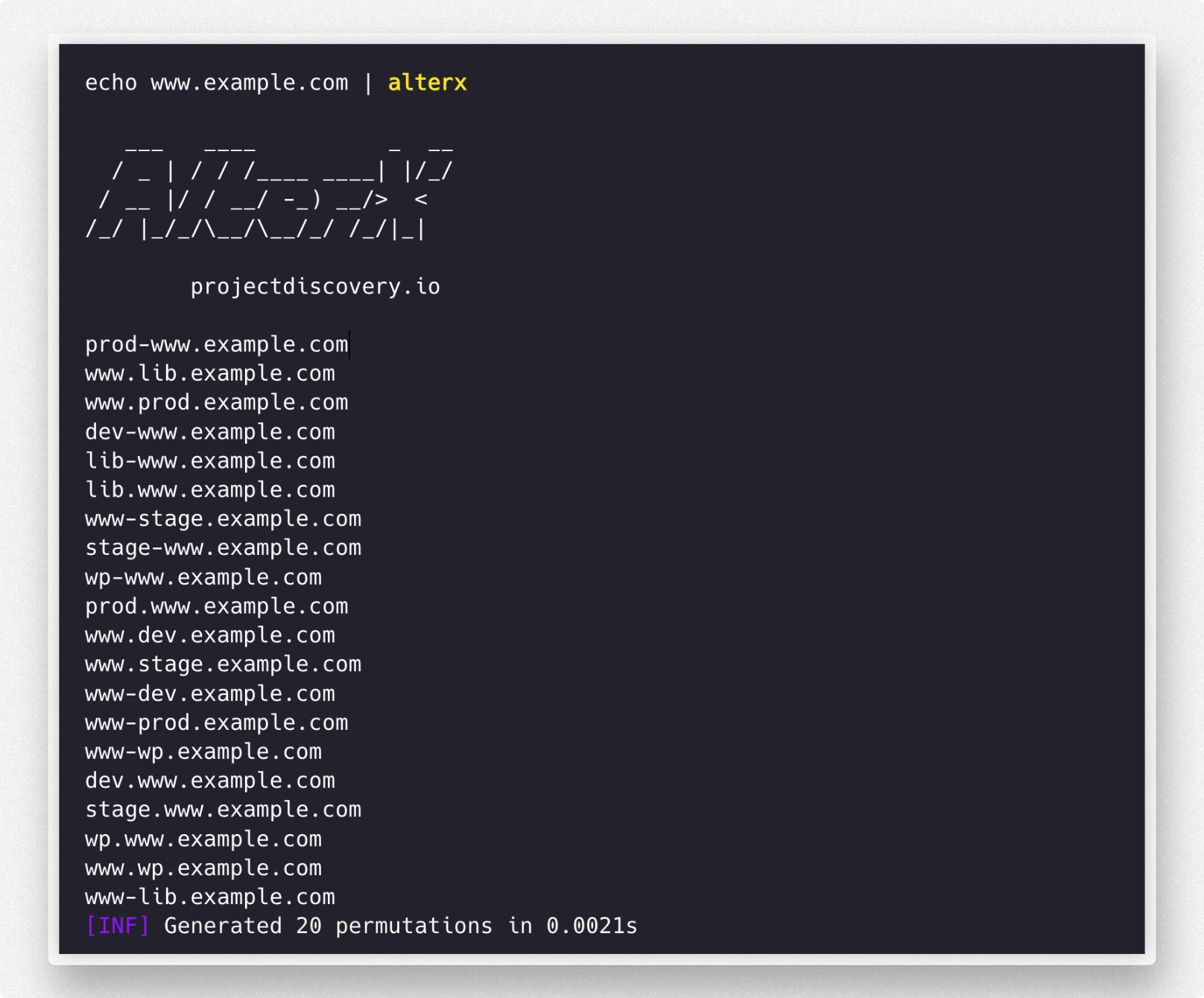
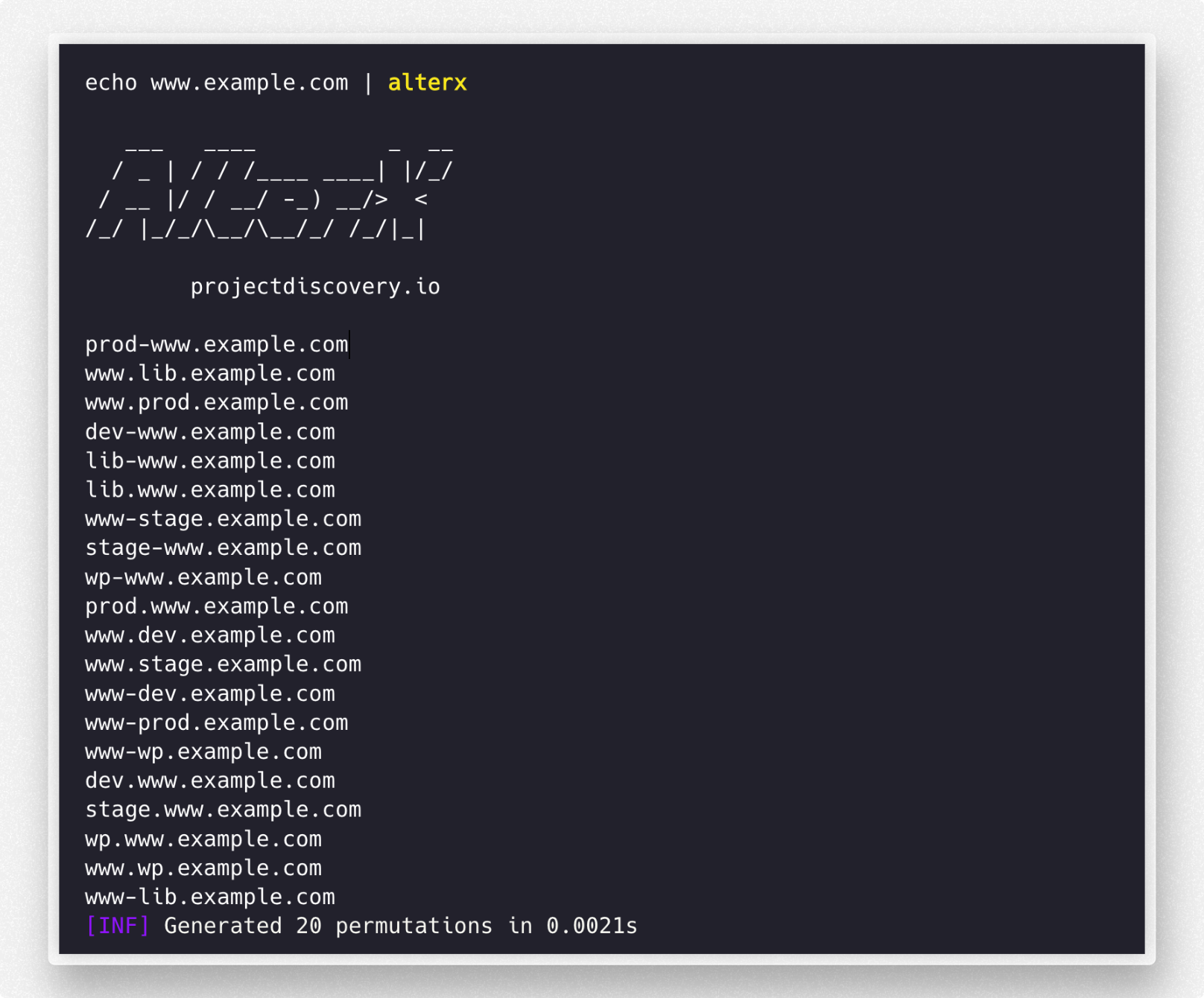
"{{sub}}-{{word}}.{{suffix}}" // ex: api-prod.scanme.sh
"{{word}}-{{sub}}.{{suffix}}" // ex: prod-api.scanme.sh
"{{word}}.{{sub}}.{{suffix}}" // ex: prod.api.scanme.sh
"{{sub}}.{{word}}.{{suffix}}" // ex: api.prod.scanme.sh
这是一个示例模式配置文件 - https://github.com/projectdiscovery/alterx/blob/main/permutations.yaml,它可以根据需要进行轻松定制。
该配置文件使用可定制模式和动态载荷为安全评估或渗透测试生成子域名排列。模式包括基于连字符、基于点号等。用户可以创建自定义载荷部分,例如词汇、区域标识或数字,以满足特定需求。
例如,用户可以定义一个新的载荷部分 env,其值为 prod 和 dev,然后在模式中使用如 {{env}}-{{word}}.{{suffix}} 来生成像 prod-app.example.com 和 dev-api.example.com 这样的子域名。这种灵活性使得能够为独特的测试场景和目标环境定制子域名列表。
用于生成的默认模式配置文件存储在 $HOME/.config/alterx/ 目录中,也可以通过 -ac 选项使用自定义配置文件。
一个示例:在 tesla.com 的现有被动子域名列表上运行 alterx,为我们产生了10 个额外的新且有效的子域名,这些子域名使用 dnsx 解析。
$ chaos -d tesla.com | alterx | dnsx


   ___   ____          _  __
  / _ | / / /____ ____| |/_/
 / __ |/ / __/ -_) __/>  <
/_/ |_/_/\__/\__/_/ /_/|_|

      projectdiscovery.io

[INF] Generated 8312 permutations in 0.0740s
auth-global-stage.tesla.com
auth-stage.tesla.com
digitalassets-stage.tesla.com
errlog-stage.tesla.com
kronos-dev.tesla.com
mfa-stage.tesla.com
paymentrecon-stage.tesla.com
sso-dev.tesla.com
shop-stage.tesla.com
www-uat-dev.tesla.com
同样,-enrich 选项可用于将已知子域名作为词汇输入,以生成针对目标的排列。
$ chaos -d tesla.com | alterx -enrich

   ___   ____          _  __
  / _ | / / /____ ____| |/_/
 / __ |/ / __/ -_) __/>  <
/_/ |_/_/\__/\__/_/ /_/|_|

      projectdiscovery.io

[INF] Generated 662010 permutations in 3.9989s
你可以使用 -pattern CLI 选项在运行时修改默认模式。
$ chaos -d tesla.com | alterx -enrich -p '{{word}}-{{suffix}}'

   ___   ____          _  __
  / _ | / / /____ ____| |/_/
 / __ |/ / __/ -_) __/>  <
/_/ |_/_/\__/\__/_/ /_/|_|

      projectdiscovery.io

[INF] Generated 21523 permutations in 0.7984s
还可以使用 -payload CLI 选项覆盖现有变量的值。
$ alterx -list tesla.txt -enrich -p '{{word}}-{{year}}.{{suffix}}' -pp word=keywords.txt -pp year=2023