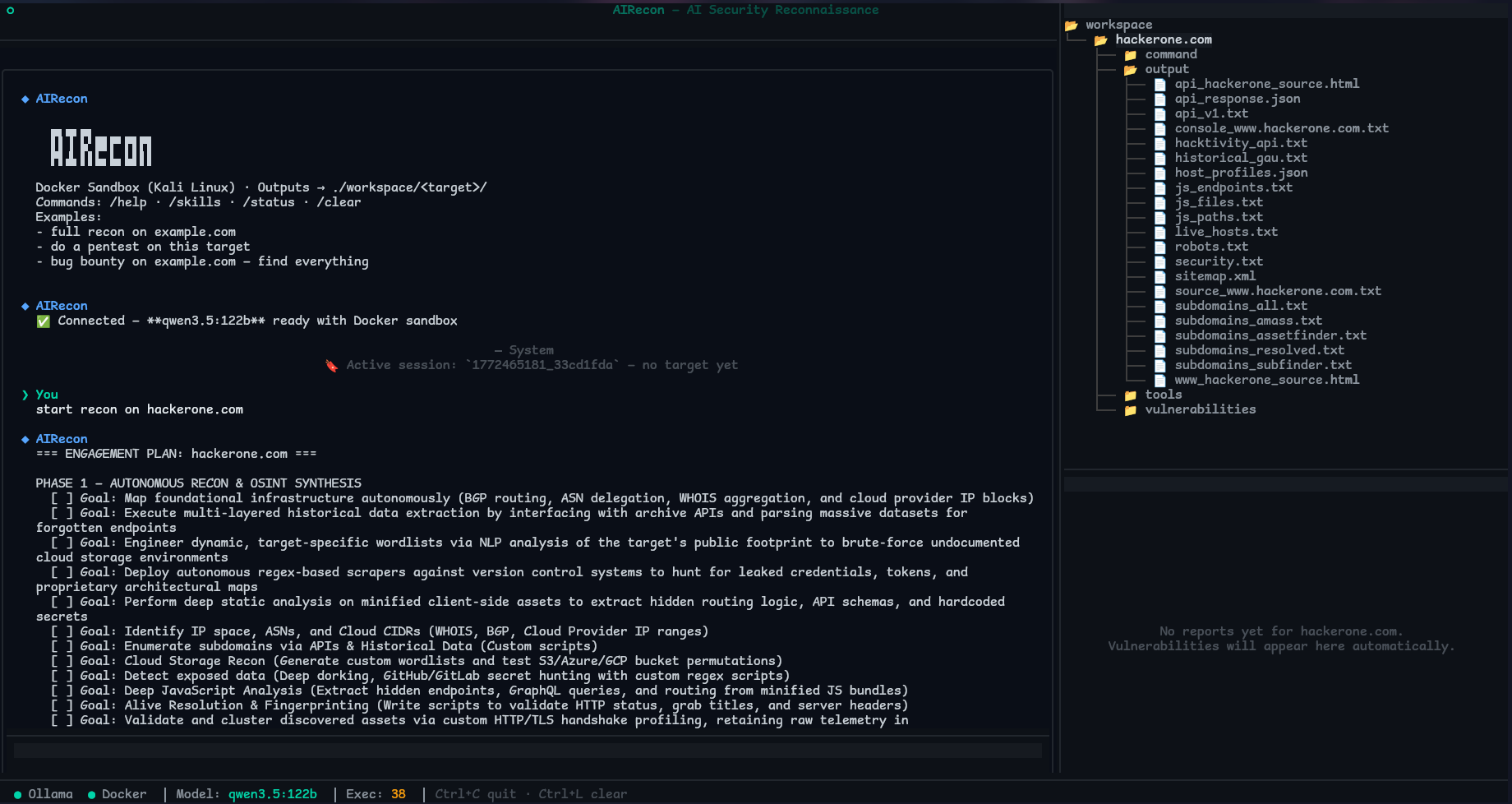



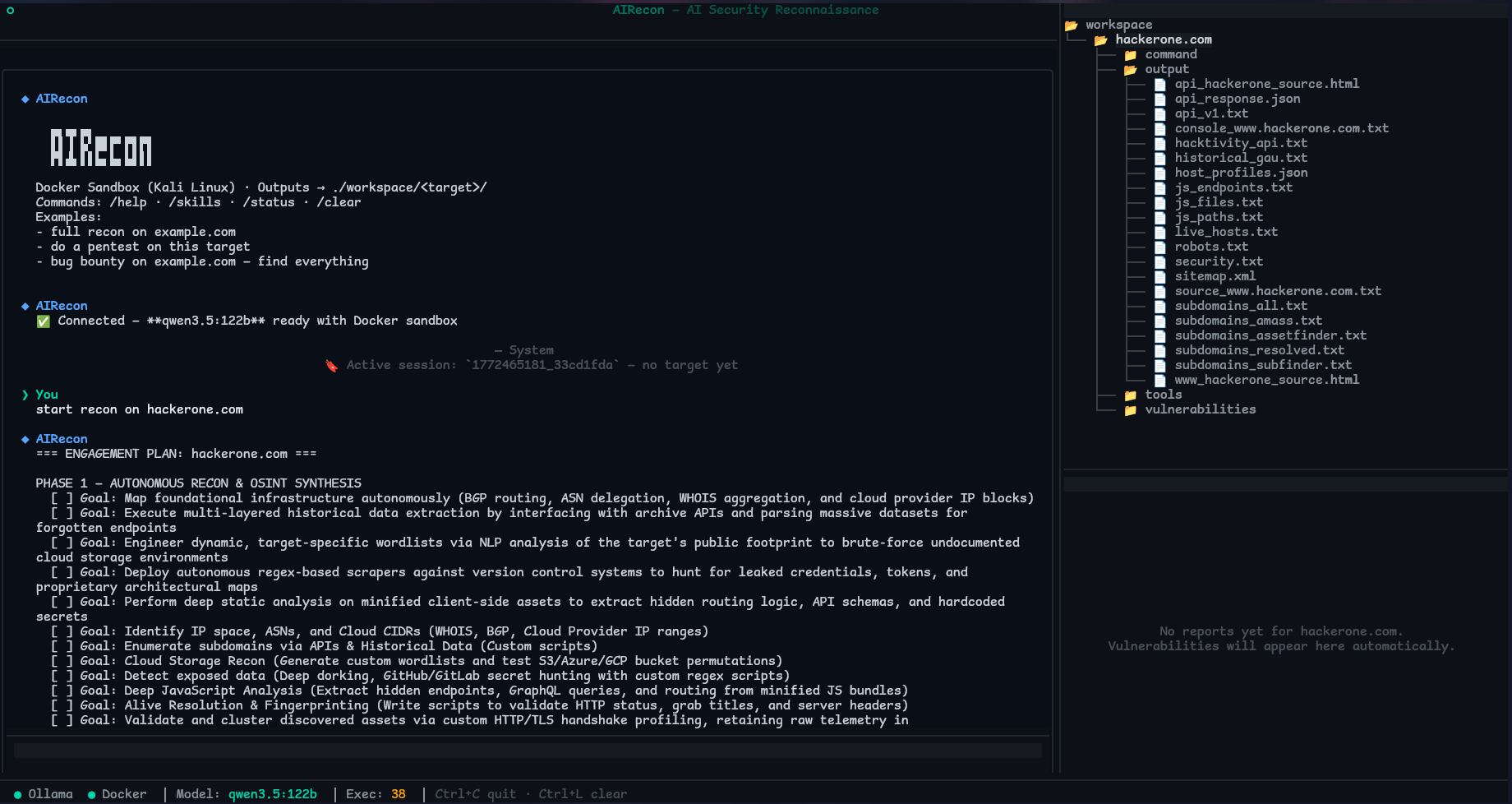
AIRecon 是一个自主渗透测试代理,它结合了自托管的 Ollama LLM 与 Kali Linux Docker 沙箱、原生的 Caido 代理集成、结构化的 RECON → ANALYSIS → EXPLOIT → REPORT 流程,以及实时的 Textual TUI——完全离线,无需 API 密钥。
基于商业 API 的模型(OpenAI GPT-4、Claude、Gemini)对于递归、自主的侦察工作流来说成本高昂,每会话可能需要数千次 LLM 调用。
AIRecon 完全为本地、私密运行而设计。
§FUZZ§)、发现项、范围。dataset_search——将其决策建立在真实索引数据之上。RECON → ANALYSIS → EXPLOIT → REPORT
每个阶段都有特定的目标、推荐的工具和自动转换条件。阶段强制是软性的——代理会获得指导,但不会被限制。每 5 次迭代(阶段评估)、10 次迭代(自我评估)和 15 次迭代(上下文压缩)执行一次检查点。
AIRecon 不会对 LLM 进行微调。其“学习”是基于本地、结构化的遥测数据,用于指导工具选择并避免重复失败路径。
本地持久化(全部存储在磁盘,无云端):
~/.airecon/memory/airecon.db,存储会话、发现项、模式、目标情报、工具使用情况、模型性能、技能使用情况以及攻击链发现。~/.airecon/learning/global_learning.json(工具性能统计、策略模式、观察日志、提炼的洞察)。~/.airecon/memory/by_target/,包含端点、漏洞、WAF 绕过、敏感参数和认证端点。workspace/<target>/payload_memory.json。对行为的影响:
AIRecon 需要一个具备扩展思考(<think> 块)和可靠工具调用能力的模型。能力通过 ollama show 元数据自动检测。
⚠️ 工具调用支持是必需的。 模型必须支持原生函数/工具调用。不具备此能力的模型无法执行任何工具(http_observe、execute、浏览器操作等),这将使 AIRecon 完全无法工作。
建议最低参数:8B-9B。 低于 8B 的模型技术上可用但强烈不推荐——它们会频繁幻觉工具输出、虚构 CVE、忽略范围规则,并产生不可靠的工具调用。
模型规模指南:
已知问题: DeepSeek R1 产生不完整的函数调用。低于 8B 的模型缺乏可靠的工具调用支持。
如果你没有 GPU 或本地显存低于最低要求,你可以在免费的 Google Colab T4 GPU 上运行 Ollama,并通过公共隧道连接 AIRecon。
工作原理:
Google Colab GPU 你的本地机器
┌─────────────────────────┐ ┌──────────────────────────┐
│ Ollama (qwen3.5:9b) │◄────────►│ AIRecon TUI │
│ cloudflared tunnel │ HTTPS │ ollama_url: 隧道 URL │
└─────────────────────────┘ └──────────────────────────┘
步骤:
~/.airecon/config.yaml:ollama_url: "https://xxxx.trycloudflare.com" # 单元格 6 输出的 URL
ollama_model: "qwen3.5:9b"
ollama_timeout: 300.0
ollama_chunk_timeout: 300.0
ollama_num_ctx: 32768
ollama_num_ctx_small: 16384
airecon startColab GPU → 可用模型:
限制:
qwen3.5:9b 是最低可用配置——相比本地 35B+ 模型,响应更慢,工具调用错误更多scripts/airecon_colab.ipynb,如果你想自行托管或修改前置条件: Python 3.12+、Docker 20.10+、Ollama(运行中)、git、curl
curl -fsSL https://raw.githubusercontent.com/pikpikcu/airecon/refs/heads/main/scripts/install.sh | bash
该脚本会自动检测远程或本地模式,如果缺少 Poetry 则自动安装(通过官方安装程序——无系统包冲突),构建 wheel,并安装到 ~/.local/bin。
git clone https://github.com/pikpikcu/airecon.git
cd airecon
./install.sh
# 如有必要,添加到 ~/.bashrc 或 ~/.zshrc
export PATH="$HOME/.local/bin:$PATH"
airecon --version
配置文件:~/.airecon/config.yaml(首次运行自动生成)。AIRecon 会在首次运行时创建 ~/.airecon/ 目录,包括使用自定义 ~ 路径时。
# ======================================
# Ollama Connection
# ======================================
# Ollama API endpoint. REQUIRED — must be set. For local: http://127.0.0.1:11434. For remote: http://IP:11434
ollama_url: "http://127.0.0.1:11434"
# Model to use. 122B for best reasoning (requires 60GB+ VRAM). For 12GB VRAM: use qwen2.5:7b or smaller. For 8GB VRAM: use qwen2.5:1.8b.
ollama_model: "qwen3.5:122b"
# Total request timeout (seconds). 180s = 3 min. Stable for most models. Increase to 300s for slow remote servers or 122B models.
ollama_timeout: 180.0
# ======================================
# Ollama Model Settings
# ======================================
# Context window size. 65536 = 64K (stable for 12GB VRAM with 8B models). 131072 = 128K requires 30GB+ VRAM. Set -1 for server default.
ollama_num_ctx: 65536
# Context for CTF/summary mode. 32768 = 32K (stable for 12GB VRAM). Reduced from 64K for stability with 8B+ models.
ollama_num_ctx_small: 32768
# LLM output randomness. 0.0=deterministic, 0.15=recommended (strict), 0.3=creative. Does NOT affect thinking mode — controls output diversity only.
ollama_temperature: 0.15
# Max tokens to generate. 16384 = 16K (stable for 12GB VRAM). 32K requires more VRAM.
ollama_num_predict: 16384
# Enable extended thinking mode (for Qwen3.5+/Qwen2.5+). When enabled, model generates <think> reasoning blocks before answering.
ollama_enable_thinking: true
# Thinking intensity: low|medium|high|adaptive. For 12GB VRAM: use 'low' or 'medium'. 'high' may cause OOM with 8B models. Low=only deep tools, Medium=ANALYSIS+deep tools, High=most iterations (high VRAM only).
ollama_thinking_mode: low
# Protect first N tokens from KV eviction. 4096 = 4K (reduced for 12GB VRAM stability). 8K for larger VRAM.
ollama_num_keep: 4096
# ======================================
# Proxy Server
# ======================================
# Host to bind proxy server. 127.0.0.1 = localhost only.
proxy_host: 127.0.0.1
# Port for proxy server. Default 3000.
proxy_port: 3000
# ======================================
# Timeouts
# ======================================
# Docker command timeout (seconds). 900s = 15 min for long scans (nmap, nuclei).
command_timeout: 900.0
# ======================================
# Docker Sandbox
# ======================================
# Container memory limit. '16g' = 16GB (stable for 32GB+ RAM host, 18GB image + Chromium). Prevents OOM kills. Set to '12g' for 32GB RAM, '8g' for 16GB systems, '4g' for 8GB systems.
docker_memory_limit: 16g
# ======================================
# Deep Recon
# ======================================
# Auto-start deep recon on session start.
deep_recon_autostart: true
# Recon execution mode: standard|full. standard=respect user scope, full=auto-expand simple target prompts into comprehensive recon.
agent_recon_mode: standard
# ======================================
# Safety
# ======================================
# Allow destructive tests (e.g., DELETE requests). Default: False for safety.
allow_destructive_testing: false
远程 Ollama(LAN 服务器或 Google Colab 隧道):
ollama_url: "http://192.168.1.100:11434" # LAN 服务器
ollama_model: "qwen3.5:35b"
# 或通过 Colab 隧道(参见上方"在 Google Colab 上运行 Ollama"章节):
ollama_url: "https://xxxx.trycloudflare.com"
ollama_model: "qwen3.5:9b"
ollama_timeout: 300.0
ollama_chunk_timeout: 300.0
AIRecon 可以连接到外部 MCP 服务器,并动态将其工具暴露为 mcp_<server> 工具。
配置文件:~/.airecon/mcp.json
示例配置:
{
"mcpServers": {
"hexstrike": {
"command": "python3",
"args": [
"/path/hexstrike-ai/hexstrike_mcp.py",
"--server",
"http://127.0.0.1:8888"
],
"env": {
"PYTHONUNBUFFERED": "1"
},
"enabled": true
},
"xssgen": {
"command": "python3",
"args": [
"/path/xssgen/xss_client.py",
"--server",
"http://127.0.0.1:8000"
],
"env": {
"PYTHONUNBUFFERED": "1"
},
"enabled": true
},
"recon": {
"transport": "sse",
"url": "https://example.com/mcp",
"enabled": true,
"headers": {
"Authorization": "Bearer xxxxx"
}
}
}
}
在聊天中使用 MCP 工具:
mcp_<服务器>list_tools、search_tools、call_tool示例:
{"name": "mcp_acme", "arguments": {"action": "list_tools"}}
airecon-dataset 是一个可选组件,它从 HuggingFace 下载安全数据集并索引到本地 SQLite FTS5 数据库中。安装后,LLM 通过 dataset_search 工具自主查询它们。
工作原理: dataset_search 是 tools.json 中的一个标准代理工具。LLM 决定何时调用它——AIRecon 不会自动触发。系统提示指示代理在尝试不熟悉的技术之前查询知识库。
git clone https://github.com/pikpikcu/airecon-dataset.git
cd airecon-dataset && python install.py
包含的数据集(共约 109 万条记录,100% 离线):
代理查询示例(由 LLM 自主调用):
dataset_search: {"query": "log4j RCE exploitation chain"}
dataset_search: {"query": "SSRF bypass cloud metadata", "category": "bug-bounty"}
dataset_search: {"query": "nuclei template XSS detection"}
dataset_search: {"query": "CVE 2021 44228", "category": "vulnerability"}
结果每条最多 500 个字符。CVE ID 中的特殊字符(短横线、方括号)会被自动清理。
airecon start # 启动 TUI
airecon start --session <session_id> # 恢复会话
示例提示词:
# 完整流程
full recon on example.com
pentest https://api.example.com
# 具体任务
find subdomains of example.com
scan ports on 10.0.0.1
check for XSS on https://example.com/search
test SQL injection on https://example.com/api/login parameter: username
run schemathesis on https://example.com/openapi.json
# 认证测试
login to https://example.com/login with [email protected] / password123 then test for IDOR
test https://app.example.com with TOTP: JBSWY3DPEHPK3PXP
# 多代理
spawn an XSS specialist on https://example.com/search
run parallel recon on: example.com, sub.example.com, api.example.com
# Caido
replay request #1234 with a modified Authorization header
use Caido to fuzz the username parameter in request #45 with §FUZZ§ markers
workspace/<target>/
├── command/ # 系统管理的日志
├── output/ # 原始工具输出(nmap、httpx、nuclei、subfinder、...)
├── tools/ # AI 生成的利用脚本(.py、.sh)
└── vulnerabilities/ # 已验证的漏洞报告(.md)
会话持久化在 ~/.airecon/sessions/<session_id>.json —— 子域名、端口、技术、URL、漏洞(Jaccard 去重)、认证令牌和已完成阶段。
Ollama OOM / HTML 错误页面 —— 通常在长时间会话或大模型接近显存上限时发生。
sudo systemctl restart ollama
{ "ollama_num_ctx": 32768, "ollama_num_ctx_small": 16384, "ollama_num_predict": 8192 }
代理循环/停滞 —— 通常是推理失败。尝试更大的模型,或将 ollama_temperature 降至 < 0.2。
Docker 沙箱无法启动:
docker build -t airecon-sandbox airecon/containers/kali/
Caido 连接被拒绝 —— Caido 必须在 AIRecon 之前运行。默认:127.0.0.1:48080。
安装后 PATH 未找到:
export PATH="$HOME/.local/bin:$PATH" && source ~/.zshrc
欢迎提交 Issue 和 PR。如果你报告 bug,请附上日志、配置和最小复现步骤。
AIRecon 仅供授权安全测试使用。始终获得明确许可,并遵守适用法律和项目范围。
请参阅 LICENSE。
| 特性 | AIRecon | 基于云的代理 |
|---|
| 需要 API 密钥 | 否 | 是 |
| 目标数据发送至云端 | 否 | 是 |
| 离线工作 | 是 | 否 |
| Caido 集成 | 原生 | 无 |
| 会话恢复 | 是 | 视情况而定 |
| 本地知识库 | ~109 万条记录 | 无 |
| 模型 | 拉取命令 | 显存 | 备注 |
|---|
| Qwen3.5 122B | ollama pull qwen3.5:122b | 48+ GB | 最佳质量,最可靠 |
| Qwen3.5 35B | ollama pull qwen3.5:35b | 20 GB | 推荐给大多数用户 |
| Qwen3.5 35b | ollama pull qwen3.5:35b-a3b | 16 GB | MoE — 更低显存 |
| Qwen3.5 9B | ollama pull qwen3.5:9b | 6 GB | 最低可用——频繁出错 |
| Colab GPU | 显存 | 可用模型 | 计划 |
|---|
| T4 | 15 GB | qwen3.5:9b | 免费 |
| L4 | 22 GB | qwen3.5:35b-a3b (MoE) | Pro |
| A100 | 40 GB | qwen3.5:35b | Pro+ |
| H100 | 80 GB | qwen3.5:122b | Pro+ |
| 键 | 默认值 | 备注 |
|---|
ollama_temperature | 0.15 | 保持在 0.1–0.2。更高的值会导致幻觉。 |
ollama_num_ctx | 131072 | 如果显存有限,降至 32768。 |
ollama_keep_alive | "60m" | 模型保留在显存中的时长。 |
deep_recon_autostart | true | 裸域名输入自动扩展为完整侦察。 |
allow_destructive_testing | false | 解锁激进模式(SQLi 确认、RCE 链)。 |
command_timeout | 900.0 | Docker 中每条 shell 命令的最大秒数。 |
vuln_similarity_threshold | 0.7 | 漏洞的 Jaccard 去重阈值。 |
| 数据集 | 记录数 | 内容 |
|---|
| Pentest Agent (ChatML) | 322,433 | 基于 CVE 的利用工作流(MITRE/NVD/ExploitDB) |
| CTF SaTML 2024 | 190,657 | 真实的攻防 CTF 交互数据 |
| CTF Instruct | 141,182 | Pwn、Web、密码学、取证、逆向工程 |
| Cybersecurity CVE | 124,732 | CVE 分析、CVSS、利用上下文 |
| SQL Injection Q&A | 50,632 | 对话式 SQLi——检测、绕过、利用 |
| Cybersecurity Fenrir | 83,918 | 攻防指令对 |
| Red Team Offensive | 78,430 | 横向移动、权限提升、规避 |
| Cybersecurity Q&A | 53,199 | 广泛的安全知识 |
| StackExchange RE | 20,641 | 二进制分析、反汇编、调试、恶意软件 |
| Nuclei Templates | 23,180 | Nuclei YAML 模板生成 |
| NVD Security Instructions | 2,063 | 结构化 CVE 分析,包含严重性和修复建议 |
| APT Privilege Escalation | 1,000 | 结合 APT 策略的 Linux 权限提升技术 |
| Bug Bounty & Pentest | 146 | Payload、绕过方法、报告模板 |